ON1 Resize AI 2026: Enlarge Photos up to 10x for Big Prints
ON1 Resize AI 2026 is a photo enlargement app and Photoshop/Lightroom plugin for Windows and Mac that upscales images up to 10x with AI, for $49.99 one-time at Black Friday pricing until November 27, 2026 (regular $99.99). It is for photographers who print large, crop hard, or need to rescue a small file, and it is the descendant of Genuine Fractals, the enlarger printers have used for over two decades.
You cropped a bird down to a quarter of the frame, and now the client wants a 24x36 inch print. Standard resampling turns the feathers to mush. Resize AI rebuilds the detail as it enlarges, then adds the print-shop tools (sharpening for your paper, soft proofing, tiling and canvas wrap margins) so the file is ready to send.
Quick facts
- Version: Resize AI 2026, released August 7, 2025 (still the current version)
- Developer: ON1 Inc. (Oregon, USA)
- Platforms: Windows 10 (22H2 or later) and Windows 11, 64-bit; macOS 13 or later. ARM Windows PCs aren't supported
- Works as: standalone app, or plugin for Photoshop (including layered files) and Lightroom Classic
- Enlargement: up to 10x, with Highest Quality (diffusion) and Standard AI models
- Price: $49.99 one-time for 2 computers (regular $99.99); also built into ON1 Photo RAW 2027
- Trial: 30 days, fully working with no watermarks; starts at first launch
- Guarantee: 30-day money-back
- What we checked: the price on the order page ($49.99, regular $99.99) and the trial terms on ON1's download page on November 20, 2026. We didn't install the trial, whose download link ON1 sends by email.
Before you buy
- ON1 Photo RAW 2027 already includes Resize AI 2026. Buy it separately only if you work in Photoshop or Lightroom Classic.
- Only two plugin hosts. ON1 lists Photoshop and Lightroom Classic; for other editors use the standalone app.
- The Black Friday price ends November 27, 2026 at 11:59 PM Pacific.
Download Free TrialBuy Resize AI 2026
Overview
Resize AI combines two approaches: neural-network super-resolution that invents plausible fine detail, and the fractal-based enlargement of Genuine Fractals, which ON1 has developed for more than twenty years. The 2026 version added two AI models. Highest Quality uses diffusion to rebuild texture and edges in tight crops, small images and AI-generated art. Standard is faster and suits noisy or compressed files, big batches and older graphics cards. You tell Resize AI whether the source is standard or high quality, and it suggests a model.

Resize AI 2026 enlarging an egret (original top right, enlarged crop behind it), with the Photo Size panel and the model choice: Standard or Highest Quality, model "2026 Best Quality".
Features
Two AI models for different sources
ON1 Resize AI 2026 enlarges up to 10x with either the Highest Quality diffusion model, for cropped, low-resolution and fine-art enlargements, or the Standard model, for high-ISO and compressed files, batch jobs and computers with limited graphics power.
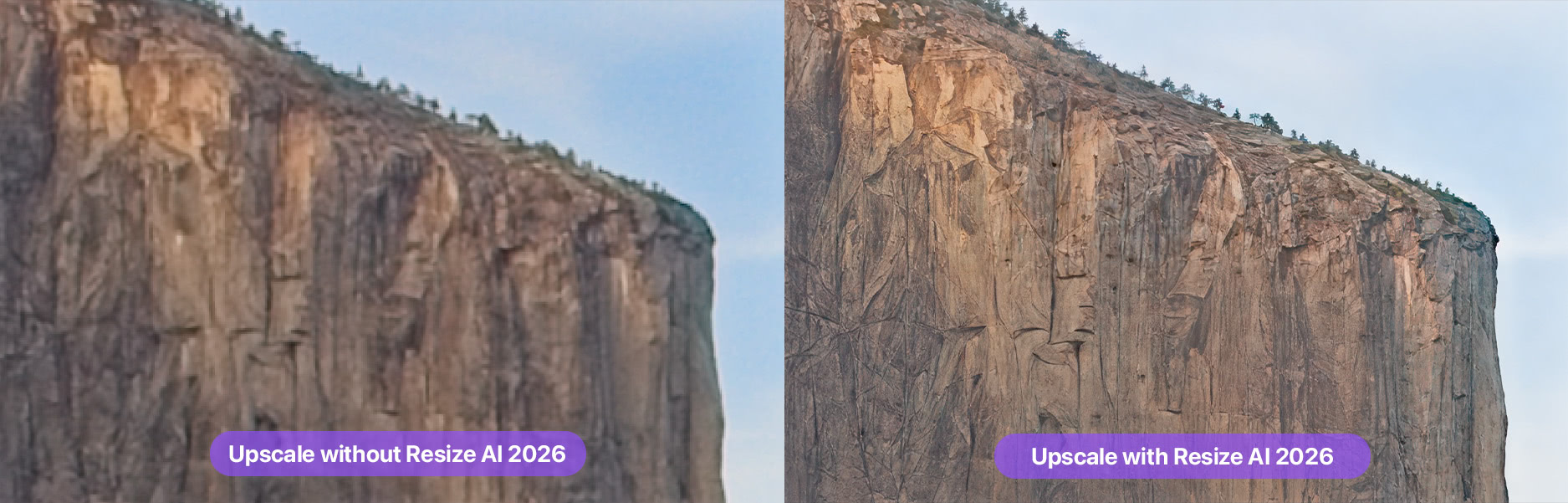
ON1's comparison of a cliff face: upscaled without Resize AI (left) and with Resize AI 2026 (right), where the rock texture stays defined.
Face Recovery
ON1 Resize AI 2026 rebuilds faces in an enlargement with Face Recovery, with a strength control so group shots and small faces in a crop don't come out smeared or over-processed.
Print tools: presets, soft proofing, tiling, gallery wrap
ON1 Resize AI includes sharpening and resolution presets tuned for printers, soft proofing to preview the print on screen, tiling that splits a mural into printable sections, and gallery wrap margins (for example a reflected edge) for canvas. Noise reduction and film grain options round out the output settings.
Batch resizing and layered Photoshop files
ON1 Resize AI batch-processes hundreds of photos with export presets that set file names, types, destinations, wrap margins and watermarks. As a Photoshop plugin it resizes layered files with masks, alpha channels, text and adjustment layers in RGB, CMYK, Grayscale and LAB.
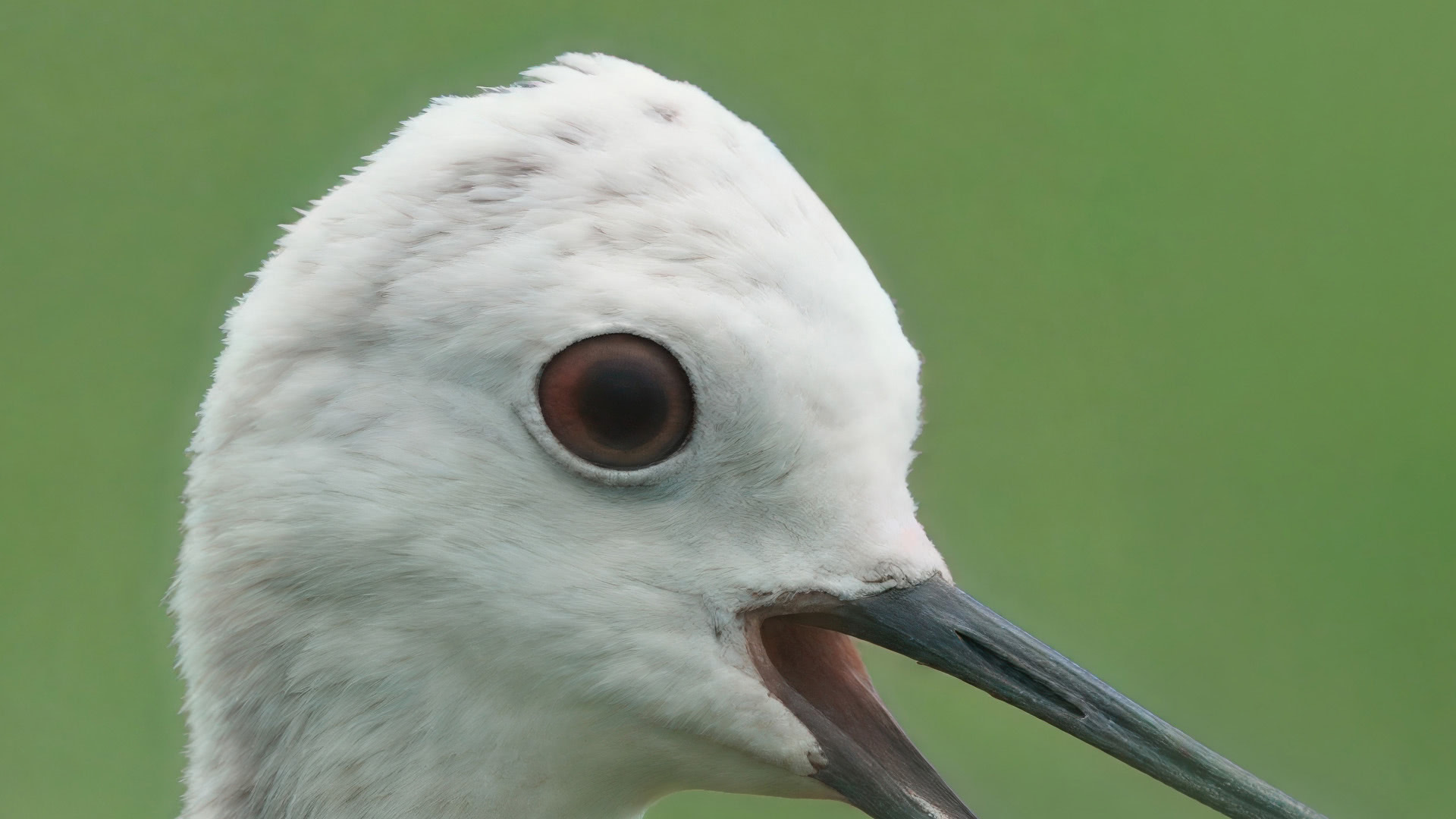
ON1's sample of the Highest Quality model: a small crop of a wading bird's head enlarged, with feather texture rebuilt around the eye.
Benefits
- Print bigger from the files you have, including crops and older low-megapixel cameras.
- Print-ready output in one step: enlarge, sharpen for the paper, proof and tile without another program.
- Stays inside Photoshop and Lightroom Classic, including layered Photoshop documents.
- A one-time price, with no per-image credits or subscription.
Real-World Uses
- Wildlife crops: a distant bird cropped to 20% of the frame, enlarged for a 20x30 inch print.
- Canvas and murals: a landscape enlarged with gallery wrap margins, or tiled into three panels for a wall.
- Old digital files: 6-megapixel photos from early cameras brought up to modern print sizes.
- AI-generated art: small renders upscaled for print with the Highest Quality model.
- Print labs and studios: batch-resize a whole order with one export preset.
Who It's For, and Who Should Skip It
Resize AI suits photographers and print shops who regularly print large or enlarge crops, and who work in Photoshop or Lightroom Classic.
Skip it if you own ON1 Photo RAW 2027 (it's built in), if you only share photos online at screen size, or if you use a Windows ARM laptop. If you also want denoising, face fixes and sharpening in one AI tool, a broader enhancer may suit you better.
Usage Guide
- Enter your email on ON1's Resize AI trial page, open the installer it sends and install. The 30-day trial starts at first launch.
- Open a photo in the standalone app, or send it from Lightroom Classic or Photoshop.
- In Photo Size, set the target size, a percentage or a preset, and the resolution (for example 300 pixels/inch).
- Choose the source type (standard or high quality) and confirm the suggested model; turn on Face Recovery for people.
- Set sharpening for your paper, soft-proof, and add tiling or gallery wrap if needed.
- Save, or export a batch with an export preset.
Where it falls short
- Not the winner on every image. In Silent Peak Photo's tests Topaz Gigapixel did better on some images and Resize AI on others, and the portrait output was "comparatively harsh".
- No one-click automatic mode; you pick the size, model and sharpening yourself, though presets help.
- The Highest Quality model is demanding. ON1 recommends 16 GB of RAM and an 8 GB graphics card; on weaker machines the Standard model is the practical choice.
What Users Say
Resize AI 2026 has fewer independent reviews than ON1's flagship, but the detailed ones are positive with clear caveats. ON1 as a company scores 4.1 out of 5 on Trustpilot from 3,226 reviews.
Silent Peak Photo
Richard Adams tested Resize AI 2026 at launch in August 2025 and called it a "top-tier upscaler packed with print-friendly features". "ON1 Resize AI outperformed Lightroom Super Resolution in all of my test cases," he wrote, and against Gigapixel, "Resize AI did better when it came to enlarging my Bellbird and Furseal images." But "both Topaz Photo AI and Gigapixel continue to give Resize AI a hard time," and: "While I wish Resize AI included a one-click automatic mode, this can be mitigated by using and creating presets." He found the interface "concise, straightforward, and responsive".
Inside Photo RAW
Resize AI 2026 is built into ON1 Photo RAW. PhotoWorkout's Photo RAW review notes that some AI features take a lot of processing time on older hardware, which applies to the Highest Quality model too.
Customers
A customer ON1 quotes on its page, Oliver: "I didn't expect such immense scaling to be possible with so little loss of quality. Unreservedly recommended." On Trustpilot, recent ON1 reviews mostly praise support and training ("In my experience, ON1's most impressive quality is it's service," Ron Shaw, 5 stars), while the negative ones cite bugs after upgrades.
The pattern: excellent enlargements for print, clearly better than Lightroom's built-in Super Resolution, and close to the best-known AI upscalers at a lower price, with manual settings and heavy hardware demands as the trade-offs.
Comparisons
Resize AI vs Lightroom Super Resolution
Silent Peak Photo found Resize AI ahead of Lightroom's Super Resolution in every test. Resize AI also goes up to 10x and adds Face Recovery, tiling, gallery wrap and print sharpening, which Lightroom's enlargement doesn't offer.
Resize AI vs Topaz Gigapixel
Reviewers find the two trade wins image by image. Resize AI has the stronger print workflow (wrap margins, tiling, soft proofing, layered PSD support); Gigapixel is the better-known pure upscaler.
Editions and Pricing
Prices on the order page on November 20, 2026, in USD. Black Friday prices end November 27, 2026 at 11:59 PM Pacific.
| Option |
Price now |
Regular price |
License |
What you get |
| Resize AI 2026 | $49.99 | $99.99 | Perpetual, 2 computers | Standalone app, Photoshop and Lightroom Classic plugins |
| Photo RAW MAX subscription | $79.99/year | $89.99/year | Subscription, 3 computers | Resize AI inside Photo RAW MAX, plugins, future versions |
Buy Resize AI 2026Subscribe to Photo RAW MAX
FAQs
How large can ON1 Resize AI enlarge a photo?
ON1 Resize AI 2026 enlarges up to 10x the original size, and its tiling tool splits very large outputs into sections for murals.
I bought Resize AI 2023. Do I get Resize AI 2026 free?
Only if you bought Resize AI 2023 on or after June 24, 2025. Otherwise Resize AI 2026 is a paid upgrade, with upgrade pricing when you sign in to your ON1 account.
Does ON1 Resize AI work with layered Photoshop files?
Yes. As a Photoshop plugin, ON1 Resize AI resizes layered documents with masks, alpha channels, text and adjustment layers, in RGB, CMYK, Grayscale and LAB.
Can ON1 Resize AI upscale AI-generated images?
Yes. ON1 recommends Resize AI's Highest Quality model for AI-generated art as well as small and cropped photos.
Does the Resize AI trial watermark the output?
No. The ON1 Resize AI 2026 trial is fully working for 30 days with no watermarks.
Can I get a refund on ON1 Resize AI?
Yes. ON1 Resize AI 2026 has a 30-day money-back guarantee.
System Requirements
- OS: Windows 10 version 22H2 or later, or Windows 11 (64-bit); macOS 13 or later (macOS 14 recommended)
- Processor: four-core 64-bit Intel or AMD at 2 GHz with SSE 4.2, or Apple Silicon; Windows ARM not supported
- RAM: 8 GB (16 GB if shared with the GPU); 16 GB or more recommended
- Disk: 1.6 GB for installation
- Graphics: Metal (Mac) or DirectX 12 and DirectML (Windows), Vulkan 1.1 and OpenGL 4.2, 4 GB video memory (8 GB recommended); 1920x1080 display
- Plugin hosts: Photoshop CC, Lightroom Classic
Conclusion
ON1 Resize AI 2026 is worth it for anyone who prints large from Photoshop or Lightroom Classic, especially at $49.99 until November 27, 2026 ($99.99 after). The reason to buy is enlargement quality plus a print workflow (tiling, wrap margins, soft proofing, layered PSDs) that pure upscalers don't have. The reason not to: if you own ON1 Photo RAW 2027 you already have it, and if you want one-click results or have an older computer, the manual settings and hardware demands will slow you down. Run your hardest crop through the 30-day trial first.
Download Free TrialBuy Resize AI 2026