ON1 Photo RAW 2027: A Lightroom and Photoshop Alternative You Can Own
ON1 Photo RAW 2027 is an all-in-one RAW photo editor and organizer for Windows and Mac, sold as a one-time purchase: $59.99 at Black Friday pricing until November 27, 2026, then $99.99. It is for photographers who want Lightroom-style cataloguing, Photoshop-style layers and masking, and AI noise reduction in a single app, without paying Adobe every month.
If your editing day means bouncing between a cataloguer, a RAW developer, a noise plugin and a layer editor, Photo RAW folds those into one window. You point it at the folders where your photos already live, cull and rate them, develop the RAW file, mask the sky with one click, clean up high-ISO noise and export, all without creating intermediate files.
Quick facts
- Version: Photo RAW 2027, released November 2, 2026
- Developer: ON1 Inc. (Oregon, USA)
- Platforms: Windows 11 64-bit (x86 and ARM) and macOS 13 or later; a companion mobile app exists separately
- License: perpetual, installs on 2 computers, free updates for the 2027 version; MAX edition installs on 3
- Price: $59.99 (regular $99.99); Photo RAW MAX 2027 $129.99 (regular $169.99); MAX subscription $79.99/year
- Trial: 30 days, needs a free ON1 account
- Guarantee: 30-day money-back
- What we checked: Windows installer ON1_Photo_RAW_2027.exe (1.01 GB, build folder 19492.0.3) and the Mac disk image (1.21 GB) on ON1's download server, and the prices on the order page for every edition (Photo RAW $59.99, MAX $129.99, MAX yearly $79.99, Photo Studio $179.99/year) on November 20, 2026. We didn't run the trial.
Before you buy
- The Black Friday prices end November 27, 2026 at 11:59 PM Pacific. After that Photo RAW goes back to $99.99 and MAX to $169.99.
- The standard edition doesn't work as a plugin. Running ON1 from inside Photoshop or Lightroom Classic, Restore AI and the AI Culling Assistant all need Photo RAW MAX.
- Next year's version is a paid upgrade. A perpetual license gets every 2027 update, but not Photo RAW 2028. The MAX subscription and Photo Studio include future versions.
- It needs a capable computer. The minimum is a 4-core CPU, 8 GB of RAM and a graphics card with 4 GB of video memory; ON1 recommends 32 GB of RAM and an RTX 3000-class or Radeon RX 6000-class card.
Download Free TrialBuy Photo RAW 2027Buy Photo RAW MAX 2027
Overview
ON1 has sold photo software for photographers for over two decades, and Photo RAW is its flagship. The app has four main areas: Browse for finding, rating and keywording photos where they sit on disk, Develop for RAW tone and color, Effects for stackable filters and looks, and a layers workspace with masking and retouching. ON1's standalone tools (NoNoise AI, Resize AI, Effects, Portrait AI and Sky Swap AI) are built in rather than sold as extras.
The 2027 release concentrates on image quality. ON1 rebuilt the RAW processing engine for richer default color and contrast, with narrower Highlights and Shadows sliders that don't flatten the image. ON1 says it went through more than eight iterations and blind comparisons by photographers before release. NoNoise AI got new models for wildlife, portraits, astrophotography and scanned film, masking now works the same way across layers, filters and local adjustments, and MAX owners get a new AI Culling Assistant.
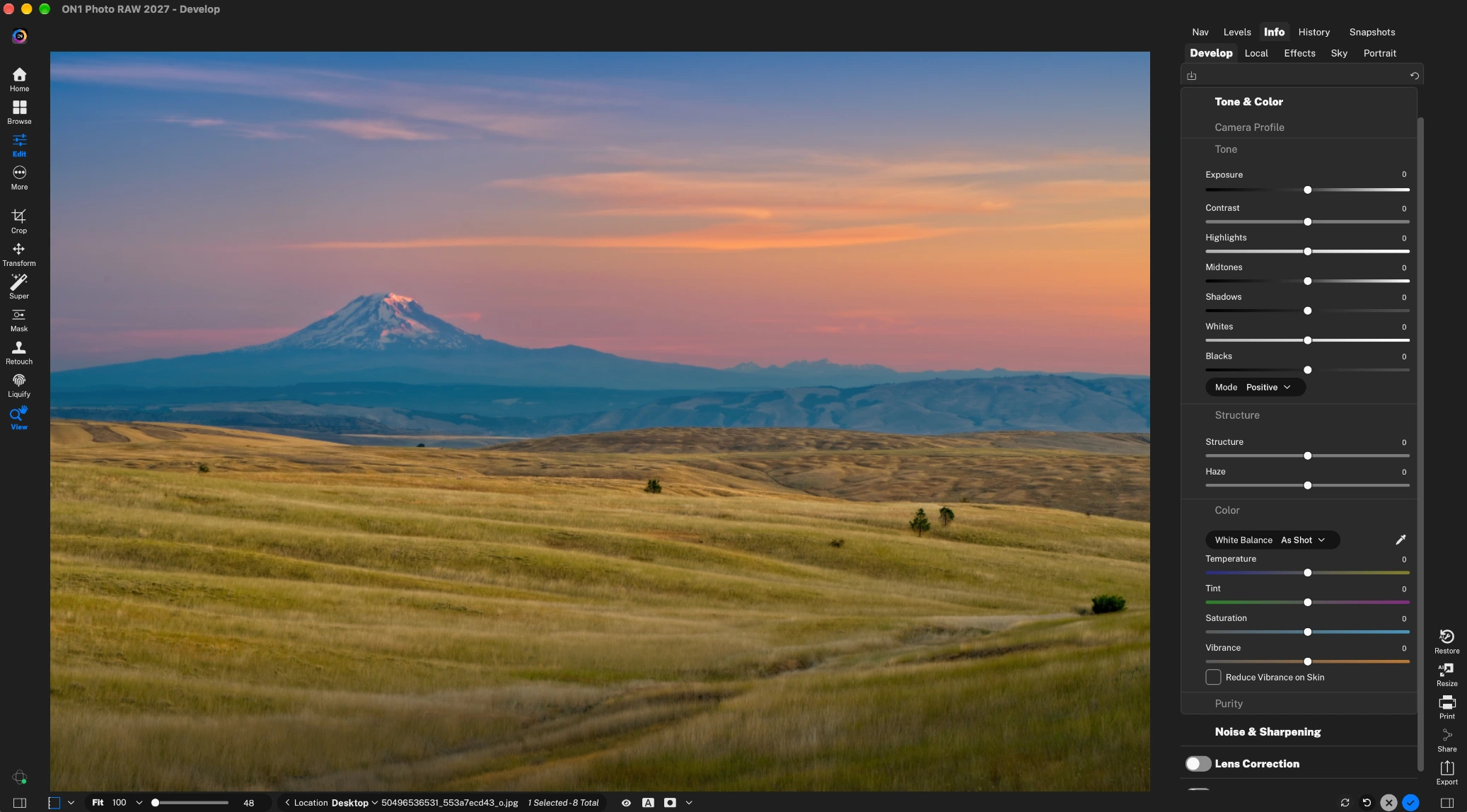
The Photo RAW 2027 Develop module: a landscape RAW file with the Tone & Color panel (Exposure, Contrast, Highlights, Shadows, Whites, Blacks) on the right.
Features
A new RAW engine with better default color
ON1 Photo RAW 2027 develops RAW files with a rebuilt engine that gives more color and contrast straight out of the camera and keeps contrast when you pull back highlights or lift shadows. The Highlights, Midtones and Shadows sliders are narrower, so each one touches less of the tonal range. ON1 says photographers preferred it over the 2026 engine in blind tests across many cameras and genres.
AI masking in one click
ON1 Photo RAW selects a sky, a subject or a background with Super Select AI: you click on it and the mask is drawn. Subject and Background masks and AI Depth Masks (foreground, midground, background) work without painting a stroke. In 2027 the same masks apply consistently to layers, Effects filters and local adjustments, with a live preview when you hover.

AI masking in the Photo RAW 2026 interface: two photographers on a beach selected in one click (shown in red), with the Sunshine filter applied to the mask.
NoNoise AI, Tack Sharp AI and Resize AI built in
ON1 Photo RAW includes the same noise reduction ON1 sells as NoNoise AI 2027, with models tuned for wildlife, portraits, astro and macro. Tack Sharp AI recovers detail in slightly soft or shaken shots, and Resize AI enlarges photos for print with diffusion-based models. Brilliance AI makes an automatic first pass on exposure, color and tone that you can then adjust.
Layers, retouching and generative tools
ON1 Photo RAW works with layers and keeps every edit non-destructive, even in layered files. Generative Erase and Perfect Eraser remove distractions, Generative Crop & Expand extends the canvas, and Sky Swap AI replaces a flat sky and adjusts the rest of the scene to match. HDR merge, focus stacking and panorama stitching are built in. In MAX and the subscription, Generative Erase and Crop can render in ON1's cloud for higher-quality results.

The Photo RAW 2026 editing window (ON1's annotations): presets on the left, Layers, Brilliance AI and Tone & Color on the right.
Hundreds of stackable filters and presets
ON1 Photo RAW has hundreds of filters, presets, LUTs, textures and borders, and every one can be stacked and masked, so a look can go on just the sky or just the subject. AI Adaptive Presets save their AI masks, so a sky or subject adjustment finds the right area again on the next photo.

The filter browser open over a motocross shot, with stacked Motion, Color Enhancer, Sunshine and Dynamic Contrast filters (Photo RAW 2026 interface).
Photo management without an import step
ON1 Photo RAW browses your folders where they are, with no import step, and adds ratings, color labels, albums, stacks and AI keywording on top. Catalogued folders stay fast to search. Version 2027 adds a Loupe pane for checking faces from Grid view, a better Compare view and Folder Actions that apply metadata, presets and exports automatically when photos land in a folder.

Browse in Photo RAW 2026: a grid of wildlife RAW files with star ratings, and the metadata and keyword panel on the right.
MAX only: Restore AI, Culling Assistant and Adobe plugins
ON1 Photo RAW MAX 2027 adds three things. Restore AI repairs dust, scratches, tears, fading and grain on scans and old digital files, refocuses soft images and colorizes black-and-white photos; it runs in ON1's cloud, with unlimited restorations for one year on a perpetual MAX license and for as long as you subscribe. The AI Culling Assistant groups similar shots and flags out-of-focus frames and closed eyes. And MAX runs as a plugin inside Photoshop, Photoshop Elements, Lightroom Classic, Apple Photos and Affinity Photo.

The ON1 2026 plugins in Photoshop's Filter menu and Lightroom Classic's Plug-in Extras menu (a MAX feature).
Benefits
- One app instead of two subscriptions. Cataloguing, RAW development, layers and noise reduction are in one program you pay for once.
- Your files stay where they are. No import step, no proprietary library to move, and edits are stored non-destructively next to your originals.
- Local AI, with your photos kept private. Most AI processing runs on your own computer, and ON1 says it doesn't train AI on customers' photos. Only Restore AI and the cloud rendering option in MAX send images to ON1's servers.
- A year of free updates. ON1 shipped 10 free updates to Photo RAW 2026; a 2027 license gets every 2027 update.
Real-World Uses
- Leaving Lightroom. Point Browse at your existing photo folders, rate and keyword them, and develop RAW files without paying Adobe's monthly plan.
- Wildlife and event shooters at high ISO. Clean up ISO 6400+ frames with NoNoise AI, rescue slightly soft ones with Tack Sharp AI, and cull a burst quickly (the Culling Assistant is MAX only).
- Landscape photographers. Mask the sky with one click, bracket-merge HDR, stitch panoramas and use Sky Swap AI when the sky was flat.
- Family archivists. With MAX, scan old prints and let Restore AI repair scratches and fading in a batch, then colorize black-and-white photos.
- Print makers. Upscale a tight crop with Resize AI to the size you need for a large print.
Who It's For, and Who Should Skip It
ON1 Photo RAW suits hobbyists and working photographers who want a full editing and organizing workflow they own outright, especially those who use layers, masks and effects and would otherwise pair Lightroom with Photoshop.
Skip it if you only resize or crop the occasional phone photo (a free editor will do), if you live inside Lightroom Classic and just want one tool from ON1 (buy the standalone NoNoise AI or Effects plugin, or MAX), or if your computer has integrated graphics and 8 GB of RAM, where the AI tools will feel slow. Linux isn't supported.
Usage Guide
- Create a free ON1 account on the download page and install Photo RAW 2027 (about 1 GB on Windows, 1.2 GB on Mac). The trial runs for 30 days.
- Open Browse, add the folders that hold your photos, and catalogue the ones you want to search quickly.
- Rate and label your keepers, then press the Develop tab to edit a RAW file. Start with Brilliance AI or the Tone & Color sliders.
- Turn on Noise & Sharpening for NoNoise AI and Tack Sharp AI on high-ISO shots.
- Use Super Select AI or the Subject, Sky and Depth masks to limit an adjustment or a filter to part of the image.
- Add looks in Effects, retouch with Perfect Eraser or Generative Erase, and stack layers if needed.
- Export, share to Flickr or print. Save repeated steps as presets or a Folder Action.
Where it falls short
- Stability complaints. Some Trustpilot reviewers report crashes and bugs after upgrades, including one in October 2026 who saw crashes after using NoNoise AI.
- A crowded, sometimes confusing interface. Digital Camera World found browsing versus cataloguing muddled and the masking options "baffling", and TechRadar found some actions weren't immediately obvious.
- Not best-in-class at everything. Reviewers find AI subject masks and automatic adjustments sometimes need cleanup, and TechRadar thought the layers section felt bare next to Photoshop.
- Catalog speed with huge libraries. PhotoWorkout notes catalogs can slow down at 50,000+ images.
- Restore AI needs the internet. It runs only in ON1's cloud, and on a perpetual MAX license the unlimited restorations last one year.
What Users Say
Photo RAW gets warm reviews from photo magazines for its range and value, with steady criticism of its interface and occasional rough edges. ON1 as a company scores 4.1 out of 5 on Trustpilot from 3,226 reviews. On G2 there are too few reviews for a rating.
Photo magazines and review sites
Digital Camera World (Rod Lawton, reviewing Photo RAW 2026; 5/5 for features and value, 4/5 for design and performance): "ON1 Photo RAW 2026 has some quirks and rough edges, and it's not the best at everything, but its sheer scope is a joy." He listed "Restore AI in MAX edition is uncanny" among the reasons to buy, and "Masking options can be baffling" among the reasons to avoid, adding: "The results from ON1 Photo RAW 2026 are not always great without a little more work."
TechRadar (Steve Paris, Photo RAW 2026) called it "an excellent tool designed to help you organize your digital photos", with pros including "Well-implemented AI" and "One-off fee". On the downside: "The app is very rich in features, although the section where you get to work with layers could do with some improvement." His cons: "Some basic tools, like Browse, are occasionally glitchy".
PhotoWorkout (Andreas De Rosi, 4.3/5): "ON1 Photo RAW 2026 is genuinely impressive software." But also: "Let's be honest: ON1 Photo RAW is demanding software." His cons include "Steeper learning curve than simpler editors like Luminar" and "Catalog performance can slow with very large libraries (50,000+ images)".
Expert Photography (N Constant, score 86 for Photo RAW 2026): "ON1 Photo RAW is a fantastic program" and "Smart Albums are a brilliant addition." With one caveat: "Sometimes, even the AI adjustments can be sloppy."
Trustpilot (4.1/5, 3,226 reviews of ON1)
ROBERT MARSHALL, 5 stars, October 2026, "Photo Raw Max keeps getting better...": "The Photo Raw Max app just keeps getting better. The learning tools, examples and downloads are a positive too."
Ron Shaw, 5 stars, October 2026: "In my experience, ON1's most impressive quality is it's service. They fully stand behind their products"
William Garoutte, 5 stars, November 2026: "So many great features! And, I have not even learned to use many of them, yet!!"
Long time user, 4 stars, October 2026: "Product is reasonably simple to use with a lot help available"
Che Wei Pok, 3 stars, October 2026: "It crashes few times after using Nonoise AI. Also, the cursor movement of tool eg perfect eraser is lacking"
Nico R, 1 star, November 2026, "Horrendous software": "Contant bugs, performance issues, whole edit batches lost to some incompatibility bug after an upgrade."
Early Photo RAW 2027 feedback on ON1's site
ON1 publishes comments from 2027 customers on its Black Friday page, unsigned. One reads: "The new RAW engine is fantastic from the rendering to the slider operational smoothness. Overall operation is fast and efficient." Another: "So far I've been really impressed with 2027. Images look really good just as soon as they are loaded and Brilliance AI isn't so 'in your face' as it was, much more useable."
A beta tester quoted in ON1's launch post: "Testing with Fujifilm RAW files, the new RAW processing produces cleaner, sharper and brighter results." These come from the vendor, so weigh them accordingly.
The pattern: people like how much the app does for a one-time price, the built-in AI tools and ON1's support and training. The complaints are about a busy interface with a learning curve, masks and automatic edits that sometimes need touching up, and bugs or crashes for some users after upgrades. Independent reviews of the 2027 version itself are still scarce; the magazine verdicts above are for 2026.
Comparisons
ON1 Photo RAW vs Adobe Lightroom + Photoshop
Adobe's Photography plan is subscription-only and splits cataloguing (Lightroom) from layer editing (Photoshop). Photo RAW does both in one app for a one-time fee and doesn't need an import step. Adobe has the bigger ecosystem, more plugins and far more tutorials and third-party support; Photo RAW's layers are simpler than Photoshop's.
ON1 Photo RAW vs Luminar Neo
Both are one-time-purchase alternatives to Adobe with AI tools. PhotoWorkout rates Photo RAW's learning curve steeper than Luminar's; in return Photo RAW has the fuller photo organizer, layers and masking in the same app, and a plugin mode in MAX.
Photo RAW 2027 vs Photo RAW MAX 2027 vs subscriptions
Both perpetual editions have the same editor. MAX adds Restore AI, the Culling Assistant, cloud rendering for Generative Erase and Crop, Adobe plugin support and a third install. The MAX subscription includes everything in MAX plus future versions and 200 GB of ON1 Cloud Sync. ON1 Photo Studio adds every standalone ON1 app, 1 TB of Cloud Sync, 5 installs and ON1 Plus training.
Editions and Pricing
Prices on the order page on November 20, 2026, in USD. The Black Friday prices end November 27, 2026 at 11:59 PM Pacific. Every Buy button below opens ON1's order page for that option.
| Edition |
Price now |
Regular price |
License |
What it adds |
| Photo RAW 2027 | $59.99 | $99.99 | Perpetual, 2 computers | Full standalone editor and organizer, 2027 updates |
| Photo RAW MAX 2027 | $129.99 | $169.99 | Perpetual, 3 computers | Restore AI (1 year), Culling Assistant, Adobe plugins, cloud AI rendering |
| Photo RAW MAX subscription | $79.99/year | $89.99/year ($7.99/month) | While subscribed, 3 computers | Everything in MAX, future versions, 200 GB Cloud Sync |
| ON1 Photo Studio | $179.99/year | $179.99/year ($17.99/month) | While subscribed, 5 computers | Every ON1 app, 1 TB Cloud Sync, ON1 Plus training |
Buy Photo RAW 2027Buy Photo RAW MAX 2027Subscribe to Photo RAW MAXSubscribe to ON1 Photo Studio
FAQs
Does ON1 Photo RAW 2027 require a subscription?
No. ON1 Photo RAW 2027 and Photo RAW MAX 2027 are one-time purchases that never expire. A subscription is optional and only needed if you want future versions included and Cloud Sync storage.
Can I use ON1 Photo RAW as a plugin in Lightroom Classic or Photoshop?
Only with MAX. Photo RAW MAX 2027 (perpetual or subscription) installs plugins for Photoshop, Photoshop Elements, Lightroom Classic, Apple Photos and Affinity Photo. The standard Photo RAW 2027 runs as a standalone app only.
Will I get Photo RAW 2028 for free?
Not with a perpetual license. ON1 Photo RAW 2027 includes every 2027 update, but the next yearly version is a paid upgrade. ON1 offers an optional auto-upgrade at checkout that locks in today's price for next year's release, and the MAX subscription includes new versions.
Does ON1 Photo RAW run on Windows 10?
No. ON1 Photo RAW 2027 lists Windows 11 (64-bit, x86 or ARM) and macOS 13 or later as the minimum. Windows 10 users need to upgrade the operating system first.
Does ON1 Photo RAW upload my photos to the cloud?
Not for normal editing. ON1 Photo RAW runs most AI tools on your computer and ON1 says it doesn't train AI on your photos. Restore AI and the optional cloud rendering for Generative Erase and Crop (MAX and subscriptions) process images on ON1's servers. Cloud Sync storage comes only with the subscriptions.
How many computers can I install ON1 Photo RAW on?
ON1 Photo RAW 2027 installs on 2 computers, Photo RAW MAX (perpetual or subscription) on 3 and ON1 Photo Studio on 5.
Can I get a refund on ON1 Photo RAW?
Yes. ON1 offers a 30-day money-back guarantee on Photo RAW purchases.
Which languages does ON1 Photo RAW support?
ON1 Photo RAW 2027 runs in English, German, Spanish, French, Japanese, Korean, Simplified Chinese, Russian, Portuguese, Italian and Dutch.
System Requirements
- OS: Windows 11 64-bit (x86 or ARM) or macOS 13 and above (macOS 15 recommended)
- Processor: four-core Intel or Apple Silicon on Mac, four-core 64-bit on Windows, 2 GHz or faster with SSE 4.2 or Neon (M2 or an eight-core CPU recommended)
- RAM: 8 GB (16 GB if shared with the GPU); 32 GB or more recommended
- Disk: 6 GB for installation, SSD recommended
- Graphics: Metal (Mac) or DirectX 12 and DirectML (Windows), plus Vulkan 1.1 and OpenGL 4.2, with 4 GB of video memory (8 GB recommended, NVIDIA RTX 3000 or AMD Radeon RX 6000 or better); 1920x1080 display
- Internet: needed for installation, activation, updates and Cloud Sync
- Optional plugin hosts (MAX): Photoshop, Photoshop Elements, Lightroom Classic, Apple Photos, Affinity Photo
Conclusion
ON1 Photo RAW 2027 is worth it for photographers who want to leave Adobe's subscription and still have a catalog, a RAW developer, layers, masking and good noise reduction in one app. At $59.99 until November 27, 2026 ($99.99 after), it's a one-time cost you keep. The main reason to buy is the scope for the price. The main reason not to is polish: the interface takes learning, AI masks sometimes need touching up, and some users report bugs after upgrades, so use the 30-day trial on your own RAW files first. Choose MAX if you need the Photoshop and Lightroom plugins or Restore AI, and the subscription if you always want the newest version.
Download Free TrialBuy Photo RAW 2027Buy Photo RAW MAX 2027