ON1 NoNoise AI 2027: Clean Up High-ISO Photos Without Losing the Detail
ON1 NoNoise AI 2027 is a $39.99 AI noise reduction and deblurring app for Windows and Mac (Black Friday price until November 27, 2026; regular $69.99) that runs on its own or as a plugin in Lightroom Classic and Photoshop. It is for wildlife, event, astro and indoor shooters whose best frames come out grainy at high ISO.
You know the shot: a bird in poor light at ISO 12,800, or the Milky Way at ISO 6400, sharp enough but full of colored speckles. NoNoise AI removes that grain from the RAW data itself and sharpens what's left, so the feathers and stars survive the cleanup instead of turning to plastic.
Quick facts
- Version: NoNoise AI 2027, released October 1, 2026
- Developer: ON1 Inc. (Oregon, USA)
- Platforms: Windows 11 64-bit (x86 and ARM) and macOS 13 or later
- Works as: standalone app, or plugin for Photoshop, Lightroom Classic, Photoshop Elements, Affinity Photo, Apple Photos and Corel PaintShop Pro
- Files: RAW from 800+ cameras, DNG, JPG, TIFF, PNG; saves cleaned RAW files as DNG
- Price: $39.99 one-time (regular $69.99); also included in ON1 Photo RAW and the Photo Studio subscription
- Trial: 30 days, full version, needs a free ON1 account
- Guarantee: 30-day money-back
- What we checked: Windows installer ON1_NoNoise_AI_2027.exe (429 MB, build folder 19466) on ON1's download server, and the price on the order page ($39.99, Photo Studio $179.99/year) on November 20, 2026. We didn't run the trial.
Before you buy
- If you own ON1 Photo RAW 2027, you already have it. NoNoise AI's noise reduction is built into Photo RAW and Photo RAW MAX, so a separate license only makes sense if you edit in Lightroom, Photoshop or another app.
- Upgrades are paid. NoNoise AI 2027 is a paid upgrade for owners of earlier versions, and the next yearly version will be too.
- The faster AI engine is Windows-only in this release. Mac users get the new models and the model selector, but not the speed gain.
- The Black Friday price ends November 27, 2026 at 11:59 PM Pacific.
Download Free TrialBuy NoNoise AI 2027
Overview
Most noise reduction trades grain for a soft, painted look. ON1's approach is to start from the RAW data: NoNoise AI demosaics each RAW file with ON1's own RAW engine, decides how much noise reduction that particular photo needs, removes the noise and then sharpens with ON1's Progressive Sharpening, which sharpens fine texture and larger edges by different amounts to avoid halos.
Version 2027 rebuilt the noise reduction models to tell grain from real texture more accurately, retrained the TackSharp AI deblurring model so it adds less noise, and added a model selector so you pick the model for your subject instead of guessing at sliders.
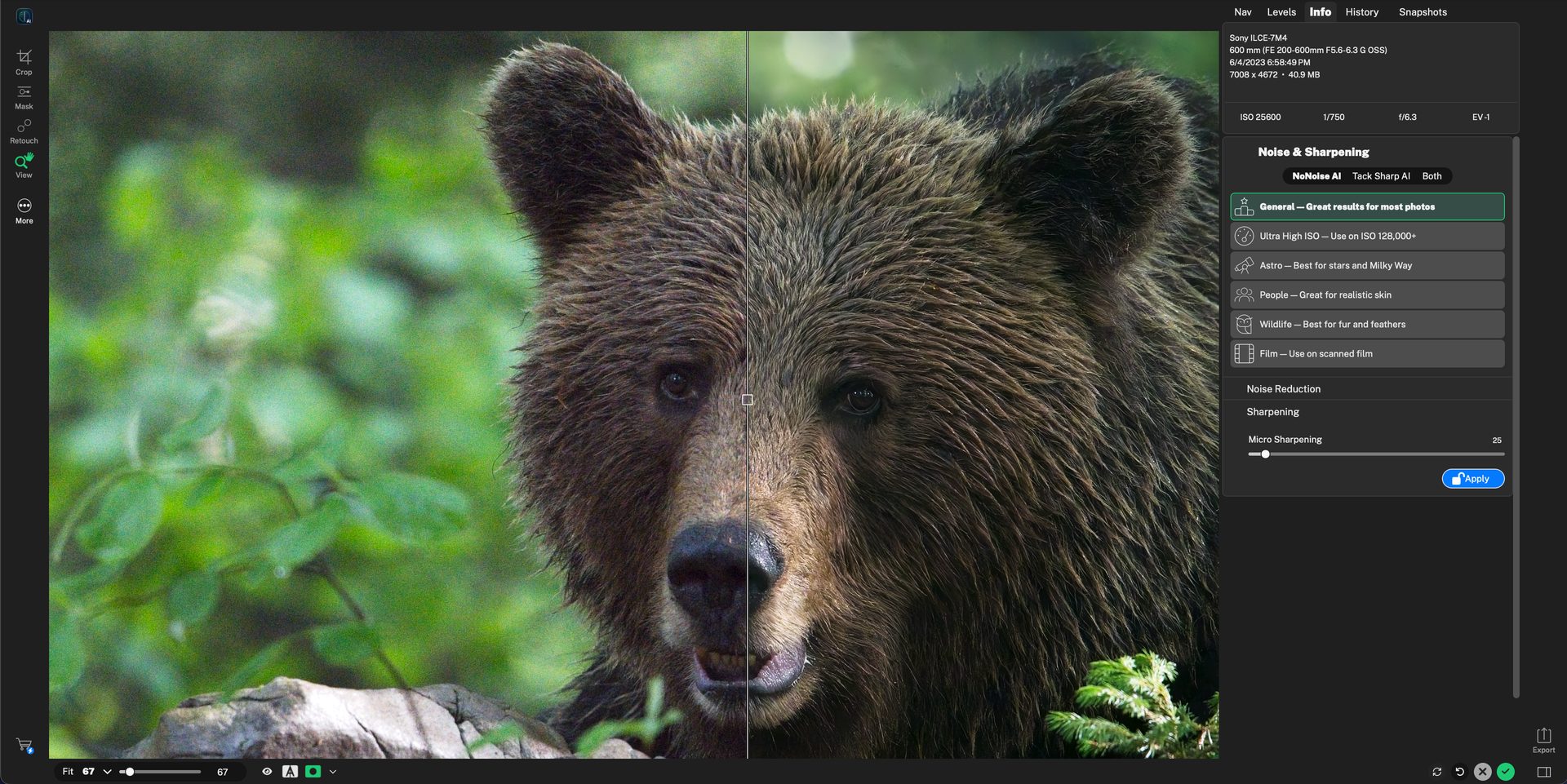
NoNoise AI 2027 with a split before/after preview of a brown bear and the Noise & Sharpening panel (General, Ultra High ISO, Astro, People, Wildlife, Film) on the right.
Features
A model for each kind of subject
NoNoise AI 2027 lists six models in one panel: General for most photos, Ultra High ISO for ISO 128,000 and up, Astro for stars and the Milky Way, People for realistic skin, Wildlife for fur and feathers, and Film for scanned negatives and slides. Below them, Luminance, Enhance Detail, Color and Micro Sharpening sliders fine-tune the result.
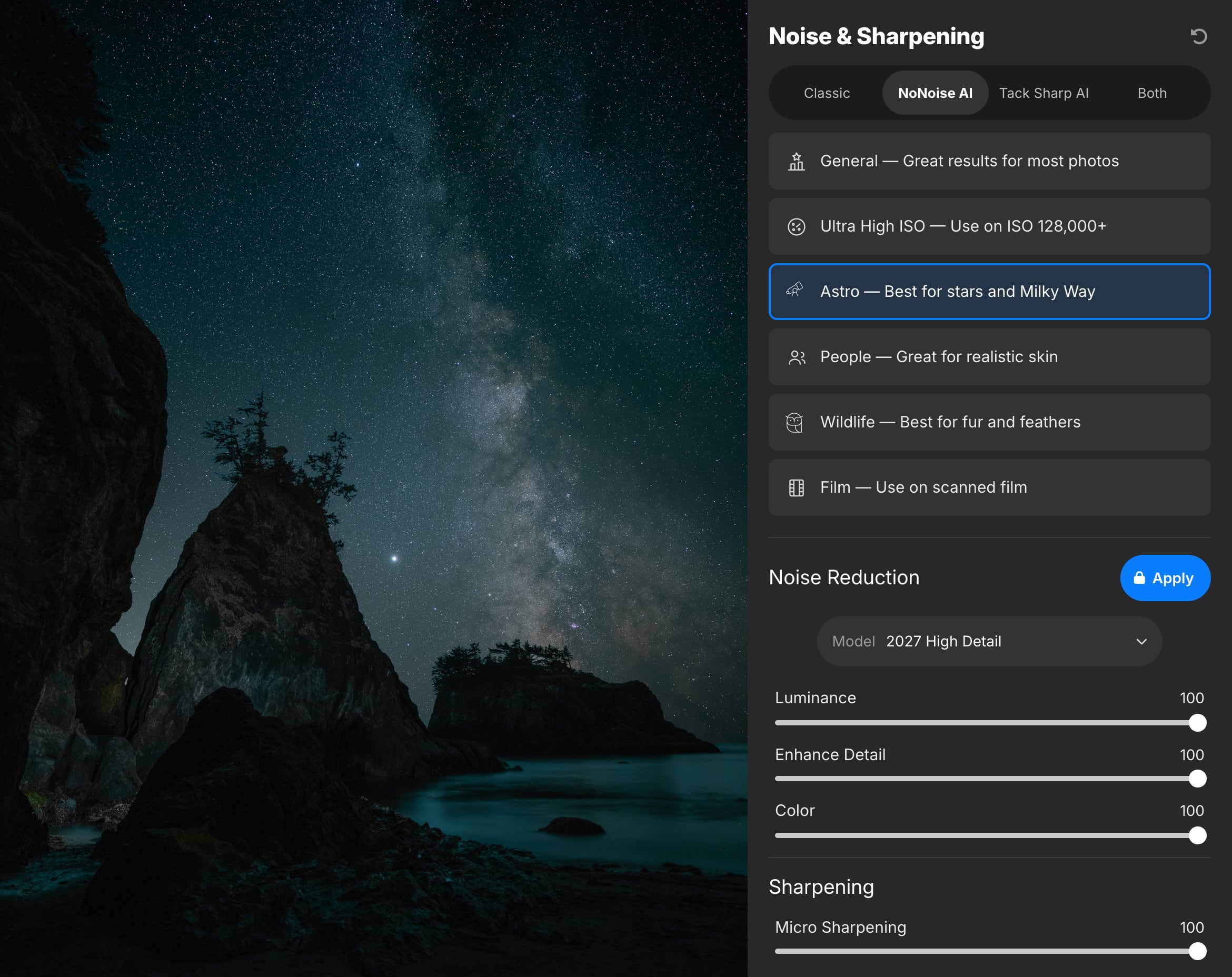
The Noise & Sharpening panel with the Astro model selected for a Milky Way shot, and the 2027 High Detail model with its Luminance, Enhance Detail, Color and Micro Sharpening sliders.
TackSharp AI for soft and shaken shots
NoNoise AI includes TackSharp AI, which corrects slight focus misses and camera shake. In 2027 it was retrained to add less noise and fewer artifacts while sharpening, and you can run it alone or together with noise reduction ("Both").
RAW in, DNG out
NoNoise AI 2027 opens RAW files from more than 800 cameras plus DNG, JPG, TIFF and PNG. A cleaned RAW file is saved as a DNG, so it keeps its full tonal and color range when you go back to editing in Lightroom or elsewhere.
Standalone or inside your editor
NoNoise AI 2027 runs as its own app or as a plugin for Photoshop, Lightroom Classic, Photoshop Elements, Affinity Photo, Apple Photos and Corel PaintShop Pro. From Lightroom you send a photo to NoNoise and get the cleaned file back in your catalog.
Here is what that looks like on a 100% crop from ON1's comparison of a red-tailed hawk, before and after NoNoise AI 2027:
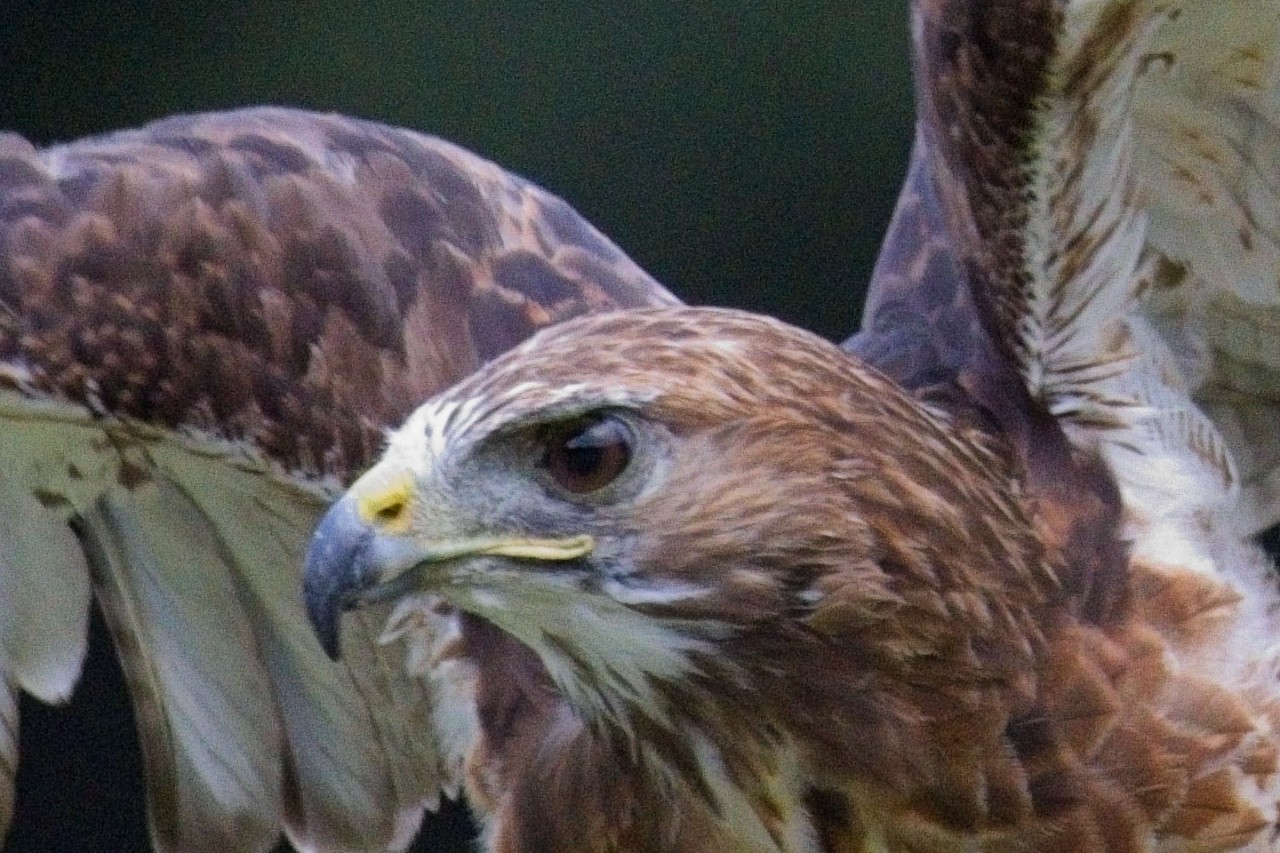
Before: the original high-ISO crop, with grain in the dark background and across the feathers.
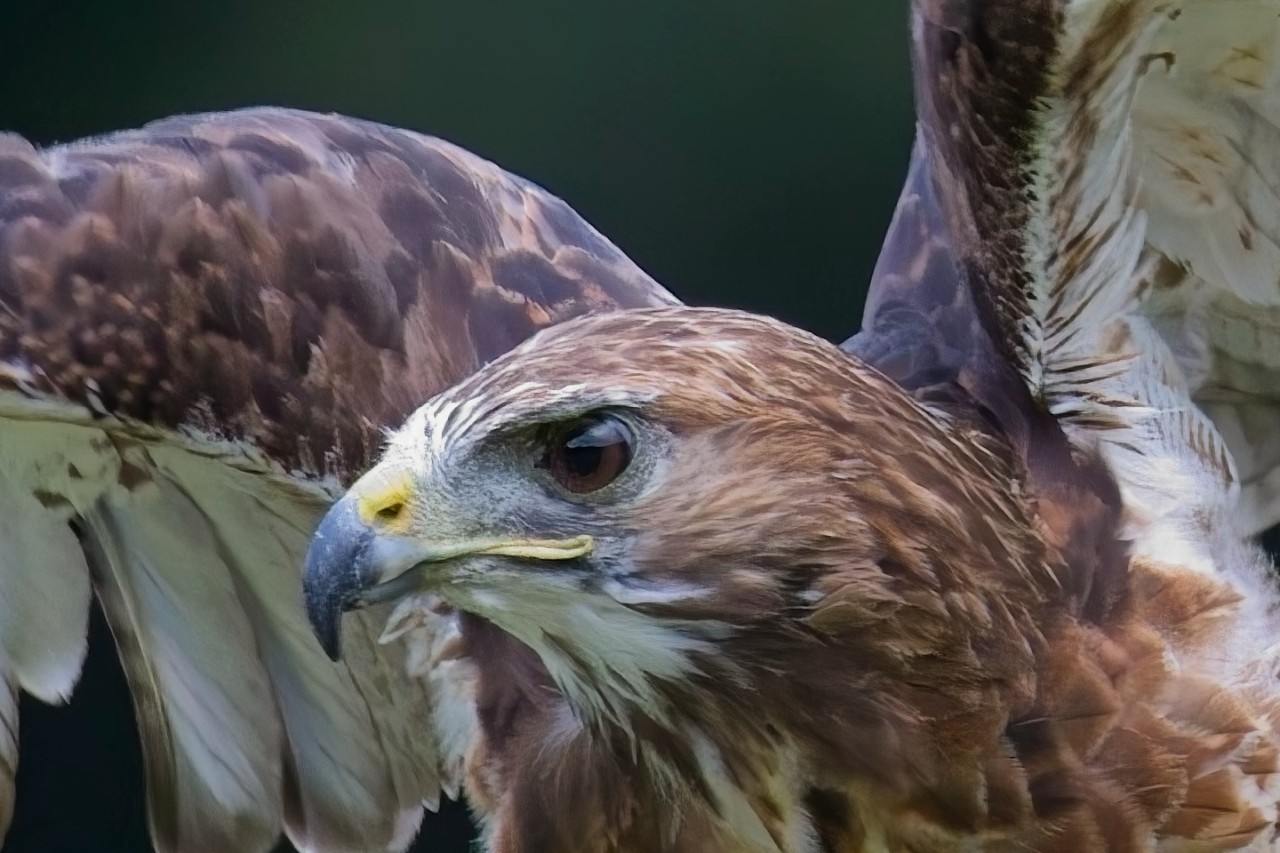
After NoNoise AI 2027: the background is clean and the feather detail is kept (ON1's sample image).
Benefits
- Shoot at higher ISO. Use the fast shutter speed you need and clean up the grain afterwards.
- Keep your editor. It slots into Lightroom Classic or Photoshop instead of replacing them.
- Own it. A one-time license with no subscription.
- Works on JPEGs too, not only RAW files, so old phone and camera JPEGs can be cleaned up.
Real-World Uses
- Birds and wildlife at dawn and dusk: the Wildlife model at ISO 6400-25,600, then TackSharp AI on the frames with slight motion blur.
- Night sky: the Astro model on a Milky Way exposure to remove noise without erasing faint stars.
- Indoor events and sports halls: the People model for skin that doesn't turn waxy.
- Scanned film: the Film model to tame grain on scans of negatives and slides.
Who It's For, and Who Should Skip It
NoNoise AI fits photographers who edit in Lightroom Classic, Photoshop, Affinity Photo or Apple Photos and want better high-ISO results than their editor's own noise reduction, without a subscription.
Skip it if you already own ON1 Photo RAW (it's built in), if you rarely shoot above ISO 1600, or if you want an all-in-one enhancement tool that also upscales and fixes faces in batch: then ON1 Photo RAW, or a broader tool, covers more for the money.
Usage Guide
- Create a free ON1 account on the NoNoise AI download page and install it (about 429 MB on Windows).
- Open a RAW file in the standalone app, or send a photo to NoNoise AI from Lightroom Classic or Photoshop through the ON1 plugin entry.
- Pick the model that matches your subject: General, Ultra High ISO, Astro, People, Wildlife or Film.
- Drag the split preview over the fine detail at 100% and adjust Luminance, Enhance Detail, Color and Micro Sharpening.
- Switch to TackSharp AI or "Both" for soft shots, then Apply and save as DNG (or back to your editor).
Where it falls short
- An interface reviewers find less intuitive than rival denoisers; Silent Peak Photo also found the small light-grey text on black hard to read.
- Speed on modest hardware. It wants a GPU with 4 GB of video memory at minimum, and Capture the Atlas found it "can be slow sometimes".
- Best one photo at a time. Reviewers find it better suited to fixing individual shots than to churning through big batches.
- Some crash reports. A Trustpilot reviewer in October 2026 reported crashes after using NoNoise AI inside Photo RAW.
What Users Say
Independent reviews of the 2027 version are still scarce, so the verdicts below are for earlier versions of NoNoise AI. ON1 as a company scores 4.1 out of 5 on Trustpilot from 3,226 reviews.
Review sites
Capture the Atlas (Prince Berkoh, 4/5, testing NoNoise AI 2022): "ON1 NoNoise AI delivers superb results." and "NoNoise AI works miracles in landscape photography." On the downside: "ON1 NoNoise AI's interface is less intuitive than other programs in it's category." Pros listed include "AI algorithm is great" and "Price"; cons "Unintuitive interface" and "Can be slow sometimes".
Silent Peak Photo (Richard Adams, March 2026, comparing it with DxO PureRAW): "The interface is concise and responds quickly to your adjustments, resulting in a pleasant workflow." But "NoNoise AI's wider feature set can get a little complicated," and "ON1 NoNoise AI is at its best when attending to one photo at a time." For occasional denoising or JPEG work, he concludes "ON1 NoNoise AI should be more than sufficient."
Customers
On Trustpilot, Che Wei Pok (3 stars, October 2026) wrote: "It crashes few times after using Nonoise AI. Also, the cursor movement of tool eg perfect eraser is lacking". Long time user (4 stars) found ON1's software "reasonably simple to use with a lot help available".
Customer comments ON1 publishes on its NoNoise AI page are positive, as you'd expect: "Pretty darn good at what it does. Look out DX0! Keep up the great work on this." (Christopher), and "Super program removes all noise in one click." (Bent). One wildlife shooter, Jack, says he "tested all the competitors" and found ON1 had the "most natural denoising, fairest price and best support".
The pattern: reviewers rate the noise removal itself highly, especially for the price, and see it as a match for the better-known denoisers on single images. The complaints are about the interface, speed on older computers and occasional crashes.
Comparisons
NoNoise AI vs DxO PureRAW
DxO PureRAW only processes RAW files and has a simpler interface. NoNoise AI also cleans JPEG, TIFF and PNG, adds TackSharp AI deblurring and subject-specific models, and costs less.
NoNoise AI vs ON1 Photo RAW
Photo RAW 2027 includes the same NoNoise AI and TackSharp AI, plus a full editor and organizer. Buy NoNoise AI alone if you're staying with Lightroom or Photoshop; buy Photo RAW if you want to leave them.
Editions and Pricing
Prices on the order page on November 20, 2026, in USD. Black Friday prices end November 27, 2026 at 11:59 PM Pacific.
| Option |
Price now |
Regular price |
License |
What you get |
| NoNoise AI 2027 | $39.99 | $69.99 | Perpetual | Standalone app and plugins, 2027 updates |
| ON1 Photo Studio | $179.99/year | $179.99/year | Subscription, 5 computers | NoNoise AI, Photo RAW MAX and every other ON1 app, future versions, 1 TB Cloud Sync |
Buy NoNoise AI 2027Subscribe to ON1 Photo Studio
FAQs
Is ON1 NoNoise AI a subscription?
No. ON1 NoNoise AI 2027 is a perpetual license: you pay once and keep it. It's also included in the optional ON1 Photo Studio subscription.
Does ON1 NoNoise AI work with Capture One?
ON1 doesn't list Capture One among NoNoise AI 2027's plugin hosts. The supported hosts are Photoshop, Lightroom Classic, Photoshop Elements, Affinity Photo, Apple Photos and Corel PaintShop Pro; with other editors, use the standalone app and open the DNG it saves.
Is NoNoise AI 2027 a free update for NoNoise AI 2024 owners?
No. ON1 NoNoise AI 2027 is a paid upgrade; owners of earlier versions can sign in to their ON1 account to see upgrade pricing.
Does ON1 NoNoise AI run on Windows 10 or older Macs?
No. ON1 NoNoise AI 2027 needs Windows 11 (64-bit, x86 or ARM) or macOS 13 or later, plus a graphics card with at least 4 GB of video memory.
Can I get a refund on ON1 NoNoise AI?
Yes. ON1 refunds NoNoise AI 2027 in full if you contact it within 30 days of receiving the software.
Does NoNoise AI need an internet connection?
For setup, yes. ON1 NoNoise AI needs an internet connection and an ON1 account for installation, activation and update checks; the noise reduction itself runs on your computer.
System Requirements
- OS: Windows 11 64-bit (x86 or ARM) or macOS 13 and above (macOS 15 recommended)
- Processor: four-core Intel or Apple Silicon on Mac, four-core 64-bit with SSE 4.2 or Neon on Windows (M2 or eight-core recommended)
- RAM: 8 GB (16 GB if shared with the GPU); 32 GB recommended
- Disk: 6 GB for installation, SSD recommended
- Graphics: Metal (Mac) or DirectX 12 and DirectML (Windows), Vulkan 1.1 and OpenGL 4.2, 4 GB video memory (8 GB recommended); 1920x1080 display
- Plugin hosts: Photoshop CC, Photoshop Elements 2020+, Lightroom Classic, Apple Photos, Affinity Photo, Corel PaintShop Pro
Conclusion
ON1 NoNoise AI 2027 is worth it at $39.99 (until November 27, 2026; $69.99 after) for Lightroom and Photoshop users who shoot at high ISO and want cleaner RAW files without a subscription. The reason to buy is natural-looking noise removal with subject-specific models and deblurring. The reason not to: if you already own ON1 Photo RAW it's a duplicate, and its interface and speed on older computers draw complaints. Try it on your noisiest shots during the 30-day trial before deciding.
Download Free TrialBuy NoNoise AI 2027