ON1 Effects 2026: Finished Looks for Your Photos, Inside Lightroom or Photoshop
ON1 Effects 2026 is a photo effects app and plugin for Windows and Mac with hundreds of stackable filters, presets, LUTs, textures and borders, for $34.99 one-time at Black Friday pricing until November 27, 2026 (regular $69.99). It is for photographers who want film looks, glows, motion blur or a moody color grade in a few clicks, applied to just the subject or just the sky with AI masks.
Lightroom presets change the whole frame and Photoshop makes you build every look from layers and blend modes. Effects sits between the two: pick a preset, stack another filter on top, click the subject to keep it untouched, and send the photo back to your editor.
Quick facts
- Version: Effects 2026, released January 15, 2026
- Developer: ON1 Inc. (Oregon, USA)
- Platforms: Windows 10 (22H2 or later) and Windows 11, 64-bit; macOS 12 or later. ARM Windows PCs aren't supported
- Works as: standalone app, or plugin for Photoshop, Lightroom Classic, Photoshop Elements, Affinity Photo, Apple Photos and Corel PaintShop Pro
- License: perpetual, 2 computers; also built into ON1 Photo RAW
- Price: $34.99 (regular $69.99); or the Photo RAW MAX subscription at $79.99/year
- Trial: 30 days, fully working with no watermarks; the clock starts at first launch
- Guarantee: 30-day money-back
- What we checked: the price on the order page ($34.99, regular $69.99) and the trial terms on ON1's download page on November 20, 2026. We didn't install the trial, whose download link ON1 sends by email.
Before you buy
- Photo RAW owners already have it. Every Effects 2026 feature is built into ON1 Photo RAW and Photo RAW MAX.
- Effects 2026 is a year behind Photo RAW. Photo RAW 2027 is out, so the standalone Effects is the 2026 release; upgrades from earlier Effects versions are paid.
- The Black Friday price ends November 27, 2026 at 11:59 PM Pacific.
Download Free TrialBuy Effects 2026
Overview
ON1 Effects is the creative-finishing part of ON1's toolkit, sold on its own. You open a photo (or send it from Lightroom or Photoshop), browse presets by category, and build a look from 30+ adjustable filters: Black & White, HDR Look, Dynamic Contrast, Lens Blur, Glow, film looks, Split Tone, LUTs, textures, borders and more. Each filter has its own opacity, blending and mask, so looks can be stacked and placed exactly where you want them.
The 2026 release added one-click Subject and Background masks, Mask Layers, better masks for hair, foliage and trees, and four new filters: Depth Lighting, Split Field, Double Exposure and Motion.
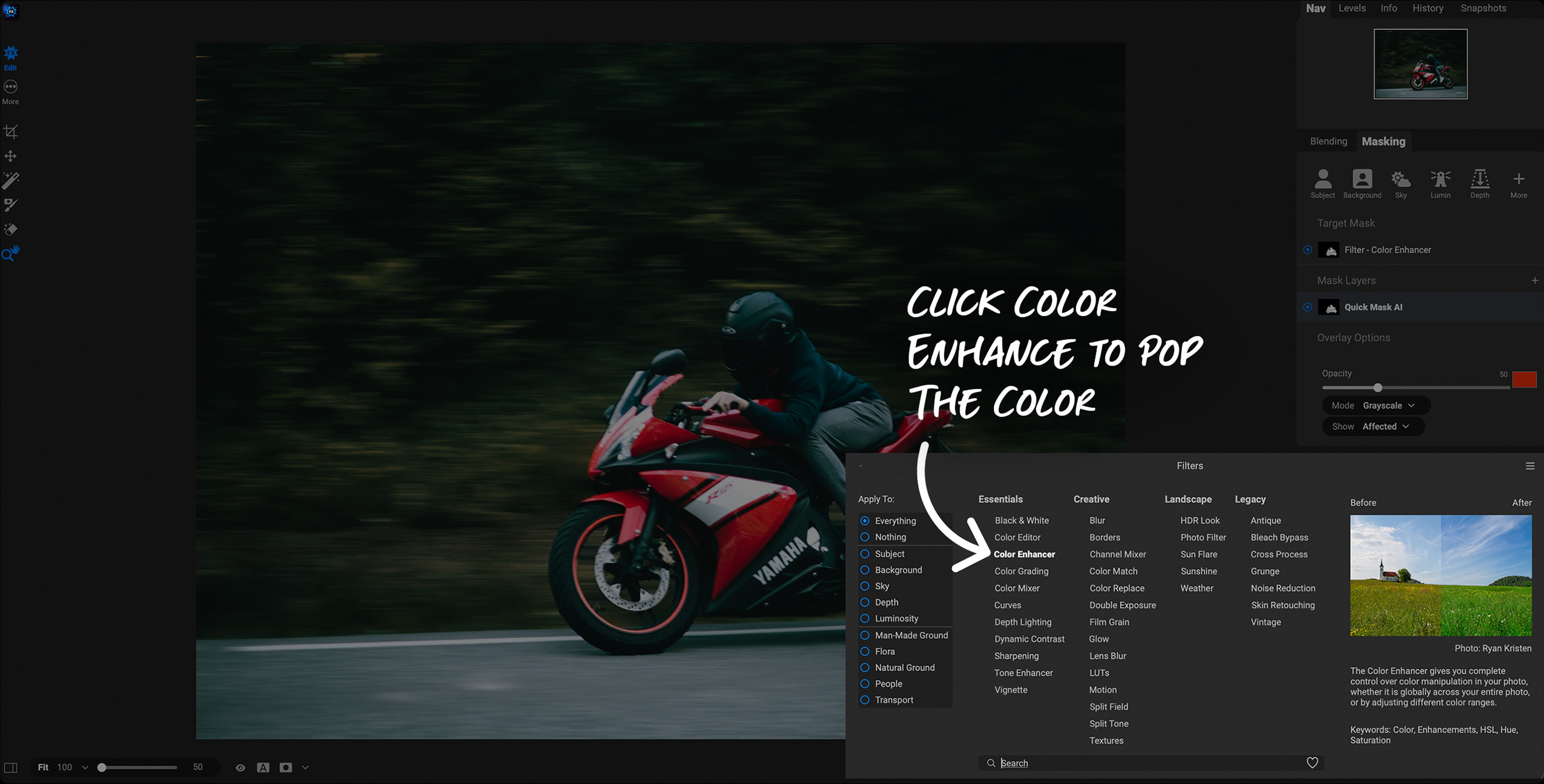
The Filters browser in ON1 Effects 2026, grouped into Essentials, Creative, Landscape and Legacy, with Color Enhancer about to be applied to a masked motorcyclist.
Features
Stackable filters, presets, LUTs and textures
ON1 Effects 2026 includes hundreds of presets plus filters you can stack, blend and adjust: vintage film, cinematic grades, glows, B&W conversions, split toning, textures and borders. An AI Style Advisor suggests looks for the photo you have open, and you can save your own stacks as presets.
One-click AI masks for any filter
ON1 Effects 2026 masks the subject or background in one click, or selects what you click on with Super Select AI, so a filter applies only where you want it. Mask Layers let one mask drive several filters, and the 2026 masks handle hair, foliage and trees better than before.
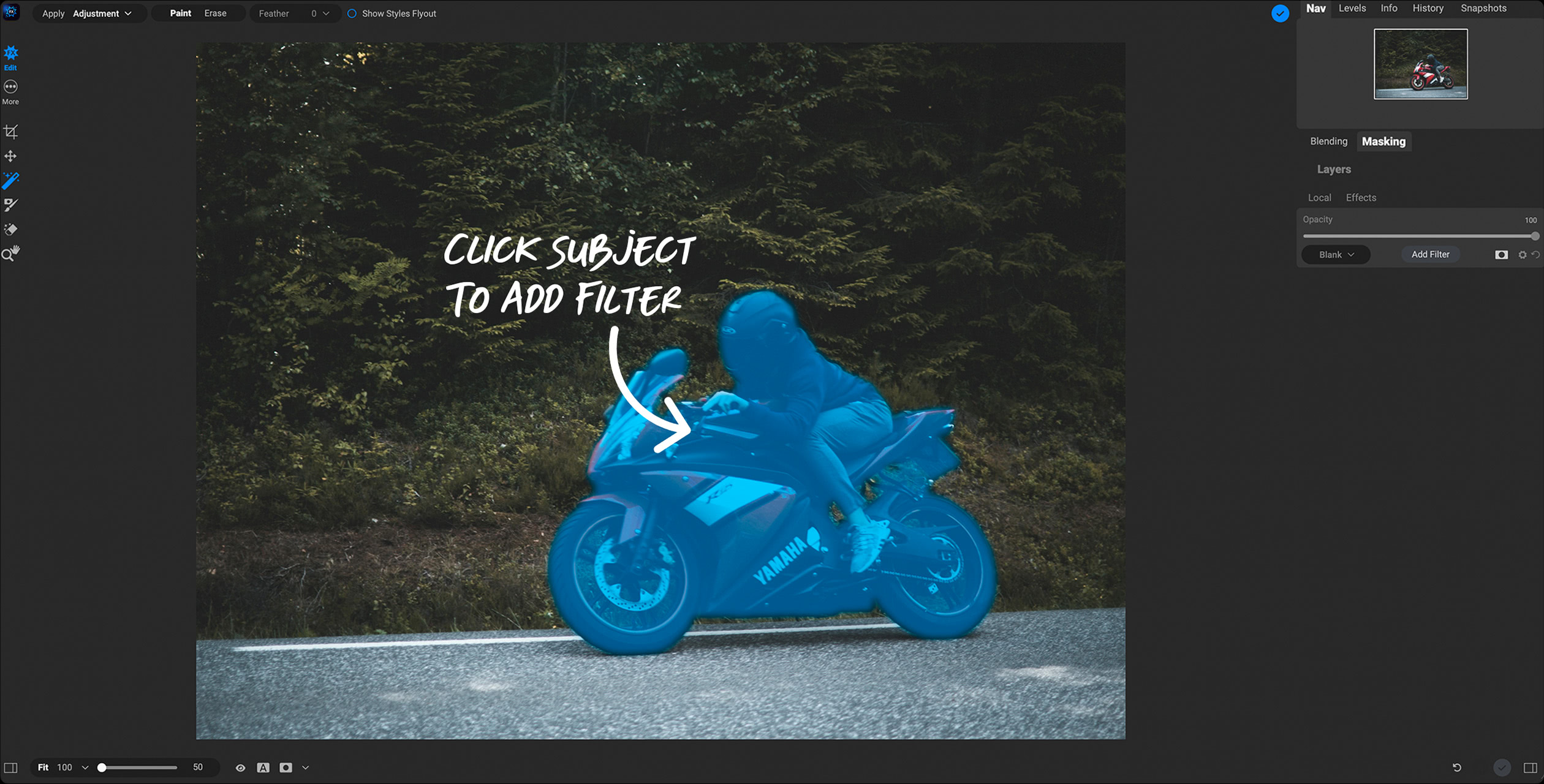
Super Select AI in Effects 2026: one click selects the rider and bike (shown in blue) before a filter is added.
Four new filters in Effects 2026
ON1 Effects 2026 adds Motion (panning, zoom and twist blur on still photos), Double Exposure (blend two photos), Depth Lighting (brighten or darken the foreground or background separately) and Split Field (bring a distant background closer while keeping a wide-angle foreground).
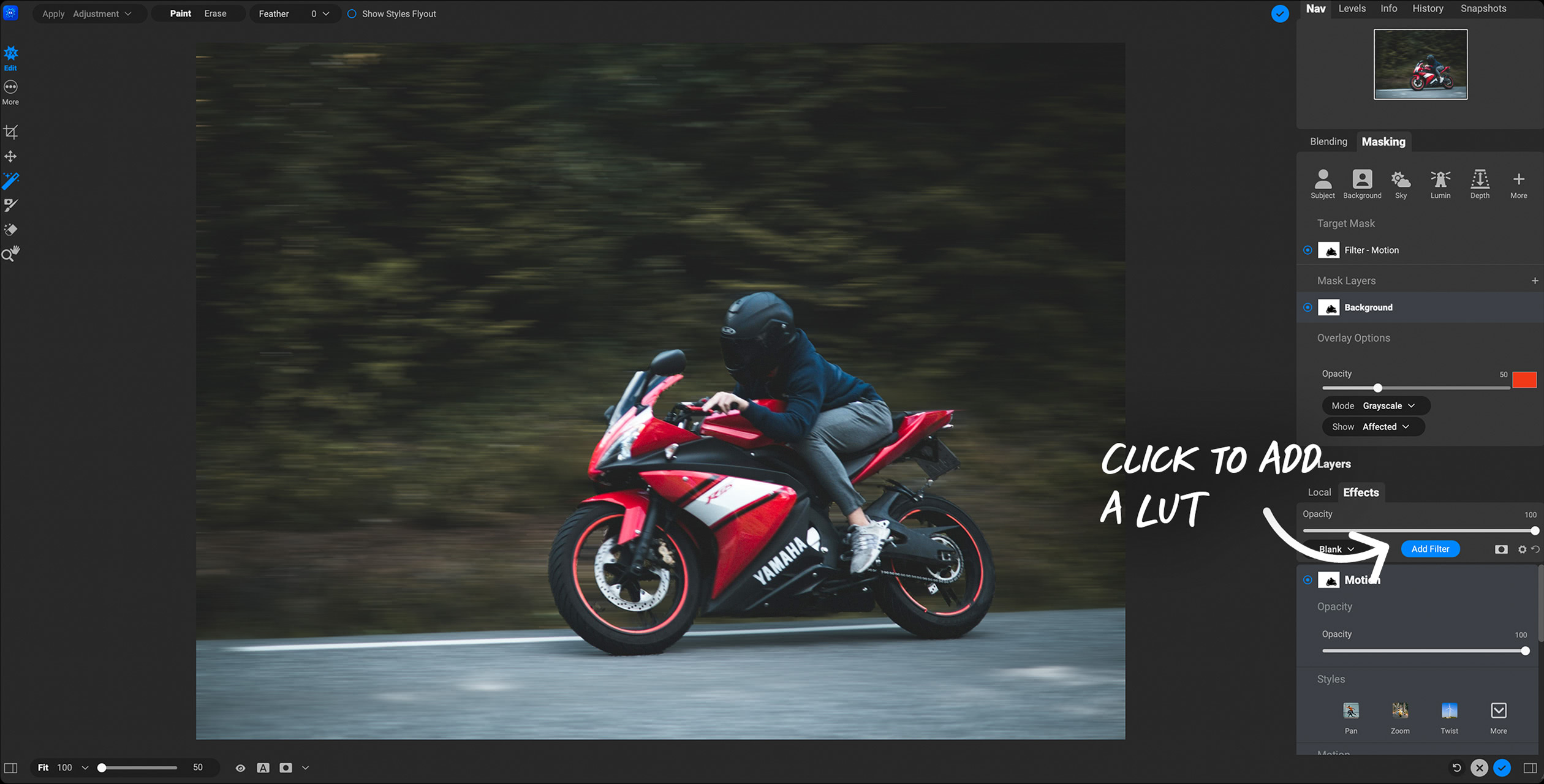
The new Motion filter applied to the background mask only, so the rider stays sharp while the trees blur as if panned.
Layers for composites
ON1 Effects 2026 combines several photos as non-destructive layers with AI masks, for sky replacements, swapping heads in a group shot or building a composite from separate frames.
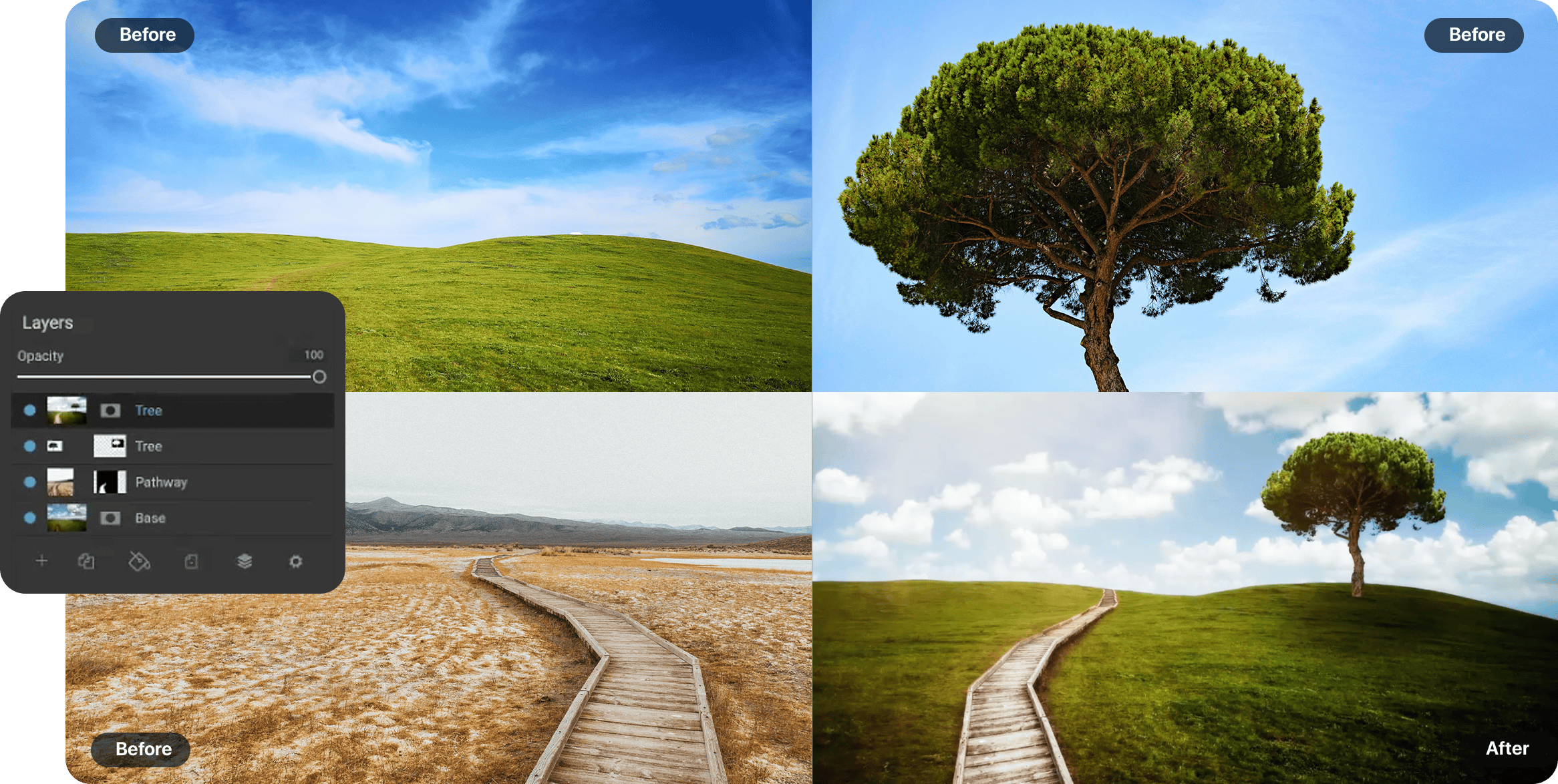
ON1's composite example: the Layers panel stacks a sky, a tree and a boardwalk photo (Before) into one image (After).
Soft-proofing and batch export
ON1 Effects 2026 previews prints with soft-proofing and ICC profiles, and batch-processes a set of photos with the same look in one export.
Benefits
- Looks you can't get from a Lightroom preset: textures, glows, motion blur and double exposures, masked to part of the frame.
- No need to switch editors. It works from inside the editor you already use.
- A one-time price. No subscription unless you choose one.
Real-World Uses
- Portraits: a soft glow and film look on the background while skin and eyes stay crisp.
- Sports and cars: a Motion pan blur behind a sharp subject, for a sense of speed from a static shot.
- Landscapes: Dynamic Contrast and a sunshine glow on the foreground, a different grade on the sky.
- Creative projects: Double Exposure portraits and textured, bordered prints.
- Wedding and event sets: one look saved as a preset and batch-applied to the whole gallery.
Who It's For, and Who Should Skip It
Effects suits Lightroom Classic, Photoshop, Affinity Photo and Apple Photos users who want a large library of creative finishes with masking, for a one-time price.
Skip it if you own ON1 Photo RAW (it's included), if you use a Windows ARM laptop (not supported), or if you only want accurate RAW development and no stylized looks: a RAW editor's own presets will do. If you're thinking of buying more than one ON1 tool, ON1 Photo RAW 2027 includes Effects, NoNoise AI and Resize AI in one app.
Usage Guide
- Enter your email on ON1's Effects trial page, open the installer it sends and install Effects 2026. The 30-day trial starts when you first launch it.
- Open a photo in the standalone app, or send one from Lightroom Classic, Photoshop or another supported host.
- Browse the presets, or open the Filters browser and add a filter.
- Click the subject or background mask (or Super Select AI) to limit the filter to part of the photo.
- Stack more filters, adjust each one's opacity and blending, and save the stack as a preset.
- Apply to return to your editor, or export (one photo or a batch) from the standalone app.
Where it falls short
- Not every filter earns its place. Life After Photoshop found the filters "not all equally useful", with the new Depth Lighting effect too subtle to matter much.
- Masking takes learning. The same reviewer called the masking options "powerful but could do with some simplification".
- No ARM support on Windows, and it needs a graphics card with 4 GB of video memory.
What Users Say
ON1 Effects 2026 has one in-depth independent review so far; its filter set also ships inside Photo RAW, which magazines have reviewed. ON1 as a company scores 4.1 out of 5 on Trustpilot from 3,226 reviews.
Life After Photoshop (4.5/5)
Rod Lawton reviewed Effects 2026 in April 2026: "The quality of the preset effects is very high" and "You get a lot of very good tools for not very much money." He singled out the Motion filter for swirly bokeh, zoom and panning blur. His reservations: "The masking options are powerful but could do with some simplification" and, of the interface, "It doesn't look like a serious photographic tool."
The same filters inside Photo RAW
Digital Camera World's review of Photo RAW 2026, which has the same Effects module, listed "Excellent creative presets and filters" first among its reasons to buy, and added: "The range of effects and the scope offered by this program are pretty extraordinary." It also warned "Masking options can be baffling".
ON1 customers on Trustpilot
Most recent reviews praise ON1's support and training: "So many great features! And, I have not even learned to use many of them, yet!!" (William Garoutte, 5 stars). Complaints focus on bugs after upgrades and, in one case, an unanswered cancellation request: "I cant communicate with them. I want to cancel a purchase and I dont get answers" (Alan, 1 star).
The pattern: high-quality presets and a big creative range for the money, against masking that takes learning and a few filters that add little.
Comparisons
ON1 Effects vs Lightroom presets
Lightroom presets set sliders across the whole photo. Effects adds what sliders can't do (textures, borders, glows, motion blur, double exposures) and masks each filter separately.
ON1 Effects vs ON1 Photo RAW
Photo RAW 2027 includes all of Effects plus RAW development, cataloguing, NoNoise AI and Resize AI. Effects alone is the cheaper choice if you only want the looks and will stay in your current editor.
Editions and Pricing
Prices on the order page on November 20, 2026, in USD. Black Friday prices end November 27, 2026 at 11:59 PM Pacific.
| Option |
Price now |
Regular price |
License |
What you get |
| Effects 2026 | $34.99 | $69.99 | Perpetual, 2 computers | Standalone app and plugins |
| Photo RAW MAX subscription | $79.99/year | $89.99/year | Subscription, 3 computers | Effects inside Photo RAW MAX, every ON1 app as a plugin, future versions |
Buy Effects 2026Subscribe to Photo RAW MAX
FAQs
Is ON1 Effects a one-time purchase?
Yes. ON1 Effects 2026 is a perpetual license for 2 computers. It's also available inside the Photo RAW MAX subscription.
Is Effects 2026 a free upgrade from Effects 2025?
No. ON1 Effects 2026 is a paid upgrade from earlier versions; owners can sign in on ON1's site for upgrade pricing.
Does ON1 Effects work on a Windows ARM laptop?
No. ON1 Effects 2026 needs a 64-bit Intel or AMD processor on Windows; ARM processors aren't supported. On Mac, Apple Silicon is supported.
Does the ON1 Effects trial add a watermark?
No. The ON1 Effects 2026 trial is fully working for 30 days with no watermarks, and the 30 days start the first time you launch it.
Can I get a refund on ON1 Effects?
Yes. ON1 Effects 2026 has a 30-day money-back guarantee.
System Requirements
- OS: Windows 10 version 22H2 or later, or Windows 11 (64-bit); macOS 12 or later (macOS 14 recommended)
- Processor: four-core 64-bit Intel or AMD at 2 GHz with SSE 4.2, or Apple Silicon; ARM Windows not supported
- RAM: 8 GB (16 GB if shared with the GPU); 16 GB or more recommended
- Disk: 1.5 GB for installation
- Graphics: Metal (Mac) or DirectX 12 and DirectML (Windows), Vulkan 1.1 and OpenGL 4.2, 4 GB video memory (8 GB recommended); 1920x1080 display
- Plugin hosts: Photoshop CC, Photoshop Elements, Lightroom Classic, Apple Photos, Affinity Photo
Conclusion
At $34.99 until November 27, 2026 ($69.99 after), ON1 Effects 2026 is a good buy for Lightroom and Photoshop users who want a deep library of creative finishes with real masking, without a subscription. The reason to buy is the quality and range of its presets and filters for the money. The reasons not to: you already own Photo RAW, you're on a Windows ARM machine, or you'd use only a handful of looks. Try the full 30-day trial on a few of your own photos first.
Download Free TrialBuy Effects 2026