Devart Excel Add-in for MySQL: Edit MySQL and MariaDB Tables Right in Excel
Devart Excel Add-in for MySQL is a $179.95 add-in for Microsoft Excel on Windows that pulls MySQL or MariaDB data into a worksheet, refreshes it with one click, and lets you edit the rows and save the changes back to the database. It suits analysts and office staff who know Excel better than SQL, and the license is perpetual with one year of updates included.
Getting MySQL data into Excel for reading is easy enough with an ODBC driver and Get Data. Changing that data is the hard part: someone exports a sheet, edits it, and a developer writes the updates back by hand. This add-in turns that round trip into an Edit Mode, a Commit button and a Rollback button on Excel's ribbon.
Quick facts
- Version: 3.1.70, released September 7, 2026 (3.0, June 12, 2026, added MariaDB 12 and Excel 2024)
- Developer: Devart
- Runs in: Microsoft Excel 2007, 2010, 2013, 2016, 2019, 2021 and 2024 for Windows
- Databases: MySQL 3.23 to 9.x, MariaDB 5 to 12, Percona, SingleStore, Amazon RDS and Aurora, Azure Database for MySQL, Google Cloud SQL for MySQL
- Security: SSL and SSH connections and MySQL authentication plugins
- Download: 76.60 MB installer, shared by all Devart Excel add-ins; needs a free Devart account
- Price: $179.95 for a perpetual license with one year of updates; $259.95 with two years
- Trial: 30 days, free
- Refund: the order page promises a 30-day money-back guarantee "if you are not satisfied", while Devart's ordering FAQ grants refunds within 30 days only when a technical problem support can't fix stops the product working
- What we checked: the order page charged $179.95 for one license with a year of updates, $259.95 with two years and $219.95 with premium support, and the download page listed version 3.1.70 at 76.60 MB, on November 17, 2026. We didn't install the add-in or connect it to a MySQL server
Download Free Trial Buy Now
Overview
Installing the add-in puts a Devart tab on Excel's ribbon with Get Data, Refresh, Edit Mode, Commit, Rollback and Manage Connections. Get Data opens an Import Data Wizard: you pick "MySQL database", enter host, port (3306), user, password and database, then choose what to load. The connection can be saved in the workbook, with or without the password, or entered again each time.
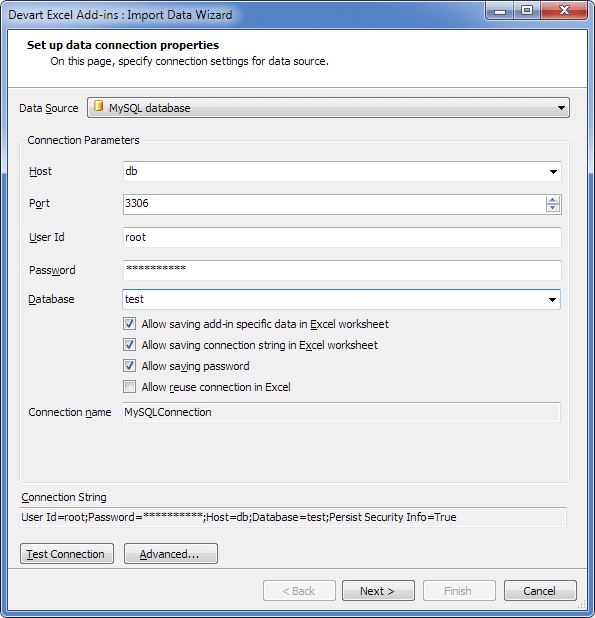
The Import Data Wizard's connection page: host, port 3306, user, password and database, with options to save the connection and password in the worksheet.
Features
Pick data visually or with SQL
Devart Excel Add-in for MySQL's Visual Query Builder lets you choose a table, tick its columns and columns from related tables, and set WHERE filters and ORDER BY visually; an SQL Query tab takes a hand-written SELECT instead. A Data Preview window shows the result before it lands in the sheet.
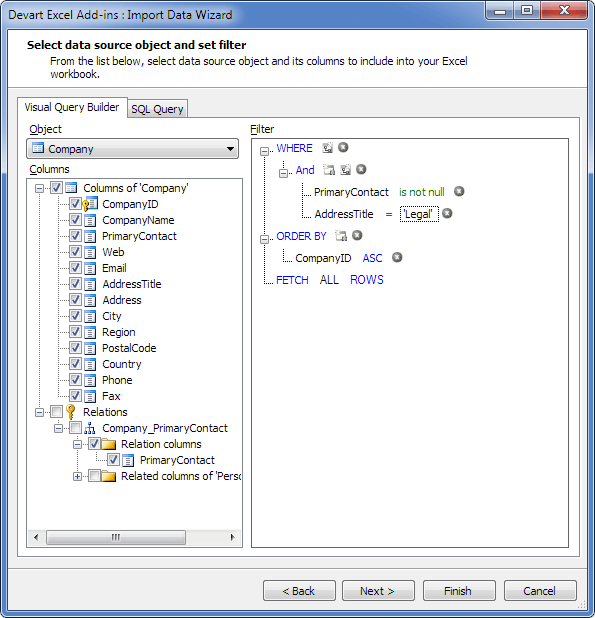
The Visual Query Builder: columns of a Company table and a related table on the left, a WHERE filter and ORDER BY on the right.
Edit rows, then Commit or Rollback
Devart Excel Add-in for MySQL's Edit Mode lets you change cells, add rows and delete rows as in any worksheet, with every change highlighted. Commit writes the changes to MySQL; Rollback throws them away. Nothing reaches the database until you commit.
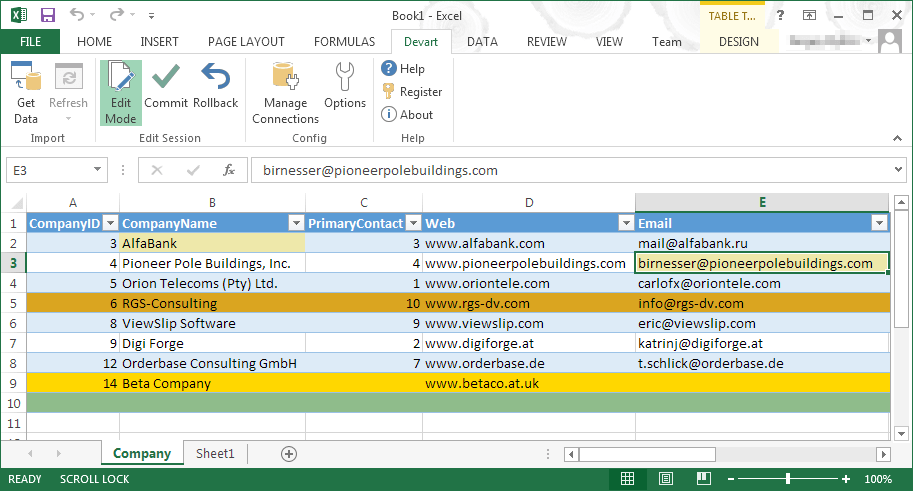
Edit Mode in Excel: the Devart ribbon with Commit and Rollback, a changed cell and a new row highlighted before committing.
Validation before anything is written
Devart Excel Add-in for MySQL checks edits as you type and marks errors in the cell, such as text in a numeric column or a duplicate primary key, so bad values are caught before Commit.
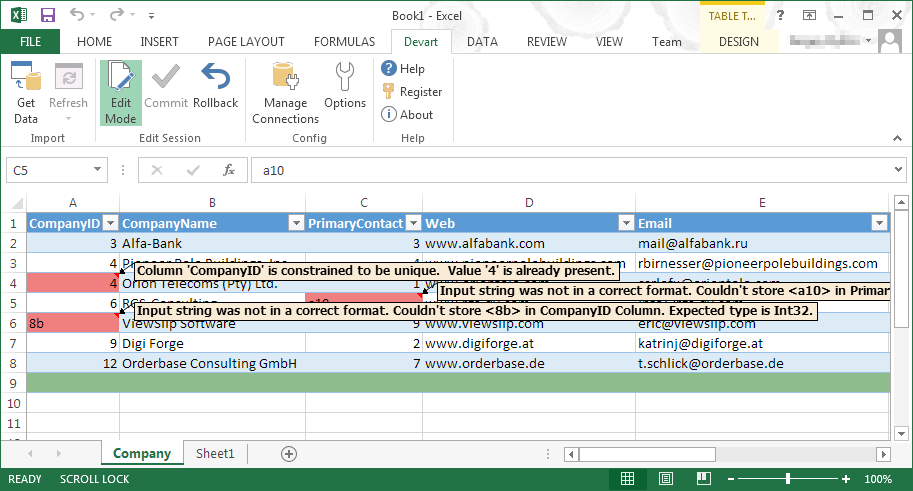
Validation in Edit Mode: red cells with messages for a duplicate CompanyID and values that don't match the column type.
One-click refresh and broad server support
Devart Excel Add-in for MySQL reloads every imported range from the database with the Refresh button, so charts and formulas built on the data update without re-importing. It connects to MySQL from 3.23 to 9.x, MariaDB up to 12 (with its UUID and INET6 types), Percona and SingleStore, over SSL or SSH, including Amazon RDS, Aurora, Azure and Google Cloud.
Benefits
- No developer in the loop. Staff fix prices, stock levels or customer details themselves, with a commit step and validation as guard rails.
- Excel's tools on live data. Sorting, filters, formulas and charts work on database rows that refresh on demand.
- Fewer stray exports. One workbook connected to the database replaces copies of CSV files mailed around.
- Old and new servers. The same add-in covers a legacy MySQL 5.0 box and a current MariaDB 12 cloud database.
Real-World Uses
- Updating a web shop's catalogue. A merchandiser loads the products table, adjusts prices in Excel and commits the changes to the store's MySQL database.
- Cleaning up CRM data. An admin finds duplicate customers with Excel's tools and fixes or deletes them in Edit Mode.
- Monthly reports. An analyst builds charts on imported order data and refreshes them each month with one click.
- Bulk data entry. Staff paste a block of new rows into the sheet and commit them, with validation catching bad dates or duplicate keys.
Who It's For, and Who Should Skip It
The add-in suits small teams that keep business data in MySQL or MariaDB and want non-developers to view and change it safely from Excel, on Windows.
Skip it if you use Excel for Mac or Excel on the web: only Excel for Windows is supported. Skip it too if you only read data, because a free ODBC driver with Excel's Get Data does that, or if you're a developer who's happier in a database tool such as dbForge Studio for MySQL or MySQL Workbench.
Usage Guide
- Sign in to Devart (a free account), download the 76.60 MB installer and run it with an administrator account; choose the MySQL add-in.
- Open Excel and click Get Data on the Devart tab.
- Pick MySQL database, enter host, port, user, password and database, and click Test Connection. Use Advanced for SSL or SSH settings.
- Choose a table and columns in the Visual Query Builder (or write SQL), preview, and finish to load the data into the sheet.
- Click Edit Mode, make your changes, then Commit to save them to MySQL or Rollback to cancel. Use Refresh later to reload current data.
Before you buy
The add-in edits a table safely only when each row can be identified, so tables need a primary key or unique index; give each Excel user a MySQL account with only the rights they need. Your MySQL server also has to accept connections from each user's PC, directly or through SSH.
Where it falls short
- Windows Excel only. There's no version for Excel for Mac or Excel on the web.
- Few reviews. Capterra and GetApp list a single review for the MySQL add-in, so there's little independent feedback.
- One database type per purchase. Each Devart add-in is sold separately; several databases or cloud apps call for a pack.
- Admin rights to install. Locked-down office PCs need IT to install it.
What Users Say
Review sites
Independent feedback on this add-in is scarce. Capterra and GetApp show 5.0 out of 5 from a single review of Devart Excel Add-in for MySQL; the reviewer liked the product and suggested the query editor could be easier for complex SQL. With one rating, treat it as a hint rather than a verdict, and use the 30-day trial on your own tables.
Comparisons
Devart add-in vs. ODBC and Get Data
Excel can read MySQL for free through the MySQL ODBC driver and Get Data (Power Query), and for read-only reporting that's enough. Devart Excel Add-in for MySQL costs $179.95 but adds editing with validation and commit/rollback, a simpler connection without a driver, and SSH tunnelling. Its write-back is the reason to pay.
Single add-in vs. the Database Pack
Devart's Excel Add-in Database Pack bundles Devart's add-ins for databases, MySQL among them, and is listed on this site at $399.95. If you need three or more of them, the pack costs less than buying each add-in at $179.95.
Editions and Pricing
| Option | Price | Notes |
|---|
| 1 license, 1 year of updates | $179.95 | Perpetual: the version you have keeps working after the year |
| 1 license, 2 years of updates | $259.95 | Longer update period at a lower cost per year |
| 1 year with premium support | $219.95 | Adds premium support and access to nightly builds |
| 5 or more licenses | 5% to 15% off | Volume discounts from 5, 10 or 20 licenses |
Buy Now opens the order page with one license and one year of updates; you change the term, premium support and quantity there. The order page ticks automatic yearly renewal of updates by default, at $89.95 for the next year; untick it there if you only want the first year.
FAQs
Does Devart Excel Add-in for MySQL work on Excel for Mac?
No. Devart Excel Add-in for MySQL runs only in Excel for Windows, versions 2007 to 2024. The MySQL server itself can run on Windows, Linux or macOS.
Does it need the MySQL ODBC driver or Connector/NET?
No. Devart Excel Add-in for MySQL connects to the server itself; it needs only .NET Framework 4.0 or later and the Visual Studio 2010 Tools for Office Runtime besides Excel.
Can it connect to MariaDB and Amazon RDS?
Yes. Devart Excel Add-in for MySQL supports MariaDB 5 to 12, Amazon RDS for MySQL and MariaDB, Amazon Aurora, Azure Database for MySQL and Google Cloud SQL for MySQL.
Is the password stored in the workbook?
Only if you allow it. Devart Excel Add-in for MySQL's connection page has separate options for saving the connection string and saving the password in the worksheet.
Does the add-in keep working after the first year?
Yes. Devart Excel Add-in for MySQL is a perpetual license, so the version you have keeps working; the first year includes updates and support, and extending them later is discounted.
Can I get a refund?
Possibly. Devart Excel Add-in for MySQL's order page offers a 30-day money-back guarantee if you're not satisfied, but Devart's ordering FAQ describes refunds within 30 days only for technical problems its support can't fix. Use the 30-day trial first.
System Requirements
- Microsoft Excel 2007, 2010, 2013, 2016, 2019, 2021 or 2024 for Windows
- .NET Framework 4.0 or later and Visual Studio 2010 Tools for Office Runtime
- An account with administrator rights for the install
- MySQL 3.23 to 9.x, MariaDB 5 to 12, Percona or SingleStore, local or cloud-hosted
Conclusion
Devart Excel Add-in for MySQL is worth $179.95 when people who live in Excel need to change MySQL or MariaDB data and you'd rather not build them a web form: validation and a commit step make that safe. The main reason not to buy is read-only use, which free ODBC and Get Data already cover, and it's no help to Mac users. If write-back from Excel is what you need, test it on a copy of your tables with the 30-day trial.
Download Free Trial Buy Now