PT Portrait: Slider-Based Portrait Retouching for Windows and Mac
PT Portrait is a portrait retouching program from Photo-Toolbox for Windows and macOS that finds the face in a photo and then lets you smooth skin, reduce pores, wrinkles, shine and eye bags, whiten teeth, brighten eyes and reshape the face with sliders. The Standard Edition lists at $29.95 and the Studio Edition, which adds a Photoshop plug-in and batch processing, at $39.95, both one-time purchases, and both are 30% off at checkout during the vendor's autumn sale. It's for photographers and hobbyists who retouch headshots, family photos and portraits and want natural results without hours of manual brushing in Photoshop.
Frequency separation and dodge-and-burn work, but they're slow to learn and slower to do. PT Portrait turns the common jobs into named sliders: drag "Eye bags" up and they fade, while the skin keeps its texture.
Quick facts
- Version: PT Portrait 6.1 (macOS hotfix 6.1.3 for crashes on macOS 26)
- Developer: Photo-Toolbox (Chengzhu Li)
- Platforms: 64-bit Windows 10 or later with DirectX 11.1, and macOS 12 Monterey or later on Intel or Apple silicon
- Workflow: three steps, Fitting, Makeover and Reshape
- Opens: 8/16-bit images, RAW files and HEIF/HEIC
- Editions: Standard (standalone, 8-bit sRGB output) and Studio (adds the Photoshop and Photoshop Elements plug-in, presets, 16-bit output with ICC profiles, batch)
- Price: Standard $29.95 list, $20.96 at checkout in the autumn sale; Studio $39.95 list, $27.96 in the sale; one-time payment, lifetime license
- Refunds: within 30 days with a valid reason, not for a change of mind
- What we checked: the Windows Standard installer (91,816,488 bytes, product version 6.1, valid code signature) downloaded from the vendor, and $20.96 for Standard and $27.96 for Studio, both lifetime licenses, on the order page on November 11, 2026. We didn't retouch photos with it ourselves
Download Free TrialBuy Now
Overview
PT Portrait is a dedicated portrait retoucher, not a general photo editor. It works in three steps shown across the top of the window. In Fitting, it places outlines around the face, eyes, eyebrows, nose and mouth (since version 5 it detects them automatically when the image loads) and you drag any point that's off. In Makeover, you retouch skin and features with slider panels. In Reshape, you adjust the shape of the face and features, then save. Version 6.1 improved the face detection rate.

PT Portrait's Makeover step in split before/after view, with the Skin Details panel's imperfection, smoothing, around-eye and texture sliders on the right.
Features
Automatic face fitting
PT Portrait finds the face and its outline points as soon as a photo opens, so most portraits need only a quick check in the Fitting step. You can set options such as whether the eyebrows are visible and the mouth is open, and the outline points can sit outside the image edge for tightly cropped faces.
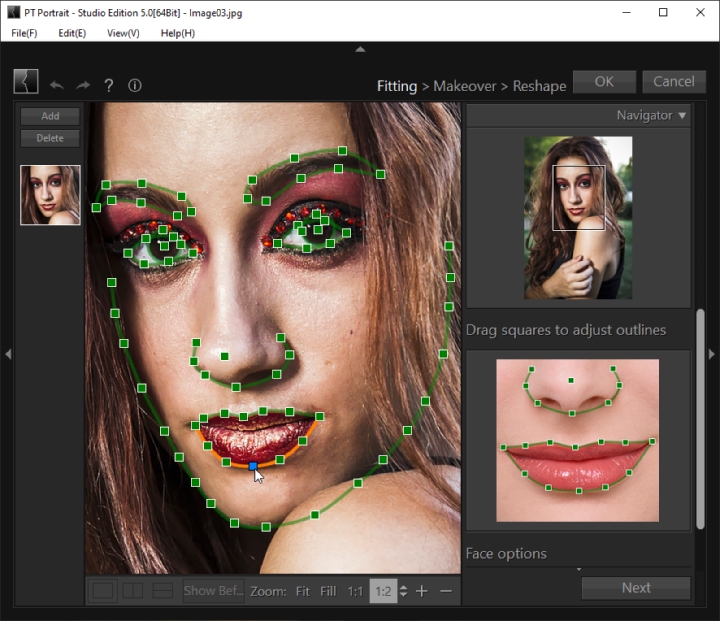
The Fitting step (Studio Edition 5.0 shown): outline points around each feature, with a guide image on the right showing where the nose and lip points belong.
Skin smoothing that keeps texture
PT Portrait smooths skin with separate Fine, Medium and Coarse detail sliders and can add texture back, so faces don't turn to plastic. Imperfection sliders target pores, wrinkles, shine, shadow, redness and yellowish areas, and a skin color panel adjusts tone, temperature, tint and contrast of the skin only. A skin brush extends the mask to shoulders, arms and other visible skin, not just the face.
Eyes, eye bags and dark circles
PT Portrait reduces eye bags and crow's feet, lightens dark circles (a slider added in version 6), brightens and sharpens eyes, can change iris color, and darkens eyebrows. A red-eye correction tool is built in.
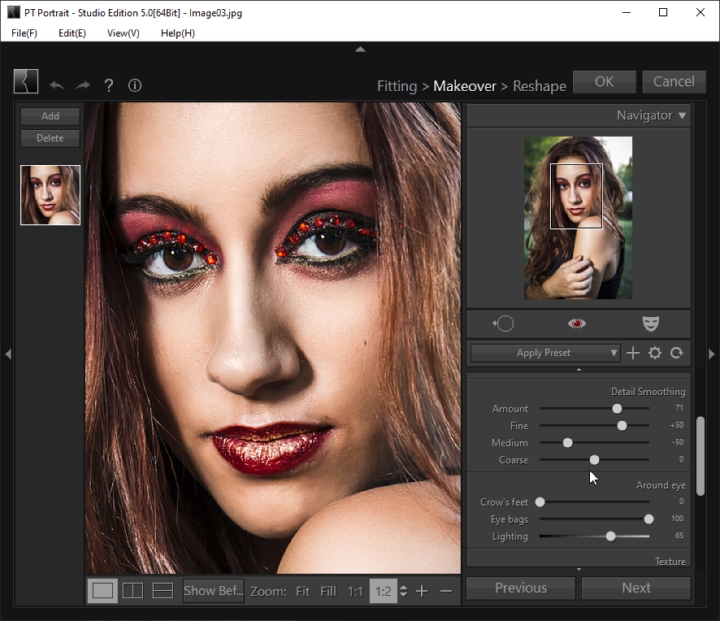
The Makeover step (version 5.0): Detail Smoothing and Around eye sliders, with Eye bags set to 100.
Teeth, lips and blemishes
PT Portrait whitens yellow teeth, makes lips more vivid or changes their color, and has a blemish removal tool for spots the sliders miss.
Face reshaping
PT Portrait's Reshape step slims the face, enlarges eyes, lifts eye corners, slims the nose and tip, and can adjust the smile, using the outlines from Fitting. A Face Contour panel in Makeover shapes the jaw and cheeks.
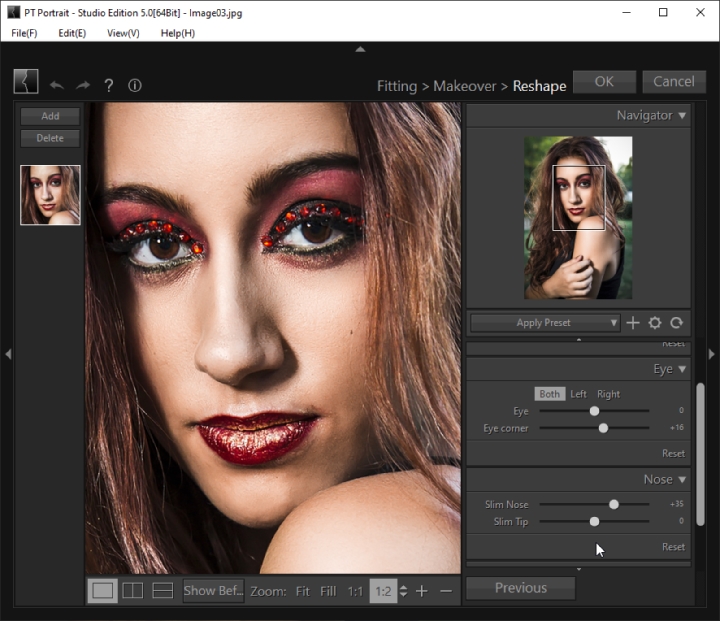
The Reshape step (version 5.0): eye and nose sliders, with Slim Nose at +35 and Eye corner at +16.
Studio Edition: plug-in, presets and batch
PT Portrait Studio runs as a plug-in inside Photoshop (CS or later on Windows, CS5 or later on Mac) and Photoshop Elements, saves slider settings as presets for one-click looks, saves 8- or 16-bit files with a chosen ICC profile (including Display P3), and processes a batch of image files at once. All processing is 16-bit and color managed in both editions.
Benefits
- Minutes instead of an hour. Named sliders replace layer masks and healing brushes for the usual skin and eye work.
- Natural results. Skin keeps its texture, and every slider can be pulled back, so you decide how far to go.
- Fits an existing workflow. Studio works inside Photoshop, so you can retouch a layer and keep going.
- No subscription. Both editions are one-time purchases.
Real-World Uses
- School and staff headshots. Even out skin, reduce shine and whiten teeth on a set of headshots, then batch the rest with a saved preset in Studio.
- Wedding and family portraits. Soften tired eyes and dark circles after a long day without making anyone look airbrushed.
- Dating and profile photos. Clear up a blemish or two and brighten the eyes in a selfie.
- Beauty retouching in Photoshop. Use the Studio plug-in for the skin pass, then finish hair and background in Photoshop.
Who It's For, and Who Should Skip It
It's for portrait, event and family photographers, and anyone who retouches faces regularly and wants quick, natural results on Windows or Mac.
Skip it if you want a general photo editor: PT Portrait has no crop, rotate or flip tools (removed in version 5) and no global photo adjustments since version 6, so you'll still need an editor for those. If you need skin retouching for a large batch inside Lightroom, the vendor's SkinFiner is built for speed and works as a Lightroom plugin. And if you mainly want to edit body shape rather than faces, this isn't that kind of tool.
Usage Guide
- Install. Download the Windows (about 87 MB) or Mac (about 108 MB) installer of the edition you want. Studio users can also install the Photoshop plug-in from the user guide's instructions.
- Open a portrait. PT Portrait detects the face and places the outlines.
- Fitting. Check the outline points around the eyes, brows, nose, lips and face, drag any that are off, and click Next.
- Makeover. Work through Skin Details, Skin Color, Face Contour and the feature panels, or apply a preset. Use the skin brush to add neck and shoulders, and the blemish tool for leftover spots.
- Reshape. Adjust the face, eyes, nose and smile if you want to.
- Save. Click OK (in the plug-in) or save the file; Studio lets you pick 16-bit and an ICC profile.
Before you buy
- Choose the edition first. Standard and Studio are separate downloads. If you need Photoshop, 16-bit output or batch processing, try the Studio download.
- The sale price isn't permanent. The autumn 30% discount brings Standard to $20.96 and Studio to $27.96 at checkout; regular prices are $29.95 and $39.95.
- Refunds need a reason. The vendor considers refunds within 30 days when the software doesn't work as advertised or doesn't meet expectations, but not for a change of mind.
- Newer systems only. Version 6.1 needs Windows 10 or later (64-bit) or macOS 12 or later.
Where it falls short
- Face detection can miss. Tilted, partly hidden or very small faces may need manual fitting; the vendor's guide has a whole section on locating a face by hand.
- Standard saves 8-bit sRGB only. Fine for web and prints from a lab, limiting if you edit further in 16-bit.
- No basic photo tools. Crop, rotate and global adjustments are gone, so it's one stop in a workflow, not the whole thing.
- Overdoing it is easy. High settings on smoothing and reshape sliders can look artificial, so check at 100% zoom.
What Users Say
Few published reviews
PT Portrait has been sold for years (Softpedia's changelog follows it to 6.0.1), but it has almost no public user reviews: AlternativeTo lists it with no comments yet, and we found no ratings on the large review sites. Don't confuse it with PortraitPro (formerly Portrait Professional), a different program from another company whose reviews often come up in searches. The best evidence is the free trial on your own portraits.
Comparisons
PT Portrait vs. SkinFiner
Both come from Photo-Toolbox. PT Portrait does the full face: skin, eyes, teeth, lips and reshaping, one portrait at a time (or in batches in Studio). SkinFiner concentrates on skin only, with AI-assisted automatic smoothing and tone equalization, and is built for speed on large batches, as a standalone app or a Photoshop/Lightroom plugin. Wedding and event shooters with hundreds of frames lean to SkinFiner; anyone perfecting a few portraits gets more control from PT Portrait.
PT Portrait Standard vs. Studio
Standard is a standalone app that saves 8-bit sRGB. Studio adds the Photoshop and Photoshop Elements plug-in, slider presets, 8/16-bit output with a chosen ICC profile, and batch processing, for $10 more at list price.
Editions and Pricing
| Edition | List price | At checkout, Nov 11, 2026 | Runs as | Extras |
|---|
| Standard | $29.95 | $20.96 | Standalone app | Opens 8/16-bit and RAW, saves 8-bit sRGB |
| Studio | $39.95 | $27.96 | Standalone app and Photoshop/Elements plug-in | Presets, 8/16-bit output with ICC profile, batch processing |
Both are one-time purchases with a lifetime license. The other Buy Now buttons on this page order the Standard Edition; use the buttons below to pick an edition.
Buy Standard ($20.96)Buy Studio ($27.96)
FAQs
Does PT Portrait run on Apple silicon Macs?
Yes. PT Portrait and its plug-ins have run natively on Apple silicon since version 5.1.1, and version 6.1 needs macOS 12 Monterey or later. The 6.1.3 hotfix fixed crashes on macOS 26.
Can PT Portrait open RAW and iPhone HEIC photos?
Yes. PT Portrait opens RAW files and HEIF/HEIC images in both editions; the Standard Edition saves the result as an 8-bit sRGB file.
Does PT Portrait work as a Lightroom plugin?
No. PT Portrait Studio is a plug-in for Photoshop and Photoshop Elements, not Lightroom. The vendor's SkinFiner works with Lightroom.
Will PT Portrait work on 32-bit Windows or Windows 7?
No. PT Portrait dropped 32-bit systems in version 5, and version 6.1 needs 64-bit Windows 10 or later with DirectX 11.1.
Can I get a refund for PT Portrait?
Only with a valid reason. Photo-Toolbox considers refund requests within 30 days of purchase when the software doesn't work as advertised or doesn't meet expectations, and doesn't refund a change of mind.
System Requirements
- Windows: Windows 10 or later, 64-bit only, DirectX 11.1 or later; Photoshop CS or later for the Studio plug-in
- macOS: macOS 12 Monterey or later, 64-bit Intel or Apple silicon; Photoshop CS5 or later for the Studio plug-in
- Installers: about 87-89 MB (Windows) and 108-110 MB (Mac)
Conclusion
PT Portrait is worth it at $20.96 (Standard) or $27.96 (Studio) for anyone who retouches faces often and wants natural results fast. The reason to buy it is control at a low one-time price: dedicated sliders for skin, eyes, teeth, lips and face shape, with texture kept. The main reason not to is that it does only that: no crop, no general adjustments, and Standard saves 8-bit only, so pick Studio if you work in Photoshop or need batches. Try it on a few of your own portraits first, since public reviews are scarce.
Download Free TrialBuy Now