PT Photo Editor Pro: A 14 MB RAW Editor with Regional Edits and Batch Watermarking
PT Photo Editor Pro is a lightweight Windows photo editor from Photo-Toolbox that develops RAW files, fixes color and exposure, retouches blemishes, applies edits to selected regions, and watermarks or edits hundreds of photos in one batch. It's a one-time purchase: $29.95 list, and $20.96 on the order page during the vendor's 30% autumn sale. It's for hobby photographers who want Lightroom-style adjustments without a subscription or a heavy install.
The whole Pro installer is about 14 MB. If you've been putting off editing a folder of holiday shots because your editor takes a minute to open, or you just need the same white balance, crop and copyright mark on 200 pictures, this is the kind of tool it is: open a folder, adjust, save, or hand the lot to the batch window.
Quick facts
- Version: PT Photo Editor 5.10.5, Pro Edition
- Developer: Photo-Toolbox (Chengzhu Li), making photo software since 2009
- Platform: 64-bit Windows 7 SP1 or later. No Mac version
- Opens: RAW files, JPEG, TIFF, PNG and HEIF/HEIC; saves 8-bit or 16-bit with a chosen ICC profile
- Modules: Global Edit, Regional Edit, Watermark, plus a Batch window
- Price: $29.95 list, one-time payment, lifetime license; $20.96 at checkout during the autumn sale
- Free alternative: a Free Edition (4.0.3) with the basic tools and 8-bit sRGB output only
- Refunds: within 30 days with a valid reason, not for a change of mind
- What we checked: the Pro installer (15,092,552 bytes, product version 5.10.5, valid code signature, dated September 8, 2026) downloaded from the vendor, and $20.96 for the lifetime Pro license on the order page on November 11, 2026 (list price $29.95). We didn't edit photos with it ourselves
Download Free TrialBuy Now
Overview
PT Photo Editor looks and works like a small cousin of Lightroom's Develop module: a dark window with a histogram and history on the left, the photo in the middle, adjustment panels on the right, and a filmstrip browser along the bottom. Three tabs at the top right switch between Global Edit (the whole photo), Regional Edit (selected areas) and Watermark. Edits are non-destructive while you work, with a full history list, and every step can be saved as an effect preset.

The vendor's annotated Global Edit screen: the effect presets browser open over a landscape, the edit tools and adjustment panels on the right, and the folder browser along the bottom.
Features
RAW development with 16/32-bit processing
PT Photo Editor Pro opens RAW files from most cameras and processes every image at 16 or 32 bits per channel, so strong exposure and color changes don't band. Version 5.10.3 introduced new tone-mapping for RAW files and a Texture slider, and later updates keep adding newer camera models. It's fully color managed: you can save as 16-bit and choose the output ICC profile, including Display P3.
Exposure, color and detail panels
PT Photo Editor gives you one-click white balance, exposure and contrast, levels with a clipping warning, curves per color channel, split toning, dehaze, defringe, sharpening and noise reduction. Color tools can target skies, flowers and skin tones. Dozens of effect presets come built in, you can make your own, and the vendor posts more to download.
Repair and geometry tools
PT Photo Editor has crop and straighten, a lens correction tool for barrel and pincushion distortion, vignetting and perspective, a blemish remover for spots and acne, a clone/healing tool for removing distractions, red-eye correction, and liquify brushes (forward warp, push left, bloat, pucker, twirl). Liquify, lens correction, dehaze and defringe are Pro-only.
Regional editing with masks
PT Photo Editor's Regional Edit module adjusts only part of a photo. Select a region with the brush, gradient, lasso or quick selection tool, see it as a red overlay, then set separate foreground and background adjustments: temperature, exposure, clarity, saturation and more. You can keep several named regions per photo, such as "sky" and "houses".

Regional Edit: the red overlay marks the selected region, with two saved regions in the list and the adjustment sliders below.
Watermarks and frames
PT Photo Editor Pro has a watermark module much like the vendor's separate PT Watermark program: text and image watermarks, simple graphic marks, frames with outlines and shadows, and fields filled from the photo's metadata (camera, lens, exposure, date, time zone, file name). Styles save as one-click presets.

The Watermark module: a frame, a caption and a line of camera settings added to a photo, with presets on the left.
Batch convert, rename, edit and watermark
PT Photo Editor's Batch window converts formats, renames with patterns such as the date, rotates, flips and resizes, and, in Pro, applies a preset or a set of adjustments and a watermark to every file. Batch settings can be saved as presets, and you choose what happens when a file name already exists.
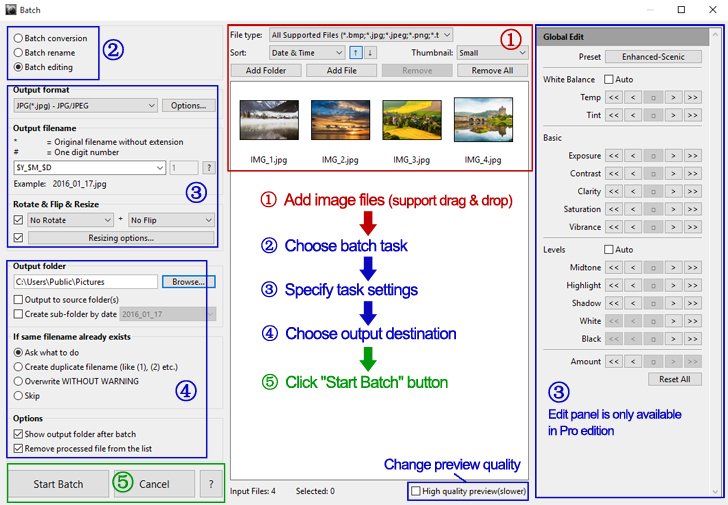
The Batch window with the vendor's five numbered steps; the edit panel on the right is Pro-only.
Metadata viewing and editing
PT Photo Editor Pro shows and edits a photo's metadata, so you can fix a wrong date or add copyright details before you publish.
Benefits
- No subscription. You pay once and keep the license.
- Fast on modest PCs. A 14 MB program starts quickly and doesn't need a gaming graphics card, although it uses the GPU for the interface when it can.
- One tool for the whole job. Develop, retouch, watermark and export without passing files between three programs.
- Repeatable results. Presets and batch editing give a whole shoot the same look in one run.
Real-World Uses
- Holiday RAW files. Fix white balance and lift shadows on a folder of RAW shots, then export JPEGs for sharing.
- A hazy landscape. Use dehaze and a gradient region to bring back a washed-out sky while leaving the foreground alone.
- Selling online. Batch-resize product photos, rename them by date, and stamp your shop name on every one.
- Portfolio exports. Add a frame and a line of camera data to the shots you post, saved as a preset for next time.
Who It's For, and Who Should Skip It
It's for hobby and enthusiast photographers on Windows who want RAW development, local adjustments and batch output at a low one-time price.
Skip it if you need layers, compositing or text design (a layer-based editor fits that), a photo catalog with ratings and keywords, or RAW edits that stay re-editable later: PT Photo Editor exports the result rather than storing your settings in a sidecar file. Mac users have no version. If you only need basic fixes and 8-bit JPEGs, the vendor's Free Edition may be enough.
Usage Guide
- Install. Download the 14 MB Pro installer and run it on 64-bit Windows 7 SP1 or later, at a screen size of at least 1400 x 900.
- Open a folder. Click the folder path in the image browser at the bottom and pick a photo.
- Make global edits. In Global Edit, try an effect preset, then fine-tune with the Basic, Levels, Curves, Color and Details panels. Crop, straighten or repair with the tool icons.
- Fix part of the photo. Switch to Regional Edit, select an area with the brush, gradient, lasso or quick selection, and adjust the foreground or background.
- Add a watermark. Switch to Watermark, add text, an image or a frame, and save the style as a preset.
- Save or batch. Use Save As for one photo, or open Batch, add files, choose the task, settings and output folder, and click Start Batch.
Before you buy
- Try the Pro download first. The Pro installer is the trial; the Free Edition is a separate, older program (4.0.3) with fewer tools.
- The sale price isn't permanent. The 30% autumn discount brings Pro to $20.96 at checkout; the regular price is $29.95.
- Refunds need a reason. The vendor considers refunds within 30 days when the software doesn't work as advertised or doesn't meet expectations, but not for a change of mind.
- 64-bit only. 32-bit Windows support ended with version 5.6.6.
Where it falls short
- No re-editable RAW sidecars. A RAW edit has to be exported to keep it; settings aren't saved to XMP files the way Lightroom and darktable do, the main complaint from users.
- No layers. It's a developer and retoucher, not a compositing tool.
- Thumbnails only in a strip. The browser is a filmstrip along the bottom, with no full-page grid for culling.
- Small vendor, slow release notes. Updates arrive mainly as camera support and fixes; 5.10.5's notes list crash fixes and a batch bug with low memory.
What Users Say
PT Photo Editor has few published user reviews, and they are short, so here is what there is, word for word.
AlternativeTo
- BJ (March 2023, edited September 2023, five stars): "Nice app; decent results." and "Downside is that editing a RAW file requires it be exported to some other format in order for the editing to be used." He adds: "Would have been nice if the app would have used XMP files to retain editing details so the RAW could be "re-editable"." and "Otherwise, a bargain." After trying it again: "Add those two features and I'd open my wallet in a heartbeat."
- harsha1959 (December 2023, reply): "I agree with Barry Levine. XMP file support is a must before any purchase." and "What I would like to see is a page full of Thumbnails, not just thumbnails at the bottom of the page."
The pattern: people like the results and the price, and the two recurring requests are re-editable RAW edits (XMP sidecars) and a full thumbnail grid. Neither has been added as of version 5.10.5, so test those parts of your workflow in the trial.
Comparisons
PT Photo Editor Pro vs. the Free Edition
Both have the color adjustments, basic tools, regional editing, presets and batch converting, renaming and resizing. Only Pro develops RAW and opens HEIF/HEIC, saves 16-bit with a chosen ICC profile, edits metadata, and has the newer rendering engine, liquify, lens correction, dehaze and defringe, the clipping warning, the watermark module, and batch editing and watermarking.
PT Photo Editor Pro vs. PT Watermark
PT Watermark ($24.95 list) is the vendor's dedicated watermarking program that also works as a Lightroom plugin. If you only need watermarks and frames, it's the smaller tool; if you also edit the photos, PT Photo Editor Pro has a similar watermark module built in.
Editions and Pricing
| Edition | Version | Price | License | Output |
|---|
| Free Edition | 4.0.3 | Free | Freeware | 8-bit sRGB only, no RAW |
| Pro Edition | 5.10.5 | $29.95 list; $20.96 at checkout in the autumn sale | One-time, lifetime | 8/16-bit with chosen ICC profile, RAW and HEIF input |
FAQs
Is PT Photo Editor Pro a subscription?
No. PT Photo Editor Pro is a one-time purchase with a lifetime license; the order page sells it as a lifetime license with nothing to renew.
Does PT Photo Editor work on a Mac?
No. PT Photo Editor is Windows-only and needs 64-bit Windows 7 SP1 or later. The vendor's portrait tools, PT Portrait and SkinFiner, do have Mac versions.
Can PT Photo Editor open my camera's RAW files?
Most likely. PT Photo Editor Pro develops RAW files and most updates add newer camera models, but the vendor doesn't publish a camera list, so open a few of your own files in the trial before you buy.
Can I open iPhone HEIC photos in PT Photo Editor?
Yes, in the Pro Edition. PT Photo Editor Pro opens HEIF/HEIC files; the Free Edition doesn't.
Does PT Photo Editor work as a Photoshop or Lightroom plugin?
No. PT Photo Editor is a standalone program. Of the vendor's tools, PT Portrait Studio is a Photoshop plugin, SkinFiner works with Photoshop and Lightroom, and PT Watermark works with Lightroom.
Can I get a refund if PT Photo Editor isn't right for me?
Only with a valid reason. Photo-Toolbox considers refund requests within 30 days of purchase when the software doesn't work as advertised or doesn't meet expectations, and doesn't refund a change of mind.
System Requirements
- 64-bit Windows 7 SP1, 8, 10 or 11
- Screen resolution of 1400 x 900 or higher
- About 14 MB installer
Conclusion
PT Photo Editor Pro is a good buy at $20.96 (or $29.95 at full price) for Windows photographers who want RAW development, local adjustments and batch watermarking without a subscription. The reason to buy it is how much it packs into a tiny, fast program: regional masks, dehaze, lens correction and a full watermark module are things free editors often lack. The main reason not to is the workflow: no re-editable RAW sidecars, no layers and no catalog, so if you live in Lightroom's library or need compositing, it won't replace that. Open your own RAW files in the trial first.
Download Free TrialBuy Now