Luminar Neo: AI Photo Editing for Mac and Windows, Paid Once
Luminar Neo (now sold simply as Luminar) is Skylum's AI photo editor for macOS and Windows: raw editing, layers and masks plus one-slider AI tools for skies, skin, noise, sharpening and object removal. The Desktop Only one-time license costs $99 on the order page during Skylum's Black Friday sale (checked November 17, 2026), with All Platforms at $139 and Max at $159. It suits hobbyists and travel or portrait photographers who want quick, good-looking results without a monthly fee.
You know the routine: a flat sky, a power line through the frame, a portrait that needs ten minutes of skin work. Luminar's pitch is that each of those is one tool and one slider. The catch is in the fine print, because "one-time" doesn't cover everything, and that's spelled out below.
Quick facts
- Version: 1.29.0, released October 28, 2026 (the Fall Upgrade). Skylum dropped the "Neo" from the name with version 1.28.0 in August 2026
- Developer: Skylum (formerly Macphun), the maker of Luminar 3, Luminar AI and Aurora HDR
- Runs on: macOS 13 Ventura or later, Windows 10 (version 1909 or later, 64-bit) and Windows 11
- Also works as: a plug-in for Adobe Photoshop, Lightroom Classic and Apple Photos
- License: one-time purchase. Desktop Only covers two computers (Mac and Windows can be mixed)
- Price: Desktop Only $99, All Platforms $139, Max $159 (Black Friday prices). Luminar Prime add-on $69 a year on sale
- Trial: 7 days, all features, one computer, an email address and no card
- Guarantee: 30-day money-back guarantee
- What we checked: the trial link served an 83 MB Windows installer (LuminarSetup.exe) and a 22 MB Mac installer, the changelog lists version 1.29.0 as the latest, and the order page showed Desktop Only at $99, All Platforms at $139, Max at $159 and the Auto-upgrades add-on preselected, all on November 17, 2026. We didn't edit raw files in the app ourselves, and the sale prices will change after Black Friday.
Before you buy
- The generative tools expire. GenErase, GenSwap, GenExpand, Restoration and the AI Assistant come with every plan for 365 days. After that they need Luminar Prime, a yearly subscription ($69 on sale, $139 crossed out). Sky AI, Noiseless AI, Background Removal and the other non-generative AI tools keep working.
- Untick "Auto-upgrades" if you don't want it. The order summary adds it for free for the first year, then it renews at $33 a year (Desktop Only) or $49 a year (All Platforms).
- Big upgrades can cost extra. Skylum's own plan FAQ says the Desktop Only license gets updates and bug fixes, "but big upgrades may require extra upgrade payments." The Fall Upgrade 2026 features are included with plans bought now.
- Black Friday prices. The prices on this page are sale prices and differ by country. Check the order page for what you pay.
Download Free TrialSee Plans and Buy
Overview
Luminar Neo launched in 2022 as the successor to Luminar 3 and Luminar AI and has been updated every month or two since. It's built around three tabs: Catalog for browsing and organizing, Presets for one-click looks, and Edit, where the tools sit in a single panel. Edits are non-destructive, so the original file stays untouched, and layers let you stack photos, textures and adjustments.
Where Lightroom expects you to build a look from sliders, Luminar starts from the result: pick "Sky AI", choose a sky, and the tool masks the old one and matches the lighting, reflections and atmosphere. You can still go manual with curves, HSL, dodge and burn, the clone tool and lens correction. It reads raw files from more than 1,000 cameras, including CR2, CR3, NEF, ORF and RAF.

The Catalog tab: All Photos, Single Image Edits, Favourites, folders and albums on the left, thumbnails on the right, and the Catalog, Presets and Edit tabs at the top.
Features
One-slider AI fixes for landscapes
Luminar Neo's landscape tools do the masking for you. Sky AI swaps the sky and relights the scene to match, Enhance (rebuilt in 1.29 so highlights no longer blow out and colors don't oversaturate) improves a whole photo with one slider, Structure AI adds detail without touching faces, and Atmosphere adds fog, mist or haze. Since 1.29 the fog is rendered as a 3D volume that picks up the photo's colors and settles on the ground.
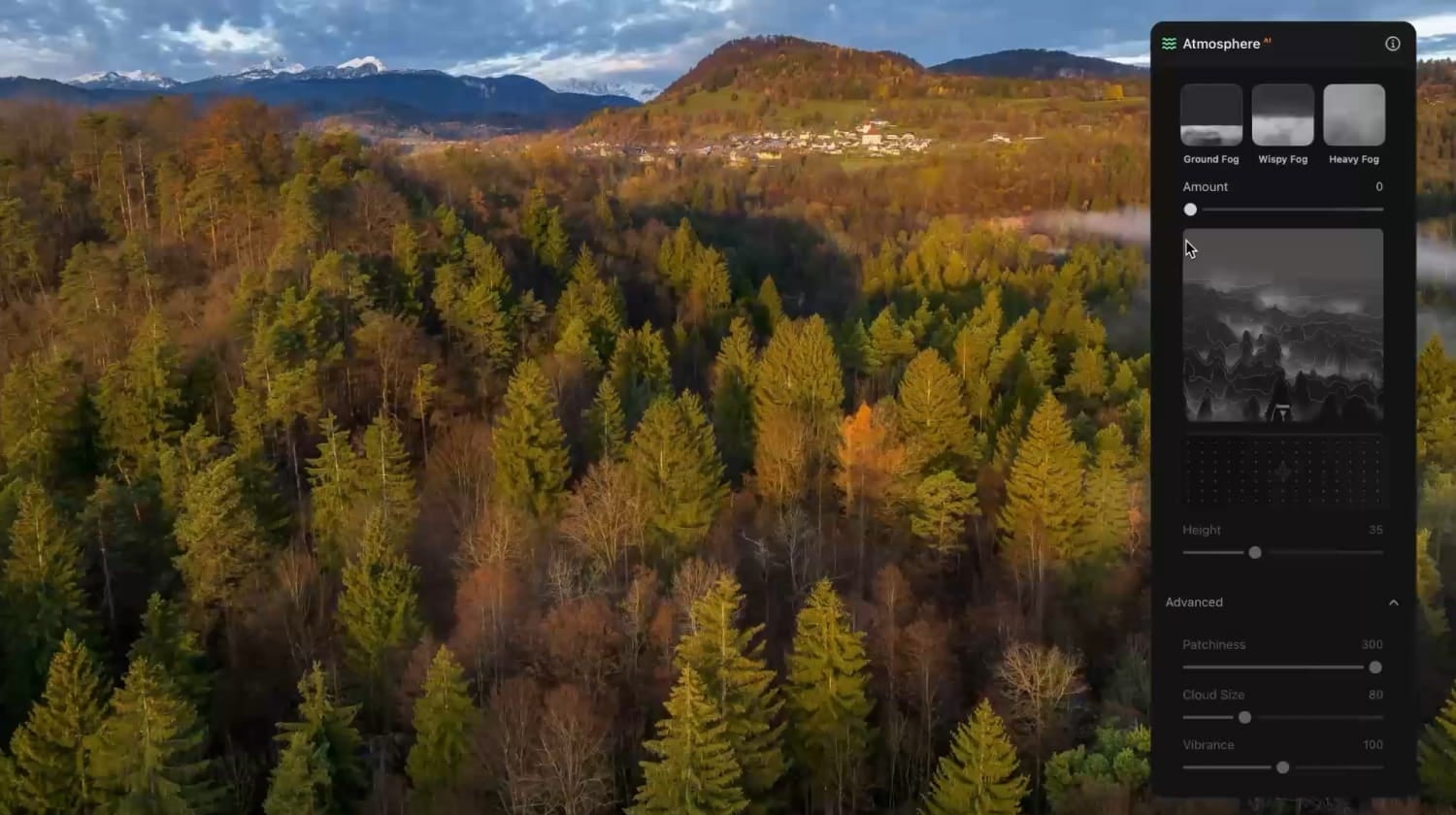
The Atmosphere panel on an aerial forest shot: Ground, Wispy and Heavy Fog, a depth map, and Height, Patchiness, Cloud Size and Vibrance sliders.
Portrait retouching without manual masks
Luminar Neo finds faces and skin on its own. Skin AI smooths skin and removes shine while keeping texture, Face AI relights faces with a soft light and can slim them, Bokeh AI blurs the background like a fast lens, and Portrait Background removes or replaces it. Version 1.27.0 (April 2026) added mask feathering and smarter portrait tools.
Generative tools and the AI Assistant
Luminar Neo's generative tools work on Skylum's servers. GenErase removes people, wires and other distractions, GenSwap replaces an object you describe, and GenExpand extends the frame. Restoration repairs old, scratched photos. The AI Assistant, rebuilt in 1.29, holds a conversation: ask it to "enhance this photo" and it applies the edit, or ask "how do I remove distractions?" and it explains the steps. These five tools are the ones that need Luminar Prime after the first year, and they're covered by a fair use policy.

The AI Assistant panel with suggested prompts such as "Enhance this photo" and "How to remove distractions?" and a text box for your own request.
Pro Tools: Upscale, Noiseless, Supersharp and photo merging
Luminar Neo's Pro Tools cover image quality: Noiseless AI for high-ISO noise, Supersharp AI for motion and focus blur, Upscale for enlarging, plus HDR Merge, Panorama Stitching and Focus Stacking for multi-shot images. HDR Merge works in batches and groups bracketed shots automatically.
Smarter crop, export and printing (version 1.29)
Luminar Neo's Fall Upgrade reworked the end of the workflow. Crop now suggests up to 12 compositions (Rule of Thirds, Golden Ratio, Golden Spiral) and straightens the horizon with an Auto button. Export opens a full-screen preview with text or image watermarks and Long Edge, Short Edge or Dimensions resizing. A new print mode supports ICC profiles and soft proofing, and you can order lab prints, canvas and metal from inside the app.
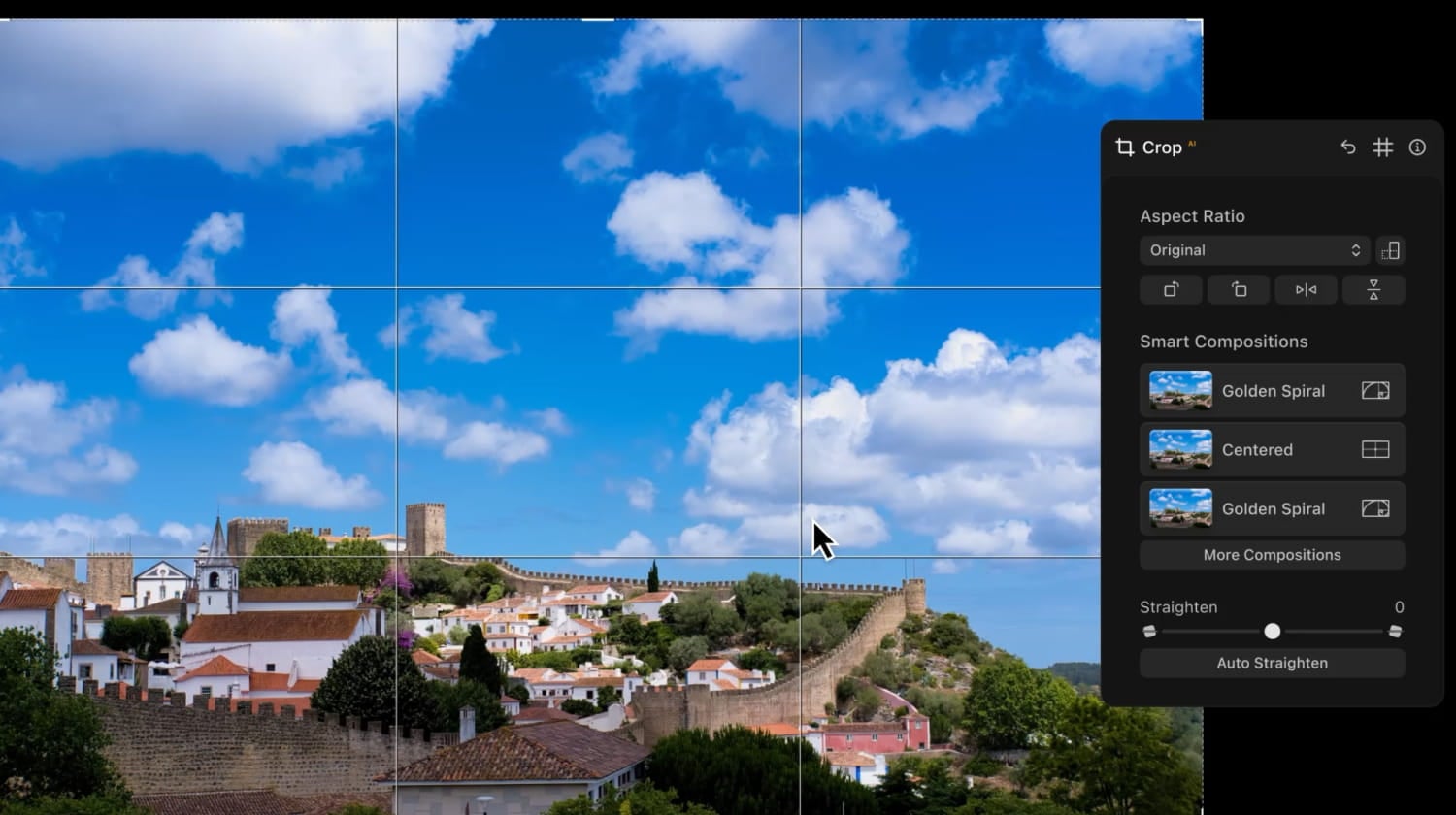
The Crop panel with a rule-of-thirds grid, Smart Compositions (Golden Spiral, Centered), the Straighten slider and Auto Straighten.
Layers, plug-ins and a Lightroom move-over
Luminar Neo supports layers with blend modes for composites, textures and overlays, and it runs as a plug-in inside Photoshop, Lightroom Classic and Apple Photos, so you can keep your current organizer. Version 1.27.1 added a migration that brings a Lightroom Classic library across with its folders, albums, ratings and basic edits, leaving the original catalog untouched.

The Layers panel in the Edit tab with a portrait composited over a new background (an earlier build, still showing the Luminar Neo logo).
Benefits
- Fast results for people who don't want to learn masking. Most edits are a tool and a slider, which is why beginners and busy parents stick with it.
- No monthly bill to keep editing. The app and its non-generative tools keep working after the first year, which is the main reason people choose it over Lightroom.
- Everything in one place. HDR, panoramas, focus stacking, noise reduction and upscaling are built in, so you don't need four separate apps.
- Mac and Windows on one license. Desktop Only covers two computers of either kind.
Real-World Uses
- Travel photos with dull skies: Sky AI replaces a white sky in seconds, and Atmosphere adds morning fog to a valley shot.
- Family and event portraits: Skin AI and Face AI tidy a batch of party photos, and presets plus batch editing give the whole set one look.
- Night and indoor shots: Noiseless AI cleans up high-ISO photos from an older camera or phone.
- Restoring old prints: scan a damaged family photo and run Restoration to fix scratches and fading (in the first year, or with Prime).
- Real estate and product photos: HDR Merge blends bracketed interiors, and GenErase removes clutter from a listing photo.
Who It's For, and Who Should Skip It
Luminar Neo fits hobbyists, travel and family photographers and anyone who finds Lightroom slow to learn, and Lightroom users who want Luminar's AI tools as a plug-in. It's also a good fit if you dislike subscriptions and are happy with the non-generative tools after year one.
Skip it if you manage a large professional library with heavy keywording and metadata work: the catalog is basic next to Lightroom's, and there's no batch renaming. Skip it too on an older laptop with 8 GB of memory if you edit big raw files, and if you mainly want generative fill, because those tools need a yearly payment anyway. A dedicated catalog-and-raw tool or an Adobe plan will serve those buyers better.
Usage Guide
- Install: download the trial, run the installer, and sign in with your Skylum account. Plan for 10 GB of free disk space.
- Add photos: in Catalog, click Add Photos and pick a folder. Lightroom Classic users can run the migration instead.
- Try a preset: open the Presets tab to see one-click looks for your photo, then fine-tune.
- Edit: in the Edit tab, start with Enhance and Crop, then move to Sky AI, Skin AI or the Pro Tools as the photo needs. Use the AI Assistant if you don't know which tool to pick.
- Batch: use batch processing to apply the same adjustments to a whole set of photos shot in similar light.
- Export or print: choose a size and watermark in the full-screen export, or print with soft proofing.
Where it falls short
- Speed on older hardware. Reviewers report lag with large files and slow multi-photo exports, and Skylum recommends 16 GB of memory. Version 1.28.1 claims batch export about 15% faster.
- A thin catalog. No metadata editing or batch renaming, and DPReview found import options hidden and image management limited.
- Generative results vary. GenErase and GenSwap results range from very good to unusable on busy backgrounds. Version 1.29 added automatic retries.
- The upsell. Paid upgrades, Prime, Auto-upgrades and creative add-ons are offered often, and the most common complaint on Trustpilot is about "lifetime" licenses that stop getting new features.
- One-way sync. Cross-device editing in All Platforms works from mobile to desktop only.
- No text tool, and radial and gradient masks can't be moved after you apply them.
What Users Say
Luminar Neo splits opinion more than most photo editors. People who use it for quick, good-looking edits tend to love it, while long-time Skylum customers are often angry about paid upgrades and time-limited AI tools. Here's what we found on review sites and in independent reviews.
Trustpilot: 4.6 out of 5 from 7,147 reviews (Skylum)
Recent reviews are mostly 5 stars, and 4% of all reviews give 1 star. Praise centers on ease of use and support:
- Phil Rocoeur, "Luminar Neo is a great software" (5 stars, November 2026): "Luminar Neo is a great software, very user friendly, with very nice features easy to operate."
- Andrew B, "Best of the bunch" (5 stars, November 2026): "I trialled several products before settling on Luminar. It's really impressive, especially for the price."
- Ulf Arfvidsson, "My best photo editor so far" (5 stars, November 2026): "Although I am not a pro in photo editing I am very happy with the software."
- Rimas Straleckas (5 stars, November 2026), after buying a second subscription by mistake: "The support team quickly understood the issue, canceled the unnecessary subscription, and processed a full refund."
- Phil, "easy to use" (4 stars, November 2026): "easy to use, upgrades are helpful, gives a good result."
The 1- and 2-star side
- Ernesto Ticas, "Bait-and-switch pricing right after purchase" (1 star, September 2026): "Paid $140 for Luminar and within days got hit with a demand for another $80 for a 'Fall Upgrade'"
- SERGIUSZ WINOGRODZKI, "Planned obsolescence" (1 star, September 2026): "'Perpetual licensing' that stops working as soon as the app's support ends"
- TM from Tokyo, "Three 'lifetime' licenses. Only one product still alive. Never again." (1 star, October 2026): "I will never buy a Skylum product again."
- Stephen Platt, "Luminar always wanting you to pay extra" (1 star, March 2026): "all the new features are not available unless you pay extra"
- Clinton Fowler, "Product is okay" (2 stars, March 2026): "they don't do refunds if it renews. So beware of the subscription trap."
- Tom, "Customer Support is a Joke" (1 star, October 2026): "The result of this upgrade was that all of my images went blue."
PhotoWorkout: 5 out of 5 (Andreas De Rosi, version 1.29, updated November 2026)
"The Fall 2026 update moves Luminar from editing to finishing." Its pros start with "One-time purchase, no subscription required", and its cons are "Generative AI tools require annual renewal after first year" and "Occasional performance lag with very large files on older hardware". The verdict: "The only real caveats are the annual renewal for generative AI tools and the one-way mobile sync limitation." On the catalog: "While not as deep as Lightroom's library module, it's more than adequate for most workflows."
Digital Photo Mentor: 4 out of 5 (Darlene Hildebrandt, updated October 2026)
Written for people moving from Lightroom: "for anyone tired of Lightroom's complexity, Neo offers a refreshingly powerful alternative". She adds that "the value for the price — especially if you grab a lifetime license — is hard to beat," but also that "It's not flawless, and some of the GenAI tools still need refinement," that the program "can be slow to respond at times," and that it "can lag on older systems." On which improvements are free, she writes: "I asked this question of several people at Skylum and got different answers."
DPReview (Mike Tomkins, October 2023)
An older review, but its points still match user reports. It says Luminar Neo "offers a pretty vast scope for editing" "in a stylish and attractive package that's designed specifically for photographers," and that "It's pretty swift for the most part, and includes many AI-based tools that aim to make complex tasks much easier." Its cons include "User interface sometimes feels disorganized and the learning curve quite steep", "Image management options are a bit limited", "Generative AI features are time-limited for perpetually-licensed versions" and "Software tries to upsell you on packages you don't own yet".
The recurring themes
People like the ease of use, the results from Sky AI and the portrait tools, the one-time price and responsive support. They complain about paid upgrades and the yearly charge for generative tools, which long-time owners see as a broken promise of "lifetime" licenses, about speed on older computers and a basic catalog. Buy it for the editing, go in knowing what renews, and untick what you don't want at checkout.
Comparisons
Luminar Neo vs Adobe Lightroom
Lightroom has the deeper catalog (keywords, metadata, smart collections) and is the industry standard, but it's subscription-only. Luminar Neo is faster to learn, has more one-click AI tools, and you can keep using it without paying again. Many photographers use both: Lightroom Classic to organize, Luminar as a plug-in for skies and portraits.
Luminar Neo vs Luminar 3 and Luminar AI
Luminar 3 and Luminar AI are no longer developed. Luminar Neo adds layers with AI masking, the generative tools, the Pro Tools for noise, sharpening and merging, and support for current cameras and macOS versions. Skylum offers owners of older Skylum products a custom upgrade price after logging in on the pricing page.
Editions and Pricing
All three plans are one-time licenses, chosen on Skylum's pricing page. Prices below are the US Black Friday prices on the order page on November 17, 2026.
| Plan |
Sale price |
License |
What it adds |
| Desktop Only |
$99 |
One-time, 2 computers (Mac or Windows) |
Luminar on desktop, Fall Upgrade 2026 features, generative tools and AI Assistant for 1 year |
| All Platforms |
$139 |
One-time, plus 3 mobile and 3 web devices |
Luminar Mobile (iOS, Android, ChromeOS), Luminar on Web, mobile-to-desktop editing, Spaces web galleries |
| Max |
$159 |
One-time, same devices as All Platforms |
1 year of Luminar Prime: new features released that year are yours to keep, plus the Library of Assets (presets, LUTs, overlays, skies, courses) |
| Luminar Prime (add-on) |
$69 a year |
Yearly subscription, billed annually |
Keeps the generative tools and AI Assistant after year one, for owners of a license (doesn't include the app) |
Which one? Desktop Only is enough for most people who edit on a computer. Pick All Platforms only if you'll really start edits on your phone, and Max if you want next year's new features without paying for them separately.
FAQs
Is Luminar Neo the same product as the new "Luminar"?
Yes. Skylum renamed Luminar Neo to Luminar (Luminar on Desktop) with version 1.28.0 in August 2026. It's the same app, and existing Luminar Neo owners update to it from their Skylum account.
Does Luminar Neo keep working if I never pay again?
Luminar Neo keeps working on a one-time license, with all the non-generative tools (Sky AI, Noiseless AI, Background Removal and the rest). After 365 days, GenErase, GenSwap, GenExpand, Restoration and the AI Assistant stop until you buy Luminar Prime.
Can I use one Luminar Neo license on a Mac and a Windows PC?
Yes. The Luminar Neo Desktop Only license covers two computers, and they can be one Mac and one Windows PC.
Does Luminar Neo work as a Lightroom or Photoshop plug-in?
Yes. Luminar Neo installs as a plug-in for Adobe Photoshop, Lightroom Classic and Apple Photos, so you can send a photo to it and get the edited version back in your library.
Will Luminar Neo run on my older Mac?
Luminar Neo needs macOS 13 Ventura or later since version 1.28.1. On macOS 12 Monterey the installed version keeps working but gets no more updates. It runs on Apple silicon and Intel Macs (Core i5 8th generation or better), with 8 GB of memory as the minimum and 16 GB recommended.
Do I have to enter a card for the Luminar Neo trial?
No. The Luminar Neo trial asks only for an email address, which gets the download link. It runs for 7 days on one computer with all features.
Can I get a refund on Luminar Neo?
Skylum offers a 30-day money-back guarantee on Luminar purchases. Watch automatic renewals: a Trustpilot reviewer reports being refused a refund after a renewal, so cancel Auto-upgrades or Prime in your Skylum account before the renewal date if you don't want them.
Which languages does Luminar Neo support?
Luminar Neo on desktop is available in English, German, Spanish, French, Italian, Chinese (Simplified and Traditional), Korean, Japanese, Portuguese, Dutch, Polish, Swedish, Norwegian, Danish, Czech and Ukrainian.
System Requirements
- Mac: MacBook, iMac, Mac mini or Mac Pro from early 2010 or newer, Intel Core i5 8th gen or better or Apple silicon, macOS 13.0 or later
- Windows: Windows 10 version 1909 or later (64-bit only) or Windows 11, Intel Core i5 8th gen or AMD Ryzen 5 or better, OpenGL 3.3 compatible graphics
- Memory: 8 GB RAM minimum, 16 GB or more recommended
- Disk: 10 GB free, SSD recommended
- Display: 1280x768 or better
- Internet: needed for the generative tools and AI Assistant, which run on Skylum's servers
Conclusion
At $99 for Desktop Only, Luminar Neo is worth it for photographers who want polished landscapes and portraits fast, on a Mac or a Windows PC, without an Adobe subscription. The one reason to buy it is how much its AI tools do with a single slider. The main reason not to is Skylum's pricing model: the generative tools need a yearly payment after the first year, big upgrades may cost extra, and long-time owners say so loudly. If you're a casual or enthusiast shooter, try it for 7 days on your own photos and buy during the sale. If you need a deep catalog or run an older laptop, look elsewhere.
Download Free TrialSee Plans and Buy