Filter Forge 15: 14,000+ Free Photo Effects and Textures, Plus an Editor to Build Your Own
Filter Forge is a Windows and Mac program that runs on its own or as a plugin for Photoshop, Photoshop Elements, Affinity Photo, Corel PHOTO-PAINT and Paint.NET, and gives you free access to a library of more than 14,000 user-made filters. A permanent license costs $29.50 (Basic), $69.50 (Professional) or $129.50 (Studio) at checkout with the vendor's standing 50% discount, and the 30-day trial is the full Studio Edition.
If you have ever needed a convincing rusty metal texture for a game model, a watercolor look for a photo, or a tileable stone pattern for a website background, you know how long it takes to paint one by hand. Filter Forge turns that into picking a filter, nudging a few sliders and rendering at whatever size you need.
Quick facts
- Version: 15.001 (Filter Forge 15.0 released December 8, 2025)
- Developer: Filter Forge (Tallinn, Estonia), sold through PayPro Global
- Platforms: Windows 10/11 64-bit and macOS 14 Sonoma or later (Intel and Apple silicon); each license is for Windows or for Mac
- Works with: standalone, or as a plugin in Photoshop 2024-2026, Photoshop Elements 2024-2026 (Windows), Affinity Photo 2/2.5, Corel PHOTO-PAINT and Paint.NET
- Price: Basic $29.50, Professional $69.50, Studio $129.50, permanent licenses for version 15 (regular prices $59, $139 and $259)
- Trial: 30 days, Studio Edition, no registration and no feature limits
- Filter Library: 14,176 free filters, usable in every edition
- What we checked: the Windows installer (270.2 MB, version 15.001) on the vendor's download page, and the order page for all six licenses (Basic, Professional and Studio, Windows and Mac) with the 50% code applied: $29.50, $69.50 and $129.50 on November 25, 2026. We didn't build a filter in the editor or time renders.
Before you buy
- Pick the right edition. Basic can only use library filters, on images up to 3000 x 3000 pixels and without the unlimited CPU-core rendering of the higher editions. Creating or changing filters, big images, 16/32-bit, OpenEXR and PBR maps start at Professional. Animation, video effects and project files are Studio only.
- Pick the right platform. Windows and Mac licenses are separate products, so buy the one for the computer you'll use. Studio covers two seats, Basic and Professional one.
- The license is for version 15. Future major versions are a paid upgrade, unless you buy the vendor's lifetime-upgrade bundle on its own site.
- The 50% price is the everyday price. The vendor's buy page has shown the same "50% discount" countdown for months; the buttons on this page apply the code for you.
- The Windows plugin doesn't work with Microsoft Store versions of host apps.
Download Free TrialBuy Basic ($29.50)Buy Professional ($69.50)Buy Studio ($129.50)
Overview
Filter Forge has been sold since March 2007 and has a following among texture artists, game developers and Photoshop hobbyists. Its central idea is that every filter is a small procedural "recipe" built from components such as Blur, Levels, Gradient or Perlin Noise. Because filters are procedural, they are resolution-independent: the same texture renders at 500 pixels or 8000 pixels without blurring, and most of them tile without visible seams.
The recipes come from the community. The online Filter Library holds 14,176 filters, free to download in any edition, from cartoon and sketch effects to frames, distortions, glitches, bricks, wood and stone. Version 15 adds a speed rating for every library filter, so you can tell a quick filter from one that will keep your CPU busy before you click it.
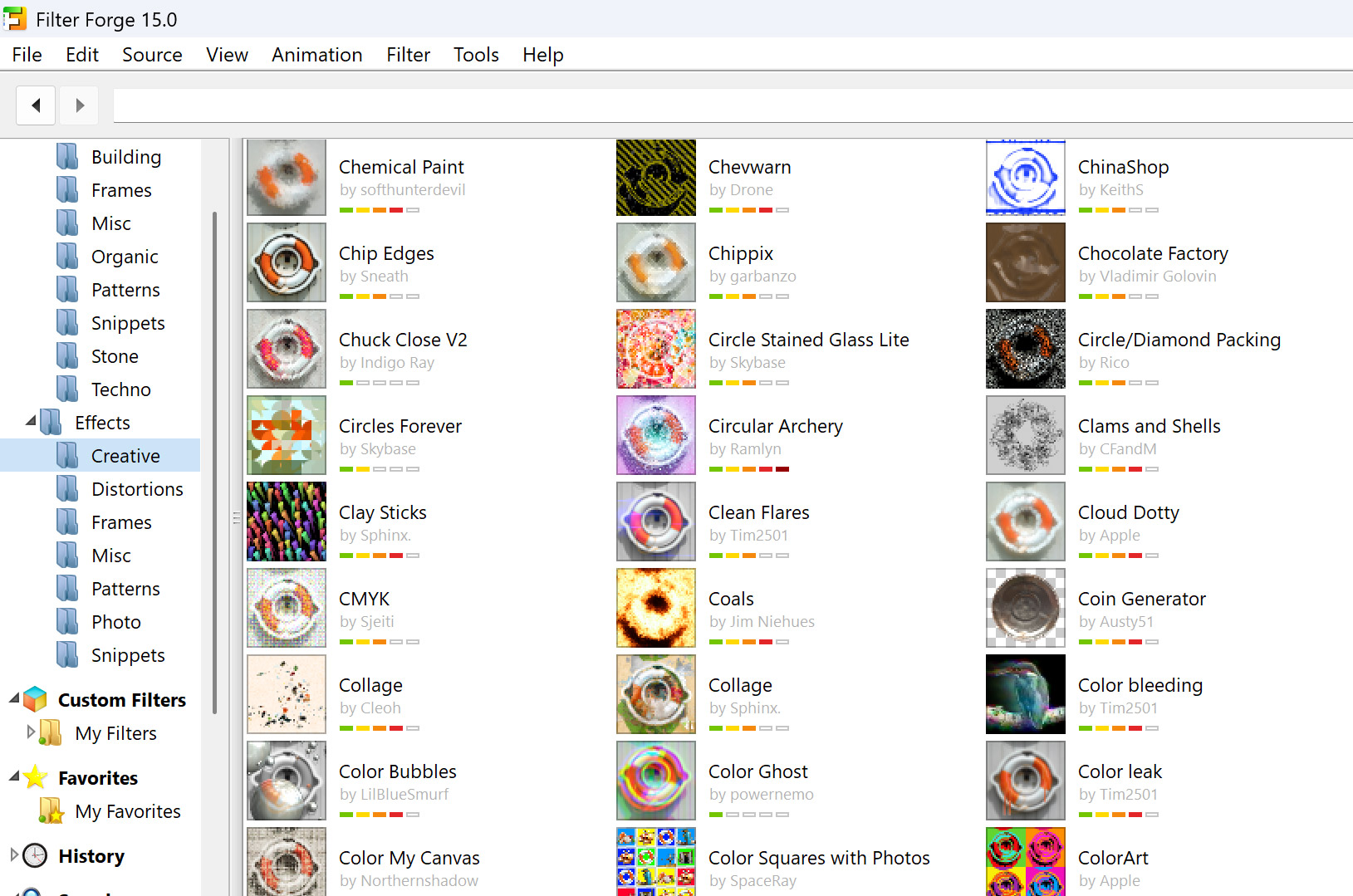
Filter Forge 15.0's library browser: each filter shows its author and a colored bar that rates how fast it renders.
Features
A free library of 14,000+ effects and textures
Filter Forge gives every edition unlimited access to the online Filter Library. Each filter comes with presets, and a randomizer generates variations you can browse until something fits. Categories cover photo effects (watercolor, sketch, cartoon, frames) and textures (stone, metal, organic, patterns, buildings).
Tileable, resolution-independent textures
Filter Forge renders most textures as tileable images, on square and non-square canvases, and the additional maps it generates tile too. Since filters are procedural, you can render a small preview and a print-size final from the same settings.
PBR texture maps for 3D work (Professional and Studio)
Filter Forge Professional and Studio export PBR maps such as albedo, roughness, metallic and normal alongside the color image, which is what game engines and 3D renderers expect. They also add 16- and 32-bit image modes and OpenEXR and PFM output for high-precision work.
A visual node-based Filter Editor (Professional and Studio)
Filter Forge Professional and Studio let you build a filter from scratch or open any library filter and change how it works, by wiring components together on a canvas. No code is needed. Version 14 added a Text component and animated 3D noise, and version 15 adds connection highlighting and a Power component.
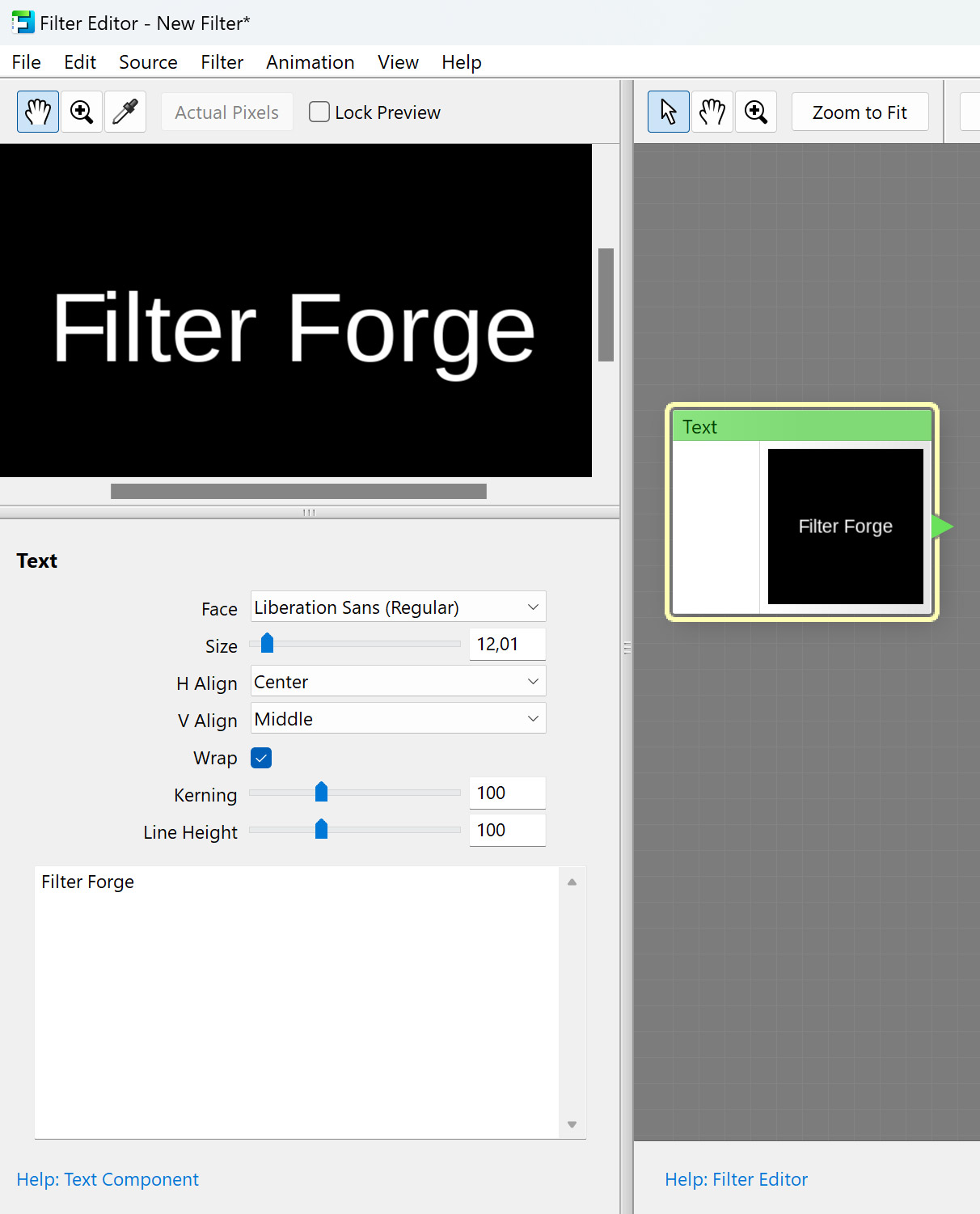
The Filter Editor: the preview on the left and the component canvas on the right, here with the Text component added in version 14.
Animation and video effects (Studio)
Filter Forge Studio can animate filters procedurally, process video files and image sequences, and export the result to a video file. Version 15 adds a built-in preview player, so you no longer need another app to check an animation. Studio also saves project files that keep your images, filters and settings together.
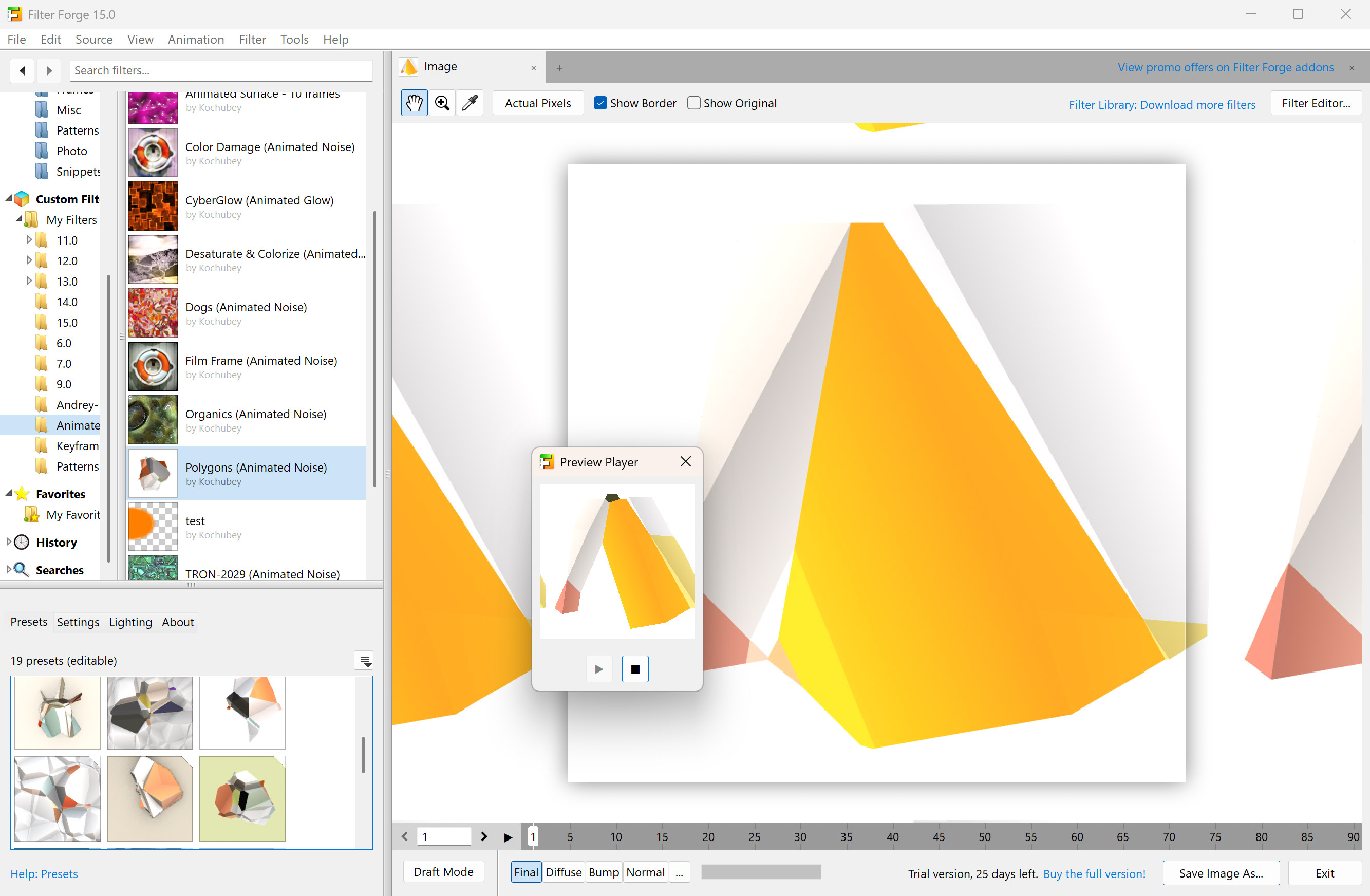
Filter Forge 15.0 with the new Preview Player playing an animated noise filter; the trial countdown shows at the bottom right.
Plugin or standalone
Filter Forge installs as a Photoshop-compatible plugin and as a standalone application. As a plugin, it opens from the host's filter menu on the current layer; standalone, it opens and saves image files itself. A command-line renderer is included in every edition for scripted jobs.
Benefits
The main payoff is time. A texture you would spend an afternoon painting is a few clicks away, and because the result is procedural you can change the scale, color or wear later instead of starting over. For 3D artists, getting matching normal and roughness maps in the same render removes a whole step. For photographers and designers, the library is a large, varied effects collection for a one-time price, with no subscription.
Real-World Uses
- Game and 3D texturing: render a tileable cobblestone or rust texture at 4096 pixels with its normal and roughness maps for Unity, Unreal or Blender.
- Photo effects in Photoshop: run a watercolor, pencil or vintage-frame filter on a layer, then mask it like any other filter result.
- Web and print backgrounds: make a tileable paper, fabric or marble pattern at the exact size a layout needs.
- Motion graphics (Studio): apply an animated noise or glitch filter to a video clip and export it as a video file.
- Filter authoring: build your own filters, share them in the library, and earn a free Professional or Studio license through the vendor's reward program.
Who It's For, and Who Should Skip It
Filter Forge suits texture artists, game developers, 3D hobbyists and Photoshop users who want a huge effect collection without a subscription, and tinkerers who enjoy taking a filter apart to see how it works.
Skip it if you only want a couple of one-click photo looks: the effects built into Photoshop or Affinity Photo, or a simple preset pack, will be faster to learn. It is also the wrong tool for AI image generation or retouching (the same company sells a separate app, Ultraforge, for AI work). And if you edit on an iPad or in a browser, there is no version for you.
Usage Guide
- Download the Windows or Mac installer from the vendor and install it. The trial runs as Studio Edition for 30 days with no registration.
- Open Filter Forge on its own, or in Photoshop choose it from the Filter menu so it opens on the current layer.
- Browse the filter categories on the left, or search by name, and click a filter to preview it on your image.
- Try the presets under the preview, adjust the sliders on the Settings tab, and change lighting on the Lighting tab for textures.
- Render and save, or apply the result back to the Photoshop layer. In Professional and Studio, choose the extra texture maps you need for 3D work.
- To customize a filter, open it in the Filter Editor (Professional and Studio) and change or add components.
Tips
- Check the performance bar before you apply a filter to a large image: the slowest filters can take minutes.
- Library filters download over the internet as you use them. The vendor sells an offline backup of the whole library separately.
- Use Draft Mode while you adjust settings, and switch to Final only for the last render.
Where It Falls Short
- Learning the editor takes time. Using library filters is easy, but building your own means learning how procedural components fit together, and reviewers have called the designer unintuitive.
- Some filters are slow. Complex filters can take minutes on big images, which is why version 15 added speed ratings.
- The interface looks dated next to modern design apps.
- Library quality varies. It's community-made, so some filters are excellent and others are rough or near-duplicates.
- Mac plugin support is narrower: only Photoshop is listed as a host on macOS.
- A few order complaints. Its Trustpilot page has two 1-star reviews, about a delayed license and a pre-order of the separate Ultraforge app.
What Users Say
Filter Forge is an older product, so most detailed reviews cover earlier versions. The themes have stayed steady: people love the library and the power of the editor, and complain about the learning curve, speed and the old-fashioned interface.
Independent reviews
Amy Davies, reviewing Filter Forge 6 for Photography Blog (November 2016, 3.5 out of 5), found it "very easy to use" once you are familiar with it, but warned that "it's still not particularly simple, and the designer is not intuitive", that "many of the terms in the filter are not exactly beginner friendly", and that depending on the filter you "may be kept waiting several minutes". She also called the interface "quite old-fashioned in appearance". Her complaint that there was no batch processing inside Filter Forge has since been answered by the separate Visual Batch Renderer, added with version 13.
Digital Arts
Neil Bennett of Digital Arts, quoted on the vendor's testimonials page: "Filter Forge is — by quite a margin — the most powerful plug-in we've looked at here. That's because it's a tool for creating plug-ins, both generative texture-creation tools and effect filters." He added a balanced note: "Creating filters from scratch is time-consuming, but for a wider user group, it's a great way to modify already-created effects."
The Plugin Site
Kay Michael Kuhnlein, reviewing Filter Forge 3 in April 2012, wrote: "Here we have a plugin which you can actually only describe by superlatives, because the features break all moulds." He also cautioned: "A tip: not each of the 9385 filters is suited for each plugin version."
Artists and professionals (from the vendor's testimonials page)
- Russell Brown, Senior Creative Director at Adobe: "The Filter Forge Watercolor filter is so realistic that it's scary."
- Neil Blevins, technical director in feature films: "This is really a fantastic piece of software, I highly recommend everyone checking it out if you're into pattern/texture map creation."
- Karl Wickens, visual effects lead artist at Electronic Arts: "Filter Forge's amazing node based editor has been invaluable in giving us the power to create textures that make the most of today's real-time pixel shaders."
- David Hoisington: "I needed rock textures and instead of the usual day it takes me to make one, I was able to make 20!"
- Steve Verreault, game developer: "forge is actually a lot more solid and easy to use and has a nicer preset library than any of the other solutions I've seen."
- Nick Mead, reviewer at Softonic: "Filter Forge is an excellent filter creation tool with a strong community spirit that will enhance your Photoshop creations."
Trustpilot
Filter Forge's Trustpilot page has only two reviews (TrustScore 2.9), both 1-star and both about orders rather than the program. Larry Reigel (October 2024): "I can't vouch for the program itself but I attempted to purchase the software and never received a license". The company replied that the key had been sent to his email address and that it had refunded him. MarkaPhotog (October 2023) wrote "I have been charged 3 times and still no product to use, not even a beta" about a pre-order of Ultraforge, the company's separate AI app; the company replied that his subscription was still active and beta keys would follow.
Summary: reviewers agree that Filter Forge is unusually powerful for texture and effect creation, and that the free library is its biggest asset. The recurring complaints are the learning curve of the editor, slow renders on complex filters and a dated interface. The few buyer complaints are about license delivery, so keep your order email and contact the vendor if the key doesn't arrive.
Comparisons
Basic vs Professional vs Studio
Basic is for applying library filters to everyday images. Professional is the edition most people should buy: it removes the 3000-pixel limit, renders on all CPU cores, and adds the Filter Editor, PBR maps and high-bit-depth output. Studio adds animation, video processing, project files and a second seat, which matters mainly to motion designers or anyone with two computers.
Filter Forge vs Photoshop's built-in filters
Photoshop's Filter Gallery covers common looks and is already paid for. Filter Forge adds thousands of community effects, procedural tileable textures with PBR maps, and a way to build your own filters, for a one-time fee instead of a subscription.
Editions and Pricing
| Edition | Price at checkout | Seats | What it adds | Buy |
|---|
| Basic | $29.50 (regular $59) | 1 | Library filters, tiling, plugin and standalone, images up to 3000 x 3000 | Buy Basic WindowsBuy Basic Mac |
| Professional | $69.50 (regular $139) | 1 | Filter Editor, large images, all CPU cores, 16/32-bit, OpenEXR, PBR maps, snippets | Buy Pro WindowsBuy Pro Mac |
| Studio | $129.50 (regular $259) | 2 | Everything in Professional plus animation, video effects, image sequences and project files | Buy Studio WindowsBuy Studio Mac |
All three are permanent licenses for Filter Forge 15, priced on November 25, 2026 with the vendor's 50% code, which each button applies. Taxes depend on your country and are shown on the order page. The vendor also sells 1-month and 3-month subscriptions, lifetime-upgrade bundles and add-ons such as the Filter Library Backup on its own site.
FAQs
Can I use one Filter Forge license on both Windows and Mac?
No. Filter Forge sells Windows and Mac licenses as separate products, so choose the platform you'll install it on. The Studio Edition license covers two computers.
Do I have to pay again when the next Filter Forge version comes out?
Yes. A Filter Forge 15 license is permanent for version 15, and later major versions are paid upgrades. The vendor's lifetime-upgrade bundles, sold on its own site, include all future versions for a one-time fee.
Are the filters in the Filter Forge library free?
Yes. All 14,176 filters in the Filter Forge Library are free to download and use in every edition, including Basic.
Does Filter Forge work in Affinity Photo or Paint.NET?
Yes, on Windows: Filter Forge 15 lists Affinity Photo 2, 2.5 and Affinity 3 by Canva, Paint.NET and Corel PHOTO-PAINT as plugin hosts. On a Mac, the listed host is Adobe Photoshop, and the standalone app works on both.
Does Filter Forge run on Apple silicon Macs?
Yes. Filter Forge 15 supports Intel and Apple M-series Macs on macOS 14 Sonoma, 15 Sequoia and 26 Tahoe.
Can I get Filter Forge for free?
Filter Forge rewards filter authors: three of your filters reaching High Usage rank in the library earn a free Professional license, and five earn a Studio license.
Does the Filter Forge trial add a watermark?
No. The Filter Forge trial is the full Studio Edition for 30 days, with no limits except the time limit.
System Requirements
- Windows: Windows 10 or 11, 64-bit, 4 GB RAM; installer 270.2 MB
- Mac: macOS 14 Sonoma, 15 Sequoia or 26 Tahoe, Intel or Apple silicon, 4 GB RAM; installer 326.4 MB
- Plugin hosts (Windows): Photoshop and Photoshop Elements 2024-2026, Corel PHOTO-PAINT 2017-2021, Paint.NET, Affinity Photo 2/2.5 and Affinity 3
- Plugin hosts (Mac): Photoshop 2024-2026
- An internet connection to download filters from the library
Conclusion
Filter Forge is worth buying if you make textures or like experimenting with effects: Professional at $69.50 is the sweet spot, a one-time price for a 14,000-filter library, tileable PBR textures and an editor to build your own. The library and the procedural, any-size output are the reasons to buy it.
The reasons not to are the learning curve once you go beyond presets, slow renders on heavy filters, and an interface that shows its age. Basic is only worth it if you never need images over 3000 pixels, and Studio only if you work with animation or video. The 30-day Studio trial will show you which group you are in.
Download Free TrialBuy Basic ($29.50)Buy Professional ($69.50)Buy Studio ($129.50)