Merge Sheets for Google Sheets: Match and Update Tables Without VLOOKUP
Merge Sheets is an Ablebits add-on for Google Sheets that matches rows between tables by one or more key columns and pulls the missing or changed values into your main sheet, with no VLOOKUP or INDEX/MATCH formulas. It runs in the browser on Windows, Mac and Chromebooks, and the 12-month plan for one Google account is $19.99 with the discount code applied on the order page (regular price $33.60), with a 30-day free trial.
Think of a product list that needs this week's prices from a supplier's sheet, or a customer table that needs phone numbers from the CRM export. With formulas, that's a column of lookups to write, check and paste as values. With Merge Sheets, it's five steps and a result message telling you how many rows were updated.
Quick facts
- Version: 2.2, released June 23, 2026
- Developer: APPS4GS (Mikalai Mikhuta JDG), which builds Google Workspace add-ons under the Ablebits name
- Works in: Google Sheets in a web browser, on Windows 10 and up, macOS 10.15.7 Catalina and up, and ChromeOS
- Price: 12-month plan $19.99 with the discount code (regular $33.60); lifetime $59.90; each for one Google account
- Trial: 30 days, fully functional
- Guarantee: unconditional 30-day money-back guarantee
- Marketplace rating: 4.1 out of 5 from 192 ratings, 970K+ installs
- What we checked: on the order page the 12-month plan was $33.60, or $19.99 with the code TrSbExpr-MjAdns-01 that the vendor's own Buy link uses, and the lifetime plan was $59.90; the Google Workspace Marketplace page showed version 2.2 and a 4.1-star average from 192 ratings, all on November 8, 2026. We didn't install the add-on or run a merge ourselves.
Before you buy
- Merge Sheets is also part of Power Tools. Ablebits' Power Tools ($49.99 a year) includes Merge Sheets along with Remove Duplicates, Combine Sheets and 30-odd other tools.
- It updates your sheet directly. The default is "Update your main table", so make a copy first or choose "Create a new spreadsheet" in the last step until you trust your settings.
- One subscription per Google account, and the 12-month plan has to be renewed or switched to lifetime after a year.
Download Free TrialBuy Now
Overview
Merge Sheets runs from Extensions > Merge Sheets (or from the Merge & Combine group if you have Power Tools) and works in five steps: select the main sheet, select one or more lookup sheets, choose the matching key columns, choose which columns to update or add, and set extra options. The lookup sheets can sit in other spreadsheets on your Google Drive, and there's no limit on how many you add: they're merged into the main sheet one by one, in the order they appear in the list.
Version 2.2 added scheduled runs at set days and hours (daily, weekly or monthly, even when you're offline), a "Get selection" button for quick range picking, and a default of the whole table for saved scenarios. Version 2.1 in September 2024 added export and import of scenarios.
Features
Match on one or several key columns
Merge Sheets matches rows by any columns that identify a record, such as an ID, or a name and a title together, regardless of row order. The lookup table's column names don't have to match yours: you pair each main-table column with its lookup column, or let Auto detect do it. Options cover headers in either table, skipping empty cells and matching case.

Step 3 of 5: Name and Title in the main table are paired with Author and Title in the lookup table as the key columns.
Pull from several lookup sheets and files
Merge Sheets lets you tick any number of lookup sheets in a tree view, including sheets from other spreadsheets added with "Add files from Drive", and set a range for each. That makes it practical to update one master list from several regional or monthly files in a single run.

Step 2 of 5: lookup sheets picked from the current file and from a second spreadsheet, "books - ultimate list".
Control exactly what gets updated
Merge Sheets can update every matched cell, only empty and new cells, or only when the lookup cell actually contains data, so blanks never overwrite your values. You can add new columns from the lookup table, add non-matching rows to the end of the main table, and insert extra matching rows (when one key has several records) either at the end or right after the row with the same key. Results go into your main table or a new spreadsheet.

Step 5 of 5: where to place results, plus options to add non-matching rows, a status column and additional matching rows.
See what changed
Merge Sheets can color every updated cell with a hue you pick, clear existing coloring, or add a status column that labels each row (updated, new, matching), which you can then sort or filter. At the end it reports how many lookup sheets were processed, how many rows matched, and how many rows and columns were updated or inserted.

The results message: 2 lookup sheets processed, 313 of 313 matching rows found, 313 rows updated, with the updated IDs highlighted in yellow.
Scenarios on a schedule
Merge Sheets saves your five steps as a scenario that runs in one click, and since version 2.2 can run it on its own: daily, weekly, or monthly on a set day (such as the first Monday) at a set time, even when you're offline. Scenarios can be exported and imported to share them with teammates or other Google accounts. The scheduler is marked Beta.
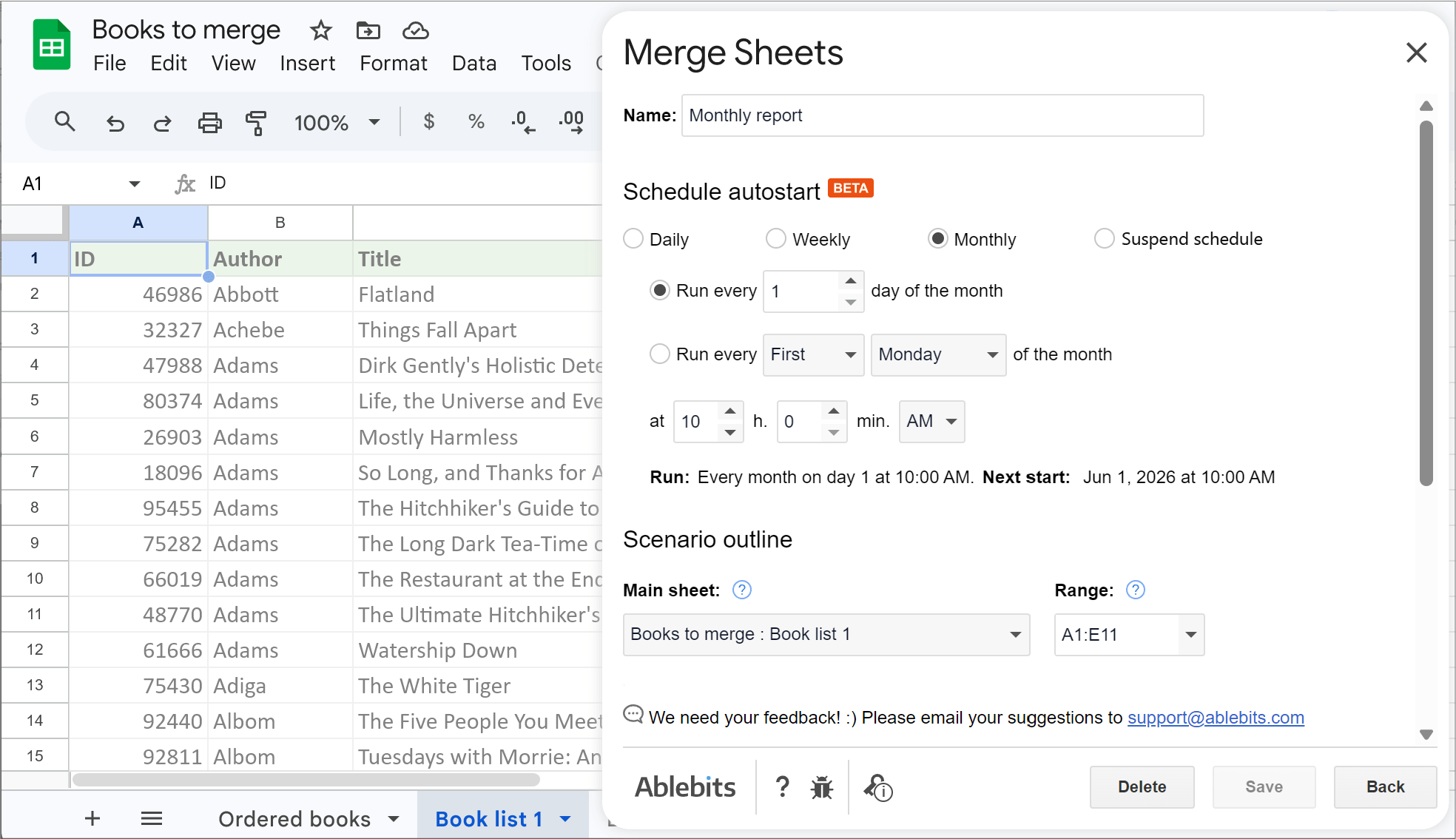
Schedule autostart (Beta) for a "Monthly report" scenario, set to run on day 1 of every month at 10:00 AM.
Real-World Uses
- Price and stock updates: refresh prices and quantities in your product list from a supplier's sheet by SKU, updating only cells where the supplier sent a value.
- Monthly reporting: schedule a scenario that pulls the latest figures from several team files into the master report on the 1st of each month.
- Contact enrichment: fill in missing phone numbers or emails in a lead list from a CRM export, marking which rows changed in a status column.
- Order follow-up: bring order status from a fulfillment sheet into a customer list, with every order for the same customer inserted under that customer's row.
Who It's For, and Who Should Skip It
It's for anyone who regularly updates one Google Sheets table from others (operations, e-commerce, sales and reporting staff) and finds VLOOKUP or XLOOKUP formulas slow to build, fragile, or confusing for whoever inherits the sheet.
Skip it if:
- you're comfortable with VLOOKUP, XLOOKUP or QUERY and only merge occasionally.
- you want to stack sheets with the same columns on top of each other rather than match them. That's Combine Sheets, a different Ablebits add-on.
- you also need dedupe, splitting or text cleanup. Power Tools includes Merge Sheets and much more for $49.99 a year.
- you work in Microsoft Excel. This add-on runs only in Google Sheets.
Usage Guide
- Click Download Free Trial to open the Google Workspace Marketplace page, click Install and grant the permissions, signed in to the Google account you'll use.
- Open the spreadsheet with your main table and start the add-on from the Extensions > Merge Sheets menu.
- Step 1: confirm the main sheet and range. Step 2: tick the lookup sheets, using Add files from Drive for other spreadsheets.
- Step 3: tick the key columns and pair them with the lookup columns (or click Auto detect).
- Step 4: choose which columns to update and which new columns to add.
- Step 5: choose where to place the results, whether to add non-matching or extra matching rows, a status column and coloring, then click Merge.
- Click Save scenario on the results screen to reuse the settings, and set a schedule if the merge should repeat. After buying, activate your key from the key icon at the bottom of the add-on.
Where It Falls Short
- Static results, not live formulas. Merge Sheets writes values into your table. When the lookup sheet changes, nothing updates until you run the merge (or its schedule) again.
- Exact key matches only. "Acme Inc." and "ACME, Inc" won't match. Clean the key columns first.
- Duplicate keys need a decision. By default only the first matching lookup row updates your record, and inserting all extra matching rows right after the same key is noticeably slower.
- Multiple Google accounts in one browser can leave the Next button disabled or the progress spinner running, according to the vendor's known-issues page; signing out of the other accounts fixes it.
What Users Say
Merge Sheets has 4.1 out of 5 from 192 ratings on the Google Workspace Marketplace and more than 970,000 installs, the best average of the three Ablebits add-ons we looked at (Power Tools has 3.6, Remove Duplicates 3.3). Reviewers mostly use it as a VLOOKUP replacement and single out the support team.
Google Workspace Marketplace reviews
"This app is incredibly powerful, and it's a reasonable price for the lifetime subscription. Additionally, customer service is actually real humans, they get back to you so quickly, and actually solve the issues!" Casey Siddons, 5 stars, September 2026
"very good app been using it for years to do vlookup type work !" William Green, 5 stars, July 2025
"I've used this tool at the last 3 companies and it's fantastic. This is super easy to merge info from different sheets and build my reports in a flash. LOVE IT" Cody Crawford, 5 stars, October 2024
"This is the best tool! It's so much easier and cleaner than trying to get formulas right. The support team has always been very helpful. Super cheap for such a great product!" Amanda Duncan, 5 stars, July 2024
"This tool is easy-to-use and the support team is very responsive and friendly. Ablebits makes merging data on Google Sheets easy. Definitely worth it!" Lindsey Ebert, 5 stars, May 2024
"Excellent extension... helping me merge data across multiple sheets!!" Mercy Aycart, 5 stars, September 2025
"This app makes it so easy to merge Google Sheets! I purchased the MS Excel version also!" Jacinda Patishnock, 5 stars, November 2024
The recurring themes
Long-term users (one has used it "at the last 3 companies", another "for years") treat Merge Sheets as their everyday lookup tool and say it's simpler and cleaner than getting formulas right. Support comes up again and again as quick and run by "real humans". The reviews Google shows are positive, while the 4.1 average from 192 ratings means some users did rate it lower; the vendor's known-issues page points to multiple signed-in Google accounts and company web filters as the common problems.
Comparisons
Merge Sheets vs VLOOKUP, XLOOKUP and INDEX/MATCH
Formulas stay live and cost nothing, but each returned column needs its own formula, several key columns need helper columns or array tricks, and adding new rows or extra matches takes more work. Merge Sheets handles several keys, many lookup sheets, new rows, extra matches and change highlighting in one run, at the price of results that are values, not live formulas.
Merge Sheets vs Power Tools
Power Tools ($49.99 a year, $99.95 lifetime) contains Merge Sheets plus Remove Duplicates, Combine Sheets, Consolidate Sheets and 30-odd more tools. If merging is all you do, Merge Sheets at $19.99 with the code is the cheaper buy; if you'd also buy Remove Duplicates, Power Tools costs less than the two.
Editions and Pricing
| Plan | Price | Term | Users |
|---|
| 12-month | $19.99 with the code (regular $33.60) | 12 months of use and updates | 1 Google account |
| Lifetime | $59.90 | One-time payment, all future updates | 1 Google account |
The Buy Now button applies the code to the 12-month plan automatically. At $19.99 a year, the lifetime plan pays off after about three years. Ten or more subscriptions get a volume discount on the order page, from 20% (10-20) up to 50% (51 or more).
FAQs
Can Merge Sheets pull data from another Google Sheets file?
Yes. Merge Sheets' "Add files from Drive" button adds sheets from other spreadsheets on your Google Drive as lookup tables, alongside sheets in the current file.
Will Merge Sheets overwrite my data with blank cells?
Only if you let it. Merge Sheets has options to update only empty cells in your main table and to update only when the lookup cell contains data, so blanks in the lookup sheet are skipped.
What does Merge Sheets do when a key appears in several lookup rows?
By default Merge Sheets updates your row with the first matching lookup row. Turn on "Insert additional matching rows" to bring in the others, either at the end of the main table or right after the row with the same key.
Do the merged results update automatically like a formula?
No. Merge Sheets writes values, so results change only when you run the merge again. A saved scenario reruns it in one click, and a schedule can rerun it daily, weekly or monthly without you.
Does Merge Sheets work in Excel?
No. Merge Sheets runs only inside Google Sheets. Ablebits' Excel merge tools are separate products from a different company.
Can I move my Merge Sheets license to another Google account?
Yes. In Merge Sheets, click the key icon, copy your activation key, click Deactivate, then activate the key under the other account. One key works under one account at a time.
What's the difference between Merge Sheets and Combine Sheets?
Merge Sheets matches records by key columns and updates one main table, like a lookup. Combine Sheets stacks several sheets into one by their column headers without matching anything. Both are included in Power Tools.
System Requirements
- A Google account with Google Sheets and an internet connection
- Windows 10 or later, macOS 10.15.7 Catalina or later, or ChromeOS
- Chrome, Firefox, or Safari on a Mac
Conclusion
At $19.99 a year with the code, Merge Sheets is worth it if you update one Google Sheets table from others every week or month. It turns a fragile wall of lookup formulas into a saved, schedulable five-step job, and it has the best Marketplace rating of Ablebits' Sheets add-ons, with reviewers who've used it for years.
The main reason not to buy it: the results are static values, so if you need a live link that updates the moment the source changes, a VLOOKUP or XLOOKUP formula is still the right tool. And if you'd also use the dedupe and cleanup tools, Power Tools includes Merge Sheets for $49.99.
Download Free TrialBuy Now