RS RAID Retrieve: Recover a Failed RAID or NAS Without the Controller
RS RAID Retrieve is a Windows, macOS and Linux tool that rebuilds failed RAID and NAS arrays from the bare disks and recovers the files, starting at $197.95 once for arrays of up to 3 disks. It's for home NAS owners and IT staff, and the free download detects your array and previews the files before you pay.
The controller died, the Synology won't boot, or a second drive dropped out during a rebuild. The worst next step is to let the NAS try again. Pulling the disks and reading them from a PC keeps your options open, and that's what this program is for.
Quick facts
- Version: 3.2
- Developer: Recovery Software (RecoverHDD), Cherkasy, Ukraine
- Platforms: Windows 7 to 11, Windows Server 2003 to 2019, macOS 10.12 to 15, Linux
- Arrays: RAID 0, 1, 4, 5, 6, 10, 50, 60, 1E, 5E, 5EE, JBOD, SHR, X-RAID, RAIDZ, Storage Spaces, Linux mdadm, Drobo, Unraid
- Price: $197.95 (up to 3 disks), $297.95 (up to 5), $497.95 (unlimited), one-time
- Trial: free detection and preview; saving needs a license key
- Guarantee: 30 days, with conditions (see below)
- What we checked: installer version 3.2 (91.5 MB), digitally signed by Recovery Software, dated October 9, 2026 and downloaded from the vendor; order page prices of all three editions on November 7, 2026. We didn't recover a real failed array.
Before you buy
- Count your disks. Home Edition stops at 3 disks and Office at 5. A 4-bay NAS needs Office at $297.95. The Buy Now button opens the order page on Home, so change the edition there.
- Don't rebuild or initialize. Don't let the NAS or controller run a rebuild while you're trying this, and label each disk and its bay before you pull it.
- You need ports and space. Every disk must connect to one PC at once, and you need a separate drive big enough for the recovered data.
- Preview before paying. The refund terms exclude a change of mind but cover files you could view and couldn't restore, if support can't solve it.
Download Free TrialBuy Now
Overview
RS RAID Retrieve scans the connected disks, works out the array type, disk order, stripe size and offset, and shows you a virtual copy of the array. From there it behaves like a recovery program: browse folders, preview, save. All of this runs read-only, according to the vendor, so the disks stay as they are.
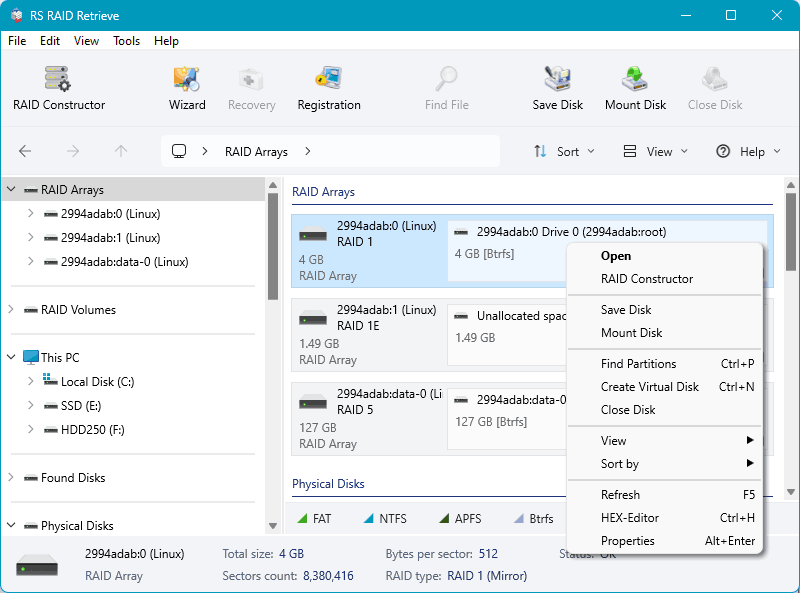
Detected Linux RAID arrays in the main window, with the RAID Constructor button at the top left.
Features
Automatic array detection
RS RAID Retrieve identifies the RAID type, disk order, stripe size and block offset by itself. The vendor puts detection at 5 to 10 minutes, which beats guessing at parameters on an inherited server with no documentation.
No original controller needed
RS RAID Retrieve reads disks connected directly to any PC. It lists HP Smart Array, Dell PERC, Adaptec, Intel RSTe, LSI MegaRAID and DDF-compatible devices among its supported controllers, so you don't have to source an identical card.
NAS volumes, including Synology SHR
RS RAID Retrieve handles the layouts NAS boxes really use: SHR and SHR-2, X-RAID, Btrfs volumes, mdadm and ZFS RAIDZ, on Synology, QNAP, Western Digital, Netgear, ASUSTOR, Thecus, TerraMaster and Buffalo units.
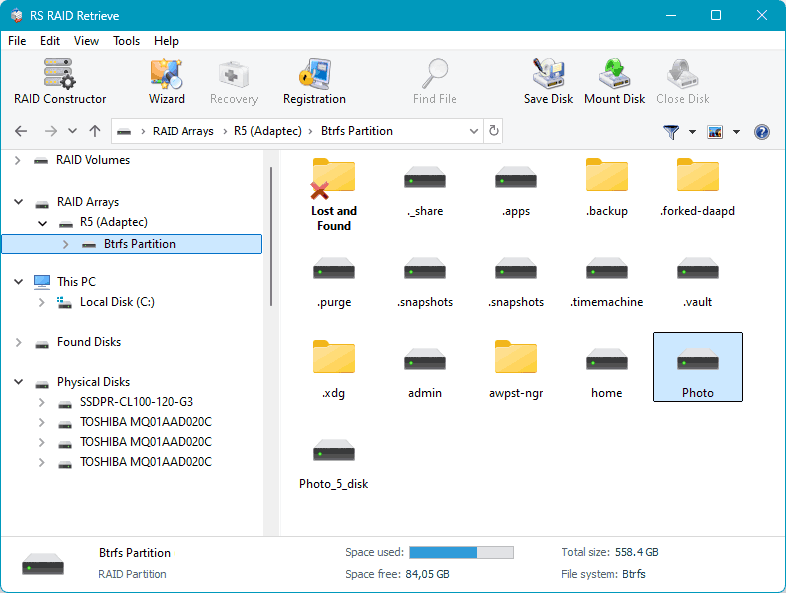
Browsing a Btrfs partition on a reassembled Adaptec RAID 5, with the physical disks listed on the left.
Recovery from an SSH connection
RS RAID Retrieve can connect to a NAS over SSH and read its disks remotely, which helps when the unit still runs and you'd rather not open it.
RAID Constructor for manual setups
RS RAID Retrieve's RAID Constructor lets you set the parameters by hand when automatic detection needs help, as with exotic layouts or arrays with missing metadata.
Degraded and bad-sector arrays
RS RAID Retrieve works around bad blocks and can attempt partial recovery from an array that has lost more disks than its redundancy allows. A RAID 5 missing two disks is a partial-recovery case, not a full one.
File systems and virtual disks
RS RAID Retrieve reads NTFS, ReFS, FAT, exFAT, APFS, HFS+, Ext2/3/4, XFS, Btrfs, ZFS, ReiserFS, UFS and VMFS, and pulls VMDK, VHD/VHDX, VDI and QCOW2 files off a broken datastore. The July 2026 update added BitLocker, LUKS and VeraCrypt volumes, which it opens when you have the key.
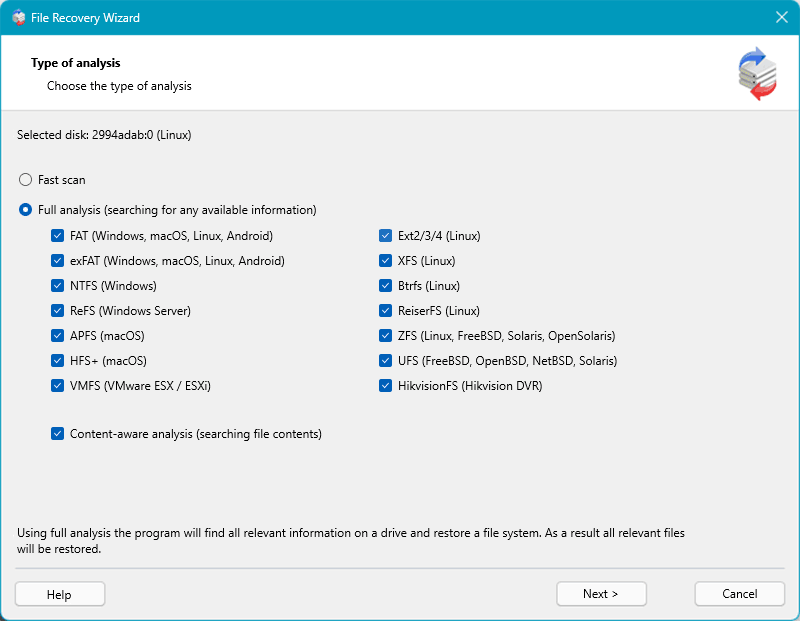
The analysis step, with a fast scan or full analysis across each file system.
Benefits
The main saving is against a lab. RAID recovery services commonly run to four figures, so trying software first on a logical failure can pay off many times over, and a free preview means you'll know quickly if it's working. You also don't need a replacement NAS or matching controller just to read your data.
Real-World Uses
- A small office whose hardware RAID controller died with a server's RAID 5 behind it
- A home Synology that won't boot after a failed update, with SHR disks intact
- A rebuild that failed when a second disk threw errors
- A VMware host whose datastore sits on a broken array
- An old server with no notes on stripe size or disk order
Who It's For, and Who Should Skip It
RS RAID Retrieve is for IT staff and capable home users with logical RAID or NAS failures who can connect every disk to one PC.
Skip it if a disk clicks, isn't detected, or failed physically on an array that can't lose it: that's a job for a lab, and repeated scanning can make it worse. Skip it for a single drive, where RS Partition Recovery is much cheaper. And if the data is business-critical and irreplaceable, call a lab first and use the disks only as they advise.
Usage Guide
- Power down the NAS or server, label the disks, and connect them to a PC.
- Install the program on a separate system drive and start it.
- Let it detect the array, or set it up in RAID Constructor.
- Open the array, and choose fast scan or full analysis.
- Browse and preview your files, checking several large ones.
- Register the right edition, then save to a separate drive, a ZIP archive or FTP.
Where it falls short
- The Home Edition is small. Three disks rules out most 4-bay and larger NAS units, so the headline price isn't what most NAS owners will pay.
- The success figures are the vendor's own. It quotes 85 to 95 percent, and we found no independent test to back that up.
- It takes hours. The vendor estimates 1 to 4 hours for scanning and 30 minutes to 2 hours to recover, and big arrays will take longer.
- Software can't fix hardware. Past the fault tolerance, recovery is partial at best, and files spanning the lost disks will be damaged.
What Users Say
Independent reviews of RS RAID Retrieve are scarce. Technology Counter has no reviews, and Product Hunt lists none.
Trustpilot, praise
Trustpilot shows a TrustScore of 3.2 from just 2 reviews for recoverhdd.com, both from 2022. The 5-star review is about this program: Mikolaj Rybaruk, in May 2022, describes recovering data from a failed RAID 0 array, writing "I am truly grateful to RS RAID Retrieve for a great product that helped me out in my hour of need."
Trustpilot, criticism
The 1-star review, from a reviewer named ed, concerns an ext4 recovery where files were empty in the full version and a refund didn't arrive: "DO NOT BUY THIS SOFTWARE - NO REFUND IS POSSIBLE". It's worth taking to heart at this price: open a good sample of files in the preview before paying.
Two reviews can't carry a verdict, so the free detection and preview on your own disks is the real test.
Comparisons
RS RAID Retrieve vs RS Partition Recovery
RS Partition Recovery ($97.95) has a Drive Manager that shows RAID sets too, but RS RAID Retrieve is the one built around array detection and the RAID Constructor. For multi-disk arrays, buy this one.
RS RAID Retrieve vs a recovery lab
Software costs a few hundred dollars and suits logical failures. A lab costs far more and is the only option for physical damage. Try the free preview first only when the disks all spin up normally.
Editions and Pricing
| Edition | Price | Disks in array | License |
|---|
| Home | $197.95 | Up to 3 | One PC or server |
| Office | $297.95 | Up to 5 | One PC or server |
| Commercial | $497.95 | Unlimited | Unlimited PCs or servers, includes services to third parties |
These are one-time prices from the order page, November 7, 2026, with no auto-renewal. Every edition includes virtual machines, forensic images, encrypted drives, lifetime free upgrades and free support.
FAQs
Can RS RAID Retrieve recover a 4-bay Synology NAS?
Yes, RS RAID Retrieve supports Synology SHR and standard RAID, but four disks need the Office edition at $297.95, because Home stops at three.
Can RS RAID Retrieve help if two drives failed in a RAID 5?
RS RAID Retrieve can attempt partial recovery, but RAID 5 only tolerates one failed drive, so expect part of your data at best.
Do I need the original RAID controller for RS RAID Retrieve?
No. RS RAID Retrieve reads disks connected straight to a PC and doesn't need the old controller or NAS.
Does RS RAID Retrieve write to my RAID disks?
No. RS RAID Retrieve works read-only according to the vendor, and saves recovered files to a location you choose.
Can a data recovery business use RS RAID Retrieve?
Only with the Commercial edition at $497.95. RS RAID Retrieve's Home and Office licenses don't cover services to third parties.
Can I upgrade RS RAID Retrieve to a bigger edition later?
Yes. RS RAID Retrieve's buy page has an upgrade link for moving to a higher license, so you can start with the edition your array needs.
System Requirements
- Windows 7, 8, 10 and 11, Windows Server 2003 to 2019
- macOS 10.12 Sierra to macOS 15 Sequoia
- Ubuntu, Debian, Fedora, Linux Mint, openSUSE
- Enough ports to connect every disk, plus a separate drive for the output
Conclusion
RS RAID Retrieve is worth it for a logical RAID or NAS failure, especially when the alternative is a lab bill. The one reason to buy is automatic detection without the original hardware, and the free preview proves it on your own disks before you spend anything. The main reason not to is physical damage, which no software fixes. Budget for the Office edition if you run a 4-bay NAS.
Download Free TrialBuy Now