RS Office Recovery: A Document-Only Recovery Tool
RS Office Recovery is a $57.95 one-time program for Windows, macOS and Linux that recovers deleted and lost Word, Excel, PDF and OpenOffice documents from hard drives, SSDs, USB sticks and memory cards, for people who only care about getting documents back. The free download finds and previews them before you pay.
A report deleted from a flash drive, a spreadsheet lost after a format, a thesis on a disk Windows won't open: a general recovery tool would bury those files among thousands of system files. This one shows only documents.
Quick facts
- Version: 5.3
- Developer: Recovery Software (RecoverHDD), Cherkasy, Ukraine
- Platforms: Windows XP to 11, OS X 10.7 to macOS 15, major Linux distributions
- Formats: DOC, DOCX, XLS, XLSX, RTF, HTML, PDF, ODS, ODT, ODP, ODG
- Price: $57.95 for the Home Edition, one-time, with lifetime free upgrades
- Trial: free scan and preview; saving needs a license key
- Guarantee: 30 days, with conditions (see below)
- What we checked: installer version 5.3 (34.4 MB), digitally signed by Recovery Software, dated October 20, 2026 and downloaded from the vendor; order page price of $57.95 with Home Edition selected, on November 7, 2026. We didn't run a recovery on a damaged drive.
Before you buy
- It finds lost documents. It doesn't repair damaged ones. A document that's still on your disk but won't open is a different problem from a deleted one.
- Preview before paying. The refund terms exclude a change of mind, but they cover a document you could view in the free version and couldn't restore in the full one, if support can't solve it.
- The order page opens on Home Edition. Change it in the drop-down there for Office or Commercial.
Download Free TrialBuy Now
Overview
RS Office Recovery uses a wizard from start to finish: choose a disk, choose a scan depth, look through thumbnails of what it found, save. It's a narrow product by design, and it's a light 34 MB download.

Found Word and Excel files as thumbnails, with a live preview on the right. The vendor's screenshot shows the older version 1.0 interface.
Features
Quick Recovery for recent deletions
RS Office Recovery's Quick Recovery mode finds recently deleted documents in minutes, which is the right first try after a Shift+Delete or an emptied Recycle Bin.
Comprehensive Analysis for formatted and damaged disks
RS Office Recovery reads the whole device block by block in this mode, looking for signatures that mark the start of a document, and then reads each file header to work out the name and length. This is what finds documents on formatted, repartitioned or corrupted media.
An integrity check that filters out broken files
RS Office Recovery tests each document it discovers and drops the damaged and incomplete ones from the list. Fewer dead files means less clicking through previews on a large disk, though it also means you won't see a partly damaged file that might still have held useful text.
Full-size document preview
RS Office Recovery opens documents and spreadsheets in its built-in viewer, including embedded charts, so you can identify the right version before you save it.
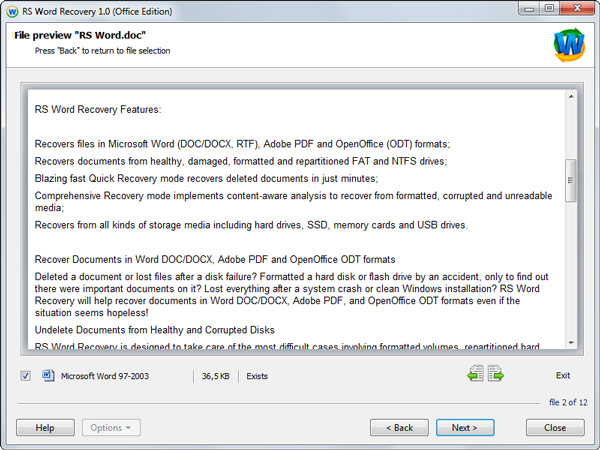
A full document preview in the same wizard, shown here in the vendor's earlier RS Word Recovery tool.
Virtual drive images for unstable media
RS Office Recovery can capture a bit-exact image of a failing disk in one long read and then recover from the image, without touching the original again.
Handles encrypted and compressed documents
RS Office Recovery recovers encrypted and compressed documents and supports NTFS on-the-fly compression.
Benefits
You get a shorter, cleaner result list than a general tool gives you, at a lower price than the vendor's all-round programs. For an office where the valuable losses are always documents, that focus saves real time. You also don't need separate tools for Microsoft Office and LibreOffice files.
Real-World Uses
- A student recovering a dissertation draft from a formatted USB stick
- An accountant looking for last year's spreadsheets on a repartitioned disk
- A small office pulling PDFs off a laptop drive that no longer boots, with the disk connected to another PC
- Someone who cleared the Recycle Bin and needs a Word file back the same day
Who It's For, and Who Should Skip It
RS Office Recovery is for anyone whose lost files are documents, spreadsheets, presentations or PDFs, and who wants a guided tool rather than a technical one.
Skip it if you also need photos, video or email back: RS File Recovery covers all file types for $20 less. If a whole partition is gone, RS Partition Recovery is the better fit. And if the document is in OneDrive, Google Drive or File History, check the version history there first, because that's free and instant.
Usage Guide
- Install the program on a drive other than the one that held the documents.
- Start the wizard and choose the disk, or an image of it.
- Run Quick Recovery. If your document doesn't appear, run Comprehensive Analysis.
- Open the thumbnails in the viewer and tick the files you want.
- Enter your license key and save the files to a different drive.
Where it falls short
- It costs more than RS File Recovery while doing less. The Home Edition price is higher, even though File Recovery also reads Office and PDF files. You're paying for the focused results list and integrity check.
- Only complete documents make the list. That's tidy, but a half-overwritten file is left out.
- Old screenshots. The vendor's pictures still show version 1.0, so the real program looks different.
What Users Say
We found no user reviews of RS Office Recovery on its own, and AlternativeTo lists it with none. The feedback that exists covers RS Data Recovery, the vendor's bundle that includes this program.
Capterra
Capterra shows 4.4 out of 5 from 5 reviews, listed under the vendor's RS Data Recovery bundle. Reviewers say it brought back deleted photos, videos and documents and describe the interface as straightforward. On the critical side:
- "The trial version gives you very limited access to important feature which require you to purchase a full license."
- "When I was using it sometimes in export process of big size data I saw unexpected close of program."
Trustpilot
Trustpilot shows a TrustScore of 3.2 from just 2 reviews for recoverhdd.com, both from 2022. The 1-star one, from a reviewer named ed, says files were empty after recovery in the full version and that no refund came: "DO NOT BUY THIS SOFTWARE - NO REFUND IS POSSIBLE". The 5-star one thanks the vendor's RAID tool for saving an array.
Together, that's too little to call a verdict from users, so the free preview is the test that counts.
Comparisons
RS Office Recovery vs RS File Recovery
RS Office Recovery ($57.95) shows only intact documents. RS File Recovery ($37.95) recovers every file type, including Office files and PDFs, with a longer list to go through. On price alone, File Recovery wins. Office Recovery wins when you're searching a big disk for one document.
RS Office Recovery vs repair tools
A repair tool, such as Office's own Open and Repair command, fixes a file that exists but won't open. RS Office Recovery finds files that are gone. Try repair first if you can still see the file.
Editions and Pricing
| Edition | Price | License | Notes |
|---|
| Home | $57.95 | One PC or server, lifetime upgrades | Free tech support |
| Office | $197.95 | Listed on the order page | Pick it in the edition drop-down |
| Commercial | $297.95 | Unlimited PCs or servers | Adds services to third parties, virtual machines, forensic images and encrypted drives |
All three are one-time prices from the order page, November 7, 2026. There's no auto-renewal.
FAQs
Does RS Office Recovery recover Excel files?
Yes. RS Office Recovery recovers XLS and XLSX spreadsheets, as well as ODS files from LibreOffice and OpenOffice.
Can RS Office Recovery recover from an SSD?
RS Office Recovery supports SSDs and other flash media, but the chance of success on an SSD drops quickly after deletion because TRIM clears the blocks. Scan as soon as you can.
Does RS Office Recovery read Mac and Linux disks?
Yes. RS Office Recovery lists APFS, XFS, UFS, ReiserFS and Ext2/3/4 as well as NTFS, FAT, exFAT and ReFS.
How does RS Office Recovery get activated?
RS Office Recovery is activated with a name and key emailed after payment, usually within an hour. If nothing arrives within 24 hours and support doesn't respond, the vendor's policy gives you a refund.
Can I exchange RS Office Recovery for another program?
Yes. RS Office Recovery's vendor offers an exchange for a more suitable program if it turns out to be the wrong tool.
Are there discounts on RS Office Recovery?
RS Office Recovery has discounts for non-profits, schools, the army, welfare institutions and disabled customers, on request by email.
System Requirements
- Windows XP, 2003, Vista, 2008 Server, 7, 8, 10 and 11
- macOS 10.12 Sierra to macOS 15 Sequoia, OS X 10.7 to 10.11
- Ubuntu 10.04 to 24.04, Debian 6 to 12, Fedora 13 to 40, Mint 9 to 21.3, openSUSE 11.3 to 15.6, Arch Linux
- A separate drive for saving recovered documents
Conclusion
RS Office Recovery is worth it if documents are all you've lost and you want to find them without sifting through everything else on the disk. The reason to buy is that clean, verified list. The reason not to is that RS File Recovery costs less and also recovers documents, so a budget-minded buyer should try that one first. Either way, the free preview settles it.
Download Free TrialBuy Now