RS Partition Recovery: Bring Back Lost Partitions and Formatted Drives
RS Partition Recovery is a $97.95 one-time tool for Windows, macOS and Linux that finds deleted partitions and recovers files from formatted, RAW and damaged drives, for users whose disk needs more than an undelete. The free download runs the full scan and preview, so you can see your files before you buy.
The drive says "You need to format the disk", the wrong volume went in Disk Management, or diskpart clean ran on the wrong number. The data is often still there, under a partition table that no longer points at it.
Quick facts
- Version: 5.5
- Developer: Recovery Software (RecoverHDD), Cherkasy, Ukraine
- Platforms: Windows, macOS 10.12 to 15, Linux
- File systems: NTFS, FAT, exFAT, ReFS, APFS, HFS+, Ext2/3/4, XFS, Btrfs, ZFS, ReiserFS, UFS, HikvisionFS
- Price: $97.95 for the Home Edition, one-time, with lifetime free upgrades
- Trial: every scan and preview; saving needs a license key
- Guarantee: 30 days, with conditions (see below)
- What we checked: installer version 5.5 (92.7 MB), digitally signed by Recovery Software, dated October 9, 2026 and downloaded from the vendor; order page price of $97.95 with Home Edition selected, on November 7, 2026. We didn't run a recovery on a damaged drive.
Before you buy
- Home Edition leaves out three things the product page promotes. Virtual machine disks, forensic images and encrypted drives (BitLocker, LUKS, VeraCrypt) need Office or Commercial. If your lost data is on one of those, the $97.95 edition isn't the one to buy.
- Check with the free scan. The refund terms exclude a change of mind. They cover a file that previews in the free version but can't be restored in the full one, if support can't solve it.
- Have a second drive ready. Recovered files have to go somewhere else.
Download Free TrialBuy Now
Overview
RS Partition Recovery is the broadest single-disk tool in the vendor's range. It lists drives, RAID sets and found disks in one Explorer-style window, runs a wizard for guided recovery, and adds technical tools for hard cases. Development is active: the update history shows releases in March, May, July and October of 2026, with the October update adding encrypted ZFS and better Ext3/4 journal analysis.
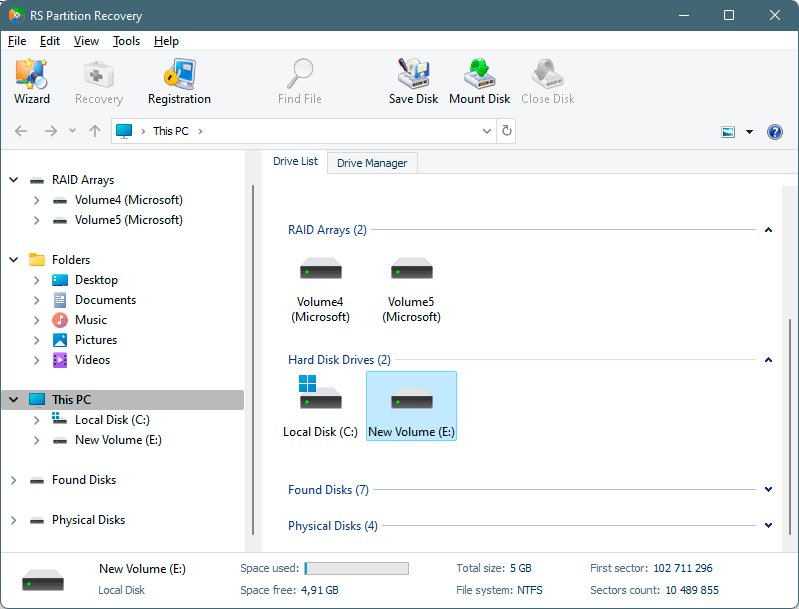
The main window, listing RAID arrays, hard disks, found disks and physical disks.
Features
Finds partitions that are no longer in the table
RS Partition Recovery scans for lost and deleted volumes, including those wiped by diskpart clean, removed in Disk Management or lost in an interrupted resize. It handles both MBR and GPT disks.
Reads RAW and "not formatted" drives
RS Partition Recovery can open a volume that Windows offers to format and pull the files off it, so you don't have to format or reinstall to get at them.
Full analysis across many file systems
RS Partition Recovery's full analysis ticks off each file system to search for, from NTFS and APFS to Btrfs, ZFS and HikvisionFS for CCTV recorders. Content-aware analysis then finds files by signature when the file system itself is destroyed.

The analysis step, with fast scan or full analysis and a checkbox for each file system.
Forensic-style tools in the box
RS Partition Recovery includes a hex viewer, sector-by-sector disk imaging, and a SMART monitor that shows each attribute, the temperature and an overall Good, Caution or Bad status, so you can judge a drive before you stress it.
Remote disks over SSH
RS Partition Recovery can connect over SSH to a NAS, server or VMware ESXi host and treat the remote storage as a regular disk, which saves pulling the drives.
Preview, then save several ways
RS Partition Recovery previews documents, images and video in place, and saves to a hard disk, a ZIP archive or FTP.
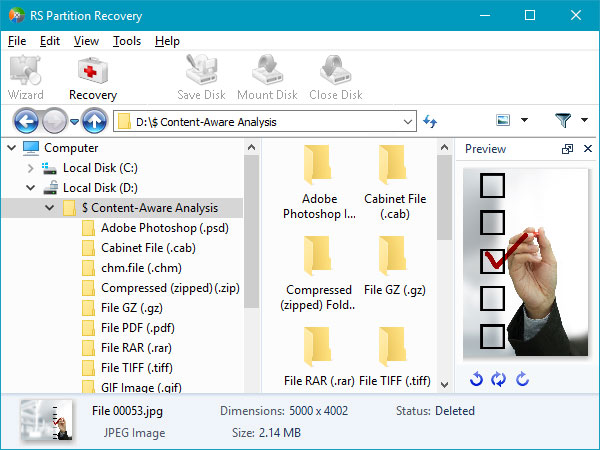
Content-aware results sorted by file type, with a preview of a deleted JPEG.
Benefits
You don't need to know what went wrong before you start. Run one scan, and if the partition, the file system or just the files are recoverable, they show up in the same window. The vendor describes all of this as read-only, so scanning shouldn't change the source disk. And since a license isn't a subscription, it's still there for the next disaster, with upgrades included.
Real-World Uses
- A dual-boot PC where a Windows update hid the Linux partition
- An external drive that turned RAW after being unplugged mid-write
- A resize that died in a power cut and left the disk unallocated
- A CCTV recorder disk in HikvisionFS that needs footage pulled
- A disk reformatted from NTFS to Ext4 with old files still on it
Who It's For, and Who Should Skip It
RS Partition Recovery is for technically comfortable users and small IT shops facing a lost volume or a formatted disk, on any of the three major operating systems.
Skip it if files were merely deleted from a healthy drive: RS File Recovery does that for $37.95. For a multi-disk array, you want RS RAID Retrieve. If you're comfortable on a command line and only need to restore a partition table, the free TestDisk is worth a try first. And if the drive makes clicking sounds, stop and take it to a lab.
Usage Guide
- Install the program on a drive that isn't the affected one.
- If the disk may be failing, check its SMART status and create a disk image first.
- Select the disk, and start the wizard or use Find Partitions.
- Choose fast scan, or full analysis with content-aware analysis for a badly damaged disk.
- Browse the results and preview your files.
- Register, then save to another drive, a ZIP file or FTP.
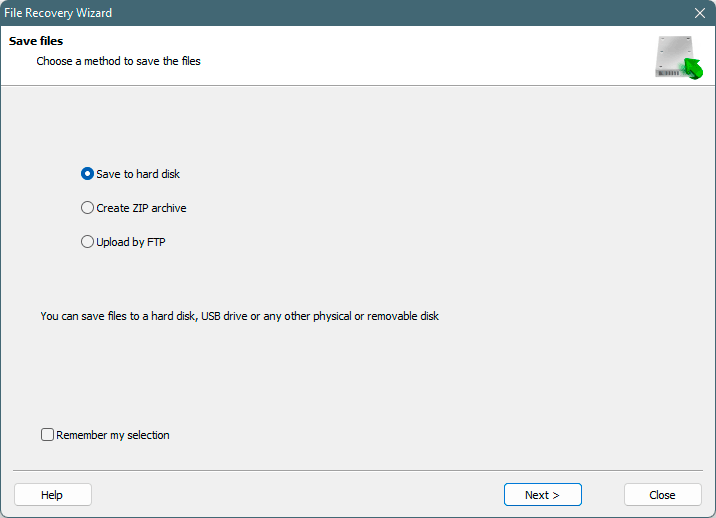
The final wizard step: save to a disk, create a ZIP archive or upload by FTP.
Where it falls short
- Scans are slow. The vendor itself estimates 3 to 12 hours per 1 TB of hard disk for most recoveries.
- The full feature list costs more. Encrypted volumes and VM disks start at $237.95, not $97.95.
- Deep-scan results lose their names. Files found by signature land in type groups such as "File GZ" and "File TIFF" under generic names, so a big recovery takes sorting.
What Users Say
We found no written user reviews of RS Partition Recovery itself. SaaSworthy shows a single 5-out-of-5 rating, and SoftwareSuggest has no reviews. The feedback worth reading covers RS Data Recovery, the vendor's bundle that includes this program.
Capterra
Capterra shows 4.4 out of 5 from 5 reviews, listed under the vendor's RS Data Recovery bundle. Reviewers praise how it found deleted photos, videos and documents and call the interface straightforward. One said a job "taked 14 hours". Another reported a stability problem:
- "When I was using it sometimes in export process of big size data I saw unexpected close of program."
Trustpilot
Trustpilot shows a TrustScore of 3.2 from just 2 reviews for recoverhdd.com, both from 2022. The 1-star review, from a reviewer named ed, says files recovered from an ext4 system were empty in the full version and that the 30-day guarantee wasn't honored: "DO NOT BUY THIS SOFTWARE - NO REFUND IS POSSIBLE". That's one account, but it's a good reason to preview several files, not just one, before you pay.
The short version: small sample, mostly positive on results, negative on scan time and on one refund.
Comparisons
RS Partition Recovery vs RS File Recovery
RS Partition Recovery costs $60 more and adds lost-partition recovery, RAW volumes, more file systems and the technical tools above. RS File Recovery is the better buy for a plain deletion.
RS Partition Recovery vs RS RAID Retrieve
Both read the same wide range of file systems. RS RAID Retrieve ($197.95) adds automatic reassembly of multi-disk arrays, and its RAID Constructor is the feature you're paying for.
Editions and Pricing
| Edition | Price | License | Adds |
|---|
| Home | $97.95 | One PC or server, lifetime upgrades | Core recovery |
| Office | $237.95 | One PC or server, lifetime upgrades | Virtual machines, forensic images, encrypted files and drives |
| Commercial | $397.95 | Unlimited PCs or servers | All of the above, plus services to third parties |
These are one-time prices from the order page, November 7, 2026, with no auto-renewal. The order page opens on Home Edition, and you change it in the edition drop-down.
FAQs
Can RS Partition Recovery recover files after emptying the Recycle Bin?
Yes, RS Partition Recovery can recover those files if they haven't been overwritten. The vendor advises you to stop using the disk and create an image right away.
Do I have to rescan after buying RS Partition Recovery?
No. RS Partition Recovery lets you enter the key after a scan and save straight away, with no second scan.
Does RS Partition Recovery work with virtual machine disks?
RS Partition Recovery handles VMDK, VHD/VHDX, VDI and QCOW2 images through Tools, Mount Disk, but that needs the Office or Commercial edition.
Can a repair shop use RS Partition Recovery?
Only with the Commercial edition, at $397.95. RS Partition Recovery's Home and Office licenses don't include services to third parties.
Does RS Partition Recovery come with support?
Yes. RS Partition Recovery includes free support by live chat and email, and the free version gets support too.
Can I move my RS Partition Recovery license to a new PC?
Yes. RS Partition Recovery's vendor says your registration code still works after you change computers.
System Requirements
- Windows XP to 11, Windows Server 2003 to 2022
- macOS 10.12 Sierra to macOS 15 Sequoia, OS X 10.7 to 10.11
- Ubuntu, Debian, Fedora, Linux Mint, openSUSE, Arch Linux
- A separate drive for saving recovered files
Conclusion
RS Partition Recovery is worth buying if you've lost a partition or a formatted disk and the free scan shows your files. The one reason to buy is how much it covers in a single scan, across Windows, Mac and Linux file systems. The main reason not to is the Home Edition's gap: if your data sits on an encrypted drive or inside a VM, you're really looking at $237.95. Scan first, check several previews, then decide.
Download Free TrialBuy Now