RS File Recovery: Get Deleted Files Back for $37.95, Once
RS File Recovery is a $37.95 one-time tool for Windows, macOS and Linux that restores deleted files and folders from hard drives, SSDs, USB sticks and memory cards, for home users who want a low-cost undelete program. The free download scans and shows you what it can recover before you pay anything.
You emptied the Recycle Bin, pressed Shift+Delete on the wrong folder, or formatted a memory card too soon. If the space hasn't been overwritten, the files are usually still on the disk, and this is the job the program does.
Quick facts
- Version: 7.5
- Developer: Recovery Software (RecoverHDD), Cherkasy, Ukraine
- Platforms: Windows XP to 11, macOS and OS X 10.7 to macOS 15, major Linux distributions
- Price: $37.95 for the Home Edition, one-time, with lifetime free upgrades
- Trial: free scan and preview; saving needs a license key
- Guarantee: 30 days, with conditions (see below)
- What we checked: installer version 7.5 (92.8 MB), digitally signed by Recovery Software, dated October 9, 2026 and downloaded from the vendor; order page price of $37.95 with Home Edition selected, on November 7, 2026. We didn't run a recovery on a damaged drive.
Before you buy
- Run the free scan first. The refund terms exclude a change of mind and expect you to have tried the free version. A refund does apply if a file previews in the free version but can't be restored in the full one and support can't fix it.
- Stop using the drive. Install the program on a different drive from the one holding the lost files, because writing to that drive can overwrite them.
- The order page opens on Home Edition. Change the edition in the drop-down there if you need Office or Commercial.
Download Free TrialBuy Now
Overview
RS File Recovery gives you two ways to work: a step-by-step Recovery Wizard for anyone who just wants the files back, and an Explorer-style window with folders, a preview pane and a recovery list for people who like to pick through a disk by hand. It comes from a Ukrainian company that has been developing data recovery software since 2008 and sells a range of tools, each aimed at one kind of data loss.
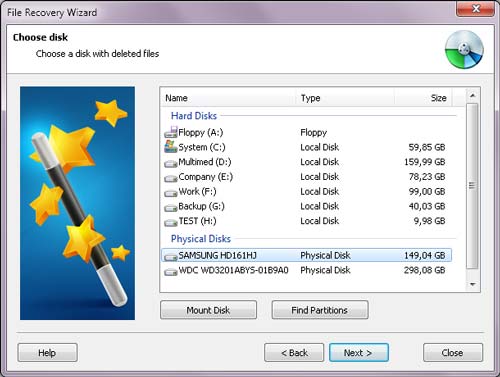
The Recovery Wizard listing local drives and physical disks. The vendor's screenshots show an older version 3.1 interface.
Features
Recovers files the Recycle Bin no longer has
RS File Recovery restores files and folders removed with Shift+Delete or cleared from the Recycle Bin, plus files on formatted and repartitioned disks and on corrupted or deleted FAT and NTFS partitions.
Deep scan that ignores the damaged file system
RS File Recovery reads the entire disk and looks for known file signatures, such as the JFIF header of a JPEG or the PK header of a ZIP, and works out each file's length from its header. It's slow, and it's what you use when a normal scan finds nothing.
Preview before you pay
RS File Recovery shows pictures and documents in a preview pane, so you can see whether a file is intact. A Prognosis column in the results rates each file's condition (Exists, Good, Possible).
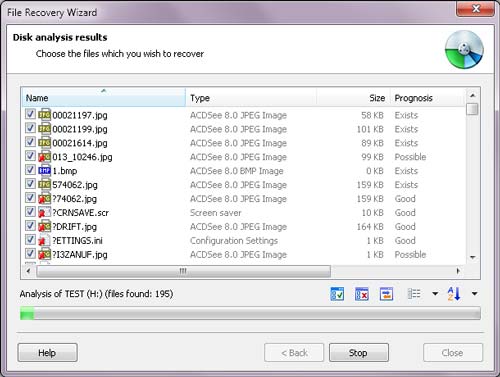
Analysis results with the Prognosis column, in the older interface shown on the vendor's site.
Virtual drive images for failing disks
RS File Recovery can save a bit-exact copy of a disk to a file and then work on that copy. On a card or drive that's starting to fail, this means one long read rather than repeated scans of the bad hardware.
Filters that cut the scan down
RS File Recovery's wizard lets you choose fast or deep analysis and filter by file type, so you can look for only the documents or photos you lost.
Four ways to save
RS File Recovery saves to another drive, burns to CD or DVD, uploads over FTP, or writes everything into one ISO file. Keeping the output off the source drive is the point.
Benefits
The main benefit is cost with no gamble: the price is low, there's no subscription, and you see the recoverable files first. You also don't lose scan time by buying later. The vendor says that if you scanned before purchasing, you just enter the key when you save, with no second scan.
Real-World Uses
- A camera card formatted by accident before the photos were copied off
- A work folder deleted with Shift+Delete from a laptop
- An external drive that was reformatted, with old project files still on it
- A USB stick that went unreadable, where you image it first and scan the image
Who It's For, and Who Should Skip It
RS File Recovery suits home users with an ordinary deletion or a formatted card who want a guided tool at a low one-time price.
Skip it if a whole partition has vanished or the drive shows as RAW: RS Partition Recovery from the same vendor is built for that. Skip it for a failed RAID or NAS too. If your drive clicks or isn't detected at all, no software will help, so power it down and talk to a recovery lab. If you only need one small file back on Windows, a free undelete tool may do the job.
Usage Guide
- Download and install the program on a drive other than the one you're recovering from.
- Open the Recovery Wizard and choose the drive or physical disk.
- Pick the scan type. Start with the fast one, and use full analysis if your files don't appear.
- Optionally filter by file type, then wait for the scan and preview the results.
- Buy a key if the files look good, enter it, and save them to a different drive.
Where it falls short
- Scans take a long time. Capterra and G2 reviewers of the vendor's bundle both mention it, and one spent 14 hours on a recovery. Deep scans read the whole disk.
- Overwritten data is gone. A preview that opens is your best sign. An SSD with TRIM active can clear deleted data quickly, whatever the vendor's support list says.
- The screenshots lag the product. The vendor's pictures still show version 3.1, so expect a newer look than the ones on this page.
What Users Say
Independent feedback on this vendor is thin, and we found no user reviews of RS File Recovery alone. What exists mostly sits under RS Data Recovery, the vendor's bundle that includes this program.
Capterra
Capterra shows 4.4 out of 5 from 5 reviews, listed under the vendor's RS Data Recovery bundle, with the reviews we could read dating from 2019 to 2021. Reviewers credit it with getting deleted photos, videos and documents back and call the interface straightforward. The complaints are specific:
- "When I was using it sometimes in export process of big size data I saw unexpected close of program."
- "The trial version gives you very limited access to important feature which require you to purchase a full license."
Trustpilot
Trustpilot shows a TrustScore of 3.2 from just 2 reviews for recoverhdd.com, both from 2022. One is a 1-star complaint from a reviewer named ed, who says files recovered from an ext4 system came out empty in the full version and that the refund never arrived: "DO NOT BUY THIS SOFTWARE - NO REFUND IS POSSIBLE". The other is a 5-star thank-you for the vendor's RAID tool.
The pattern across these few reviews: people like the simple interface and the results on ordinary deletions, and dislike long scans and the refund experience.
Comparisons
RS File Recovery vs RS Partition Recovery
RS File Recovery ($37.95) covers deleted files. RS Partition Recovery ($97.95) also finds lost partitions and handles RAW and failing volumes with more tools. If your drive still mounts and shows its contents, the cheaper one is usually enough.
RS File Recovery vs the RS Data Recovery bundle
The bundle, $147.95 on the order page, packs File, Partition, Office and Photo Recovery plus Browser Forensics. It only makes sense if you want several of them, and it's a separate product from this listing.
Editions and Pricing
| Edition | Price | License | Notes |
|---|
| Home | $37.95 | One PC or server, lifetime upgrades | Free tech support |
| Office | $137.95 | Listed on the order page | Pick it in the edition drop-down |
| Commercial | $237.95 | Unlimited PCs or servers | Adds services to third parties, virtual machines, forensic images and encrypted drives |
All three are one-time prices from the order page, November 7, 2026. There's no auto-renewal.
FAQs
Does RS File Recovery need to be bought again on a new computer?
No. RS File Recovery's vendor says you can reuse your registration code after changing computers.
How do I activate RS File Recovery after buying it?
RS File Recovery is activated with a user name and key sent by email after payment, normally within an hour. Enter them in the program's registration form to enable saving.
Does RS File Recovery work on macOS and Linux disks?
Yes, RS File Recovery lists APFS, XFS, UFS, ReiserFS and Ext2/3/4 alongside NTFS, FAT, exFAT and ReFS, and there are Mac and Linux builds as well as the Windows one.
Are there discounts on RS File Recovery?
RS File Recovery has discounts for non-profits, schools, the army, welfare institutions and disabled customers. You request them by email at the vendor's support address.
Can I swap RS File Recovery for another RS program?
Yes, in some cases. The vendor offers an exchange for a more suitable program if you bought the wrong one, and refunds a wrong purchase once you've bought the right tool.
Which payment methods does RS File Recovery accept?
RS File Recovery is sold through a checkout that takes PayPal, Visa, MasterCard, Maestro, JCB, Discover, American Express, Diners Club, GiroPay and direct debit.
System Requirements
- Windows XP, 2003, Vista, 2008 Server, 7, 8, 10 and 11
- macOS 10.12 Sierra to macOS 15 Sequoia, OS X 10.7 to 10.11
- Ubuntu 10.04 to 24.04, Debian 6 to 12, Fedora 13 to 40, Mint 9 to 21.3, openSUSE 11.3 to 15.6, Arch Linux
- A separate drive for saving recovered files
Conclusion
RS File Recovery is worth it for a home user with a plain deletion or a formatted card. The reason to buy is simple: at $37.95 with a free preview, you only pay once you've seen your files. The reason not to is the refund policy, which is narrow, and the small, mixed record of independent reviews. Try the scan, and buy only if the preview opens your files.
Download Free TrialBuy Now