A device on a COM port stops answering, and your software gives you nothing useful. You can't tell whether the app sent a bad command, the device replied with garbage, or the driver changed a setting midway. Serial Port Monitor shows what actually crosses the port, so you can stop guessing.
Quick facts
- Version: 9.5.602
- Platforms: Windows (32-bit and 64-bit), including Windows on ARM
- Price: starts from $59.00, with Lifetime and Yearly options
- Editions: Standard and PRO
- Free option: a non-commercial license is available on request
Key features
Filter captured data so you only see what matters
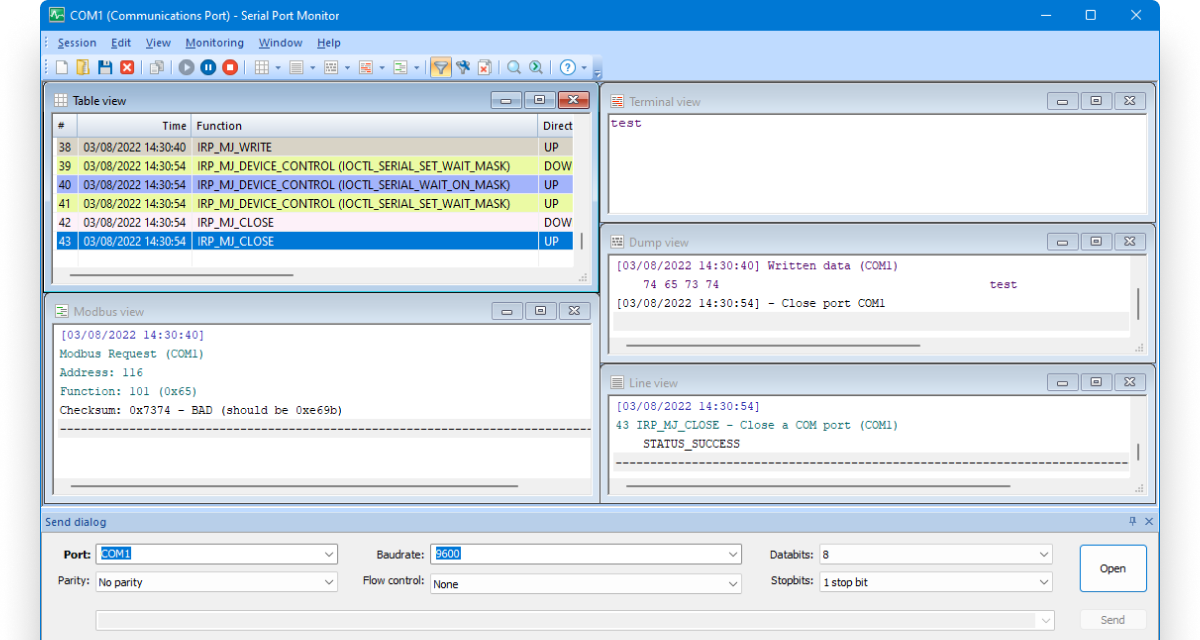
You can set up monitoring filters to track only the events you care about, including IOCTL and IRP requests. Captured data can be shown in table, line, dump and terminal views at the same time.
Watch several ports in one session
Monitor one, two or more serial interfaces together. All communication goes into a single log, so you can see how a port interacts with several devices and applications at once.
Read Modbus RTU and ASCII traffic
Besides RS232, RS422 and RS485, the program can capture and analyze Modbus RTU and ASCII messages passing between the devices you are testing.
Send your own data to a monitored port
You can send data as a string, or in binary, octal, decimal or hexadecimal format, to a monitored port as though a certain application had sent it. This shows how your device reacts to particular commands.
Compare a new session with a saved one
Pick Compare session from the main menu and load an earlier recording. You see the differences between runs, which helps when a fix works on one machine and not another.
Sniff ports that another program already uses (PRO)
The PRO plan adds sniffing of RS232 ports in use by another application, an Advanced Send Dialog for exchanging data, and changing port parameters on the fly.
Who it's for
It suits developers writing or testing COM port software, hardware engineers debugging devices such as modems or projectors, and teachers running electronics courses. Hobbyists on non-commercial projects can ask for a free license.
Pros and cons
Pros
- Monitors an unlimited number of COM ports at once, with all types supported.
- Four visualizers and stream filtering with presets.
- Saves, loads and exports monitored data, and copies it to the clipboard.
- Lifetime purchase option with all upgrades included.
Cons
- Windows only.
- Sniffing ports already in use and the Advanced Send Dialog need the PRO plan.
- Older versions have to be requested from support.
What users say
"SPM has a slick, modern UI and so far has been completely reliable." (Capterra)
"I found Serial Port Monitor works without hassle." (SourceForge)
FAQs
Which serial port types can it monitor?
It handles RS232, RS422 and RS485 ports, and standard on-board ports, extension board ports and serial-via-USB adapters.
What is the difference between Standard and PRO?
Standard covers monitoring and analysis. PRO adds sniffing of ports already in use, the Advanced Send Dialog, and changing port parameters on the fly.
Can I pay once instead of subscribing?
Yes. Both plans come as a one-time Lifetime purchase or a Yearly subscription you can cancel anytime. Owners of a previous version get a 50% upgrade discount.
Can I get it free?
Non-commercial users can request a free license, and educators can apply for free licenses through a separate form.
System requirements
- Windows (32-bit and 64-bit): Vista, 7, 8, 10, 11
- Windows Server 2008, 2012, 2016, 2019, 2022
- Windows on ARM