Devart ODBC Driver for Zoho Inventory: Stock, Packages and Price Books Through SQL
Devart ODBC Driver for Zoho Inventory gives Windows tools SQL access to a Zoho Inventory organization for $109.95 a year. Items and item groups, stock adjustments, packages and their line items, price books, and the sales and purchase documents around them arrive as tables in Excel, Power BI, Access, Tableau or SQL Server, and can be updated from there.
Inventory questions rarely stay inside one app. Reorder planning wants sales history next to supplier lead times; a warehouse dashboard wants packages shipped per day beside staff rosters. The driver lets the tools you already use read Zoho Inventory directly.
Quick facts
- Latest version: 1.9.0, released October 16, 2026 (first released December 15, 2021)
- Vendor: Devart
- Operating system: Windows Vista and later, 32/64-bit, including Terminal Server; needs .NET Framework 4.5 or later
- How it connects: Zoho data center, Zoho Inventory Organization ID, and a refresh token from "Sign In with Zoho"
- Typical tables: Items, ItemGroups, ItemGroupItems, ItemAdjustmentsLineItems, Packages, PackageLineItems, Pricebooks, PricebookItems, Organizations
- Price: $109.95 a year, or a $219.95 perpetual Desktop license
- Trial: free for 30 days after activation with a Devart trial key
- Refunds: available for 30 days when a technical problem can't be fixed by Devart support
- What we checked: the order page listed Desktop for Windows (1-year subscription) at $109.95, and Devart's download page showed version 1.9.0 in a 32.15 MB EXE, on November 14, 2026. We have not connected the driver to a Zoho Inventory organization
Before you buy
Zoho Inventory, Zoho Books and Zoho Invoice share Zoho's organization model, and a single Zoho login can see several organizations. Make sure the Organization ID in the DSN is your Inventory organization, not a Books or test one. Stock adjustments written through SQL change on-hand quantities for real, so keep write access for people who would also be allowed to adjust stock in the Zoho interface.
Download Free Trial Buy Now
Overview
Devart's Zoho Inventory driver follows the shape of Zoho Inventory itself. Catalogue data comes as Items, ItemGroups and ItemGroupItems (variants grouped under a parent); stock changes as adjustment line items; fulfilment as Packages and PackageLineItems; and customer-specific pricing as Pricebooks and PricebookItems. Sales and purchase documents such as invoices sit alongside them.
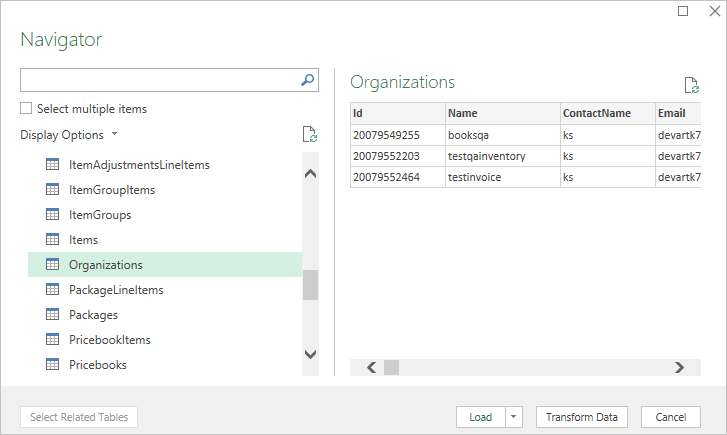
Excel Navigator through the Zoho Inventory DSN: item, item group, package and price book tables, with the Organizations table previewed.
Setup takes a minute once you have the Organization ID: pick the data center, sign in to Zoho in the browser, and the refresh token is stored (encrypted since version 1.5.0). Every ODBC application on the computer can then use the DSN.
Features
Catalogue and variants as tables
Devart ODBC Driver for Zoho Inventory separates items, item groups and the items inside each group, so a query can list every variant of a product family with its stock and price.
Fulfilment you can measure
Devart ODBC Driver for Zoho Inventory exposes Packages and PackageLineItems, which makes packed-and-shipped counts per day, per customer or per item a simple GROUP BY.
Price books for customer pricing
Devart ODBC Driver for Zoho Inventory includes Pricebooks and PricebookItems, so special price lists can be compared with standard item prices in Excel or checked for gaps.
Organizations table to find the right ID
Devart ODBC Driver for Zoho Inventory returns an Organizations table with each organization's ID, name and an IsDefaultOrg flag, a quick way to confirm which organization your reports point at.
Bulk edits with SQL
Devart ODBC Driver for Zoho Inventory supports INSERT, UPDATE and DELETE and batching of statements, useful for mass price or attribute changes across a catalogue.
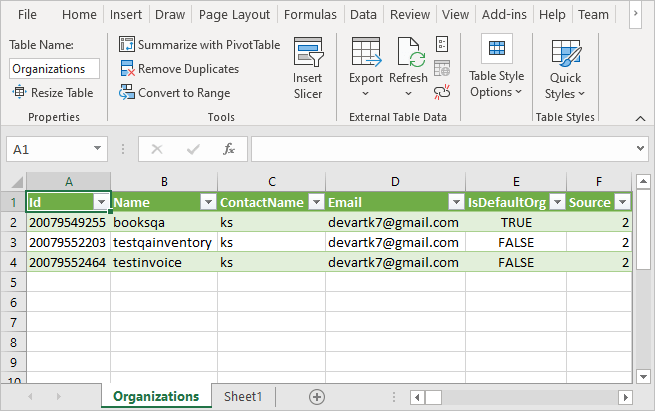
The Organizations table loaded into an Excel sheet: organization IDs, names, contact, e-mail and the IsDefaultOrg flag.
Benefits
- Reorder decisions on live numbers. Stock and sales come straight from Zoho Inventory when the workbook refreshes.
- Warehouse KPIs in your BI tool. Packages per day and lines per package feed Power BI or Tableau dashboards.
- Price list hygiene. Comparing price books with item prices catches outdated customer pricing.
- One place for operations data. A SQL Server linked server combines Zoho Inventory with ERP, e-commerce or shipping data.
Real-World Uses
- Weekly reorder sheet. A buyer lists items below their reorder point with recent sales volumes in Excel and sends purchase requests from it.
- Fulfilment dashboard. A warehouse manager charts packages per day and average lines per package in Power BI.
- Wholesale price review. A sales manager compares each customer price book against list prices before a price increase.
- Catalogue update. An e-commerce admin changes an attribute on hundreds of items in one UPDATE after a supplier rebrand.
Who It's For, and Who Should Skip It
Devart ODBC Driver for Zoho Inventory is built for buyers, warehouse and operations managers, and analysts on Windows who run Zoho Inventory and do their planning and reporting in Excel, Power BI or SQL Server.
Skip it if you use a Mac, or if Zoho Inventory's own reports and Zoho Analytics already give you what you need. Note the scope, too: if your sales and accounting live in Zoho Books, you'll want Devart's separate Zoho Books driver as well, since each Zoho app has its own driver and license.
Usage Guide
- Download the trial (the button on this page; Devart asks for a free account) and install the driver.
- Open the ODBC Data Source Administrator with the same bitness as your program, add a DSN and choose Devart ODBC Driver for Zoho Inventory.
- Activate the trial key on the License tab.
- Select your data center, enter the Zoho Inventory Organization ID, click Sign In with Zoho and approve access, then Test Connection.
- Unsure of the ID? Connect once, load the Organizations table and use the row whose name matches your Inventory organization.
- Point Excel (Data > Get Data > From ODBC), Power BI or SQL Server at the DSN.
Tip
For stock reports, pull item and package tables with a date filter or a status filter rather than whole tables. Zoho's API sends data page by page, so narrower queries refresh noticeably faster and use fewer of your API calls.
Where It Falls Short
- Only for Windows. No macOS or Linux driver exists.
- API, not database, performance. Big catalogues and long histories load at Zoho API speed, and calls count toward your Zoho plan's API allowance.
- One organization per DSN. Multi-company setups need one DSN per organization.
- No published data dictionary. Devart lists the connection options but not each table's columns, so you learn the schema in the trial.
What Users Say
Feedback on Devart's ODBC drivers is collected for the product line, not per Zoho app, so nothing below is specific to Zoho Inventory.
Software Advice and Capterra
Software Advice scores the line 4.6 out of 5 for value for money and 4.4 for customer support. On Capterra, a reviewer of the PostgreSQL driver said it gave them ODBC access while working with their corporate SSO and SSH setup, and another reviewer found the drivers easy to install and was into their Postgres schemas quickly.
Those comments come from database users rather than SaaS users, so their main value here is about installation, licensing and support. Whether the Zoho Inventory tables cover your stock reports is something only the trial with your own organization can tell you.
Comparisons
ODBC driver vs. Zoho Inventory reports
Zoho Inventory's built-in reports cover stock summaries, sales by item and similar views at no extra cost. Devart ODBC Driver for Zoho Inventory ($109.95 a year) is for custom planning sheets, cross-system dashboards and bulk edits those reports can't do.
Zoho Inventory driver vs. Zoho Books driver
Both cost $109.95 a year and connect the same way. The Inventory driver centres on items, item groups, packages and price books; the Books driver on accounting: bank accounts, taxes, vendor credits and time entries. Companies that run both apps usually need both drivers.
Editions and Pricing
| Edition | 1-year subscription | Perpetual | Who can use it |
|---|
| Desktop for Windows | $109.95 | $219.95 | One user at a time on one computer |
| Server Standard for Windows | $799.95 | $1,599.95 | Several users on one server with up to 6 cores, one legal entity |
| Server Enterprise, Site, OEM | Quote | Quote | Any core count, a whole company, or shipping the driver in your own app |
A single product covers every edition. Buy Now opens checkout at Desktop for Windows with a 1-year subscription, and from there you can pick Server Standard, two or three years of subscription, or the perpetual license, add priority support, and get 5 to 15 percent off for 5 or more copies.
FAQs
Does Devart ODBC Driver for Zoho Inventory need a separate Zoho API key?
No. Devart ODBC Driver for Zoho Inventory uses an OAuth refresh token created when you click Sign In with Zoho in the DSN dialog; no API key has to be generated by hand.
Can the Zoho Inventory driver adjust stock levels?
Devart ODBC Driver for Zoho Inventory supports INSERT, UPDATE and DELETE, and inventory adjustments are exposed as tables. What it can change is limited by the Zoho Inventory API and your user's role, so test any write on a sample item.
Does it include Zoho Books data?
No. Devart ODBC Driver for Zoho Inventory covers the Inventory organization. Devart sells a separate ODBC Driver for Zoho Books.
Can several warehouse staff share one license?
Not with Desktop. Devart ODBC Driver for Zoho Inventory Desktop allows one user at a time; shared use on a server needs Server Standard ($799.95 a year) or higher.
Is there a Mac version of the Zoho Inventory driver?
No. Devart ODBC Driver for Zoho Inventory is available for 32-bit and 64-bit Windows only.
System Requirements
- Windows Vista or later, 32-bit or 64-bit, Windows Server and Terminal Server included
- .NET Framework 4.5 or later
- 32.15 MB installer; one version of the driver at a time
- A Zoho Inventory organization and a Zoho user who can sign in
- HTTPS access to the Zoho data center, optionally through a proxy
Conclusion
Devart ODBC Driver for Zoho Inventory is worth $109.95 a year for teams that plan stock, track fulfilment or manage price lists in Excel and Power BI on top of Zoho Inventory. Its tables mirror how Zoho Inventory organizes items, packages and price books, which keeps queries readable.
Don't buy it for a Mac, and don't expect database speed on large catalogues. Run the 30-day trial and build your reorder sheet against your own organization first.
Download Free Trial Buy Now