You need to send a document to a print shop or a client, but the application you made it in has no PDF export, or its export ignores color settings and fonts. PDF Creator for Windows 8 solves this by installing as a virtual printer. Anything that can print on Windows can now produce a PDF.
Quick facts
- Version: 8.0.0.8666
- Edition: Workstation Edition
- Platforms: Windows 8.1, 8, 7, Vista, XP, plus Windows Server 2012, 2008 and 2003
- Installer size: about 2 MB
- 64-bit: 64-bit and 32-bit Windows 8 are both supported
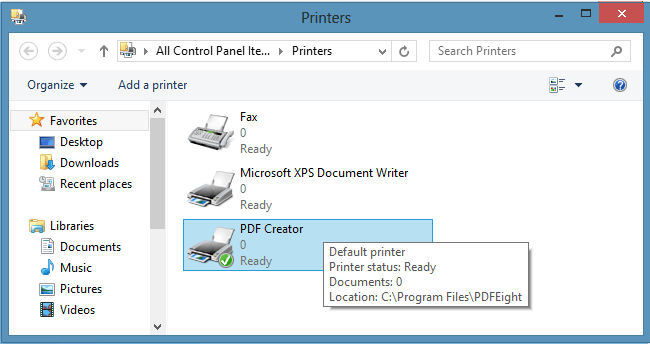
Key features
Make a PDF from any program that prints
You choose the PDF Creator printer in the Print dialog and get a searchable, color PDF. You can also convert other formats to PDF, and view the result automatically after it is created.
Control page size, orientation, scaling and resolution
You can set the PDF paper size, define a custom paper size, and choose orientation, scaling and PDF resolution.
Print-ready color and fonts
Output supports RGB, sRGB and CMYK color with ICC profiles. Font embedding and subsetting keep the document looking the same on other machines. Image downsampling and graphics compression help keep file sizes down.
Password and permission protection
You can secure PDFs with passwords and permissions, using 128-bit RC4 encryption.
Standards-compliant output
The software is capable of Adobe PDF, PDF/X and PDF/A output, and supports PDF 1.4 and 1.5 on the product page.
Share the printer and integrate it
You can share the PDF Creator printer with other computer users through a separate sharing utility. A Custom Action DLL interface lets developers integrate it with the printer driver.
Who it's for
It suits you if you want a straightforward PDF printer for office documents, prepress files or secured reports on a Windows PC. If your files go to a commercial printer, the CMYK and PDF/X options are the main draw. For several users on a network, the printer-sharing utility helps. Organisations deploying across a server should look at the vendor's separate PDF Server product.
Pros and cons
Pros
- Works from any Windows application that can print
- CMYK, ICC profile and PDF/X support for press work
- Font embedding and encryption included
- Small download of about 2 MB
Cons
- It is a printer driver, not a PDF editor, so you can't change existing PDFs with it
- Windows only
- The product page lists PDF 1.4 and 1.5 only
FAQs
Does it work on 64-bit Windows?
Yes. The vendor states support for both 64-bit and 32-bit Windows 8.
Which Windows versions are supported?
Windows 8.1, 8, 7, Vista and XP, plus Windows Server 2012, 2008 and 2003.
Can I protect PDFs with a password?
Yes. You can set passwords and permissions with 128-bit RC4 encryption.
Can I choose CMYK output?
Yes. You can choose CMYK, sRGB or RGB output for images.
Can other people use the printer?
Yes. A printer sharing utility lets you share it with other computer users.
System requirements
- Windows 8.1, 8, 7, Vista, XP
- Windows Server 2012, 2008, 2003
- 32-bit and 64-bit editions