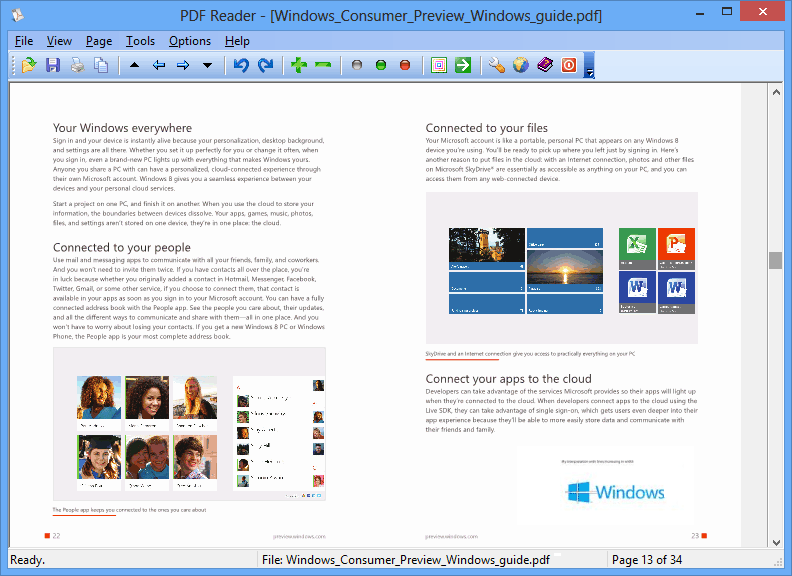
You double-click a PDF and wait while a heavy program loads just so you can read two pages. PDF Reader for Windows 10 is a small, free viewer written in native code, built to open files in a second or two.
Quick facts
- Version: 3.0.1.2823 (3.61 MB download)
- Platforms: Windows 10 (32-bit and 64-bit), 8.1, 8, 7, Vista, XP, and Windows Server 2016, 2012, 2008, 2003 and Home Server
- Price: Free for personal and home use. Business use needs a commercial license.
- Languages: English, French, German, Spanish, Portuguese, Italian
Key features
Open PDFs in a second or two
The reader is native desktop code, not a Metro UI app. You stay on the classic desktop when you open a PDF from your Desktop, Library or My Documents. You can also associate it with the PDF file type.
Convert PDF pages to common formats
You can convert PDF to TXT, BMP, JPG, GIF, PNG, WMF, EMF, EPS and TIFF.
Copy text and graphics from any region
Select a region on a page and copy the text and graphics in it with a few mouse clicks.
Slideshow mode for presenting
The slide show lets you page through a document the way you would step through PowerPoint slides.
The basics are covered
You get zoom in and out, page rotation, and printing. It can also be added to Windows 10 as a built-in PDF browser.
Who it's for
It suits you if you want a light replacement for the default PDF handler on a home PC. It also suits you if you need to export PDF pages as images or text. Terminal-server users can install it on supported Windows Server versions.
Pros and cons
- Pro: small download and fast opening.
- Pro: works on everything from XP to Windows 10 and several server editions.
- Pro: exports to many image and text formats.
- Con: free use is limited to personal and home use. Businesses need a commercial license.
- Con: it is a viewer, so don't expect it to create PDFs. That is a separate product from the same vendor.
FAQs
Is it really free?
Yes for personal and home use. Business and commercial use requires a commercial license.
Does it work on 64-bit Windows 10?
Yes. It is designed and certified for Windows 10 in both 64-bit and 32-bit.
Can I use it on older Windows?
Yes. It is backward compatible with Windows 8.1, 8, 7, Vista and XP.
Can I install it on a server?
Yes, for terminal users on Windows Server 2016, 2012, 2008, 2003 and Home Server.
System requirements
Windows 10, 8.1, 8, 7, Vista or XP, or Windows Server 2016, 2012, 2008 or 2003. The installer is about 3.61 MB.