DWG FastView Premium: A Lightweight DWG Viewer and Editor for PC, Phone and Browser
DWG FastView is a free CAD viewer from Gstarsoft (the maker of GstarCAD) that opens AutoCAD DWG and DXF drawings on Windows, iPhone, iPad, Android and in a web browser. DWG FastView Premium, $47.99 a year at checkout (or $7.99 a month), adds markup and dimension tools, text search and 5 GB of cloud storage to the same account on every device.
It's for the people around a CAD drawing rather than the person drafting it: a site manager checking a measurement, a client marking up a revision, an estimator reading a floor plan on a laptop without a full AutoCAD license. The free app opens the drawing; Premium lets you comment on it and measure it properly.
Quick facts
- Windows app version: 10.7.0, published November 16, 2026
- Developer: Suzhou Gstarsoft Co., Ltd.
- Platforms: Windows, iOS, Android and web; one account across all of them
- Files: DWG and DXF drawings, with external references
- Price: Premium $47.99 a year or $7.99 a month at checkout; Super (Premium plus 3D view) is sold on the vendor's site
- Free version: viewing, layers, printing and simple drawing tools, with ads in the mobile app
- Refunds: full refund within 7 days, then a refund for the days remaining
- What we checked: the Windows installer, DWGFastView V10.7.0 (125.8 MB), and the order page on November 20, 2026: DWG FastView Premium Yearly $47.99 renewing every 12 months, and Premium Monthly $7.99 renewing monthly. The vendor's own upgrade page lists $45.99 and $4.99. We didn't open drawings in it.
Download Free VersionBuy Premium YearlyBuy Premium Monthly
Overview
The Windows app looks like a slimmed-down CAD program: a dark drawing area, Model and Layout tabs, and a ribbon with view, layer, draw, measure, dimension and modify groups. It starts fast and opens several drawings in tabs, which is the point of a viewer: no multi-gigabyte CAD install, no license server. The same account signs in to the mobile app and the web version, so a drawing saved to the cloud on the PC is on your phone at the site.
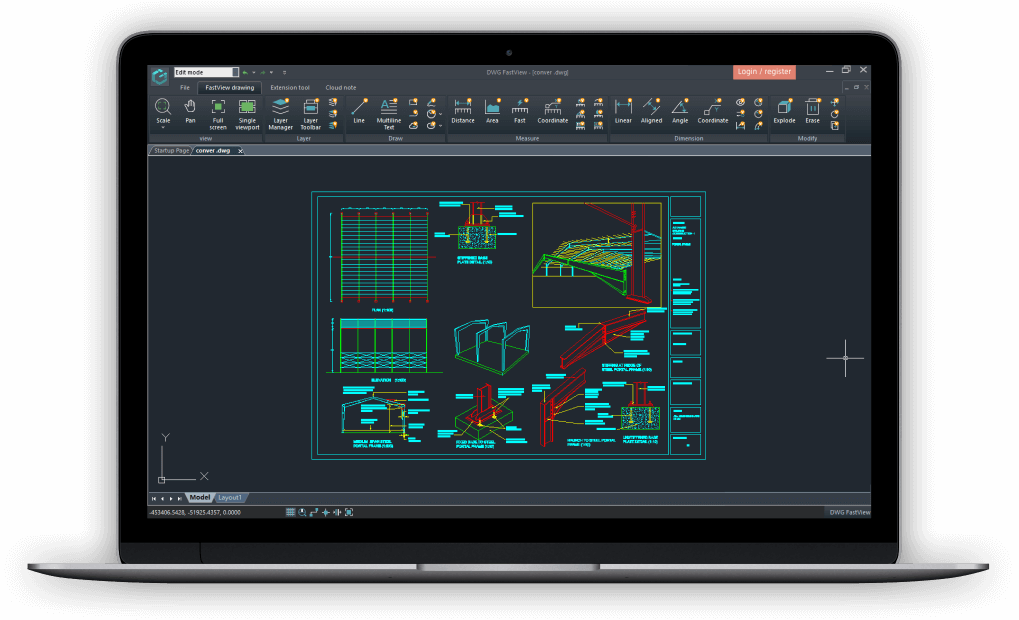
DWG FastView for Windows (shown on a laptop) with a steel portal frame drawing open: the ribbon's Layer, Draw, Measure, Dimension and Modify groups across the top.
Features
Fast viewing of DWG and DXF, including external references
DWG FastView opens AutoCAD and other 2D and 3D drawings, pans and zooms smoothly on large files, and opens several drawings at once. Gstarsoft calls it the first CAD viewer to support external references, so drawings that pull in xrefs show the referenced parts instead of blanks. Layer management, a magnifier, tables and printing are in the free version.
Markup and annotation (Premium)
DWG FastView Premium adds annotation tools on Windows: text, leaders, lines, arrows, rectangles, ellipses, sketches and revision clouds. On a phone it also adds image and audio notes, so someone on site can attach a photo or a voice comment to the exact spot in the drawing.
Dimensions and measuring (Premium)
DWG FastView Premium places real dimensions: linear, aligned, angular, arc, radius, diameter and coordinate, with dimension settings and a show/hide switch. It also measures circles and arcs and finds text in the drawing. The mobile app adds block counting, recording and exporting measurement results, and scale syncing.
Light editing
DWG FastView includes simple drawing tools (lines, polylines, ellipses, sketches and revision clouds) and modify tools such as explode and erase, enough to fix a dimension or sketch a change. With Premium, the mobile app adds trim, extend, offset, fillet and chamfer, plus layer on/off controls.
One account, cloud drawings everywhere
DWG FastView keeps drawings in its cloud, 5 GB with Premium (10 GB with Super), and the same account opens them in the Windows app, the mobile app and the browser. The web version needs no install, which helps when you're on someone else's PC.
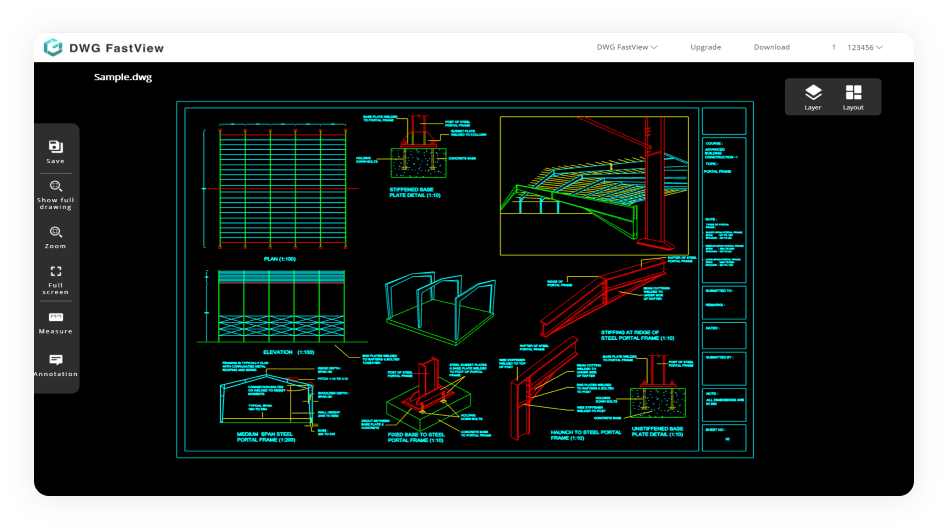
DWG FastView for Web in a browser: Sample.dwg with Save, Show full drawing, Zoom, Full screen, Measure and Annotation on the left and Layer and Layout on the right.
Benefits
- A fraction of a CAD license. $47.99 a year lets reviewers, clients and site staff open and mark up drawings without a full CAD seat.
- The same tools on the phone. One subscription covers Windows, mobile and web.
- Nothing lost when you stop paying. Your drawings stay stored after Premium expires; you only lose the Premium tools.
- A maintained product. The Windows installer on the download page was updated in November 2026.
Real-World Uses
- A site visit: open the latest floor plan on a phone, measure a wall run, and leave a photo note where the as-built differs.
- Client review: a homeowner marks revision clouds and text notes on an architect's DWG and sends it back.
- Estimating: count blocks (doors, fixtures) on mobile and export the measurement results.
- A quick fix in the office: correct a dimension or add a leader note on the PC without waiting for the drafter.
Who It's For, and Who Should Skip It
DWG FastView Premium suits contractors, project managers, estimators, students and clients who read CAD drawings more than they draw them, especially across PC and phone.
Skip it if you only need to look at a DWG now and then: the free version and Autodesk's free DWG TrueView already do that. If you draft for a living, you need a full CAD program such as AutoCAD or GstarCAD, not a viewer. And if you dislike subscriptions, this is one: there's no one-time license on the order page. There's no Mac desktop app; Mac users rely on the web version.
Usage Guide
- Download the Windows installer with the button on this page and run it.
- Open a DWG or DXF from the Startup Page or by dragging it into the window; switch between Model and Layout tabs at the bottom.
- Register a free DWG FastView account (Login / register at the top right) to use cloud files and the mobile and web versions.
- After buying Premium, you get a confirmation email at your billing address, and the subscription shows in the Account Center. Sign in to the apps with your DWG FastView account, which may differ from your billing email.
- Use the Measure and Dimension groups for measurements and the annotation tools for markup, then save to the cloud to share.
Before you buy
- Both Premium plans renew automatically: yearly at $47.99, monthly at $7.99. The yearly plan works out at about $4 a month.
- Try the free version on your own drawings first. If Premium doesn't suit you, the refund is full within 7 days and pro-rated after that.
- 3D drawing view needs the Super plan, which isn't on this order page.
Where it falls short
- Tools moved behind the paywall. Mobile users have complained that features which used to be free, such as basic annotation, now need Premium.
- Ads in the free mobile app. Premium removes them; the free version can feel cluttered.
- Not a drafting tool. Editing is limited to simple drawing and modify commands.
- Price differs by where you buy. The order page here was $2 a year and $3 a month above the vendor's listed prices on the day we checked.
What Users Say
Apple App Store (4.5 out of 5 from 1.1K ratings)
"Great, Simple and Intuitive Interface for Quick Edits": "it was immediately clear 1, how to import and 2, get started on leader lines to add the information." comaed, October 2021
"Want to give it 5 stars but...": "I love the app and was very impressed but overwhelmed when I first started using it" ShawnLaughlin, October 2019
"Just another BS subscription!": "I want to be able to purchase the app if I want it and use it on my device forever." Woodshop Whizzard, September 2020
"New update is plain awful purely greedy for money": "These were basic options and now they are locked behind a paywall for absolutely no reason" sendblink23, April 2022
"Don't waste your time and money!!!! Super dishonest. Won't work.": "What a horrible company that will force you to pay for something ahead of time without letting you know if it even works." Cf123!!!, November 2024
"Layout": "when I convert DWG files to PDF, it creates corrupted PDFs." EL INGE RT, who otherwise calls the app excellent
Business review sites
On G2, the earlier desktop edition, DWG FastView Plus, averages 4.3 out of 5 from 10 reviews, and DWG FastView 4.2 from 4; Capterra shows 4.3 from 7 reviews for DWG FastView Plus. Reviewers there mention that it loads faster than AutoCAD and handles DWG and DXF, and the most common criticism is that the editing tools are limited.
The recurring themes
Users like DWG FastView for speed and a simple interface for viewing and quick markup. The complaints are about the business model: subscriptions instead of a one-time purchase, ads in the free app, and features moving from free to Premium. Since the yearly plan is a subscription by design, that's the main question to settle before buying.
Comparisons
DWG FastView vs Autodesk DWG TrueView
DWG TrueView is free and comes from AutoCAD's maker, but it's a Windows-only viewer and converter with no markup or editing. DWG FastView is lighter, adds mobile and web versions with a shared cloud, and Premium adds markup and dimensions. Choose TrueView for free, view-only work on one PC; choose DWG FastView Premium if you annotate or work across devices.
DWG FastView vs a full CAD program
GstarCAD or AutoCAD draft and edit everything, at many times the price. DWG FastView covers viewing, measuring and markup for the people who don't draft.
Editions and Pricing
| Plan | Price | Cloud storage | What it adds | Buy |
|---|
| Free | Free | Basic | Viewing, layers, printing, simple drawing; ads on mobile | Free download |
| Premium Yearly | $47.99 a year | 5 GB | Annotation, dimensions, text find, measuring, no mobile ads | Buy Yearly |
| Premium Monthly | $7.99 a month | 5 GB | Same as yearly, cancel any month | Buy Monthly |
| Super | $67.99 a year on the vendor's site | 10 GB | Premium plus 3D drawing view on Windows, mobile and web | Vendor's site only |
FAQs
Does one DWG FastView Premium subscription work on my phone too?
Yes. DWG FastView Premium is tied to your account, so it works in the Windows app, the iOS and Android apps and the web version. Sign in to the mobile app with your DWG FastView account email or social login, which isn't necessarily your billing email.
What happens to my drawings if DWG FastView Premium expires?
Nothing is deleted. DWG FastView keeps your data after Premium ends; you can still use the free version, just without the Premium features.
Can I get a refund on DWG FastView Premium?
Yes. Gstarsoft gives a full refund within 7 days of purchase, and after that a refund for the days remaining on the subscription.
Is there a one-time license for DWG FastView?
Not for DWG FastView Premium: it's sold as a monthly or yearly subscription. The older DWG FastView Plus desktop license is no longer what Gstarsoft sells.
Does DWG FastView show 3D models?
DWG FastView opens 2D and 3D drawings, but the dedicated 3D drawing view is part of the Super plan, not Premium.
Is there a Mac version of DWG FastView?
Not a desktop app. Mac users can use DWG FastView for Web in a browser, and the iPad and iPhone apps.
How do I confirm my DWG FastView purchase went through?
After payment, DWG FastView sends an email to your billing address, and the subscription appears in the Account Center on the website.
System Requirements
- Windows PC for the desktop app (about 126 MB installer)
- iOS or Android for the mobile app; any modern browser for the web version
- A free DWG FastView account for cloud files and Premium
Conclusion
DWG FastView Premium is worth $47.99 a year if you mark up and measure CAD drawings regularly but don't draft them, especially if you switch between a PC and a phone on site. One subscription gives you annotation, real dimensions and cloud storage everywhere. The main reason not to buy: it's a subscription, and if you only need to look at drawings, the free version or a free viewer is enough. Try the free app on your own files first; the 7-day full refund covers a wrong guess.
Download Free VersionBuy Premium YearlyBuy Premium Monthly