dotConnect for Dynamics 365: Work with Dynamics 365 Data in .NET Using Plain SQL and EF Core
You need your .NET app to read contacts from Dynamics 365, update a few opportunities, and push new leads back in. The usual route is Microsoft's Dynamics 365 API: entity references, request objects, paging cookies and a different way of thinking about data than the SQL your team already writes every day. A small integration turns into a week of reading API docs.
dotConnect for Dynamics 365 (formerly dotConnect for Dynamics CRM) from Devart takes a different route. It's an ADO.NET data provider, so Dynamics 365 shows up in your code as a connection, a command and a data reader, the same classes you already use for SQL Server or Oracle. You write SELECT name, createdon FROM role, and the provider turns it into Dynamics 365 API calls for you.
Quick facts
- Version: 3.2.223
- Developer: Devart
- Type: ADO.NET data provider for Microsoft Dynamics 365, with ORM support
- Platforms: .NET 5 to 10, .NET Core 3.1, .NET Framework 4.5 to 4.8, ASP.NET Core, Blazor and .NET MAUI, on Windows, Linux and macOS (x86 and x64)
- Languages: C#, VB.NET and F#
- ORMs: Entity Framework Core 1 to 10, Entity Framework 4 to 6, Dapper 1.x and 2.x, NHibernate 1.x to 5.x
- IDE: design-time integration with Visual Studio, from older releases up to the newest, and NuGet packages for VS Code, Rider and other IDEs
- Price: $339.95 USD for a single-developer license with one year of updates and support
- Trial: fully functional for 30 days, no credit card required
- Guarantee: 30-day money-back guarantee
- Installer size: 18.75 MB
Before you buy: which license you need
The $339.95 license is the Developer edition. It covers one developer, on one or more development workstations, building and testing applications. That's enough to ship a desktop or client app: the people who run your app don't need their own Devart license, and there are no runtime fees.
If your code will run on a server that many users reach at once (a web server, an application server, a batch server), Devart asks for the Server edition, priced at $800 on its store. Companies that want unlimited machines, or that redistribute the provider inside a product they sell, need a Site or OEM license. Also note that Entity Developer, Devart's visual model designer that appears in its tutorials, is sold separately.
Download Free TrialBuy Now
Overview
dotConnect for Dynamics 365 sits between your application and Dynamics 365. Your code opens a DynamicsConnection, runs a DynamicsCommand, and reads rows with a DynamicsDataReader or fills a DataTable with a DynamicsDataAdapter. Accounts, contacts, leads, contracts, products, campaigns and opportunities all appear as tables you can query.
Behind the scenes, the provider decides how much work to push to Dynamics 365. Simple queries are compiled straight into Dynamics 365 API calls and run on the Dynamics side. Complex queries are split: part runs in Dynamics 365, and a local SQL engine in the provider finishes the job, for example a JOIN the API can't do on its own. Either way, your app just gets rows back.
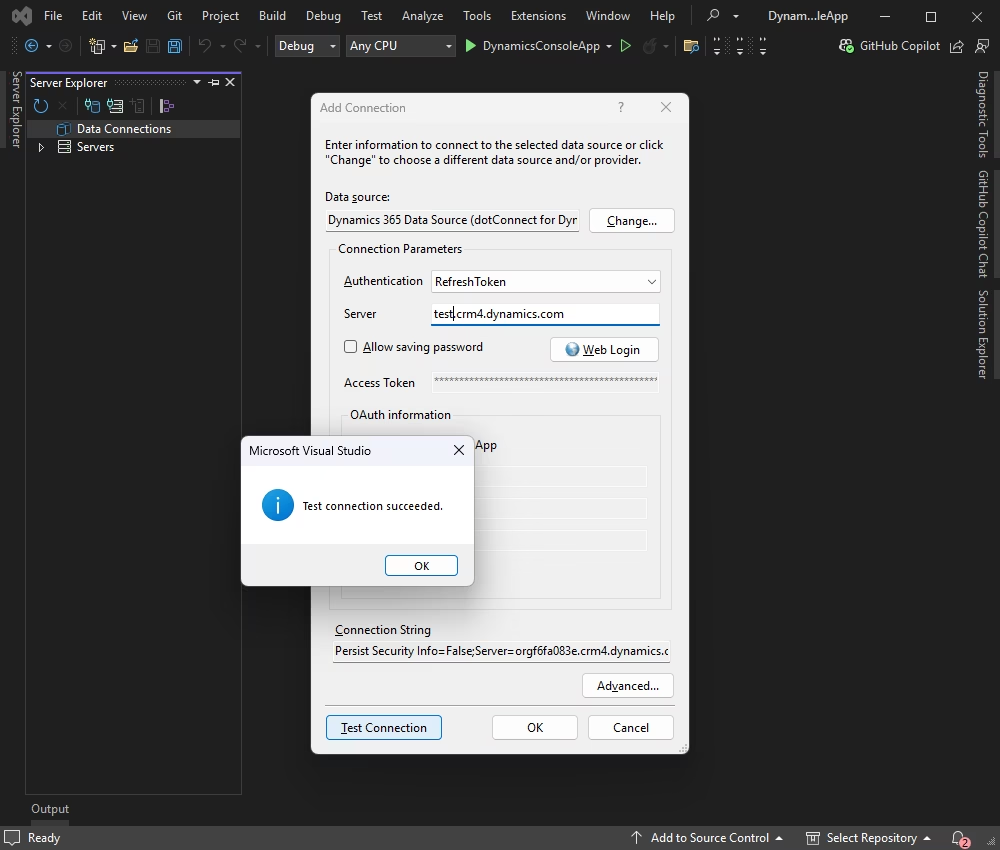
Visual Studio's Add Connection dialog with the Dynamics 365 data source from dotConnect selected: RefreshToken authentication, a crm4.dynamics.com server, a Web Login button, and a "Test connection succeeded" message.
Features
SQL against Dynamics 365, including writes
The built-in engine supports SQL-92 SELECT statements with complex JOINs and WHERE conditions, plus INSERT, UPDATE and DELETE. You can update data either by changing rows returned by a DynamicsDataAdapter and calling its Update method, or by running DML statements directly through a DynamicsCommand. Every Dynamics 365 data type is supported, and paged access to query results keeps large reads manageable.
ORM support: EF Core, EF6, Dapper and NHibernate
If your team prefers objects to SQL strings, the provider plugs into Entity Framework Core 1 through 10 (via the Devart.Data.Dynamics.EFCore package), classic Entity Framework 4 to 6, Dapper and NHibernate. EF support includes change tracking, object caching and inheritance mapping (TPH, TPT and TPCT). Each recent release has updated the provider to the latest EF Core 8, 9 and 10 versions.
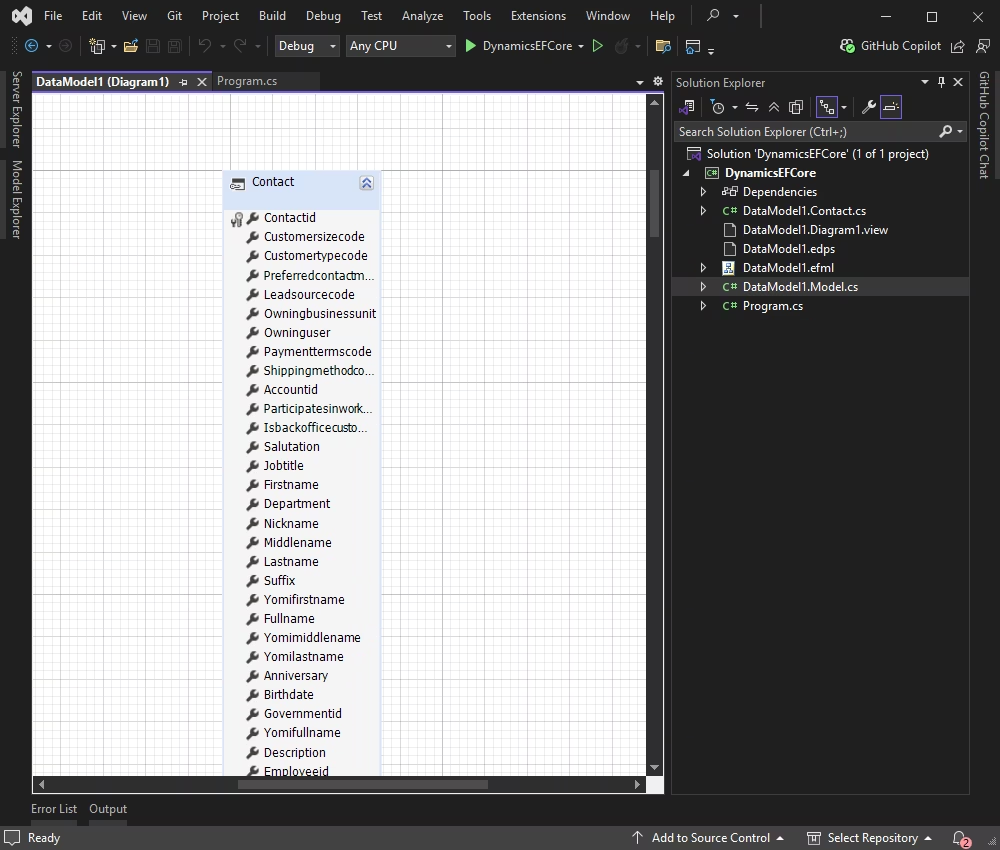
An EF Core model in Visual Studio built with Entity Developer (sold separately): the Dynamics 365 Contact entity with fields such as Firstname, Lastname, Jobtitle and Birthdate, and the generated DataModel1 classes in Solution Explorer.
Visual Studio tools for browsing and querying data
In Visual Studio, you get a Dynamics 365 data source in Server Explorer, so you can connect, expand the object tree, and preview data without writing code. Design-time editors add IntelliSense descriptions, syntax highlighting and SQL code completion. In VS Code, JetBrains Rider, Cursor or Windsurf, you use the NuGet packages without the design-time tools.
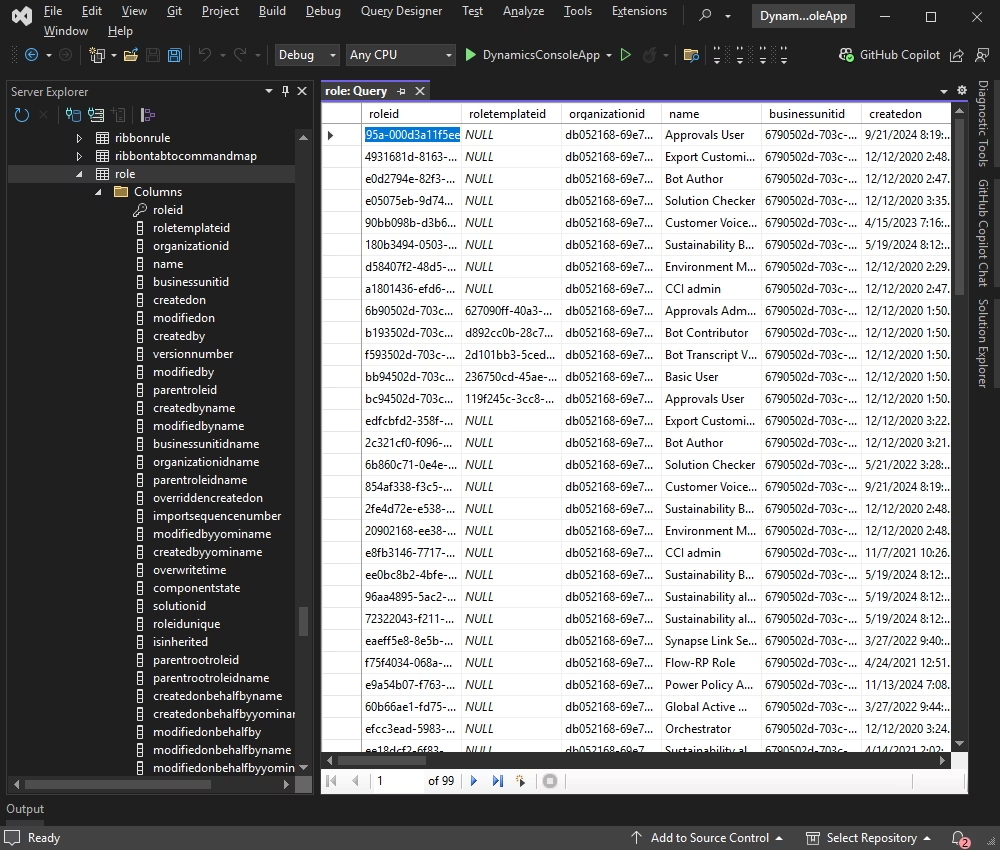
Server Explorer with the Dynamics 365 role table expanded to show its columns, and a role query open in the Query Designer listing role IDs, names, business units and creation dates across 99 pages.
Two ways to sign in with OAuth
The provider can retrieve an OAuth token interactively at design time in Visual Studio, or at runtime, where your app opens a browser sign-in with just Authentication Type=RefreshTokenInteractive in the connection string. If you register your own Azure app, you pass its Client Id and Client Secret instead.
Speed and bulk loading
Intelligent fetch block sizing, connection pooling and batch processing cut round trips. For moving lots of records into Dynamics 365, the DynamicsLoader component is built for fast data loading.
Security and SQL tracing
Connections run over SSL/TLS, can go through a proxy server, and the provider can operate in FIPS 140-2 mode on Windows. When a query behaves oddly, the DynamicsMonitor component and Devart's free dbMonitor tool show the SQL your app sent, per component, with optional output to the IDE.
Benefits
The big win is that your team doesn't have to learn the Dynamics 365 API to ship an integration. Developers who know ADO.NET and SQL are productive on day one, and the code they write looks like the data access code in the rest of your app. That also makes it easier for the next person to maintain.
EF Core support means you can treat Dynamics 365 like any other database in a modern .NET project: LINQ queries, a DbContext, and entity classes. And since the provider runs on Linux and macOS as well as Windows, a service that syncs Dynamics data can live in a Linux container instead of a Windows-only box.
Real-World Uses
- A customer portal: an ASP.NET Core or Blazor site that shows customers their own cases, contracts and orders pulled live from Dynamics 365, on a Server license.
- Nightly sync: a .NET worker service that reads new leads from a web form database and bulk-loads them into Dynamics 365 with DynamicsLoader.
- Reporting extracts: a scheduled job that JOINs accounts and opportunities with SQL and writes the results to a data warehouse table.
- Field app: a .NET MAUI app that lets sales staff look up and update contacts. Devart has a step-by-step MAUI guide for exactly this.
- Legacy WinForms tools: an older .NET Framework 4.8 app that binds a grid to a
DataTable filled from Dynamics 365 with a data adapter.
Who It's For
This is a tool for .NET developers who need Dynamics 365 data inside their own applications, especially teams that already use EF Core, Dapper or NHibernate, or that have a lot of SQL skill and little Dynamics API experience. It isn't meant for analysts who want Dynamics data in Excel or Power BI without writing code. Devart sells separate products for that (see Comparisons).
Usage Guide
- Install. Run the 18.75 MB installer. It adds the Visual Studio integration and the assemblies for .NET Framework projects. For .NET 5 and later projects you can instead add the NuGet package with
dotnet add package Devart.Data.Dynamics.
- Connect in Visual Studio. In Server Explorer, right-click Data Connections, choose Add Connection, pick the Dynamics 365 data source, enter your server (for example
yourorg.crm.dynamics.com), click Web Login, and test the connection.
- Explore your data. Expand the connection to see Dynamics tables and columns, and open a query to preview rows.
- Connect in code. Create a
DynamicsConnection with a connection string that includes your server, the authentication type and your License Key, then call Open().
- Query. Run a
DynamicsCommand such as SELECT roleid, name, createdon FROM role and loop through a DynamicsDataReader, or fill a DataTable with a DynamicsDataAdapter.
- Write back. Use INSERT, UPDATE or DELETE statements, or edit the
DataTable and call the adapter's Update method.
- Go further with EF Core. Add
Devart.Data.Dynamics.EFCore, scaffold or design a model, and query with LINQ.
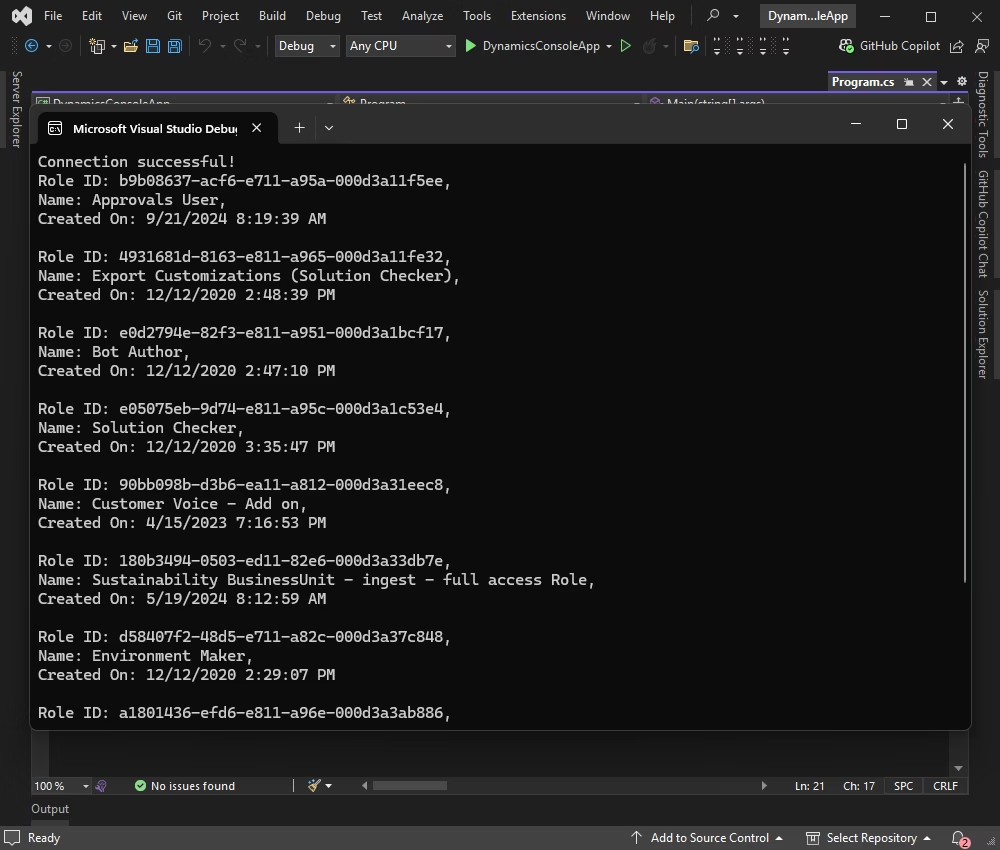
A C# console app built on dotConnect printing "Connection successful!" followed by Dynamics 365 role IDs, names such as Approvals User and Bot Author, and their creation dates.
Tips
- Where you put the license depends on the project. In .NET 5 and later projects, the license key goes in the
License Key connection string parameter. In .NET Framework projects, you install the licensed build from Devart's Customer Portal.
- To deploy, copy
Devart.Data.Dynamics.dll, Devart.Data.SqlShim.dll and Devart.Data.dll into your app's folder, or use the setup's "Minimal installation" option. A full install isn't needed on target machines.
- Upgrading means uninstalling the old version (along with Entity Developer and LinqConnect, if installed) before installing the new one from the Customer Portal.
Comparisons
dotConnect vs. coding against the Dynamics 365 API
Microsoft's own tools have you work with the Dynamics 365 API directly. That costs nothing extra, but you learn its object model and its query style. dotConnect trades a license fee for a familiar ADO.NET and SQL surface, ORM support and design-time tools. If your integration is one small call, the API is fine. If it's a sizable app with many queries and an EF Core data layer, the provider saves time.
Other Devart products for Dynamics 365
- Excel Add-in for Dynamics 365: for people who want Dynamics data in Excel, with no code.
- SSIS Data Flow Components for Dynamics 365: for ETL packages in SQL Server Integration Services.
- MCP Server for Dynamics 365: a free download that gives AI tools access to Dynamics 365 data. Recent dotConnect versions also include a demo MCP server among the samples.
- dotConnect Universal: a single provider for SQL Server, Oracle, PostgreSQL, MySQL, SQLite, DB2, InterBase, Access and Firebird, if you need many databases rather than Dynamics 365.
Editions and Pricing
- Developer: $339.95. One developer, any number of development workstations, for building and testing applications.
- Server: $800. One server used by one organization, including web, application and batch servers and multi-user workstations.
- Site / OEM: from $4,999. Site covers unlimited computers in one company. OEM adds royalty-free redistribution with your application, silent installation and unlimited installs.
Every license includes one year of updates and support, with two- and three-year options and premium support available at checkout. Devart also sells perpetual licenses, which keep working after the subscription ends, and backs purchases with a 30-day money-back guarantee.
FAQs
Do I still need the installer if I use NuGet?
Only for .NET Framework projects. .NET Core and .NET 5 and later projects use the NuGet packages. .NET Framework projects use the assemblies from the installer. The installer also adds the Visual Studio design-time tools.
Is it the same product as dotConnect for Dynamics CRM?
Yes. Devart renamed dotConnect for Dynamics CRM to dotConnect for Dynamics 365. The NuGet package is still Devart.Data.Dynamics.
Which Dynamics 365 versions does it support?
Devart says it supports all versions of the Microsoft Dynamics 365 API.
Does it need any Microsoft client libraries?
No. The provider connects to Dynamics 365 without extra client libraries.
What happens when the year of updates ends?
With a perpetual license, you can keep using the version you have indefinitely. You only need to renew to get newer versions and support.
Can I distribute my app without paying more?
Yes, as long as you hold a valid license. End users don't need a Devart license and there are no deployment fees. Only the three runtime assemblies may be redistributed, and they must be used only by your solution. Selling the provider as part of a product to third parties is what the OEM license is for.
Does it work on Linux and Mac?
Yes, for .NET 5 to 10 and .NET Core 3.1 applications, on x86 and x64. Devart's release notes mention fixes for applying the license key on Red Hat-based distributions such as RHEL, AlmaLinux and Rocky Linux. The Visual Studio design-time tools are Windows only.
How often is it updated?
Often. The revision history shows several releases a year, each bringing EF Core updates and fixes. Version 3.0 added support for .NET 10 and the newest Visual Studio.
System Requirements
- Operating system: Windows, Linux or macOS, x86 or x64
- Frameworks: .NET 5, 6, 7, 8, 9 or 10, .NET Core 3.1, or .NET Framework 4.5 to 4.8
- IDE for design-time features: Visual Studio, from older releases up to the newest
- Service: a Microsoft Dynamics 365 organization and an account that can sign in to it
Conclusion
dotConnect for Dynamics 365 is for .NET teams who would rather write SQL or LINQ than learn another vendor API. It makes Dynamics 365 behave like a database your code already understands, keeps up with new .NET and EF Core releases, and runs everywhere .NET does. The licensing is the part to get right: $339.95 is the developer seat, and server-side apps need the Server edition. Start with the 30-day trial against a sandbox org and see how much of your integration code simply disappears.
Download Free TrialBuy Now