X-Mirage for PC: Mirror and Record an iPhone or iPad on a Windows PC
X-Mirage for PC is a $16 one-time-purchase Windows program that turns your computer into an AirPlay receiver, so an iPhone or iPad can show its screen on the PC over Wi-Fi and you can record it with one click. It suits teachers, app demonstrators and gamers who want an iPhone on a bigger screen, as long as the 15-day trial works with your current iOS version.
Windows has no AirPlay receiver of its own. Its Wireless Display feature uses Miracast, which an iPhone doesn't speak. X-Mirage fills that gap for less than most alternatives.
Quick facts
- Version: 3.0.4 in the current installer
- Developer: X-Mirage
- Runs on: Windows 10, 8 and 7, as the vendor states it. A separate Mac version exists.
- Works with: iOS 9 to 14 as the vendor states it, plus Google Cast senders
- Installer size: 35 MB
- Price: $16 one-time at checkout, 1 PC, free updates
- Trial: 15 days
What we checked: product version 3.0.4 and size (35.2 MB) of the vendor's installer file, which is dated May 6, 2025, and the price of $16 with a lifetime term on the order page, on November 6, 2026. We didn't install it or mirror a device, so we can't confirm it works on iOS 15 or later or on Windows 11.
Before you buy
- The vendor's compatibility list stops at iOS 14 and Windows 10. One third-party writer reports it working with iOS 17 and Windows 11, but we couldn't confirm that. Use the full 15-day trial on your own iPhone before you pay.
- Both devices need the same network. The vendor recommends 802.11n Wi-Fi or Ethernet for the PC. Guest networks and VPNs are a common cause of the PC not showing up in the AirPlay list.
- The vendor's site looks little changed in years. Don't count on quick fixes when a new iOS version arrives.
Download Free TrialBuy Now
Overview
X-Mirage runs in the background on your PC and appears as a screen in your iPhone's Screen Mirroring list, the same way an Apple TV would. Choose it and the phone's display opens in a window on the PC. Everything on the screen shows up: apps, games, photos, videos and presentations. A record button captures the window to a video file.

Vendor image of two devices mirrored to separate windows on a Windows desktop, one of them playing a video.
Features
Mirror more than one device at once
X-Mirage for PC shows several iPhones or iPads in separate windows on the same PC. That's useful for comparing two apps side by side or letting a few people show their screens in a classroom. You can name your receiver so it's easy to pick out, and set a password to keep other people off it.
Record the screen with a voiceover
X-Mirage for PC records the mirrored screen with one click, and it can add your voice from the PC's microphone. Press the record icon to start and again to stop. The vendor aims this at app tutorials, lessons and game videos.
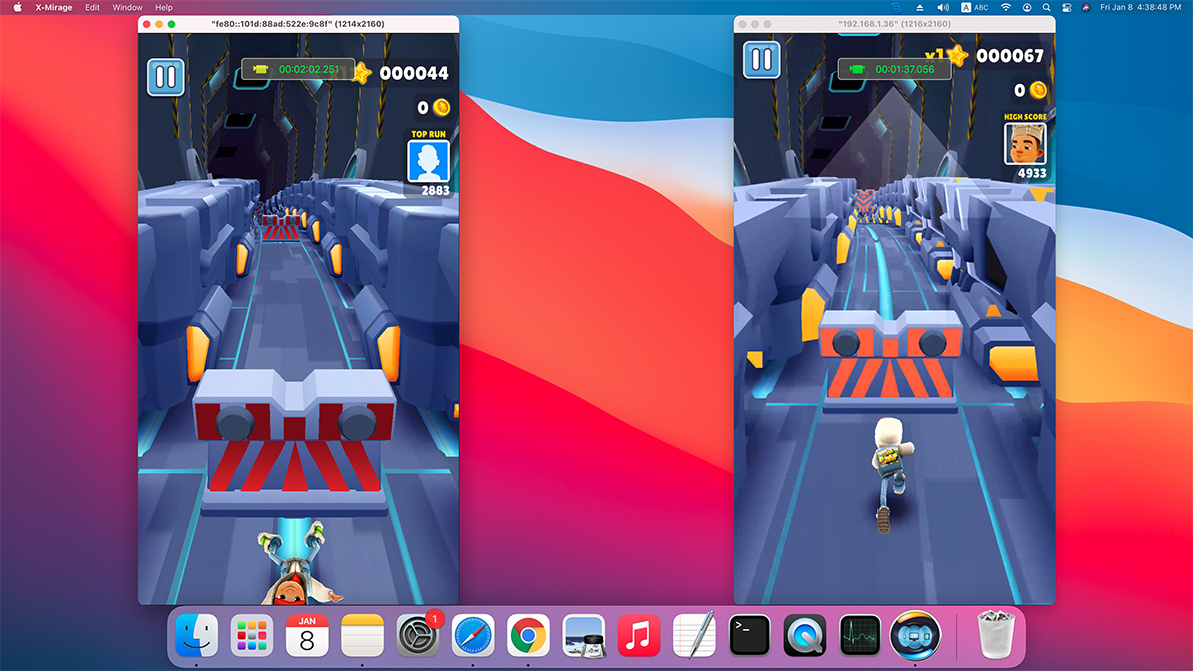
Two iPhones mirrored into separate windows. The vendor's image was taken on the Mac version, and the idea is the same on PC.
Stream video and audio to the PC
X-Mirage for PC also receives AirPlay video and audio, not only full mirroring. A media bar on the PC handles play, pause, volume and track changes, so you don't need to pick up the phone.
Receive Google Cast too
X-Mirage for PC adds Google Cast receiving, which lets Android phones and Chromebooks that support casting show on the same PC, according to the vendor.
Real-World Uses
- A teacher mirrors an iPad to the classroom PC and its projector, and moves around the room while using it.
- An app developer shows a build to a client on a laptop and records a walkthrough with narration.
- A gamer records an iPhone game with no capture hardware.
- A presenter runs slides from an iPad through the meeting room PC.
Who It's For, and Who Should Skip It
X-Mirage for PC fits someone with a one-off need to see or record an iPhone on a Windows PC, for whom $16 is easy to risk after a trial that works.
Skip it if you depend on this for paid work on the latest iOS, since it has no stated support past iOS 14. A receiver with a current compatibility list is safer there. If you only want to copy files or photos, this isn't that kind of tool. And if you just need an iPhone on a TV, an Apple TV or AirPlay smart TV avoids the PC altogether.
Usage Guide
- Download and install X-Mirage on your PC, and allow it through the Windows firewall if asked.
- Connect the PC and iPhone to the same Wi-Fi network.
- On the iPhone, open Control Center and tap Screen Mirroring.
- Choose the X-Mirage entry with your PC's name.
- Use the record button on the PC to capture, and the password setting if you share the network.
- To stop, return to Screen Mirroring and tap Stop Mirroring.
Where it falls short
- Current iOS support is unconfirmed. The vendor's pages still say iOS 14, and Apple's AirPlay changes can break third-party receivers.
- The download page lags the file. It lists Windows version 3.0.1, while the installer itself reports 3.0.4.
- There's no fresh user feedback. We found no recent independent reviews, so you're relying on your own trial.
What Users Say
Reviews quoted on the vendor's site
These are old and chosen by the vendor, and the user comments read like first impressions, so give them little weight.
- "Whether you just want a way to play iOS games on the big screen — where your iMac, and not the TV, is the big screen — or want to record app tutorials and more, X-Mirage is a great way to do it." AppStorm
- "I love being able to record easily. As designer this is very important for communicating with developers/clients." J. R.
- "This app will absolutely helpful for me building iOS apps tutorials." Ari Arsyadi
Product Hunt lists X-Mirage with 86 upvotes but no written reviews. That's honestly all the user evidence we could find, which is one more reason to rely on the trial.
Editions and Pricing
X-Mirage for PC costs $16 on the order page behind the buttons here, and the vendor's own store shows $19.99 for the same single-user license on November 6, 2026. The license lets you use it forever, with free updates and technical support. The Mac version is a separate purchase.
FAQs
Does X-Mirage work on Windows 11?
X-Mirage's vendor lists Windows 10, 8 and 7. Windows 11 isn't listed, though one writer reports it working there, so test the 15-day trial first.
Does X-Mirage for PC work with the latest iPhone?
X-Mirage's vendor states compatibility up to iOS 14, so a current iPhone isn't covered by that statement. The trial is the only way to find out.
Is X-Mirage a subscription?
No. X-Mirage for PC is a one-time purchase, and the order page shows no renewal.
Can X-Mirage control the iPhone from the PC?
No. X-Mirage for PC displays and records the phone's screen, and you still operate the phone by hand. The PC's media bar only handles playback.
Do I need a cable for X-Mirage?
No. X-Mirage works over Wi-Fi, with both devices on the same network.
System Requirements
- Windows 10, 8 or 7, 32-bit or 64-bit
- An AirPlay sender, iPhone 4S or iPad 2 and later, on iOS 9 to 14 as the vendor lists it
- The same network for both devices, with 802.11n Wi-Fi or Ethernet recommended
Conclusion
X-Mirage for PC is worth $16 only if the trial works on your phone. The one reason to buy it is cheap AirPlay mirroring and recording on Windows, with several devices at once. The main reason not to is that its stated support stops at iOS 14, and we couldn't confirm anything newer. Use all 15 trial days on your own iPhone, and buy only after it has worked reliably for you.
Download Free TrialBuy Now