Short answer
For most Mac owners, CleanMyMac is the one to buy: it's the most complete and most actively updated of the three, it has a real 7-day trial with every tool, and its Trustpilot score is 4.7 from over 3,000 reviews. It's also the most expensive, at $39.95 a year for one Mac.
Choose DoYourData MacClean360 if you want the basics (junk, uninstalls, duplicates, large files) on two Macs for $39 a year or $59 once, or if your Mac runs a macOS older than Big Sur. MacBooster 8 Pro is the cheapest per Mac ($49.95 a year for three), but security vendors flag it as a potentially unwanted program and its free scan has been caught inflating threat counts, so we'd only pick it if price per Mac outweighs everything else.
At a glance
| CleanMyMac | DoYourData MacClean360 | MacBooster 8 Pro |
|---|
| Developer | MacPaw | DoYourData | IObit |
| Yearly price | $39.95 for 1 Mac | $39.00 for 2 Macs | $49.95 for 3 Macs ($29.95 for 1) |
| One-time license | $119.95, 1 Mac | $59.00 lifetime, 2 Macs | $79.95 lifetime, 3 Macs |
| Free trial | 7 days, every tool (free MacPaw account) | Free trial download | Free version only scans; cleaning needs Pro |
| macOS needed | 11 Big Sur or later | 10.9 Mavericks to 26 Tahoe | 11.5 Big Sur or later |
| Apple silicon native | ✓ | ✓ | ✓ |
| Junk cleanup and uninstaller | ✓ | ✓ | ✓ |
| Duplicates and large files | ✓ plus similar photos | ✓ | ✓ plus similar photos |
| Malware scan | ✓ Moonlock engine | ✗ | ✓ (criticized, see below) |
| App updater, cloud and email cleanup | ✓ | ✗ | ✗ |
| Refund | 30 days (yearly and one-time) | 30 days | 60 days, but not for a change of mind |
| Trustpilot | 4.7 from 3,388 reviews | 3.2 from 7 (company page, none about MacClean360) | No reviews on its own page |
How we compared them
- Every price above on the order page, in US dollars: all three MacClean360 licenses and four MacBooster 8 Pro plans at checkout, and CleanMyMac's plan grid on MacPaw's store.
- The current installers from each vendor's download server: their size, date and, for MacBooster, the version and minimum macOS inside the package.
- Each vendor's feature pages, system requirements and refund terms.
- Independent reviews: Trustpilot, the Mac App Store, Macworld, macsecurity.net and Malwarebytes' threat database.
What we checked: MacClean360 and MacBooster prices at checkout and both installers on November 18, 2026, and CleanMyMac's installer and version history on November 18, 2026 with its plan grid as of November 17, 2026. We compared features, prices, trials and reviews; we didn't run the three cleaners side by side on one Mac, so we make no claims about which one finds more junk.
CleanMyMac: the most complete, and the priciest
CleanMyMac by MacPaw, version 5.7.4 (November 6, 2026)
Price: $39.95 a year for 1 Mac, $9.95 a month, or $119.95 one-time; 2- and 5-Mac plans cost less per Mac
Runs on: macOS 11 Big Sur or later, Intel and Apple silicon
Best for: anyone who wants cleanup, uninstalls, startup items, app updates and a malware check in one reviewed scan
CleanMyMac is the successor to CleanMyMac X and the best-known Mac cleaner, made since 2008. Its Smart Care scan runs five jobs at once (cleanup, malware protection, performance, app updates and clutter) and shows a card for each with a Review button, so nothing is deleted until you've looked at the list and pressed Run. Each job also has its own module: Cleanup for caches, logs and unused language files, Protection with MacPaw's Moonlock malware engine, Performance for login and background items, Applications for complete uninstalls and an updater, and My Clutter for duplicates, similar photos and large files.
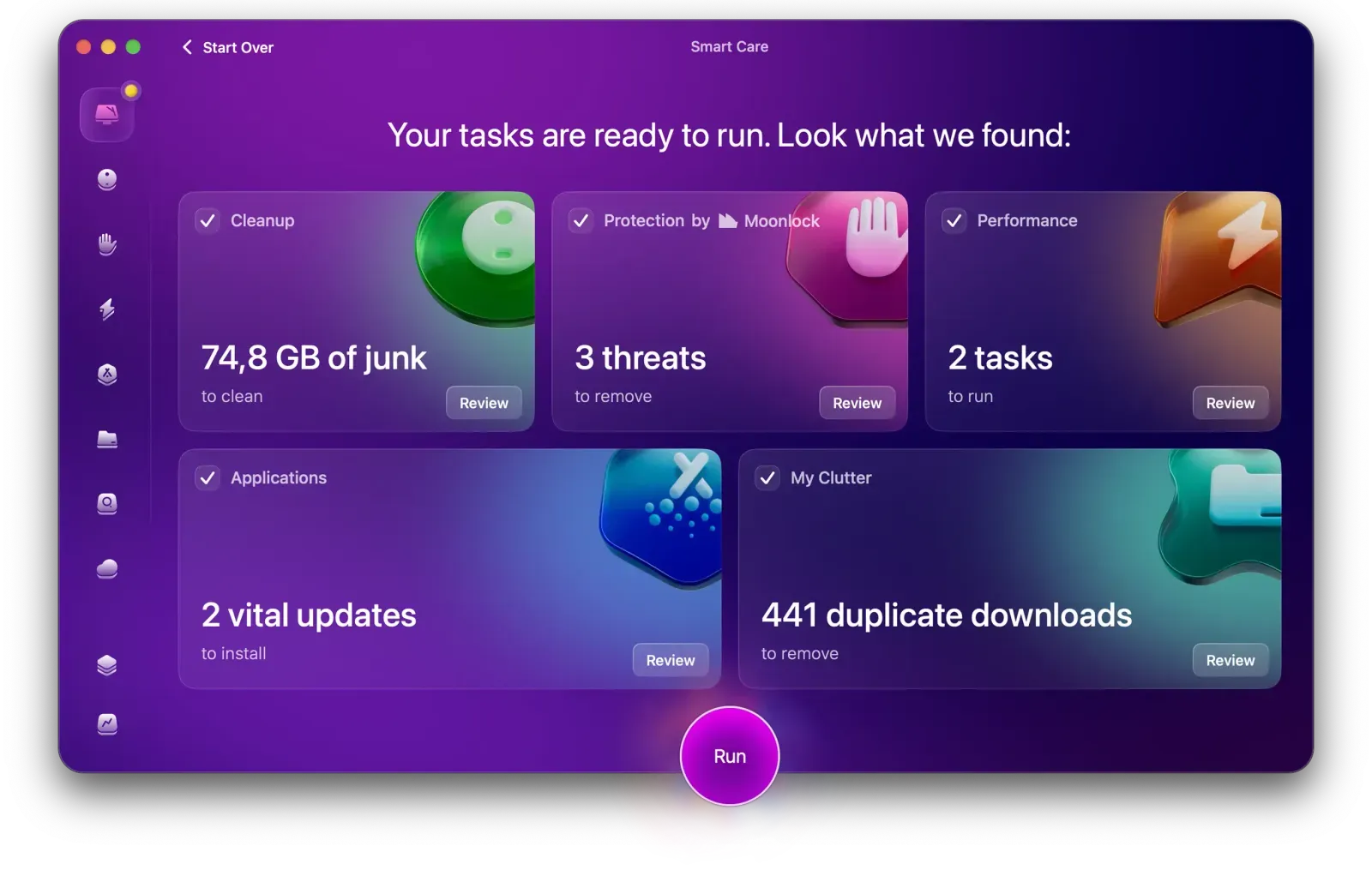
Smart Care results: 74.8 GB of junk, 3 threats, 2 performance tasks, 2 app updates and 441 duplicate downloads, each with its own Review button.
CleanMyMac is the only one of the three that keeps growing: Space Lens draws your disk as bubbles sized by folder, Cloud Cleanup shows what fills iCloud Drive, Google Drive, OneDrive and Dropbox, and between August and October 2026 MacPaw added a Notification Center, Email Cleanup for Gmail, a Screen Cleaning Mode and a Browser Care extension for Chrome. It's notarized by Apple, and the trial is the real app with every tool for 7 days.
Its weak spots are price and the malware side. Macworld's review of CleanMyMac 5 gave it an Editors' Choice badge but called the malware results "disappointing considering MacPaw's well-marketed and hyped use of the Moonlock Engine", and listed "More expensive than some rivals" as a con. One-time licenses don't include the next major version, and Trustpilot complaints are mostly about account lockouts and billing after renewal rather than the cleaning.
What we like
- One scan covers junk, malware, startup items, app updates and clutter
- Every finding has a Review step before anything is removed
- Full 7-day trial and a 30-day money-back guarantee on yearly and one-time plans
- Updated constantly, with cloud and Gmail cleanup no rival here has
- Strong reputation: 4.7 on Trustpilot from 3,388 reviews
Watch out for
- Most expensive per Mac of the three
- Malware scanning is no substitute for a security suite
- One-time licenses don't cover the next major version
- Billing and account complaints after renewals
- Audio and video pros should review caches before cleaning
What users say. "After each use, my computers run faster, and I feel more confident that there are no viruses or malware," wrote Jim Hopson on Trustpilot (November 16, 2026). The critical voices are specific: "Unfortunately, it seems that it throws caution to the wind, and deletes important stuff too," warned a reviewer titled "DAW users may wish to think twice" (October 24, 2026), and Ben Poole wrote that "it is now expensive and there are more options" (October 12, 2026).
Download CleanMyMac Free TrialBuy CleanMyMac
DoYourData MacClean360: the basics for less
DoYourData MacClean360, version 6.2 (January 8, 2026)
Price: $39 a year, $19 a month or $59 lifetime, each license for 2 Macs
Runs on: macOS 10.9 Mavericks through macOS 26 Tahoe, Intel and Apple silicon
Best for: a household with two Macs, older Macs, and people who'd rather pay once
DoYourData MacClean360 puts nine cleanup tools in one window, grouped into Cleanup (Junk Cleaner, Uninstaller, Duplicate File Cleaner, Large/Old File Cleaner), Optimization (Disk Manager, Memory Manager, Startup Items Manager) and Privacy (Internet Cleaner, File Shredder), with a System Status page on top. Each tool scans, shows a list and waits for you to choose what to remove. A menu bar utility adds quick switches such as Hide Desktop Icons, Keep Awake and Display Hidden Files.

Duplicate File Cleaner results, sorted by name with selected and total counts for each file.
MacClean360's strongest arguments are price and reach. Every license covers two Macs, the lifetime license is $59, half of CleanMyMac's one-time price for one Mac, and it's the only one of the three that still supports macOS versions older than Big Sur, back to 10.9. The 8 MB installer is tiny next to CleanMyMac's 211 MB.
What it doesn't have: a malware scanner, an app updater, cloud cleanup or a single combined scan, and it changes slowly (the current build dates from January 2026). Independent reviews are almost nonexistent: DoYourData's Trustpilot page has 3.2 from seven reviews, none of them about MacClean360, so the praise available comes from the vendor's own page. The vendor's claim that your Mac will run many times faster is marketing; expect real gains mainly on a Mac that's nearly out of disk space.
What we like
- Two Macs on every license, and a $59 lifetime option
- Runs on macOS 10.9 through 26 Tahoe
- Covers the jobs that recover the most space: junk, duplicates, large files, uninstalls
- File shredder and browser cleanup included
- 30-day money-back guarantee
Watch out for
- No malware scan, app updater or cloud cleanup
- Almost no independent reviews to go on
- Slow release pace (last build January 2026)
- Shredded files can't be recovered: back up first
What users say. The customers DoYourData quotes describe best cases: "Run MacClean360 to scan my MacBook Air, it finds about 6GB junk! Amazing," wrote Monaly, and Rick says "I have been using this cleaner for 5 years, it is very easy-to-use and offers many useful tools, such as uninstaller, internet cleaner, shredder, etc." With no independent testing to weigh against them, the free trial is the best way to judge it.
Download MacClean360 Free TrialBuy MacClean360
MacBooster 8 Pro: cheapest per Mac, with a reputation problem
MacBooster 8 Pro by IObit, version 8.3.2
Price: $49.95 a year for 3 Macs (auto-renews), $29.95 for 1 Mac, $99.95 for 5 Macs, or $79.95 lifetime for 3 Macs
Runs on: macOS 11.5 Big Sur or later, Intel and Apple silicon
Best for: households with three Macs who will read every scan result themselves
MacBooster 8 Pro is IObit's Mac counterpart to Advanced SystemCare. A System Status screen runs System Junk, Virus & Malware Scan and Turbo Boost in one go, and seven tools sit below it: Memory Clean, Privacy Protection, Uninstaller, Startup Optimization, Large & Old Files, Duplicate Finder and Photo Sweeper. The cleanup tools do real work: in Macworld's test, Duplicate Finder found 34.4 GB of redundant files and Photo Sweeper found 5,340 duplicates, and even that critical review liked Startup Optimization's clear keep-or-remove advice.
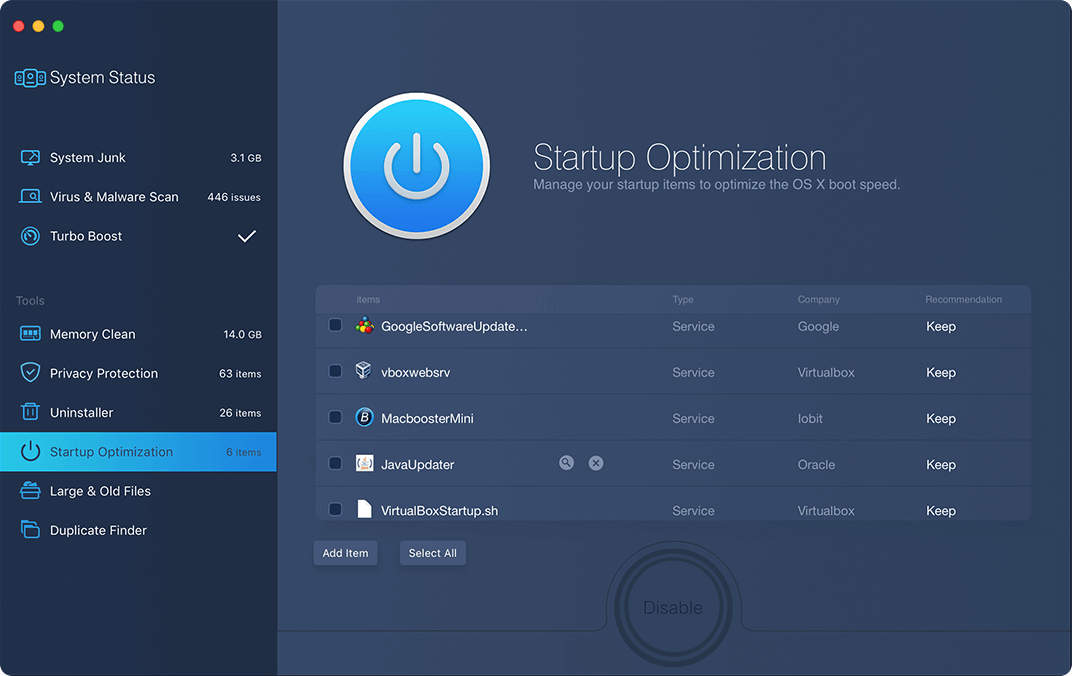
Startup Optimization showing services from Google, VirtualBox, Oracle and IObit, each marked "Keep".
The problem is trust. Malwarebytes detects MacBooster as PUP.MacBooster, a potentially unwanted program, in its "system optimizer" category, and explains that such tools "have been known to use intentional false positives to convince users that their systems have problems." Macworld's August 2024 review of version 8.2 reported that the free scan declared 229 threats and a "Dangerous" status, counting Google Chrome cookie files as threats, and concluded "We really can't recommend it." macsecurity.net's review was kinder ("we find it effective and user-friendly") but noted it "still lacks real-time security functions".
The licensing also needs care. The yearly plans renew automatically, and IObit's 60-day money-back guarantee covers cases like a duplicate purchase or a license code that never arrives, but generally not a change of mind after buying. Judge it from the free scan, reading the details of each category rather than the headline number.
What we like
- Lowest price per Mac: $49.95 a year covers three
- Duplicate Finder and Photo Sweeper recover real space, with a restore option
- Startup Optimization explains who makes each item
- Small 34 MB installer, native on Apple silicon
Watch out for
- Flagged as a potentially unwanted program by Malwarebytes
- Free scan counts harmless cookies as threats
- Auto-renewing subscription; refunds not given for a change of mind
- Apple Community users report trouble removing it completely
What users say. MacBooster's Trustpilot page has no reviews, and IObit's own testimonials are undated. Macworld's verdict: "The scaremongering is unacceptable and the software feels like a cheap copy of other multi-purpose utilities." macsecurity.net, on the other hand: "Its interface is clean and streamlined, and the names of the features are very easy to interpret, even for inexperienced users."
Download MacBooster Free Scan VersionBuy MacBooster 8 Pro
Price: what you pay per Mac
MacBooster 8 Pro is the cheapest per Mac and CleanMyMac the dearest, because the three plans cover different numbers of Macs: CleanMyMac's $39.95 covers one, MacClean360's $39 covers two and MacBooster's $49.95 covers three. If you only own one Mac, the gap narrows: MacBooster's 1-Mac plan is $29.95 and MacClean360 has no 1-Mac license.
Yearly price per Mac (USD)
CleanMyMac ($39.95, 1 Mac)$39.95
DoYourData MacClean360 ($39, 2 Macs)$19.50
MacBooster 8 Pro ($49.95, 3 Macs)$16.65
Prices on the order pages on November 17-18, 2026, divided by the number of Macs each plan covers.
For a one-time purchase the order flips less than you'd think: MacClean360's $59 lifetime license for two Macs is the cheapest way to never pay again, MacBooster's lifetime plan is $79.95 for three Macs, and CleanMyMac's $119.95 one-time license covers one Mac and excludes the next major upgrade.
Features and footprint
CleanMyMac does the most, and it's also by far the biggest download. It's the only one of the three with an app updater, cloud storage cleanup, Gmail cleanup and a malware engine of its own, and its similar-photo finder and Space Lens map make big cleanups faster. MacClean360 and MacBooster cover the core jobs (junk, uninstalls, duplicates, large files, startup items), with MacClean360 adding a shredder and MacBooster a similar-photo sweeper and a malware scan whose results you should read with care.
Installer size (MB)
DoYourData MacClean3608.3 MB
Installer files on each vendor's download server, checked November 18, 2026.
Trust and safety
CleanMyMac has the clearest record: notarized by Apple, 4.7 on Trustpilot from 3,388 reviews, and a Macworld Editors' Choice, with complaints focused on billing rather than damage. MacClean360 has no red flags but very little independent evidence either way. MacBooster is the only one flagged by a security vendor, and the Macworld test that saw cookies counted as threats is the main reason we rank it last despite its price.
All three show a list before deleting, so the real safety step is yours: open each category and untick anything you recognize, especially caches belonging to music, video or development software.
Which should you choose?
| Your situation | Pick | Why |
|---|
| One Mac, want everything in one scan | CleanMyMac | Widest feature set, best reputation, full trial |
| Two Macs on a budget | MacClean360 | $39 a year or $59 lifetime covers both |
| Mac on macOS 10.15 Catalina or older | MacClean360 | The only one that still runs there (back to 10.9) |
| You hate subscriptions | MacClean360 lifetime | Cheapest one-time license; CleanMyMac's is $119.95 for one Mac |
| Small SSD, iCloud or Google Drive filling up | CleanMyMac | Space Lens and Cloud Cleanup show where space went |
| Three Macs, lowest cost, and you'll check every result | MacBooster 8 Pro | $16.65 per Mac a year; ignore the threat count, use the cleanup tools |
Who should skip each one. Skip CleanMyMac if you only need one job done (a single uninstall or a one-off duplicate sweep) or if $39.95 a year for one Mac is more than the space is worth to you; macOS's own Storage settings handle the basics free. Skip MacClean360 if you want malware scanning or app updates in the same tool, or if you need reviews from people other than the vendor before you buy. Skip MacBooster if you're buying it for security, if you dislike auto-renewing subscriptions, or if you want the option of a refund after changing your mind.
What commonly goes wrong
- Skipping Full Disk Access. All three need it in System Settings > Privacy & Security. Without it, scans of your home folder come back incomplete and the results look smaller than they are.
- Cleaning without reviewing. A CleanMyMac Trustpilot reviewer linked a cleanup to a damaged Logic Pro project. Caches and "unused" files of audio, video and development tools are the usual casualties: untick them.
- Trusting a scary number. A free scan that reports hundreds of threats is selling you an upgrade. Open the details; browser cookies are not malware.
- Expecting a slow Mac to become fast. Clearing junk helps a nearly full disk. On a Mac with plenty of free space, slowness usually comes from too little memory or a heavy background app, which cleanup can't fix (though trimming login items can help).
- Forgetting the renewal. CleanMyMac's yearly plan and MacBooster's plans renew automatically. Note the date or switch renewal off in your account.
- Shredding the wrong thing. MacClean360's File Shredder and any emptied Trash are final. Keep a Time Machine backup before a big cleanup.
FAQs
Is CleanMyMac worth it compared with cheaper Mac cleaners?
CleanMyMac is worth the extra money if you'll use more than the basic cleanup: its malware scan, app updater, cloud cleanup and Space Lens have no equivalent in MacClean360 or MacBooster. If you only want junk and duplicates cleared, MacClean360 does that for less and covers two Macs.
Is MacBooster safe to install?
MacBooster 8 Pro isn't classic malware, but Malwarebytes flags it as a potentially unwanted program, mainly because its free scan has counted harmless items such as browser cookies as threats. Download it only from IObit's site, watch the installer for extra offers, and read each category's details before cleaning.
Which Mac cleaner has a free version?
None of the three cleans for free indefinitely. CleanMyMac has a 7-day trial with every tool, MacClean360 has a free trial download, and MacBooster's free version scans and lists issues but needs Pro to remove them.
Do I need a Mac cleaner at all?
Many people don't. macOS's Storage settings show large files and empty the Trash automatically, Login Items handles startup apps, and Activity Monitor shows memory hogs, all free. A cleaner like CleanMyMac earns its price when your disk is regularly full or you want app leftovers, caches and duplicates found for you in one pass.
Can one license cover all my Macs?
MacClean360 covers 2 Macs on every license and MacBooster's standard plan covers 3. CleanMyMac sells 1-, 2- and 5-Mac plans ($39.95, $63.95 and $127.95 a year), so a family with several Macs should compare those tiers.
Can I get a refund if I don't like the Mac cleaner I bought?
CleanMyMac and MacClean360 both offer 30-day money-back guarantees (CleanMyMac's monthly plans get 14 days). MacBooster's 60-day guarantee from IObit covers problems such as duplicate purchases or a license that doesn't work, but generally not a change of mind, so decide from its free scan first.
Does a Mac cleaner replace antivirus software?
No. CleanMyMac's Moonlock scan catches common Mac adware and malware, but reviewers found it weaker than MacPaw's marketing suggests and it has no web filter or firewall. MacClean360 has no malware scan, and MacBooster's scan is the part most criticized. Use a dedicated security product if you need protection.
Which Mac cleaner works on an old Mac?
DoYourData MacClean360 is the one for older systems: it runs on macOS 10.9 Mavericks through macOS 26 Tahoe. CleanMyMac needs macOS 11 Big Sur and MacBooster 8 needs 11.5 or later.
Conclusion
CleanMyMac is our pick for most Mac owners: it does the most, shows you everything before it deletes, keeps getting new tools and has thousands of satisfied reviewers behind it. You pay for that, at $39.95 a year for one Mac, so start with the 7-day trial and see how much it finds before you buy.
On a tighter budget, or with two Macs or an older macOS, DoYourData MacClean360 covers the essentials for $39 a year or $59 once. MacBooster 8 Pro is the cheapest per Mac, but with a security-vendor flag and inflated threat counts on its record, we'd choose it only if you'll judge every scan result yourself.
Download CleanMyMac Free TrialBuy CleanMyMac