CleanMyMac: MacPaw's All-in-One Cleaner, Malware Scanner and Tune-Up Kit for macOS
CleanMyMac is MacPaw's maintenance app for Macs running macOS 11 or later: one scan clears system junk, checks for malware, lists app updates and points out duplicate files and slow startup items. A yearly plan for one Mac costs $39.95, and a one-time license is $119.95.
If your Mac keeps warning that the disk is almost full, or it has slowed down and you can't tell which of a hundred apps and background helpers is to blame, CleanMyMac puts all of that in one window. You press Scan, look at what it found, and decide what goes.
Quick facts
- Developer: MacPaw Way Ltd, the maker of Gemini 2, ClearVPN and Setapp
- Version: 5.7.4, released November 6, 2026 (formerly sold as CleanMyMac X)
- Platform: macOS 11 Big Sur or later, Intel and Apple silicon; no Windows version
- Price: $39.95 a year for 1 Mac, $9.95 a month, or $119.95 one-time; 2- and 5-Mac plans are cheaper per Mac
- Trial: 7 days with every tool, after creating a free MacPaw account
- Guarantee: 30-day money-back on yearly and one-time plans, 14 days on monthly plans
- Download: 211 MB disk image
- What we checked: the installer from MacPaw's download server (CleanMyMac.dmg, 221,241,142 bytes), the version history showing 5.7.4 of November 6, 2026, and the plan grid on the order page as of November 17, 2026 (shown to us in Canadian dollars; the USD prices above are MacPaw's US list prices). Checked on November 18, 2026. We didn't run a scan on our own Mac.
Download Free TrialBuy Now
Overview
CleanMyMac has been around since 2008 and is probably the best-known Mac cleaner. The current generation, released as CleanMyMac 5 in October 2024 and now simply called CleanMyMac, replaced CleanMyMac X with a new interface built around Smart Care, a single scan that runs five jobs at once: cleanup, malware protection, performance tasks, app updates and clutter.
Each of those jobs also has its own module in the sidebar (Cleanup, Protection, Performance, Applications, My Clutter, Space Lens and Cloud Cleanup), so you can go straight to one task. MacPaw keeps adding to it: version 5.6 brought a Notification Center, 5.7 added Email Cleanup for Gmail, 5.7.1 a Screen Cleaning Mode that locks the keyboard while you wipe the display, and 5.7.2 a Browser Care extension for Chrome.
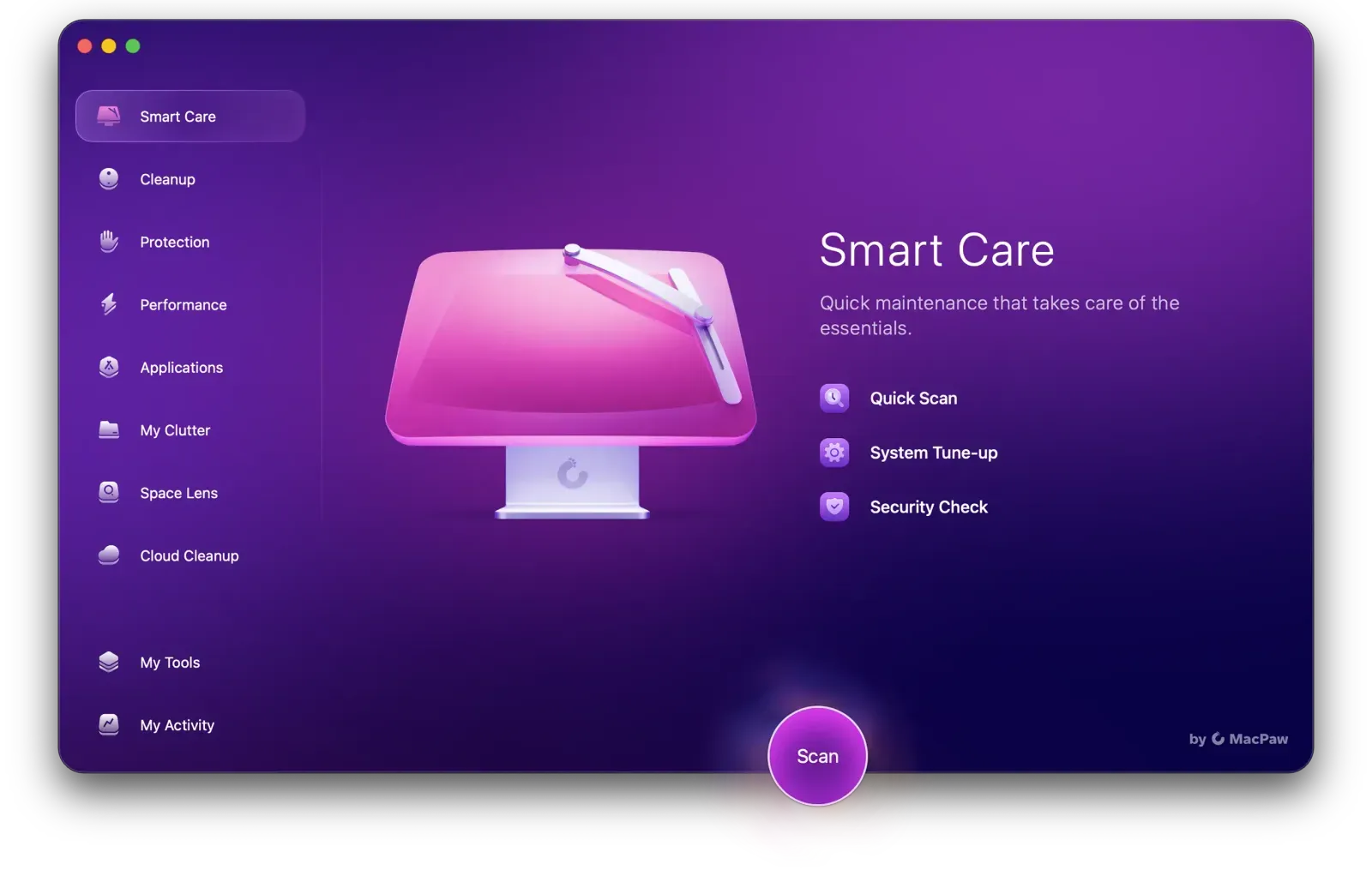
The Smart Care start screen, with Quick Scan, System Tune-up and Security Check, and the modules in the sidebar.
Features
One scan, five jobs: Smart Care
CleanMyMac's Smart Care scan checks your Mac for junk, malware, performance tasks, outdated apps and clutter in one pass, then shows a card for each with a Review button. Nothing is deleted until you press Run, and you can open any card first to untick items you want to keep.
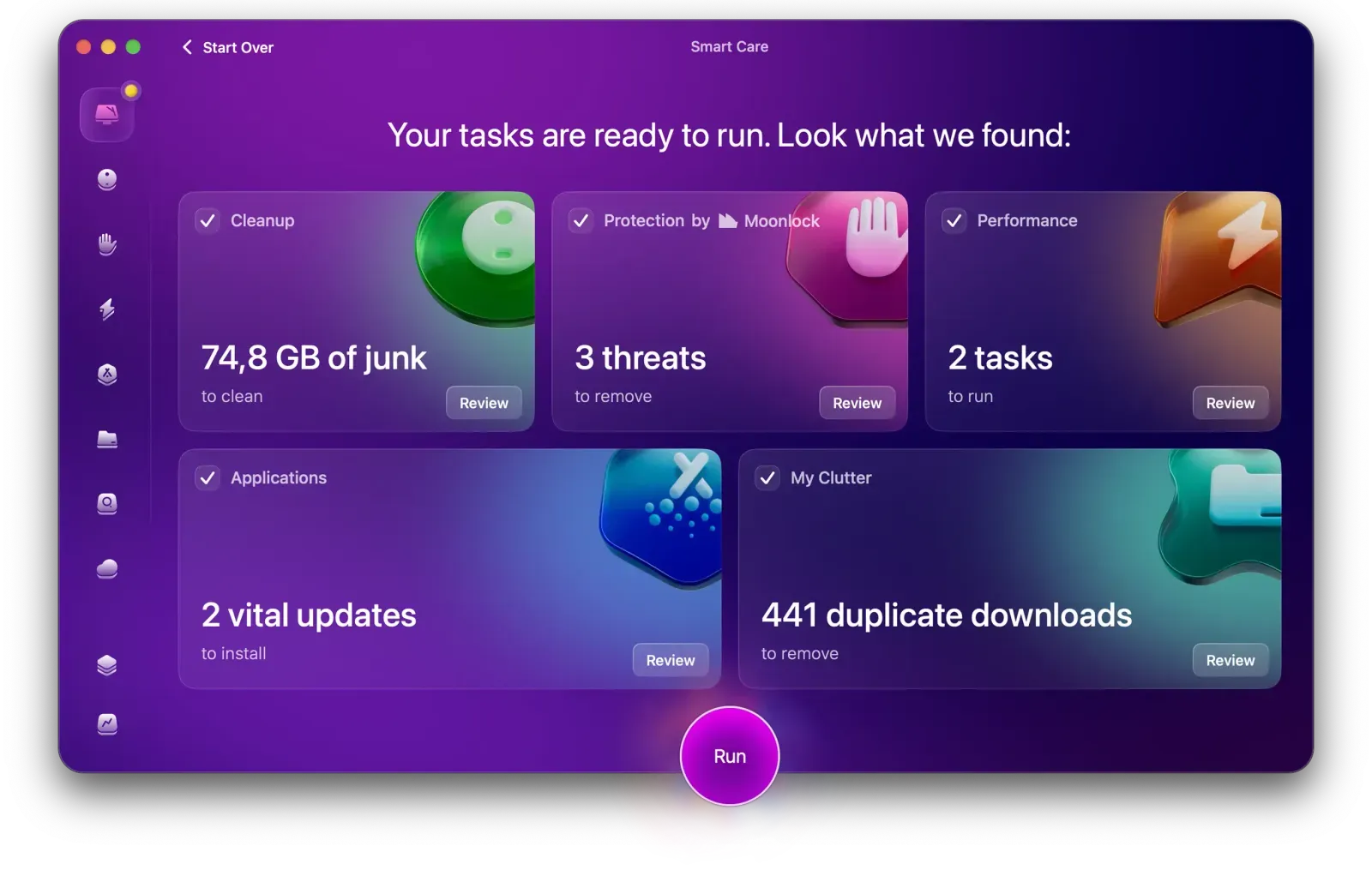
Smart Care results: 74.8 GB of junk, 3 threats, 2 performance tasks, 2 app updates and 441 duplicate downloads, each with its own Review button.
System junk, trash and unused code
CleanMyMac's Cleanup module removes caches, logs, broken downloads, unused language files, old iOS device backups and the leftovers of apps you deleted long ago. It also finds trash bins on every drive and "extra binaries", the Intel or Apple silicon half of universal apps that your Mac never runs.
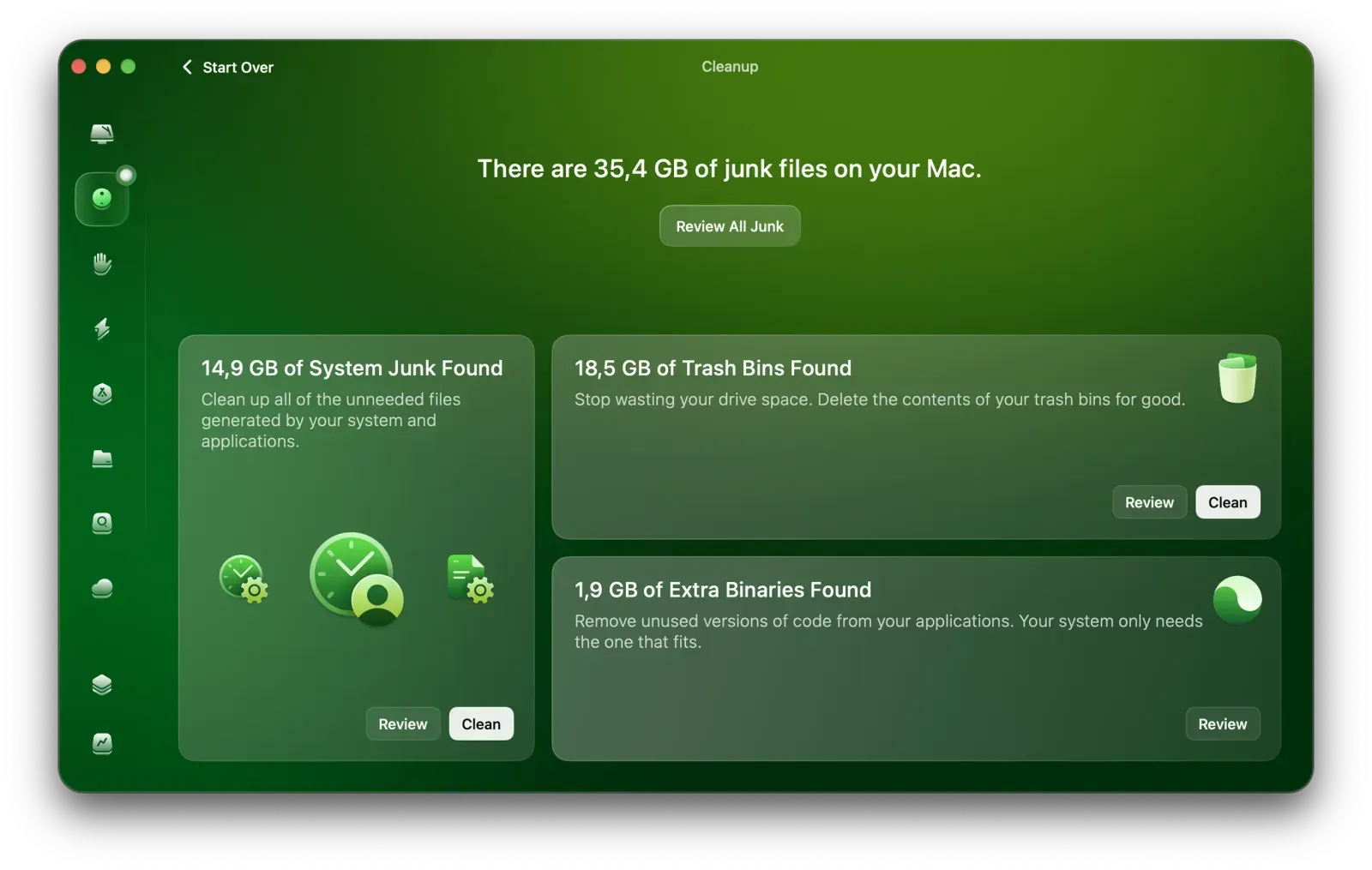
The Cleanup results: 14.9 GB of system junk, 18.5 GB in trash bins and 1.9 GB of extra binaries, each with Review and Clean buttons.
Malware scanning with the Moonlock engine
CleanMyMac's Protection module scans for adware, keyloggers, ransomware and other Mac malware using Moonlock, MacPaw's own security engine, and can clear browser data and privacy traces. It's a scanner you run (and a background monitor), not a full security suite: there's no web filter or firewall.
Performance: login items, background items and maintenance scripts
CleanMyMac's Performance module lists the apps that open at login and the background helpers that run without a window, so you can switch off the ones you don't need. It also frees up RAM, runs macOS maintenance scripts, reindexes Spotlight and speeds up Mail. A menu-bar app shows CPU load, memory, temperature and network speed in real time.
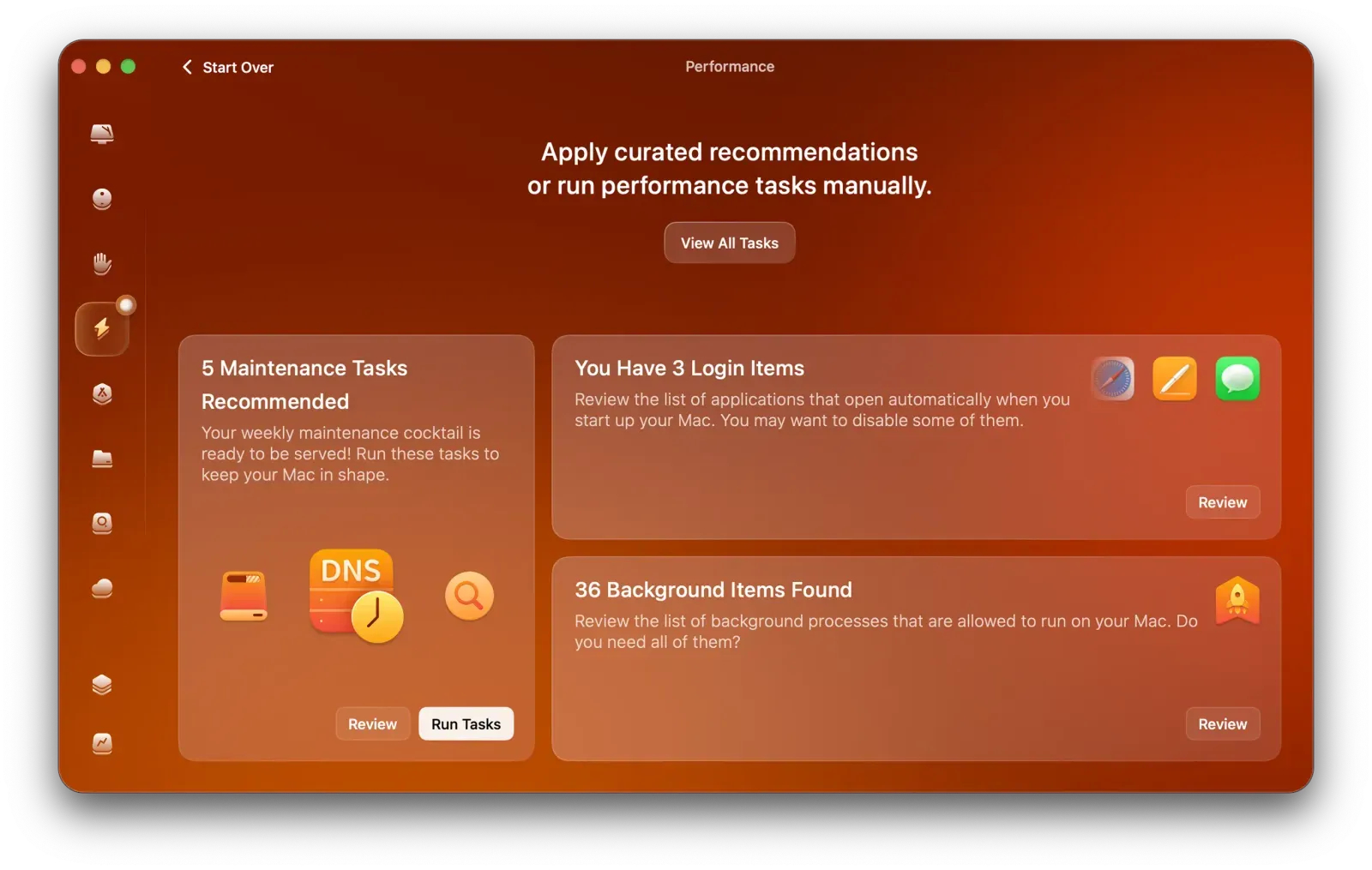
Performance results: 5 recommended maintenance tasks, 3 login items and 36 background items to review.
Complete uninstalls and app updates
CleanMyMac's Applications module removes an app together with its preferences, caches and support files, finds leftovers of apps already deleted, and shows apps you haven't opened in a long time. The Updater lists available updates, including apps from outside the App Store, with their release notes, and installs them in one batch.
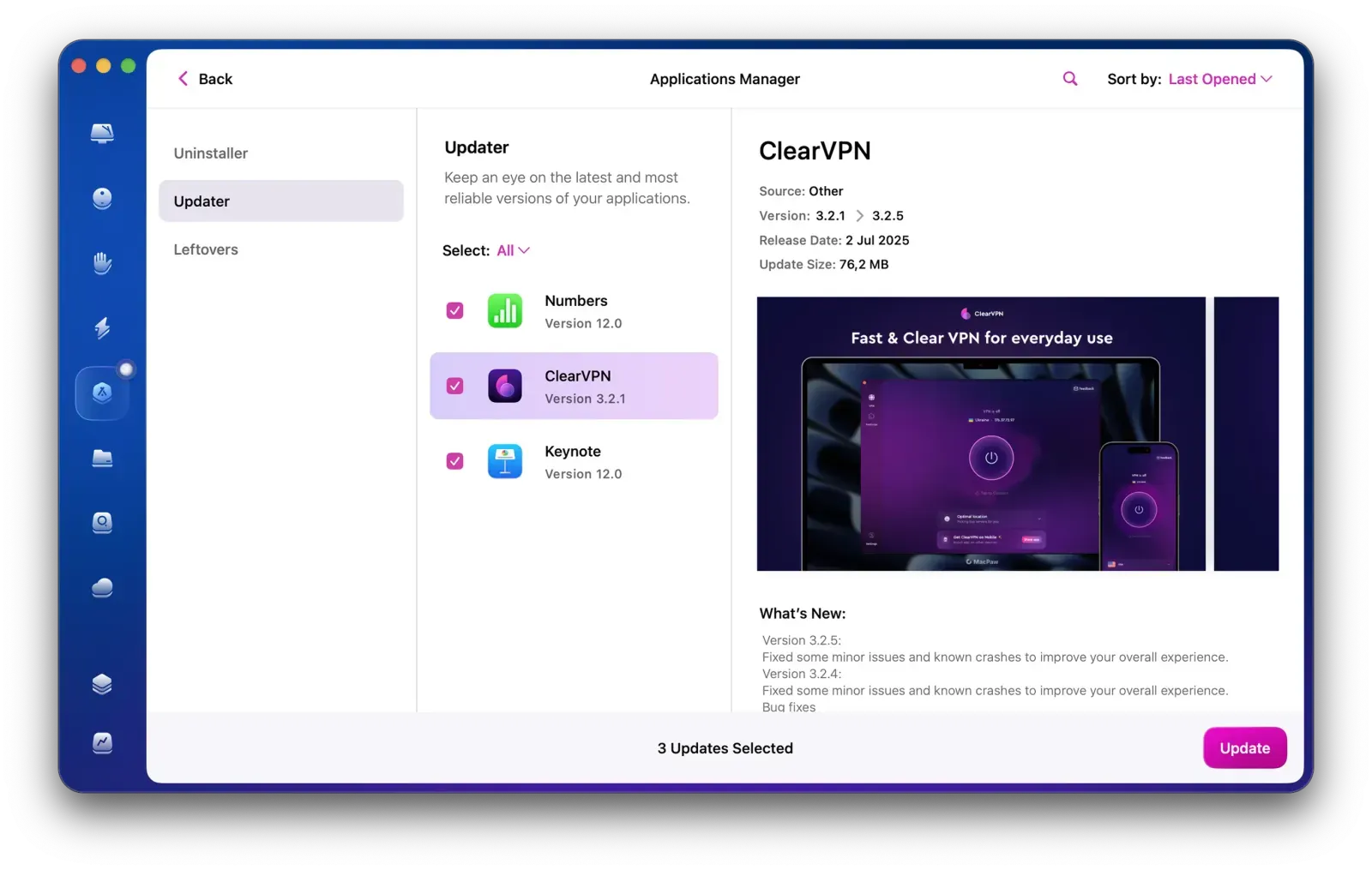
The Updater in the Applications Manager, with three updates selected and the release notes of the highlighted app.
Duplicates, similar photos, big files and cloud storage
CleanMyMac's My Clutter module finds duplicate files, nearly identical photos and large, old files, and groups app downloads (Chrome, Slack) so you can bin them in bulk. Space Lens draws your disk as bubbles sized by folder, and Cloud Cleanup shows what is filling iCloud Drive, Google Drive, OneDrive and Dropbox. Email Cleanup, added in version 5.7, sorts a Gmail inbox into old promotions, forgotten and automated mail, and unsubscribes you from senders.
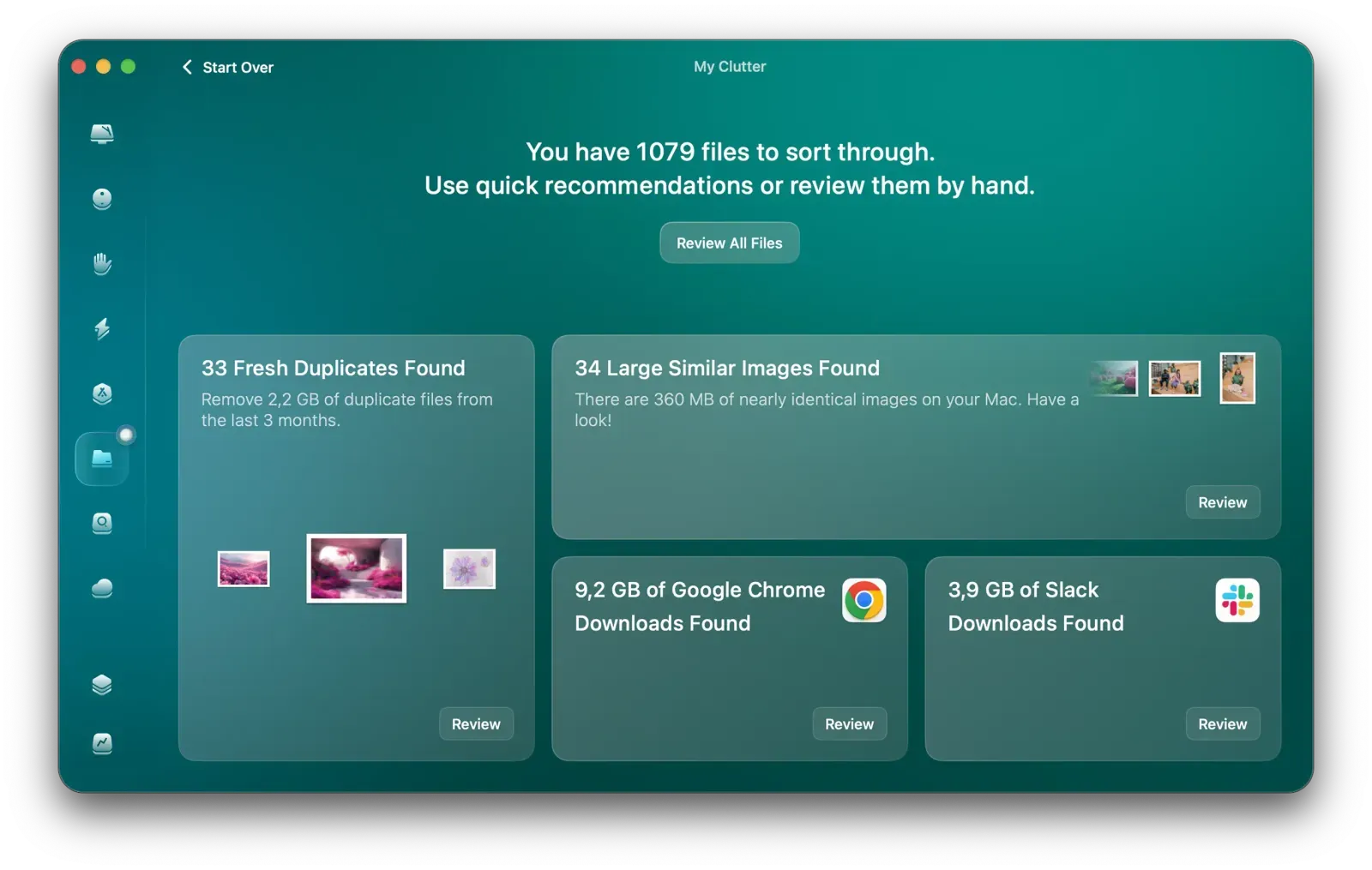
My Clutter: 33 fresh duplicates, 34 similar images, 9.2 GB of Chrome downloads and 3.9 GB of Slack downloads to review.
My Activity: what it has done for your Mac
CleanMyMac's My Activity page keeps a running total of storage cleaned, items scanned for malware, apps uninstalled and time saved, alongside a Mac Health rating and a short list of recommendations.
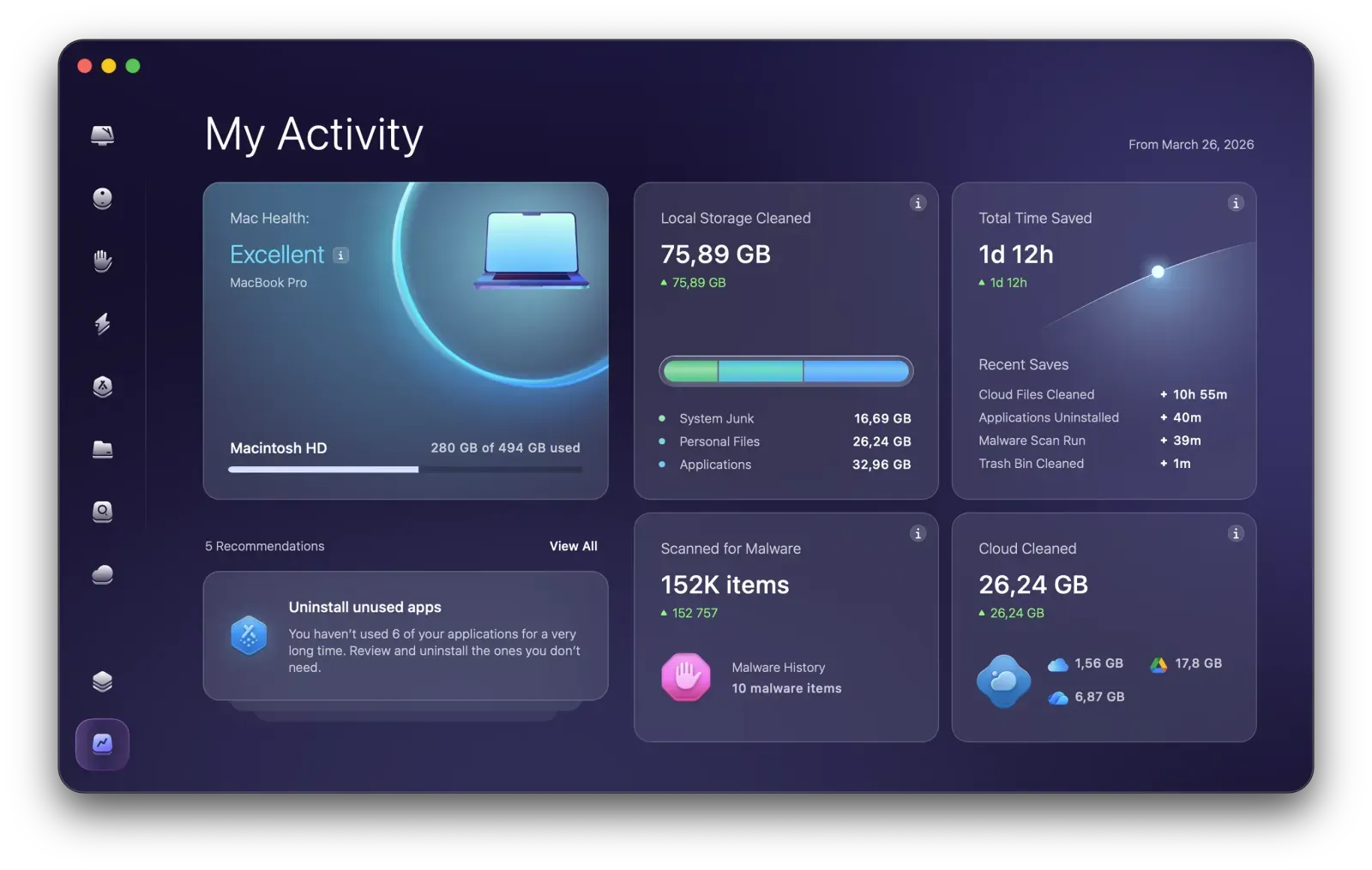
My Activity: Mac Health "Excellent", 75.89 GB of local storage cleaned, 152K items scanned for malware and 26.24 GB cleaned from the cloud.
Benefits
- One app instead of five. Cleaner, uninstaller, duplicate finder, malware scanner and startup manager share one scan and one subscription.
- You stay in control. Every finding has a Review step, so you see the list before anything is removed.
- It's built for macOS only. It knows where Mac apps hide their support files, and it's notarized by Apple.
- It keeps changing. Four feature releases between August and October 2026 alone (Notification Center, Email Cleanup, Screen Cleaning Mode, Browser Care).
Real-World Uses
- A 256 GB MacBook Air that's always full. Space Lens shows the 40 GB folder of old iPhone backups, and Cleanup removes caches and downloads you forgot about.
- A Mac that takes minutes to settle after login. The Performance module lists the 30-odd login and background items, and you switch off the ones from apps you no longer use.
- Removing an app properly. The Uninstaller deletes the app's preference and support files too, which dragging it to the Trash leaves behind.
- A photo library full of near-duplicates. Similar Images groups burst shots and edits so you keep the best one.
- A family Mac with odd pop-ups in the browser. The Protection scan looks for adware and browser hijackers.
Who It's For, and Who Should Skip It
CleanMyMac suits Mac owners who want routine maintenance in one place without learning where macOS keeps caches or launch agents, and people with small SSDs who clean up often. The 2- and 5-Mac plans make sense for a household.
Skip it if you only need one thing: a free uninstaller or the built-in macOS Storage settings may be enough, and a single-purpose duplicate finder costs less. People who run audio or video production setups (Logic Pro, plug-in libraries, sample folders) should review every list carefully before cleaning, or leave those folders out. If you want a full antivirus with web protection, a dedicated security suite is the better buy. And there's no Windows version.
Usage Guide
- Install: download CleanMyMac.dmg, drag CleanMyMac to Applications and open it. Create or sign in to your MacPaw account to start the 7-day trial, or activate a license.
- Grant Full Disk Access when asked (System Settings > Privacy & Security). Without it, scans of your home folder and apps come back incomplete.
- Run Smart Care and open each card with Review before pressing Run. Untick anything you recognize and want to keep.
- Use the modules for deeper work: Space Lens for big folders, My Clutter for duplicates, Applications for uninstalls and updates.
- Set up the menu-bar app if you want live CPU, memory and disk readings and reminders when junk builds up.
Before you buy
- The yearly plan renews automatically. MacPaw emails a reminder before renewal, and you can cancel in your MacPaw account.
- One-time licenses don't include major upgrades. CleanMyMac X owners had to pay to move to the current CleanMyMac, and the same applies to the next major version.
- The website and Mac App Store versions differ. Some App Store reviewers found speed tools missing in that edition; App Store purchases are billed and refunded by Apple.
- Discounts: the order page offers 30% off if you own another MacPaw app and 40% off if you're switching from another Mac cleaner or antivirus.
Download Free TrialBuy Now
Where it falls short
- Malware detection is not its strongest part. Macworld's review called its results disappointing given how heavily MacPaw markets the Moonlock engine.
- Cleaning can go too far for specialist setups. A Trustpilot reviewer who works with audio software warned that it "deletes important stuff too", and another linked it to a damaged Logic Pro project.
- Account and billing problems show up in complaints: lockouts after renewing, a double yearly charge, and slow replies from support.
- Permissions on new macOS releases. An App Store reviewer on macOS 15 found the Grant Access prompts did nothing, even after granting Full Disk Access.
- It costs more than many rivals, a point both Macworld and long-time Trustpilot users make.
What Users Say
CleanMyMac has a TrustScore of 4.7 out of 5 from 3,388 Trustpilot reviews (83% five-star, 5% one-star), and Macworld gave it an Editors' Choice badge. The praise is about ease of use and space recovered; the complaints are mostly about accounts, billing and price rather than the cleaning itself.
Trustpilot: praise
"After each use, my computers run faster, and I feel more confident that there are no viruses or malware." Jim Hopson, "Love CleanMyMac", November 16, 2026
"It seems to be more thorough and helps cleanse the junk that slows down your computer." K Al, October 10, 2026
"the new feature you added for cleaning up emails completely made up for it." Rick Porier, "The new Email CleanUp... Two Thumbs Up!", October 26, 2026
"really appreciate the ease of use and the number of new clean and maintenance features added." Beach Girl, "Big fan of CleanMyMac", October 2026
"I have been using their software for years, and it rocks!" Stephen C Holtzman, October 22, 2026
Trustpilot: criticism
"Unfortunately, it seems that it throws caution to the wind, and deletes important stuff too." MrEBuyer, "DAW users may wish to think twice", October 24, 2026
"I have always been very happy with Clean MyMac. However it is now expensive and there are more options" Ben Poole, October 12, 2026
"I have recently renewed my licence for two Macs, and now can no longer access my account." Chris Slade, October 8, 2026
"I was charged twice for yearly subscription (once in April 2026 and once in September 2026 again)." Katerina Novakova, September 16, 2026
Mac App Store reviews
"CleanMyMacX found things I carried with me all of these years that genuinely served no purpose; alternatively, they were a burden." The same reviewer added: "Admittedly, I was afraid to delete some things because they were not explained well." Alecfalicki, "Gets in between the cracks I never knew existed!!!", September 27, 2021
"I tried more than once to uninstall apps/extensions and CleanMy said it was done, yet when I went to check "Finder" on the Macbook, the supposedly removed apps were still there" Melissa8710, "A Joke and a waste...", January 3, 2024
"For every function, I am required to grant access to home folder or applications folder. The problem is that I can click on "Grant Access" and it does absolutely nothing." The reviewer still gave two stars "because it's a very nice and polished UI". eb1171, "Doesn't appear to function with macOS 15", October 16, 2024
Press
Macworld (Cliff Joseph, review of CleanMyMac 5, updated October 10, 2025) lists as pros "Improved interface and ease of use", "Wide range of cleaning tools" and "Subscription or one-time purchase available", and as cons "More expensive than some rivals", "Limited malware features" and "Some technical knowledge still needed". On the malware scan: "This was disappointing considering MacPaw's well-marketed and hyped use of the Moonlock Engine for this purpose."
TidBITS (Agen Schmitz, October 23, 2024) on the release: "MacPaw has released CleanMyMac 5.0, a major upgrade for the Mac maintenance utility".
The themes: people like the polished interface, the space it frees and the steady stream of new tools. The complaints cluster around account lockouts and billing after renewal, slow support, rising prices, and a few cases of files removed that the owner needed, which is why the Review step matters.
Comparisons
CleanMyMac vs macOS Storage settings
macOS's own Storage settings show big categories and can empty the Trash automatically, for free. CleanMyMac goes much further: app leftovers, caches, login and background items, duplicates, malware and cloud storage, with a review list for each.
CleanMyMac vs MacBooster and other Mac cleaners
Most rivals (MacBooster, Aiseesoft Mac Cleaner) cover the same cleanup and uninstall jobs for less money. CleanMyMac's edge is its polish, Apple notarization, a malware engine of its own, cloud and email cleanup, and how often it's updated; its drawback is the price.
Editions and Pricing
| Plan |
Yearly |
Monthly |
One-time |
| 1 Mac | $39.95 | $9.95 | $119.95 |
| 2 Macs | $63.95 | $15.95 | $191.95 |
| 5 Macs | $127.95 | $32.95 | $383.95 |
All plans include every tool. Yearly and one-time purchases carry a 30-day money-back guarantee, monthly plans 14 days. Every plan is chosen on the same order page: the Buy Now buttons open it, and you pick the number of Macs and the billing term there. Businesses needing more than 10 licenses can ask MacPaw for a quote.
FAQs
Is CleanMyMac safe to use?
CleanMyMac is notarized by Apple and shows you every item before it removes anything. The risk lies in what you approve: review lists carefully, especially caches and "unused" files belonging to music, video or development tools.
Is CleanMyMac the same as CleanMyMac X?
CleanMyMac is the successor of CleanMyMac X, released as CleanMyMac 5 in October 2024. CleanMyMac X owners can upgrade at a discount from the order page; the new version needs macOS 11 or later.
Does CleanMyMac have a free version?
CleanMyMac comes with a 7-day trial with every tool once you create a MacPaw account. After that it needs a plan or a one-time license.
Can I move my CleanMyMac license to a new Mac?
CleanMyMac licenses bought from MacPaw are tied to your MacPaw account and managed there (MacPaw's License Management page), within the number of Macs your plan covers.
Does CleanMyMac replace an antivirus?
CleanMyMac scans for and removes Mac malware with the Moonlock engine, which covers many home users. It has no web filtering or firewall, and reviewers found its detection weaker than its marketing suggests, so people at higher risk should use a dedicated security suite.
Does CleanMyMac work on Apple silicon Macs and macOS Tahoe?
CleanMyMac runs on Apple silicon and Intel Macs with macOS 11 Big Sur or later, and MacPaw updates it regularly for new macOS releases.
Can I get a refund on CleanMyMac?
CleanMyMac bought from MacPaw comes with a 30-day money-back guarantee on yearly and one-time plans and 14 days on monthly plans. Purchases made in the Mac App Store are refunded through Apple.
System Requirements
- macOS 11 Big Sur or later (Intel or Apple silicon)
- 320 MB of free disk space for the app (the installer is 211 MB)
- Display of at least 1200 x 800 pixels
- A free MacPaw account to start the trial or activate a license; internet access for updates and malware definitions
Conclusion
CleanMyMac is the most polished all-in-one Mac cleaner you can buy, and at $39.95 a year it's worth it if you want cleanup, uninstalls, duplicates, startup items and a malware scan handled in one place without learning macOS's hidden folders. The one reason to buy it: Smart Care turns an hour of manual housekeeping into a reviewed list and one click. The main reason not to: it costs more than rivals, its malware scanning is no substitute for a security suite, and its account and billing complaints are real, so keep your renewal date in mind. Start with the 7-day trial and see how much it finds on your Mac.
Download Free TrialBuy Now