Short answer
Short answer: Outlook for Windows can't open an OLM file, so you either move the mail through an online account (free, but slow and fussy), or convert the OLM file to a PST. For most people, Kernel for OLM to PST ($39, Windows) is the best value: it reads any OLM file offline, filters what you move and writes a PST you open in Outlook. Stellar Converter for OLM Standard ($39 for a year) shows a full mailbox preview first and no longer needs Outlook installed, and its Technician edition ($99) uploads straight to Microsoft 365. To convert on the Mac itself, Kernel Mac OLM Converter ($39) does it, but only on Intel Macs.
If your mailbox still lives on Microsoft 365, Exchange, Outlook.com or Gmail, you may not need any of this: sign in to the same account in Outlook for Windows and the mail comes down from the server.
At a glance: four OLM to PST converters
| Kernel for OLM to PST | Stellar Converter for OLM Standard | Stellar Converter for OLM Technician | Kernel Mac OLM Converter |
|---|
| Price | $39 (Home); $199 Corporate | $39 for one year | $99 | $39 (Home); $149 Corporate |
| Runs on | Windows 11 to 7, Server 2022 and older | 64-bit Windows 11, 10, 8.1 | 64-bit Windows 11, 10, 8.1 | macOS, Intel Macs, Java required |
| OLM versions | All Outlook for Mac versions | Outlook for Mac 2024, 2021, 2019, 2016, 2011 | Outlook for Mac 2024, 2021, 2019, 2016, 2011 | Outlook for Mac 2016 (16.53.1) and earlier |
| Mailbox preview | ✓ | ✓ three-pane view | ✓ three-pane view | ✗ folder list only |
| Several OLM files in one run | ✓ | ✗ one file at a time | ✗ one file at a time | ✓ |
| Filters | Sender, subject, folder, type, dates | Dates, sender, folder | Dates, sender, folder | Dates, item type, skip deleted or empty folders |
| Other outputs | MBOX, MSG, EML, PDF, DOC, HTML and more | MSG, EML | MSG, EML, PDF, HTML, RTF | PST only |
| Direct to Microsoft 365 | ✓ | ✗ (via an Outlook profile) | ✓ | ✗ |
| Free trial | Saves 25 items per folder | Converts and previews everything; saving needs a key | Converts and previews everything; saving needs a key | Saves 25 items per folder |
| Refunds | 30 days | 30 days; trial must be tried first | 30 days; trial must be tried first | 30 days, only if the full version fails where the trial worked |
What we checked
- We compared the OLM converters on this site that are still sold and updated: which Outlook for Mac versions they read, where they run, preview, filters, output formats, licence terms and refund rules, from the vendors' product pages, manuals and order pages.
- The current versions, from the trial installers and the vendor product pages: Kernel for OLM to PST 26.0, Stellar Converter for OLM 6.1.0.0 (October 2026) and Kernel Mac OLM Converter 23.0.
- What we checked: on November 29, 2026, the order-system prices for all four (Kernel for OLM to PST Home $39, Stellar Converter for OLM Standard $39, Technician $99, Kernel Mac OLM Converter Home $39, in USD), matching the order pages we checked between November 10 and 28, 2026.
We compared features, prices and trials. We didn't convert the same OLM file with all four, so we can't compare speed or rank how they handle a damaged archive.
Why Outlook for Windows can't open an OLM file
Outlook for Mac exports its mail, contacts and calendars as an OLM file (File, Export). Outlook for Windows only reads PST files, and Outlook for Mac can't save a PST, so the two don't meet. What you do next depends on where your mail lives.
| Your situation | What to do |
|---|
| The account still exists on Microsoft 365, Exchange, Outlook.com or Gmail | Sign in to it in Outlook for Windows. The mail is on the server; no conversion needed. |
| A small mailbox, and you still have the Mac with Outlook | The free IMAP route below. |
| Only the OLM file is left, or the mailbox is large | Convert the OLM file to PST with one of the tools below. |
| The mail has to end up in a Microsoft 365 mailbox | A converter that uploads to Microsoft 365 directly: Kernel for OLM to PST or Stellar Technician. |
The free way: move the mail through an IMAP account
You can move mail from Outlook for Mac to Outlook for Windows without a converter, using any free email account that supports IMAP (for example a Gmail or Outlook.com account) as a carrier. It works, but it's slow and it only carries email.
- On the Mac, add the IMAP account to Outlook for Mac. If the mail is only in an OLM file, import it first with File, Import.
- Create a folder in the IMAP account and drag your local mail folders into it.
- Wait until everything has uploaded. Large mailboxes can take hours or days, and free accounts have storage limits.
- On the Windows PC, add the same IMAP account to Outlook for Windows and let it download the mail.
- Drag the folders into a local PST, or use File, Open & Export, Import/Export to export them to a PST.
The catch: contacts, calendars, tasks and notes don't travel over IMAP, uploads can stall on big attachments, and you need a working Mac with Outlook. Stellar also runs a free online OLM to PST service for one file of up to 100 MB, but that means uploading your mail to its server. For a full mailbox, or when all you have is the OLM file, a converter is quicker and keeps everything.
Prices compared
Cheapest licence for one user (USD)
Kernel for OLM to PST Home$39.00
Stellar Converter for OLM Standard (1 year)$39.00
Kernel Mac OLM Converter Home$39.00
Stellar Converter for OLM Technician$99.00
Order-system prices on November 29, 2026. Stellar Standard is a one-year licence; leave auto-renewal unticked if you only need it once. Kernel's Home licences are one-time payments.
1. Kernel for OLM to PST: best value on Windows
- Price: $39 Home (personal use, one computer, 40 GB limit); $199 Corporate; $299 Technician
- Runs on: Windows 11, 10, 8.1, 8, 7 and Windows Server 2022, 2019 and older; 4 GB RAM
- Version: 26.0 (January 2026)
- Best for: converting one or many OLM files on a Windows PC, or sending them to Microsoft 365
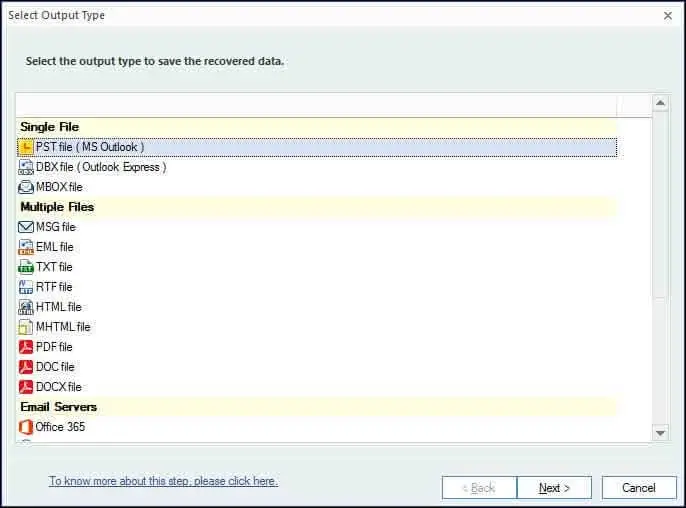
Kernel for OLM to PST's output step: a single PST, DBX or MBOX file, separate MSG, EML, PDF or DOCX files, or an email server such as Office 365.
Kernel for OLM to PST loads one or many OLM files, shows the mailbox in a folder tree with a preview and a Find Message search, and walks you through output type, filters and destination. Besides PST it writes MBOX, MSG, EML, PDF, DOC and HTML, and it can send items straight to Office 365, Live Exchange, IBM Domino and GroupWise. Filters by sender, recipient, subject, folder, item type and date range let you move only what you need, and large output can be split into smaller PSTs.
Kernel for OLM to PST is the most flexible of the four for the same $39, and it also restores data from damaged OLM files. Watch the Home licence's 40 GB limit if your archive is bigger, and note it needs a Windows PC.
What we like
- $39 one-time Home licence
- Many OLM files in one run, with filters and search
- Direct upload to Office 365 and Exchange
- Recovers data from damaged OLM files
Watch out for
- Windows only
- Home licence capped at 40 GB
- Trial saves only 25 items per folder
- Few independent reviews
"I do not trust online OLM to PST converters. For me, offline conversion capability was a must. This OLM to PST converter software works exactly as I wanted and converted my 50+ OLM files into PST without losing any email."
Tawnya Falkner, review on Kernel's product page
Kernel's product page shows 4.9 out of 5 from 518 reviews collected on its own site; on Trustpilot the company holds 4.9 from about 166 reviews, mostly about its other email tools.
Download Kernel for OLM to PST Free TrialBuy Kernel for OLM to PST
2. Stellar Converter for OLM: the best preview, Standard or Technician
- Price: Standard $39 for one year; Technician $99
- Runs on: 64-bit Windows 11, 10 and 8.1 (Intel, AMD or ARM); on a Mac through Parallels Desktop; 8 GB RAM minimum
- Version: 6.1.0.0 (October 2026)
- Best for: checking every message before you pay, and (Technician) moving mail into Microsoft 365
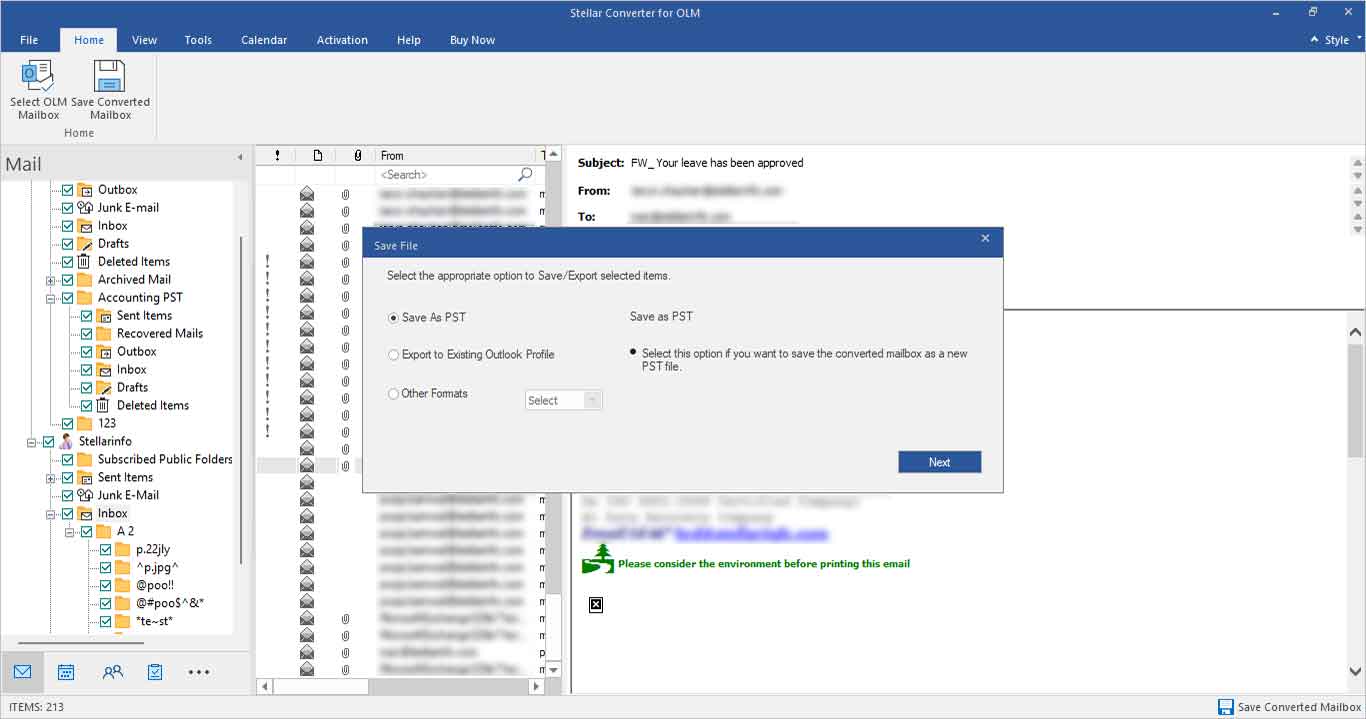
Stellar Converter for OLM: the converted mailbox behind the Save File dialog (Save As PST, Export to Existing Outlook Profile, Other Formats).
Stellar Converter for OLM Standard looks like Outlook: you select or search for the OLM file, click Convert, browse the converted mailbox in a three-pane view, then save it as a new PST, export it into an existing Outlook profile, or save items as MSG or EML. Since version 6.1, Outlook no longer has to be installed to write a PST. It splits very large PSTs at about 45 GB and keeps a log of each conversion.
Stellar Converter for OLM Technician adds PDF, HTML and RTF output and direct export to Microsoft 365 (which needs an Entra ID app registration, an extra step for home users). Both read OLM files from Outlook for Mac 2011 to 2024, but convert one OLM file per run.
What we like
- Free trial converts and previews the whole mailbox
- No Outlook needed to write a PST
- Reads OLM from Outlook for Mac 2011 to 2024
- Technician uploads to Microsoft 365
Watch out for
- Standard is a one-year licence
- One OLM file per run
- 64-bit Windows only; 8 GB RAM minimum
- Stellar refunds only buyers who tried the trial
"It is characterized by powerful features, simplicity of the interface design, and a relatively low rate of failure, which means that the migration process will be easy and problem-free."
Kapil Arya, Microsoft MVP, January 2025 (he adds that the price "may be slightly too high for common users")
"They will not refund and will not tell me why."
Nick, 1 star on Trustpilot, November 2026, about Stellar generally
Stellar holds 4.8 out of 5 on Trustpilot from about 5,600 reviews, mostly about its recovery and PST repair tools.
Download Stellar Converter for OLM Standard Free TrialBuy Stellar Converter for OLM Standard
Download Stellar Converter for OLM Technician Free TrialBuy Stellar Converter for OLM Technician
3. Kernel Mac OLM Converter: convert on the Mac itself
- Price: $39 Home (up to 25 OLM files); $149 Corporate; $299 Technician
- Runs on: macOS on Intel Macs, with Java (JDK) installed
- Version: 23.0 (package dated February 2026)
- Best for: an Intel Mac with OLM archives from Outlook 2016 or earlier, and no Windows PC to convert on
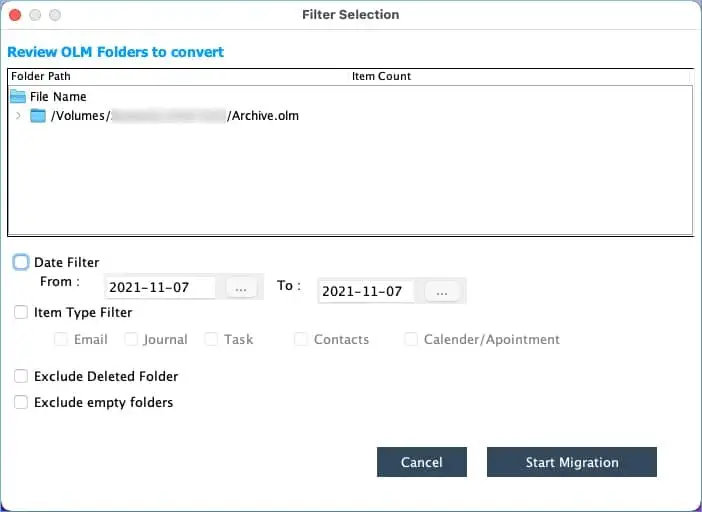
Kernel Mac OLM Converter's Filter Selection: a date range, item types (Email, Journal, Task, Contacts, Calendar) and options to skip deleted and empty folders.
Kernel Mac OLM Converter is a single-purpose app: add one or more OLM files, set filters, and save a PST to a folder you choose, ready to copy to the Windows PC. It converts emails with attachments, contacts, calendars, tasks, notes and journals, and the filters can skip deleted and empty folders.
Kernel Mac OLM Converter is the only pick here that runs on macOS, but its requirements show its age: an Intel Mac, Java, and OLM files from Outlook for Mac 2016 build 16.53.1 or earlier. It writes PST only and has no message preview. On an Apple silicon Mac, or with a newer OLM file, use the trial first, or convert on Windows instead.
What we like
- Converts on the Mac, no Windows PC needed
- Several OLM files in one run, no file size limit stated
- Date and item-type filters
Watch out for
- Intel Macs and Java only
- OLM support listed only up to Outlook 2016 (16.53.1)
- PST output only, no preview
- Narrow refund policy
Kernel's order page shows 4.9 out of 5 from 515 reviews collected on its own site; we found no independent hands-on review of the Mac app.
Download Kernel Mac OLM Converter Free TrialBuy Kernel Mac OLM Converter
How to convert OLM to PST, step by step
The steps are the same in principle for every converter. Here they are with Kernel for OLM to PST on Windows.
- Export the OLM file on the Mac. In Outlook for Mac, choose File, Export, tick the items to include (mail, contacts, calendar, tasks, notes) and save the .olm file. Skip this if you already have the file.
- Copy the OLM file to the Windows PC with a USB drive or a network share. OLM files can be many gigabytes.
- Install the trial and add the OLM file. Check the folder tree and preview a few messages, including some with attachments.
- Choose PST as the output, set any filters (dates, folders, senders) and pick where to save it.
- Buy a licence if the trial result is right, then run the full conversion.
- Open the PST in Outlook for Windows: File, Open & Export, Open Outlook Data File, or Import/Export to merge it into your mailbox.
Which should you choose?
Who should skip each one
What commonly goes wrong
- Exporting only mail. Outlook for Mac's export asks which item types to include. Tick contacts and calendars too, or they won't be in the OLM file to convert.
- Expecting IMAP to carry everything. The free IMAP route moves email only; contacts, calendars, tasks and notes stay behind.
- Huge PST files. Very large PSTs slow Outlook down. Stellar splits at about 45 GB; Kernel for OLM to PST can split output into smaller files.
- Licence limits. Kernel's Home licences cap size or file count (40 GB for OLM to PST, 25 files for the Mac app). A company migrating many staff needs a Corporate or Technician licence.
- Buying before trying. Stellar refunds only buyers who tried the trial, and Kernel's Mac refund only covers a full version that fails where the trial worked. Convert a sample first.
- Uploading private mail to an online converter. Online services are fine for a small test file, not for a mailbox with client or personal data. All four tools here convert offline (direct Microsoft 365 export aside).
FAQs
How do I convert an OLM file to PST for free?
Add a free IMAP account (such as Gmail or Outlook.com) to Outlook for Mac, drag your mail folders into it, let it sync, then add the same account to Outlook for Windows and export the folders to a PST. It carries email only, and it's slow for large mailboxes. Stellar's free online service converts one OLM file of up to 100 MB.
Can Outlook for Windows open an OLM file?
No. Outlook for Windows reads PST files, not OLM. You need to convert the OLM file to PST, or move the mail through an online account that both versions of Outlook can sign in to.
What is the best OLM to PST converter?
Kernel for OLM to PST is the best value at $39: it converts many OLM files at once, filters what you move and can upload to Office 365. Stellar Converter for OLM Standard ($39 a year) has the most complete preview, and its Technician edition exports directly to Microsoft 365.
Can I convert OLM to PST on a Mac?
Yes, with Kernel Mac OLM Converter, which runs on Intel Macs with Java and reads OLM files from Outlook for Mac 2016 and earlier. On an Apple silicon Mac, run a Windows converter such as Stellar Converter for OLM in Parallels Desktop.
Do I need Outlook installed to convert OLM to PST?
Not with Stellar Converter for OLM 6.1, which writes PST files without Outlook. You need Outlook for Windows afterwards to open or import the PST.
Will my contacts and calendar come across?
Yes, with the converters here, as long as you included them when exporting the OLM file. Kernel and Stellar convert emails, attachments, contacts, calendars, tasks and notes into the PST.
How do I open the PST file in Outlook for Windows?
In classic Outlook for Windows, choose File, Open & Export, then Open Outlook Data File to open the PST alongside your mailbox, or Import/Export to copy its contents into your account.
Can I move OLM mail straight into Microsoft 365?
Yes. Kernel for OLM to PST and Stellar Converter for OLM Technician upload to Microsoft 365 directly. With Stellar Standard you can export into an Outlook profile that's connected to Microsoft 365.
Moving mail the other way, or from another client? See Best MBOX to PST Converter and How to Convert an OST File to PST.