Short answer
These four Albus Bit tools do four different jobs, so pick by the question you need answered. AD FastReporter ($149) reports on Active Directory for managers and auditors. AD Admin 2 Pro ($299) changes accounts in bulk: disable, move, unlock, clean up. NTFS Permissions Auditor ($299) shows who can open which folders on your file servers. AD Group Manager Web ($1,295 a year) is a web portal that lets department managers maintain their own AD groups.
Each desktop tool has a free edition with no time limit, and there are no refunds, so start free. If you need all three desktop tools, Albus Bit's Pro Bundle costs $499 for one person against $747 bought separately.
At a glance
| AD FastReporter | AD Admin 2 | NTFS Permissions Auditor | AD Group Manager Web |
|---|
| Job | Reports on AD objects | Bulk changes to AD objects | Audits NTFS folder permissions | Self-service group membership |
| Pro price, one person | $149 | $299 | $299 | $1,295 a year per server, unlimited users |
| Company license (any number of staff) | $547 | $1,099 | $1,099 | — |
| License type | Perpetual, 1 year of updates | Perpetual, minor updates for life, major updates 1 year | Perpetual, 1 year of updates | Annual subscription |
| Free edition | ✓ view reports, no export | ✓ search and all 17 actions | ✓ unlimited audits, no export | ✗ (30-day trial) |
| Changes Active Directory | ✗ | ✓ | ✗ | ✓ group members only |
| Export to Excel, CSV, PDF | Pro | Pro | Pro | ✓ |
| Scheduled tasks | Pro (reports by email) | Pro (clean-up actions) | Pro (audits, change reports) | Scheduled summary reports |
| Runs on | Windows 7 or later, .NET 8 | 64-bit Windows 10 (1607) or later, .NET 10 | Windows 10 or later, .NET 10 | Windows Server 2016 or later with IIS |
| Version checked | 26.10.30 (October 30, 2026) | 26.9.17 (September 17, 2026) | 26.10.8 (October 8, 2026) | 26.11.03 (November 3, 2026) |
| Refunds | ✗ | ✗ | ✗ | ✗ |
How we compared them
- We read each product's page, its Free vs Pro comparison and the Pro license page on albusbit.com.
- We opened the order page for each product and for the Pro Bundle, in USD.
- We checked the current installer behind each download link: ADFastReporter_26.10.30.exe, ADAdmin_26.9.17.exe, NTFSPermissionsAuditor_26.10.8.exe and ADGroupManagerWeb_26.11.03.exe.
- We read the license terms (perpetual or subscription, update period, renewals) and the refund policy.
- We collected the published reviews: 4sysops, BitsDuJour buyers and customer quotes.
- What we checked: the four installers' versions and the order-page prices of all four products and the Pro Bundle on November 25, 2026.
We compared features, licenses and prices. We didn't run any of the tools against a live domain or file server, so how they behave in your directory is something the free editions and trials will show you.
AD FastReporter: Active Directory reports without scripts
- Price: Pro $149 at checkout for one person; $547 Company, $672 Consultant/MSP
- Free edition: runs all 250+ built-in reports on screen; no export, archive, filters or scheduling
- Version: 26.10.30, released October 30, 2026; Windows 7 or later with .NET Desktop Runtime 8
- Best for: admins who owe someone a regular AD report, and MSPs reporting on client domains
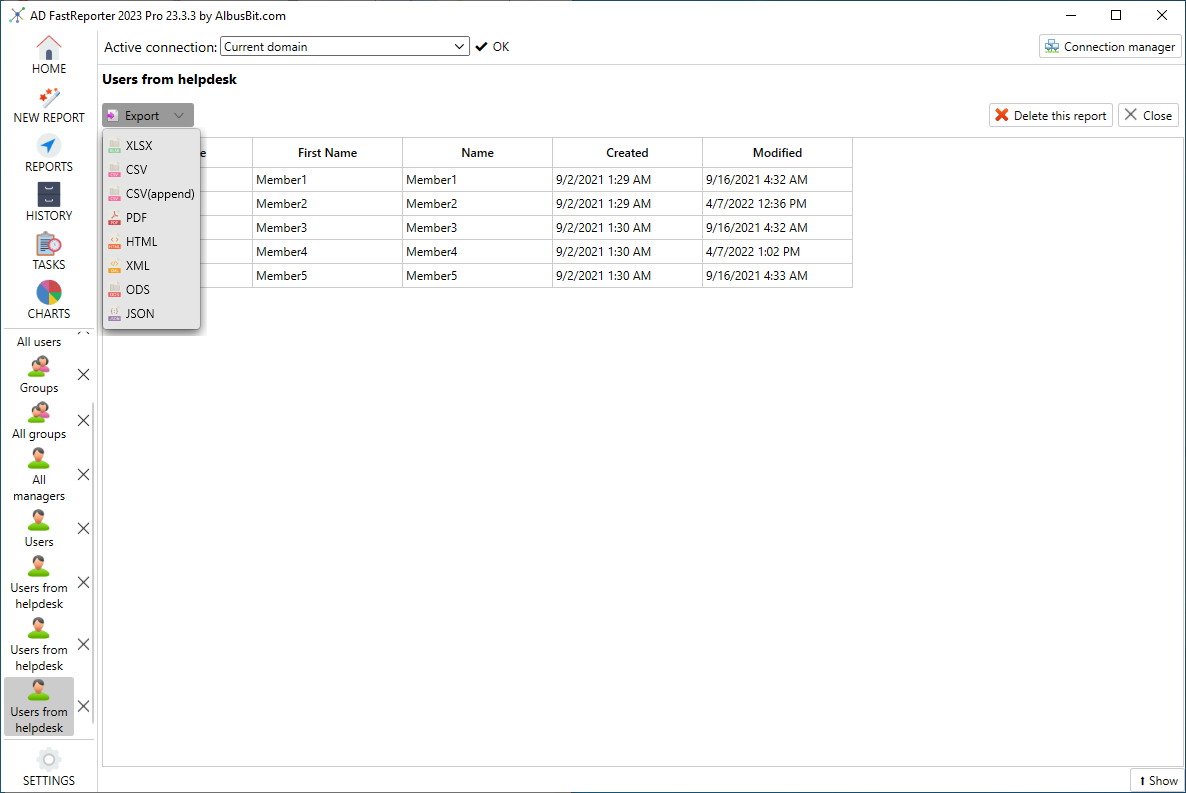
AD FastReporter Pro 23.3.3 (an older version in the vendor's screenshot) with a "Users from helpdesk" report open and the Export menu listing XLSX, CSV, CSV (append), PDF, HTML, XML, ODS and JSON.
AD FastReporter turns Active Directory into ready-made reports: more than 250 report forms across users, computers, groups, Exchange, contacts, printers, GPOs and OUs, with 370 fields you can add or remove. "Inactive for 90 days", "password never expires", locked-out accounts, computers without LAPS: they're already built, and last logon is read from every domain controller rather than one.
The free edition shows reports but can't export them, which is what most people need a report for. Pro at $149 adds export to seven formats, a report archive in a local database, a point-and-click filter manager for custom reports, and scheduled tasks that email a report every week. It only reads: you can't disable or move anything from a report.
What we like
- The cheapest Pro license in the range at $149
- Scheduled reports arrive by email, ready for auditors
- Installs on your own PC; nothing on the domain controllers
Watch out for
- Reporting only; no actions on accounts
- The free edition can't export
- Updates and support last one year unless you renew
What users say: Timothy Warner reviewed it for 4sysops: "Albus Bit AD FastReporter is a lightweight, affordable desktop application that lets you generate premade or custom Active Directory (AD) reports and export them to a variety of different formats." On BitsDuJour, Terry Hall wrote that it "completes its reports waaaay faster than my PowerShell scripts", and wished it could "take actions based on the reports". Brandon Hill, after six months of Pro, disliked the tabs: "I find myself very consistently closing out of the entire application to exit out of a single report."
Download AD FastReporter FreeBuy AD FastReporter Pro
AD Admin 2 Pro: find stale accounts and fix them in bulk
- Price: Pro $299 at checkout for one person, paid once; $1,099 Company, $1,349 Consultant/MSP
- Free edition: search plus all 17 bulk actions; no export, custom fields, scheduled tasks or history
- Version: 26.9.17, September 17, 2026; 64-bit Windows 10 (1607) or later or Windows Server 2016 to 2025, .NET Desktop Runtime 10
- Best for: admins who clean up users, computers and groups regularly and don't want to script it
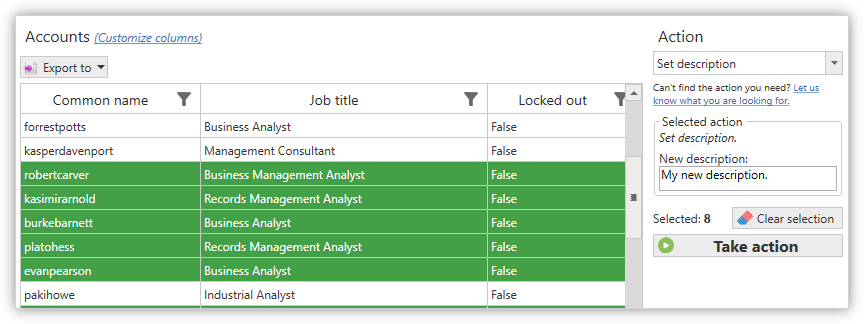
AD Admin 2: eight accounts selected in the list (with their job titles and locked-out status) and the "Set description" action filled in with new text, ready for Take action.
AD Admin 2 is the one tool here that changes Active Directory. You find accounts with saved search templates and AND/OR filters, or import a list from a CSV file, select them and apply one of 17 actions: disable, enable, delete, move to an OU, add to or remove from groups, set an expiry date, unlock, hide from the address list, disable OWA, set a random password and more. All 17 actions are in the free edition.
Pro at $299 is for clean-up that runs itself: it combines a search and an action into a scheduled task (say, disable every expired account each night), logs every change with who made it, adds custom fields and exports results. Its license is the most generous of the desktop tools: minor updates and support for life, with major updates free for the first year.
What we like
- All 17 bulk actions are free
- One-time license with lifetime minor updates
- Pro's history answers "who disabled this account, and when?"
Watch out for
- No undo: Delete can't be reversed from the tool
- Needs 64-bit Windows 10 or later because of .NET 10
- No public changelog and no independent reviews yet
Download AD Admin 2 FreeBuy AD Admin 2 Pro
NTFS Permissions Auditor: who can open what on your file servers
- Price: Pro $299 at checkout for one person; $1,099 Company, $1,349 Consultant/MSP
- Free edition: unlimited audits with the folder and account views; no export, filters, history, change reports or scheduling
- Version: 26.10.8, released October 8, 2026; Windows 10 or later with .NET Desktop Runtime 10
- Best for: access reviews, offboarding checks and audits of Windows file shares
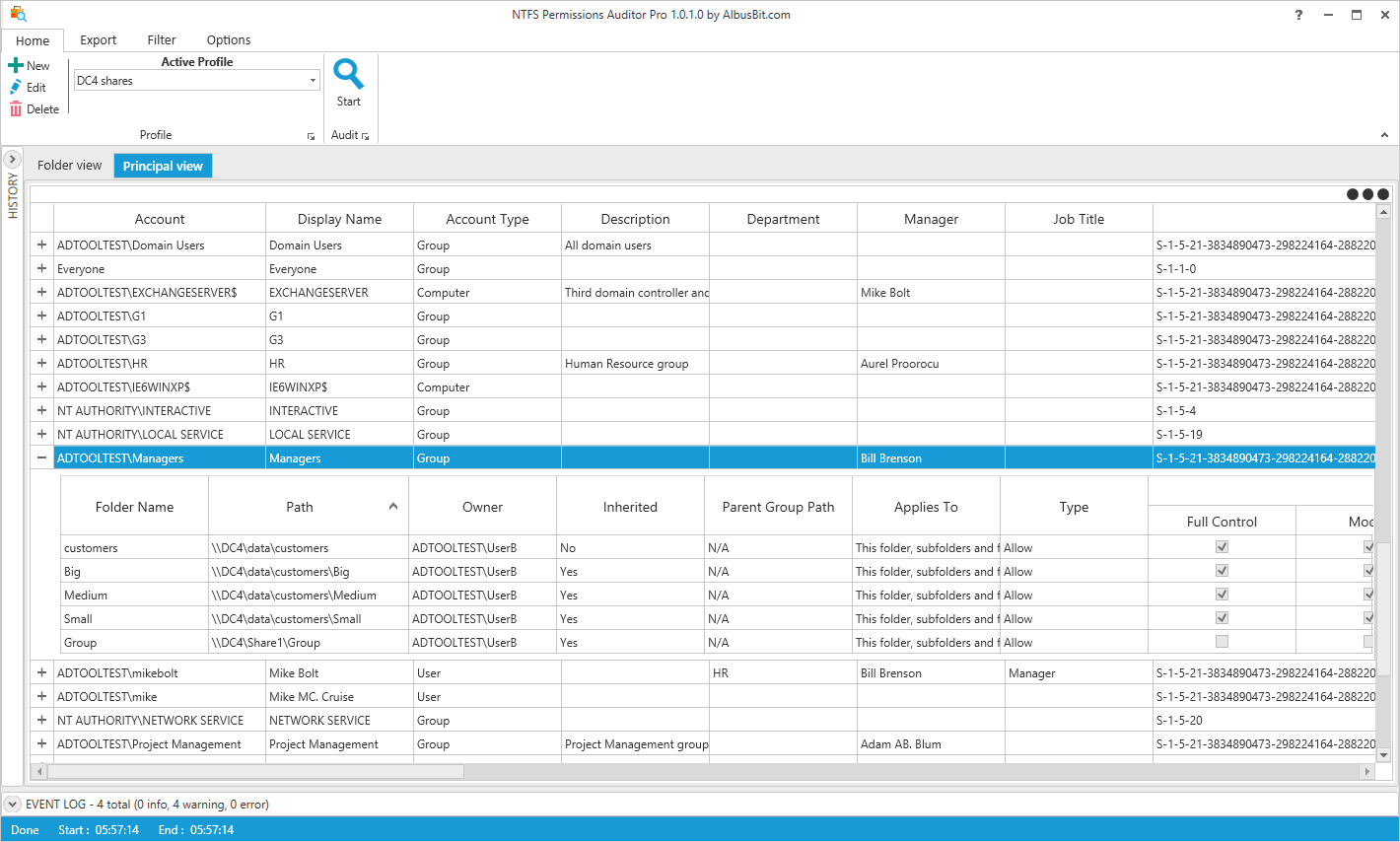
NTFS Permissions Auditor Pro 1.0.1.0 (vendor screenshot of an early version), Principal view: the Managers group is expanded to the five folders it can access, with owner, inheritance and the Full Control column.
NTFS Permissions Auditor scans shares, UNC paths and DFS namespaces, reads every folder's permissions and resolves nested Active Directory groups to real people. Its folder view answers "who can open this folder?", and its account view answers "what can this person reach?", including access that only comes through a group inside a group. It can find every share on a server or a whole domain for you, and nothing is installed on the file servers.
The free edition already gives you both views with no time limit. Pro at $299 adds export, filters such as "folders where Everyone has Modify", stored audits, change reports between two scans and scheduled audits that email you only when something changed. It reads permissions but doesn't edit them, and change reports compare snapshots, so it can't say who made a change.
What we like
- Nested groups resolved to real names, in both directions
- Unlimited audits in the free edition
- Change reports and NIS2 reports for auditors (Pro)
Watch out for
- The free edition can't export
- Read-only: fix permissions elsewhere
- Big jump from $299 to $1,099 for a Company license
What users say: Timothy Warner, a Microsoft MVP, reviewed it for 4sysops: "Albus Bit NTFS Permissions Auditor is a lightweight, easy-to-use permissions analysis tool that helps you enforce the IT security principle of least privilege." User-review sites don't have ratings for it yet.
Download NTFS Permissions Auditor FreeBuy NTFS Permissions Auditor Pro
AD Group Manager Web: let managers run their own groups
- Price: $1,295 a year at checkout for one server, unlimited users and groups; $1,590 a year with the Self-Service Portal password-reset module
- Trial: 30 days with every feature, plus a live demo on the vendor's site
- Version: 26.11.03, released November 3, 2026; Windows Server 2016 or later with IIS and the ASP.NET Core 10 Hosting Bundle
- Best for: organizations whose help desk spends real time on "add the new hire to this group" tickets
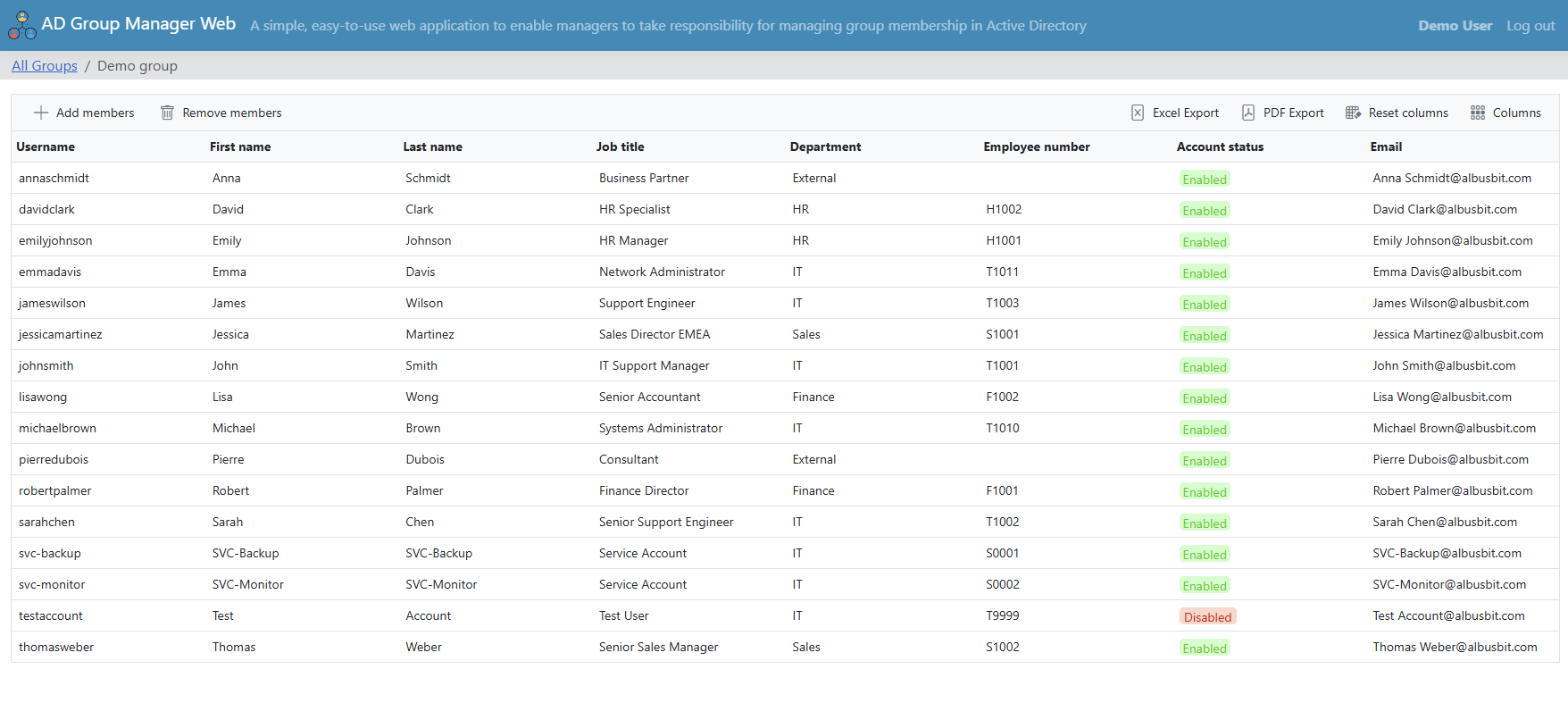
AD Group Manager Web, logged in as Demo User: the members of "Demo group" with job title, department, employee number, account status and email, and Add members, Remove members, Excel Export and PDF Export buttons.
AD Group Manager Web is the only one of the four that isn't a desktop tool. It installs as one IIS site on your own Windows Server, reads the Managed By field that's already in Active Directory, and shows each manager only the groups they own. Managers add or remove members in a browser, can give a contractor time-limited membership, and approve requests from staff who want to join. IT decides which fields they see and edit, and every change goes into an audit log with email notifications.
It's also the only subscription: $1,295 a year per server, renewed to keep using it, with no free edition. That buys a focused portal that needs no schema changes or internet connection, but it covers on-premises AD groups only, not Entra ID or Microsoft 365 groups, and it doesn't create or remove users.
What we like
- Managers handle their own group requests, with a full log
- Unlimited users and groups on one server, all on-premises
- 30-day trial and a live demo before you pay
Watch out for
- Annual subscription, no free edition
- Groups only, on-premises AD only
- No independent reviews yet
Download AD Group Manager Web TrialBuy AD Group Manager Web
Price: single tools vs the Pro Bundle
Albus Bit sells AD FastReporter Pro, NTFS Permissions Auditor Pro and AD Admin Pro together as the Pro Bundle, with three more Pro tools added free (AD Permissions Reporter, Service Credentials and AD Photo Editor). It's a perpetual license with a year of updates. If you'd buy two of the three main tools, the bundle is already close: AD Admin plus NTFS Permissions Auditor costs $598 for one person, the bundle $499.
Pro price for one person (Individual license, USD)
NTFS Permissions Auditor Pro$299
Pro Bundle (all three plus three bonus tools)$499
All three bought separately$747
Order-page prices checked on November 25, 2026, before sales tax.
Company license, any number of staff (USD)
NTFS Permissions Auditor Pro$1,099
Pro Bundle, Company$1,699
All three bought separately$2,745
Prices from albusbit.com's license pages on November 25, 2026. AD Group Manager Web ($1,295 a year) isn't part of the bundle.
License tiers differ only in who may install the software. Individual is one person; Company is any number of your own employees at any location; Consultant/MSP adds use at client sites. Features are the same in all three, so a two-admin team pays the Company price.
Reporting vs changing: AD FastReporter or AD Admin 2?
AD FastReporter is the right buy when the output is a document: a weekly list for a manager, evidence for an auditor, a dated archive. AD Admin 2 is the right buy when the output is a changed directory: stale accounts disabled, leavers moved, groups cleaned. Both find inactive accounts with last logon from every domain controller, so for a one-off clean-up the free AD Admin 2 alone may be enough; you only need FastReporter when someone wants the list as a file, on a schedule.
Directory vs file shares: where NTFS Permissions Auditor fits
NTFS Permissions Auditor answers a question the other three can't: which folders a person can open. AD FastReporter tells you which groups someone is in; NTFS Permissions Auditor tells you what those groups can open on the file servers. For an offboarding check or a "who can see the HR share" audit, it's the tool to buy.
Which should you choose?
| Your situation | Pick | Why |
|---|
| Monthly AD reports for management or auditors | AD FastReporter | Ready-made reports, export and email scheduling for $149 |
| Regular clean-up of stale users and computers | AD Admin 2 Pro | Bulk actions free; Pro schedules them and logs every change |
| "Who has access to this share?" or offboarding checks | NTFS Permissions Auditor | Nested groups resolved to people, per folder and per person |
| Group requests clogging the help desk | AD Group Manager Web | Managers maintain their own groups in a browser |
| You need two or three of the desktop tools | Pro Bundle ($499 individual) | Three Pro tools plus three bonus tools for less than two bought separately |
| Two or more admins will use the tool | The Company license of your pick | Individual covers one person only |
Who should skip all four: organizations whose users and groups live only in Entra ID or Microsoft 365, since every tool here works with on-premises Active Directory; anyone who needs real-time "who changed what" auditing from event logs, which is a different kind of product; and admins who need a report or clean-up twice a year, where the free editions or PowerShell will do. More tools are listed under server applications.
What commonly goes wrong
- Buying a reporting tool to make changes. AD FastReporter and NTFS Permissions Auditor only read; account changes need AD Admin 2, and permissions are fixed in Windows itself.
- Paying before testing. Albus Bit doesn't give refunds. Run the free edition on your own domain, then request the 7-day Pro trial (or the 30-day AD Group Manager Web trial); Albus Bit sends trial keys to work email addresses, not free webmail.
- Choosing Individual for a team. The Individual license is for one person; a second admin needs the Company license.
- Old admin workstations. AD Admin 2 and NTFS Permissions Auditor need .NET Desktop Runtime 10 and Windows 10 or later; AD Admin 2 runs on Windows Server 2012 only with Extended Security Updates.
- Untested bulk actions. AD Admin 2 has no undo. Try a new search and action on a test OU first.
- Letting updates lapse unnoticed. FastReporter and NTFS Permissions Auditor keep working after the year of updates, but renewing before expiry is cheapest (about half the license price).
FAQs
Are Albus Bit licenses perpetual or a subscription?
AD FastReporter, AD Admin 2 and NTFS Permissions Auditor are perpetual, one-time licenses; AD Group Manager Web is an annual subscription at $1,295 a year. FastReporter and NTFS Permissions Auditor include one year of updates, and AD Admin 2 includes minor updates for life and major updates for one year.
What can the free editions of AD FastReporter and NTFS Permissions Auditor do?
AD FastReporter Free runs every built-in report and NTFS Permissions Auditor Free runs unlimited audits with both views, with no time limit. Neither free edition can export, store results, filter or schedule; those need Pro.
Do these tools need to be installed on a domain controller?
No. AD FastReporter, AD Admin 2 and NTFS Permissions Auditor install on a domain-joined workstation and use your own account's rights. AD Group Manager Web installs on a Windows Server 2016 or later machine running IIS, which doesn't have to be a domain controller.
Do Albus Bit tools work with Entra ID or Microsoft 365?
No. AD FastReporter, AD Admin 2, NTFS Permissions Auditor and AD Group Manager Web work with on-premises Active Directory. Objects synced from it appear as they exist locally, but cloud-only Entra ID users and groups aren't covered.
Can I buy AD FastReporter, AD Admin and NTFS Permissions Auditor together?
Yes. Albus Bit's Pro Bundle includes all three Pro tools plus AD Permissions Reporter, Service Credentials and AD Photo Editor Pro for $499 (Individual), $1,699 (Company) or $1,999 (Consultant/MSP), against $747, $2,745 and $3,370 bought separately.
Does Albus Bit offer refunds?
No. Albus Bit doesn't refund purchases of its tools, so use the free editions, the 7-day Pro trial keys or AD Group Manager Web's 30-day trial before you buy.
Can my organization pay for Albus Bit tools by purchase order?
Yes. Albus Bit accepts purchase orders and bank transfers and sends PDF quotes on request. EU companies can enter a VAT number at checkout, and US tax-exempt organizations can claim sales tax back from 2Checkout after the order.
Conclusion
Start with the question you get asked most. If it's "send me a list", buy AD FastReporter Pro at $149: it's the cheapest way to make Active Directory reporting automatic. If it's "clean this up", the free AD Admin 2 already does the work, and Pro at $299 makes it run on a schedule with a record of every change. If it's "who can see this folder", NTFS Permissions Auditor is the only tool here that answers it. When two of those questions apply, the $499 Pro Bundle beats buying separately. AD Group Manager Web is a different purchase: worth $1,295 a year only when group requests are a steady load on your help desk. With no refunds on any of them, use the free editions and trials on your own domain before paying.
Download AD FastReporter FreeBuy AD FastReporter ProBuy AD Admin 2 ProBuy NTFS Permissions Auditor Pro