You switched to a Mac, and your old Outlook Express mail is still stuck in DBX files that Apple Mail and Entourage can't open. Retyping or forwarding thousands of messages isn't realistic. This converter turns those DBX files into MBOX, a format Mac mail programs can import.
Quick facts
- Product: SoftSpire DBX to MBOX Converter
- Runs on: Windows (the conversion happens on a PC, and you then move the MBOX file to the Mac)
- Price: $49
- Trial: a trial version is available
>
Key features
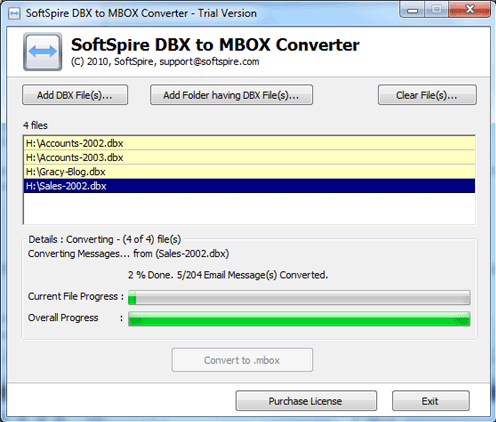
Convert many DBX files in one batch
You can select multiple DBX files and convert them together instead of repeating the job for each mailbox.
Get one MBOX file for each DBX file
The tool creates a single MBOX file for each selected DBX file, so your folders stay separate (Inbox, Sent Items and so on).
Open the result in Apple Mail, Entourage and other MBOX clients
The output works with MBOX-supporting email applications, including Mac Mail, Entourage, Thunderbird, Eudora and Evolution.
Keep read/unread status and folder structure
A third-party listing says the tool keeps the on-disk folder structure and the read/unread status of messages, and that it handles Outlook Express 5, 5.5 and 6 files.
Who it's for
It suits you if you have Outlook Express DBX files on a Windows PC and want the mail on a Mac or in Thunderbird. You only need the DBX files themselves, not Outlook Express.
Pros and cons
- Pro: Batch conversion of several DBX files.
- Pro: The MBOX output works with many mail clients, not just one.
- Pro: A trial lets you test it before paying.
- Con: It is a Windows program, so you need a PC for the conversion step.
- Con: It only handles DBX files, and $49 is a lot for a one-off migration.
FAQs
Do I need Outlook Express installed?
No. Having the DBX files is enough.
Which Mac programs can read the output?
Apple Mail and Entourage, plus other MBOX-compatible clients such as Thunderbird.
Can I convert more than one DBX file at once?
Yes. Batch conversion is supported, with one MBOX file created per DBX file.
Can I try it first?
Yes. A trial version is offered before you buy the $49 license.
System requirements
A Windows PC. Windows 98, ME, 2000, 2003, XP, Vista and 7 are the versions listed for this program.