dotConnect for SQL Server: Devart's ADO.NET Provider With Visual Studio Tooling
dotConnect for SQL Server is a $219.95-a-year ADO.NET data provider from Devart for C#, VB.NET and F# developers who build .NET applications on Microsoft SQL Server or Azure SQL. It runs on .NET 5 to 11 and .NET Framework 2.0 to 4.8 on Windows, Linux and macOS, and it adds data components, a bulk loader, SQL tracing and Visual Studio design-time tools that Microsoft's free SqlClient driver doesn't have.
If your team still maintains WinForms apps built around typed datasets, or you want SQL tracing and bulk loading without writing the plumbing yourself, this is the kind of provider that saves hours. If you only need to open a connection and run queries from a modern .NET app, the free Express edition, or Microsoft's own driver, may be all you need.
Quick facts
- Version: 7.1.248, released November 11, 2026 (added .NET 11 support)
- Developer: Devart
- Databases: SQL Server 2000 to 2025, including Express editions, and Azure SQL Database
- .NET platforms: .NET 5 to 11, .NET Core 2.0 to 3.1, .NET Standard 2.0/2.1, .NET Framework 2.0 to 4.8, ASP.NET Core, Blazor, .NET MAUI
- Operating systems: Windows, Linux and macOS, x64 and x86
- IDE: Visual Studio 2015 to 2026 integration. Works without design-time tools in VS Code, Rider and other NuGet-capable IDEs
- Package: Devart.Data.SqlServer on NuGet. The Windows installer is 16.58 MB
- Price: $219.95 for one developer with one year of updates and support. Server $699.95, OEM for 10-100 devices $4,999.95. Express edition free
- Trial: fully functional for 30 days, no credit card, free Devart account needed to download
- Guarantee: 30-day money-back guarantee
- What we checked: version 7.1.248 and the 16.58 MB download size on Devart's download page, the revision history back to 2022, and the order page on November 13, 2026: $219.95 for the default single-developer, one-year license, $699.95 for Server, $4,999.95 for OEM for 10-100 devices, and a $109.95 renewal for the next year. We didn't install it or run it against a SQL Server database.
Download Free TrialBuy Now
Overview
Devart has sold this provider for well over a decade (it began life as SQLDirect .NET), and the revision history shows how much has changed lately. Until version 5.0 in November 2023 it was a .NET Framework-only product, and Devart's own forum had developers asking when .NET 6 would be supported. Since then it has added .NET 5 to 11, a cross-platform NuGet package, SQL Server 2022 and 2025, Visual Studio 2026, the JSON and VECTOR data types, and Microsoft Entra authentication, with releases every month or two through 2026.
It connects to SQL Server directly over TCP/IP, so no client libraries need to be installed on the machine. The classes follow the standard ADO.NET model (connection, command, data reader, data adapter, provider factory, connection string builder), so code written for SqlClient moves across with renamed types rather than a rewrite. What you pay for is everything around those classes.
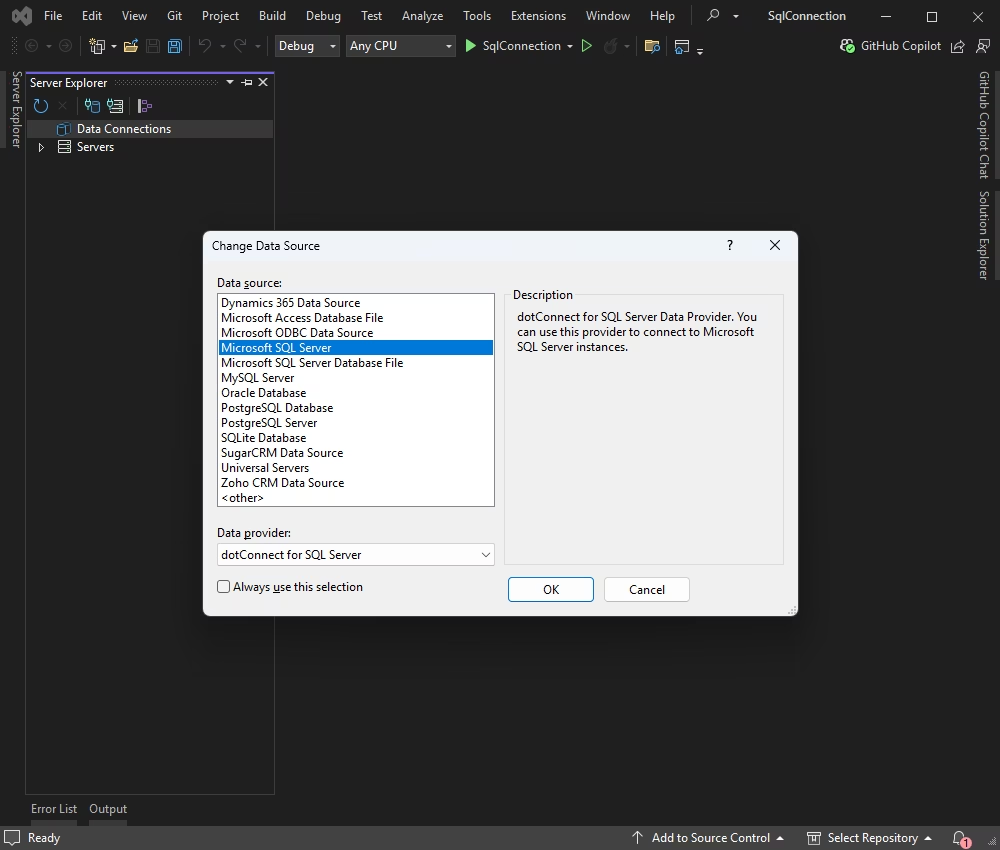
Visual Studio's Change Data Source dialog with Microsoft SQL Server selected and dotConnect for SQL Server as the data provider.
Features
Visual Studio design-time tools
dotConnect for SQL Server plugs into Visual Studio 2015 to 2026 as a Server Explorer data source, so you can browse tables, views and stored procedures and preview data without leaving the IDE. The Developer edition adds a DataSet Wizard that generates typed SQL Server datasets, a DataSet Manager that lists and binds the datasets in a project, a DataSet Editor for their contents, a TableMappings editor, and component editors with SQL syntax highlighting and code completion. A Migration Wizard converts projects that use the ODBC or OLE DB .NET providers.
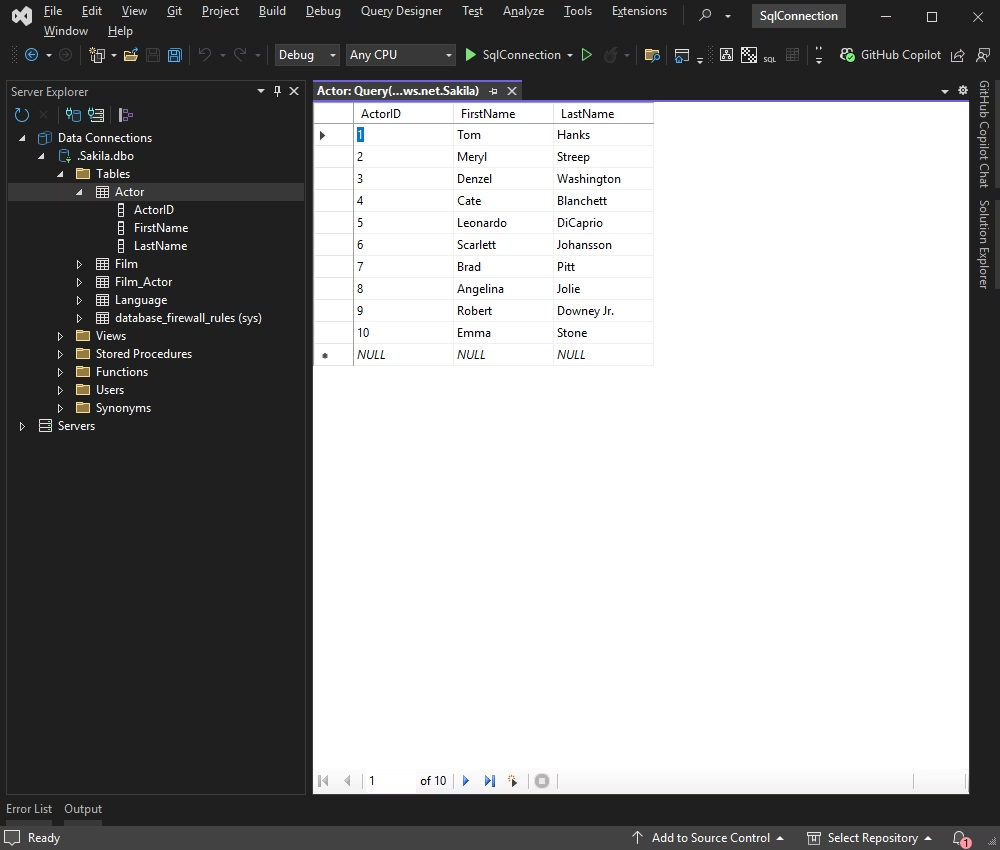
Server Explorer with a dotConnect connection open: the Sakila database's tables, and the Actor table's rows in Visual Studio's query grid.
Fast bulk loading with SqlLoader
dotConnect for SQL Server's SqlLoader class loads large sets of rows into a table far faster than individual INSERT commands, which matters for imports, data migrations and nightly feeds. Version 6.0 also added high-performance batch updates. SqlLoader is in the paid editions only.
Scripts, dumps and SQL tracing
dotConnect for SQL Server includes SqlScript for running multi-statement scripts, including very large script files loaded on the fly, and SqlDump for saving a database or part of one as a script and restoring it. SqlMonitor traces every SQL statement the provider sends, and the separate dbMonitor utility (Developer edition) shows commits, rollbacks and statements per component, which is often the quickest way to find a chatty data layer.
SqlDataTable and smarter data fetching
dotConnect for SQL Server's SqlDataTable is an all-in-one component for working with a single table or query result: it fetches, edits and saves without a separate adapter. It can fetch rows in the background (NonBlocking mode), on demand as a grid scrolls, or page by page, defer loading of large columns, and build server-side master-detail relations. For WinForms there's a DataLink component for cross-form data binding. These are Developer-edition features.
Modern authentication and SQL Server types
dotConnect for SQL Server supports Microsoft Entra authentication, including Managed Identity, MSI, Default and Workload Identity (added in version 7.0, September 2026), plus encrypted connections. It handles all SQL Server data types, with JSON and VECTOR added in 7.0, and newer connection string options such as ConnectRetryCount and ServerCertificate.
NHibernate and ASP.NET providers
dotConnect for SQL Server's Developer edition works with NHibernate and includes ASP.NET 2.0 provider model support and an SqlDataSource component for web pages. It also supports the Enterprise Library Data Access Application Block.
Benefits
- Less plumbing code. Bulk loading, script running, tracing and paged fetching come as ready components instead of helpers you write and maintain.
- One provider for old and new code. The same vendor library covers a .NET Framework 2.0 WinForms app and a .NET 11 service on Linux, which helps teams that maintain both.
- Someone to call. A paid license comes with a year of updates and Devart support, and a premium support option is sold on the order page.
- Royalty-free deployment. Applications built with it ship the Devart runtime assemblies with no per-install fee, and the OEM license covers redistribution to third parties.
Real-World Uses
- Keeping a legacy WinForms app alive. A line-of-business app built on typed datasets gets the DataSet Wizard and Editor back in Visual Studio 2022 or 2026, and can move to Microsoft Entra sign-in for Azure SQL.
- Nightly data imports. A service reads supplier CSV files and pushes hundreds of thousands of rows into staging tables with SqlLoader.
- Database deployment scripts. An installer runs schema scripts with SqlScript and takes a scripted backup of a customer's tables with SqlDump before upgrading.
- Finding slow data access. A developer turns on dbMonitor to see exactly which component fires which statement, and how many times, during one screen load.
Who It's For, and Who Should Skip It
It's for .NET teams that already work in Visual Studio and want design-time dataset tools, built-in bulk loading and tracing, and a supported commercial driver, and for shops that use several Devart dotConnect providers and want the same API across databases.
Skip it if your app uses Entity Framework Core or Dapper over plain connections and needs nothing beyond them: Microsoft.Data.SqlClient is free, open source and maintained by Microsoft. Skip the paid editions too if the free Express edition's classes cover you. And if you need one library for SQL Server plus other databases, look at Devart's dotConnect Universal instead of buying several single-database providers.
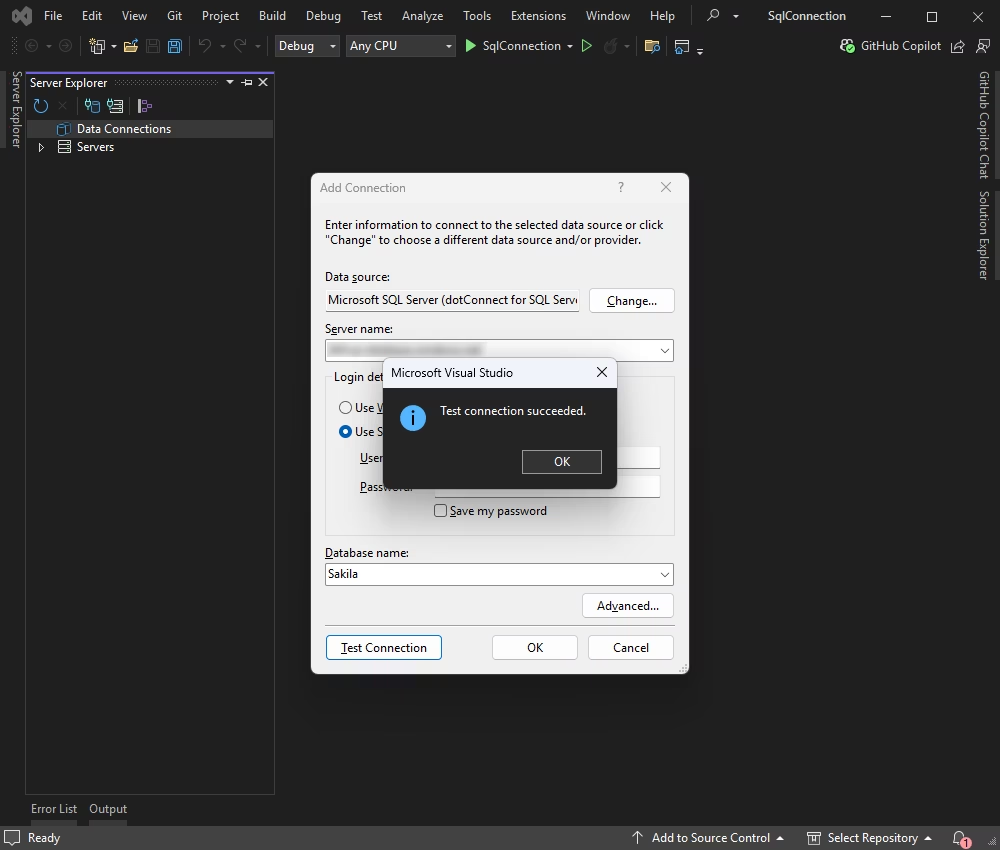
The Add Connection dialog with Microsoft SQL Server (dotConnect for SQL Server) as the data source, after a successful Test Connection to the Sakila database.
Usage Guide
- Get the trial. Sign in with a free Devart account on the download page and run the Windows installer. Close Visual Studio first. Choose "Minimal" on a machine without Visual Studio.
- Or add the package. In any IDE, run
dotnet add package Devart.Data.SqlServer (or Install-Package Devart.Data.SqlServer in the Package Manager Console).
- Connect. In Visual Studio, open Server Explorer, add a connection, choose Microsoft SQL Server and pick dotConnect for SQL Server as the provider. Enter the server, sign-in method and database, then Test Connection.
- Write code. Use
SqlConnection, SqlCommand and SqlDataReader from the Devart.Data.SqlServer namespace the way you would with ADO.NET. Drop SqlDataTable or SqlLoader on a form, or create them in code, for the extra features.
- Activate. After buying, apply your license key (6.0 added key-based licensing for .NET Framework assemblies, and 6.1 a LoadLicenseKey() method) and remove every trial assembly before building the release version.
- Deploy. Ship the Devart runtime assemblies your app uses with the license resource. For web projects, Devart.Data.SqlServer.dll and Devart.Data.dll go in the bin folder.
Before you buy
The price is a subscription to updates and support: $219.95 covers one developer for one year, and the next year renews at $109.95. Devart's order page also offers a perpetual license, which keeps the version you have working without an active subscription. Two- and three-year terms, Team and Site licensing and premium support are chosen on the order page and change the price.
Where it falls short
- Trial leftovers break builds. Devart's own FAQ says the most common problem after buying is an app compiled against trial assemblies. You have to uninstall the trial, clear Devart.* files from the GAC and project folders, reinstall and rebuild.
- Express editions of Visual Studio get less. No add-in menu, no automatic toolbox registration and no advanced Server Explorer integration.
- Design-time tools are Windows-only. On Linux and macOS you get the NuGet library, not the wizards.
- Late to modern .NET. .NET Core and .NET 5+ support arrived only in November 2023, so older blog posts and forum answers that say it's Framework-only are out of date, but the cross-platform package has a shorter track record than Microsoft's driver.
- A license is required to run. Without a valid license the provider doesn't work in a built application, so plan for renewals if you need the newest .NET or SQL Server versions.
What Users Say
Public reviews of this provider are scarce. It's a niche developer component, and the review directories (Capterra, G2, GetApp, Software Advice) list it with few or no rated reviews of their own. What real users have written is mostly on Devart's own forum.
Devart forum, January 2022
A developer asked about modern .NET: "On the product compatibility page, I only see compatibility after .NET Framework 4. I want to check if this product can be used on .NET 6 and can connect to SQL Server 2000?" (tompipen). Devart's answer at the time was that .NET 6 support was "planned to be implemented in the near future, but there is no exact timeline yet," and in October 2022 a Devart engineer added that "dotConnect for SQL Server doesn't support .NET Core (.NET 6) yet."
That was a fair complaint then. Version 5.0 (November 2023) added .NET Core and .NET 5, 6 and 7, and the provider now covers .NET 5 to 11.
Devart forum, May 2022
Another user asked: "When will the full installation be supported in VisualStudio 2022?" (EarlyBird). Visual Studio 2022 support came in version 4.0 in June 2022. The pattern in the revision history since then is quicker: Visual Studio previews and new .NET versions are usually supported within weeks, as with .NET 11 in November 2026.
The recurring themes: buyers value the Visual Studio integration and the vendor support, and the past complaints were about the provider lagging behind new .NET and Visual Studio releases, which Devart's monthly updates have largely fixed. The trial-to-licensed switch is the one practical gotcha that comes up in Devart's own FAQ.
Comparisons
dotConnect for SQL Server vs Microsoft.Data.SqlClient
Microsoft.Data.SqlClient is free, open source and the default provider for SQL Server and Azure SQL in .NET, and Entity Framework Core uses it out of the box. dotConnect for SQL Server costs $219.95 a year and earns it with what sits on top of the connection: SqlLoader bulk loading, SqlScript and SqlDump, SqlMonitor and dbMonitor tracing, SqlDataTable with paged and background fetching, typed-dataset tools in Visual Studio, and vendor support. If you don't need those, stay with Microsoft's driver.
Express vs Developer edition
The free Express edition includes the native data type classes, SqlScript, SqlMonitor, the design-time component and property editors, Visual Studio 2015 to 2026 integration and the Migration Wizard. The Developer edition adds:
- SqlDataTable, SqlDataSet and the SqlLoader bulk loader
- the DataLink class and the SqlDataSource web component
- DataSet Manager, Editor and Wizard
- ASP.NET providers, NHibernate support and dbMonitor
Editions and Pricing
Every paid license is ordered with the same Buy Now button: you pick the edition, term, license type and support on the order page. Prices below are the one-year, single-license prices on November 13, 2026.
| Edition | Price | Who can use it |
|---|
| Express | Free | Basic classes and design-time support, no SqlLoader, SqlDataTable or dataset tools |
| Developer (the order page's default, labelled Professional at checkout) | $219.95 per year, renews at $109.95 | One developer, on one or more development workstations |
| Server | $699.95 per year | One server of one organization: web, application or batch servers, or a multi-user workstation |
| OEM for 10-100 Devices | $4,999.95 per year | Use in your company and redistribution to third parties inside your application, with silent installation |
The order page also offers 2- and 3-year terms, Team and Site licensing, larger Site and OEM tiers, a perpetual license, premium support, and volume discounts of 5% to 15% from five licenses up.
FAQs
Does dotConnect for SQL Server work on Linux and macOS?
Yes. dotConnect for SQL Server's Devart.Data.SqlServer NuGet package runs on Windows, Linux and macOS with .NET 5 to 11, .NET Core or .NET Standard. Version 6.1 fixed license key activation on Red Hat-based distributions. The installer and Visual Studio tools are Windows-only.
Can dotConnect for SQL Server connect to Azure SQL Database?
Yes. dotConnect for SQL Server connects to Azure SQL, and Devart publishes a C# guide for it. It supports Microsoft Entra authentication, including managed identities, in both the .NET Framework and .NET Standard assemblies since version 7.0.
Does dotConnect for SQL Server support SQL Server 2025?
Yes. dotConnect for SQL Server added SQL Server 2025 in version 6.1.33 (February 2026), and still supports versions back to SQL Server 2000 and MSDE.
What happens when the dotConnect for SQL Server subscription year ends?
dotConnect for SQL Server keeps working at the version you have if you hold a perpetual license, but new versions and support stop until you renew ($109.95 for the next year of a single Developer license on November 13, 2026). New .NET and Visual Studio releases usually need a newer build.
Do I pay royalties to ship an app built with dotConnect for SQL Server?
No. Apps built with dotConnect for SQL Server ship its runtime assemblies with no per-installation fee. If you redistribute the driver to other companies as part of your product, Devart sells the OEM license for that.
Can I get a refund for dotConnect for SQL Server?
Yes. dotConnect for SQL Server purchases have a 30-day money-back guarantee: Devart refunds the payment in full if the product doesn't meet your expectations. Since the 30-day trial has no limits, test it on your own project first.
Does dotConnect for SQL Server work with Visual Studio Code or Rider?
Yes, as a library. dotConnect for SQL Server installs from NuGet in VS Code, JetBrains Rider and other NuGet-capable IDEs, but the design-time tools (Server Explorer integration, DataSet Wizard, component editors) need Visual Studio 2015 to 2026.
Is there a free version of dotConnect for SQL Server?
Yes. dotConnect for SQL Server Express is free and includes the core provider classes, SqlScript, SqlMonitor and Visual Studio integration. SqlLoader, SqlDataTable, the dataset tools and NHibernate support need a paid edition.
System Requirements
- .NET 5.0 to 11.0, .NET Core 2.0 to 3.1, .NET Standard 2.0/2.1, or .NET Framework 2.0 to 4.8
- Microsoft SQL Server 2000 to 2025 (including Express editions), MSDE, or Azure SQL
- Windows, Linux or macOS, x64 or x86
- Visual Studio 2015 to 2026 for the design-time tools (Windows)
- A free Devart account to download the trial
Conclusion
dotConnect for SQL Server is worth $219.95 a year to a .NET team that will actually use what it adds: SqlLoader for bulk imports, script and dump components, dbMonitor tracing, and the typed-dataset tools that keep older WinForms code maintainable in current Visual Studio. The best reason to buy it is that one supported library covers .NET Framework 2.0 to .NET 11 with those extras built in. The main reason not to is that Microsoft's free SqlClient already does the core job well, so if you only need connections and queries, you'd be paying for tools you won't open. Try the free trial on your own project before deciding.
Download Free TrialBuy Now