USB Analyzer: See What Your USB Device and Driver Are Really Saying
USB Analyzer is a $69.95 Windows tool from Electronic Team (formerly Eltima) that captures and decodes the traffic between USB devices and applications, for developers who write or debug USB drivers, firmware and device software.
A device that works on one PC and stalls on another usually gives you nothing but a vague error. USB Analyzer shows the actual requests going up and down the USB stack, with timestamps and status, so you can see which transfer failed and what it carried.
Quick facts
- Version: 4.0.288, released February 3, 2022
- Developer: Electronic Team, Inc. (the company formerly known as Eltima)
- Platform: Windows XP to Windows 10 and Server 2003 to 2012, 32-bit and 64-bit
- Captures: IRPs, URBs, IOCTLs, Plug and Play requests and USB function data
- Export: TXT, CSV, XML, HTML, plus a binary capture file
- Price: $69.95 for a single license
- Trial: fully functional for 14 days
- Installer: 11 MB
- What we checked: installer build 4.0.288, 11,686,584 bytes, signed by Electronic Team, Inc., and checkout price $69.95 with nothing added to the cart, on November 6, 2026. We didn't run a capture, and we didn't test it on Windows 11.
Before you buy
- Check it on your Windows version. The vendor's requirements stop at Windows 10 and Server 2012, and the last release is from February 2022. If you're on Windows 11, use the 14-day trial to confirm it captures your device before paying.
- It's a software sniffer. It reads requests on the Windows host. It can't tell you about signal problems on the wire.
- All sales are final. Electronic Team's terms allow a refund or replacement only for a malfunction its support can't fix within a 14-day grace period.
Download Free TrialBuy Now
Overview
USB Analyzer sits on your PC and logs what passes through the USB device stack. You pick a device or a port, choose which event types to record, and start a session. Requests scroll into a list with a number, type, direction, time, buffer size and status. Click one and the panes below show its fields and its data in hex and text.
The vendor still sells it on its own site, with this same order page, but it's no longer one of the company's lead products. The last update is 4.0.288, so think of it as a stable tool, not an actively developed one.

A monitoring session: URB transfers with direction, time and status above, and the selected request decoded in Command View and Data View below.
Features
Real-time capture of the USB stack
USB Analyzer intercepts IRPs, URBs, IOCTLs and the data moving through USB hubs as it happens, including on USB root hubs. You choose which of these to record for each session.
Decoded and raw views together
USB Analyzer shows each packet in brief in the top list, then in detail below it. Command View breaks a request into named fields such as PipeHandle and TransferFlags, and Data View gives the payload in hex and ASCII.
Several sessions at once
USB Analyzer can monitor multiple devices at a time, each in its own session, so you can compare a working device with a failing one. It lists connected devices in a simple list or a hierarchical tree.
Filters, search and markers
USB Analyzer filters captures dynamically to hide packets you don't need, searches the captured data, and lets you add markers. You can also have it stop when specified data is received, which helps catch a rare event.
Pairing of IN and OUT packets
USB Analyzer has a Pair button that jumps between a request and its matching response, which saves tracing them by hand in a long log.
Save and export
USB Analyzer saves captures to a binary file for later analysis and exports them to TXT, CSV, XML or HTML for reports or your own scripts.
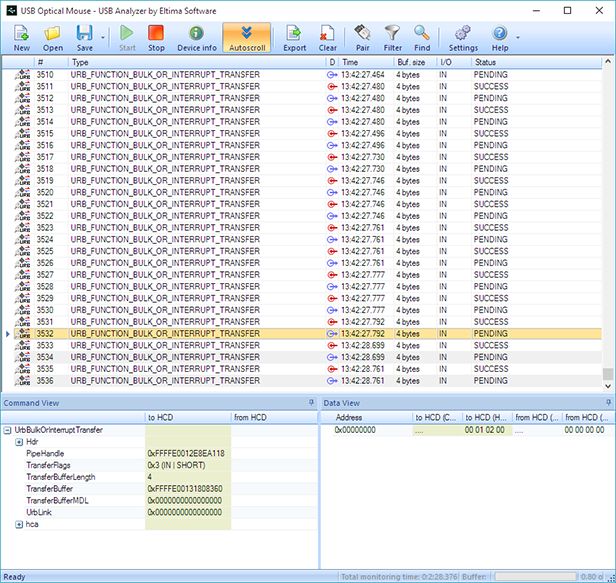
Capturing a USB optical mouse: interrupt transfers with buffer sizes and SUCCESS or PENDING status.
Benefits
- No hardware to buy. A software capture needs only the PC the device is plugged into.
- Faster answers to "whose fault is it?" You can see whether the request left the driver and what came back.
- Evidence you can share. A saved capture or an HTML export can go straight into a bug report.
- Low cost. $69.95 once is little for a tool a USB developer can use daily.
Real-World Uses
- Driver developer: compare the URBs your driver sends with those of the vendor's driver for the same device.
- Firmware engineer: check that the device answers each request with the data you expect.
- Reverse engineering a protocol: log what a Windows-only app sends to a device so you can write your own support for it.
- Support engineer: ask a customer for a capture to see where a transfer stops.
Who It's For, and Who Should Skip It
It suits developers and test engineers on Windows 10 or older who want a straightforward capture tool with a clear interface at a modest price.
Skip it if you're a regular user trying to fix a USB device: the output means little unless you know what a URB is. Skip it if you need bus-level timing or electrical detail, which takes a hardware analyzer. Developers who need current Windows 11 support from the vendor should look at a tool under active development, and anyone on a tight budget can try the free USBPcap with Wireshark first.
Usage Guide
- Download and install USB Analyzer. The 14-day trial is fully functional.
- Click New on the toolbar.
- In the Start new session window, choose the device to monitor. Advanced View lists all the USB hubs and ports it has detected.
- Tick the functions to capture: Plug and Play, IOCTL, URB and USB function.
- Start the session and use your device. Captured data fills the main window.
- Click a line to read it in Command View and Data View, and press Ctrl+G to jump to a line number.
- Use Filter, Find and Pair to narrow things down, then save or export the capture.

The Start new session window: choose a device on the left and the event types on the right.
Where it falls short
- Slow development. The last release is from February 2022, and the listed systems stop at Windows 10. The screenshots on the vendor's pages show an older Windows look.
- Windows only. There's no Mac or Linux version.
- Few outside reviews. The ratings below are the vendor's own, so there's little independent evidence on stability under heavy capture loads.
- No class-level decoding is advertised. The vendor describes raw and decoded request views, but doesn't list parsers for specific device classes. If you need those, compare with a dedicated analyzer during the trial.
What Users Say
Independent reviews of USB Analyzer are scarce, which is common for a niche developer tool. The vendor's page shows 4.9 from 87 reviews, and the quotes below come from that page, so read them as hand-picked.
On the vendor's page
Andrew Green, senior Software Developer: "USB Analyzer software is simple and well implemented. It became an essential part of our successful coding, testing and optimization!"
Dan Fuller: "USB Analyzer performs extremely well and has all the features we want. Everything seems to be configurable and customizable, from the convenient search to saving data for analysis."
Steve Matteson: "I have been using various USB analyzers on a daily basis for more than 5 years, Eltima USB Analyzer with its intuitive user interface is a really powerful tool. It has tons of options. Easy to install and use."
Softpedia also lists it and credits it with filtering, device search and export, including USB 3.0 monitoring. All of this points the same way: people like the clear interface and the search and filter tools. We found no recent reviews, good or bad, from Windows 11 users.
Comparisons
USB Analyzer vs USBPcap with Wireshark
USBPcap with Wireshark is free and has strong filtering and protocol dissectors, but it takes more setup and a steeper learning curve. USB Analyzer costs $69.95 and gives you a simpler, purpose-built window for USB work.
USB Analyzer vs hardware analyzers
A hardware analyzer sits on the cable and sees what happens on the bus itself, including problems the host never reports. It costs far more and it's another box on the bench. For driver and application work, a software tool like this one is often enough.
USB Analyzer vs Electronic Team Serial Port Monitor
Serial Port Monitor does a similar job for COM ports. If your device shows up as a virtual COM port and you only care about the serial data, that's the tool to look at instead.
Editions and Pricing
| License | Price | Covers | Where sold |
|---|
| Single license | $69.95 once | One license | This order page |
| Limited Site License | Quote | A set number of company computers on one key | Vendor sales team |
Owners of a previous version can get 50% off an upgrade, and the vendor sells a Lifetime Upgrades Guarantee as an option on its own purchase page.
FAQs
Does USB Analyzer work on Windows 11?
USB Analyzer doesn't list Windows 11 in its requirements, which stop at Windows 10 and Server 2012. The trial is the way to find out whether it works on your PC.
Can USB Analyzer monitor USB 3.0 and USB-C devices?
USB Analyzer can monitor USB 2.0 and USB 3.0 ports and USB-C devices, according to the vendor.
Is USB Analyzer the same as Eltima USB Sniffer or USB Port Monitor?
USB Analyzer is the product the vendor also describes as a USB port monitor, USB sniffer and USB protocol analyzer on its pages. They're names for one program.
Can I embed USB Analyzer in my own software?
USB Analyzer is available as an ActiveX control for developers. The vendor asks you to contact its sales team for details.
Can USB Analyzer send data to a device?
USB Analyzer is a monitoring tool. Its pages describe capturing, displaying and analyzing data, not sending it.
Does USB Analyzer need extra hardware?
USB Analyzer is software only. You install it on the Windows PC the device is plugged into.
System Requirements
- Windows XP, Vista, 7, 8 or 10, 32-bit or 64-bit
- Windows Server 2003, 2008 or 2012
- 11 MB download
Conclusion
USB Analyzer is worth $69.95 for a Windows developer who wants a clear, ready-to-use USB capture tool and doesn't need vendor support for the latest Windows. The interface is the reason to buy it: requests, fields and data are all on one screen.
The main reason not to is its age. With no release since February 2022 and no Windows 11 on its list, run your own device through the 14-day trial before you pay, because refunds are limited.
Download Free TrialBuy Now