UniDAC: One Set of Delphi Components for Oracle, SQL Server, MySQL, PostgreSQL, SQLite and More
Your Delphi application talks to SQL Server today. Tomorrow a customer wants it on PostgreSQL, another runs Oracle, and the new mobile version needs SQLite on the phone. If every database means a different component set, different quirks and a separate copy of your data layer, each new customer turns into a porting project.
Universal Data Access Components (UniDAC) from Devart is built for exactly that situation. It's one library of nonvisual components (TUniConnection, TUniQuery, TUniTable and friends) that works the same way against more than a dozen database servers. To switch servers, you change the Provider option on the connection. Your forms, grids and most of your code stay put.
Quick facts
- Version: 12.1.0
- Developer: Devart
- IDEs: Delphi and C++Builder from version 6 up to RAD Studio 13 Florence, including Community Edition, plus Lazarus and Free Pascal (Professional with Source Code edition only)
- Targets: Windows (32-bit, 64-bit and ARM64EC), macOS (including Apple Silicon), Linux, iOS and Android
- Frameworks: VCL, FireMonkey (FMX) and Lazarus LCL
- Databases: Oracle, SQL Server, MySQL, MariaDB, PostgreSQL, InterBase, Firebird, SQLite, MongoDB, DB2, Amazon Redshift, Sybase ASE, Advantage, NexusDB, DBF, Access, Excel and any ODBC source
- Price: $599.95 USD for the Professional Edition, single developer, with one year of updates and support
- Trial: 60-day evaluation of the Professional Edition. A free Express edition is also available
- Guarantee: 60-day money-back guarantee
- Download size: about 200 MB for the RAD Studio 13 installer, smaller for older IDEs
- What we checked: version 12.1.0, released September 29, 2026, with a 200.18 MB installer for RAD Studio 13 on Devart's download page, and Professional for one developer at $599.95 on the order page (renewing at $299.95 a year), both on October 15, 2026
Before you buy: check which edition you need
The edition matters more than usual here. Standard ($349.95) includes all the data providers but builds for Windows only: no macOS, Linux, iOS or Android. Its Direct mode (no database client libraries) covers MySQL and PostgreSQL, but not Oracle, SQL Server, SQLite, ASE or DBF, and it leaves out extra components such as TUniAlerter, TUniDump, TUniMetaData, TUniLoader, TCRBatchMove and the encryptor. If you plan to target macOS, Linux or mobile, or to ship Oracle or SQL Server apps without installing database clients, you want Professional. And if you work in Lazarus, only the Professional with Source Code edition supports it.
Also note that the trial is for evaluation only: the license doesn't allow production use, and C++Builder apps built with the trial run only while the C++Builder IDE is open.
Download Free TrialBuy Now
Overview
UniDAC sits between your Delphi code and the database. Each server type has its own provider, and each provider uses that server's native way of doing things, so you get a common interface without dumbing everything down to the lowest common denominator. Oracle still gets its packages, sequences and LOBs. PostgreSQL still gets notifications. SQLite still gets encryption and user-defined functions.
For SQL that has to run on several servers, UniDAC offers Unified SQL: a macro engine that swaps parts of a statement for server-specific code at run time. And if you're migrating an older application, UniDAC keeps an interface compatible with the BDE and ADO, so existing data-aware forms and reports (InfoPower and ReportBuilder included) keep working.
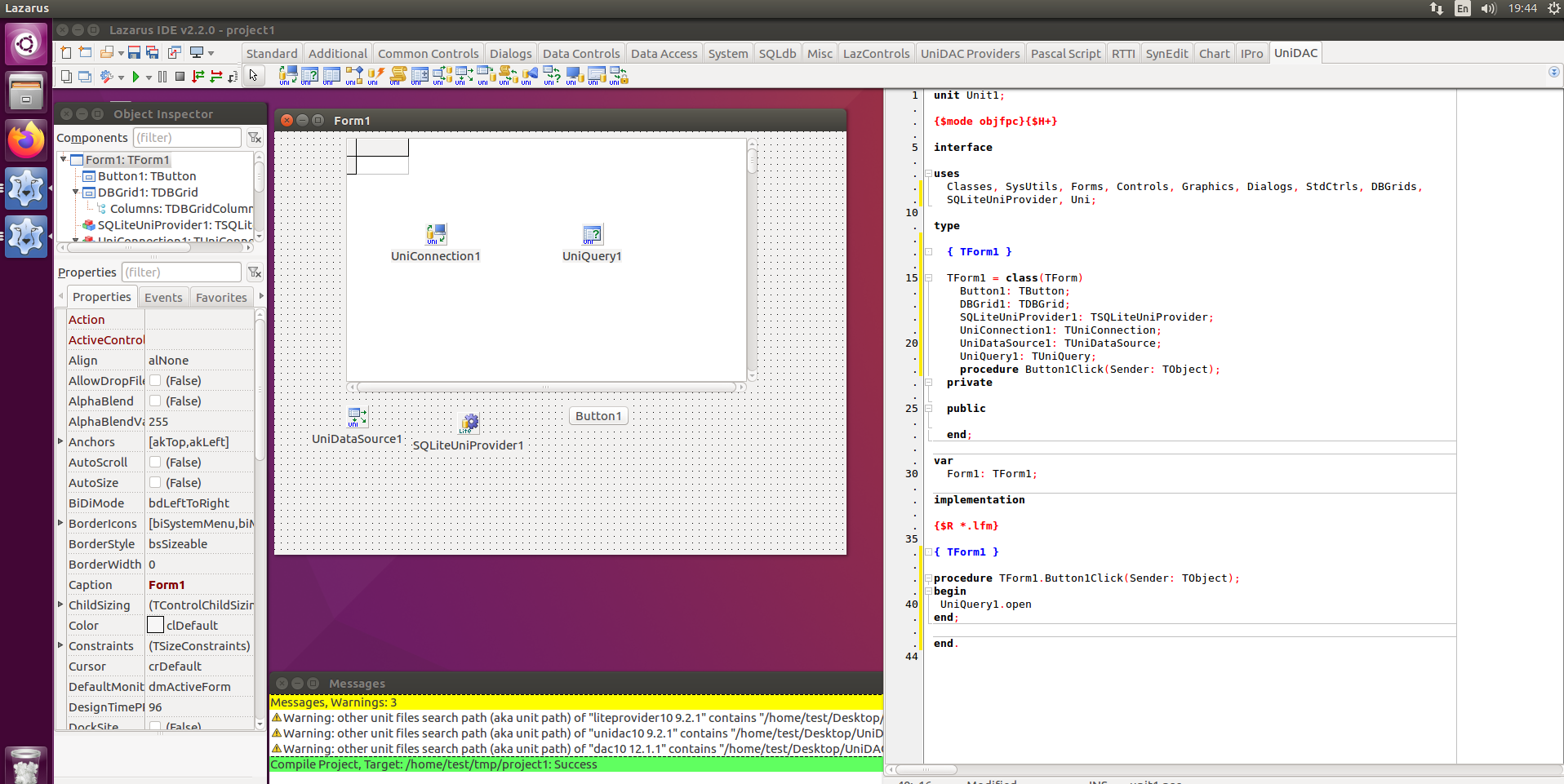
The Lazarus IDE on Ubuntu with UniDAC and UniDAC Providers palette tabs. A form holds UniConnection1, UniQuery1, UniDataSource1, a SQLiteUniProvider and a DBGrid, the code editor shows the matching unit, and the Messages pane reports a successful compile.
Features
Direct mode: no database client to install
In the Professional Edition, UniDAC can talk to Oracle, SQL Server, MySQL and PostgreSQL directly, without the vendor's client libraries, and links SQLite statically. Devart lists Direct access for Redshift, ASE, DBF and NexusDB as well. In practice this means you deploy one executable instead of walking every customer through an Oracle Instant Client install.
Desktop and mobile from the same code
Build VCL apps for Windows, FireMonkey apps for Windows, macOS, iOS and Android, or Lazarus LCL apps for Windows, macOS and Linux. Version 12.1 added RAD Studio 13 Florence Release 2 support and improved the ARM64EC target.
Server-specific power when you need it
The common components cover everyday work, but each provider exposes its server's strengths. A few examples from Devart's feature list: Oracle OCI connection pooling, DML array operations and DBMS_ALERT support. Firebird EXECUTE BLOCK and RETURNING. PostgreSQL asynchronous notifications. SQL Server Always Encrypted and support for the newest SQL Server release (both new in 12.1). MongoDB documents shown in a regular TDBGrid or edited through a "fluent" interface.
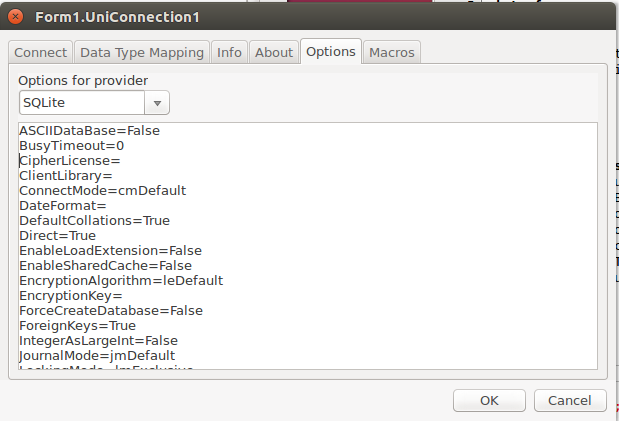
The TUniConnection editor's Options tab with the SQLite provider selected, listing provider-specific settings such as Direct=True, EncryptionAlgorithm, EncryptionKey, ForceCreateDatabase and ForeignKeys.
Components for the jobs around your queries
TUniScript runs SQL scripts, TUniLoader bulk-loads data into the server, TUniDump stores a database as a script, TUniMetaData reads object metadata, and TUniAlerter passes messages between sessions. You also get TVirtualTable for in-memory data, TVirtualQuery for running SQL against any TDataSet, an encryptor for sensitive fields, and an enhanced TCRDBGrid.
Connection resilience and security
Disconnected mode opens and closes connections automatically so you can work with data offline, and Local Failover detects a lost connection and re-runs certain operations. Pair UniDAC with Devart's SecureBridge components for SSL, SSH or HTTP/HTTPS tunneling. When something misbehaves, the free dbMonitor tool traces every SQL statement, commit and rollback per component.
Cloud services through ODBC
Combined with a Devart ODBC driver (sold separately), UniDAC reaches cloud data in Salesforce, Dynamics 365, QuickBooks, NetSuite, Zoho CRM, HubSpot, Google BigQuery, Mailchimp and others with the same components you use for SQL databases.
Benefits
The real payoff is freedom from one database. A vertical-market product can support whatever server each customer already runs without forking the data layer, and moving an app from Firebird to PostgreSQL becomes a configuration change plus some testing rather than a rewrite.
Direct mode pays off on deployment day: fewer prerequisites, fewer "it works on my machine" support calls. And because UniDAC supports IDEs all the way back to Delphi 6, you can keep an old application on an old compiler while newer projects use the same components on RAD Studio 13.
Real-World Uses
- A product sold to many companies: one Delphi codebase that connects to SQL Server for one client, Oracle for another and PostgreSQL for a third.
- Retiring the BDE: moving a legacy BDE application onto a modern database server while keeping its BDE-style data access code.
- Offline-first mobile app: a FireMonkey app that keeps data in local SQLite on an Android tablet and syncs with a central server.
- Linux back-office tools: Lazarus utilities on Linux that read DBF files from an old system and load them into MySQL with TUniLoader.
- Reporting on cloud CRM data: a desktop report that queries Salesforce through a Devart ODBC driver with the same TUniQuery as everything else.
Who It's For
UniDAC is for Delphi, C++Builder and Lazarus developers, especially anyone shipping software that must run on more than one database, deploy without client libraries, or reach mobile platforms. It's also a strong fit if you use Delphi's Professional edition, where Embarcadero's FireDAC is limited for client-server databases (see Comparisons). Hobbyists on Delphi Community Edition can use it too.
Usage Guide
- Download the right installer. Devart builds a separate installer for each IDE version, from Delphi 6 up to RAD Studio 13 Florence, plus one for Lazarus. Remove any older UniDAC version first: only one can be installed at a time.
- Install on Windows. Run the installer, choose the folders for UniDAC and demos, pick the components, then click Next, Install and Finish. You can install dbMonitor at the same time.
- Install in Lazarus (Linux or macOS). Lazarus needs the trial or the Professional with Source Code edition. In Lazarus, open Package > Open Package File, select
dclunidac10.lpk, compile it, then choose Use > Install and let Lazarus rebuild.
- Add a connection. Create a new VCL Forms Application, find the UniDAC page on the component palette, and drop a
TUniConnection on the form.
- Configure it. Double-click the connection to open its editor, pick your server from the Provider list (for example SQLite or PostgreSQL), and fill in the server, database and credentials.
- Query. Add a
TUniQuery and a TUniDataSource, hook up a DBGrid, write your SELECT, and open the query.
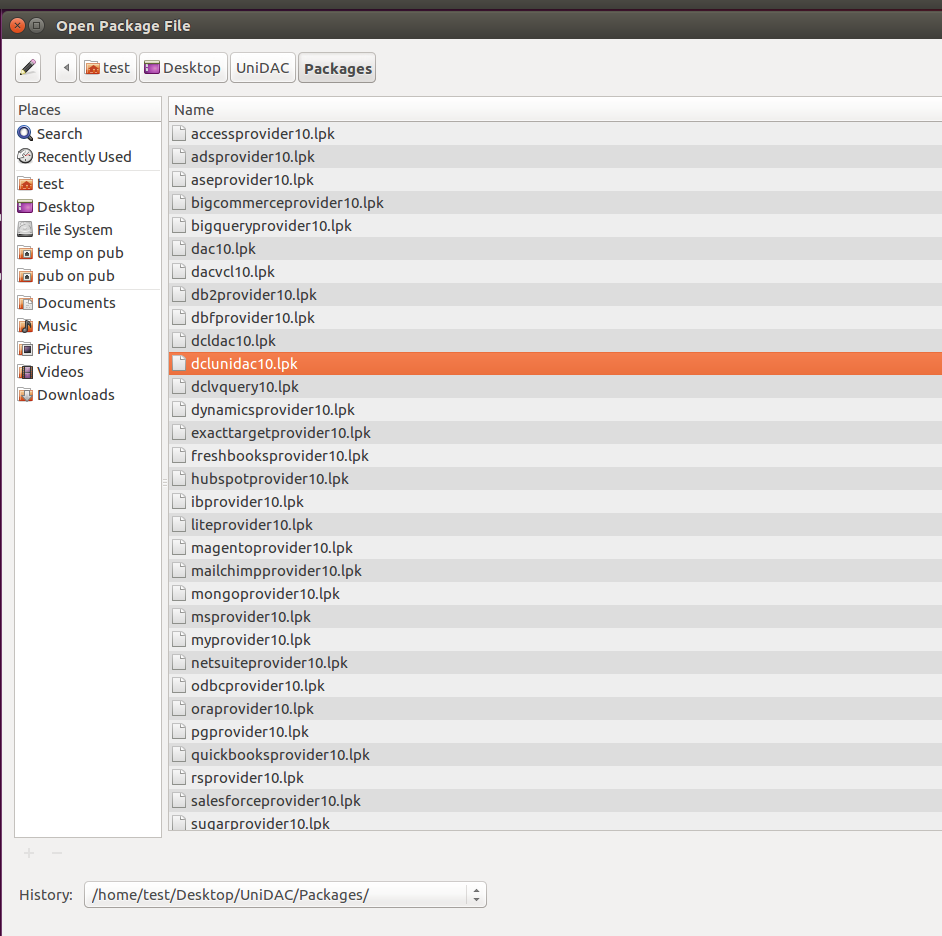
Installing UniDAC in Lazarus: the Open Package File dialog in the UniDAC Packages folder, with dclunidac10.lpk selected among provider packages such as dynamicsprovider10, mongoprovider10, oraprovider10, pgprovider10 and salesforceprovider10.
Tips
- Each provider is a separate package (for example
SQLiteUniProvider). Drop the matching provider component on your form or add its unit, or the connection won't find the server type.
- When you deploy a trial-built app for testing, you need to ship some extra bpl files even if you compile without runtime packages. The licensed version doesn't have that requirement.
- Install dbMonitor alongside UniDAC. Seeing the exact SQL each component sends is the fastest way to find a slow query.
What Users Say
UniDAC has a long track record in the Delphi community, and most feedback is warm. On Capterra it averages about 4.9 out of 5 across more than 50 reviews. The quotes below come from Devart's own testimonials page and from an independent developer forum.
From Devart's testimonials page
"I have used Devart's UniDAC for many years to develop enterprise-grade Windows Delphi apps targeting many different database servers and have come to trust their products consistent performance, quality and ease of use. A highly recommended vendor for your IT / software shop."
Steve Faleiro, Delphi Developer from Goa, India
"I just wanted to say thanks to the Devart team for a great product. UniDac succesfully compiled on my linux X64 box with Lazarus / FPC and it also succesfully compiled on my Raspberry Pi with Lazarus / FPC. Well done guys I am really impressed."
Peter Grimes, Director, Grimes Computer Support
"Yes!!! Thank you!!!! That worked great! and I LOVE your UniDAC!!! I am coming from a competitor product and I am soooooo happy to be using UniDAC!!!!! I am looking forward to converting our other systems!!"
Raymond Schappe, Senior Technology Specialist, Isthmus Technology Solutions, LLC
"Two of my projects already using that old version for years and quite stable. Even old it still powerful! you may proud of that."
Ricky J., Software Engineer, PT Arham Alam (Indonesia)
"I find the components excellent. I don't know why someone has not thought of such an idea up until now. Anyway, brilliant work, well done to you all!!!"
Robert N. Harris
From the Delphi-PRAXiS forum: UniDAC vs. FireDAC
A thread titled "FireDAC Alternative" on Delphi-PRAXiS, a large independent Delphi forum, gives a more mixed and useful picture from working developers.
"I'm using UniDAC, and it is OK, but it looks like FireDAC has a lot of improvements from version to version."
msd, Delphi-PRAXiS
"I have a few cases in which FireDAC has a solution (for example, Firebird Backup) that is not supported by UniDAC. In one of my projects, UniDAC is working, but FireDAC does backup, restore, upgrade, and small maintenance jobs on the Firebird Database."
msd, Delphi-PRAXiS
"I switched form UniDAC to FireDAC last year. If I still used the Professional edition of Delphi, I'd still have UniDAC; if I needed Direct Oracle Access, I'd still use UniDAC."
corneliusdavid, Delphi-PRAXiS
"Working with UniDAC is easier and those components perform very well too."
MichaelT, Delphi-PRAXiS
"FireDAC offers very many possibilities. I only know UniDAC for FB. The latter is very far beyond its capabilities."
Stano, Delphi-PRAXiS (comparing the two for Firebird)
The recurring themes
What people like: ease of use, stability over many years, broad database coverage, cross-platform builds including Linux and Raspberry Pi, and Direct Oracle access.
What gives them pause: it's a separate purchase on top of Delphi, which is why developers with Delphi Enterprise (which includes FireDAC's client-server access) sometimes move to FireDAC. FireDAC also covers a few administrative tasks UniDAC doesn't, such as Firebird backup and restore.
Comparisons
UniDAC vs. FireDAC
FireDAC ships with Delphi, but how much of it you get depends on your Delphi edition. Devart's own pricing comparison makes the case like this: Delphi Community Edition (free) plus UniDAC is $599.95 per developer, and Delphi Professional ($1,660.95) plus UniDAC is $2,260.90, both with client-server access on all platforms and without database clients. Delphi Enterprise, which includes FireDAC client-server access, is $3,665 per developer. Treat that as the vendor's argument, but the forum comments above agree on the core point: on Delphi Professional, or when you need Direct Oracle access, UniDAC is the stronger choice. On Delphi Enterprise, FireDAC is already paid for.
UniDAC vs. Devart's single-database DACs
Devart also sells one-database libraries: ODAC (Oracle), SDAC (SQL Server), MyDAC (MySQL), IBDAC (InterBase/Firebird), PgDAC (PostgreSQL) and LiteDAC (SQLite). If you only ever target one server, one of those may be enough. If you already own several of them, the free UniDAC Express edition puts a common interface on top.
Editions and Pricing
- Express: free. The UniDAC common engine only. It works with the Oracle, SQL Server, MySQL, InterBase/Firebird, PostgreSQL and SQLite providers that come with ODAC, SDAC, MyDAC, IBDAC, PgDAC and LiteDAC.
- Standard: $349.95. The engine plus all data providers, for Windows development in Delphi and C++Builder. Direct mode for MySQL and PostgreSQL only.
- Professional: $599.95. Everything in Standard plus macOS, Linux and mobile development, Direct mode for Oracle, SQL Server, SQLite, ASE and DBF, data encryption, the extra components and DataSet Manager.
- Professional with Source Code: about $900. Adds the source code of the component classes and is the only edition that supports Lazarus and Free Pascal. DataSet Manager and Migration Wizard aren't included as source, Direct mode for Oracle and SQL Server is obfuscated, and SQLite comes as precompiled packages.
Prices are for a single developer. Team (up to four developers at one address) and Site licenses are available, as are two- and three-year subscriptions. Your purchase includes a year of updates and support, and you keep a perpetual license for the version that's current when the subscription ends. There's a 60-day money-back guarantee.
FAQs
Do my customers need a UniDAC license?
No. Your license lets you compile and distribute your own applications with the required run-time libraries and packages. You can't redistribute UniDAC itself or sell components built from it.
Does it work with Delphi Community Edition?
Yes. Devart lists Community Editions as supported, which makes UniDAC one way to get client-server database access on the free Delphi edition.
Can I install two UniDAC versions side by side?
No. Only one version can be installed on a computer at a time, so uninstall the old one before upgrading.
What happens when my year of updates runs out?
You keep using the version you have under a perpetual license. Renewing gets you new versions, premium support and nightly builds with hotfixes.
Is the source code available?
Only in the Professional with Source Code edition, and even there some parts (Direct mode for Oracle and SQL Server, DataSet Manager, Migration Wizard) are obfuscated or not included.
Does it handle Unicode and national character sets?
Yes. UniDAC supports Unicode, and national character set support is available for Oracle, MySQL, InterBase and PostgreSQL.
How good is Devart's support?
Devart says the UniDAC team usually answers within one business day, and the subscription includes premium support.
Can it read old DBF files?
Yes. The DBF provider handles dBase III to dBase 10, dBase for Windows, HiPer-Six, FoxPro 2 and Visual FoxPro tables, including memo files and indexes.
System Requirements
- IDE: Delphi 6 or C++Builder 6 up to RAD Studio 13 Florence (Release 2), or Lazarus 4.8 with Free Pascal 3.2.2 (Professional with Source Code edition only). Some older IDE builds need a specific update or release.
- Target platforms: Windows 32-bit, 64-bit and ARM64EC, macOS 64-bit and Apple Silicon, Linux 64-bit (and 32-bit with Lazarus), iOS 64-bit, Android 32-bit and 64-bit. The Standard edition targets Windows only
- Databases: current and older versions of Oracle, SQL Server, MySQL, MariaDB, PostgreSQL, InterBase, Firebird, SQLite, MongoDB, DB2 and others. Devart's compatibility page lists exact versions.
- Cloud sources: need the matching Devart ODBC driver, sold separately
Conclusion
UniDAC has earned its reputation the boring way: years of steady releases, broad database coverage and components that just work. It's the obvious pick if you build for several databases, need Direct Oracle access, want mobile or Linux targets, or are on a Delphi edition where FireDAC's client-server support isn't included. If you already own Delphi Enterprise and only use one or two databases, compare it carefully with FireDAC before paying. Either way, the 60-day trial gives you plenty of time to point it at your own servers and find out.
Download Free TrialBuy Now