dbForge Studio for MySQL: A Full MySQL and MariaDB IDE With a Debugger, Compare Tools and Reports
dbForge Studio for MySQL is Devart's Windows IDE for MySQL and MariaDB: a SQL editor with smart completion, a stored procedure debugger, a visual query builder and database designer, backup and restore, and, in the Professional edition, schema and data compare with sync scripts. Professional costs $179.95 a year (Standard $99.95, Enterprise $229.95, monthly plans from $9.95, or perpetual licenses from $199.95), and a basic Express edition is free.
If MySQL Workbench feels slow and phpMyAdmin feels like a web form, this Studio is the heavier, SSMS-style alternative: one window for writing queries, stepping through procedures, comparing environments and exporting data.
Quick facts
- Version: 2026.2.96, released November 9, 2026 (eleven releases so far in 2026)
- Developer: Devart
- Platform: Windows 7 to 11 and Windows Server 2008 to 2025, with .NET Framework 4.7.2; macOS and Linux through CodeWeavers CrossOver
- Databases: MySQL from 5.5, MariaDB 5.5 to 13, Percona 5.5 to 8.4, HeatWave, Galera Cluster; Amazon RDS and Aurora, Azure Database for MySQL, Google Cloud, Alibaba Cloud, DigitalOcean and other cloud services
- Editions: Express (free), Standard, Professional, Enterprise
- Installer size: 136.16 MB
- Price: per year, Standard $99.95, Professional $179.95, Enterprise $229.95; per month, $9.95, $19.95 and $24.95; perpetual, $199.95, $349.95 and $449.95
- Trial: 30 days, fully functional (the download asks you to sign in with a free Devart account)
- Refund: 30 days on annual subscriptions and perpetual licenses, 7 days on monthly
- What we checked: version 2026.2.96 and its November 9, 2026 date on Devart's download page and revision history, the 136.16 MB installer size listed there, the editions feature matrix, and the order page price of $179.95 for the default Professional 1-year subscription, plus the other editions' order page prices, on November 13, 2026. We didn't connect it to our own MySQL server.
Before you buy
- Schema Compare and Data Compare start at Professional. So do database projects, pivot tables, the report designer and every command-line feature.
- Source control is Enterprise only in the MySQL Studio, along with the test data generator, database documentation and Copy Database.
- A subscription stops working when it ends. A perpetual license keeps working and includes a year of updates you can extend.
- It's a Windows program. On a Mac or Linux it runs only inside CrossOver, which you buy separately.
Download Free TrialBuy Now
Overview
dbForge Studio for MySQL shares the layout of Devart's other database Studios: a Database Explorer tree, SQL documents in tabs, an editable results grid, and wizards for comparison, export, import and backup. It covers the whole job, from writing and debugging stored procedures to designing tables on a diagram, managing users and sessions, and building reports.
It's actively maintained. The September 2026 release added support for MariaDB 13 and the newest MySQL server versions, file attachments and model selection in the AI Assistant, and quick test data for selected tables. The October build added new MariaDB syntax and fixed CHARSET/COLLATE generation for stored functions, and the November build added the exact line and column of bad values to Data Import error messages.
Features
A SQL editor that knows your schema
dbForge Studio for MySQL completes keywords, tables, columns and whole JOIN conditions, shows column types as you pick them, formats code to a profile, and checks syntax as you type (the automatic syntax check is Professional and up). Snippets, refactoring, go-to-definition and a transaction reminder come with Standard; Express has the editor with basic completion.
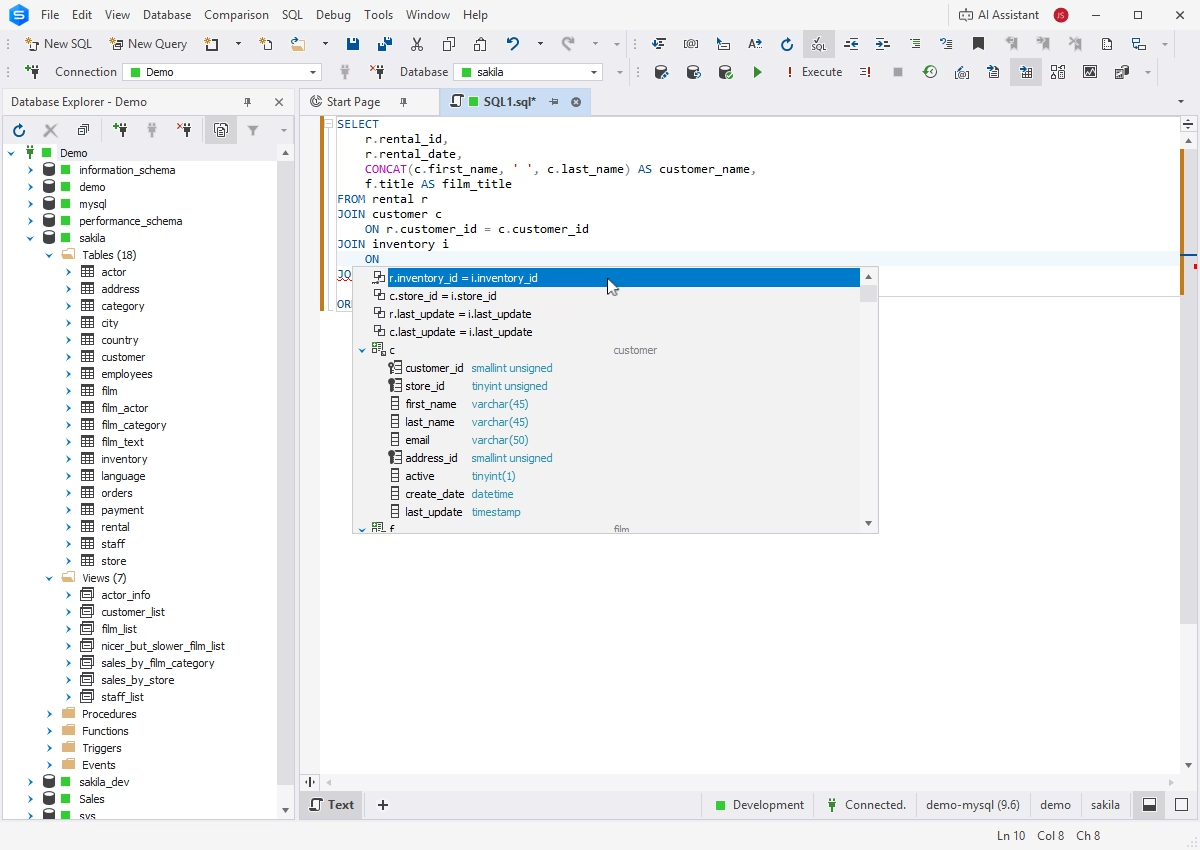
Completion offering r.inventory_id = i.inventory_id for a JOIN in the Sakila database, with each column's data type in the list.
A stored procedure debugger and Query Profiler
dbForge Studio for MySQL steps through stored procedures, functions and triggers with breakpoints, watches and a call stack. The Query Profiler shows a query's plan and session statistics and compares runs, so you can see whether an index helped. Both are in Standard and up.
Schema and data compare with sync scripts (Professional)
dbForge Studio for MySQL Professional compares two databases object by object, shows the DDL side by side with changes highlighted, and writes a synchronization script; Data Compare does the same for rows. Both run from the command line for scheduled or CI deployments. Enterprise can also compare against a scripts folder.
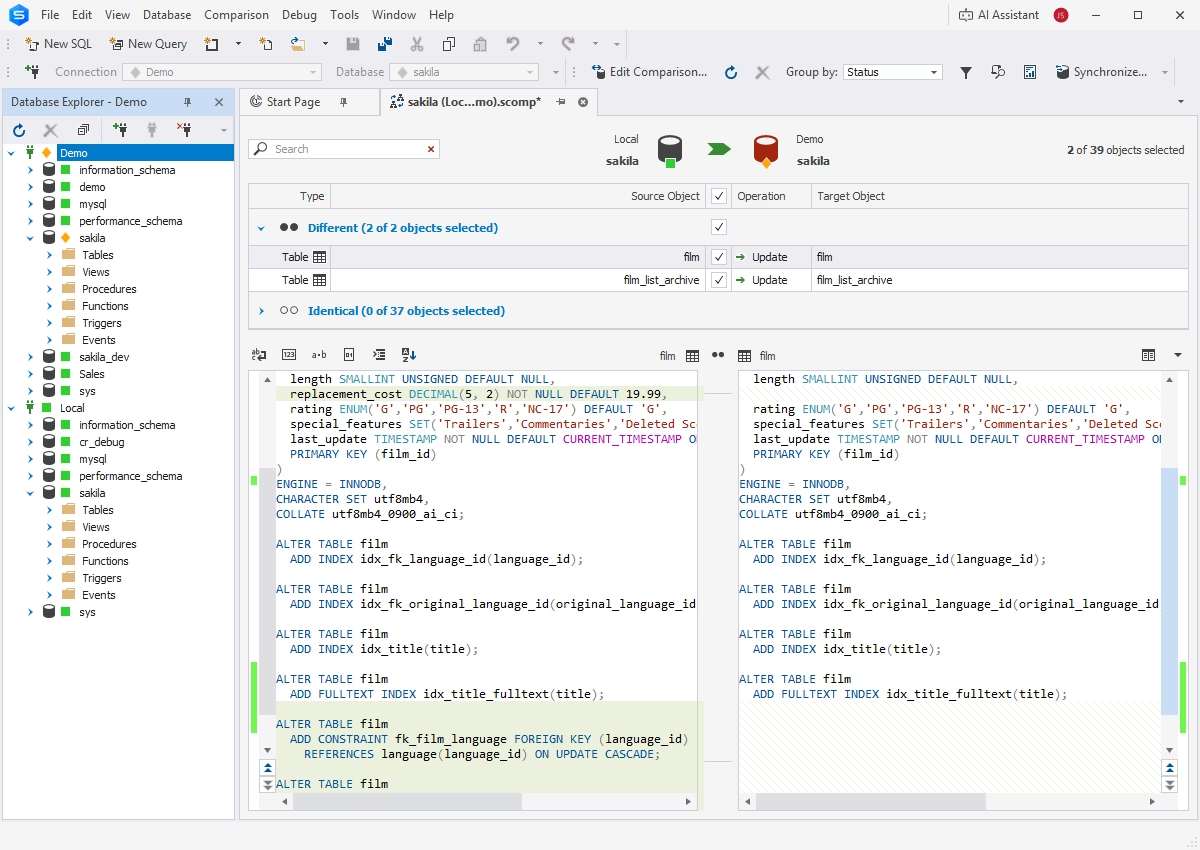
Comparing sakila on Local with sakila on Demo: two tables differ (set to Update), 37 are identical, and the film table's DDL is shown side by side.
Database Designer and visual Query Builder
dbForge Studio for MySQL draws your tables on a diagram, where you create relations, edit foreign keys and export the picture. The Query Builder assembles SELECT, INSERT, UPDATE and DELETE statements with joins and subqueries without typing SQL. The designer is in every edition, including Express; the advanced Query Builder needs Standard.
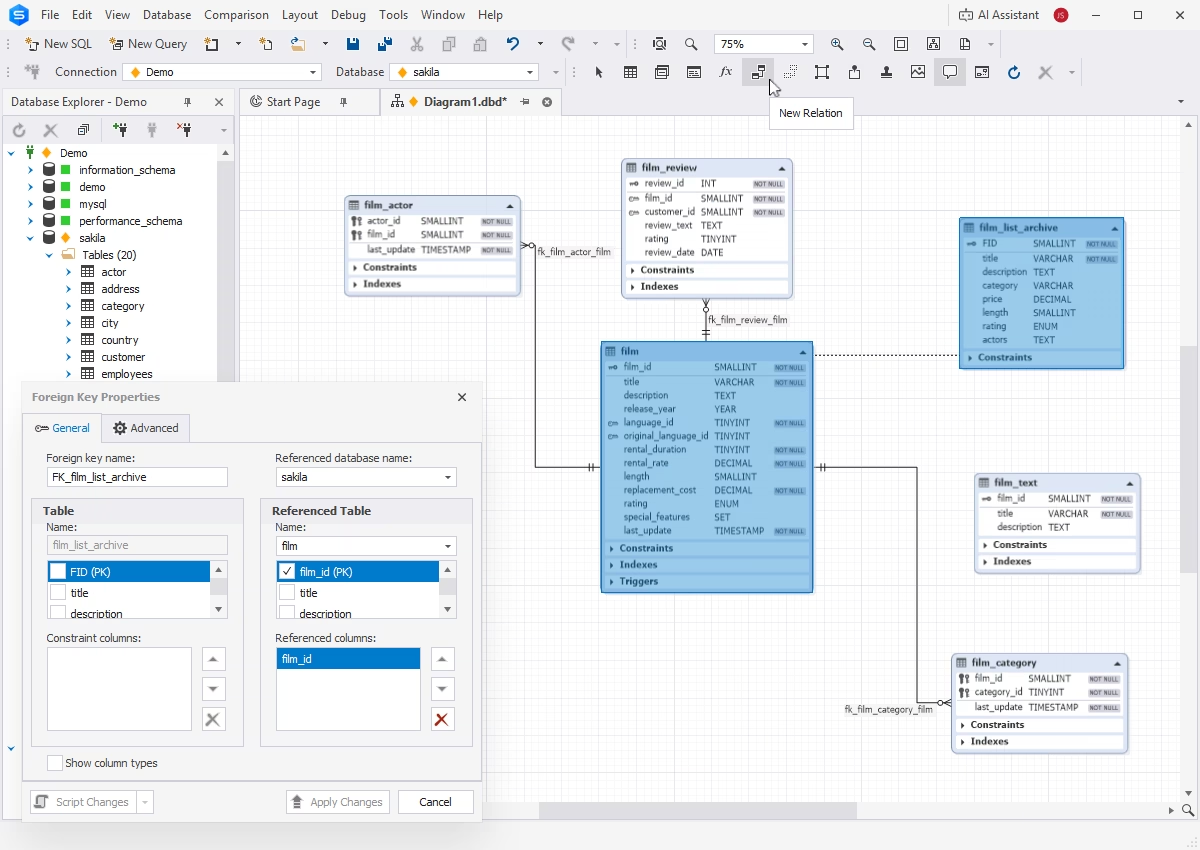
A diagram of the film tables with their relations, and the Foreign Key Properties dialog linking film_list_archive to film.film_id.
Administration: backup, users and sessions
dbForge Studio for MySQL has backup and restore wizards, a user and privileges manager, a session manager, server variables and table maintenance. Running backups from the command line takes Professional; copying a whole database between servers is Enterprise.
Import, export, pivot tables and reports
dbForge Studio for MySQL imports and exports data in many formats with reusable templates, and the Master-Detail Browser shows related rows together (Standard and up). Professional adds pivot tables, a report designer, and report creation and delivery from the command line.
AI Assistant
dbForge Studio for MySQL includes Devart's AI Assistant in every edition: it writes queries from plain-language requests using your database as context, translates requests in any language to SQL, optimizes and explains queries, finds errors and suggests fixes, and answers questions in a chat.
Enterprise extras: source control, test data and documentation
dbForge Studio for MySQL Enterprise links databases to Git (GitHub, GitLab, Bitbucket, Azure DevOps), SVN, TFVC, Mercurial, Perforce and other systems, with object history and undo of local changes. It also fills tables with test data from more than 200 generators, generates documentation in HTML, PDF and Markdown, finds invalid objects, and copies databases between servers.
Benefits
- Debugging inside the database. Stepping through a stored procedure beats sprinkling SELECTs through it to see where a value goes wrong.
- Safer releases. Compare, read the script, then sync: you see every ALTER before it touches production.
- Less tool-hopping. Querying, designing, backing up, exporting and reporting share one connection list.
- Room to grow. The same wizard settings turn into command lines in Professional, so repeated jobs can run on a schedule.
Real-World Uses
- Deploying a web app's schema change: compare the staging database with production, review the sync script and run it, or run the comparison from a .bat file in your build.
- A slow product search: profile the query, add an index, and compare the two profiling runs.
- Onboarding a new developer: generate a diagram of the database and, in Enterprise, HTML documentation of every table.
- Nightly safety net: schedule a command-line backup of each MariaDB database.
Who It's For, and Who Should Skip It
Buy it if you develop on MySQL or MariaDB every day on Windows and want a debugger, smart completion and compare tools that free tools don't give you. Professional is the edition most developers need.
Skip it if you only run the occasional query or manage a hosted site's database, where MySQL Workbench, phpMyAdmin or HeidiSQL are free and enough; if you're on a Mac and don't want CrossOver; or if you work across SQL Server, Oracle and PostgreSQL too, where Devart's dbForge Edge bundles all four Studios.
Usage Guide
- Download and install. Get the trial from Devart's download page (sign in with a free Devart account) and run the installer.
- Connect. Create a connection with host, port and login. SSL, SSH and HTTP tunnels, AWS IAM authentication and Windows/PAM authentication are supported. Color-code it as Development or Production.
- Query. Pick the database in Database Explorer, open a new SQL document and run queries; edit results in the grid.
- Design. Drag tables onto a new database diagram to see and edit relations.
- Debug. Open a procedure, set breakpoints and start debugging from the Debug menu.
- Compare (Professional). From the Comparison menu, choose source and target, review the differences, and generate the sync script.
Where It Falls Short
- The editions split the features finely. Standard has no compare tools or command line, and Professional has no source control, so check the matrix against the job you're buying it for.
- No native Mac or Linux build. CrossOver is a separate license and another layer that can misbehave.
- Frequent fix releases. The 2026 history includes a crash when working with editors (fixed in August) and parsing errors on MariaDB; updates come quickly, but plan on updating often.
- SQL databases only. One reviewer pointed out it doesn't handle NoSQL databases; it also doesn't connect to SQL Server, Oracle or PostgreSQL.
What Users Say
dbForge Studio for MySQL has 5 out of 5 from 36 reviews on SoftwareSuggest, most written between 2022 and 2024. Almost all are five stars and several read alike, so treat the score as a sign of satisfied customers. The more useful reviews name specific features and a few real complaints.
Praise (SoftwareSuggest)
Michael L., Product Design Engineer (November 2022): "I have used it for over five years to manage several MySQL databases. ... Whether it's color coding and autocomplete in SQL, the multitude of options in the import and export windows, the clear presentation of table definitions, or the tear-off windows allowing you to leverage a second monitor, the user interface works to let you perform your tasks smoothly and effectively."
Sergio G., CEO, 4/5 (November 2022): "The best part of dbForge is its debugging capability. I have never experienced a better product for debugging. It helps me refine and perfect my queries, allowing me to tune them for performance."
Imad M., Software Architect (November 2022): "We searched extensively for software or tools that perform schema and data comparison and synchronization, and dbForge Studio was the only software that met our needs."
Goran P., Research Assistant (May 2022): "It has excellent support for refactoring databases. The well-designed database diagram includes the 'Layout Diagram' option for reorganizing the layout of tables for better visibility."
Lawrencen D., Database Manager (May 2024): "Easy to navigate and use. Advanced query builder simplifies SQL query creation. Performance optimization tools."
Complaints (SoftwareSuggest)
Adam C., Director of Agile Delivery (December 2022): "This is minor, but it seems like more and more tools are coming out with a dark mode. dbForge is still missing that, so I stare at a mostly white screen the whole time I work with it." Current versions include a Dark skin; Devart updated its colors in 2025.
Ibrahim S., Managing Director (November 2022): "No way to organize connections in folders, which can get a bit messy when you are managing over 45 SQL servers." The Standard and higher editions now have connection categories and coloring.
Michael L. again: "I would like to see this level of software craftsmanship made available for other databases."
Imad M.'s review title sums up the price question: "The perfect software for MySQL and MariaDB, if you are not looking for a free software, dbForge Studio is the best."
The recurring themes: users rate the debugger, the compare tools, code completion and the import/export options highly, and several have used it for years. The complaints are small (theme, connection organization, MySQL-only scope), and the real trade-off is price against free tools such as MySQL Workbench.
Comparisons
dbForge Studio for MySQL vs MySQL Workbench
MySQL Workbench is free and cross-platform, with modeling, a SQL editor and basic administration. dbForge Studio for MySQL is Windows-only and paid, but it adds a stored procedure debugger, smarter completion and refactoring, data compare, scheduled command-line jobs, pivot tables and reports, and it supports MariaDB fully. If you mainly design schemas and run queries, Workbench may be enough; if you debug procedures or deploy changes between environments, the Studio is the stronger tool.
Standard vs Professional vs Enterprise
Standard is the developer edition: full coding help, the debugger, Query Profiler, Query Builder, backup and restore, import and export, Master-Detail Browser. Professional adds schema and data compare, database projects, CRUD generation, partitioning in the table editor, pivot tables, reports and the command line. Enterprise adds source control, the test data generator, documentation, scripts-folder comparison and Copy Database.
Editions and Pricing
All editions are sold under one product. The order page opens on Professional with a 1-year subscription; you choose the edition, monthly, yearly or perpetual licensing, and optional priority support there.
| Edition | Monthly | 1 year | Perpetual | What it adds |
|---|
| Express | Free | Free | Free | Basic editor, designer, data editor |
| Standard | $9.95 | $99.95 | $199.95 | Debugger, profiler, full coding help, backup |
| Professional | $19.95 | $179.95 | $349.95 | Schema and data compare, reports, command line |
| Enterprise | $24.95 | $229.95 | $449.95 | Source control, test data, documentation |
Devart takes 5% off for 5 to 9 licenses, 10% for 10 to 19 and 15% for 20 or more.
FAQs
Does dbForge Studio for MySQL work with MariaDB?
Yes. dbForge Studio for MySQL supports MariaDB 5.5 to 13, including Galera Cluster, and the October 2026 build added newer MariaDB syntax. It also works with Percona Server and MySQL HeatWave.
Can dbForge Studio for MySQL connect to Amazon RDS or Azure?
Yes. dbForge Studio for MySQL connects to Amazon RDS and Aurora (including IAM authentication and RDS Proxy), Azure Database for MySQL, Google Cloud, Alibaba Cloud, Tencent Cloud, Aiven and DigitalOcean managed databases.
Can I run dbForge Studio for MySQL on a Mac?
Only through CodeWeavers CrossOver. dbForge Studio for MySQL is a Windows .NET program, and Devart supports it on macOS and on Ubuntu, Debian, Fedora and Red Hat Linux inside CrossOver, which is sold separately.
Can I connect without opening the MySQL port?
Yes. dbForge Studio for MySQL connects over SSH tunnels and over HTTP through a PHP tunnel script, which helps with shared hosting that only exposes a web server.
Is the Express edition free forever?
Yes. dbForge Studio for MySQL Express is free with basic features and no time limit; the 30-day trial is for the paid editions.
What happens when my subscription ends?
A dbForge Studio for MySQL subscription becomes inaccessible when it ends, until you renew. A perpetual license keeps working with all its features; renewing it only brings new versions and support.
Can I get a refund?
Yes. Devart refunds dbForge Studio for MySQL within 30 days for annual subscriptions and perpetual licenses, and within 7 days for monthly subscriptions.
System Requirements
- Windows 7, 8, 8.1, 10 or 11, or Windows Server 2008, 2012, 2016, 2019, 2022 or 2025
- .NET Framework 4.7.2 or later
- macOS or Linux (Ubuntu, Debian, Fedora, RHEL): CodeWeavers CrossOver
- MySQL 5.5 and later, MariaDB 5.5 to 13, Percona 5.5 to 8.4
- About 136 MB for the installer download
Conclusion
dbForge Studio for MySQL is worth it for Windows developers who work in MySQL or MariaDB every day: the stored procedure debugger and the Professional edition's compare-and-sync tools are things MySQL Workbench doesn't match, and $179.95 a year (or $19.95 for a single month) is modest next to the hours they save. The reason to pass is that free tools cover light querying well, and the Studio doesn't run natively on a Mac. Try the 30-day trial on your next deployment or a procedure that won't behave.
Download Free TrialBuy Now