You share a PC with family or coworkers, and some folders just aren't meant for their eyes. Renaming them doesn't help, because anyone can still find them. Free Hide Folder takes a different approach: it hides the folder completely and puts the program behind a password.
Quick facts
- Version: 3.5
- Platforms: Windows 9x/Me/NT/2000/XP/2003/Vista/7/8/10
- Price: Free (freeware)
- File size: 876 KB
Key features
Hide a folder in a few clicks
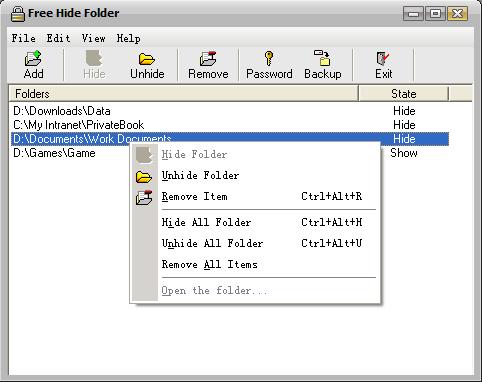
Run the program, pick the folder you want to hide, and press the Hide Folder button. Unless you unhide it yourself, other people can't find it.
Password on the program itself
Starting the program requires a password. You can change or remove it whenever you like.
Hide as many folders as you need
There's no limit on how many folders you can hide at once. The vendor says no file system structure modifications are needed.
A small, clean download
The installer is only 876 KB. The vendor states the software contains no spyware, adware or viruses.
Who it's for
It suits you if you share a Windows PC and want a simple way to keep personal folders out of sight. It also fits older machines, since the program supports everything from Windows 9x up to Windows 10.
Pros and cons
Pros
- Free, with no spyware or adware claimed
- Very small and easy to use
- Password-protected
- Handles any number of folders
Cons
- Windows only
- The program is built around hiding and a password. The vendor's page doesn't list encryption.
- Last listed update was in late 2017, a bug-fix release
FAQs
Is Free Hide Folder really free?
Yes. It is freeware. The author accepts optional donations.
Can I change the password?
Yes. You can change or remove the password at any time.
Which Windows versions work?
The vendor lists Windows 9x, Me, NT, 2000, XP, 2003, Vista, 7, 8 and 10.
How do I hide a folder?
Open the program, select the folder, and click the Hide Folder button.
System requirements
Windows 9x/Me/NT/2000/XP/2003/Vista/7/8/10 and about 876 KB of disk space for the installer.