Typing a long email to say something you could say in ten seconds is a waste of your time. Vemail lets you speak the message instead. It records your voice and sends it as an ordinary email.
Quick facts
- Platforms: Windows (2000, XP, 2003, Vista, 2008, Windows 7) and Pocket PC
- Audio formats: wav, gsm and mp3
- Trial: you can download and install it without buying first
- You need: a microphone and speakers (or a headset) and internet access
How it works
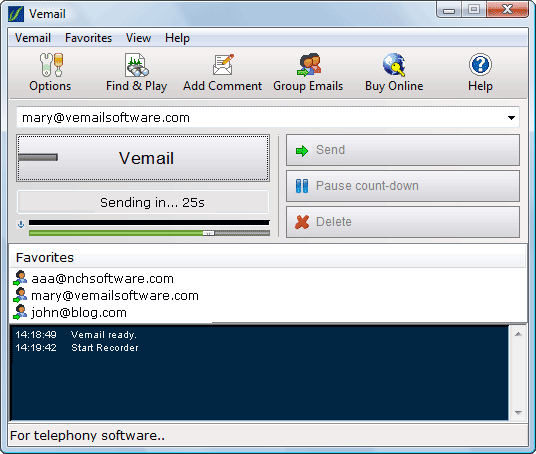
You enter an email address, then press and hold F6 while you speak. When you let go, the recording is compressed and sent as an email automatically. The person receiving it can play it in a standard media player, so they don't need to install anything.
Key features
Record and send without typing
Vemail automates the recording of voice attachments to your emails. You can send to individuals or groups, and add written comments that go into the body of the email.
Pick the compression that suits your recipients
You choose the audio compression codec, so recordings stay small enough to send and receive easily. It supports wav, gsm and mp3.
Join recordings after a pause
If you stop and want to carry on, Vemail splices the segments together.
Send from anywhere with system-wide hot-keys
You can set system-wide hot-keys to send a vemail without opening the program.
Keep and search your recordings
Current and sent recordings are saved. You can search them later or burn them directly to CD.
Get a text draft of what you said
With a speech-to-text engine installed, Vemail converts the recording into a text draft that is included with the email.
Who it's for
- People sending quick messages in the office, where a voice message is faster than typing or calling.
- Friends who want a more personal message than text.
- People with disabilities who find typing difficult.
- Pocket PC users who want to get a message out faster.
Pros and cons
Pros
- Recipients need no special software to listen.
- The F6 hold-to-record method is simple to learn.
- It works on both Windows PCs and Pocket PCs.
- You can try it before you pay.
Cons
- The text draft needs a separate speech-to-text engine.
- The supported systems listed are Windows 2000 to Windows 7, and Pocket PC 2003 or Windows Mobile 5 and later. Windows 98 and ME need a separate earlier version.
- You need a microphone or headset and an internet connection.
FAQs
Does the person I email need Vemail?
No. The message can be played in a standard media player.
Can I use it on a Pocket PC?
Yes. It needs Pocket PC 2003 or later, or Windows Mobile 5 or above, with an ARM, SH3 or MIPS CPU, a built-in microphone and speaker, and internet access.
Which audio formats does it support?
It supports wav, gsm and mp3.
Can I send to a group?
Yes. You can send emails to individuals or groups.
System requirements
- Windows 2000/XP/2003/Vista/2008 and Windows 7
- Microphone and speakers (or a headset)
- Internet access