Tired of a text editor that chokes on big files or forgets your work?
Windows Notepad is fine for a quick note. It gets frustrating once you juggle logs, scripts, web pages and long documents all at once. EditPad Pro is a Windows text editor built for that situation. It puts all your plain text files in tabs and gives you serious search tools. It also handles files of any size.
Quick facts
- Version: 8.6.1
- Platforms: Windows XP, Vista, 7, 8, 8.1, 10 and 11, 32-bit and 64-bit
- Price: US$ 59.95
- Trial: free evaluation download. It has every feature except the spell checker and configurable print headers, and it reminds you to buy a license.
- Guarantee: 100% satisfied or money back
- Upgrades: a purchase includes one year of free major upgrades
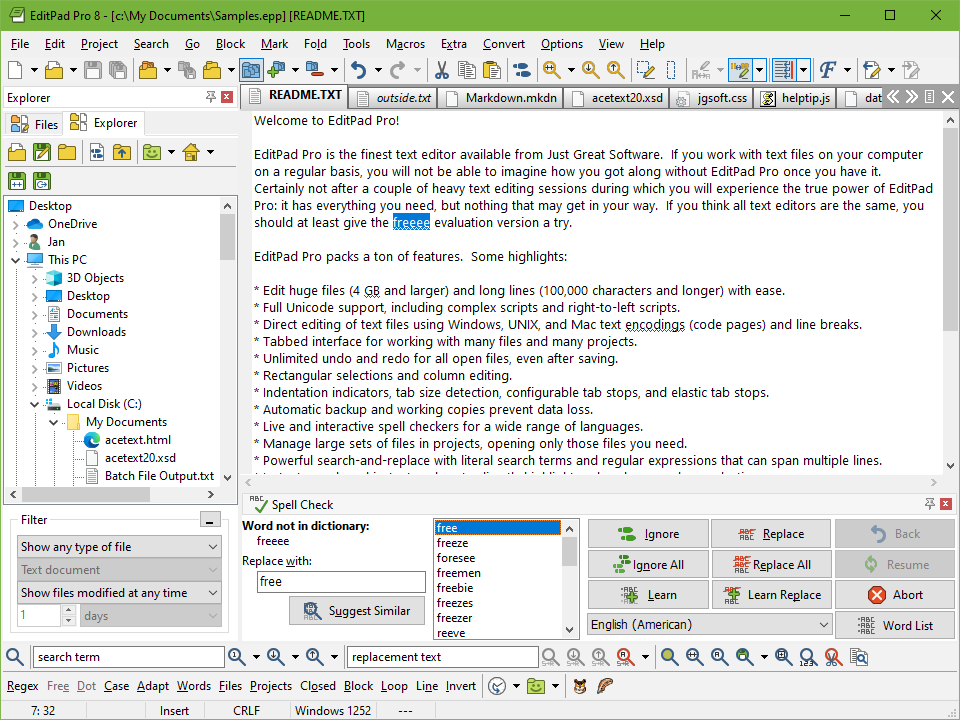
Key features
Edit every kind of text file in one tabbed window
Source code, scripts, web pages, logs, letters, memos and reports all open as tabs. There is no limit on file size or line length. You also get unlimited undo and redo, even after saving.
Search and replace with regular expressions
You can search and replace using regular expressions, and you can run a macro on all open files. Keystroke macros let you automate repetitive edits.
Syntax coloring and file navigation for code
EditPad Pro colors code and lets you jump around a file with file navigation. Both are driven by schemes, and you can download or create schemes for any language or file format. Code folding, line numbers, auto indent and an integrated diff for comparing files are also included.
Reuse phrases and snippets with the Clip Collection
Store standard phrases, formatting tags and code snippets, then insert them again instantly. It also helps you move and duplicate blocks of text.
Open files from any platform and any language
It supports CRLF, LF and CR line breaks and all Unicode formats. It also covers Windows and ISO-8859 code pages and many legacy DOS, KOI8 and EBCDIC code pages. That means Windows, Linux, UNIX and Mac text files all open correctly, including Far East languages.
Hex mode, built-in FTP and a portable install
Switch a file into hexadecimal mode to inspect binary data. Built-in FTP lets you edit files on a server. You can also run EditPad Pro as a portable editor and carry it with you. Live spell checking, column editing, bookmarks and a dark theme are included as well.
Who it's for
It suits anyone who spends hours in plain text. That includes programmers, web authors and people who read logs. It also suits writers who prefer plain text files to a word processor. The vendor's testimonials include a user who writes stories and keeps a photography directory in it. If you only open a text file once a month, the built-in Notepad will do. If you edit text every day, the search tools and tabs will save you time.
Pros and cons
Pros
- No limit on file size or line length
- Powerful regular expression search and replace
- Highly configurable, with many options set per file type
- Syntax coloring and navigation schemes can be downloaded or created for any language
- Free trial with nearly all features, plus a money-back guarantee
- Works with a very wide range of encodings and line break styles
Cons
- Windows only
- The trial has no spell checker and fixed print headers, and it nags you to buy
- The trial doesn't include the separate tools for building your own syntax coloring and file navigation schemes
- It is a paid editor, while Notepad is free
What users say
"I have only a handful of essential, excellent, and reliable programs on my computer. EditPad Pro is one of them." (EditPad Pro website testimonials)
FAQs
Can I try it before buying?
Yes. The free evaluation version has every feature except the spell checker and the configurable print headers. It reminds you to buy a license if you keep using it.
Does it run on 64-bit Windows?
Yes. Both 32-bit and 64-bit Windows are supported, from Windows XP through Windows 11.
Can I use it on a USB drive?
EditPad Pro can be installed as a portable editor. A licensed installer can also automate a portable installation from the command line.
Does it work with languages other than English?
Yes. It supports all languages, including Far East languages. The interface is available in several languages, and one license covers all language editions.
How long do upgrades last?
A purchase includes one year of free major upgrades.
System requirements
Windows XP, Vista, 7, 8, 8.1, 10 or 11, in 32-bit or 64-bit. The current download is about 24 MB.