Bolt.new: Chat Your Way to a Working, Hosted Web or Mobile App
Bolt.new (Bolt, from StackBlitz) is a browser-based AI app builder: you describe a website, web app or mobile app in a chat, and its AI agent writes the code, runs it in a live preview and publishes it with hosting, a database and sign-in built in. It suits founders, marketers, product managers and developers who want a working prototype or small app fast, and it costs $25 a month for Pro, or $216 a year ($18 a month) billed yearly, with a free plan to try it.
The pitch is speed: a landing page, a booking tool or a simple SaaS dashboard can be clickable in an afternoon, with no local setup. The thing to watch is tokens. Everything the agent does is metered, and bigger projects use more tokens per message.
Quick facts
- Developer: StackBlitz, Inc., San Francisco, the company behind the StackBlitz online code editor and its in-browser WebContainers technology.
- Runs in: Chrome or another Chromium browser (Edge, Brave, Opera, Vivaldi) on Windows, Mac, Linux or ChromeOS. Safari works with some limits, and phone and tablet browsers work for chatting, previewing and publishing. Nothing to install.
- Builds: websites and full-stack web apps with JavaScript frameworks, and iPhone/Android apps through the Expo integration.
- Price: Free (1M tokens a month, 300K a day), Pro from $25 a month or $216 a year (10M tokens a month), Teams $30 per member a month, Enterprise quoted. Bigger Pro tiers add more tokens, for example 26M tokens a month for $540 a year.
- Hosting: included. Free sites get 10 GB of bandwidth and 333,333 requests a month with a hard stop. Paid plans get 30 GB and 1 million requests, with optional pay-as-you-go above that.
- Refunds: StackBlitz's terms say subscription fees are non-refundable except where the law requires otherwise. You can cancel any time, and the plan runs to the end of the billing period.
- What we checked: the plan prices on Bolt's pricing page and help center, and the token, hosting, browser and billing rules in its help center, on November 18, 2026. We didn't build or publish an app ourselves.
Try Bolt FreeBuy Now
Before you buy: understand tokens
- Bigger projects cost more per prompt. Bolt says most token use comes from reading and syncing your project files, so the same small request costs more in a large app than in a fresh one.
- Unused tokens last two months, not forever. On a paid plan, each month's allowance stays valid for two months from the start of its billing cycle, then expires. Free-plan tokens never roll over.
- Extra tokens need the right plan. Token reloads (which never expire) are sold only on an annual Pro plan or the top monthly Pro tier. On other monthly plans, the way to get more is to upgrade.
- Yearly means a year. A downgrade from an annual plan takes effect only at the next annual renewal, and fees aren't refunded. Try a monthly Pro plan first.
Overview
Bolt is one of the best-known "vibe coding" tools. Instead of dragging blocks around like an older no-code builder, you type what you want: "a booking site for my dog-grooming business with a calendar, customer accounts and Stripe deposits". The agent plans the pages, writes the code, installs packages, runs the app in a preview pane next to the chat and fixes the errors it hits. You keep refining it in plain English, or by clicking an element in the preview and asking for a change.
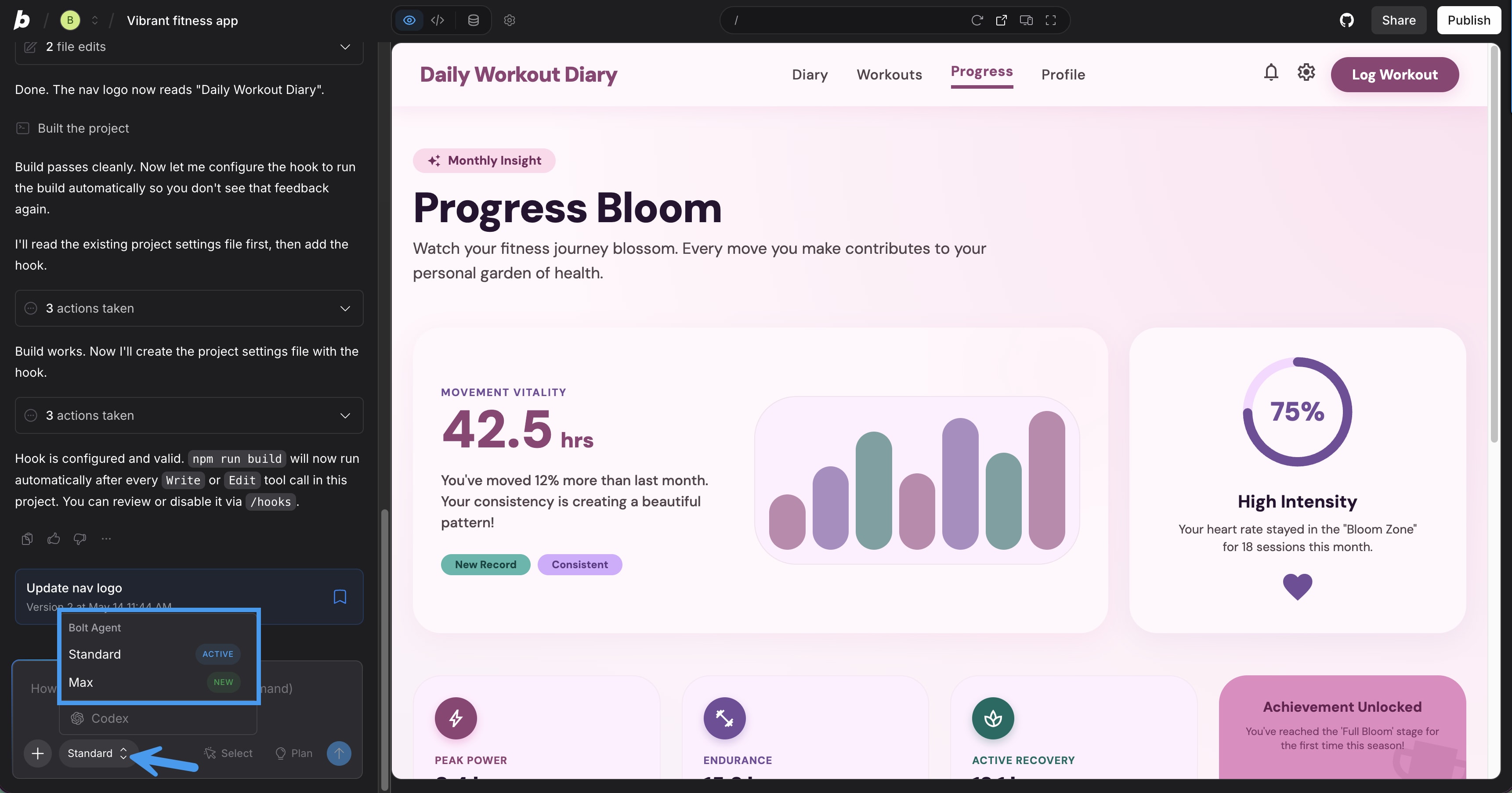
A Bolt project: the agent's chat log on the left with the agent picker (Standard, Max) open, and the live preview of a fitness app on the right.
What sets Bolt apart from many rivals is that the whole development environment runs in your browser, on StackBlitz's WebContainers. There's a real file tree, a terminal and an editor in Code view for anyone who wants to read or change the code, and you own what it generates, including for commercial projects. Bolt Cloud then covers the back end: hosting, domains, a database with sign-in, file storage and server functions, so you don't need separate accounts to get an app online.
Features
Plan first, then build
Bolt.new's Plan Mode lets you talk an idea through before any code is written: the agent proposes pages, a data model and an approach, and you agree on the scope. Bolt recommends it to save tokens, since rework is what burns them. You can also start from a Figma frame, a Google Stitch design, a GitHub repository, a team template or a Lovable project instead of a blank prompt.
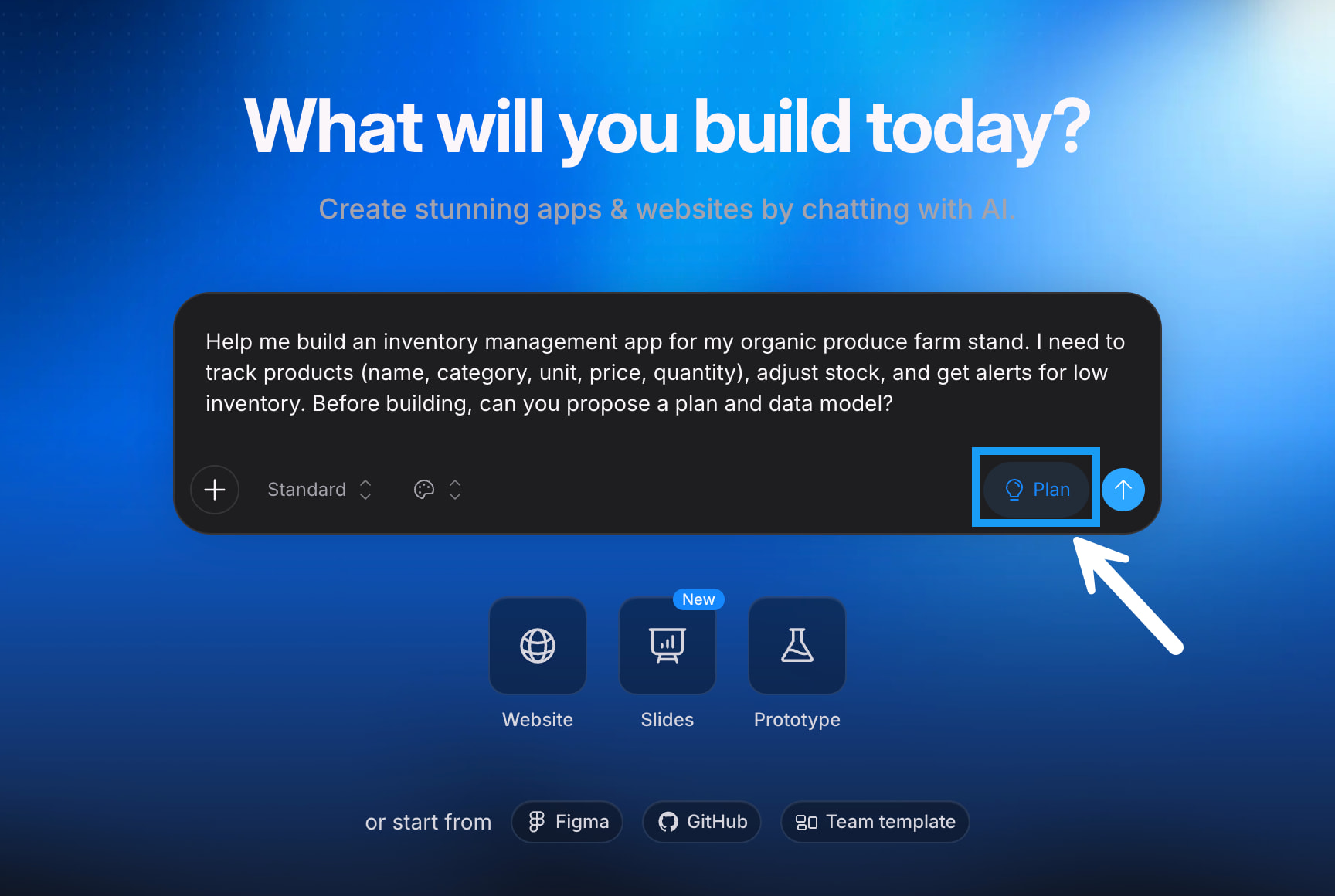
The Bolt home screen: a prompt asking for an inventory app plan, the Plan button, and shortcuts to start from Figma, GitHub or a team template.
Two agents: Standard and Max
Bolt.new gives you two build agents. Standard is fast and token-efficient for small and medium apps, UI changes and well-defined tasks. Max reasons more about each step and is meant for large codebases, refactoring and open-ended problems. Max needs a paid plan. Bolt picks the underlying models itself, so you choose the kind of work, not the model.
A built-in database, sign-in and payments
Bolt.new creates a database when your project needs one, with no setup and no limit on how many you have. From the project settings you can browse tables, add email or Google sign-in, manage your app's users, store files, keep API keys as secrets, run server functions and see logs. A security audit flags issues such as a missing access policy and can ask Bolt to fix them. Stripe handles one-time payments and subscriptions, and Pro users can choose Supabase as the database instead.
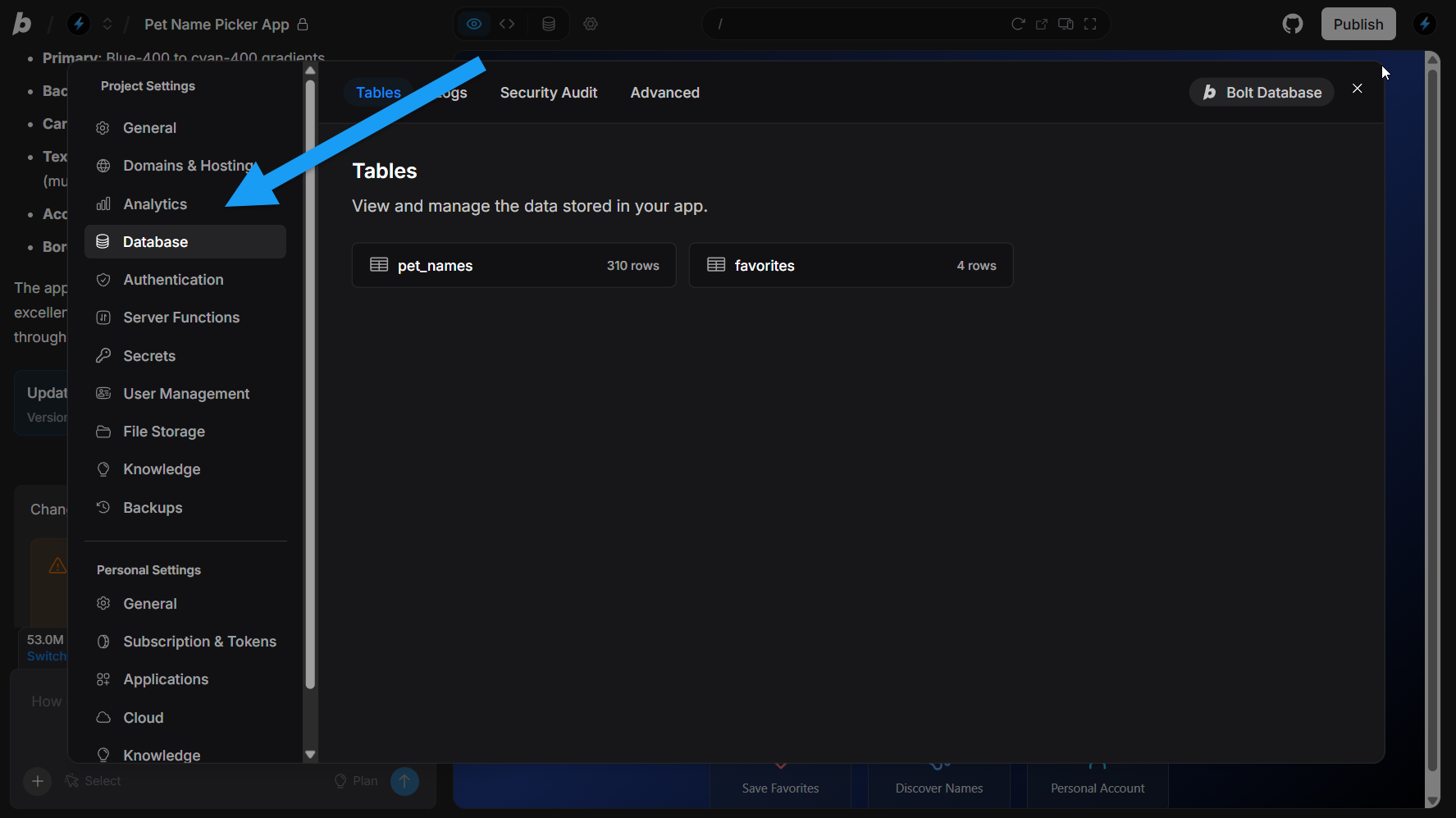
Project settings for a sample app: the Database page lists its tables (pet_names, favorites), with Authentication, Server Functions, Secrets, User Management, File Storage and Backups in the menu.
One-click publishing and your own domain
Bolt.new publishes a project to a free bolt.host address with one click. On a paid plan you can buy a domain inside Bolt or connect one you own, remove the "Made in Bolt" badge, keep a site private, and see visitors, page views and referrers in hosting analytics.
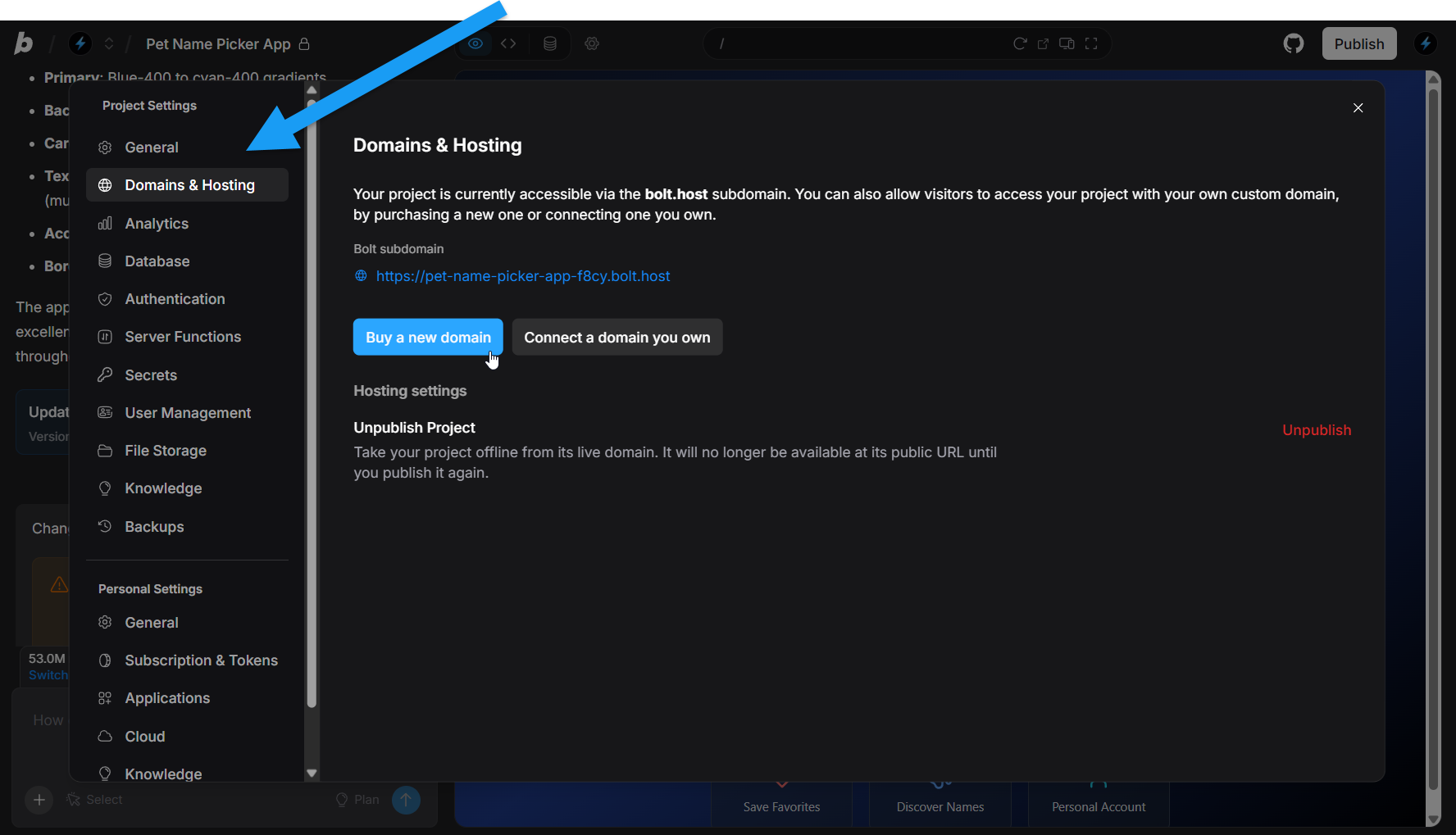
Domains & Hosting: the project's bolt.host address, buttons to buy or connect a domain, and the Unpublish option.
Version history, code access and export
Bolt.new saves a version after each change, so you can search, bookmark and restore an earlier state when the agent breaks something. Code view shows the files and a terminal (desktop Chromium browsers), and you can connect GitHub or export the project to keep a copy outside Bolt.
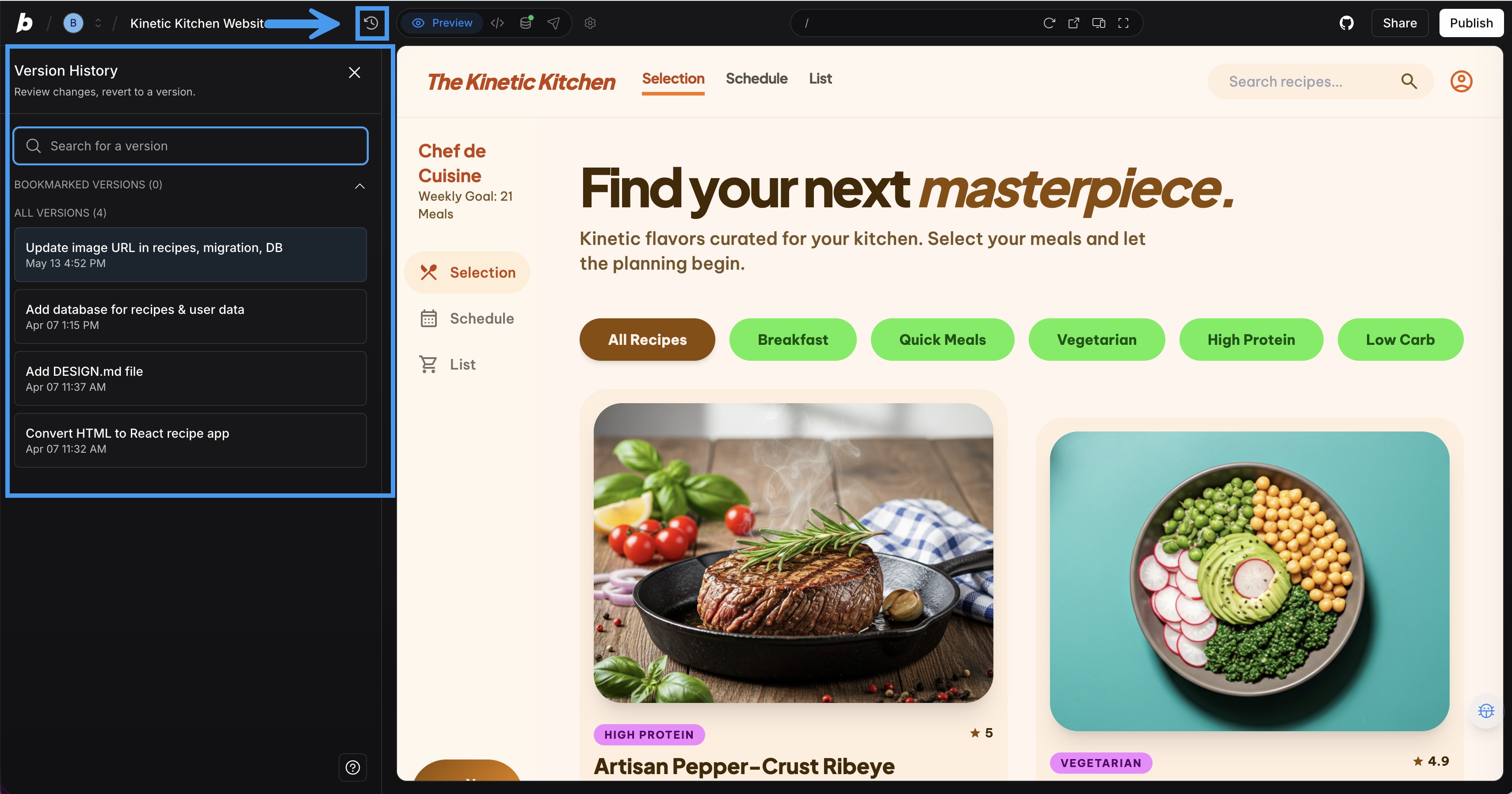
The Version History panel lists each saved change of a recipe site, next to the live preview.
Mobile apps through Expo
Bolt.new builds iPhone and Android apps with Expo when your first prompt says "mobile app". You can test on your own phone by scanning a QR code with Expo Go, then publish to TestFlight, the App Store, Google Play or the web. Publishing to the stores needs your own Expo account and Apple or Google developer accounts, plus Node.js and Git on a computer.
Benefits
- From idea to a link you can share in hours. Hosting, database and sign-in come with the project, so a prototype doesn't stall on setting up servers.
- Room to grow into code. Developers can open the code, use the terminal, connect GitHub and keep working outside Bolt, which many closed no-code builders don't allow.
- A generous free plan for trying it. 1 million tokens a month is enough to see whether Bolt understands your kind of project before you pay.
Real-World Uses
- A founder testing an idea: a waitlist page plus a clickable product demo with accounts, published on a custom domain for early users.
- A small business tool: an inventory tracker or booking system with a database and staff logins, in place of a spreadsheet.
- A product manager's prototype: a working version of a feature, imported from a Figma design, to put in front of users before engineering builds it properly.
- A marketing campaign page: a landing page with forms, SEO settings and analytics, live the same day.
- A simple mobile app: a habit or workout tracker built with Expo and tested on your phone.
Who It's For, and Who Should Skip It
Good fit: non-programmers and founders who want a working prototype or small app, product and marketing teams who need something real to show, and developers who want to scaffold a project fast and then take over the code.
Skip it if you need predictable monthly costs for a large, long-lived app that changes often, since every change costs tokens and larger projects cost more per message. If you only need a brochure website, a template builder such as Squarespace or Wix is cheaper and simpler. And if you can't review code at all, be careful putting anything with payments or personal data into production without a developer checking it.
Usage Guide
- Open bolt.new in Chrome or another Chromium browser and sign up for a free account.
- Type your idea into the chat. Click Plan to agree on an approach first, or Build now to start straight away. Say "mobile app" in the first prompt if that's what you want.
- Watch the preview update, then refine with short, specific prompts: one change at a time works best.
- Ask Bolt to add a database or sign-in when your app needs to store data. Check the tables and users in the project settings.
- Click Publish to put it online at a bolt.host address. On a paid plan, connect your own domain in Domains & Hosting.
- Bookmark good versions in Version History, and connect GitHub or export the project to keep your own copy.
Tips to Make Tokens Last
- Use Plan Mode for anything bigger than a small change, so the agent doesn't build the wrong thing and redo it.
- Stay on the Standard agent unless a task really needs Max.
- Make simple text or style edits yourself in Code view: direct edits don't use tokens, and they still work when you hit the free plan's daily cap.
- Check your balance on the Billing & usage page, where rolled-over tokens and their expiry dates are shown.
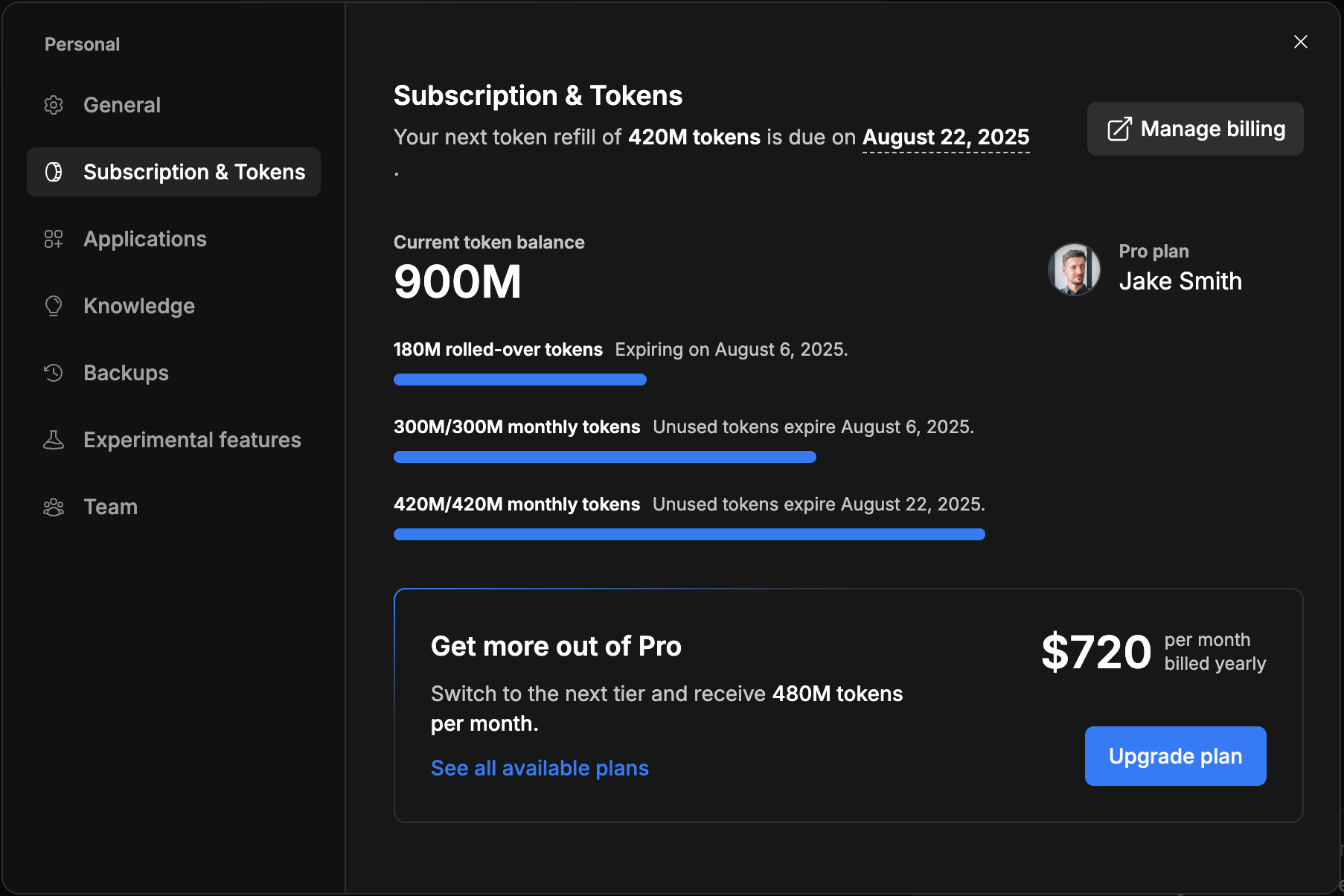
The Subscription & Tokens page of a sample high-tier Pro account, with rolled-over and monthly tokens and their expiry dates.
Where It Falls Short
- Token burn on fixes. The most common complaint is spending tokens while the agent plans, retries or argues over a bug, with little to show for it.
- Whole-file rewrites. Some users say a small fix can make Bolt rewrite a whole file and break layout that worked before. Version History is the safety net.
- Support. Several reviewers on Trustpilot and Product Hunt describe support as slow or hard to reach.
- Safari and mobile limits. In Safari, Code view is read-only and there's no terminal. On phones there's no Code view at all.
- Free hosting stops hard. A free site that passes 10 GB or 333,333 requests in a month goes offline until the next month, with no way to buy more on the free plan.
What Users Say
Trustpilot: 2.0 out of 5 from 217 reviews
Bolt.new's Trustpilot page is rated "Poor", with complaints about tokens, crashes and support outnumbering the praise. Excerpts as shown on the page on November 18, 2026.
- Razi ullah Khan, "Burns tokens on "thinking", delivers nothing" (1 star, October 29, 2026): "Tokens were consumed just for planning and internal steps"
- Edit O'Brien, "Constantly crashes in the last 5…" (1 star, October 26, 2026): "it kicks me out and all progress is lost"
- Farid Abdi (1 star, October 4, 2026): "A user should not be required to pay for errors, hallucinations, unnecessary processing"
- Tan Silliksaar, "Waste of time and money" (2 stars, September 25, 2026): "So I wasted my tokens for the month just arguing with the agent"
- Dr. Dee McGonigle, "Bolt is absolutely AMAZING" (5 stars, October 23, 2026): "Using Bolt, we have successfully developed our sophisticated platform"
- Me Market Group, "Great platform" (5 stars, October 23, 2026): "Great platform, with awesome customer support"
- Mohummad Abbas (5 stars, September 23, 2026): "it was so easy to builda website in just a few prompts"
Product Hunt: 4.4 out of 5 from 47 reviews
Product Hunt's audience of makers and developers rates Bolt.new much higher, mostly for how quickly it gets something running.
- Naumaan Zahid: "bolt.new runs the whole thing in the browser, so you go from prompt to a running app with no local setup at all."
- Stéphane Rathgeber: "Going from a prompt to something that actually runs, in the browser, with zero local setup, is the part that impressed me."
- Tokhirjon: "when you ask Bolt to fix a simple bug or syntax issue, it often rewrites the entire file, breaks your UI/UX structure"
- Ryan Mahabir: "Customer Support is slow and often non existent."
Developer review on DEV Community
Jovan Chan's long review on dev.to likes Bolt.new for landing pages, "One prompt to a deployable site.", but warns about cost on bigger projects: "every prompt triggers a full codebase read." His verdict on heavy users: "Power users with complex weekly builds will spend more on reloads than the subscription."
The themes
People who use Bolt.new for what it does best, prototypes, landing pages and small apps, praise how fast it goes from prompt to a running result with nothing to install. The complaints cluster around tokens spent on failed fixes, the agent rewriting working code, session crashes and slow support. The gap between Product Hunt (4.4) and Trustpilot (2.0) mostly reflects who's reviewing: builders trying it out versus paying users who hit a wall on a bigger project.
Bolt.new Compared
Bolt.new vs Emergent
Both turn a chat prompt into a hosted app. Bolt.new meters work in tokens and includes hosting in every plan, with a free plan of 1 million tokens a month, while Emergent meters in credits and charges a monthly credit fee for each published app. Bolt gives you an in-browser editor and terminal, which suits people who want to touch the code. Emergent's yearly Standard plan ($17 a month) is a little cheaper than Bolt's yearly Pro ($18 a month).
Bolt.new vs a template website builder
A builder like Wix or Squarespace is easier and steadier for a plain business website. Bolt.new is the better pick when you need app behavior: user accounts, a database, custom logic or payments in your own flow.
Plans and Pricing
| Plan |
Price |
Tokens |
What it adds |
| Free |
$0 |
1M a month, 300K a day, no rollover |
Public and private projects, up to 3 collaborators, hosting with Bolt branding |
| Pro |
$25 a month, or $216 a year |
From 10M a month, rollover, higher tiers available |
Custom domain, no branding, Max agent, unlimited collaborators, Supabase option, connectors and MCPs |
| Teams |
$30 per member a month |
From 10M per member |
Central billing, admin controls, SSO, team templates, private NPM registries, priority support |
| Enterprise |
Quoted |
Priced by use |
Audit logs, SOC 2 and ISO 27001 compliance, dedicated infrastructure and account manager |
FAQs
Do I own the code Bolt.new writes?
Yes. Bolt.new says the code you create is yours to use for any legal purpose, commercial projects included, and you can export it or push it to GitHub.
Can I get a refund on a Bolt.new subscription?
Bolt.new's terms say subscription fees are non-refundable unless the law where you live requires one. Cancelling stops the next renewal, and you keep the plan until the end of the period you paid for.
What happens to my site if I cancel Bolt.new Pro?
Your Bolt.new site stays online on the free plan's hosting limits. The "Made in Bolt" badge comes back the next time you publish after the downgrade takes effect, and custom domains need a paid plan.
Does Bolt.new work on an iPad or phone?
Bolt.new works in any mobile browser: you can start a project, chat, preview, publish and invite people. Code view and the terminal are desktop-only, and you can add Bolt to your home screen for quick access.
Can I bring a Lovable project into Bolt.new?
Yes. Bolt.new has an import for Lovable projects, as well as imports from GitHub repositories, Figma frames and Google Stitch designs.
Can I switch from monthly to yearly billing in Bolt.new?
Yes. Switching Bolt.new to a yearly plan at the same tier takes effect at your next renewal, when the annual price is charged. Moving to a higher yearly tier charges the annual price right away and keeps your unused tokens.
Do Bolt.new teammates share my tokens?
On the free plan, Bolt.new collaborators who edit your project use tokens from their own accounts. The Teams plan pools capacity under central billing.
System Requirements
- Chrome or another Chromium-based browser (Edge, Brave, Opera, Vivaldi) on Windows, macOS, Linux or ChromeOS for the full experience
- Safari on a Mac works with a read-only Code view, no terminal and hosted previews
- Any mobile browser for chatting, previewing and publishing
- An internet connection and a Bolt account. Store releases of mobile apps also need Expo, Apple and Google developer accounts, and Node.js and Git on a computer
Conclusion
Bolt.new is worth it if you want to turn an idea into a working, hosted prototype or small app quickly, and especially if you'd like the option to open the code and take over later: the in-browser editor, GitHub export and code ownership set it apart. It's a weaker deal for a large app you'll keep changing, because every fix costs tokens, larger projects cost more per prompt, and paying users on Trustpilot report tokens lost to failed fixes and slow support. Start on the free plan, move to Pro monthly once it's clearly saving you time, keep good versions bookmarked, and only then lock in the $216 yearly price.
Try Bolt FreeBuy Now