Short answer
Bolt.new is the best all-round AI app builder of the three: the most generous free plan (1 million tokens a month), hosting included on every plan, and a real code editor and GitHub export for when you outgrow the chat. Pro is $25 a month or $216 a year.
Pick OnSpace AI if the goal is a phone app: it tests on your own phone by QR code, builds Android APKs and submits iPhone apps for App Store review from the editor ($25 a month or $252 a year). Pick Emergent for a full-stack web app with a Python back end and built-in login, payments and AI calls, at the lowest yearly price ($204), but budget for its hosting fee in credits. None of the three has good Trustpilot reviews, so whichever you choose, start free, pay monthly, and keep your code synced to GitHub.
At a glance
| Bolt.new | Emergent | OnSpace AI |
|---|
| Made by | StackBlitz | Emergent Labs | SoulZ AI Inc. |
| Entry paid plan | Pro: $25/month or $216/year | Standard: $20/month or $204/year | Pro: $25/month or $252/year |
| What you get for it | 10M tokens a month | 100 credits a month | 7,500 credits a month |
| Free plan | 1M tokens a month (300K a day), can publish with Bolt branding | 10 credits, no publishing to production | 500 credits a day up to 2,000 a month, public projects only |
| Hosting | ✓ included (30 GB, 1M requests a month on paid plans) | Costs credits: 50 a month per app at the smallest tier | ✓ web publishing included; APK 500 credits, App Store submission 1,000 |
| Web apps | ✓ JavaScript frameworks | ✓ React/Next.js, Python FastAPI, MongoDB | ✓ |
| iPhone and Android apps | ✓ via Expo (store release needs your own Expo account) | ✓ React Native with Expo | ✓ React Native with Expo, App Store submission from the editor |
| Edit the code yourself | ✓ editor and terminal in the browser | ✗ changes go through the agent | ✓ Code mode |
| GitHub and code ownership | ✓ | ✓ | ✓ two-way sync |
| Unused allowance | Rolls over for 2 months | Expires each month | Rolls over while you subscribe |
| Refunds | ✗ non-refundable (except where law requires) | Prorated, unused subscription credits only | Not stated on the pricing page or docs we read; reviewers report refund requests going unanswered |
| Trustpilot | 2.0 from 217 reviews | 2.7 from 681 reviews | 1.8 from 17 reviews |
Tokens and credits are each company's own units and can't be compared across products: 10 million Bolt tokens, 100 Emergent credits and 7,500 OnSpace credits are just what each $20-25 plan buys.
How we picked and what we checked
- We looked at chat-driven builders that write a real, hosted app (front end, back end and database) from a plain-English prompt, not template website builders.
- Each product's pricing page, plus its help center or documentation for the rules that decide the real cost: how tokens or credits are used, whether they roll over, what hosting and publishing cost, and the refund terms.
- Platform limits: browsers supported, mobile app support and what you need to publish to the App Store and Google Play.
- Reviews on Trustpilot, Product Hunt, the App Store and independent review sites, quoted word for word.
What we checked: Bolt.new and OnSpace AI pricing and documentation on November 18, 2026, Emergent's pricing page on November 18, 2026 and its help center rules on November 17, 2026. We compared plans, limits and reviews; we didn't build and publish the same app on all three, so we make no claims about which writes better code or uses fewer credits for the same job.
Bolt.new: best overall, especially if you might touch the code
Bolt.new by StackBlitz
Price: Free; Pro $25 a month or $216 a year (10M tokens a month); Teams $30 per member a month
Runs in: Chrome or another Chromium browser for the full editor; Safari and phone browsers with limits
Best for: prototypes, landing pages and small web apps, and people who want to open the code later
Bolt.new turns a chat prompt into a running website, web app or Expo mobile app, with a live preview beside the chat. What sets it apart is that the whole development environment runs in your browser on StackBlitz's WebContainers: there's a file tree, an editor and a terminal for anyone who wants to read or change the code, and direct edits cost no tokens. Plan Mode lets you agree on pages and a data model before any code is written, and you can start from a Figma frame, a GitHub repository or an imported Lovable project.
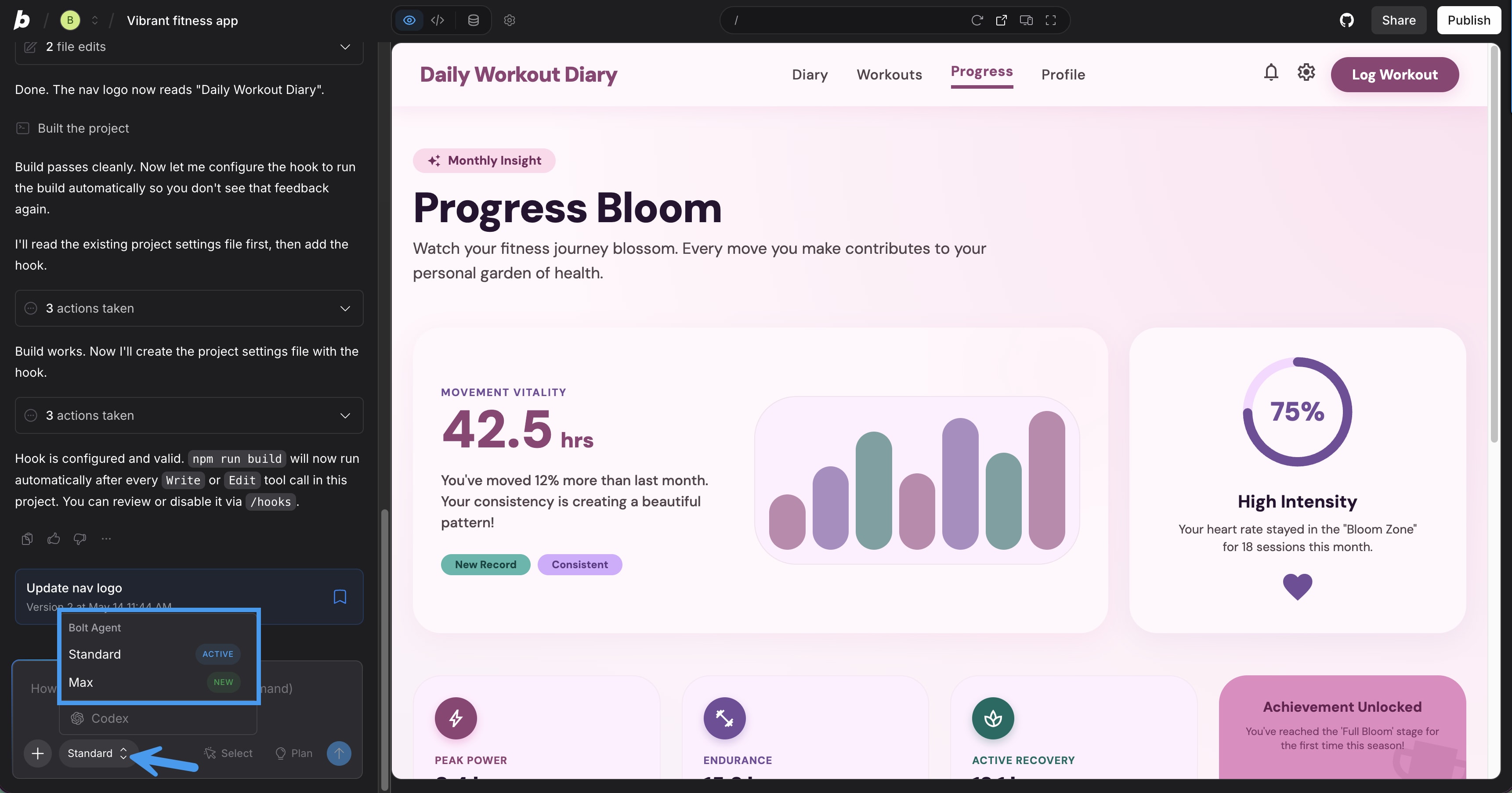
A Bolt project: the agent's chat log on the left with the agent picker (Standard, Max) open, and the live preview of a fitness app on the right.
Bolt Cloud covers the back end with no extra accounts: a database created when your app needs one, email or Google sign-in, file storage, server functions, secrets and Stripe payments, plus one-click publishing to a bolt.host address. Hosting is included in every plan, and paid plans add a custom domain and remove the "Made in Bolt" badge. Unused monthly tokens on a paid plan stay valid for two months.
The weak spot is cost on bigger projects. Bolt says most tokens go on reading and syncing your project files, so the same small request costs more in a large app, and the most common complaint is tokens spent while the agent retries a bug. Some users also report the agent rewriting a whole file to fix one line; Version History is the safety net. Fees are non-refundable, and a downgrade from a yearly plan only takes effect at renewal.
What we like
- Most usable free plan: 1M tokens a month, and you can publish
- Hosting, database and sign-in included on every plan
- Real code editor and terminal; direct edits use no tokens
- Paid tokens roll over for two months
- Product Hunt makers rate it 4.4 from 47 reviews
Watch out for
- Bigger projects cost more tokens per prompt
- Tokens spent on failed fixes are the top complaint
- No refunds; yearly plans can't be downgraded mid-term
- Full editor needs a Chromium browser
- Trustpilot 2.0 from 217 reviews
What users say. Product Hunt reviewer Stéphane Rathgeber: "Going from a prompt to something that actually runs, in the browser, with zero local setup, is the part that impressed me." On Trustpilot, Tan Silliksaar (2 stars, September 25, 2026): "So I wasted my tokens for the month just arguing with the agent." Jovan Chan's review on DEV Community sums up the trade-off: "Power users with complex weekly builds will spend more on reloads than the subscription."
Try Bolt.new FreeBuy Bolt.new Pro
Emergent: full-stack web apps, cheapest yearly plan
Emergent by Emergent Labs
Price: Free (10 credits); Standard $20 a month or $17 a month billed yearly ($204), 100 credits; Pro $200 a month or $167 billed yearly, 750 credits
Runs in: any current browser, including on a phone or tablet
Best for: founders and small businesses who want a working web app with logins, payments and AI features and won't edit code
Emergent's agents write the whole app from the chat: a React or Next.js front end, a Python FastAPI back end and a MongoDB database provisioned for the project, then test it and refresh a live preview. It's the most "batteries included" of the three for business apps: built-in login, payments through Stripe, PayPal, Razorpay or Paystack, a Universal LLM Key so your app can call OpenAI, Claude or Gemini without your own keys, and ready integrations for Twilio, Resend, SendGrid and Shopify. It also builds React Native apps for iPhone and Android. Checkpoints undo a bad change, and saving to GitHub keeps the code yours.

A sample app from Emergent's site: the admin console of "RoofQuote", a roofing-quote lead tracker, with total leads, leads this week and a pipeline by status (New, Contacted, Quoted, Won, Lost). This is an app built with Emergent, not Emergent's own workspace.
The catch is that hosting comes out of the same credits as building. Publishing an app costs at least 50 credits a month (the Starter tier, meant for prototypes), so on Standard's 100 credits one live app leaves 50 for building, and a small production app on the Launch tier (125 credits a month) needs more than Standard includes. Monthly credits expire at the end of each cycle, and Emergent says a single prompt can use anything from a handful of credits to hundreds. There's no way to make a small text fix by hand: every change goes through the agent.
On the plus side, Emergent is the only one of the three that offers a refund route: prorated refunds of unused subscription credits after you cancel, minus what your published apps used (top-ups are final).
What we like
- Lowest yearly entry price: $204
- Full-stack apps with a Python back end and a database
- Payments, login and AI calls built in
- Prorated refunds of unused subscription credits
- Best Trustpilot score of the three (2.7 from 681)
Watch out for
- Hosting costs 50+ credits a month per app, half of Standard
- Credits don't roll over
- No manual editing; every text fix costs credits
- Refund disputes and account lockouts in reviews
- Free plan can't publish to production
What users say. "Emergent in 2026 works fantastic. Tell it what you want and within days you get an application that would have take months to program before," wrote Joost van der Leij on Trustpilot (5 stars, August 2026). Catalin Berariu (1 star, October 2026) saw the opposite after four apps: "It feels as though the coding agents consistently take the longest, most expensive route to achieve a result." Unite.AI's review: "costs add up for bigger projects."
Try Emergent FreeBuy Emergent
OnSpace AI: the mobile-first pick, with a support warning
OnSpace AI by SoulZ AI Inc.
Price: Free (500 credits a day, up to 2,000 a month); Pro $25 a month or $252 a year (7,500 credits a month), larger tiers up to $1,299 a month
Runs in: any browser, plus OnSpace apps for iPhone/iPad (iOS 15.1+) and Android
Best for: non-programmers who want an iPhone or Android app in a store, or an APK to share
OnSpace AI goes further on the mobile side than the other two. You describe the app (or import a Figma design), and it builds a React Native app with a phone-shaped preview and a QR code that opens it on your own phone through the OnSpace app. When it's ready, the Download menu builds an Android APK (500 credits) or an AAB for Google Play, and Publish to App Store submits an iPhone app for review from the editor (1,000 credits plus your own Apple Developer account), with no Mac or Xcode needed. OnSpace Cloud supplies the database, logins (including Sign in with Apple and Google), file storage and edge functions, or you can connect your own Supabase project.
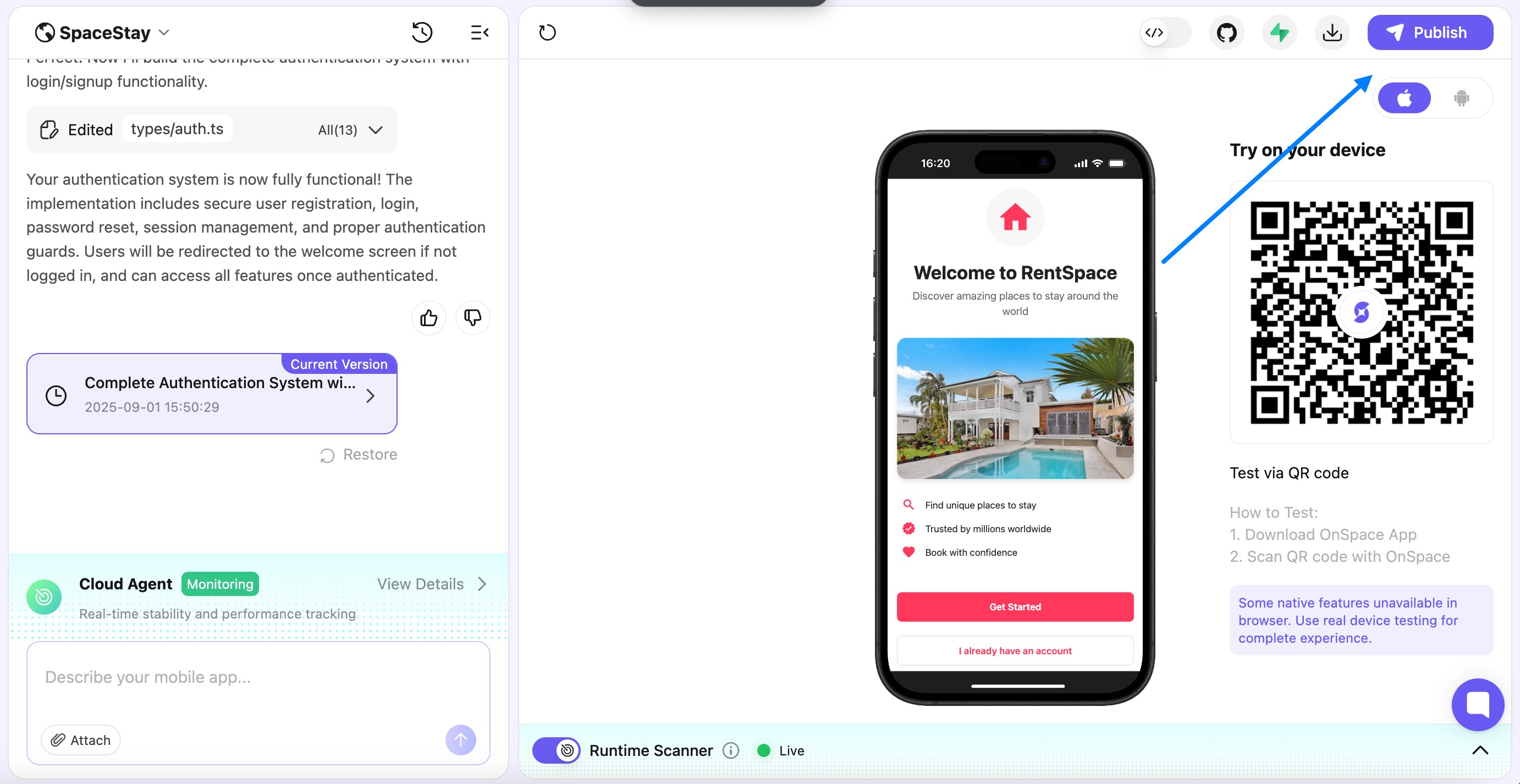
The OnSpace editor: the chat with the AI's summary of a new login system and the saved version on the left, an iPhone preview of the "RentSpace" sample app in the middle, and the QR code to test it on your own phone on the right, with the Publish button at the top.
Unused credits roll over while you keep paying (up to a year's allowance on annual plans), a Runtime Scanner lists errors while the app runs, and two-way GitHub sync keeps a copy of the code you control. Stripe and RevenueCat handle payments and in-app subscriptions.
The reason it ranks third is the company, not the editor. OnSpace's Trustpilot page shows 1.8 from 17 reviews, 88% of them one-star, and the complaints are consistent: credits that vanish on the AI fixing its own errors, no clear view of credit use, and support and refund emails that go unanswered. Cancelling expires all unused and rolled-over credits at the end of the billing period, and your data is kept only for a grace period.
What we like
- Test on your own phone by QR code
- APK, AAB and App Store submission from the editor
- Build on the go in its iOS and Android apps
- Credits roll over while you subscribe
- Two-way GitHub sync
Watch out for
- Trustpilot 1.8, mostly about support and refunds
- Hard to see where credits went
- Publishing builds cost 500-1,000 credits each
- Free plan: public projects only, with an OnSpace badge
- Highest yearly price of the three ($252)
What users say. On Product Hunt, B.K.D.E AMOAH called it "a clean, intuitive platform that makes building and launching projects fast and simple." On Trustpilot, Jordan Olson (1 star, June 2026): "They dont get back to you. Tried asking for a refund the past week, still have not replied yet." An App Store reviewer titled "No Credit Tracking" wrote: "there is NO WAY to track your credit usage".
Try OnSpace AI FreeBuy OnSpace AI Pro
Price: what a year costs
Emergent has the cheapest yearly entry plan and OnSpace AI the dearest, but the sticker price isn't the whole cost. Emergent's hosting fee comes out of your credits, while Bolt.new includes hosting, and OnSpace AI charges credits for each store build. Monthly billing costs $20 (Emergent) or $25 (Bolt.new, OnSpace AI).
Entry paid plan, billed yearly (USD)
Prices on each pricing page, checked November 18, 2026.
Ratings: builders like them, paying users less so
All three score far higher on Product Hunt, where makers review a first build, than on Trustpilot, where paying customers write after something goes wrong. Emergent scores best on both. Read the Trustpilot numbers as a warning about billing and support, not as proof that the tools don't work.
Trustpilot score (out of 5)
Emergent (681 reviews)2.7
Bolt.new (217 reviews)2.0
OnSpace AI (17 reviews)1.8
Product Hunt score (out of 5)
OnSpace AI (5 reviews)4.0
Scores as shown on Trustpilot and Product Hunt on November 17-18, 2026.
Which should you choose?
| Your situation | Pick | Why |
|---|
| Testing an idea for free | Bolt.new | 1M free tokens a month and free publishing (with branding) |
| A prototype a developer will take over | Bolt.new | Editor, terminal and GitHub export in the browser |
| A business web app with logins, payments and AI features | Emergent | Python back end, payment gateways and LLM key built in |
| An app in the App Store or an APK for testers | OnSpace AI | QR testing on your phone and store builds from the editor |
| A live app with steady traffic and a fixed budget | Bolt.new | Hosting doesn't eat your build allowance |
| You want a refund route if it doesn't work out | Emergent | The only one with prorated refunds of unused credits |
Who should skip each one. Skip Bolt.new if you'll keep changing a large app every week, since bigger projects cost more tokens per prompt and fees aren't refundable. Skip Emergent if you want to make small text fixes yourself or need a live app on a small budget, because hosting and every edit draw from the same 100 monthly credits. Skip OnSpace AI if you'd need support or a refund to bail you out; its reviews say not to count on either. And skip all three if you only need a brochure website: a template website builder is cheaper and easier.
What commonly goes wrong
- Prepaying a year on day one. All three sell a discount for yearly billing, and reviews are full of people who ran out of credits or patience in month two. Pay monthly until the tool has built something you'd ship.
- Letting the agent loop on a bug. The top complaint across all three is credits or tokens spent on the AI fixing its own mistakes. Stop after two failed attempts, restore a saved version and describe the problem differently.
- Vague first prompts. "Build me a fitness app" gets rebuilt three times. Say who uses it, which screens it needs, what data it stores and how it takes payments; Bolt.new's Plan Mode exists for exactly this.
- Forgetting publishing costs. Emergent's hosting fee and OnSpace AI's 500-1,000 credit store builds come on top of building. App Store and Google Play releases also need your own developer accounts.
- No copy of the code. Account lockouts appear in reviews of all three. Connect GitHub early so the app survives whatever happens to your account.
- Shipping unreviewed code. Anything that takes payments or stores personal data should be checked by a developer before real users arrive, whichever builder wrote it.
FAQs
What is the best AI app builder for beginners?
Bolt.new is the best place for a beginner to start: its free plan gives 1 million tokens a month, publishing is free with Bolt branding, and hosting is included, so you can build and share a working app before paying anything. If what you want is a phone app, OnSpace AI's QR-code testing on your own phone is the easier path.
Is Bolt.new or Emergent cheaper?
Emergent is cheaper on paper ($204 a year for Standard versus $216 for Bolt.new Pro, or $20 versus $25 a month), but Emergent charges at least 50 credits a month to keep each published app online, half of Standard's 100 credits. Bolt.new includes hosting, so for an app that stays live, Bolt.new often costs less in practice.
Can these AI builders publish to the App Store and Google Play?
Yes, all three build React Native apps with Expo. OnSpace AI makes it easiest: it submits an iPhone app for App Store review from the editor (1,000 credits) and builds an Android APK (500 credits) or AAB. Bolt.new and Emergent also publish mobile apps, and every route needs your own Apple and Google developer accounts.
Do I own the code an AI app builder writes?
Yes. Bolt.new, Emergent and OnSpace AI all say the code you create is yours, and each lets you export it or push it to your own GitHub repository and host it elsewhere. Moving live data is harder: Emergent, for example, doesn't offer a self-serve production database export.
Can I get a refund from Bolt.new, Emergent or OnSpace AI?
Emergent is the only one of the three that offers refunds: prorated refunds of unused subscription credits after you cancel, minus what your published apps used. Bolt.new's fees are non-refundable unless your local law requires otherwise, and OnSpace AI's reviews describe refund requests going unanswered, which is why we recommend paying monthly at first.
Why do AI app builders have such low Trustpilot ratings?
The low scores for Bolt.new (2.0), Emergent (2.7) and OnSpace AI (1.8) come mostly from paying users who ran out of tokens or credits on bug fixes, then hit billing or support problems. Makers reviewing a first build on Product Hunt rate the same tools 4.0 to 4.6. Both are true: the tools build working apps fast, and costs and support are where people get burned.
Do I need to know how to code to use an AI app builder?
No. Emergent, Bolt.new and OnSpace AI are all driven by plain-English chat. Some coding knowledge still helps: Bolt.new and OnSpace AI let you edit the code directly (and Bolt.new direct edits cost no tokens), and a developer should review anything handling payments or personal data before launch.
What happens to my app if I stop paying?
It depends on the builder. A Bolt.new site stays online on the free plan's hosting limits, with the Bolt badge back on the next publish. An Emergent app goes offline once your credits no longer cover its monthly hosting fee. OnSpace AI keeps your data only for a grace period after you cancel, so sync to GitHub first.
Conclusion
Bolt.new is our pick for most people: the free plan is big enough to build something real, hosting doesn't eat your allowance, and the in-browser editor means you're never stuck with code you can't open. Emergent is the better fit for a business web app that needs logins, payments and AI calls out of the box, if you plan for its hosting fee. OnSpace AI is the one to try when the goal is an app on phones, as long as you go in knowing its support record.
Browse more tools in our AI App Builders category. Whichever you choose: start free, pay monthly, and sync to GitHub from the first day.
Try Bolt.new FreeBuy Bolt.new Pro