OnSpace AI: Build iPhone, Android and Web Apps by Chatting With an AI
OnSpace AI is a no-code AI app builder that turns a plain-English description into a working React Native app for iPhone and Android, or a website, with a live phone preview, a built-in backend and one-click publishing. It's aimed at founders, small businesses and hobbyists who want a mobile app without hiring a developer, runs in the browser and in its own iOS and Android apps, and costs $25 a month or $252 a year for Pro, with a free plan to try it.
Its strong point is the mobile side: where many AI builders stop at web apps, OnSpace can hand you an Android APK or send your app to App Store review from inside the editor. Its weak point is trust: its Trustpilot reviews are almost all one-star, mostly about credits and unanswered support emails, so read the "Before you buy" box before you pay for a year.
Quick facts
- Developer: SoulZ AI Inc. (the seller on the App Store).
- Runs in: any current web browser, plus the OnSpace app for iPhone and iPad (iOS 15.1 or later, version 1.7.3) and Android.
- Builds: iOS and Android apps with React Native and Expo, and websites and web apps.
- Backend: OnSpace Cloud (database, logins, file storage, edge functions, secrets, logs) or your own Supabase project.
- Price: Free, or Pro from $25 a month or $252 a year ($21 a month) for 7,500 credits a month. Bigger credit tiers go up to $1,299 a month.
- Extra credit costs: 500 credits per Android APK build, 1,000 credits per App Store submission.
- What we checked: the plan prices on OnSpace's pricing page and its documentation, the build costs in its guides, and its ratings on Trustpilot, the App Store and Product Hunt, on November 18, 2026. We didn't build or publish an app ourselves.
Try OnSpace FreeBuy Now
Before you buy
- Start on the free plan, then pay monthly. The free plan gives 500 credits a day, up to 2,000 a month. Build something real with it, then try one month of Pro at $25 before committing $252 for a year.
- Credits go fast, and the cost per prompt varies. Agent mode is usage-based: the price of a request depends on how complex it is. Several reviewers say fixing the AI's own mistakes used up most of their credits.
- Publishing costs credits too. An Android APK costs 500 credits per build and an App Store submission 1,000, on top of the credits spent building the app. You also need your own Apple Developer account to publish to the App Store.
- Cancelling ends your credits. Unused and rolled-over credits expire at the end of the billing period once you cancel, and your data is kept only for a grace period, so export your code to GitHub first.
- Support has a poor record. Most Trustpilot complaints are about emails and refund requests that got no reply.
Overview
OnSpace is part of the "vibe coding" wave: you don't drag blocks around, you describe the app. You type something like "a meditation app for stressed college students with guided sessions, breathing exercises, mood tracking and study-break reminders", attach a sketch or import a Figma design, and the AI agent plans the screens and writes the code. A phone-shaped preview next to the chat shows the result, and a QR code opens it on your own phone through the OnSpace app, so you can tap through it on a real device.
You keep refining in the same chat ("add a login screen", "store bookings in the database", "take a $9.99 subscription with Stripe"). Every change becomes a saved version you can restore, and a Code mode lets you open the generated source and edit it yourself. When it's ready, the Publish button puts the app online, and the Download menu builds an Android APK or AAB.
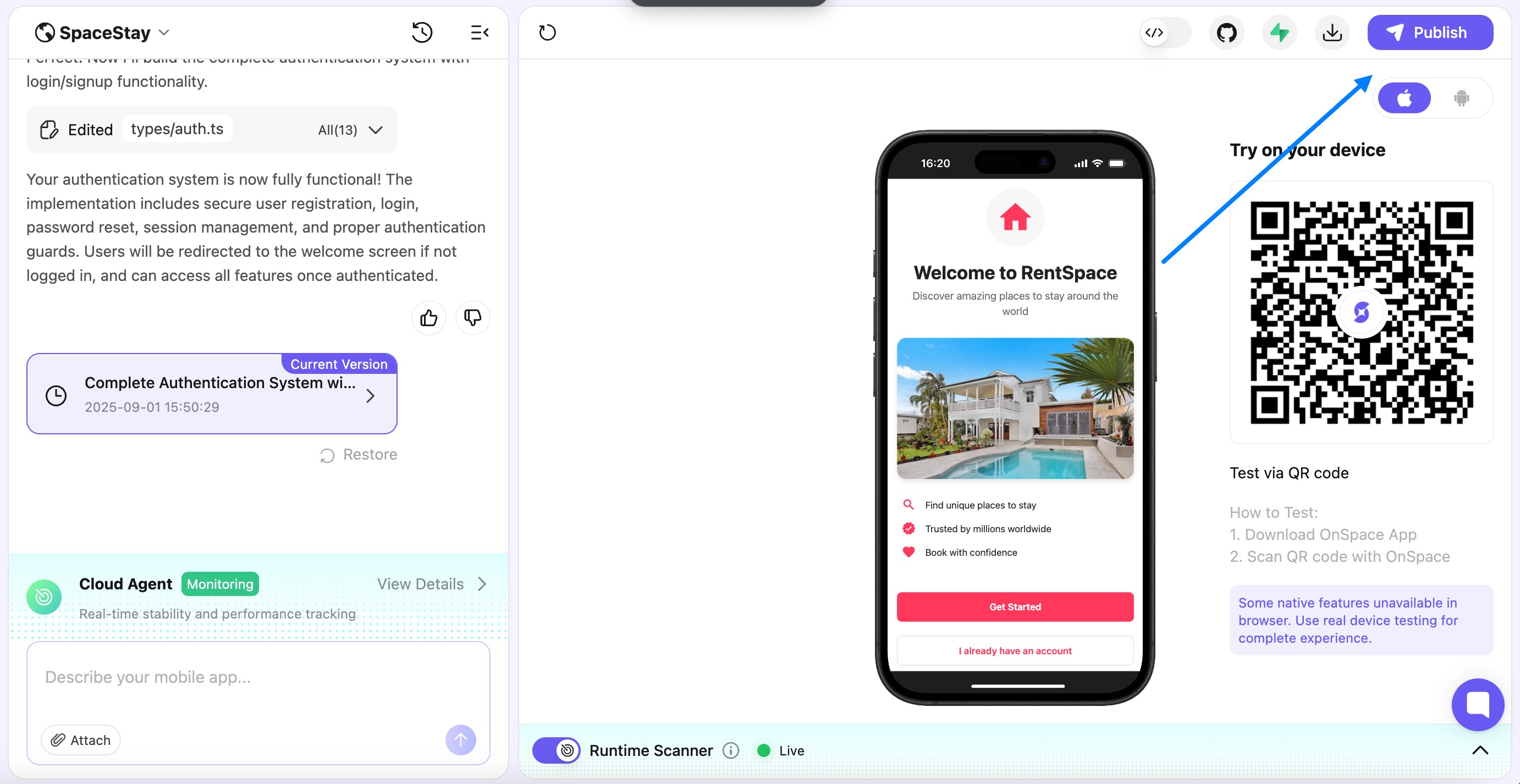
The OnSpace editor: the chat with the AI's summary of a new login system and the saved version on the left, an iPhone preview of the "RentSpace" sample app in the middle, and the QR code to test it on your own phone on the right, with the Publish button at the top.
Features
Native mobile apps from a prompt
OnSpace AI builds cross-platform mobile apps with React Native and Expo, so one project runs on both iPhone and Android. You can describe the app in words, upload reference files or sketches, or import a design from Figma. The editor also builds websites and landing pages from the same chat.
A backend with no setup
OnSpace AI includes OnSpace Cloud, a built-in backend with a database, user logins (including Sign in with Apple and Google), file storage, edge functions, secrets and logs, managed from a dashboard in the editor. You can view, add, import and export table rows there. If you prefer, you can connect your own Supabase project instead.
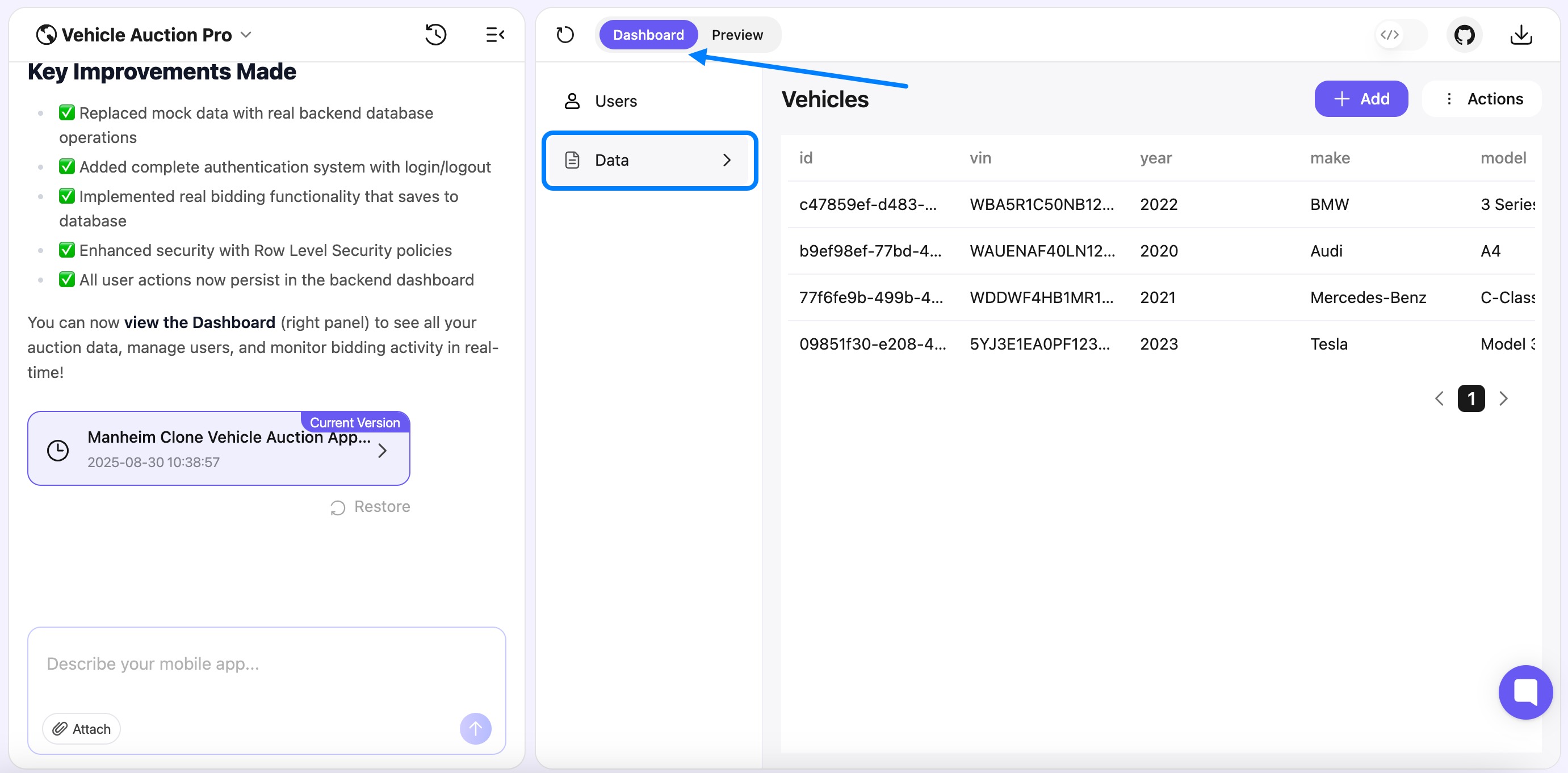
The Dashboard tab of a sample vehicle auction app: the AI's list of changes on the left, and the app's Vehicles table (VIN, year, make, model) with Add and Actions buttons on the right.
Payments, in-app purchases and AI features
OnSpace AI connects to Stripe: you link your Stripe account, describe what you want to charge, and it generates the payment screens and backend logic. For subscriptions inside iOS and Android apps it integrates RevenueCat. Built-in AI lets your app use models such as GPT-5.1 and Gemini 2.5 Pro for chatbots, summaries, translation and image generation without your own API keys, with 300 free AI tokens a month per workspace and pay-as-you-go after that.
Runtime Scanner and one-click fixes
OnSpace AI's Runtime Scanner watches the app while it runs in the cloud sandbox and lists runtime errors and performance problems. You can fix them all at once, fix one with "Fix now", or dismiss them. When something breaks, you can also send the error back to the chat and ask the AI to work through it.

An "Airbnb Clone" project: the user has sent an error back to the AI, which is working on it, while the preview shows the app's map screen and the Runtime Scanner at the bottom is live.
App Store, APK and web publishing
OnSpace AI can submit an iPhone app for App Store review from the editor: you enter your Apple Developer login, app icon, name and version, pay 1,000 credits, and it builds the app (usually in a few minutes) and tracks the submission in a Store Submissions dashboard. For Android it builds an APK to share (500 credits) or an AAB for Google Play. Websites publish to an onspace.app address, or to your own domain on Pro.
Your code, on GitHub
OnSpace AI syncs a project to your own GitHub repository in both directions, so every change is backed up with a history, a developer can work on it in their own editor, and you can host the app anywhere else. You can also download the code directly from the editor.
Benefits
- A real phone app, not just a web page. The QR-code preview on your own phone and the APK and App Store builds cover the part most non-programmers get stuck on.
- Build on the go. The iOS and Android apps let you keep prompting and testing away from your desk.
- No lock-in on the code. GitHub sync means the app survives even if you leave OnSpace.
- Credits roll over while you subscribe. Unused monthly credits carry over up to your monthly allowance (a full year's allowance on annual plans), unlike builders whose credits reset every month.
Real-World Uses
- A coach or trainer builds a workout-logging app with logins and a $9.99 monthly Stripe subscription for clients.
- A small business makes a booking or ordering app for regulars and shares it as an Android APK before deciding whether to pay for store listings.
- A founder turns a Figma mockup into a clickable iPhone prototype to show investors or test users through the QR code.
- A teacher builds a simple class tool, such as a quiz or a homework tracker, without learning to code.
Who It's For, and Who Should Skip It
OnSpace AI suits non-programmers who specifically want a mobile app, and who are happy to iterate in many small prompts, test on their phone and accept that the AI will need correcting. It's also a quick way for a designer to turn a Figma file into something clickable.
Skip it if you need dependable support or a refund route if things go wrong: the reviews below suggest you shouldn't count on either. Developers comfortable with code will get more control from an AI coding assistant in their own editor, and if you only need a web app, there are web-focused AI builders with a longer track record. Anything handling sensitive data or payments at scale needs a developer to review the generated code before launch.
Usage Guide
- Sign up at onspace.ai (or in the iOS or Android app). The free plan needs no payment.
- Plan the app before you prompt: what it does, who uses it, the main actions, and the look you want. OnSpace's own guide shows that a detailed first prompt gets better results than "build me a fitness app".
- Pick a backend under the prompt box (OnSpace Cloud or Supabase) and whether the project is public or private, then send the prompt.
- Test it in the preview and on your phone by scanning the QR code with the OnSpace app. Some native features only work on a real device.
- Refine in small steps, one feature per prompt. Turn on the Runtime Scanner and fix errors as they appear, and restore an earlier version if a change goes wrong.
- Connect GitHub early so the code is backed up.
- Publish to the web, build an APK or AAB from the Download menu, or use Publish to App Store.
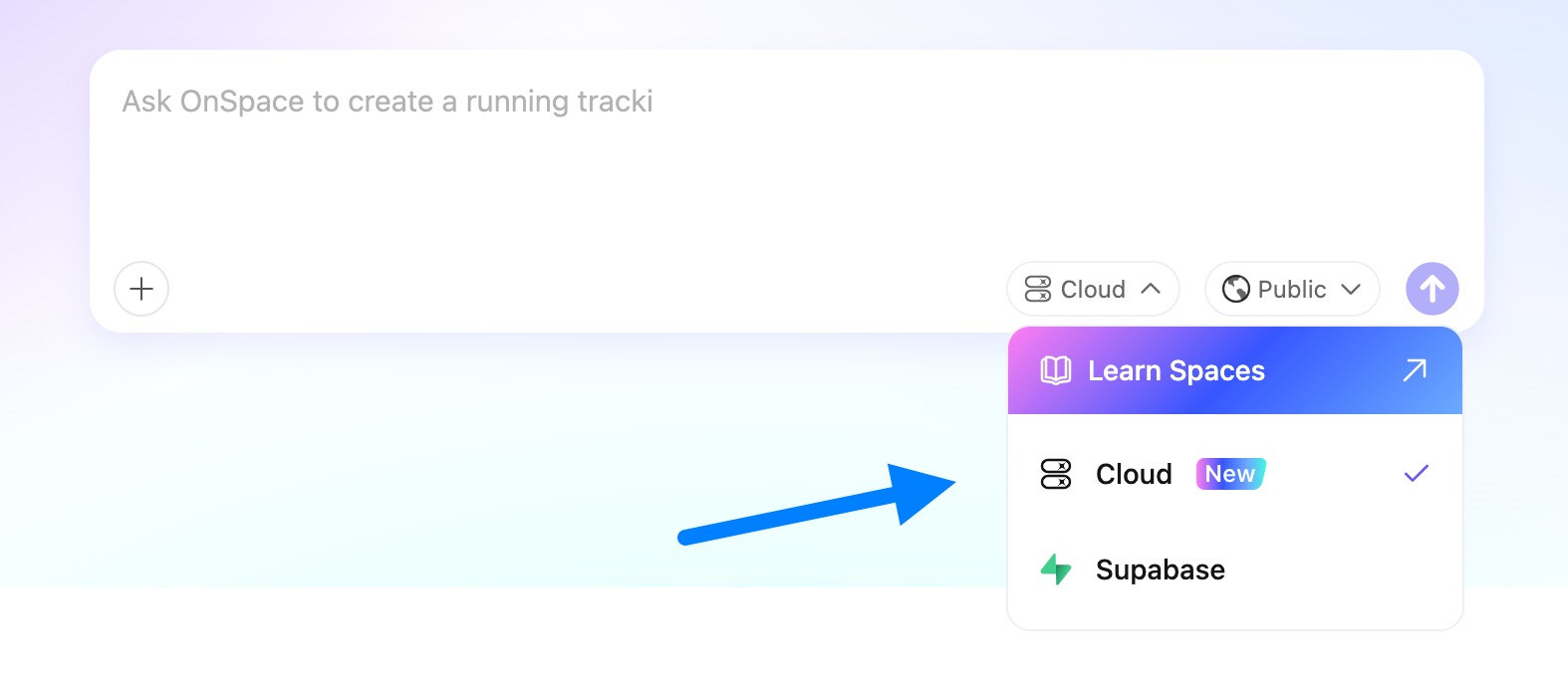
The OnSpace prompt box: a project being started with "Ask OnSpace to create a running tracker", the backend menu open with Cloud (selected) and Supabase, and the Public visibility setting.
Where it falls short
- No easy view of what you've spent. An App Store reviewer complained there was no way to track credit usage, and Trustpilot reviewers describe each attempt costing "a seemingly random amount of credits".
- The AI makes mistakes you pay to fix. Even positive reviewers mention re-prompting and error correction eating into credits.
- Publishing problems. Some users report being unable to publish revisions consistently.
- No real collaboration yet. Inviting others to a project works only through GitHub, and the AI can't read a web link you paste; you have to copy the content in.
- Support and refunds. The most common complaint by far is support that doesn't answer, including refund requests.
What Users Say
OnSpace AI's ratings depend heavily on where you look. Its own site and Product Hunt are positive, the App Store is mixed, and Trustpilot is very negative. The quotes below are word for word; the Trustpilot and App Store text came to us through a page summarizer.
Trustpilot: 1.8 out of 5 from 17 reviews
88% of the reviews are one-star, and none are four or five stars. OnSpace hasn't invited customers to review it there, which tends to attract unhappy buyers, but the complaints are consistent.
- Matthew Williams, "Extremely concerning experience — credits removed, no refund, no support response" (1 star, March 2026): "The absence of transparency, accountability, or even basic customer service is extremely concerning."
- Jordan Olson, "Horrible customer service" (1 star, June 2026): "They dont get back to you. Tried asking for a refund the past week, still have not replied yet"
- Michael Rocha, "cannot consistently publish revisions…" (1 star, July 2026): "customer service is non-existent"
- Yaseen, "Total Scam and Unprofessional Platform…" (1 star, August 2026): "They take your money and lock you out of your own code."
- Colby, "Bait and switch... sucks you in then sucks your credits dry." (1 star, February 2026): "Each try costs a seemingly random amount of credits until you're frustrated"
- Riaz F, "its good until you start using their AI" (3 stars, February 2026): "The website looks nice, they have great features and it all looks cool and useful." He later raised his rating after OnSpace offered him goodwill credits.
App Store: 3.2 out of 5 from 31 ratings
- "No Credit Tracking" by Babarambaba: "there is NO WAY to track your credit usage"
- "Customer service is non existent" by Environmental app build: "customer support does not respond no matter how many times you email them."
- "Started ok,ended horrible" by plfugovvvhhhhhess: "you have to get a subscription to make the apps!"
- "Unbelievable" by Reviewsbyne, a happier user comparing it with other builders: "OnSpace just whipped them."
Product Hunt: 4.0 out of 5 from 5 reviews
- BC Harsha Raju: "It offers a streamlined balance between speed and usability, making it particularly effective for founders"
- B.K.D.E AMOAH: "a clean, intuitive platform that makes building and launching projects fast and simple." The same reviewer adds: "Occasional responses may still require substantial editing"
- Deacon: "It's fun to use and easy to customize my app", but also "I hate the fact that credits are so hard to get!!"
- michael Cross: "Great way to build cool little apps", while wishing for "Not having to spend most of my credits error correcting."
FileHorse review
Daniel Leblanc's review on FileHorse lists "Easy to use for beginners." as a pro, and "AI-generated results need manual review." and "Usage-based credits may become restrictive." as cons, concluding that "it offers strong value for idea validation, early product design, and no-code app creation."
The common themes
People like how quickly OnSpace gets a first version of an app onto their phone and how approachable the editor is for beginners. The complaints repeat across every site: credits that run out faster than expected, much of them spent on the AI fixing its own errors; no clear view of credit use; and, most seriously, support and refund requests that go unanswered. Nobody disputes that it can build an app; the risk is in what happens when something goes wrong with your account.
Comparisons
OnSpace AI vs Emergent
Both are chat-driven AI app builders that also make React Native mobile apps. Emergent leans toward full-stack web apps with a Python back end and charges hosting in monthly credits per published app; its Standard plan is $17 a month billed yearly for 100 credits. OnSpace is more mobile-first, with on-device QR testing, APK builds and in-editor App Store submission, and its Pro plan is $21 a month billed yearly for 7,500 credits (the two companies' credits aren't comparable units). Emergent's Trustpilot score (2.7) is also weak, but better than OnSpace's 1.8.
Free plan vs Pro
The free plan builds public projects only, with the OnSpace badge, on 500 credits a day up to 2,000 a month. Pro adds private projects, more advanced AI coding models, badge removal, custom domains, APK download, faster generation and credit rollover. Enterprise adds SSO, priority queue access, a dedicated support team and exclusion from AI training data by default.
Editions and Pricing
| Plan | Credits a month | Billed monthly | Billed yearly |
|---|
| Free | 500 a day, 2,000 max | $0 | $0 |
| Pro | 7,500 | $25 | $252 ($21 a month) |
| Pro | 15,000 | $50 | $504 ($42 a month) |
| Pro | 30,000 | $100 | $1,008 ($84 a month) |
| Pro | 60,000 | $200 | $2,004 ($167 a month) |
| Enterprise | Custom | Quote | Quote |
Pro continues in larger steps up to 480,000 credits a month for $1,299 a month or $13,248 a year. You can also buy credit top-ups at any time. Prices in the iOS app are App Store prices and can differ from the website's.
FAQs
Do I need a Mac or Xcode to publish an iPhone app with OnSpace AI?
No. OnSpace AI builds the app in the cloud and submits it for App Store review from the editor. You do need a paid Apple Developer account, whose login you enter during the submission, and the submission costs 1,000 credits.
Can I get my app on Google Play with OnSpace AI?
Yes. OnSpace AI builds an Android App Bundle (AAB), the format Google Play Console asks for, in about two minutes. You upload it to Play Console yourself. An APK for sharing directly with testers costs 500 credits per build, and each new build replaces the previous one, so download it first.
What happens to my OnSpace AI credits and app if I cancel?
OnSpace AI expires all unused and rolled-over credits at the end of the billing period after you cancel. Your data stays hosted while you subscribe, and after cancelling it's kept for a grace period so you can export it, after which it may be removed. Syncing to GitHub keeps a copy of the code you control.
Do OnSpace AI credits roll over?
Yes, while you keep paying. On a monthly plan, unused credits roll over up to one month's allowance; on an annual plan, up to the full year's allowance.
Do I own the code OnSpace AI generates?
Yes. OnSpace AI says you keep full ownership of the code, and you can download it from the editor or sync it to your own GitHub repository and host it anywhere.
Can a team work on one OnSpace AI project?
Not directly yet. OnSpace AI is still building project sharing, so for now collaborators work on the code through the connected GitHub repository.
Do I need my own OpenAI or Google API key for AI features in my app?
No. OnSpace AI's built-in AI is enabled by default and gives every workspace 300 AI tokens a month, then charges pay-as-you-go from your AI balance. You can change how your app uses it under Settings, Integrations.
System Requirements
- A current web browser and an internet connection, on Windows, macOS, Linux or ChromeOS
- Optional: the OnSpace app for iPhone and iPad (iOS 15.1 or later) or Android, to build on the go and test apps on a real device
- An OnSpace account
- To publish: an Apple Developer account for the App Store, or a Google Play Console account for Google Play
Conclusion
OnSpace AI does something many AI builders don't: it takes a non-programmer all the way from a chat prompt to an app on their own phone, an Android build and an App Store submission. At $21 a month billed yearly for 7,500 credits, Pro is priced like its rivals. The reason to hesitate is the company behind it: credit costs are hard to predict, and the reviews describe support and refund requests going unanswered. Our verdict: worth trying on the free plan if you want a mobile app without coding, and worth paying for month by month once it has built something you like. Don't prepay a year until you're confident it works for your project, and keep your code synced to GitHub.
Try OnSpace FreeBuy Now