You have a page that looks fine in your browser, but you can't find the one unclosed div that's breaking the layout. You've also pasted the same menu into twenty pages, and now it needs a change. CoffeeCup HTML Editor is built for that kind of hand-coding work: it helps you find tags, reuse page elements and check your markup before you publish.
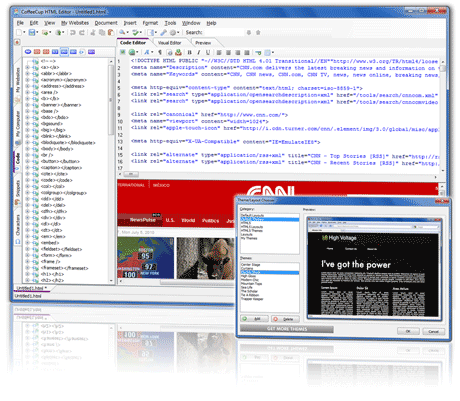
Quick facts
- Platform: Windows 7 or higher
- Price: $29
- Trial: a free trial is available
- Hosting: optional sync with CoffeeCup hosting, or FTP to any host
Key features
Tag highlighting that finds the matching end tag
The editor highlights the closing tag that pairs with the one you're on. You stop hunting for the end of a div, and it works for other tags too.
A Components Library for menus, headers and footers
Save a reused element once and embed it in any page. When you edit the library item, every page that uses it updates, so you don't change each copy by hand.
Tag Reference, Code Completion and validation in one place
A Tag Reference puts the correct tags at hand. Code Completion suggests tags as you type and suggests selectors from your referenced CSS files. A built-in Validation Tool checks your code for valid pages.
Live preview beside your code
A split-screen preview shows the page right below your code. You can also send the preview to another window or a second monitor.
Start from a free responsive template
A Template Downloader imports free, responsive templates in two clicks. They also work as practice material if you want to learn CSS Grid.
Website Projects, a Start Screen and Open From Web
Website Projects keep your files organized and help avoid broken links and images. The Start Screen offers a new HTML page, a template, a larger project or a PHP file. Open From Web loads files straight from a web server.
Structured data and one-click publishing
You can add schema.org structured data to label your content. The built-in FTP uploader publishes to any host and lets you switch between addresses, such as a work-in-progress site and a live one. You can also sync with CoffeeCup hosting.
Who it's for
It suits you if you want to write your own HTML and CSS rather than drag and drop. It also fits if you're learning and want a tag reference and validation close by. If you'd rather build visually, CoffeeCup's separate Site Designer is the better fit.
Pros and cons
Pros
- Low one-time price
- Free trial
- Validation, code completion and tag reference built in
- Reusable components, templates and live preview
- FTP publishing to any host
Cons
- Windows only; it requires Windows 7 or higher
- It's a code editor, so you write the markup yourself
What users say
"I've tried many editors but this is by far the best and simplest to use." (CoffeeCup website)
"The Components Library is a huge asset for anybody designing websites." (CoffeeCup website)
FAQs
Can I try it before buying?
Yes. A free trial version is offered.
Does it work on a Mac?
The product page lists a Windows requirement (Windows 7 or higher) and doesn't describe a Mac version of this editor.
Do I have to use CoffeeCup hosting?
No. You can publish with the FTP uploader to any web host or your own server. Hosting sync is optional.
Can it check my code?
Yes. The built-in validation tool checks your code, and code completion helps prevent unclosed tags as you type.
System requirements
Windows 7 or higher.