Jodit Editor PRO: The Free Jodit WYSIWYG Editor Plus 28 Paid Plugins, From $99 Once
Jodit Editor PRO from XDSoft is the paid edition of Jodit, an open-source WYSIWYG HTML editor for web apps, adding 28 plugins such as a file manager, PDF and Word export, clean paste from Word, an AI assistant, mentions, charts and math formulas. It's for developers who already like the free Jodit core and need the extras for a CMS, CRM or admin panel. PRO is a one-time $99 for one domain, Multi PRO $399 for unlimited domains, and OEM $799 to ship it inside a product you sell.
Be clear on one thing first: Jodit itself is free. The core editor is MIT-licensed on GitHub, with formatting, tables, images, links, source view and a basic file browser. You only need PRO when you want the premium plugins, priority support, or the right to redistribute it.
Quick facts
- Developer: XDSoft (xdsoft.net), Jodit's author since 2017
- Version: 4.21.0, released November 20, 2026 (core and PRO)
- Type: JavaScript/TypeScript component with no dependencies, installed from npm; React, Vue and Angular versions
- Adds to the free core: 28 plugins, the Finder file browser, a full image editor and priority support
- Price: PRO $99 (1 domain), Multi PRO $399 (unlimited domains), OEM $799 (redistribution), all one-time
- Trial: no trial key; PRO runs fully without a key but shows a small red notice in the corner
- Guarantee: 30-day money back
- What we checked: the npm registry on November 25, 2026: jodit-pro 4.21.0 published November 20, 2026, and about 13,100 downloads of jodit-pro in the week to November 24; and the order page on November 25, 2026: Jodit Editor Professional Version $99.00, Multi Professional Version $399.00, OEM Version $799.00. We didn't build a project with it.
Before you buy
- Try the free core first. If you only need a solid editor with tables, images and source view, the MIT-licensed Jodit may be all you need.
- PRO is one domain, not subdomains. A PRO key works on one domain and doesn't cover *.yoursite.com. Multi PRO gives each domain its own key; development hosts like localhost, staging.* and test.* need no key at all.
- Selling a product with the editor inside? PRO and Multi PRO cover your own websites. SaaS, CMS or desktop products delivered to other companies need the OEM license.
- Support lasts one year; updates don't stop. You get updates as long as they're released, but premium support ends after a year, and only OEM can extend it.
- Keys aren't emailed. After paying, you create your license key in XDSoft's account area.
Buy PRO ($99)Buy Multi PRO ($399)Buy OEM ($799)
Overview
You install jodit-pro from npm (or jodit-pro-react), import its CSS, and create the editor on a textarea or div with your license key in the options. Everything from the free Jodit carries over: the TypeScript core, the plugin architecture, themes, and the same API, so moving from the free editor to PRO is mostly a package swap. Then you switch on the plugins you want and configure the toolbar. XDSoft's site has a live demo with presets (Classic, Full, Inline, Document) and an online playground for trying configurations.
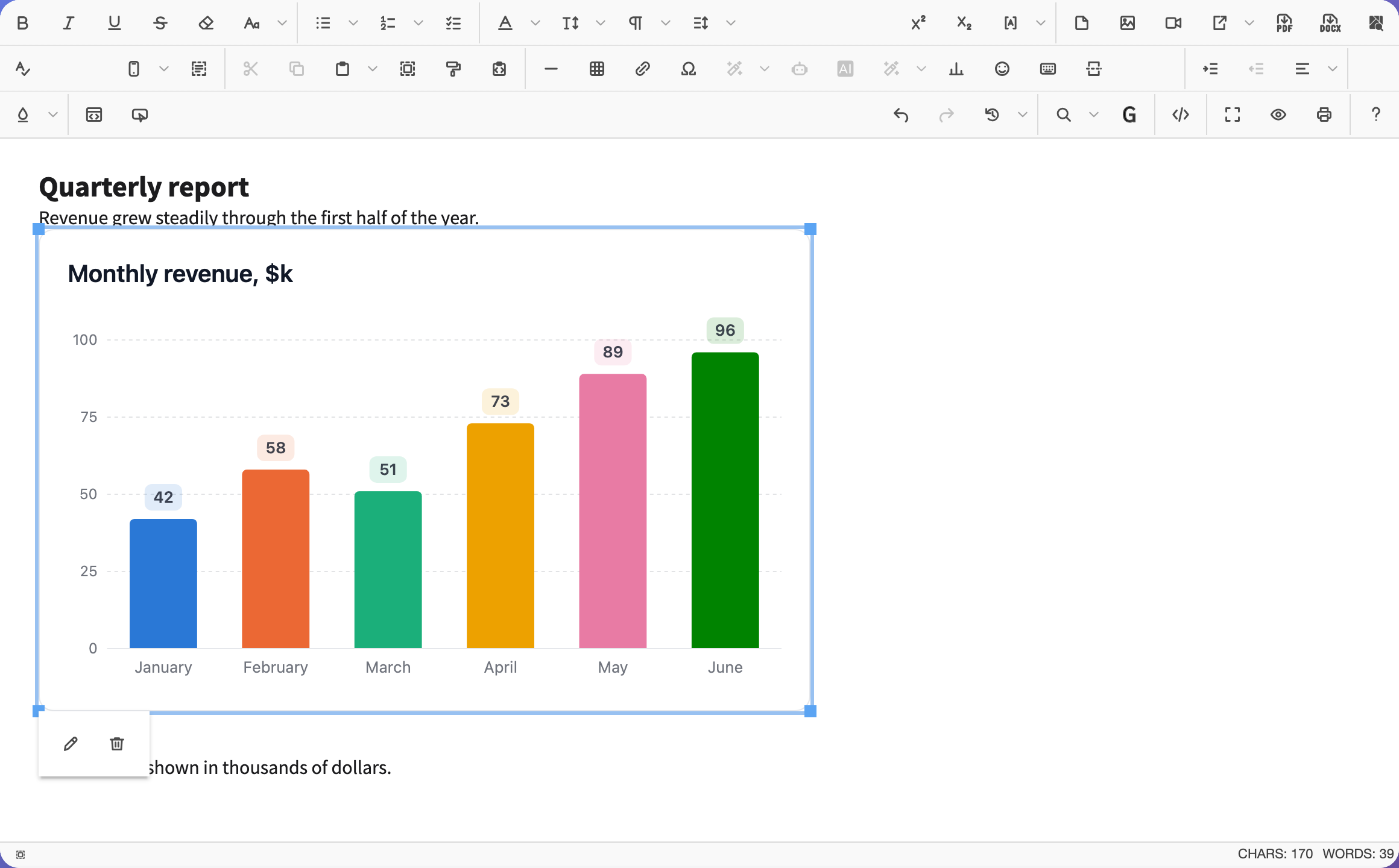
The PRO toolbar, including PDF and DOCX export buttons, with a "Monthly revenue" bar chart from the Chart plugin selected for editing; the status bar counts characters and words.
Features
Finder file browser
Jodit PRO replaces the core's simple file browser with Finder: a full file manager with dark and light themes, a folder tree, favorites, filtering, uploads, renaming and deletion, so authors can pick and manage images and files without leaving the editor. You connect it to your own server-side storage.
Word in, PDF and DOCX out
Jodit PRO's Paste from Word plugin keeps tables, lists and formatting when users paste from Microsoft Word and Excel (the free core's version is limited). Export to PDF and DOCX turns the editor's content into a document with custom fonts, styling and page breaks, and a Page Break plugin marks where pages split.
Charts and math as part of the content
Jodit PRO inserts bar, line, area, pie, donut and radar charts as plain inline SVG, edited in a dialog with a live preview, so the chart travels with the HTML. The Math plugin renders LaTeX and MathML formulas through MathJax as self-contained SVG, inline or as a block, with templates and a symbol palette.
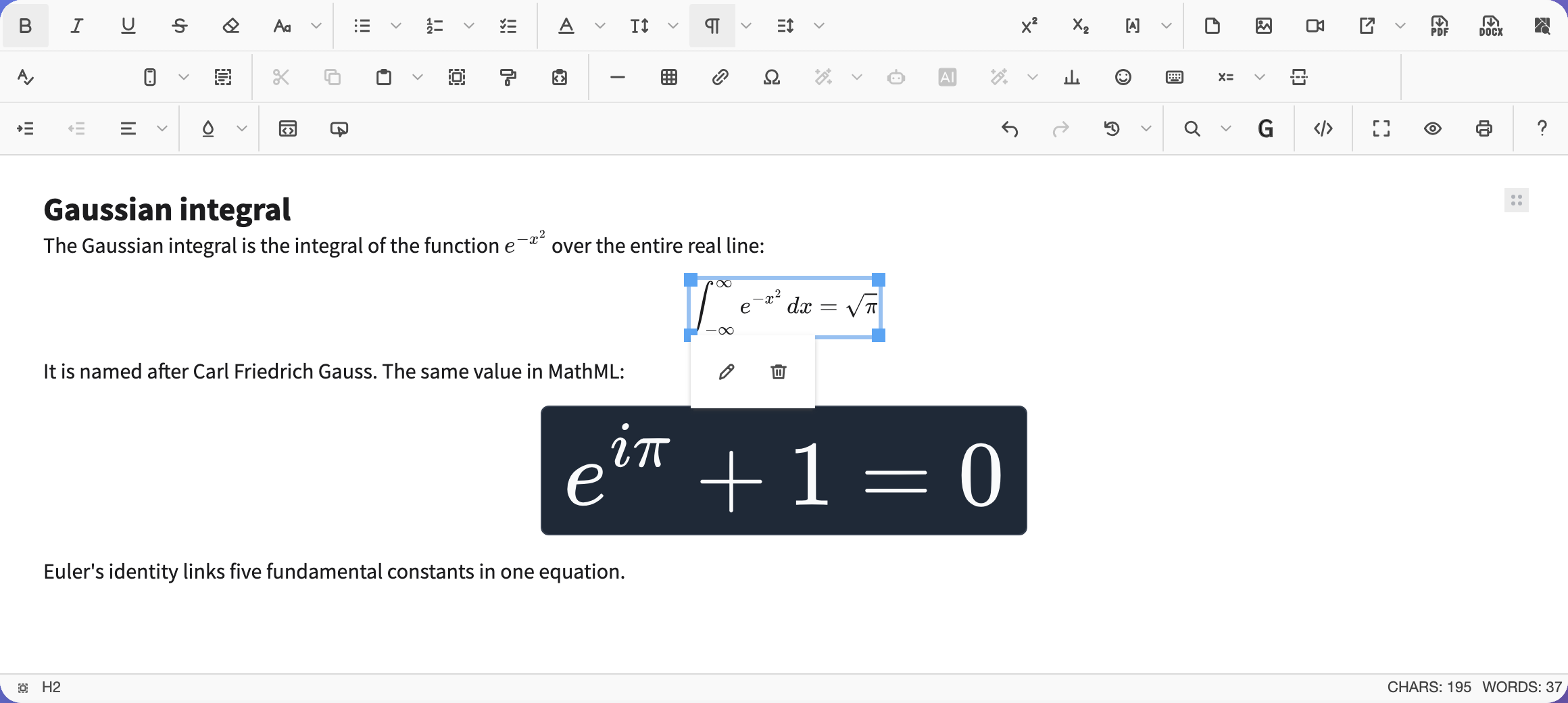
The Math plugin: a Gaussian integral written in LaTeX, selected with edit and delete buttons, and Euler's identity in MathML below it.
Writing helpers: AI, mentions, history
Jodit PRO includes an AI Assistant with a chat interface and editing tools, autocomplete and @mentions fed from your own data, an emoji picker with colon shortcodes, a Backup plugin that snapshots content at intervals so users can restore an earlier version, Change Case, Translate (Google Translate or your own provider), Google Search on the selected text, and a regex-based highlighter for patterns such as signatures.
Layout and block tools
Jodit PRO adds Tune Block, a small handle on each block for changing its heading level, moving it up or down, or deleting it; Show Blocks outlines; Style Cards and Templates for ready-made layouts, cards and pricing tables; a to-do list; a Button Generator; Google Maps; an iframe editor; a virtual keyboard; a Paste Code block with syntax highlighting; and a Mobile View that previews content at phone widths.
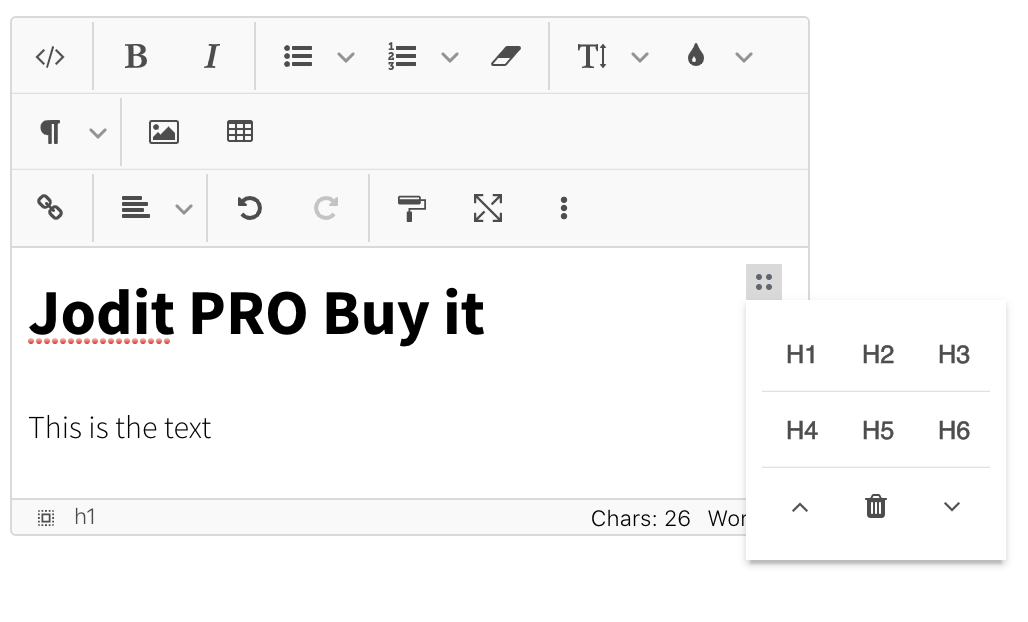
Tune Block on a heading: switch it between H1 and H6, move it up or down, or delete it.
Benefits
- Pay once. Unlike most commercial editors, PRO, Multi PRO and OEM are one-time fees with updates for as long as they ship.
- No lock-in on the core. The editor underneath stays MIT-licensed and on GitHub, so your content and integration don't depend on a closed product.
- Light footprint. No runtime dependencies, the same as the open-source version.
- Active development. Core and PRO 4.21.0 shipped together in November 2026.
Real-World Uses
- A company CMS where editors paste articles from Word and manage images through Finder.
- A CRM or help desk with @mentions of colleagues and templates for common replies.
- An education platform that needs math formulas and charts in lesson content.
- A SaaS product that ships a white-label editor to its own customers under the OEM license.
Who It's For, and Who Should Skip It
Jodit PRO suits developers building content screens in web apps who want a full-featured editor for a one-time price, especially if they already use the free Jodit.
Skip it if the free core covers your needs (many projects never need Finder, Word paste or PDF export), if you need real-time collaborative editing (the comparison table lists collaboration only for Enterprise), or if your company requires a vendor with a large support organization: PRO support lasts one year and goes through XDSoft alone.
Usage Guide
- Try the live demo and playground on XDSoft's site, or install
jodit-pro locally; it runs fully without a key, with a small red notice.
- Buy the license that matches your use (one domain, many domains, or redistribution).
- Sign in to XDSoft's account area and create your license key for your domain.
- Run
npm install jodit-pro, import the CSS, and create the editor with JoditPro.make('#editor', { license: 'YOUR-KEY' }).
- Enable the plugins you need, configure the toolbar, and connect Finder to your file storage.
Where it falls short
- Server work for files. Finder and uploads need a back end that you connect yourself.
- AI and translation have limits. The AI Assistant is capped on the Cloud plan, and Translate uses the Google Translate API.
- Few written reviews. Jodit is widely installed but rarely reviewed, so most of the evidence is usage numbers rather than opinions.
- Short PRO support window. One year, with no extension for PRO or Multi PRO.
What Users Say
Usage on GitHub and npm
The open-source Jodit repository has about 1,970 stars and 387 forks on GitHub, with only 16 open issues when we checked. On npm, the core jodit package was downloaded about 275,600 times in the week to November 24, 2026, the React wrapper about 167,600 times, and jodit-pro about 13,100 times. That's a large, active user base.
Joomla Extensions Directory
The Jodit editor extension for Joomla has one review, from Evgen (April 2018):
- On functionality: "A lots functions, but i think most usefull `copy/past` functionality."
- On support: "My issue on github was fixed in 1 day"
- On documentation: "Very very good documentation and playground service"
Formal reviews on G2, Capterra and similar sites are missing, and the evidence is mostly adoption: lots of projects install it, issues get closed, and the playground and documentation get praised. The main caveat: all support comes from XDSoft itself.
Comparisons
Jodit PRO vs the free Jodit core
Both share the same TypeScript core, API and updates. The free core (MIT) has the standard editing tools, a basic file browser and image crop and resize, with community support only. PRO adds 28 plugins, the Finder file manager, the full image editor, full Paste from Word, a custom color picker, PDF/DOCX export, and technical support for a year. The free core is the better choice when you don't need those plugins.
Editions and Pricing
| License | Price | Domains | Support | Extras |
|---|
| Core | Free (MIT) | Any | Community | Built-in plugins only |
| PRO | $99 one-time | 1 | Technical, 1 year | 28 plugins, Finder |
| Multi PRO | $399 one-time | Unlimited, a key per domain | Technical, 1 year | Same as PRO |
| OEM | $799 one-time | Unlimited, one wildcard key | Premium, 1 year, renewable | Redistribution, PRO plugin source, white label |
XDSoft also offers a Cloud subscription at $27 a month and custom Enterprise contracts, which are ordered from its own site. Each button below orders that license, with a 30-day money-back guarantee:
Buy PRO ($99)Buy Multi PRO ($399)Buy OEM ($799)
FAQs
Is Jodit Editor free?
Yes, the Jodit core is free and open source under the MIT license. Jodit PRO, the paid edition, adds premium plugins and support on top of it.
Is Jodit PRO a subscription?
No. Jodit PRO, Multi PRO and OEM are one-time payments with updates for as long as they're released. Only the Cloud plan is billed monthly or yearly.
Does Jodit PRO cover my subdomains?
No. A Jodit PRO key covers one domain only. For several domains or subdomains, Multi PRO gives each one a key, and OEM uses one wildcard key.
Do I need a key on localhost or staging?
No. Jodit PRO doesn't need a key on development domains such as localhost, staging.*, test.*, beta.* or *.dev.*.
Is there a React version of Jodit PRO?
Yes. Jodit PRO installs in React as jodit-pro-react, and the plan comparison lists Vue and Angular versions too.
Can I get a refund on Jodit PRO?
Yes. Every Jodit PRO and OEM license has a 30-day money-back guarantee; email XDSoft from the purchase address with your order ID.
Can I pay by invoice?
Yes. Jodit PRO orders go through PayPro Global, which takes cards, PayPal and invoice with bank transfer for companies, and sends the receipt and invoice by email.
System Requirements
- A modern web browser
- npm (or yarn) to install
jodit-pro or jodit-pro-react
- A back end for file storage if you use Finder or uploads
Conclusion
Jodit Editor PRO is good value if you've outgrown the free Jodit: $99 once for one site buys a file manager, Word paste, PDF and DOCX export, charts, math and an AI assistant on an editor that's actively maintained and widely used. The best reason to buy is that one-time price on an open-source core. The reasons to pause are that the free core may already be enough, the single-domain PRO key doesn't stretch to subdomains, and PRO support ends after one year. Install it, test the plugins you need without a key, then buy the license that matches how many sites you run.
Buy PRO ($99)Buy Multi PRO ($399)Buy OEM ($799)