Revo Uninstaller Pro 5: Remove Programs and Everything They Leave Behind
Revo Uninstaller Pro 5 is a $24.95 Windows uninstaller (one PC, one year of updates, tax included at checkout) that runs a program's own uninstaller, then finds and deletes the files, folders and Registry entries it left behind. It's for anyone whose PC is cluttered with old software, and it has a 30-day free trial.
You know the symptoms: a program that's "uninstalled" but still has a folder in Program Files, an antivirus trial whose uninstaller crashes halfway, a browser toolbar that comes back after every reboot. Windows' own Apps and Features removes what the program's uninstaller tells it to and nothing more. Revo Uninstaller Pro goes looking for the rest.
Quick facts
- Version: 5.5.4, released September 23, 2026
- Developer: VS Revo Group
- Runs on: Windows 11, 10, 8.1, 8, 7 and Windows Server, 32-bit and 64-bit
- License: one PC, with 1 year of updates and technical support
- Price: $24.95 at checkout, tax included. Two PCs cost $34.94 and three PCs $39.93 for the year.
- After the year: the program keeps working with the version you have. Renewing at a discount only gets you newer versions.
- Free trial: 30 days, all features, no credit card
- Guarantee: 60-day money-back, for any reason
What we checked: the trial installer RevoUninProSetup.exe from the vendor (17.4 MB, file version 5.5.4.0, dated September 23, 2026), and the 1-year, 1-PC license on the order page at $24.95 including $1.47 tax, with 2 PCs at $34.94, 3 PCs at $39.93 and the 2-year license at $39.95, on October 29, 2026. We didn't run uninstalls with it on a test PC.
Download Free TrialBuy Now
Overview
Revo Uninstaller Pro works in two passes. First it runs the program's built-in uninstaller, exactly as Windows would. Then it scans the drive and the Registry for leftovers and shows you what it found, so you decide what gets deleted. Before it touches anything it makes a System Restore point and a backup of the entire Registry, and deleted files go to the Recycle Bin, so a wrong click can be undone.
The program opens on All Programs, which puts recently installed software at the top under "New Programs". Down the left side are the other modules: Traced Programs, Windows Apps, Browser Extensions, Logs Database, Hunter Mode and the Tools.
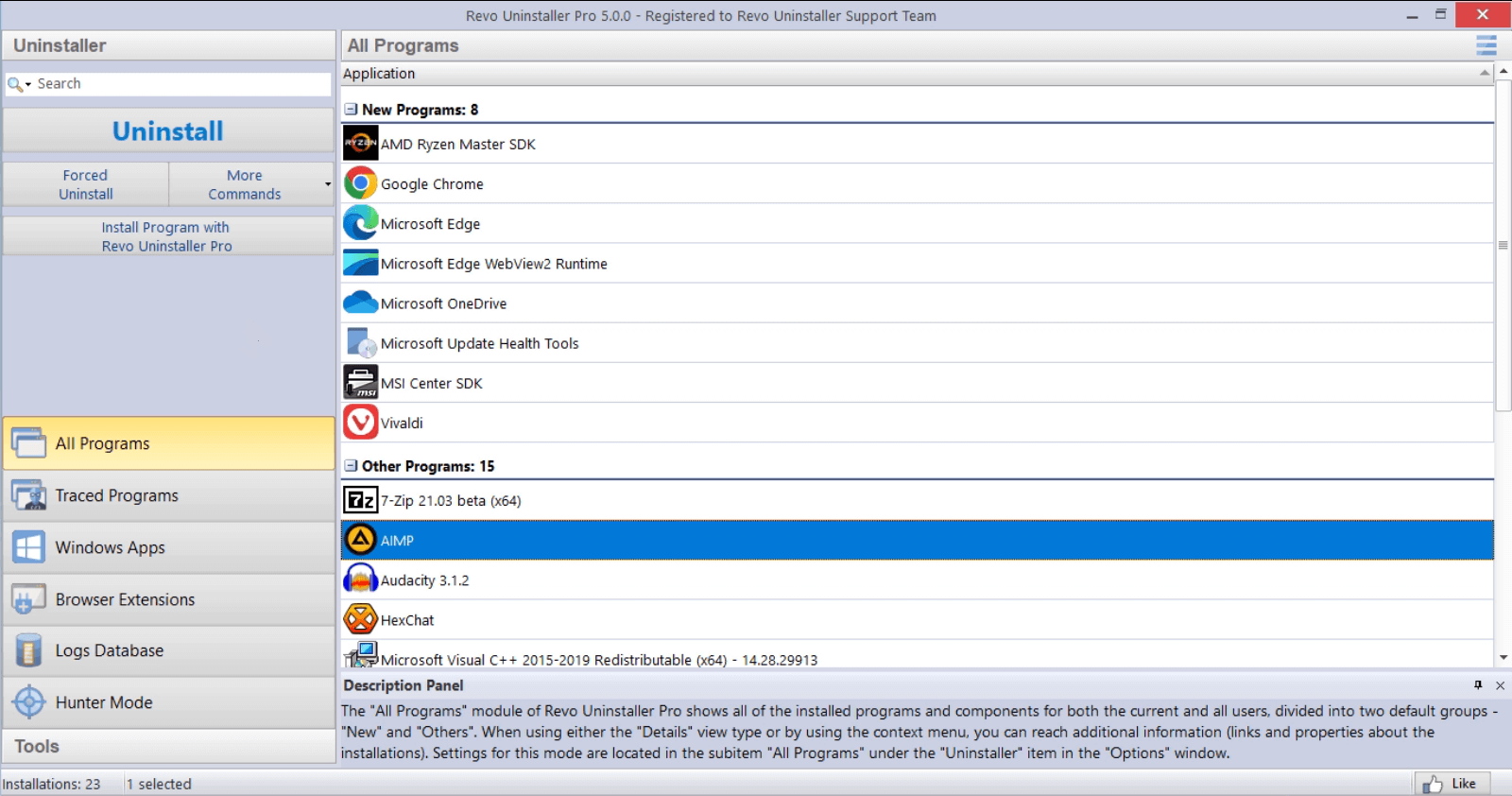
The All Programs view in Revo Uninstaller Pro 5.0: 8 recently installed programs under New Programs, the rest under Other Programs, with Uninstall, Forced Uninstall and "Install Program with Revo Uninstaller Pro" on the left.
Features
A leftover scan after every uninstall
Revo Uninstaller Pro scans for leftover files, folders and Registry entries once a program's own uninstaller finishes, and you choose how deep it looks. The Moderate mode, the default, scans the most common places on the drive and in the Registry; the Pro edition also adds an extended scan that the free Revo Uninstaller doesn't have. Leftovers are listed for you to tick, not deleted blindly.
Forced Uninstall for programs that won't leave
Revo Uninstaller Pro's Forced Uninstall removes programs that don't show up in any list, whose uninstaller is missing or broken, or that were only partly installed or removed. You type the program's exact name or point to its folder, and Revo finds its uninstall command, any matching trace log, and the leftovers. It's also the way to clean up after software that was removed without Revo months ago.
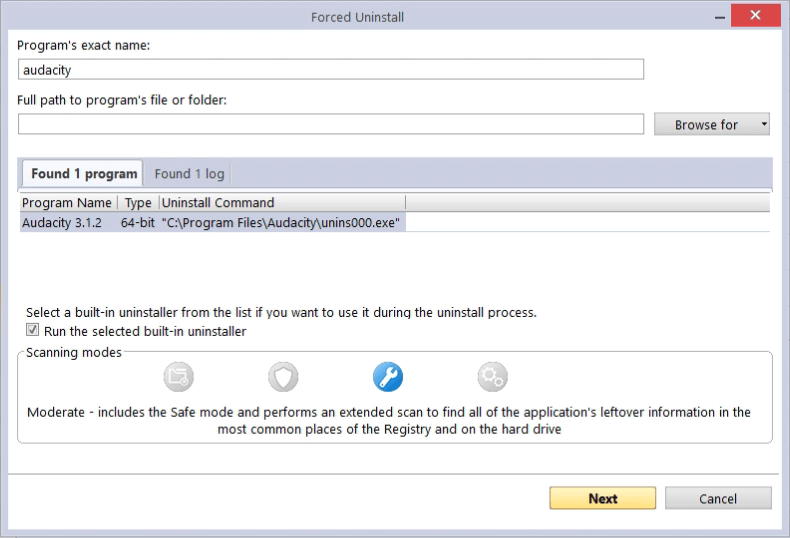
Forced Uninstall with "audacity" typed in: Revo found Audacity 3.1.2 with its unins000.exe uninstall command and one trace log, with the Moderate scanning mode selected.
Quick/Multiple Uninstall: a whole queue in one pass
Revo Uninstaller Pro's Quick Uninstall removes several programs in one go. It creates one Registry backup and one restore point for the whole queue, runs each program's uninstaller silently where it can, then scans for and removes the leftovers automatically. On a new laptop full of trialware, that's one confirmation instead of a dozen wizards.
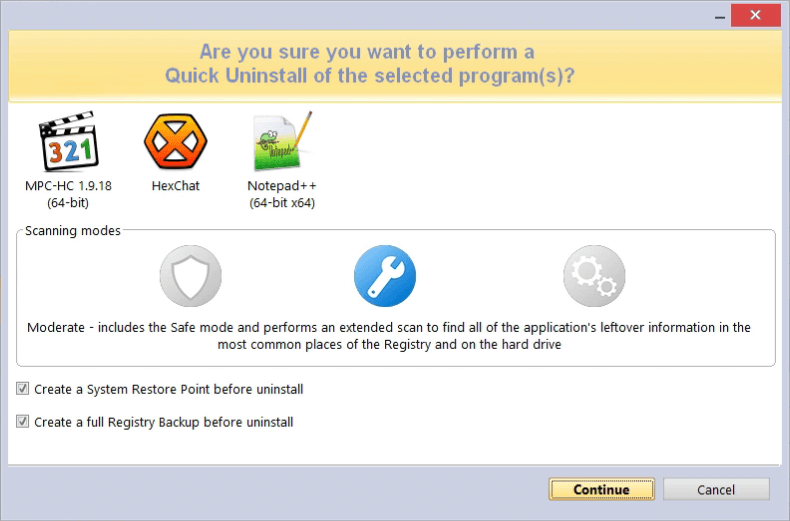
The Quick Uninstall confirmation for MPC-HC, HexChat and Notepad++, with the Moderate scanning mode and both "Create a System Restore Point" and "Create a full Registry Backup" ticked.
Windows apps and browser extensions in one place
Revo Uninstaller Pro lists Windows apps, both the pre-installed ones and Store apps, separately from desktop programs. You can remove several at once, remove an app for every user account, or reset an app to its default state as a troubleshooting step. The Browser Extensions module groups extensions, themes and plugins by browser (Chrome, Firefox, Edge, Opera and Internet Explorer) so you can remove them without opening each browser.
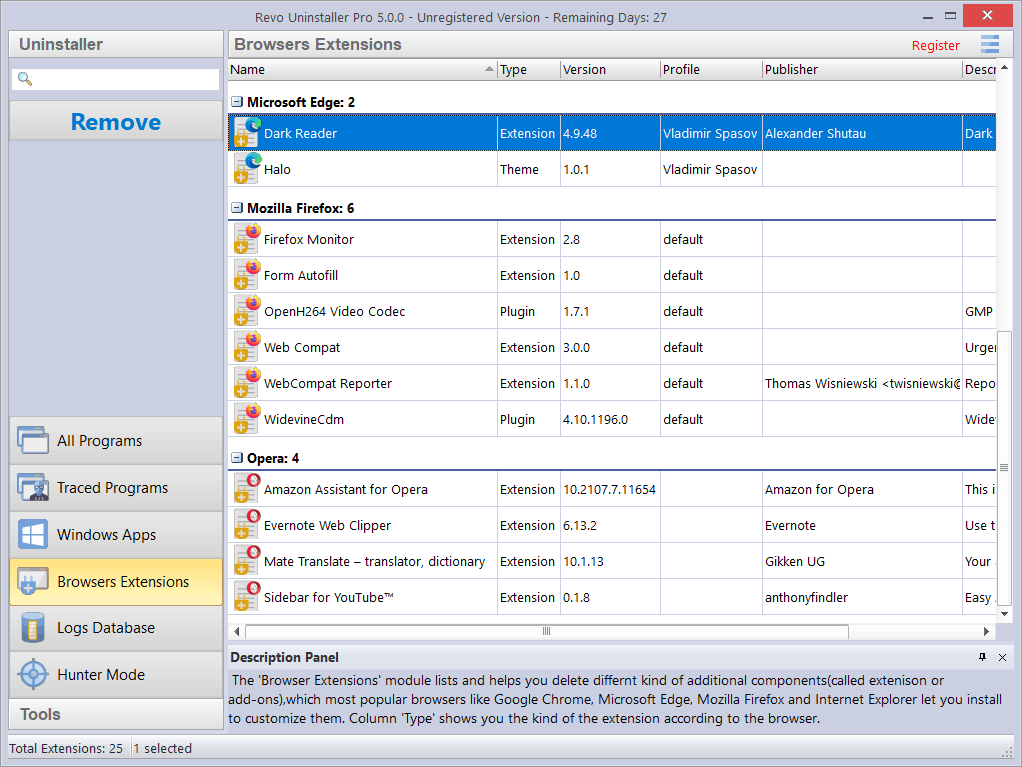
The Browser Extensions module in the trial version (27 days left): 25 extensions grouped under Microsoft Edge, Mozilla Firefox and Opera, with type, version, profile and publisher.
Trace logs: record an install, reverse it exactly
Revo Uninstaller Pro's Real-Time Installation Monitor records every change a setup program makes into a trace log. Later, Revo uses that log to undo the installation exactly, including obscure leftovers a normal scan could miss, and Custom Uninstall lets you pick individual items from it. For software you didn't trace, the Logs Database offers trace logs that Revo's own team made for thousands of programs, filtered to match your Windows version.
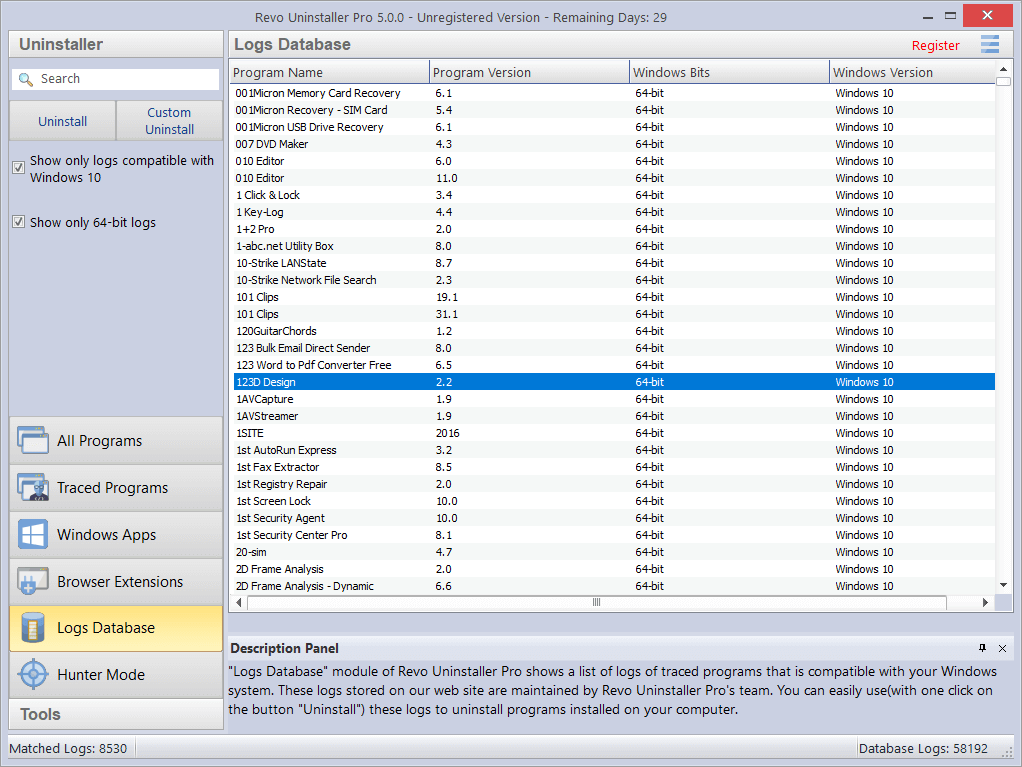
The Logs Database in the 5.0 trial: 8,530 logs matching 64-bit Windows 10 out of 58,192 in the database, with Uninstall and Custom Uninstall buttons on the left.
Hunter Mode and six extra tools
Revo Uninstaller Pro's Hunter Mode hides the main window and gives you a target icon to drop on any window, desktop shortcut or tray icon, then offers to uninstall that program or stop it starting with Windows. It's the quickest way to identify a mystery pop-up, and since version 5.5.0 it fully supports Windows apps. The Tools section adds an Autorun Manager, Junk Files Cleaner, Windows Tools, History Cleaner (browsers, MS Office and Windows), Evidence Remover and Unrecoverable Delete.
Benefits
The real benefit is confidence. With a restore point, a full Registry backup and the Recycle Bin behind every removal, you can be thorough without worrying that you've broken Windows. You also get back the disk space and startup time that dead programs quietly hold on to, and you can fix the "can't reinstall because the old version is still half there" problem that the built-in tool leaves you stuck with. Free technical support is included with the license, which matters for a tool that edits the Registry.
Real-World Uses
- Clearing out a new PC: queue the preinstalled trials and Store apps you'll never use and remove them in one Quick Uninstall.
- Fixing a failed reinstall: a program refuses to install because an old copy is "still there". Forced Uninstall finds and removes the remains.
- Removing a stubborn security suite: run its uninstaller through Revo, then delete the services, drivers and Registry keys it left behind.
- Testing software safely: install a program you're unsure about with "Install Program with Revo Uninstaller Pro", try it, then remove every trace with the log.
- Tracking down a pop-up: drop the Hunter Mode target on the window to see which program it belongs to and stop it at startup.
Who It's For, and Who Should Skip It
Revo Uninstaller Pro suits people who install and remove software often, anyone looking after a cluttered family PC, and anyone who has met a program that simply won't uninstall. TechRadar put it simply: "If you're constantly installing and uninstalling software, the Pro version of Revo Uninstaller will serve you better."
Skip it if you remove a program once in a while: the free Revo Uninstaller already runs a leftover scan after a normal uninstall. If you clean up many PCs, look at Revo Uninstaller Pro Portable instead, which is licensed per user for unlimited computers. And Mac or Linux users need something else, since Revo is Windows only.
Usage Guide
- Install the trial. Download RevoUninProSetup.exe (about 17 MB), run it and start Revo Uninstaller Pro. The 30-day trial needs no credit card.
- Pick a program. In All Programs, select it and click Uninstall. Leave "Create a System Restore Point" and "Create a full Registry Backup" ticked.
- Let its uninstaller run. Revo starts the program's own uninstaller first. Finish it as usual.
- Scan and review. Choose a scanning mode (Moderate is the default), then go through the leftover Registry items, files and folders it found. Tick only what you're sure about and click Delete.
- For stubborn cases, use Forced Uninstall with the program's name or folder, or drop the Hunter Mode target on its window.
- To undo, restore Registry items from Backup Manager, files from the Recycle Bin, or roll back with the restore point.
- Activate. When you buy, enter the serial number in the same copy. Nothing needs reinstalling.
Before you buy
- The license is per PC. Buying for two or three computers? The multi-PC options are cheaper than separate licenses ($34.94 for 2, $39.93 for 3). One Trustpilot reviewer bought two copies and was confused about receiving one serial number, so check the PC count on the order page.
- "1 year" means updates, not use. When the year ends, Revo Uninstaller Pro keeps working; you just stop getting new versions and support.
- VS Revo Group runs seasonal sales on its own store (50% off at the end of October 2026), so the price can drop at holidays.
Where it falls short
- A deep scan can catch the wrong thing. Windows Report warned that "some tools carry the risk of accidentally deleting important user data, if not used with caution." The Advanced scan and Evidence Remover deserve extra care.
- Not every trace goes. Windows Report found the browser extension removal "might not be able to remove all traces of a browser extension", and that Hunter Mode might miss programs running silently in the background.
- Quick Uninstall gives up control: you can't choose the order the programs are removed in.
- Some Windows apps need admin rights to remove, which Windows Report noted Revo doesn't have by default.
- Occasional misses and sluggishness. Trustpilot users have reported a laggy interface, a game it couldn't delete, and Microsoft Edge not showing up in its list.
What Users Say
Windows Report: 7.5 out of 10
Vlad Turiceanu tested Revo Uninstaller Pro hands-on for Windows Report (updated April 9, 2025). He removed Driver Easy with Forced Uninstall: "Within a few seconds, Revo uninstalled Driver Easy from my system. However, I recommend using this feature as a last option after trying the standard uninstall process."
He also uninstalled OBS Studio with Hunter Mode and a Windows app with its leftovers, and liked the layout: "I've used several uninstallers to date. However, in my opinion, Revo stands out from its competitors because of its easy-to-navigate interface."
His verdict was more reserved: "However, some tools carry the risk of accidentally deleting important user data, if not used with caution. Overall, I'd give it a solid 7.5/10."
MSPoweruser: 8.5 out of 10
Pranav Bhardwaj (updated October 24, 2025) used it to strip Windows bloatware: "I used it to remove Cortana, WMP, and a few other bloatware that I never use." On the interface: "Among the many uninstallers I've used, the sleek and straightforward UI of Revo Uninstaller remains a standout for me."
He praised the trial, noting that "Revo Uninstaller comes with a 30-day free trial with all features", and scanned the installer on VirusTotal, where "70 out of 71 engines marked it safe."
His cons: "Free version has limited features" and "No macOS or Linux versions are available." His verdict: "While the Pro version adds advanced capabilities, the free edition is a solid choice for most users."
TechRadar: the free edition's review points to Pro
Richard Sutherland reviewed Revo Uninstaller Free for TechRadar (October 31, 2020) and listed its weaknesses as "Can only perform one uninstall at a time" and "Can't force uninstall", the two gaps Pro fills. He wrote that "Revo Uninstaller Pro adds many useful features, including the ability to uninstall multiple applications at once, Forced Uninstalls (where you can remove programs that are difficult to uninstall), real-time system monitoring, and command-line support."
On support: "During our testing, we sent a few emails requesting information and received replies within 24 hours."
TechRadar's best free uninstallers guide adds that the free edition "can't log new installations, though - if you want that, you might like to give Revo's Pro version a whirl for 30 days. It's worlds away from the free edition's late-90s styling, and will give your drives a good scrubbing."
Trustpilot: 4.8 out of 5 from 317 reviews
VS Revo Group's Trustpilot profile covers its free and paid products: 93% of reviews give 5 stars and 3% give 1 star. These excerpts were read through a summarizer, so the wording is close but not guaranteed exact.
Richard S. (5 stars, August 2026), on removing a trojan that his antivirus missed: "the Revo Uninstaller Pro trial did the job quickly and completely. Very pleased."
DANCASTERWIN (5 stars, October 2026): "good application to delete kernel softwares with a click"
Randy Vanlandingham (5 stars, October 2025): "Looked at reviews online, downloaded the trial program, decided to buy it, haven't looked back yet"
Luis Wilhelmi (5 stars, January 2026): "After using the free version of this product i wanted to give back and purchased the pro version." He also praised the fast support that fixed a mistake in his order.
Darwin Jimerson (3 stars, July 2025): "Licensing is very confusing. Please clarify." He bought two copies, received one serial number, and hadn't had a reply to his email.
Crate Yessir (3 stars, June 2024): "Chouldn't delete a game that i dont even play anymore"
Ed Renaltner (2 stars, April 2023): "Revo Uninstaller can't see Microsoft Edge on my computer to uninstall it, although it is in my files."
The recurring praise is consistent across sites: Revo finds leftovers Windows leaves behind, removes programs that won't uninstall normally, has an interface that's easy to find your way around, and comes with quick support. The complaints are scattered rather than systemic: confusion about multi-PC licensing, the odd program it couldn't remove, and occasional sluggishness. Reviewers also agree that for light use the free edition may be enough.
Comparisons
Revo Uninstaller Pro vs Revo Uninstaller Free
Both run the program's uninstaller and then scan for leftovers, and both have Hunter Mode, Windows app removal, the extra cleaning tools and free technical support. Pro adds Forced Uninstall, Quick/Multiple Uninstall, extended leftover scanning, browser extension removal, real-time installation monitoring with the Logs Database, and the multi-level backup system. If you've ever had a program refuse to uninstall, those are the features you'll want.
Revo Uninstaller Pro vs Revo Uninstaller Pro Portable
The features are identical. The installable Pro is licensed per PC, has a 30-day trial and costs $24.95 a year for one PC. Portable doesn't install, runs from a USB stick, is licensed per user for unlimited computers, has no trial and costs $29.95 a year. TechRadar called Portable "a proper uninstaller, mainly for enterprises with many computers." For your own one to three PCs, the installable Pro is the better buy.
Editions and Pricing
| License |
Price at checkout |
Updates and support |
Computers |
Trial |
| Pro, 1 year (this license) |
$24.95 |
1 year |
1 PC |
30 days |
| Pro, 1 year, 2 PCs |
$34.94 |
1 year |
2 PCs |
30 days |
| Pro, 1 year, 3 PCs |
$39.93 |
1 year |
3 PCs |
30 days |
| Pro, 2 years |
$39.95 |
2 years |
1 PC |
30 days |
| Pro Portable, 1 year |
$29.95 |
1 year |
Unlimited, one user |
None |
| Revo Uninstaller Free |
Free |
Not applicable |
Any |
Not needed |
All prices include tax and were read on the order page on October 29, 2026. Every paid license keeps working after its update period and comes with a 60-day money-back guarantee.
FAQs
Does Revo Uninstaller Pro stop working after one year?
No. Revo Uninstaller Pro keeps working after the year with the versions released during your subscription. Renewing, at a discount, is only needed for newer versions and continued support; you apply the new serial number to the same copy.
Is the Revo Uninstaller Pro trial limited?
Revo Uninstaller Pro's 30-day trial has all features and doesn't ask for a credit card. The title bar shows the days remaining, and you register the same installation when you buy.
Can I use one Revo Uninstaller Pro license on my laptop and my desktop?
Not with the 1-PC license. Revo Uninstaller Pro is licensed per computer, so two PCs need the 2-PC option ($34.94 a year at checkout). If you work on many computers, Revo Uninstaller Pro Portable's per-user license covers unlimited PCs.
Can Revo Uninstaller Pro remove a program that isn't in the list?
Yes. Revo Uninstaller Pro's Forced Uninstall doesn't need the program to be installed or listed: enter its exact name, point to its folder, or both, and it scans for what remains.
Can I undo an uninstall in Revo Uninstaller Pro?
Partly. Revo Uninstaller Pro sends deleted leftover files to the Recycle Bin and backs up deleted Registry entries in Backup Manager, and it can create a System Restore point first. To get the program itself back, reinstall it from its setup file.
Does Revo Uninstaller Pro work on Windows 7 or 32-bit PCs?
Yes. Revo Uninstaller Pro 5.5.4 supports 32-bit and 64-bit Windows 7, 8, 8.1, 10, 11 and Windows Server editions, and needs only 512 MB of RAM.
Is Revo Uninstaller Pro safe?
Revo Uninstaller Pro is made by VS Revo Group, which says it has been on the market for more than 18 years, and MSPoweruser's VirusTotal check found 70 of 71 engines marked the installer safe. Download it only from the vendor, and keep the restore point and Registry backup options on.
Can I get a refund for Revo Uninstaller Pro?
Yes. VS Revo Group accepts cancellations and refunds for any reason within 60 days of purchase.
System Requirements
- Operating system: Windows 7, 8, 8.1, 10, 11 and Windows Server editions, 32-bit and 64-bit
- Processor: 800 MHz Pentium-compatible or faster
- Memory: 512 MB RAM
- Disk: 85 MB free space
Conclusion
Revo Uninstaller Pro is worth $24.95 if you install and remove software regularly or have a program that won't go away. It's well reviewed, careful (a restore point and Registry backup before every removal), and the version you buy keeps working after the year. The one reason to buy it is Forced Uninstall plus the leftover scan, which fix problems Windows' own tool can't. The main reason not to is light use: if you uninstall something a few times a year, the free Revo Uninstaller is enough, and if you service many PCs, Portable is the better license. Start with the 30-day trial on the program that's been giving you trouble.
Download Free TrialBuy Now