Revo Registry Cleaner Pro: Registry Cleaning, Tweaks and Change Tracking for $14.99
Revo Registry Cleaner Pro is a $14.99 Windows tool from VS Revo Group, the maker of Revo Uninstaller, that removes invalid Registry entries, backs up everything it deletes, and adds 50 Windows tweaks and a live Registry monitor. It fits Windows tinkerers and support-minded users who want those tools in one place, and it comes with a useful twist: the license keeps working after the year of updates ends.
One thing up front: Microsoft doesn't recommend Registry cleaners, and cleaning the Registry won't rescue a slow PC. What this program does well is make the job reversible, and the tuner and watcher are worth more to many people than the cleaning itself.
Quick facts
- Version: 2.2.5, released September 16, 2026
- Developer: VS Revo Group
- Platform: Windows 7, 8, 8.1, 10 and 11, 32-bit and 64-bit
- Price: $14.99 for 1 PC with one year of updates, and the license to use it has no end date
- Trial: 30 days of the Pro version, no credit card
- Guarantee: 60 days money back, for any reason
- Free edition: yes, without the Registry Watcher, Auto Clean and Auto Backup
What we checked: installer file version 2.2.5.0 (94 MB, digitally signed by VS Revo Group OOD), and the order page, which showed $14.99 today, an update renewal at $8.99 and auto-renewal as an option, on November 5, 2026. We didn't run a scan, so we can't say how many entries it finds or whether cleaning changes performance.
Download Free TrialBuy Now
Overview
The Registry is the database where Windows and your programs keep their settings. Uninstalled programs leave entries behind, and over time those pile up. Revo Registry Cleaner Pro finds them, sorts them into more than 15 categories, and lets you decide how aggressive to be.
The window has four modules down the left: Registry Cleaner, Registry Tuner, Registry Watcher and Backup Center. The scanning methods come from the same work behind Revo Uninstaller, which has cleaned up after uninstalled programs for over 18 years.
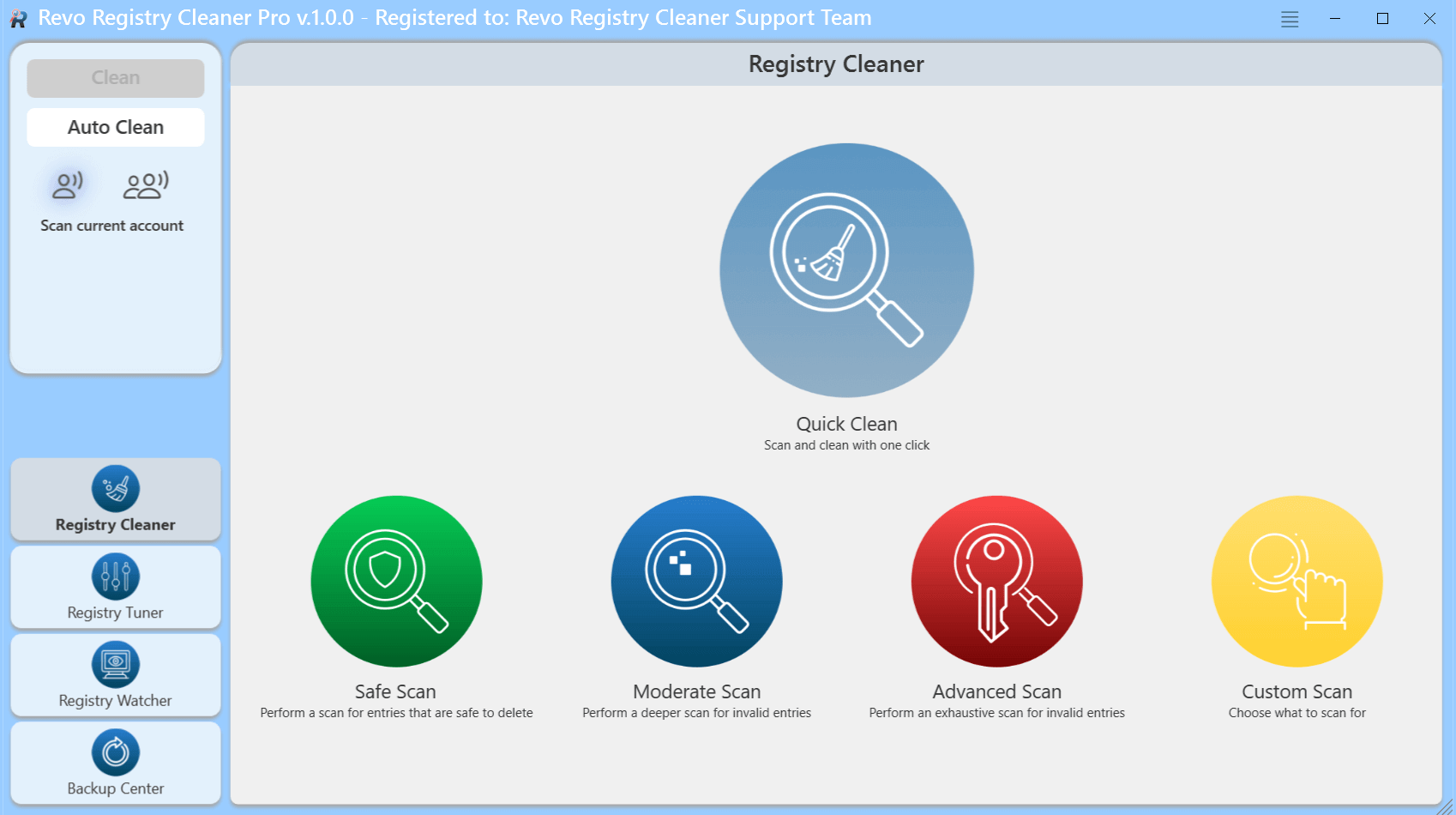
The main screen: Quick Clean, four scan modes and the four modules. The title bar shows version 1.0.0, so the current release may look slightly different.
Features
Four scan depths, from cautious to exhaustive
Revo Registry Cleaner Pro offers Safe, Moderate, Advanced and Custom scans, plus a one-click Quick Clean. Safe sticks to entries the program considers safe to delete, and Advanced is exhaustive. You can add your own keys to include or exclude, and Pro can scan all user accounts rather than only the current one.
Registry Tuner with 50 tweaks
Revo Registry Cleaner Pro's Registry Tuner turns Windows settings on and off with a switch, sorted into Windows Appearance, File Explorer, Desktop, Security and Stability, Windows Usage and System. The screenshot below shows real examples: disabling ads and widgets in Windows 11, and bringing back the Windows 10-style context menu.
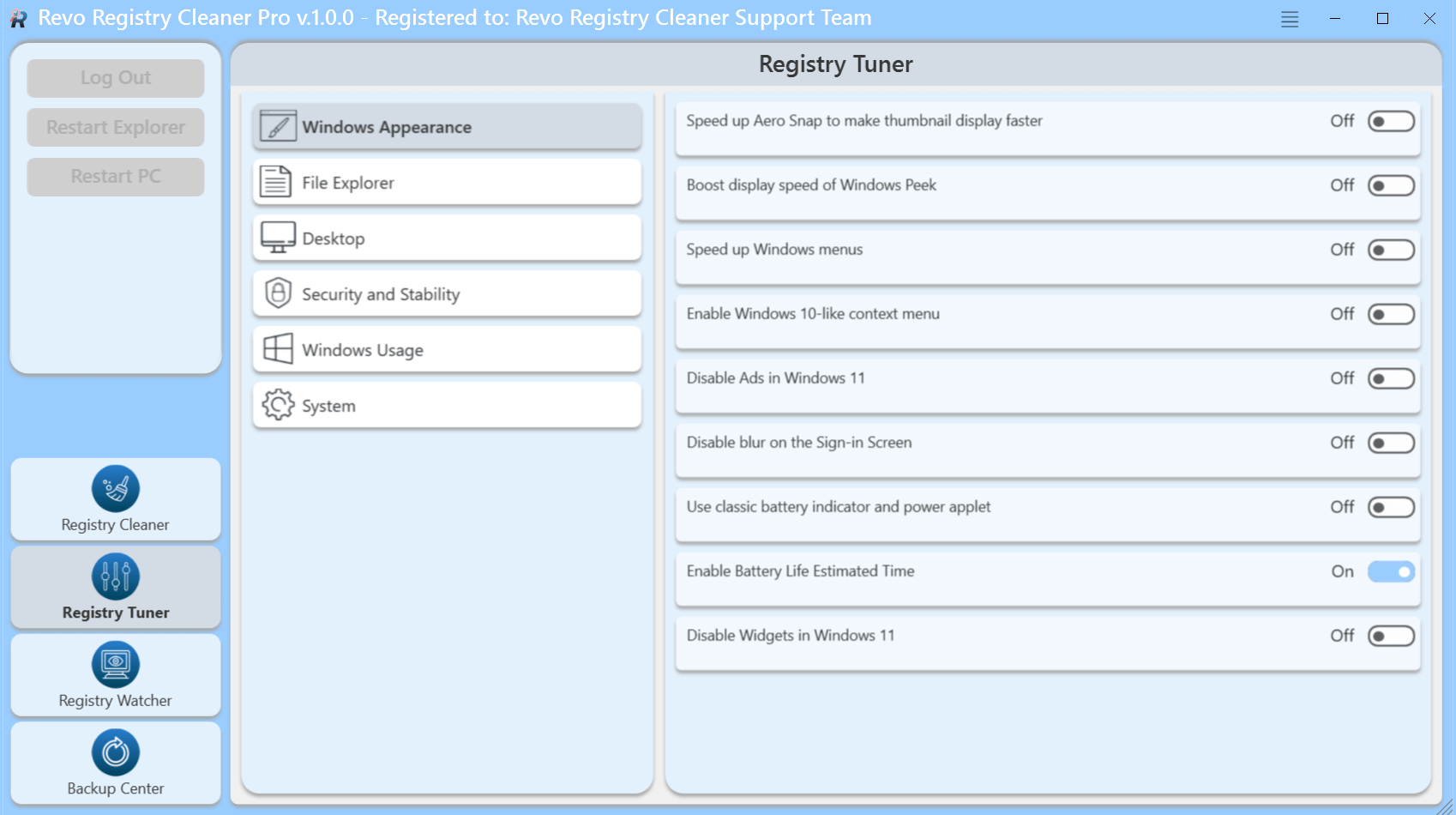
The Registry Tuner's Windows Appearance tweaks. Each one is a simple on or off switch.
Registry Watcher shows what programs change
Revo Registry Cleaner Pro's Registry Watcher tracks chosen Registry keys in real time and identifies the process behind each change. You can filter by operation type or data, then save or export the results. It's a handy way to see what a new installer actually did. This module is Pro only.
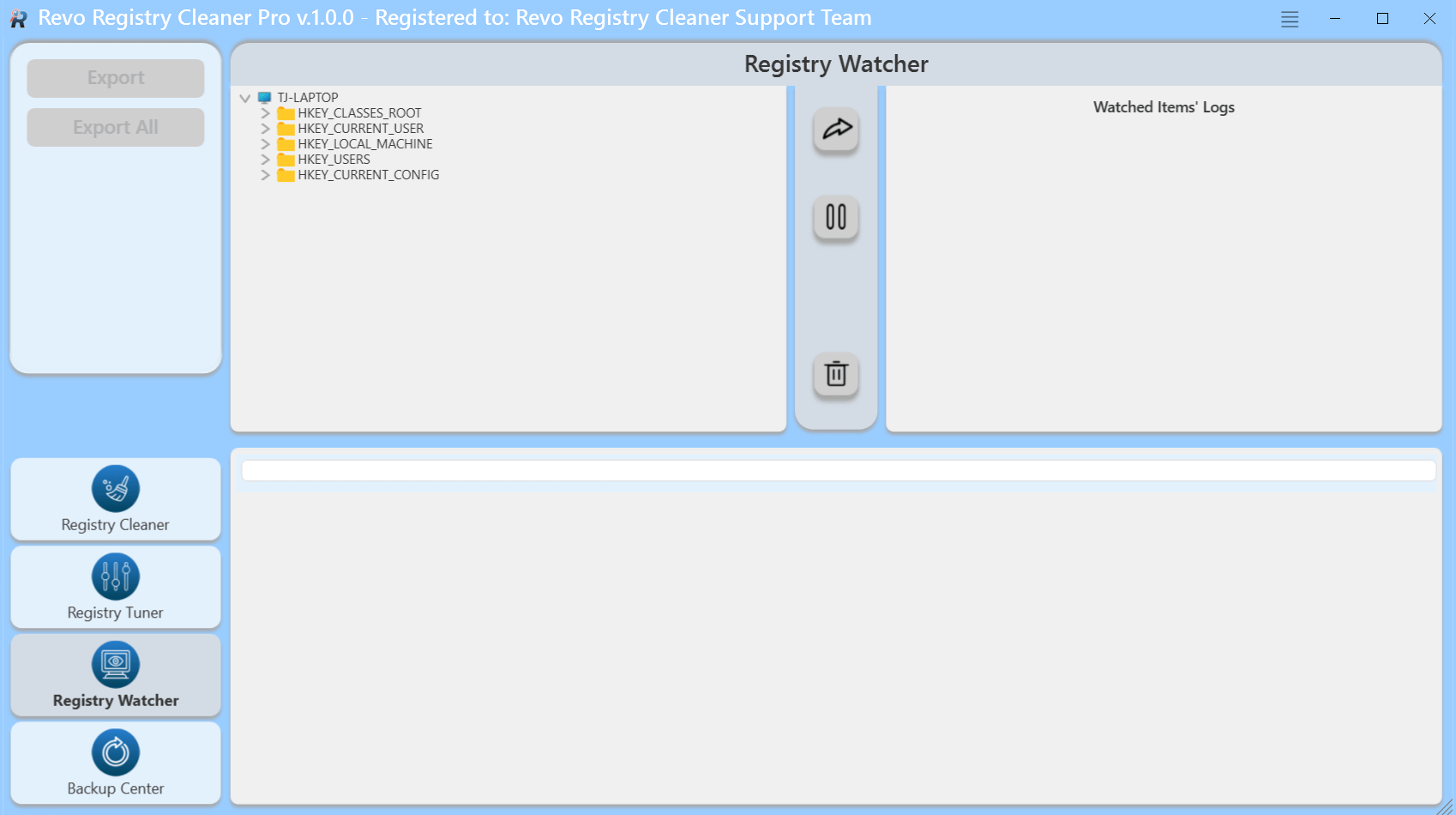
The Registry Watcher: pick keys in the tree on the left, and changes appear in the log.
Backup Center makes cleaning reversible
Revo Registry Cleaner Pro backs up deleted entries automatically, and the free edition's page says it takes a full Registry backup before removing anything. You can also back up single keys or the whole Registry by hand, schedule backups, and create a System Restore point from the Backup Center, a feature added in version 2.0.5.
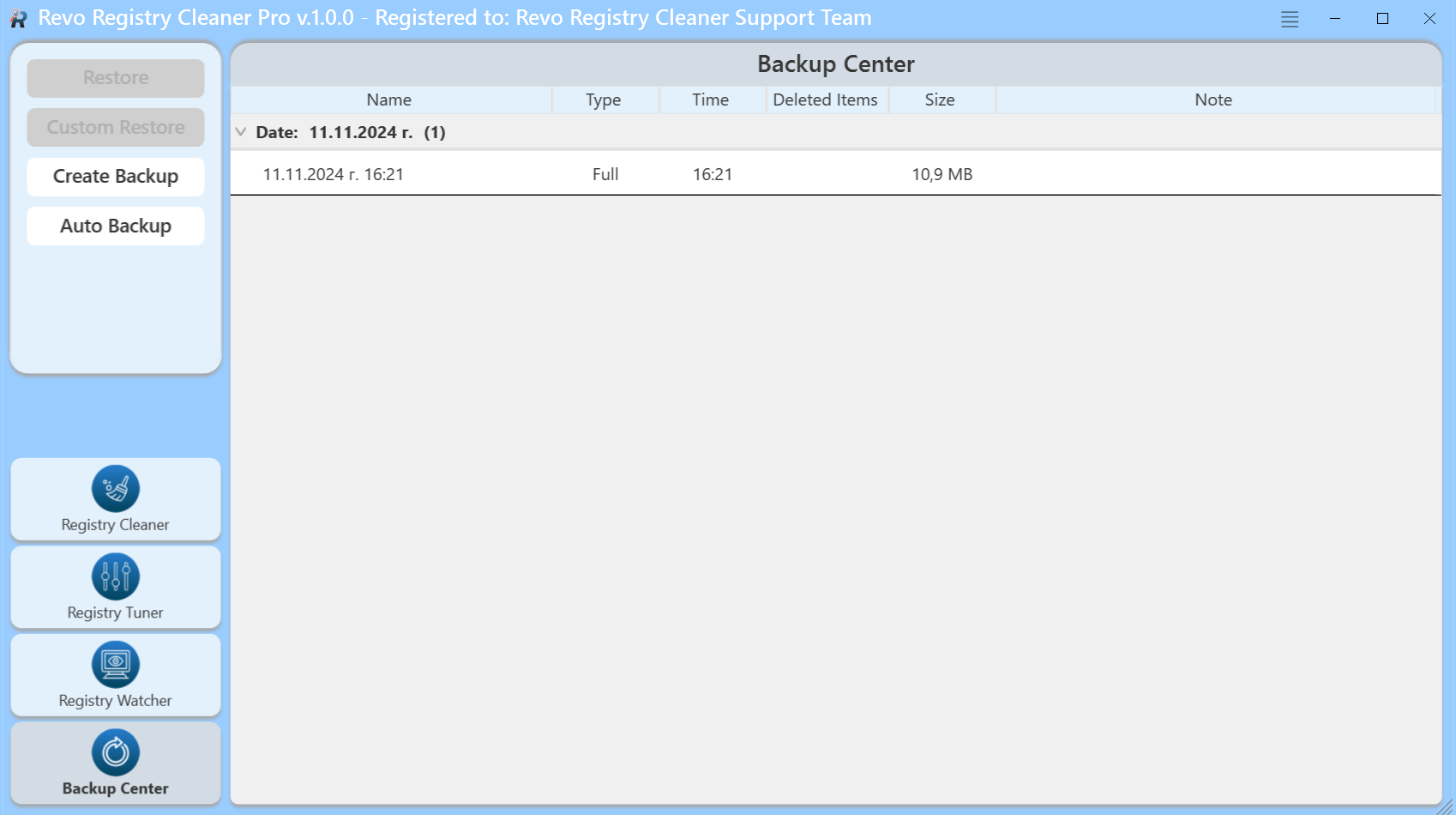
The Backup Center, with one full backup and buttons for Restore, Custom Restore and Auto Backup.
Scheduled Auto Clean and dark mode
Revo Registry Cleaner Pro can run a daily, weekly or monthly clean at your chosen scan mode, schedule backups the same way, and update itself in the background. A dark mode is included. Auto Clean and Auto Backup are not part of the Portable edition.
Benefits
- A safety net. Because deletions are backed up, trying a scan is low risk compared with editing the Registry by hand.
- Fewer separate tools. Tweaks you'd otherwise apply through scripts or several small utilities sit behind simple switches.
- Answers about changes. When a setting keeps changing, the Watcher can show which process did it.
- No forced repurchase. Stop paying and the installed program keeps working, without new updates.
Real-World Uses
- After a big uninstall: run a Moderate scan once you've removed an old security suite or a large program.
- Taming Windows 11: switch off ads and widgets, and restore the older context menu, in a few clicks.
- Checking an installer: watch the Run key while a new program installs to see whether it adds itself to startup.
- Helping family PCs: set a monthly Safe-mode Auto Clean, with backups, on a relative's computer.
Who It's For, and Who Should Skip It
Buy it if you like to tune Windows, want the Watcher or the automatic schedule, and are happy to spend $14.99 on a well-maintained utility.
Skip it if your PC is slow and you hope this will fix it: more memory, an SSD or fewer startup programs will do much more. Skip the Pro version too if you only want an occasional manual clean, because the free edition has the same scanning, the Tuner and backups. It's also no use on a Mac or Linux PC.
Usage Guide
- Download the installer (94 MB), run it, then launch Revo Registry Cleaner Pro. The 30-day trial needs no credit card.
- Open Backup Center and create a full backup or restore point before your first clean.
- On the Registry Cleaner screen, choose whether to scan the current account or all accounts.
- Start with a Safe Scan and review the results before cleaning.
- If something misbehaves afterwards, go to Backup Center and restore.
- Once you're comfortable, try Moderate, or set up Auto Clean on a schedule.
Before you buy
- Start with the free edition or the trial. The 30-day trial is the full Pro version.
- Check the renewal option at checkout. The order page offers auto-renewal, with update renewal shown at $8.99. You don't need to renew to keep using the program.
- More PCs cost little extra. 2 PCs are $19.98 and 3 PCs are $24.99 for one year.
Where it falls short
- Registry cleaning has limited value. Microsoft doesn't support Registry cleaners, and the benefit on a healthy PC is usually small. Any cleaner can remove something a rare program needed, so keep the backups.
- Deeper scans need more care. Advanced mode is exhaustive by design, so use it only if you're able to judge what it lists.
- It may be overkill for most people. Pro's extras are aimed at users who want to monitor and tune, not at someone after a quick tidy-up.
- Older PCs may feel it. FileHorse's review warns of slight resource use on low-spec systems.
- Windows only. There's no macOS or Linux version.
What Users Say
Revo Registry Cleaner is a young product, first released in November 2024, so there are fewer reviews than for Revo Uninstaller. What exists is positive, though no independent lab test turned up.
Jim Hillier, Dave's Computer Tips (July 15, 2025)
The most detailed write-up we found comes from Jim Hillier, who says he has tried many Registry cleaners. He calls this one "by far the most full-featured and safest I've come across" and says "there are zero negatives." He doesn't report scan results or side-by-side numbers, so read that as an informed opinion and not as a test.
On the license he notes: "When the subscription expires, the software will remain active and usable for as long as you like."
FileHorse
Michael Reynolds' FileHorse review lists "Comprehensive Scanning: Over 15 categories for detailed cleanup" and "Affordable Pro Version: Full features at $14.99/year" as pros. His cons: "Limited Free Version: Lacks key features like Registry Watcher," "Windows Only: Not available for macOS or Linux" and "Resource Usage: May slightly affect low-spec systems." The page's data shows 10 out of 10, from only 4 ratings.
Trustpilot: Revo Registry Cleaner page
The separate VS Revo Group page on Trustpilot shows 3.9 out of 5 from just 5 reviews, read through a page summarizer. Quotes below are short excerpts.
"Revo Registry Cleaner is an excellent app to find and remove invalid entries in windows registry" - Dhruv Gupta, July 9, 2025, 5 stars
"I am currently testing Revo Registry Cleaner Pro trial and I like the Registry Tuner feature" - Damien Thorn, June 15, 2025, 4 stars
"I not really understand registry cleaners so I like Safe mode of Revo Registry Cleaner Free." - JA Cos, June 17, 2025, 3 stars
"My computer hasn't given me any more problems now; I have Windows 11 Pro installed." - Rafael Hernandez, July 24, 2025, 5 stars
Trustpilot: the Revo Uninstaller side of the company
Revo Uninstaller's own Trustpilot page shows 4.8 out of 5 from 317 reviews, mostly for the uninstaller and not this product, but it speaks to the company's reputation:
"Gets rid of stubborn programs that leave so many traces behind on standard uninstalling. Highly recommend." - alsay, October 13, 2026
The pattern: users like the Safe mode, the Tuner and the low price. The criticism is mild: the free edition is missing the Watcher, and low-spec PCs may notice it. Nobody we read claimed big speed gains, and that's a fair expectation to carry into a purchase.
Comparisons
Revo Registry Cleaner Pro vs Revo Registry Cleaner Free
Revo Registry Cleaner Free has the same scanning algorithms, 4 scan modes, 15+ categories, the Registry Tuner and backups. Pro adds the Registry Watcher, the Registry key include list, multiple user account scanning, Auto Clean and Auto Backup. Pay for Pro if you want automation or monitoring.
Revo Registry Cleaner Pro vs Revo Uninstaller Pro
Revo Uninstaller Pro removes programs and hunts down what they leave behind at that moment. Revo Registry Cleaner Pro works on the Registry as a whole and adds tweaks and monitoring. If you can only buy one, the uninstaller stops most of the mess from forming in the first place.
Editions and Pricing
| Edition | 1 year of updates | 2 years of updates | Use after updates end |
|---|
| Pro, 1 PC | $14.99 | $19.99 | Yes |
| Pro, 2 PCs | $19.98 | $23.98 | Yes |
| Pro, 3 PCs | $24.99 | $27.99 | Yes |
| Pro Portable | $16.99 | $21.99 | Yes |
| Free | $0 | Not applicable | Yes |
The Portable edition runs from a USB stick on unlimited computers, but it leaves out Auto Clean and Auto Backup.
FAQs
Does Revo Registry Cleaner Pro stop working when the subscription ends?
No. Revo Registry Cleaner Pro's plans are a year of updates plus a lifetime license to use the program, so it keeps running after that year. You just stop getting new versions until you renew.
Will Revo Registry Cleaner Pro make my PC faster?
Probably not by a noticeable amount. Revo Registry Cleaner Pro removes unneeded entries, and the vendor's tweaks may help with specific settings, but a Registry clean alone rarely changes everyday speed.
Can Revo Registry Cleaner Pro undo a clean?
Yes. Revo Registry Cleaner Pro stores deleted entries in its Backup Center so you can restore them, and you can also take a full backup or System Restore point beforehand.
Does Revo Registry Cleaner Pro work on Windows 11?
Yes. Revo Registry Cleaner Pro supports 32-bit and 64-bit Windows 7, 8, 8.1, 10 and 11, and several of its tweaks are specifically for Windows 11.
How often does Revo Registry Cleaner Pro get updates?
Revo Registry Cleaner Pro gets frequent updates. The version history lists releases in September, June, May, April, March and February of 2026, which is reassuring for a one-year plan.
What is the refund policy for Revo Registry Cleaner Pro?
VS Revo Group accepts cancellations and refunds for any reason within 60 days of purchase, and support is free.
Is Revo Registry Cleaner Pro different from Revo Uninstaller?
Yes, Revo Registry Cleaner Pro and Revo Uninstaller are separate products from the same company. The cleaner works on the Registry as a whole, and the uninstaller removes programs and their leftovers.
System Requirements
- Windows 7, 8, 8.1, 10 or 11 (32-bit or 64-bit)
- 512 MB RAM
- 200 MB free disk space
- 1 GHz Pentium-compatible CPU
Conclusion
Revo Registry Cleaner Pro is an easy buy at $14.99 if you want the Tuner, Watcher and scheduling, and an unnecessary one if you only want a clean. The best reason to buy is a frequently updated, reversible toolkit from a respected Windows utility maker that keeps working after your update year ends. The main reason not to is that Registry cleaning itself rarely delivers a visible speedup, and the free edition covers occasional cleaning. Try the 30-day trial and see whether you use the Pro extras.
Download Free TrialBuy Now