You have a Windows application written in C++ that still looks like it came from another era. Moving it to a modern UI, hooking it to a database and keeping it fast usually means stitching together several tools. C++Builder from Embarcadero puts a visual designer, a Clang-based compiler and a large component library in one IDE.
Quick facts
- Current version: 13.2
- Platform: Windows (native apps)
- Professional edition: $1,200 perpetual licence plus $399 first-year maintenance, $1,599 in total for a new user
- Pro Term License: $500 per year
- Other editions: Enterprise ($3,999), Architect ($5,999), and a free Community Edition
- Trial: a free trial is offered
Key features
A Clang-based compiler with initial C++23 support
The toolchain uses a Clang-enhanced compiler and the Dinkumware STL. You also get easy access to Boost and common libraries such as SDL2.
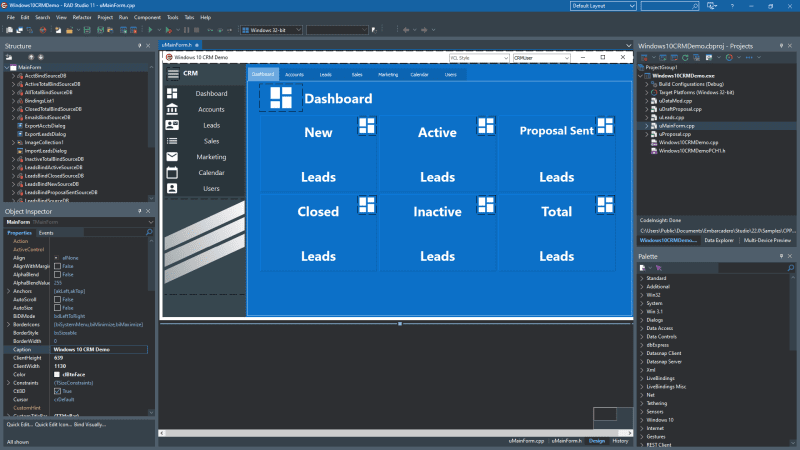
Visual UI design with the VCL
The Visual Component Library provides components for fast visual UI design and data binding. VCL Styles have design-time support, so you see how a styled form will look before you run it.
Modernize older apps for Windows 11
You can update aging applications with up-to-date responsive controls and Windows Store support.
Native access to over 20 databases
FireDAC connects directly to databases such as Oracle, SQL Server and MySQL. Higher editions add remote and enterprise data sources.
Build automation and version control
Continuous build setups work through MSBuild and CMake project support. Git and Subversion are integrated for tracking changes.
REST, web and IDE extensibility
An HTTP and REST client library is included, with components for AWS and Azure. WebStencils handles server-side script-based processing of HTML files. Plugins can add tool windows, code completion and syntax highlighting to the IDE.
Optional AI help in the IDE
Kai, Embarcadero's agentic AI, is available as a premium add-on. It can run against local or cloud models.
Who it's for
It suits developers and teams who want to build native Windows desktop apps in C++ without hand-coding every window. The editions scale: Professional for individuals and small teams, Enterprise for client/server and multi-tier work with a RAD Server licence, and Architect for database, cloud and web-enabled apps. The free Community Edition is for freelancers, startups and nonprofits with revenue under $5000.
Pros and cons
Pros
- Visual designers and a mature component library speed up UI work.
- A modern Clang-based compiler with initial C++23 support.
- Perpetual licences are available, so you are not forced onto a subscription.
- A free trial and a free Community Edition let you test it first.
Cons
- The focus is Windows; the vendor's current messaging is about native Windows apps only.
- Pricing is high for individuals, and continued updates need a paid Update Subscription after year one.
- Database connectivity beyond local sources, and RAD Server, need the Enterprise or Architect editions.
FAQs
Can I buy it without a subscription?
Yes. Professional, Enterprise and Architect are perpetual licences, with the first year of maintenance included. The Pro Term License is an annual subscription.
Is there a free version?
Yes. The Community Edition is free for freelancers, startups and nonprofits under the revenue limit. A free trial of the full product is also offered.
What do I get with the Update Subscription?
It covers updates and hotfixes for the current release, access to upgrades while active, and three annual developer support incidents.
Does it include database tools?
FireDAC is part of the product, with local database access in lower editions and remote and enterprise sources in higher ones.
Can I get it as part of a bundle?
Yes. C++Builder is also included in RAD Studio, which combines Delphi and C++Builder.
System requirements
- OS: Windows 10 or later
- Processor: 1.8 GHz or faster dual core
- Memory: 3 GB or more RAM
- Disk: 6 to 60 GB depending on options
- Display: DirectX 11 and 1440x900 or higher