Stop opening every PDF just to see what is inside
You are hunting for one contract in a folder of fifty PDFs. Opening each in a reader takes time. PDF Previewer for Windows 11 shows the content in the Preview pane of Windows Explorer or the Reading pane of Microsoft Outlook when you click the file.
Quick facts
- Version: 2.0
- Platforms: Windows 11 (x64/x86) and Windows Server 2022 (64-bit/32-bit)
- Price: Free for non-commercial use
- Memory and disk: 4GB RAM, 256 MB free disk space
- Display: 1024x768 or higher
Key features
See a PDF's content without opening it
The plug-in uses the PDF Preview Handler interface, so a click on a file in Explorer shows its content in the preview pane. The same works in the Outlook Reading pane, which helps with PDF attachments.
Icons that show the cover page
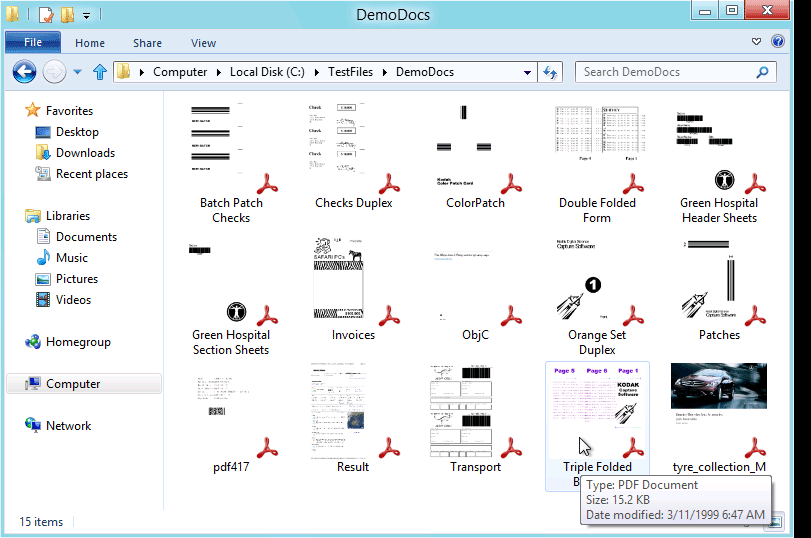
Each PDF's icon is generated from its cover page, so you can tell files apart at a glance.
Page through documents in the pane
Use the Previous Page and Next Page buttons. You can also right-click and choose First Page or Last Page. Double-click the pane for actual-size continuous view, and drag the view with the mouse wheel.
Copy a page as an image or as text
Copy PDF As Image places a page on the clipboard as a bitmap. Copy PDF As Text extracts all the text from a page to the clipboard.
Language support and 64-bit speed
The vendor says files with Asian, Hebrew and Arabic fonts open without difficulty across 86 languages. On 64-bit Windows 11 it runs about twice as fast as on 32-bit.
Who it's for
It suits anyone who handles many PDFs: legal staff checking cover pages, office staff sorting emailed files, and anyone who wants a quick look before opening a document. It runs only on Windows 11 and Windows Server 2022.
Pros and cons
- Pro: Free for non-commercial use.
- Pro: Works in both Explorer and Outlook.
- Pro: Page navigation and copy-as-text or image are built in.
- Con: Windows 10, 8.1, 8, 7, Vista and XP are not supported.
- Con: Commercial use is not covered by the free license.
FAQs
Is it really free?
Yes, it is freeware for non-commercial use only.
Does it work in Outlook?
Yes. The content appears in the Reading pane of Microsoft Outlook.
Can I use it on Windows 10?
No. It works only on Windows 11, Windows Server 2022 and later.
Can I copy text from a previewed page?
Yes. Copy PDF As Text extracts all text from a page to the clipboard.
System requirements
- Windows 11 x64/x86 or Windows Server 2022 64-bit/32-bit
- 4GB RAM
- 256 MB free disk space
- 1024x768 display resolution