dbForge Query Builder for MySQL: Draw Your Queries Instead of Typing Them
dbForge Query Builder for MySQL is Devart's Windows tool for building MySQL and MariaDB queries on a visual diagram: you drag tables onto a canvas, it draws the joins, and it writes the SELECT, INSERT, UPDATE or DELETE statement for you. It costs $74.95 a year or $149.95 for a perpetual license, and it suits analysts, report writers and developers who would rather see a query than read fifty lines of JOINs.
You've inherited a database with forty tables and no documentation, and someone wants a report that pulls from six of them by Friday. Query Builder lets you drop the tables in, see which keys connect them, tick the columns you want, and run the result, with the SQL sitting in the Text tab whenever you want to check it.
Quick facts
- Version: 2026.2.96, released November 9, 2026
- Developer: Devart
- Platform: Windows 7 to 11 and Windows Server 2008 to 2025, with .NET Framework 4.7.2; macOS and Linux through CodeWeavers CrossOver
- Databases: MySQL 5.5 to 26.7, MariaDB 5.5 to 13, Percona 5.5 to 8.4, HeatWave, Galera Cluster; Amazon RDS and Aurora, Azure Database for MySQL, Google Cloud, Alibaba Cloud, Tencent Cloud and Oracle MySQL Database Service
- Query types: SELECT, INSERT, UPDATE and DELETE, with sub-queries
- Download: 52.51 MB
- Price: $74.95 for a 1-year subscription or $149.95 perpetual; one edition
- Trial: free for 30 days (the download asks you to sign in with a free Devart account)
- What we checked: version 2026.2.96 and its November 9, 2026 date on Devart's download page and revision history, the 52.51 MB download size listed there, and the order page price of $74.95 for the default 1-year subscription on November 13, 2026. We didn't build queries against our own database.
Before you buy
- The same query builder is inside dbForge Studio for MySQL, whose Standard edition starts at $99.95 a year and adds database design, backup and migration tools. If you'll want those later, start there.
- A subscription stops working when it ends; the $149.95 perpetual license keeps working, with a year of updates.
- It's a Windows program. On a Mac or Linux it needs CrossOver, sold separately.
Download Free TrialBuy Now
Overview
Query Builder is updated on the same schedule as dbForge Studio for MySQL, with five builds between August and November 2026. The canvas is the heart of it: each table shows as a box with its columns, joins appear as lines with a diamond you click to change the join type, and tabs under the diagram (Selection, Joins, Where, Group By, Having, Order By) hold the rest of the query. Switch to the Text tab and you get the SQL, which you can edit by hand and send back to the diagram.
Around that sits a fairly complete SQL workbench: an editor with code completion, a profiler, a data grid, pivot tables, a report designer and export to 14 formats. The September 2026 release added support for MySQL 26.7 and MariaDB 13 and several AI Assistant improvements, including model selection and file attachments; the October build fixed an "Unknown table 'TABLESPACES'" error and improved copying data to Excel.
Features
Queries drawn on a diagram
dbForge Query Builder for MySQL turns tables into boxes on a zoomable canvas and joins columns automatically by primary/foreign key or by matching names. You can add sub-queries to any part of the main query, build complex conditions with an expression builder, undo and redo, and convert a SELECT into an INSERT, UPDATE or DELETE in one step. The Document Outline window lists the query's parts so you can jump around a large one, and the diagram can be previewed and printed.
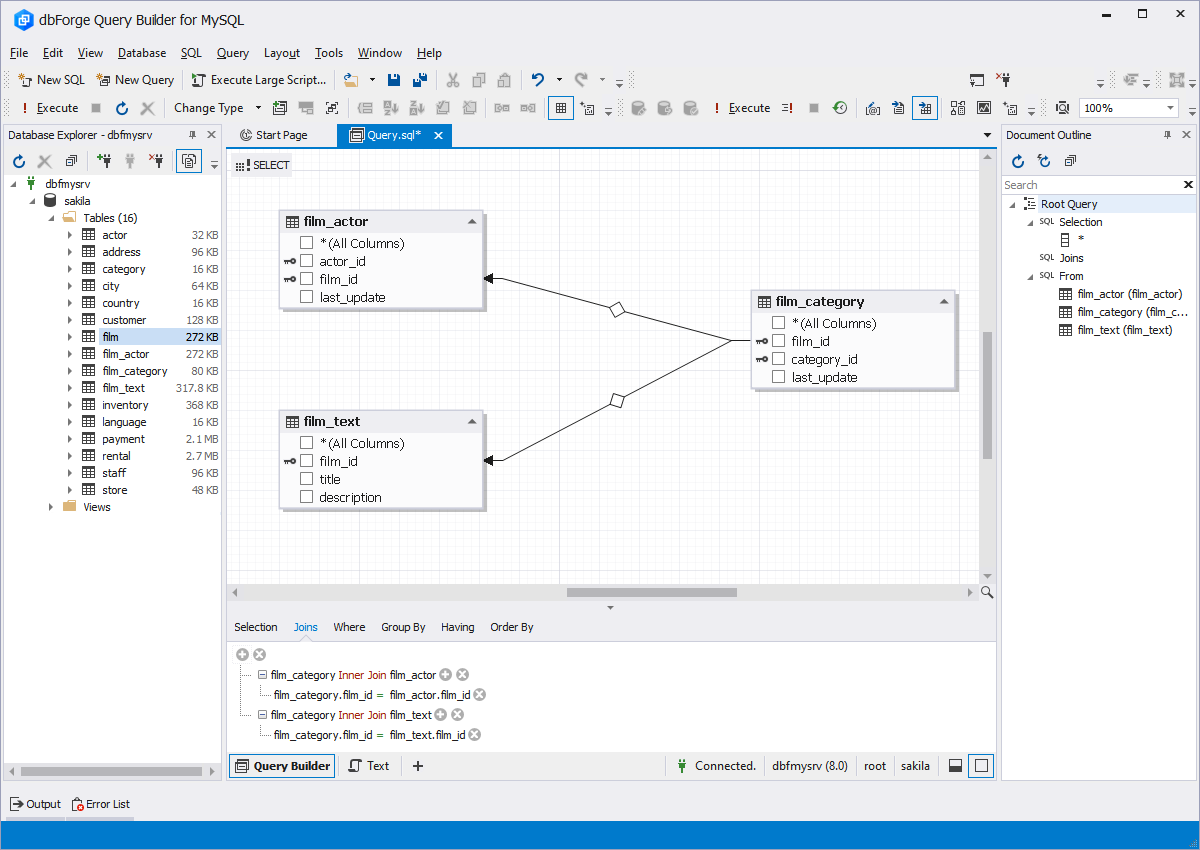
A query on the sakila sample database: film_category inner-joined to film_actor and film_text, with the joins listed on the Joins tab and the query parts in Document Outline on the right.
A profiler that shows why a query is slow
dbForge Query Builder for MySQL runs a query through SHOW PROFILE, EXPLAIN and the STATUS variables and shows the plan as a tree and as a diagram, with the cost of each step. Profiling results are kept in a history, so you can change an index or a join, run it again, and compare the two runs with the differences highlighted.
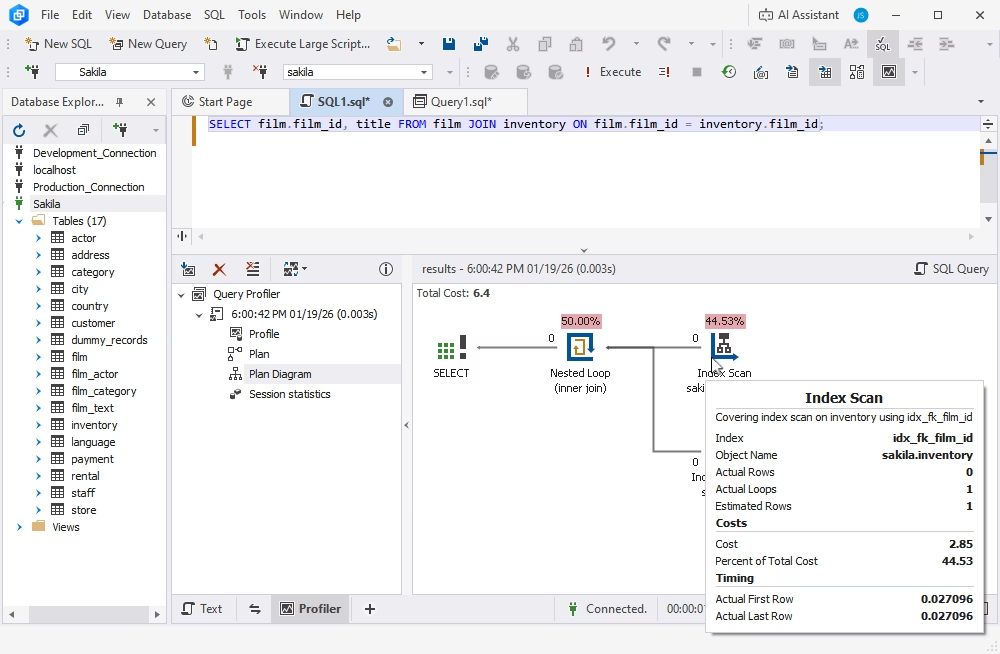
The Query Profiler's plan diagram for a film/inventory join: a nested loop and a covering index scan on idx_fk_film_id, with its cost and timing in the tooltip.
An SQL editor for when you do want to type
dbForge Query Builder for MySQL includes a full SQL editor with syntax coloring, context-aware completion, instant syntax checks, bookmarks, quick information about schema objects and code formatting with predefined or custom profiles (also from the command line). You can run a whole script, a selection or a single statement, and every executed query lands in Query History, along with a snippet library for SQL you reuse.
Results you can edit, pivot and report on
dbForge Query Builder for MySQL fetches results asynchronously, pages through large result sets, and lets you edit multi-table results, look up foreign key values and accumulate changes to apply in one batch. For analysis there are pivot tables with pivot charts and grand totals, a Master-Detail Browser for related tables, and a report designer for simple, data-aware and master-detail reports. Data exports to HTML, TXT, XLS, XLSX, MDB, RTF, PDF, JSON, XML, CSV, ODBC, DBF, SQL and Google Sheets, with reusable templates.
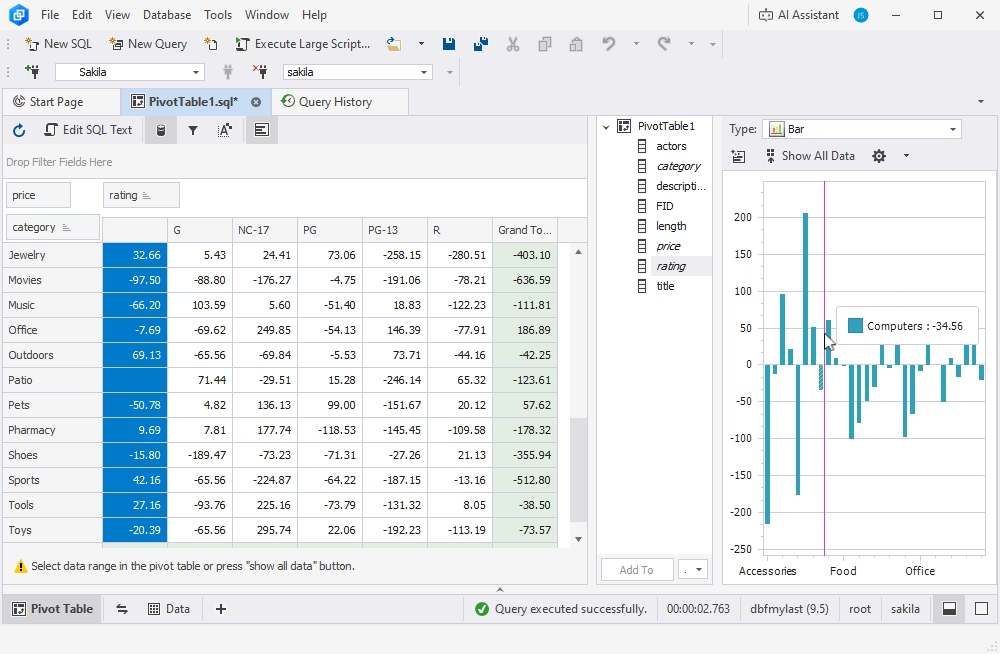
A pivot table of price by category and rating, with grand totals and a bar chart of the same data.
AI Assistant built in
dbForge Query Builder for MySQL includes Devart's AI Assistant in a side panel: it turns plain-English requests into SQL with the database's context, explains and optimizes queries, and helps with errors. Since September 2026 you can pick the AI model, attach files and give it standing instructions, and a free Express edition of the assistant is available.
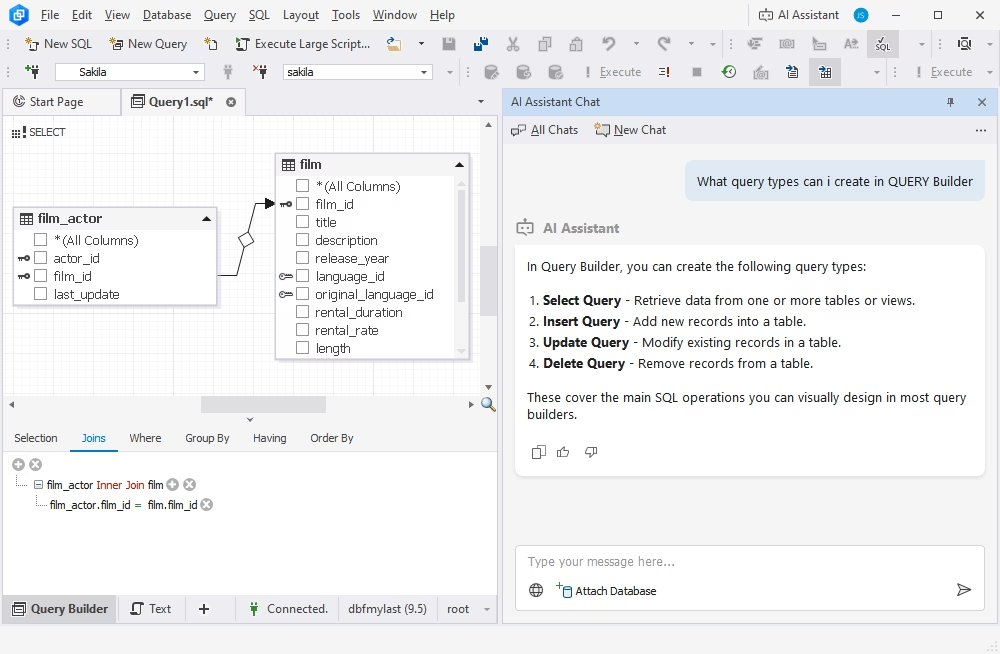
The AI Assistant Chat panel answering which query types Query Builder can create, beside a film_actor to film diagram.
Connections without client libraries
dbForge Query Builder for MySQL connects directly, without MySQL client libraries, over SSL, SSH or an HTTP tunnel through PHP. It supports Windows and PAM authentication, Percona PAM, AWS RDS Proxy with caching_sha2_password, the MySQL embedded server and the Sphinx search engine.
Benefits
- Fewer join mistakes. Seeing the tables and their keys makes a missing or wrong join condition obvious before it multiplies your row count.
- SQL for people who don't live in SQL. Analysts and support staff can pull their own data without waiting for a developer.
- From query to report in one tool. Build the query, check its plan, pivot the result and export or print a report without switching programs.
- A teaching aid. Because the SQL updates as you draw, beginners see how each JOIN, WHERE or GROUP BY turns into code.
Real-World Uses
- Exploring an unfamiliar schema: drag in the tables a report needs and let the auto-join show how they connect.
- Monthly business reports: build a sales query once, group it in a pivot table and export it to Excel or Google Sheets each month.
- Tuning a slow page: profile the query behind it, add an index, profile again and compare the two runs.
- Teaching SQL: Devart quotes a Kutztown University professor who says students now learn complex queries in 90 minutes instead of three weeks.
- Bulk fixes: design a SELECT that finds the rows, check the result, then convert it into an UPDATE or DELETE.
Who It's For, and Who Should Skip It
Buy it if you query MySQL or MariaDB regularly, work with schemas that have many related tables, and prefer to see joins rather than type them, or if you train people who are new to SQL.
Skip it if you're fluent in SQL and only want an editor (a free client such as MySQL Workbench has a basic one); if you also need schema compare, backups or database design, where dbForge Studio for MySQL is better value; or if you're on a Mac and don't want CrossOver.
Usage Guide
- Download and install Query Builder from Devart's download page (sign in with a free Devart account) and start the 30-day trial.
- Create a connection in Database Explorer: host, port, user, and SSL or SSH settings if you need them.
- Click New Query and drag the tables you need from Database Explorer onto the canvas. Check the joins it draws and click a join's diamond to change its type.
- Tick the columns and fill in the Where, Group By, Having and Order By tabs.
- Execute the query, then switch to the Text tab to see or adjust the SQL.
- Profile or export. Open the Query Profiler if it's slow, or send the result to a pivot table, report or export.
Where It Falls Short
- Diagrams get crowded. A query with a dozen tables is easier to read as text, and complex logic still needs SQL knowledge.
- It's a slice of the Studio. Many buyers end up wanting dbForge Studio for MySQL, which includes the same query builder plus much more for a little more money.
- No native Mac or Linux build. CrossOver is a separate license.
- Project files are hard to manage on big projects, according to one long-time user quoted below.
What Users Say
Independent reviews of the stand-alone Query Builder are scarce: Capterra, GetApp and Software Advice list it with no user reviews yet. What exists comes from Devart's own pages, so read these as the vendor's selection.
Customer stories on Devart's product page
Mario Randazzo, Owner/Developer at Gamemite: "dbForge Query Builder for MySQL lets me do the table linking and testing out of table JOINs quickly and visually without typing out a paragraph of code."
Christine "CJ" Rhoads, Professor at Kutztown University College of Business: "It used to take three weeks to teach this level of SQL. Now, with dbForge, students learn to build complex queries in just 90 minutes."
Michael Wates, IT Services Manager at High Sports Group Limited: "With the help of this tool, we were able to turn around requests most effectively. We got swift development in an easy-to-use tool. As a result, our operations became more productive by approximately 25%."
André de Boer, Software Engineer at Tridax Software: "dbForge Query Builder is lightweight, affordable software, which enables fast query building. We got about 80% more productive with its help."
Devart's testimonials page, including a criticism
Robert Nowotny, Chief Technology Officer, Rotek: "I really love the product, from my point of view a bit more focus on usability to manage, document and find your productfiles would be really great ! Now its a lot of grepping to find what You need on bigger projects."
The theme is consistent: people like seeing joins instead of writing them, and teachers find it speeds up learning. The one complaint is about organizing files on large projects. With so little independent feedback, the 30-day trial on your own schema is the real test.
Comparisons
Query Builder vs dbForge Studio for MySQL
dbForge Studio for MySQL Standard (from $99.95 a year) has the same visual query building and profiling, plus database diagrams, data migration and backup and recovery. Its data reporting starts at the Professional edition, while Query Builder includes the report designer. Query Builder at $74.95 makes sense when queries and reports are all you need.
Query Builder vs MySQL Workbench
MySQL Workbench is free and has a SQL editor, visual EXPLAIN and schema modeling, but no drag-and-drop query designer. If you write SQL comfortably, Workbench may be enough; if you want to draw queries and get pivot tables and reports, Query Builder adds that.
Editions and Pricing
dbForge Query Builder for MySQL has a single, full-featured Standard edition. The order page opens on the 1-year subscription; the perpetual license, 2- or 3-year terms and priority support are options you choose there.
| License | Price | What you get |
|---|
| Standard, 1-year subscription | $74.95 | Use and updates for a year, renews yearly |
| Standard, perpetual | $149.95 | Use forever, 1 year of updates included |
Devart takes 5% off for 5 to 9 licenses, 10% for 10 to 19 and 15% for 20 or more.
FAQs
Does dbForge Query Builder for MySQL work with MariaDB?
Yes. dbForge Query Builder for MySQL supports MariaDB 5.5 to 13 and Percona Server 5.5 to 8.4 as well as MySQL 5.5 to 26.7.
Can I edit the SQL that Query Builder generates?
Yes. dbForge Query Builder for MySQL shows the query's SQL on the Text tab, where you can edit, format and run it like any script.
Does dbForge Query Builder for MySQL connect to Amazon RDS?
Yes. dbForge Query Builder for MySQL works with Amazon RDS and Aurora, including RDS Proxy, and with Azure Database for MySQL, Google Cloud, Alibaba Cloud, Tencent Cloud and HeatWave.
Does it run on a Mac?
Only through CodeWeavers CrossOver. dbForge Query Builder for MySQL is a Windows program; Devart supports running it on macOS and on Ubuntu, Debian, Fedora and RHEL with CrossOver installed.
What happens when my subscription ends?
A dbForge Query Builder for MySQL subscription stops working when it ends, until you renew. The perpetual license keeps working; renewing it only brings updates and support.
Is there a discount for several licenses?
Yes. Devart gives 5% off dbForge Query Builder for MySQL for 5 to 9 licenses, 10% for 10 to 19 and 15% for 20 or more, applied on the order page.
System Requirements
- Windows 7, 8, 8.1, 10 or 11, or Windows Server 2008, 2012, 2016, 2019, 2022 or 2025
- .NET Framework 4.7.2 or later
- macOS or Linux (Ubuntu, Debian, Fedora, RHEL): CodeWeavers CrossOver
- MySQL 5.5 to 26.7, MariaDB 5.5 to 13, Percona 5.5 to 8.4
- About 53 MB for the installer download
Conclusion
dbForge Query Builder for MySQL is worth $74.95 a year if you build MySQL or MariaDB queries across many tables and want to see the joins, or if you're teaching SQL: the diagram, profiler, pivot tables and reports cover the whole trip from question to answer. The main reason not to buy it is dbForge Studio for MySQL, which includes the same builder plus backups, design and migration from $99.95 a year. If queries and reports are all you need, Query Builder is the cheaper and lighter choice. Try it free for 30 days on your own schema.
Download Free TrialBuy Now