You need to send a contract or a spreadsheet of customer data to someone, and plain email attachments feel like postcards. You want the file locked so only the recipient can open it, and you want them to be able to confirm it came from you. Open PGP Studio from GoAnywhere handles that job on your desktop.
Quick facts
- Vendor: GoAnywhere (HelpSystems / Fortra)
- Price: free for personal and commercial use
- Platforms: Windows, Linux, UNIX and Mac OS X
- Type: standalone desktop tool, no GoAnywhere MFT needed
- Standard: Open PGP
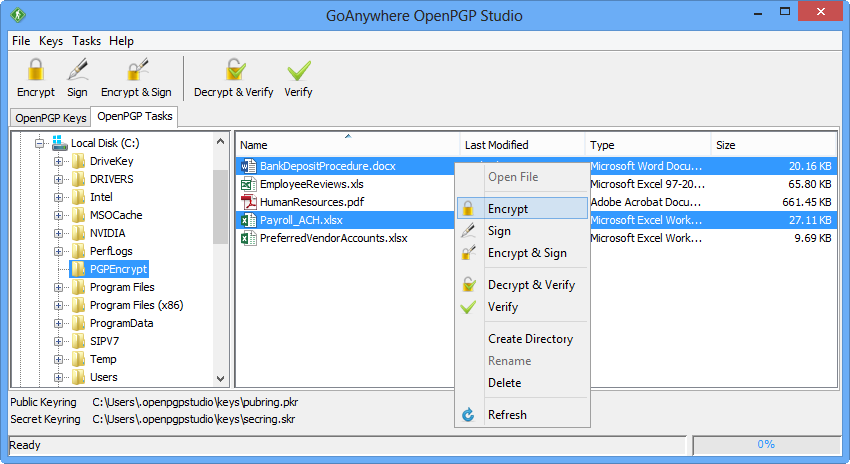
Key features
Encrypt and decrypt files with a dual-key system
Open PGP Studio uses a dual-key (asymmetric) system. You encrypt with the recipient's public key, and only their private key opens the file.
Sign documents and verify who sent them
You can create and verify digital signatures. The Decrypt & Verify option checks a received file in one step.
Manage your keys in one place
The built-in key manager lets you create, import, export and manage the Open PGP keys you need, so you don't have to juggle separate key tools.
Wrap output in ASCII armor or compress it
You can encase encrypted documents in ASCII armor so they can be pasted into text-based channels. You can also compress output files.
Same interface on every platform
Installers exist for Windows, Linux, UNIX and Mac OS X. The interface looks and works the same on each, so moving between machines doesn't mean relearning it.
Who it's for
It suits you if you encrypt or decrypt files now and then and don't need to automate it. Individuals, small teams and IT staff who handle the occasional sensitive file are the fit. If you encrypt files constantly, or need scheduling and workflows, GoAnywhere MFT is the vendor's automation product.
Pros and cons
Pros
- Free for personal and commercial use
- Covers encrypt, decrypt, sign and verify in one tool
- Integrated key manager
- Works on Windows, Linux, UNIX and Mac OS X
- Runs standalone
Cons
- Manual use only, with no automation of repeated jobs
- No free support is offered
- The download form asks for a business email
FAQs
Is Open PGP Studio really free?
Yes. The vendor states it is completely free for both personal and commercial use.
Do I need GoAnywhere MFT to use it?
No. It is a standalone desktop tool for manual encryption and decryption.
Can it automate encryption?
Not by itself. It is designed for manual work, and automation belongs to GoAnywhere MFT.
Which operating systems does it run on?
Windows, Linux, UNIX and Mac OS X, with installers for each.
Is support included?
The vendor says it does not offer free support for Open PGP Studio. Pressing F1 in the app opens help.
System requirements
- Windows, Linux, UNIX or Mac OS X
- About 95 MB of disk space on Windows and Linux, not counting your data
- About 7 MB on UNIX, where a Java runtime is not included