dbForge Query Builder for SQL Server: Draw Your T-SQL Instead of Typing It
dbForge Query Builder for SQL Server is a $139.95-a-year Windows tool from Devart that lets you build SELECT, INSERT, UPDATE and DELETE queries for Microsoft SQL Server and Azure SQL by dragging tables onto a diagram and ticking columns. It's aimed at analysts, report writers and developers who need multi-table joins without hand-writing every line, and it adds a query profiler, pivot tables and a report designer on top. A perpetual license costs $279.95.
If you've ever stared at a schema with forty tables trying to remember which key links SalesOrderHeader to Customer, this is the problem it solves: you drop both tables on the canvas and the join appears, already wired to the foreign key.
Quick facts
- Version: 2026.2.96, released November 9, 2026
- Developer: Devart
- Platform: Windows 7 to 11 and Windows Server 2008 to 2025, with .NET Framework 4.7.2 or later
- Databases: SQL Server 2000 (limited) to 2025, LocalDB, Express editions, SQL Server on Linux, Azure SQL Database, Azure SQL Managed Instance, Azure Synapse, Amazon RDS, Microsoft Fabric
- Download: 54.67 MB installer
- Price: $139.95 for one user with one year of updates and support (subscription), or $279.95 for a perpetual license. Volume discounts start at 5 licenses
- Trial: fully functional for 30 days, free Devart account needed to download
- Refunds: within 30 days, when a technical problem stops the product from working and Devart support can't fix it
- What we checked: version 2026.2.96 and the 54.67 MB size on Devart's download page, the revision history back to the 2025.1 releases, the SQL Server compatibility list in Devart's documentation, and the order page on November 14, 2026: $139.95 for the default one-year subscription without premium support. We didn't install it or run it against a SQL Server database.
Download Free TrialBuy Now
Overview
Query Builder is one of the single-purpose tools Devart splits out of its larger dbForge Studio for SQL Server. You connect to a server in Database Explorer, open a new query, and drag tables or views from the tree onto a grid canvas. Each table becomes a box with a checkbox per column. Ticking a column adds it to the SELECT list, and the line drawn between two boxes is the JOIN. Underneath the diagram sit tabs for Selection, Joins, Where, Group By, Having and Order By, so the clauses that other designers bury in property windows are one click away. At any moment you can flip to the Text view and see the T-SQL it has written.
Devart releases it on the same schedule as the rest of the dbForge line. The revision history shows seven builds between May 15 and November 9, 2026 alone, from fixes for WITH XMLNAMESPACES and WINDOW clause parsing to an Excel-specific clipboard format added in October 2026.
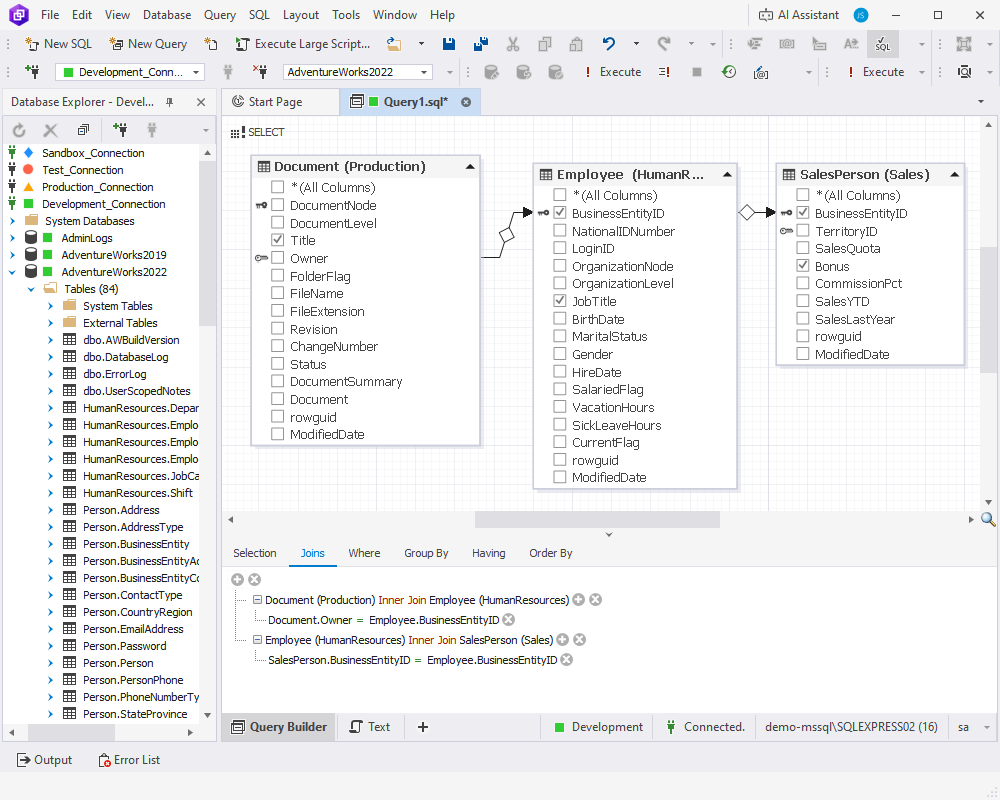
The query diagram with three AdventureWorks2022 tables joined on their keys, and the Joins tab below listing both inner joins.
Features
Joins drawn for you
dbForge Query Builder joins tables automatically by their primary and foreign keys, or by matching column names when no constraint exists. It handles INNER, LEFT OUTER, RIGHT OUTER, FULL OUTER and CROSS joins, and you change the type from the Joins tab instead of rewriting the statement. A complex-condition expression builder covers ON clauses that need more than one column.
Sub-queries and DML from the same diagram
Query Builder lets you add a sub-query to any part of the main query and edit it visually in its own diagram, with the Document Outline window showing the query's structure. Once a SELECT returns the right rows, one command converts it into an INSERT, UPDATE or DELETE against the same tables, which is the safest way to write a bulk update: check the rows first, then change them. You can also reverse-engineer an existing query by pasting its SQL and letting the tool draw the diagram.
Query profiler with execution plans
The built-in profiler in dbForge Query Builder runs your query and shows its execution plan as a diagram, with each operator's share of the cost, plus Plan Tree, Top Operations, Table I/O and the raw Plan XML. Profiling runs are kept in a history, so you can add an index, run again and compare the two results with the differences highlighted.
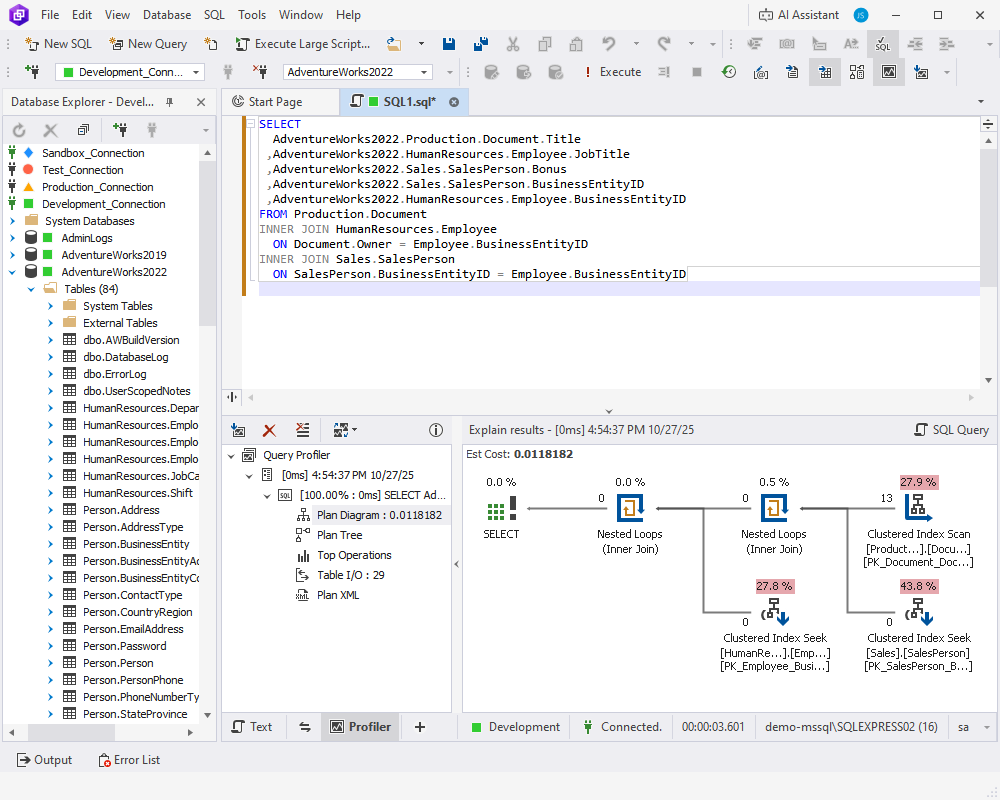
The Profiler tab: the generated SELECT above, and the plan diagram below with clustered index scan and seek costs.
A real SQL editor for when you do type
dbForge Query Builder includes an editor with context-aware completion, instant syntax checks, quick info on schema objects, and a formatter with built-in and custom profiles that can also run from the command line. It executes a whole script, a selection or a single statement, and keeps a history of what you ran.
Data grid, pivot tables and a master-detail browser
Results in dbForge Query Builder open in an editable grid with paginated browsing, foreign-key lookups, a card view, grouping by any column and full-text search, and you can edit result sets that span several tables. For analysis, a query can become a pivot table with a chart beside it, grand totals and drag-to-reorder fields, while the Master-Detail Browser shows related tables side by side.
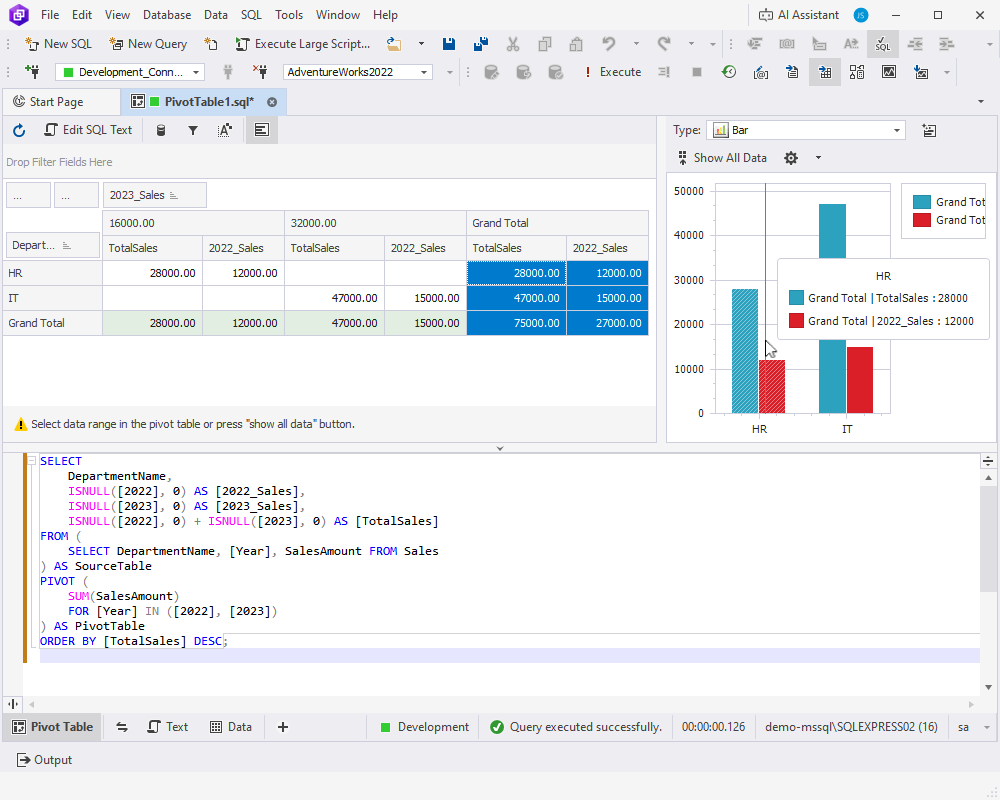
A pivot table of sales by department and year with its bar chart, and the PIVOT query underneath.
Reports and export
dbForge Query Builder has a banded report designer for simple, data-aware and master-detail reports, with a toolbox of labels, tables, charts and barcodes. Reports export to PDF, DOCX, XLSX, CSV and other formats. Separately, query results export to 14 formats including SQL, CSV, XLS and XLSX, with settings saved as templates and runnable from the command line.
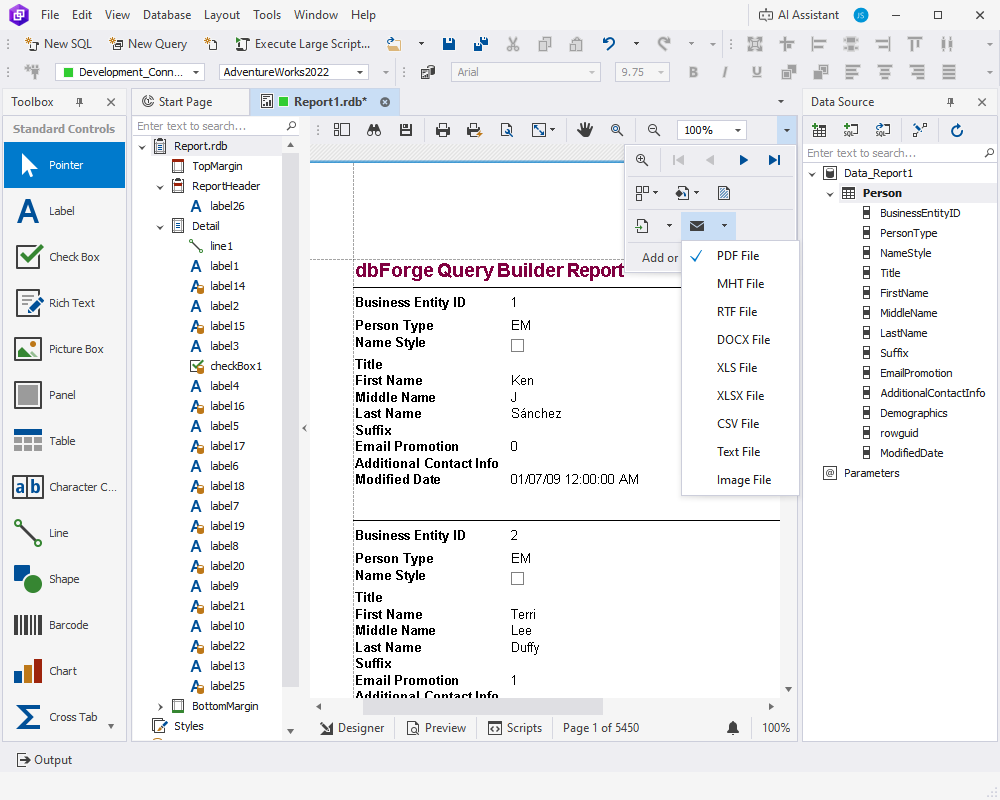
The report designer with a Person table report and its export menu (PDF, MHT, RTF, DOCX, XLS, XLSX, CSV, text, image).
AI Assistant, licensed separately
dbForge Query Builder has a panel for dbForge AI Assistant, which turns plain-English requests into SQL using the attached database's schema, explains and fixes queries, and answers SQL questions. The Assistant is its own product: a free Express plan with 200,000 tokens a month, or Professional from $9.95 a month or $99.95 a year for 20 million tokens.
Benefits
- Fewer wrong joins. Joins follow the real foreign keys, so you don't accidentally join on a similarly named column and double your row count.
- Readable queries for the next person. A saved diagram is easier for a colleague to understand than a 60-line statement.
- Tuning without a second tool. The plan, the history and the comparison sit next to the query you're building.
- From question to report in one window. Build the query, pivot it, and send a PDF without switching to Excel or SSRS.
Real-World Uses
- A finance analyst who knows the data but not T-SQL builds a monthly revenue-by-region query across orders, customers and territories, then saves it as a pivot table.
- A developer inheriting an undocumented database pastes a long legacy query in, lets Query Builder draw it, and finally sees which tables it really touches.
- A DBA checks that a cleanup will hit the right rows as a SELECT, converts it to a DELETE, and profiles it before running it on production.
- A support team produces a weekly master-detail report of open tickets per customer and exports it to PDF for the account managers.
Who It's For, and Who Should Skip It
It suits people who query SQL Server regularly but don't write T-SQL fluently: analysts, report builders, support staff, and developers who work with unfamiliar schemas. It's also a good teaching aid, because the Text view shows exactly what each drag and tick produces.
Skip it if you already write joins faster than you can draw them: several reviewers who were experienced SQL users said typing was quicker. Skip it too if you need more than SQL Server. Devart sells a separate Query Builder for MySQL, and its multi-database dbForge Edge covers several servers. If you'd also use schema compare, data compare or a completion add-in for SSMS, the dbForge SQL Tools bundle ($469.95 a year for 15 tools, Query Builder included) or dbForge Studio for SQL Server is better value than buying tools one by one. Mac and Linux users get no native build.
Usage Guide
- Sign in with a free Devart account on the download page, download the 54.67 MB installer and run it. It needs .NET Framework 4.7.2, which current Windows versions already have.
- Start Query Builder and create a connection in Database Explorer: server name, SQL Server or Windows authentication (Microsoft Entra ID with MFA is supported for Azure), and the database.
- Click New Query, then drag the tables you need from Database Explorer onto the diagram. Joins appear where keys exist.
- Tick the columns to return, and use the Where, Group By, Having and Order By tabs under the diagram to filter and sort.
- Switch to Text to read the generated T-SQL, and press Execute to see results in the grid.
- To tune it, open the Profiler tab, run it, change something, run again and compare.
- Save the query file, or turn the results into a pivot table or report and export them.
Before you buy
- The $139.95 price is a subscription: after a year you renew to keep getting updates and support, or stop using the product. Choose Perpetual on the order page ($279.95) if you'd rather pay once.
- The order page also offers 2- and 3-year terms and a premium support option, and you pick them there.
- Devart's ordering FAQ ties refunds to technical problems: a refund within 30 days applies when a technical problem prevents you from using the product and support can't solve it. Use the 30-day trial to decide whether you like the tool.
Where it falls short
- Visual design has limits. Devart's own FAQ says the designer focuses on SELECT, INSERT, UPDATE and DELETE with joins and sub-queries. For CTEs, UNION or window functions you'll be writing text in the editor.
- Big diagrams get crowded. G2 reviewers mention table boxes that are hard to resize and joins that look broken after moving boxes around, even though the query was fine.
- No table designer. It builds queries, not schemas. Creating or altering tables needs SSMS or dbForge Studio.
- Some lag on slower machines was reported by users, and one reviewer had trouble saving and reloading query diagrams.
What Users Say
Query Builder has only a handful of public reviews, because most Devart customers review the bundles or dbForge Studio instead. Here's what the reviews of this exact product say.
SoftwareSuggest (4 out of 5, 1 review)
Gordon V., a verified reviewer at a company of 51-200 employees who had used it for 2+ years, April 15, 2022, "Very good at outlining MSSQL DBs": "Easy GUI to build joined searches and test them. I had issues saving the vector query maps. Worth it for developers. Two perpetual licenses per purchase. Does not include a table builder. Not the complete suite." He rated ease of use 5, value for money 4 and customer support 2 out of 5.
G2 (about five reviews)
- A reviewer looking for an SSMS replacement called it intuitive and simple to install, and liked that changing the join type is easy and that Group By and Having sit in tabs at the bottom instead of being hidden.
- Another found it a bit complex at first, but said there's a lot to gain once you get used to navigating it.
- On the critical side, one reviewer who already wrote queries said it wasn't intuitive and that typing the SQL would have been faster, and another said it took a long time to learn.
- Several reviewers saw it mainly as a learning tool or a tool for non-developers in finance or marketing rather than for experienced SQL writers.
- Smaller complaints: table boxes that are hard to resize, and some lag that one reviewer suspected was their own machine.
Testimonials on Devart's site
Jerry Schumacher, R&D, Boca Data Solutions: "dbForge Query Builder for SQL Server lets you write query statements within minutes. Great Product... Thank You."
Jens Wichmann, Valenzi GmbH & Co. KG, about Devart's support: "You're crazy, damn good support! Thumbs up! If every software company would provide only as half as your speed and customer friendly handling, it would be heaven!"
The pattern is clear: people who think visually or are still learning SQL like how quickly it produces working joins, while fluent T-SQL writers find the diagram slower than typing. The complaints are about diagram handling and speed, not wrong results.
Comparisons
vs. the query designer in SSMS
SQL Server Management Studio is free and has a basic query designer. Query Builder adds automatic joins on keys, visual sub-queries, the SELECT-to-DML conversion, a profiler with history and comparison, pivot tables and a report designer. If you only occasionally need a quick join, SSMS is enough. If building queries visually is a daily task, the extras are what you're paying for.
vs. dbForge Studio for SQL Server and SQL Tools
dbForge Studio for SQL Server is Devart's all-in-one IDE and includes the same query builder plus schema and data compare, debugging and administration. The dbForge SQL Tools bundle ($469.95 a year) packs Query Builder with 14 other tools, from SQL Complete to Data Compare and Unit Test. Buy Query Builder alone only if the visual designer is the one piece you need.
Editions and Pricing
There's one edition, Standard, with every feature. You choose the license type and term on the order page.
| License | Price (one user) | What you get |
|---|
| Subscription, 1 year (default) | $139.95 | Use, updates and support for a year, renewable |
| Perpetual | $279.95 | Use forever, one year of updates and support included |
| Volume | 5% to 15% off | 5-9 licenses 5%, 10-19 licenses 10%, 20 or more 15% |
FAQs
Does dbForge Query Builder work with Azure SQL Database?
Yes. dbForge Query Builder supports Azure SQL Database, Azure SQL Managed Instance, Azure Synapse dedicated and serverless pools, Microsoft Fabric, and Microsoft Entra ID sign-in with multi-factor authentication, as well as Azure Private Link.
Can dbForge Query Builder connect to MySQL or PostgreSQL?
No. This edition is for SQL Server only. Devart sells dbForge Query Builder for MySQL as a separate product, and dbForge Edge for several database systems.
Can I run dbForge Query Builder on a Mac?
Not natively. dbForge Query Builder is a Windows application that needs .NET Framework 4.7.2. Mac and Linux users would have to run it in a Windows virtual machine.
What happens when the dbForge Query Builder subscription ends?
dbForge Query Builder's subscription license covers use plus updates for the paid period. When it ends, you renew for another term or stop using the product. With the perpetual license, the program keeps working after the included year of updates.
Does dbForge Query Builder support parameterized queries?
dbForge Query Builder uses parameters to filter data in reports, and export settings can be saved as reusable templates. It isn't a stored-procedure designer, though.
Is the AI Assistant included in the dbForge Query Builder price?
No. dbForge Query Builder shows the AI Assistant panel, but the Assistant has its own license: a free Express plan, or Professional from $99.95 a year for a much larger token allowance.
Does dbForge Query Builder change my database when I build a query?
No. dbForge Query Builder only runs what you execute. A SELECT reads data, and the INSERT, UPDATE or DELETE it generates runs only when you press Execute, so you can preview the statement in the Text view first.
System Requirements
- Windows 7, 8, 8.1, 10 or 11, or Windows Server 2008, 2012, 2016, 2019, 2022 or 2025
- .NET Framework 4.7.2 or later
- SQL Server 2005 to 2025 (2000 with limited support), LocalDB, SQL Server on Linux, Amazon RDS, ApsaraDB RDS, Azure SQL Database and Managed Instance, Azure Synapse, Microsoft Fabric, Heroku
- About 55 MB for the installer
Conclusion
dbForge Query Builder for SQL Server is worth $139.95 a year if you regularly need multi-table queries and would rather see the joins than type them: analysts, report builders and developers working with someone else's schema. The reason to buy it is how fast it turns a pile of related tables into a correct, readable query, with profiling and pivot reports in the same window. The reason not to is fluency: if you write T-SQL comfortably, SSMS is free and faster for you, and if you need more than one dbForge tool, the SQL Tools bundle or dbForge Studio costs less per tool. Try it on your own database during the 30-day trial before you commit, since Devart refunds only for technical problems.
Download Free TrialBuy Now