dbForge Transaction Log: See Who Changed Your SQL Server Data, and Undo It Row by Row
dbForge Transaction Log is Devart's Windows tool for reading SQL Server transaction logs: it lists every INSERT, UPDATE and DELETE recorded in a database's log, shows who made it and when, and writes the T-SQL to undo or replay it. It costs $369.95 a year ($39.95 a month, or $729.95 perpetual) and suits DBAs who need to recover deleted rows or audit changes without restoring a whole backup.
Someone ran a DELETE without a WHERE clause on a production table at 3 pm. A full restore would throw away every good change made since the last backup. Transaction Log lets you find that one transaction, generate an undo script for just those rows, check it, and run it.
Quick facts
- Version: 2026.2.96, released November 9, 2026 (updates came out in September, October and November 2026)
- Developer: Devart
- Platform: Windows 7 to 11 and Windows Server 2008 to 2025, with .NET Framework 4.7.2
- Reads: SQL Server 2012, 2014, 2016, 2017, 2019, 2022 and 2025, from live databases or detached .mdf, .ndf and .ldf files
- Installer size: 51.72 MB
- Price: $369.95 for a 1-year subscription, $39.95 a month, or $729.95 for a perpetual license
- Trial: free for 30 days (the download asks you to sign in with a free Devart account)
- Refund: 30 days on annual and perpetual licenses, 7 days on monthly
- What we checked: version 2026.2.96 and its November 9, 2026 date on Devart's download page and revision history, the 51.72 MB installer size listed there, and the order page prices of $369.95 a year, $39.95 a month and $729.95 perpetual on November 12, 2026. We didn't run it against a live SQL Server.
Before you buy
- It can only show what SQL Server still has. Transaction Log reads the log and data files. A database in the simple recovery model reuses its log space quickly, so older changes may already be gone. Run the trial against your own database before an emergency.
- Subscriptions stop working when they lapse. If you only need it once a year for an emergency, the perpetual license or a single month may suit you better.
- SQL Server only. It doesn't read MySQL, Oracle or PostgreSQL logs.
Download Free TrialBuy Now
Overview
SQL Server writes every data change to the transaction log, but it doesn't give you a friendly way to read it. Transaction Log turns that log into a grid of operations grouped by type, with the user, schema, object, event time and LSN for each. From there you can filter, inspect a single operation's properties, and export undo or redo scripts.
It works three ways. Online NTFS reads the log directly from disk, Online VSS reads it through the Volume Shadow Copy Service, and both connect to the database under your credentials. Offline mode reads the files of a detached or copied database and needs no server permissions at all, only the file. Devart updates it on the same schedule as its dbForge Studios; the September 2026 build added product activation by signing in and improvements to the built-in AI Assistant.
Features
A readable grid of every logged change
dbForge Transaction Log shows transactions in a grid you can group, sort and filter by user, date, object, change type and more. A filter editor builds conditions such as "object name begins with credit", and search covers regular expressions, transaction details and row history.
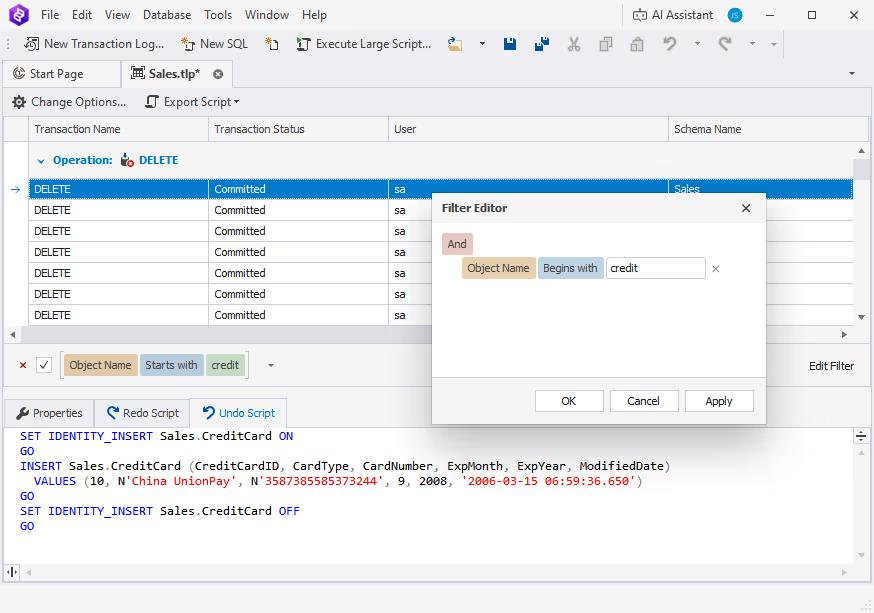
Committed DELETE operations grouped in the grid, a filter on object names starting with "credit", and the undo script for the selected row below.
Undo and redo scripts for one operation or many
dbForge Transaction Log generates a T-SQL undo script that reverses the selected operations, and a redo script that replays them. Pick one row, a whole transaction or everything in the filter, then export the script to a file or open it in the SQL editor to check it before you run it.
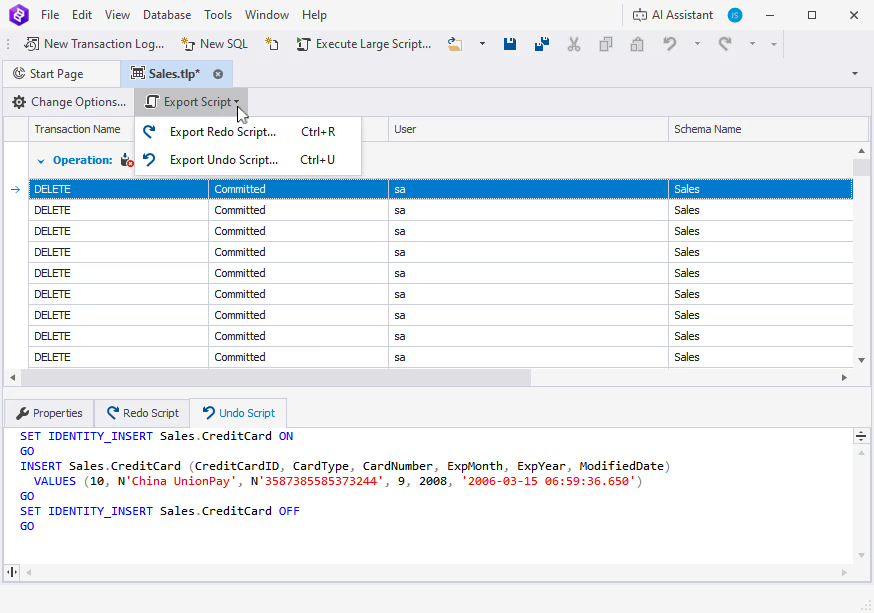
The Export Script menu, with separate commands for the redo and undo scripts.
Recover deleted rows without a full restore
dbForge Transaction Log rebuilds deleted rows as INSERT statements, so you can put back exactly the rows that were lost and leave everything else as it is. It can also return selected tables to a point in time, without the rollback touching other tables.
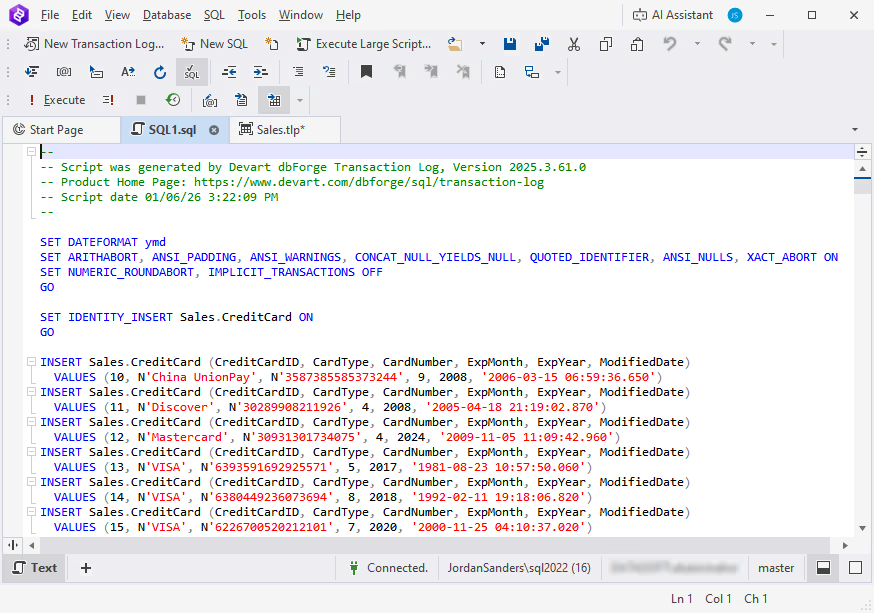
A generated script that re-inserts deleted rows into Sales.CreditCard, opened in the SQL editor.
Who made the change, and under which login
dbForge Transaction Log shows the user and login behind each operation and when it was committed, including changes made before you installed it, as long as they're still in the log. The Properties tab lists the transaction ID, status, schema, object, event time and the user's SID.
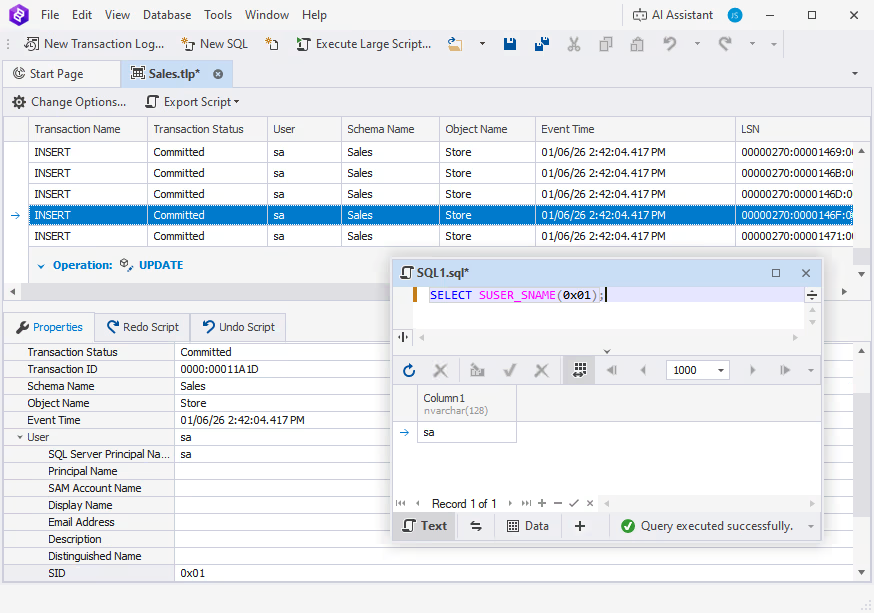
Properties of an INSERT into Sales.Store, with a query resolving the SID to the login name.
Isolate the transactions you care about
dbForge Transaction Log's column filters narrow thousands of operations to a few tables or one user. Combined with the time and type filters, that's how you find the one bad batch among a day of normal traffic.
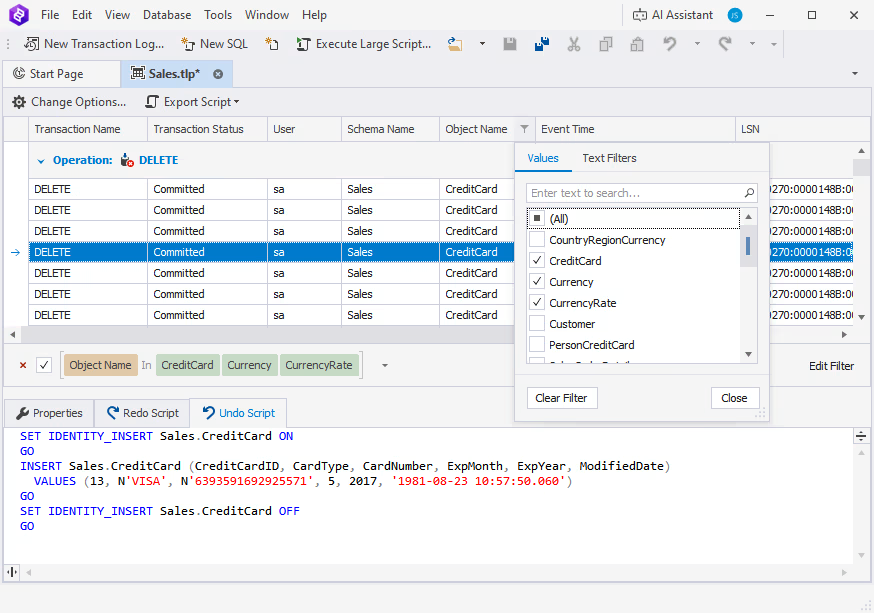
A column filter on Object Name limiting the grid to the CreditCard, Currency and CurrencyRate tables.
Export to SQL or bulk files
dbForge Transaction Log exports the log data to SQL scripts or bulk files, which you can run right away against any database or keep for later, for example to replay changes on a test copy.
Benefits
- Smaller, faster fixes. Row-level undo avoids the data loss and downtime of restoring a whole database to an earlier point.
- An answer to "who did this?" The user, login and time of each change are there for an audit or an incident report.
- Safe on copies. Offline mode lets you investigate a copied log file away from production.
Real-World Uses
- The missing WHERE clause: find the DELETE, export its undo script, review it and put the rows back.
- A bad deployment script: an UPDATE overwrote prices on one table. Revert that table to the minute before the release while the rest of the database keeps the day's orders.
- A security review: list every change to a sensitive table over a week and who made it.
- A broken server: no need to attach the database; open the copied .ldf and .mdf files in Offline mode and pull out the operations you need.
Who It's For, and Who Should Skip It
Buy it if you look after SQL Server databases where a mistaken change is expensive and a full restore is a last resort: DBAs, support engineers and consultants who get the "can you get this data back?" call.
Skip it if you're not on SQL Server, if your databases run in the simple recovery model and you can't change that, or if you only need ongoing auditing, where SQL Server's own Change Data Capture or Change Tracking, set up in advance, may be enough.
Usage Guide
- Download the trial from Devart's download page, sign in with a free Devart account, and install it.
- Click New Transaction Log on the toolbar.
- Choose Online NTFS or Online VSS and connect to the database, or go to the Offline tab and pick the detached file.
- Filter by object, user or change type until you see the operations you need.
- Select them and use Export Script to get the undo or redo script, open it in the SQL editor, check it, and run it.
Where it falls short
- Scanning a big log on production costs resources. Devart warns of I/O overhead, extra CPU, disk space use and backup delays on busy systems, and suggests scanning a narrow time, transaction ID or LSN range, off-peak, or on a read-only replica.
- Not for SQL Server 2008 R2 or older. The supported list starts at SQL Server 2012.
- Few public reviews. There are almost no public user reviews of this product, so the 30-day trial is your real test.
Comparisons
Transaction Log vs. a point-in-time restore
SQL Server's own point-in-time restore brings back a whole database as it was at a moment, which means restoring to a copy and moving the data by hand, or losing every later change. dbForge Transaction Log works at the row and table level on the live database, so you reverse only the bad change. The restore is free and always available if you have the backups; Transaction Log is faster and more precise when the change is small and recent.
Editions and Pricing
There's one edition, the full version. The order page opens on the 1-year subscription, and the monthly and perpetual licenses are options on the same page.
| License |
Price |
Refund window |
| 1-month subscription |
$39.95 per month |
7 days |
| 1-year subscription |
$369.95 per year |
30 days |
| Perpetual license |
$729.95 |
30 days |
FAQs
What permissions does dbForge Transaction Log need?
dbForge Transaction Log's two online modes connect to the database under your own credentials. Offline mode needs no server permissions; you only point it at the log or data file.
Can dbForge Transaction Log show changes made before it was installed?
Yes. dbForge Transaction Log reads what's recorded in the log, so it shows earlier changes too, as long as SQL Server hasn't reused that part of the log yet.
Does dbForge Transaction Log run the undo script automatically?
No. dbForge Transaction Log generates the T-SQL script, and you choose whether to run it right away, open it in the SQL editor to check it first, or save it to a file for later.
Does dbForge Transaction Log work with Azure SQL Database?
Devart's compatibility list for dbForge Transaction Log names only on-premises SQL Server versions 2012 to 2025, and the online modes read the files from disk, so plan on SQL Server you run yourself.
Is the AI Assistant included in dbForge Transaction Log?
dbForge Transaction Log has Devart's AI Assistant chat built in for writing and explaining SQL. It has a free plan; the paid plan is a separate license.
Can I buy just one month of dbForge Transaction Log for an emergency?
Yes. dbForge Transaction Log is sold by the month at $39.95, which is often the cheapest way to handle a one-off recovery. Monthly purchases have a 7-day refund window.
System Requirements
- Windows 7, 8, 8.1, 10 or 11, or Windows Server 2008, 2012, 2016, 2019, 2022 or 2025
- .NET Framework 4.7.2 or later
- SQL Server 2012, 2014, 2016, 2017, 2019, 2022 or 2025
Conclusion
dbForge Transaction Log is worth having for any SQL Server shop where one bad UPDATE or DELETE would hurt: it turns the log into a list you can read and produces the exact script to reverse a mistake, which is far less disruptive than a restore. The main reason not to buy it is that it can only recover what the log still holds, so it's no substitute for backups or the full recovery model. Try it on your own database during the 30-day trial, and if you'll only need it now and then, the monthly license is the cheap way in.
Download Free TrialBuy Now