dbForge Index Manager for SQL Server: Find and Fix Index Fragmentation from SSMS
dbForge Index Manager for SQL Server is Devart's SSMS add-in that scans a database for fragmented indexes, tells you which ones to rebuild or reorganize, and does it with one click, as a script, or on a schedule from the command line. It costs $129.95 a year or $259.95 for a perpetual license, with a 30-day free trial. It's for DBAs and developers who look after SQL Server databases without a full maintenance solution in place and want index upkeep to stop being a guessing game.
When a query that ran in two seconds last month now takes twenty, and the plan hasn't changed, scattered index pages are one of the usual suspects. Index Manager shows you, table by table, whether that's the problem.
Quick facts
- Version: 2026.2.96, released November 9, 2026
- Developer: Devart
- Works in: SSMS 2016, 17, 18, 19, 20, 21 and 22
- Databases: SQL Server 2005 to 2025 (2000 with limited support), SQL Server on Linux, Azure SQL Database and Managed Instance, Azure Synapse, Microsoft Fabric
- Platform: Windows 7 to 11 and Windows Server 2008 to 2025, with .NET Framework 4.7.2
- Download: installed from the 812.56 MB dbForge SQL Tools installer, where you pick the tools you want
- Price: $129.95 for a 1-year subscription, $259.95 for a perpetual license with a year of updates
- Trial: 30 days with every feature (the download asks you to sign in with a free Devart account)
- Refund: 30-day money-back guarantee on annual and perpetual licenses; Devart's ordering FAQ is stricter and refunds only when a technical problem its support can't fix stops the product working
- What we checked: version 2026.2.96 and its November 9, 2026 date on Devart's download page and revision history, the 812.56 MB size of the SQL Tools installer it's delivered in, and the order page prices of $129.95 for a year and $259.95 perpetual on November 13, 2026. We didn't run a scan on our own server.
Before you buy
- It does one job. Index Manager handles fragmentation: rebuild or reorganize. It doesn't suggest missing indexes, find unused ones or update statistics on its own.
- One edition, one Buy button. The order page opens on a 1-year subscription at $129.95; the perpetual license and 2- or 3-year terms are options there.
- Online rebuilds depend on SQL Server. The Online option is off by default, and SQL Server allows online index rebuilds only in editions that support them, such as Enterprise and Azure SQL.
- Free alternatives exist. Many DBAs schedule Ola Hallengren's free maintenance scripts instead. Index Manager's value is the visual overview and the one-click fix, not capabilities you can't get any other way.
Download Free TrialBuy Now
Overview
Every insert, update and delete shifts index pages around, and over time an index's pages end up out of order and half empty. SQL Server reports this through a dynamic management view, but reading it table by table is tedious. Index Manager runs that analysis for a whole database, splits the indexes into "Action required" and "No action required", and gives each one a recommended fix based on two thresholds: by default, reorganize when fragmentation is over 10% and rebuild when it's over 30%.
It opens as a document inside SSMS, next to your query windows. Devart updates it with the rest of its SQL Server tools; recent builds added SSMS 21 and 22 support, Entra ID sign-in improvements and faster SSMS startup with logging enabled.
Features
A ranked list of the indexes that need work
dbForge Index Manager for SQL Server shows every index that needs attention with its fix type (Rebuild or Reorganize), name, table, index type, size in pages and MB, fragmentation percentage, the reason, and a maintenance priority. You can sort, search and filter the list by any column, switch database or connection from the toolbar, and click Reanalyze after a change.
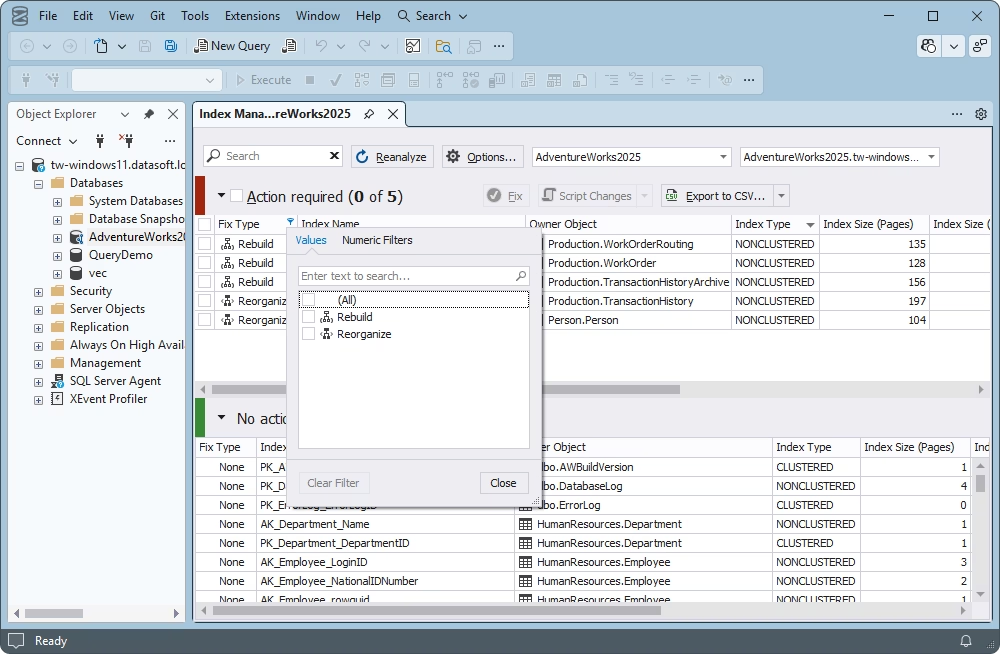
Index Manager for AdventureWorks2025 in SSMS: five indexes need action (three rebuilds, two reorganizations), with the Fix Type filter open.
Thresholds you control
dbForge Index Manager for SQL Server lets you set the reorganize and rebuild thresholds, a minimum index size (so tiny indexes, where fragmentation doesn't matter, are skipped), and how rebuilds run: sorting in tempdb, and online or offline. Reset puts the defaults back.
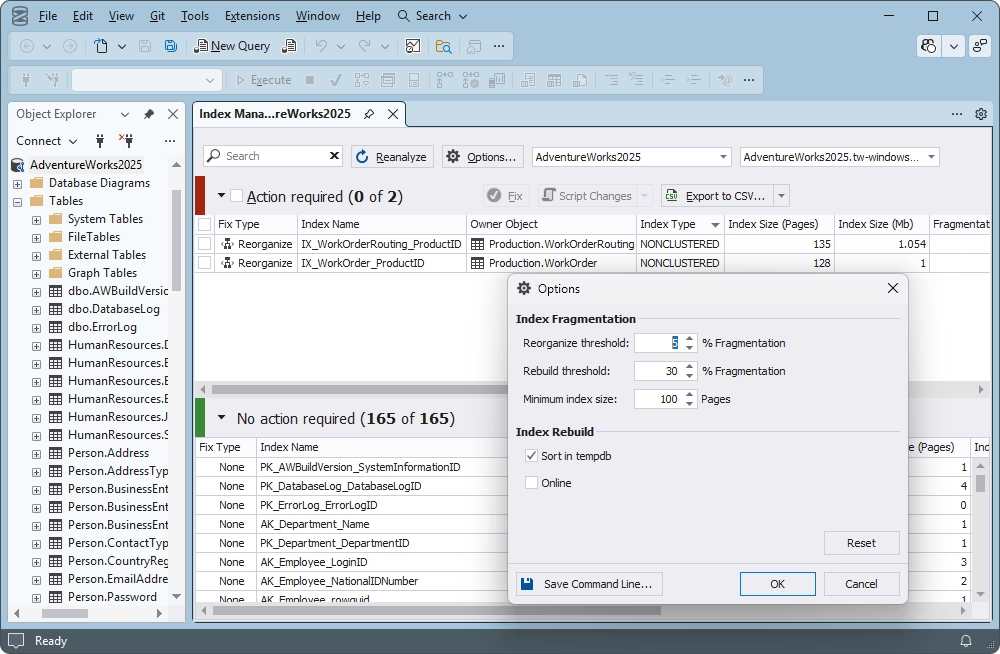
The Options dialog: reorganize threshold set to 5%, rebuild at 30%, minimum index size 100 pages, Sort in tempdb on and Online off, with a Save Command Line button.
Fix now, or script it for later
dbForge Index Manager for SQL Server fixes the indexes you tick with the Fix button, or writes the ALTER INDEX commands with Script Changes, to a new SQL window or the clipboard, so you can review them or run them in a maintenance window. Export to CSV saves the scan results for a report or a before-and-after comparison.
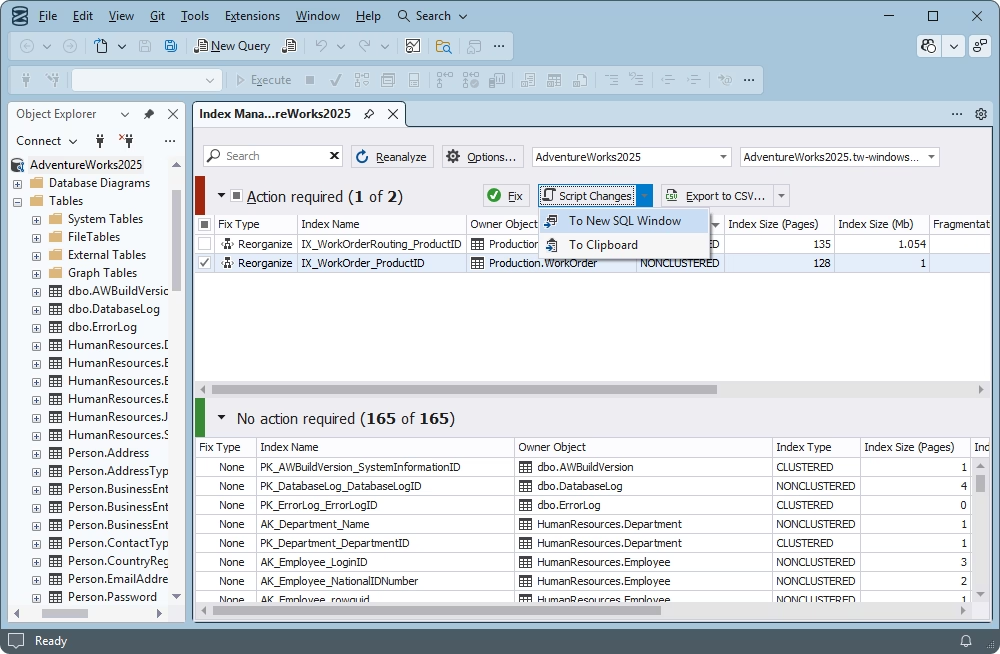
One index selected for reorganization, with the Script Changes menu offering To New SQL Window or To Clipboard.
Scheduled maintenance from the command line
dbForge Index Manager for SQL Server can save your connection, database and options as a .bat file (or a PowerShell command) that analyzes, fixes and reports without opening SSMS. Schedule it in Windows Task Scheduler and fragmentation is handled every night.
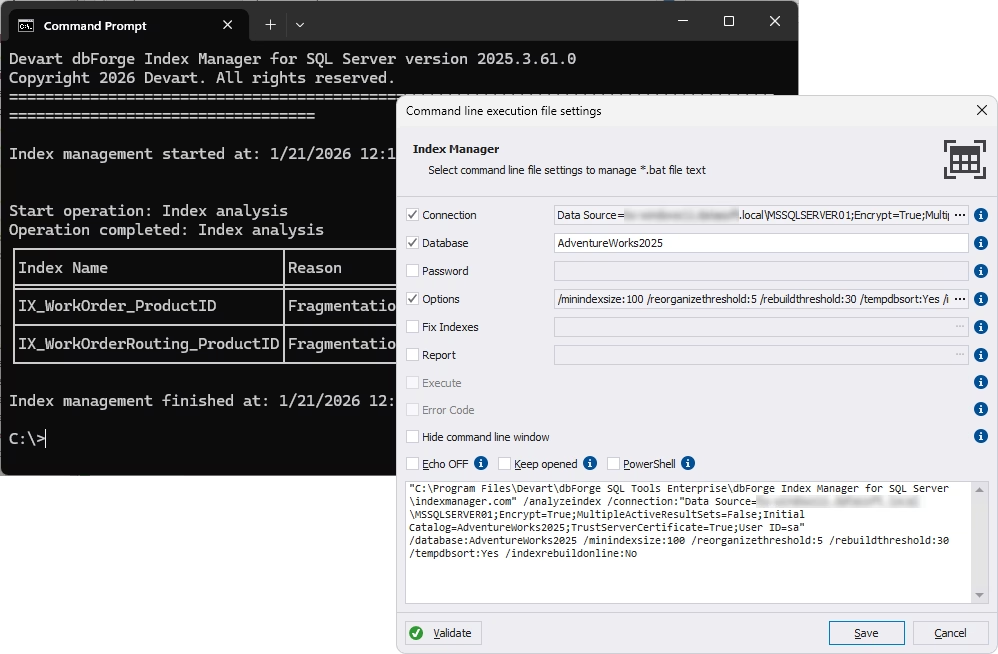
The command-line file settings dialog (connection, database, options, Fix Indexes, Report, PowerShell) in front of a Command Prompt running an index analysis.
Benefits
- A clear answer in minutes. Instead of querying DMVs by hand, you see which indexes matter, ranked, with the recommended fix.
- Less unnecessary work. The minimum size and thresholds keep it from rebuilding small or barely fragmented indexes, which wastes log space and I/O.
- Repeatable maintenance. The same settings run interactively in SSMS and unattended from the command line.
Real-World Uses
- A "why is it slow?" check. Before digging into query plans, scan the database and rule fragmentation in or out.
- Nightly upkeep on a small server. A .bat file from Index Manager, scheduled in Task Scheduler, keeps indexes in shape where there's no DBA on staff.
- After a bulk load. Run a scan after a large import or purge, script the fixes, and run them in the maintenance window.
- Reporting to the team. Export the before and after results to CSV to show what the maintenance changed.
Who It's For, and Who Should Skip It
It's for accidental DBAs, developers responsible for a production database, and consultants who need a quick fragmentation picture on a client's server, especially where nobody has set up maintenance jobs.
Skip it if you already run Ola Hallengren's scripts or SQL Server Maintenance Plans and are happy with them, if you need broader index tuning (missing or unused indexes), or if you work on MySQL or PostgreSQL. If you'd use several Devart SQL Server tools, the dbForge SQL Tools bundle includes Index Manager with 14 others from $469.95 a year.
Usage Guide
- Install. Download the dbForge SQL Tools installer (you'll sign in with a free Devart account) and select Index Manager.
- Open it. In SSMS, open Index Manager for a database from its Object Explorer menu and let the analysis run.
- Review. Look at the Action required list, sort by size or fragmentation, and check the reasons.
- Adjust. Click Options to set thresholds and the minimum index size, then Reanalyze.
- Fix or script. Tick the indexes and click Fix, or use Script Changes to review the commands first.
- Automate. In Options, click Save Command Line, then schedule the .bat file in Windows Task Scheduler.
Where it falls short
- Fixing can be heavy. The analysis is light, but rebuilds and reorganizations on large tables use a lot of I/O and log space. Run them in a maintenance window, as Devart itself advises.
- Fragmentation isn't always the problem. On modern SSD storage, fragmentation matters less than it used to, and outdated statistics or a bad plan are often the real cause of slowdowns. Index Manager won't tell you that.
- A big download for a small tool. It comes in the 812.56 MB SQL Tools installer.
- Few public reviews. Index Manager has almost no independent reviews on the major software review sites, so the trial is the way to judge it.
Comparisons
dbForge Index Manager vs. Ola Hallengren's maintenance scripts
Ola Hallengren's free IndexOptimize procedure, scheduled through SQL Server Agent, is the standard for automated index maintenance and also handles statistics. It has no interface. Index Manager gives you the visual overview, per-index control and a one-click fix inside SSMS. Many DBAs prefer the free scripts for scheduled work; Index Manager suits people who want to see and choose.
dbForge Index Manager vs. SSMS Maintenance Plans
SSMS's built-in Maintenance Plans can rebuild or reorganize indexes on a schedule at no cost, but they don't show you per-index fragmentation the way Index Manager does, and they don't run on SQL Server Express, which has no SQL Server Agent. Index Manager's command line plus Windows Task Scheduler covers Express.
Editions and Pricing
There's one edition. The order page opens on a 1-year subscription; choose the perpetual license or a longer term there.
| License | Price | What you get |
|---|
| 1-year subscription | $129.95 | All features and updates for one year; stops working if not renewed |
| Perpetual license | $259.95 | Works permanently, with one year of updates and support (extendable) |
| dbForge SQL Tools bundle | from $469.95 a year | Index Manager plus 14 more SQL Server tools |
Prices are per user. Devart takes 5% off for 5 to 9 licenses, 10% for 10 to 19 and 15% for 20 or more, and priority support is an extra option at checkout.
FAQs
When does dbForge Index Manager recommend a rebuild instead of a reorganize?
dbForge Index Manager for SQL Server recommends a rebuild above 30% fragmentation and a reorganize between 10% and 30% by default. Both thresholds and the minimum index size can be changed in Options.
Can dbForge Index Manager scan several databases or servers?
Yes. dbForge Index Manager for SQL Server lets you switch between connections and databases from its toolbar and scan as many as you need, then filter the results by schema, table or index type.
Does dbForge Index Manager work with SQL Server Express?
Yes. dbForge Index Manager for SQL Server supports SQL Server Express editions, and since Express has no SQL Server Agent, its command-line .bat files with Windows Task Scheduler are a practical way to schedule index maintenance there.
Does dbForge Index Manager work with Azure SQL Database?
Yes. dbForge Index Manager for SQL Server supports Azure SQL Database, Azure SQL Managed Instance and Azure Synapse, with Microsoft Entra multi-factor sign-in.
Will running dbForge Index Manager slow down my server?
dbForge Index Manager for SQL Server's analysis needs few resources, but the rebuild and reorganize operations it runs can be heavy on large tables. Schedule fixes for a maintenance window.
Can I get a refund on dbForge Index Manager?
Yes. Devart refunds dbForge Index Manager for SQL Server within 30 days on an annual subscription or a perpetual license.
System Requirements
- Windows 7, 8, 8.1, 10 or 11, or Windows Server 2008, 2012, 2016, 2019, 2022 or 2025
- .NET Framework 4.7.2 or later
- SQL Server Management Studio 2016, 17, 18, 19, 20, 21 or 22
- SQL Server 2005 to 2025 (2000 with limited support), SQL Server on Linux, Azure SQL, Azure Synapse, Microsoft Fabric
Conclusion
dbForge Index Manager for SQL Server is worth $129.95 a year if you look after SQL Server databases without a DBA's toolkit and want fragmentation handled from SSMS. The one reason to buy it is the clear, ranked view of which indexes need work, with a one-click fix and a scheduled command line behind it. The main reason not to is that free tools already do the scheduled part well: if you're comfortable with Ola Hallengren's scripts, you don't need it. Use the 30-day trial on your busiest database, and if you'd use Devart's other SQL Server tools too, the SQL Tools bundle is the better buy.
Download Free TrialBuy Now