dbForge Unit Test for SQL Server: tSQLt Testing Without Leaving SSMS
dbForge Unit Test for SQL Server is a $189.95-a-year add-in for SQL Server Management Studio that lets database developers write, organize and run unit tests for stored procedures, functions and views in plain T-SQL, using the open-source tSQLt framework. It runs on Windows inside SSMS 2016 and v17 to v22, and a command-line runner lets you put the same tests into a build pipeline. A perpetual license costs $379.95.
The pitch is simple: you change a stored procedure that 30 reports depend on, and instead of hoping nothing broke, you click Run All Tests and get a red or green answer in a few seconds.
Quick facts
- Version: 2026.2.96, released November 9, 2026
- Developer: Devart
- Type: add-in for SQL Server Management Studio 2016 and v17 to v22, built on tSQLt
- Databases: SQL Server 2005 to 2025 (2000 limited), LocalDB, SQL Server on Linux, Azure SQL Database and Managed Instance, Azure Synapse, Microsoft Fabric
- Installer: there's no separate setup file. Unit Test is installed from the 812.56 MB dbForge SQL Tools installer, where you pick the add-ins you've licensed
- Price: $189.95 for one user with one year of updates and support (subscription), or $379.95 perpetual. Volume discounts from 5 licenses
- Trial: fully functional for 30 days, free Devart account needed to download
- Refunds: within 30 days if a technical problem keeps the add-in from working and Devart support can't fix it
- What we checked: version 2026.2.96 and the SQL Tools installer offered on the Unit Test download page, the SSMS and SQL Server compatibility list and the command-line reference in Devart's documentation, and the order page on November 14, 2026: $189.95 for the default one-year subscription without premium support. We didn't install it or run tests against a database.
Download Free TrialBuy Now
Overview
SQL Server has no built-in unit testing. The usual answer is tSQLt, a free framework made of T-SQL tables, views, procedures, functions and a CLR assembly that you install into the database under test. Tests are stored procedures grouped into schemas called test classes, and tSQLt runs each one inside a transaction that's rolled back afterwards, so tests don't leave data behind. The framework is powerful but entirely script-driven.
dbForge Unit Test is the graphical layer on top. It adds a Unit Test submenu to the database's right-click menu in Object Explorer (Add New Test, View Test List, Run All Tests, Install and Uninstall Test Framework) and a docked Test List Manager. You still write the test bodies in T-SQL, but installing tSQLt, creating classes, running tests and reading results become clicks. It's sold on its own or as one of the 15 tools in the dbForge SQL Tools bundle, and it has been part of Devart's monthly-ish release train since 2025, with builds 2026.1.39 through 2026.2.96 between May and November 2026.
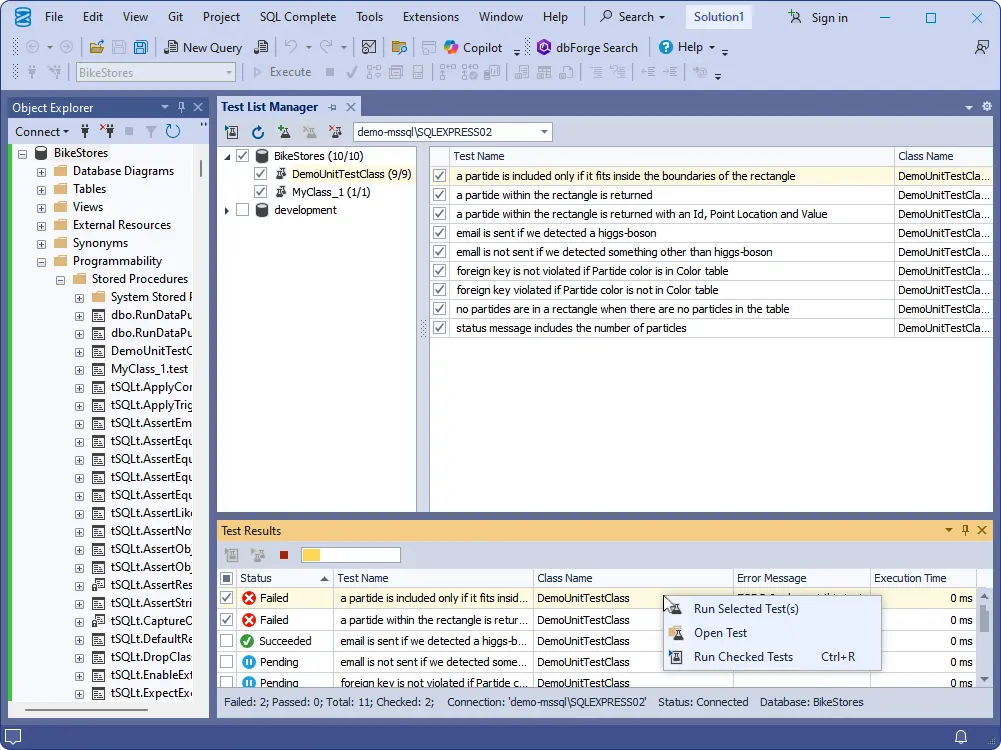
Test List Manager in SSMS: test classes per database on the left, nine tests in DemoUnitTestClass on the right, and the Test Results panel with failed, succeeded and pending tests.
Features
One-click tSQLt install and removal
dbForge Unit Test installs tSQLt on any database from a dialog where you pick the connection and database. On SQL Server 2017 and later, tSQLt needs the database's TRUSTWORTHY option on, and the installer sets it for you. Uninstalling removes the framework's procedures, functions and CLR object, and you choose whether your tests stay in the database or go with it.
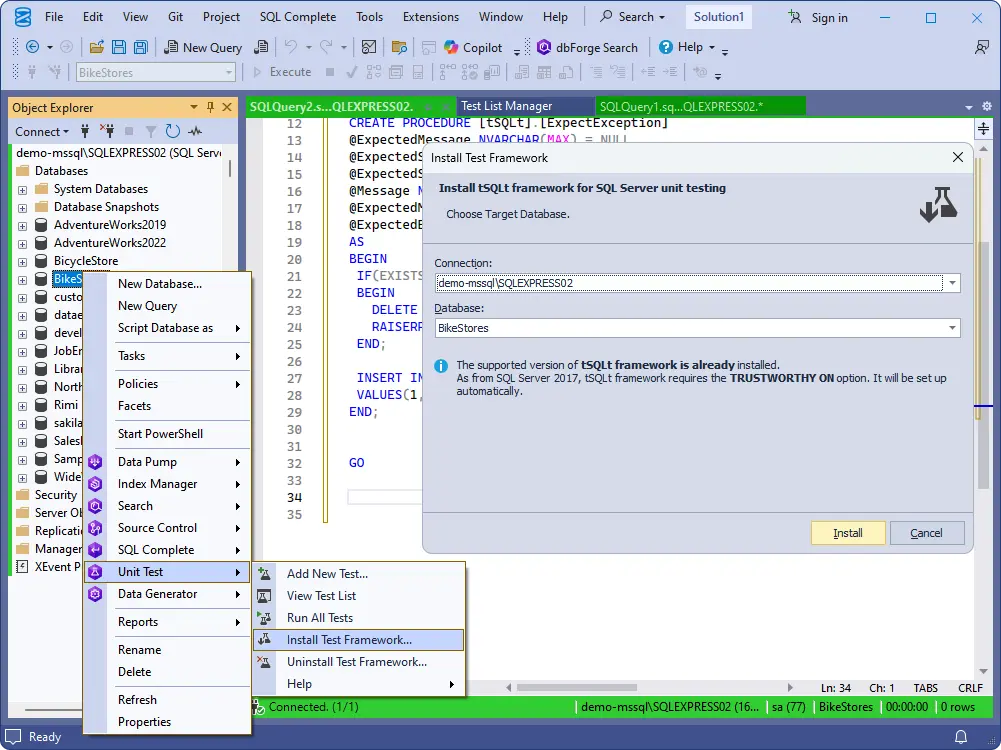
The Unit Test submenu in Object Explorer and the Install Test Framework dialog, noting that TRUSTWORTHY ON is set automatically on SQL Server 2017 and later.
Tests written in ordinary T-SQL
dbForge Unit Test doesn't invent a test language. Each test is a tSQLt stored procedure, so you arrange data, call the object under test and check the result with tSQLt's assert procedures, all in the SSMS query editor you already use. Objects can be tested in isolation, without inserting extra rows just to satisfy keys and IDs.
Test classes and the Test List Manager
dbForge Unit Test shows every database's test classes and tests in one tab, with checkboxes to choose what to run. From its context menu you create, edit, rename and delete tests and classes. The Test Results panel underneath lists each test's status, class, error message and execution time, and you can rerun just the selected or checked tests.
Example tests to learn from
dbForge Unit Test ships a library of pre-written tests you can add to a database, built around Devart's own test-driven development practices. For a team new to tSQLt, reading working examples beats starting from the framework's reference.
Command-line runner for CI
dbForge Unit Test includes unittest.com, which takes a /testsupport switch with a connection string and can install tSQLt first (/install_tsqlt), run one class (/class), uninstall the framework afterwards and write a report file (/outreport). Arguments can live in a text file. Combined with dbForge DevOps Automation, this runs your tests on every build.
Benefits
- Safer refactoring. A suite of tests turns "I think this change is fine" into a result you can show in a code review.
- Lower entry cost for tSQLt. Developers who'd never set up the framework by hand will use it when it's a menu item.
- The same tests locally and on the build server. What you run in SSMS is what the pipeline runs.
Real-World Uses
- A team rewriting a pricing stored procedure writes tests for the current rules first, then refactors until every test is green again.
- A developer fixes a bug where a foreign key was violated for a missing color code, and adds a test so the bug can't come back unnoticed.
- A build server installs tSQLt on a fresh test database, runs every test class from the command line, saves the report and removes the framework.
- A lead developer onboards juniors by having them read and extend the bundled example tests.
Who It's For, and Who Should Skip It
It's for teams that keep real logic in SQL Server: stored procedures, functions, triggers and constraints that matter to the business. If your developers live in SSMS and you want tSQLt without the script plumbing, it fits.
Skip it if you're comfortable running tSQLt from scripts. The framework is free, and the add-in mostly saves clicks rather than adding test capabilities. Skip it too if you use Azure Data Studio, VS Code or Visual Studio rather than SSMS, since it's an SSMS add-in only, or if most of your logic lives in application code, where your language's test framework is the better place for tests. And if you'll want more than one dbForge add-in, the SQL Tools bundle ($469.95 a year for 15 tools) costs about 2.5 times this one tool.
Usage Guide
- Sign in with a free Devart account on the Unit Test download page, download the dbForge SQL Tools installer and choose Unit Test during setup. SSMS must already be installed.
- Open SSMS, connect to your server, right-click a development database and choose Unit Test > Install Test Framework.
- Choose Add New Test, give it a class and a name, and write the test body in T-SQL using tSQLt's assert procedures.
- Open View Test List to see every class and test, tick the ones you want and run them. Read failures in the Test Results panel.
- For automation, run
unittest.com /testsupport with a connection string from your build script and save the report.
Before you buy
- The $189.95 subscription stops working when the year ends unless you renew. Choose Perpetual ($379.95) on the order page to keep using it, with the first period of updates included.
- The order page also offers 2- and 3-year terms and premium support.
- Devart's ordering FAQ ties refunds to technical problems that support can't solve, so do your evaluation during the 30-day trial.
Where it falls short
- tSQLt changes the database. It adds objects and a CLR assembly, and on SQL Server 2017+ needs TRUSTWORTHY ON. Many shops won't allow that on production, so plan on a dedicated test database.
- No SSMS 2012 or 2014 any more. Since version 7.0 the add-ins support SSMS 2016 and later only.
- You still write the tests. The add-in manages and runs tests, but test logic, fake data and asserts are your T-SQL.
- A big download for one add-in. You get it through the 812.56 MB SQL Tools installer.
What Users Say
Independent reviews of this add-in on its own are scarce: Capterra lists it with no user reviews so far, and buyers tend to review the SQL Tools bundle or dbForge Studio instead.
Devart customer story (about Devart's SQL Server tools in general)
Andrew Richards, Managing Director, quoted on the Unit Test page: "We are able to deliver code of significantly better quality, and better tested in a shorter time than was possible before our investment in Devart tools... Our customers get access to more robust applications, against more realistic data."
Without a body of reviews to lean on, the trial matters more than usual. Install tSQLt on a copy of a real database, write two or three tests for a procedure you know well, and see whether the Test List Manager saves you enough time over plain scripts.
Comparisons
vs. tSQLt on its own
tSQLt is free and does the actual testing either way. Without the add-in you install it from a script, create classes with tSQLt.NewTestClass and run tests with tSQLt.RunAll, reading results as text. dbForge Unit Test adds the menus, the Test List Manager, the results grid, the examples and a packaged command-line runner. You're paying for convenience, not capability.
vs. Redgate SQL Test
Redgate SQL Test is the other well-known SSMS add-in built on tSQLt, and it does the same core job. Compare them in their trials on how they show results and fit your existing toolset: if you already use dbForge SQL Complete or Schema Compare, Unit Test sits in the same SSMS menus and the same bundle.
Editions and Pricing
Unit Test has one edition, Standard. The license type and term are picked on the order page.
| Option | Price | Notes |
|---|
| Unit Test, 1-year subscription (default) | $189.95 | One user, stops at the end of the term unless renewed |
| Unit Test, perpetual | $379.95 | One user, keeps working, first period of updates included |
| dbForge SQL Tools bundle | from $469.95 a year | 15 tools including Unit Test, SQL Complete, Schema Compare, Data Compare and DevOps Automation |
FAQs
Does dbForge Unit Test work with SSMS 21 and 22?
Yes. dbForge Unit Test supports SSMS v22, v21, v20, v19, v18, v17 and 2016. SSMS 2012 and 2014 are no longer supported by current versions.
Can dbForge Unit Test test Azure SQL Database?
dbForge Unit Test lists Azure SQL Database, Azure SQL Managed Instance, Azure Synapse and Microsoft Fabric as supported, with Microsoft Entra ID MFA sign-in.
Do I have to learn tSQLt to use dbForge Unit Test?
Partly. dbForge Unit Test handles installing the framework and running tests, but the test bodies use tSQLt's procedures and asserts, so you'll learn those basics. The bundled examples are the quickest way in.
Will dbForge Unit Test leave test data in my database?
No. dbForge Unit Test runs tests through tSQLt, which wraps each test in a transaction and rolls it back, so data the test inserts disappears afterwards. The framework itself stays installed until you uninstall it.
Can I run dbForge Unit Test tests in Azure DevOps or Jenkins?
Yes. dbForge Unit Test's unittest.com command-line runner can be called from any build tool that runs Windows commands Devart pairs it with its DevOps Automation product for a full database CI process.
System Requirements
- Windows 7, 8, 8.1, 10 or 11, or Windows Server 2008, 2012, 2016, 2019, 2022 or 2025
- .NET Framework 4.7.2 or later
- SQL Server Management Studio 2016 or v17 to v22
- SQL Server 2005 to 2025 (2000 limited), LocalDB, SQL Server on Linux, ApsaraDB RDS, Azure SQL Database and Managed Instance, Azure Synapse, Microsoft Fabric
- tSQLt installed on each database you test (the add-in installs it)
Conclusion
dbForge Unit Test for SQL Server is worth $189.95 a year to an SSMS-based team that wants database unit tests but hasn't adopted tSQLt because of the setup and scripting. The one reason to buy it is that it makes tSQLt a normal part of working in SSMS, from the first test to the build server. The main reason not to is that tSQLt itself is free, so developers already comfortable with it get convenience rather than new abilities, and anyone wanting two or more dbForge add-ins should price the SQL Tools bundle first. Use the 30-day trial on a test copy of your database, since refunds cover only technical failures.
Download Free TrialBuy Now