dbForge Compare Bundle for SQL Server: Schema Compare and Data Compare, 37-40% Cheaper Together
dbForge Compare Bundle for SQL Server is Devart's pack of two Windows tools (both also usable from SSMS): dbForge Schema Compare for SQL Server, which finds structural differences and writes the T-SQL deployment script, and dbForge Data Compare for SQL Server, which finds differing rows and writes the data sync script. Professional costs $359.95 a year and Standard $299.95 (perpetual: $719.95 and $599.95), 37% to 40% less than the two tools bought separately. It's for SQL Server developers and DBAs who deploy changes from development to test to production.
A release rarely changes only structure or only data: a new column usually needs default values, a new feature needs its lookup rows. The bundle compares both with the same kind of wizard, comparison document and sync script, and Professional adds source control, backups and the command line for the data side too.
Quick facts
- Version: 2026.2.96, released November 9, 2026
- Developer: Devart
- Contains: Schema Compare for SQL Server and Data Compare for SQL Server, both in Standard edition (Standard bundle) or both in Professional edition (Professional bundle)
- Platform: Windows 7 to 11 and Windows Server 2008 to 2025, with .NET Framework 4.7.2; compare directly from SSMS 17 to 22
- Databases: SQL Server 2000 to 2025, SQL Server on Linux, Azure SQL Database and Managed Instance, Azure Synapse, Amazon RDS, Microsoft Fabric, Heroku Cloud
- Download: 149.49 MB, one installer for both tools
- Price: Professional $359.95 a year or $719.95 perpetual; Standard $299.95 a year or $599.95 perpetual
- Trial: 30 days, full functionality (the download asks you to sign in with a free Devart account)
- What we checked: version 2026.2.96 and its November 9, 2026 date on Devart's download page and revision history, the 149.49 MB download size listed there, the editions table, and the order page prices of $359.95 for the default Professional 1-year subscription, $299.95 for Standard, $719.95 and $599.95 perpetual, plus the separate prices of both tools, on November 13, 2026. We didn't run a comparison against our own databases.
Before you buy
- Standard has no command line for data. In the Standard bundle only Schema Compare runs from the command line; Data Compare's command line, plus source control, scripts folders, backups and DACPAC sources for schemas, need Professional.
- Look at dbForge SQL Tools too. For $469.95 a year it includes both compare tools plus 13 more (SQL Complete, Source Control, Data Generator, Documenter and others).
- A subscription stops working when it ends; a perpetual license keeps working after its year of updates.
- Check the refund terms. Devart's order page promises a refund within 30 days if you're not satisfied (on annual subscriptions and perpetual licenses), but its ordering FAQ ties refunds to technical problems its support can't fix, so make up your mind during the trial.
Download Free TrialBuy Now
Overview
Both tools follow the same flow. You pick a source and a target (a live database or, depending on the tool and edition, a snapshot, scripts folder, backup or source control revision), set options and mappings, and click Compare. The comparison document lists objects or tables by status, shows DDL or row differences side by side, and lets you exclude anything that shouldn't be deployed. The synchronization wizard then writes the script, which you open in the internal editor, save, or run against the target after checking the warnings.
Devart keeps both tools moving. The November 2026 release kept SYSTEM_VERSIONING enabled when adding columns to temporal tables and fixed an out-of-memory error with large XLS reports, September 2026 added a "Last modified" column to schema comparison results, August fixed running out of memory with a large number of different rows, and June fixed an "Unknown type 'json'" error in data comparison.
What's in the Bundle
dbForge Schema Compare for SQL Server: structure
dbForge Schema Compare for SQL Server compares all SQL Server object types (from tables, procedures and functions to certificates, partition schemes, Service Broker objects and database properties), including encrypted routines, and generates a dependency-ordered T-SQL deployment script with warnings. Professional also compares scripts folders, objects in Git, Azure DevOps or SVN, native backups and DACPAC packages.
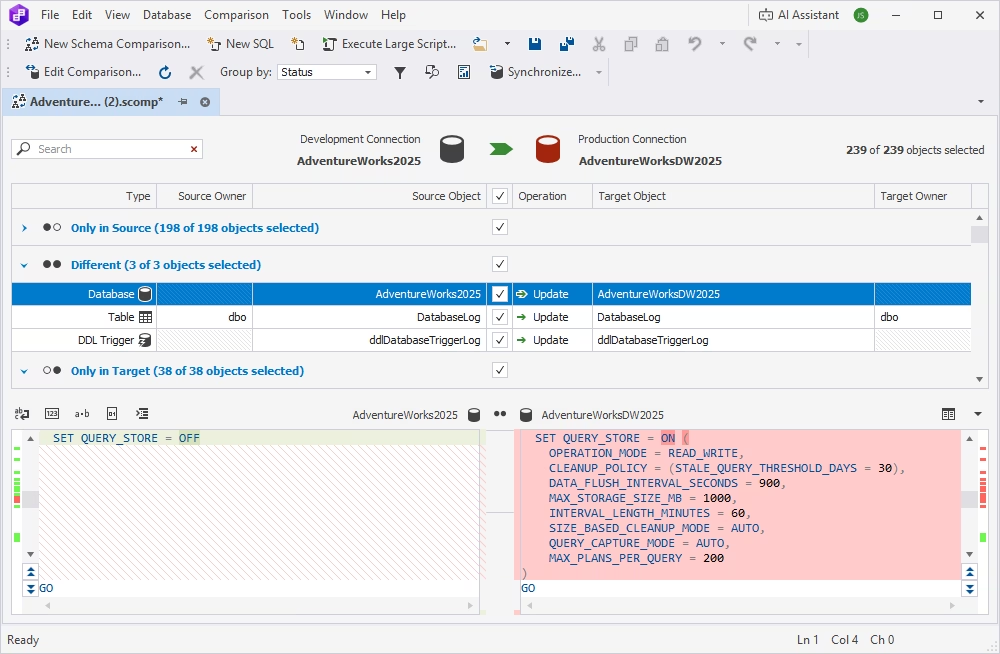
Schema Compare: 239 objects between AdventureWorks2025 and AdventureWorksDW2025, with the database-level Query Store setting differing on each side.
dbForge Data Compare for SQL Server: rows
dbForge Data Compare for SQL Server compares tables, views and custom query results, maps tables and columns with different names or types, and uses a custom comparison key for tables without a primary key. It can restore damaged or missing rows from a native SQL Server backup without restoring the whole database, in both editions.
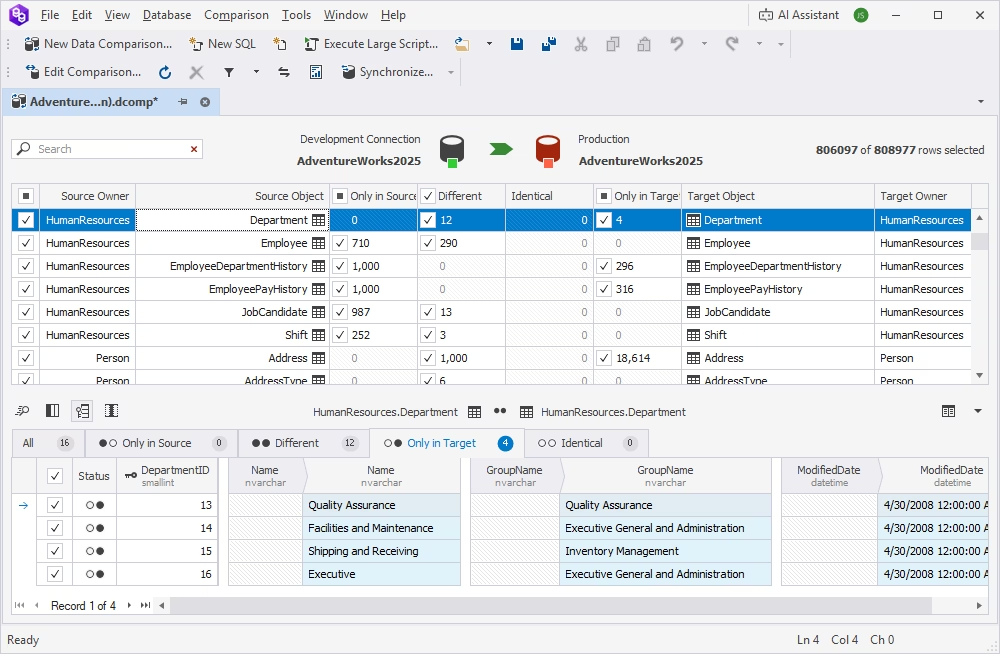
Data Compare: development vs production AdventureWorks2025, with the four HumanResources.Department rows that exist only in the target shown below.
Features
Mapping and comparison options
dbForge Compare Bundle for SQL Server lets you ignore case, underscores or spaces in object names, include or exclude tables and views by mask, ignore columns by mask (such as ModifiedDate), skip computed, LOB, TIMESTAMP, ROWGUID or IDENTITY columns, and filter data at row level.
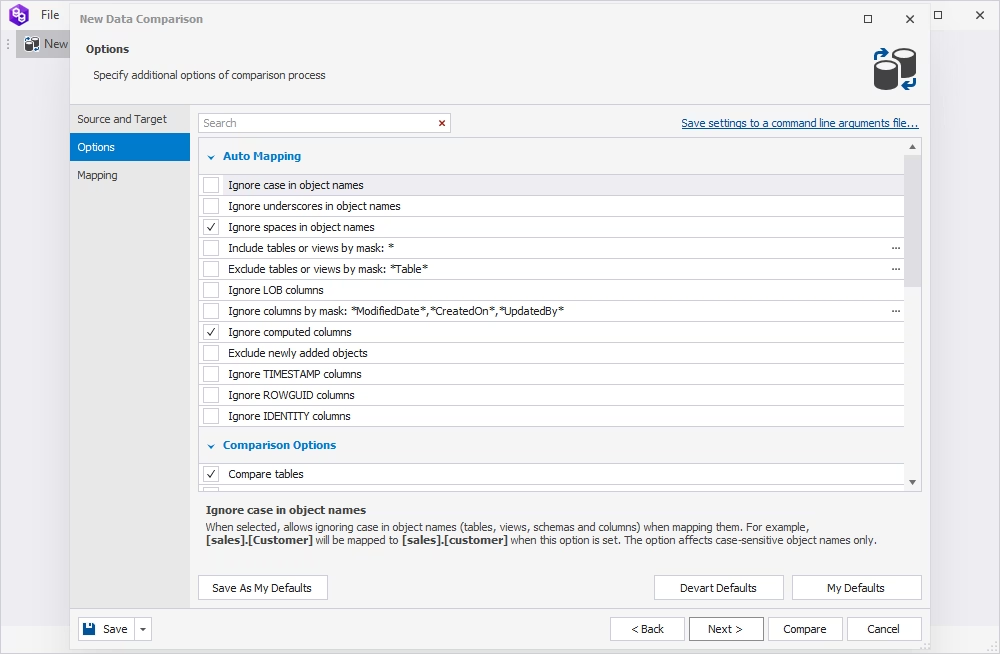
The data comparison Options page: auto-mapping rules, columns to ignore, and comparison options for tables.
Reports for audits and reviews
dbForge Compare Bundle for SQL Server exports schema differences to HTML, Excel and XML and data differences to CSV, Excel and HTML, so a reviewer or auditor sees exactly what will change.
Command line for CI and scheduled jobs
dbForge Compare Bundle for SQL Server turns a saved comparison into command-line syntax and a .bat file for Windows Task Scheduler or a build server. Professional adds Data Compare's command line, status reporting from the CLI wizard, the full set of command-line options and use with dbForge DevOps Automation for continuous integration.
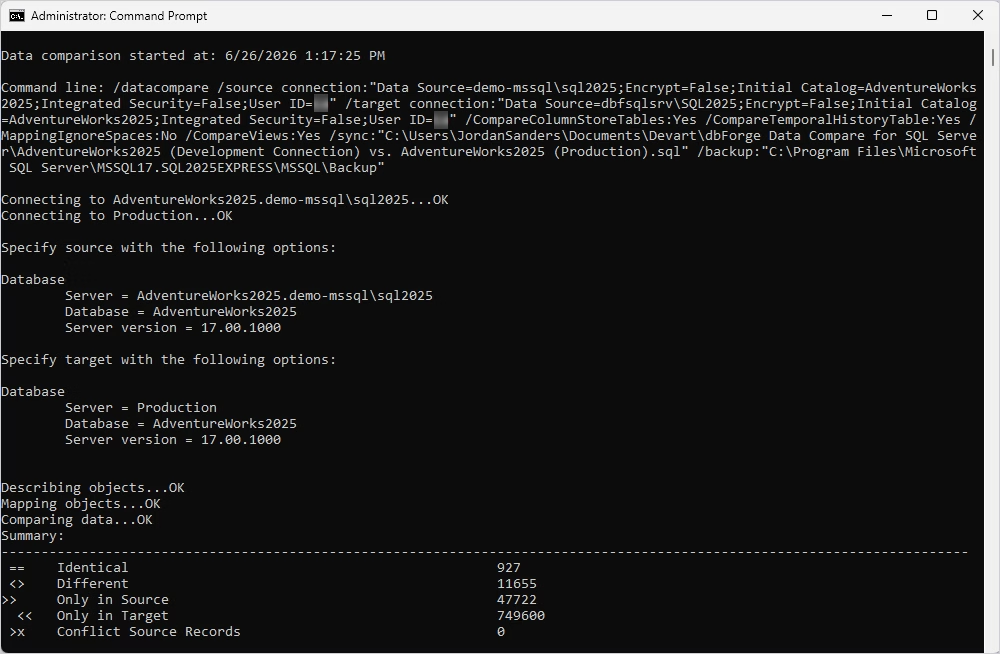
A command-line data comparison of AdventureWorks2025 between the development and production servers: 927 identical, 11,655 different, 47,722 only in source and 749,600 only in target.
Benefits
- One tool set for a whole release. Schema and data changes are compared, reviewed and deployed the same way.
- Fewer surprises in production. Warnings and dependency checks come before the script runs, not after.
- Recovery without a full restore. Pull single rows back out of a native backup when someone deletes the wrong data.
Real-World Uses
- Deploying a sprint: compare DEV with TEST for structure, then sync the new reference data.
- Upgrading client databases: an ISV compares each client's schema with the release version and generates the upgrade script (one G2 reviewer has done this for 13 years).
- CI checks: a build step compares the database with what's in source control (Professional).
- Fixing an accidental delete: compare a table with last night's backup and restore only the missing rows.
Who It's For, and Who Should Skip It
Buy it if you deploy SQL Server changes that touch both schema and data. Choose Professional if you need source control, DACPAC or backup sources, or command-line data comparison.
Skip it if you only compare structure (Schema Compare alone is cheaper), if you'd use other Devart tools (dbForge SQL Tools at $469.95 includes both), or if you'd rather work in an IDE (dbForge Studio for SQL Server Professional, $399.95 a year, includes schema and data compare). It's Windows-only, which one reviewer missed.
Usage Guide
- Download and install the Compare Bundle from Devart's download page (sign in with a free Devart account); both tools and their SSMS integration are installed.
- Compare schemas. In Schema Compare, choose source and target, set options, and click Compare.
- Deploy structure. Review the DDL differences, exclude what isn't ready, and run or save the sync script.
- Compare data. In Data Compare, check the table mapping and comparison keys, then compare.
- Sync data with the Data Synchronization Wizard, after reading the warnings.
- Automate: save the projects and generate .bat files for scheduled or CI runs.
Where It Falls Short
- Large comparisons are heavy. Devart fixed out-of-memory errors with many differing rows (August 2026) and big XLS reports (November 2026), and a G2 reviewer says large HTML reports take a while to open.
- Standard is limited for automation: no data command line, no source control or backup sources for schemas.
- Two applications. Schema and data are compared in separate tools and documents.
- Windows only.
What Users Say
SaaSworthy shows seven G2 reviews of the Compare Bundle for SQL Server, all rated 5 out of 5, written from 2020 to April 2026. They're more detailed than most, and they include a couple of honest gripes.
Praise (G2, shown on SaaSworthy)
Armando M. (March 16, 2024): "I have used the comparator for 13 years, it is by far the best comparator on the market, easy to use, fast, accurate, generates comparison scripts in seconds."
Robby Gunawan S. (April 27, 2026): "You can compare schemas or data using the default settings in three steps, or, if you want more detail, you can adjust the advanced settings. The comparison process is fast, within seconds you get results showing which data or schema is different."
Paolo L. (March 4, 2024): "dbForge Comparer includes everything you can do with the same tool you can find in Visual Studio or in VSCode, but it's much more faster and much more versatile."
A verified user in IT services (June 26, 2023): "It reduces mistake in changes management."
A verified user at a political organization (April 11, 2022): "Easy to synchronize data between servers, or backup to local instance."
Criticism (G2, shown on SaaSworthy)
A verified user in government administration (November 12, 2024), who called it "A useful tool for a reasonable price": "Perhaps the only thing is that if there are a lot of differences between the databases and the report is saved in HTML, opening the large report can take quite some time."
Anna K. (March 18, 2020), who uses it from the command line in a CI pipeline: "There were a couple similar solutions in our shortlist, but only dbForge ticks all the boxes and is reasonably priced." Her one dislike: "Windows only, would like to run it under Linux"
The themes are consistent: fast comparisons, scripts generated in seconds, easy filtering of what to deploy and a fair price. The complaints are about very large HTML reports and the lack of a Linux version.
Comparisons
The bundle vs buying both tools separately
Schema Compare and Data Compare for SQL Server cost $239.95 a year each at Standard and $299.95 each at Professional. Together that's $479.90 or $599.90 a year against $299.95 or $359.95 for the bundle; perpetual licenses cost $959.90 or $1,199.90 separately against $599.95 or $719.95.
The bundle vs dbForge SQL Tools and dbForge Studio for SQL Server
dbForge SQL Tools ($469.95 a year and up) includes both compare tools plus 13 others, such as SQL Complete, Source Control, Data Generator and Documenter. dbForge Studio for SQL Server Professional ($399.95 a year) includes schema and data compare with their command lines inside a full IDE. The bundle is the cheapest way to get both compare tools at Professional level.
Editions and Pricing
Both editions are sold under one product. The order page opens on Professional with a 1-year subscription at $359.95; you choose the edition, subscription or perpetual license, 1 to 3 years of support and optional priority support there.
| Bundle edition | Contains | 1-year subscription | Perpetual | Separately (year / perpetual) |
|---|
| Standard | Schema Compare Standard + Data Compare Standard | $299.95 | $599.95 | $479.90 / $959.90 |
| Professional | Schema Compare Professional + Data Compare Professional | $359.95 | $719.95 | $599.90 / $1,199.90 |
Devart takes 5% off for 5 to 9 licenses, 10% for 10 to 19 and 15% for 20 or more.
FAQs
Does dbForge Compare Bundle for SQL Server work inside SSMS?
Yes. Both tools in dbForge Compare Bundle for SQL Server can start a comparison directly from SQL Server Management Studio (SSMS 17 to 22 and 2016), and they also run as standalone applications.
Can it compare a database with a backup file?
Yes. dbForge Compare Bundle for SQL Server's Data Compare restores rows from a native backup in both editions; comparing schemas with a backup needs the Professional bundle.
Can it compare against Git or a DACPAC?
Yes, with Professional. The Professional bundle's Schema Compare compares objects in Git, Azure DevOps (Git, TFVC) and SVN, scripts folders and DACPAC packages.
Does it support Azure SQL and Microsoft Fabric?
Yes. dbForge Compare Bundle for SQL Server supports Azure SQL Database, Azure SQL Managed Instance, Azure Synapse, SQL Database in Microsoft Fabric, Fabric Data Warehouse and OneLake, with Microsoft Entra MFA.
Can it compare tables without a primary key?
Yes. dbForge Compare Bundle for SQL Server's Data Compare lets you set a custom comparison key for tables that have no primary key or unique constraint.
What happens if I let the subscription lapse?
A dbForge Compare Bundle for SQL Server subscription stops working at the end of its term until you renew. Devart charges 20% more to renew 3 or more months after the end, and 60% more after 12 months.
System Requirements
- Windows 7, 8, 8.1, 10 or 11, or Windows Server 2008, 2012, 2016, 2019, 2022 or 2025
- .NET Framework 4.7.2 or later
- SQL Server 2000 to 2025, Azure SQL, Amazon RDS, Microsoft Fabric
- Optional: SSMS 17 to 22 or SSMS 2016 for the integration
- About 150 MB for the installer download
Conclusion
dbForge Compare Bundle for SQL Server is a strong buy for anyone who deploys SQL Server changes: both tools are fast, well reviewed and actively maintained, and the bundle costs 37% to 40% less than buying them separately. Get Professional ($359.95 a year) if you want the data command line, source control or backup comparisons; Standard is enough for hands-on comparisons. The main reason to look elsewhere is dbForge SQL Tools, which adds 13 more tools for about $110 a year more than Professional, at its starting price. Try the bundle free for 30 days.
Download Free TrialBuy Now