dbForge Studio for PostgreSQL: An SSMS-Style IDE for Postgres on Windows
dbForge Studio for PostgreSQL is Devart's Windows IDE for PostgreSQL and Postgres-based cloud services: SQL coding with completion and formatting, a data editor, import and export, a query profiler and, in the Professional edition, schema and data compare and sync. Professional costs $139.95 a year, Standard $89.95, and a basic Express edition is free. It's for developers and analysts who find pgAdmin too bare and want something closer to SQL Server Management Studio.
If you've spent an afternoon hand-writing ALTER scripts to bring a production database in line with development, or exporting query results to CSV just to pivot them in Excel, those are the jobs this Studio is built to shorten.
Quick facts
- Version: 2026.2.96, released November 9, 2026
- Developer: Devart
- Platform: Windows 7 to 11 and Windows Server 2008 to 2025, with .NET Framework 4.7.2; macOS and Linux through CodeWeavers CrossOver
- Databases: PostgreSQL 8.4 and later (PostgreSQL 19 support was added in September 2026), plus Amazon RDS, Aurora and Redshift, Azure PostgreSQL, Google Cloud SQL, Supabase, Neon, YugabyteDB, TimescaleDB, Greenplum and more
- Editions: Express (free), Standard, Professional
- Installer size: 59.76 MB
- Price: Professional $139.95 a year or $279.95 perpetual; Standard $89.95 a year or $179.95 perpetual
- Trial: fully functional for 30 days (the download asks you to sign in with a free Devart account)
- Refund: 30-day money-back guarantee on annual and perpetual licenses; Devart's ordering FAQ is stricter and refunds only when a technical problem its support can't fix stops the product working
- What we checked: version 2026.2.96 and its November 9, 2026 date on Devart's download page and revision history, the 59.76 MB installer size listed there, the edition feature matrix, and the order page prices of $139.95 and $279.95 for Professional and $89.95 and $179.95 for Standard on November 12, 2026. We didn't run it against our own PostgreSQL server.
Before you buy
- Schema Compare and Data Compare are Professional only. So are test data generation, data reports and every command-line feature. If those are why you're here, don't buy Standard.
- Subscriptions stop working when they lapse. The perpetual license keeps working and includes a period of updates you can extend.
- The order page opens on Professional, 1 year. Standard and the perpetual license are options on the same page.
- Windows program. On a Mac or Linux it runs only inside CrossOver, a separate paid product.
Download Free TrialBuy Now
Overview
dbForge Studio for PostgreSQL is one of four Devart Studios (the others cover SQL Server, MySQL and Oracle), and it shares their layout: a Database Explorer on the left, SQL documents in tabs, results in a grid, and wizards for export, import and comparison. Devart's own FAQ puts it plainly: pgAdmin 4 is the official tool for core administration, lighter tools like DBeaver or TablePlus suit light work, and this Studio aims at heavier development, compare and deployment work.
It's actively developed. The September 2026 release added a PostgreSQL debugger, visual editors for functions, procedures and event triggers, PostgreSQL 19 support and quick test data for selected tables. The October and November builds fixed user-reported bugs such as Schema Compare flagging identical expression indexes as different and Query Builder misquoting table aliases.
Features
SQL coding help and a configurable formatter
dbForge Studio for PostgreSQL completes keywords, objects, JOINs and column lists as you type, maps aliases, inserts snippets and renames objects with refactoring. The formatter follows a profile you set rule by rule, so a team's code looks the same. Standard has all of this; the free Express edition has basic completion and formatting only, and the syntax check and the formatter's command line are Professional features.
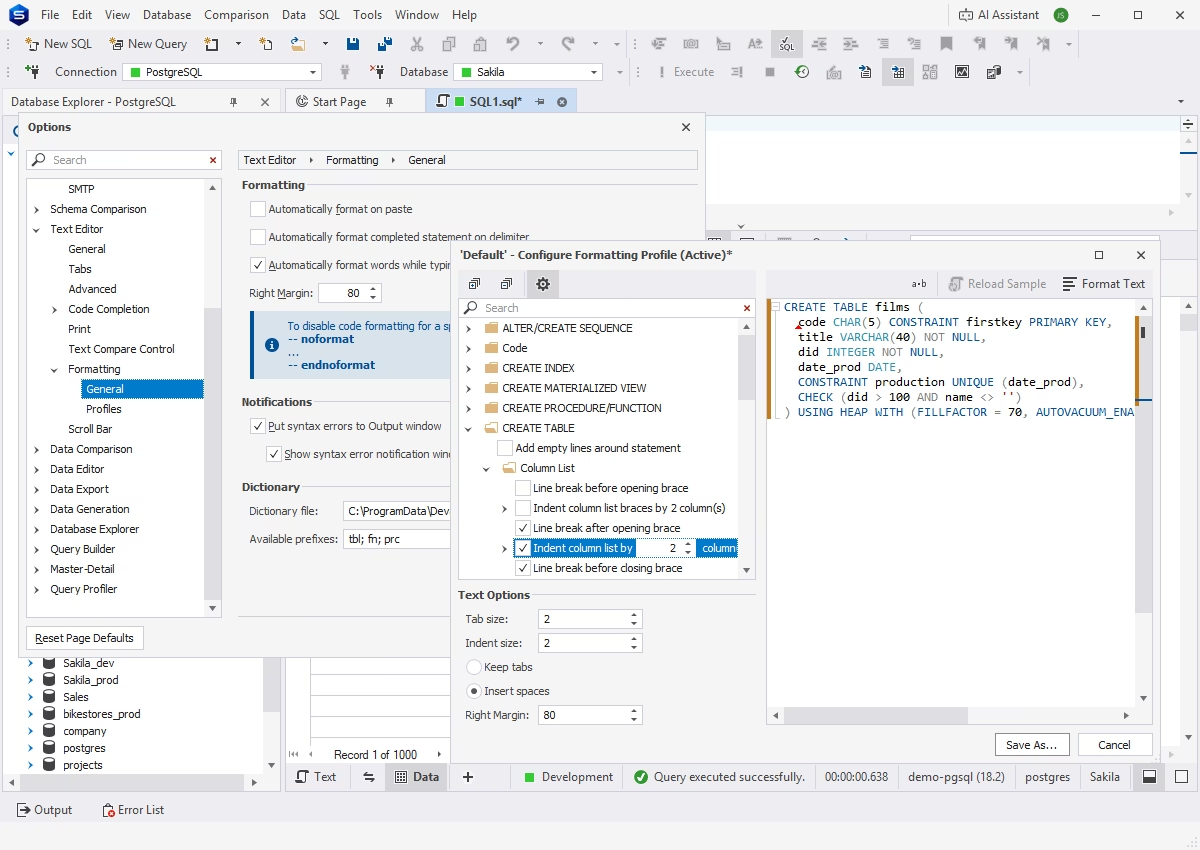
The formatting options and profile editor, previewing how a CREATE TABLE statement will be laid out.
Schema Compare and Data Compare (Professional)
dbForge Studio for PostgreSQL Professional compares two databases object by object, shows the DDL side by side with the differences highlighted, and writes the synchronization script. Data Compare does the same for table rows. Both can run from the command line for scheduled or CI deployments.
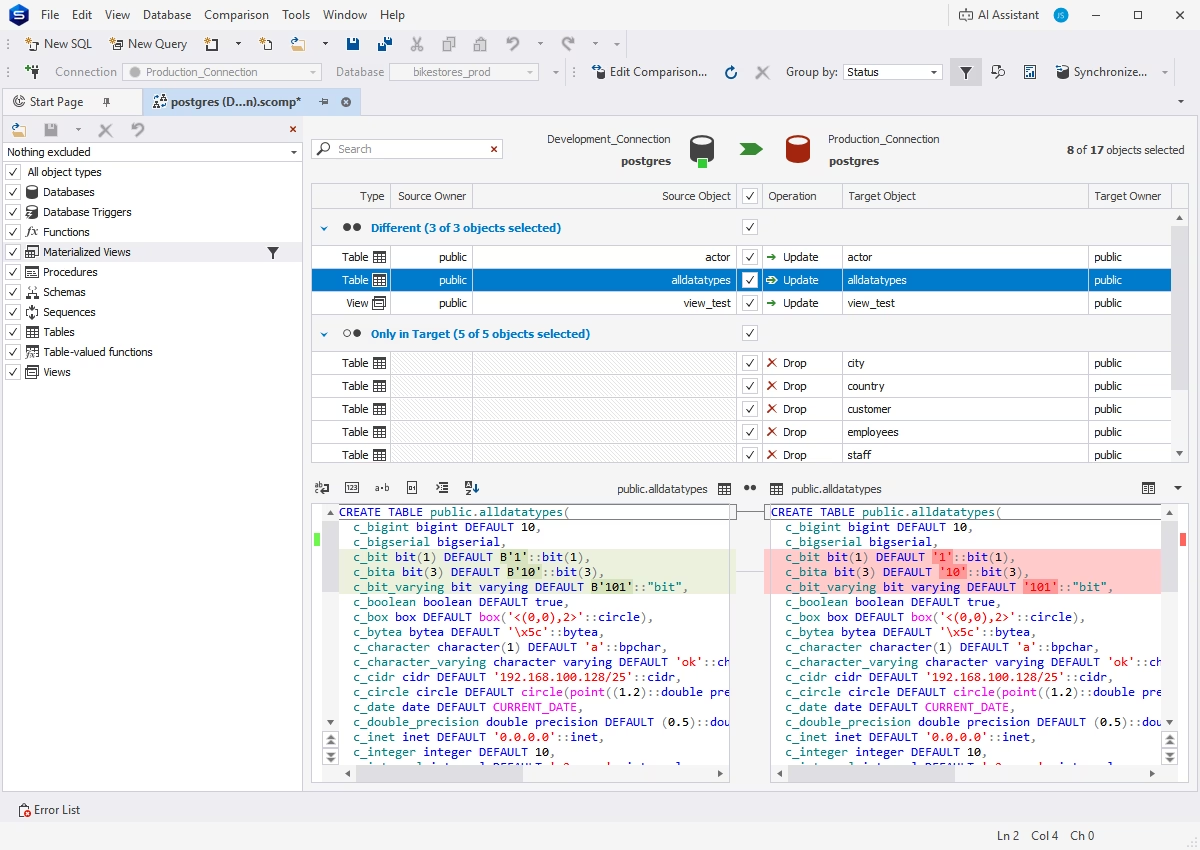
Comparing Sakila_dev with Sakila_prod: 34 objects only in the source, 5 different, and the customer table's DDL side by side.
Data export to 14+ formats and import from 10+
dbForge Studio for PostgreSQL exports a table or a query result to HTML, text, Excel, Google Sheets, Access, RTF, PDF, JSON, XML, CSV, ODBC, DBF and SQL, and saves the settings as a template to reuse. Import works from more than ten file formats. All editions have this; running it from the command line is Professional only.
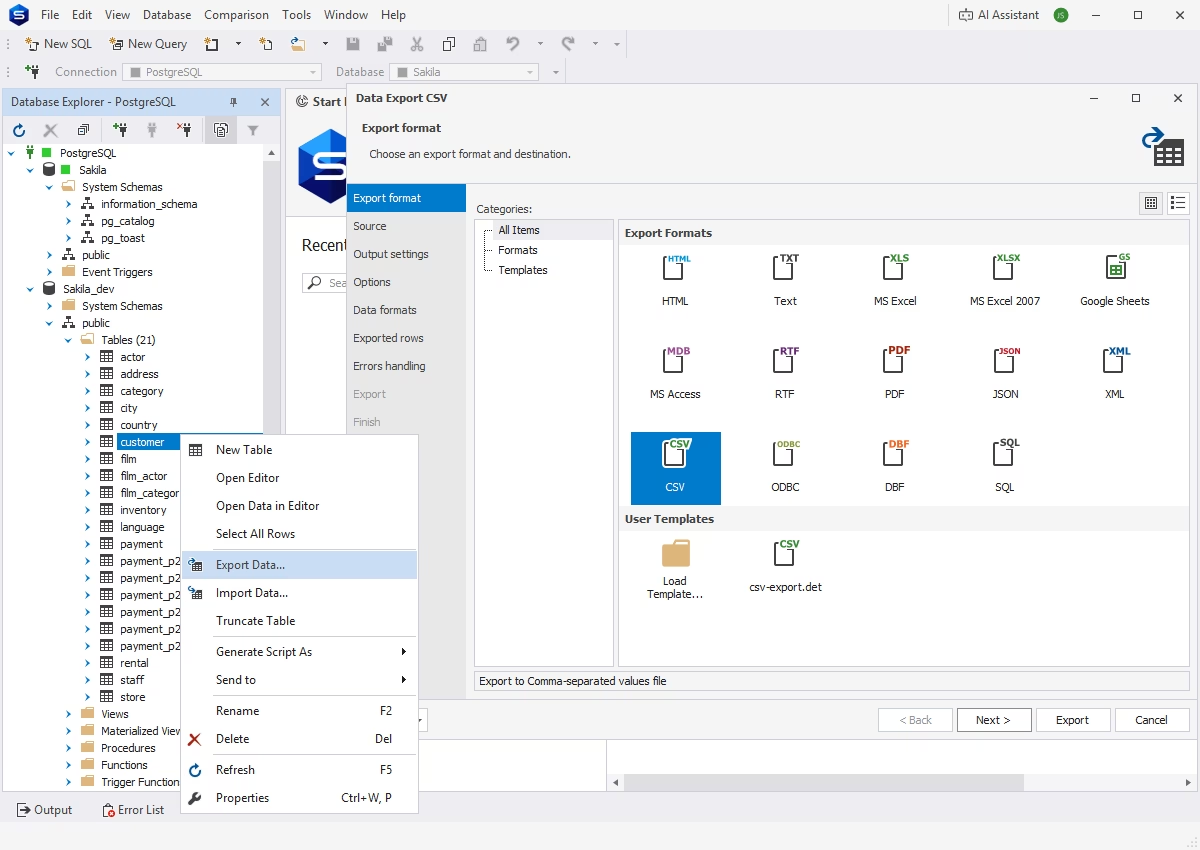
The Data Export wizard opened from a table's context menu, with CSV selected among the export formats.
Query Profiler, pivot tables and reports
dbForge Studio for PostgreSQL's Query Profiler shows a query's execution plan and timing so you can see where it's slow. Pivot tables and the Master-Detail Browser (Standard and Professional) let you summarize and drill into data without leaving the IDE. Professional adds a report designer for printable, exportable reports.
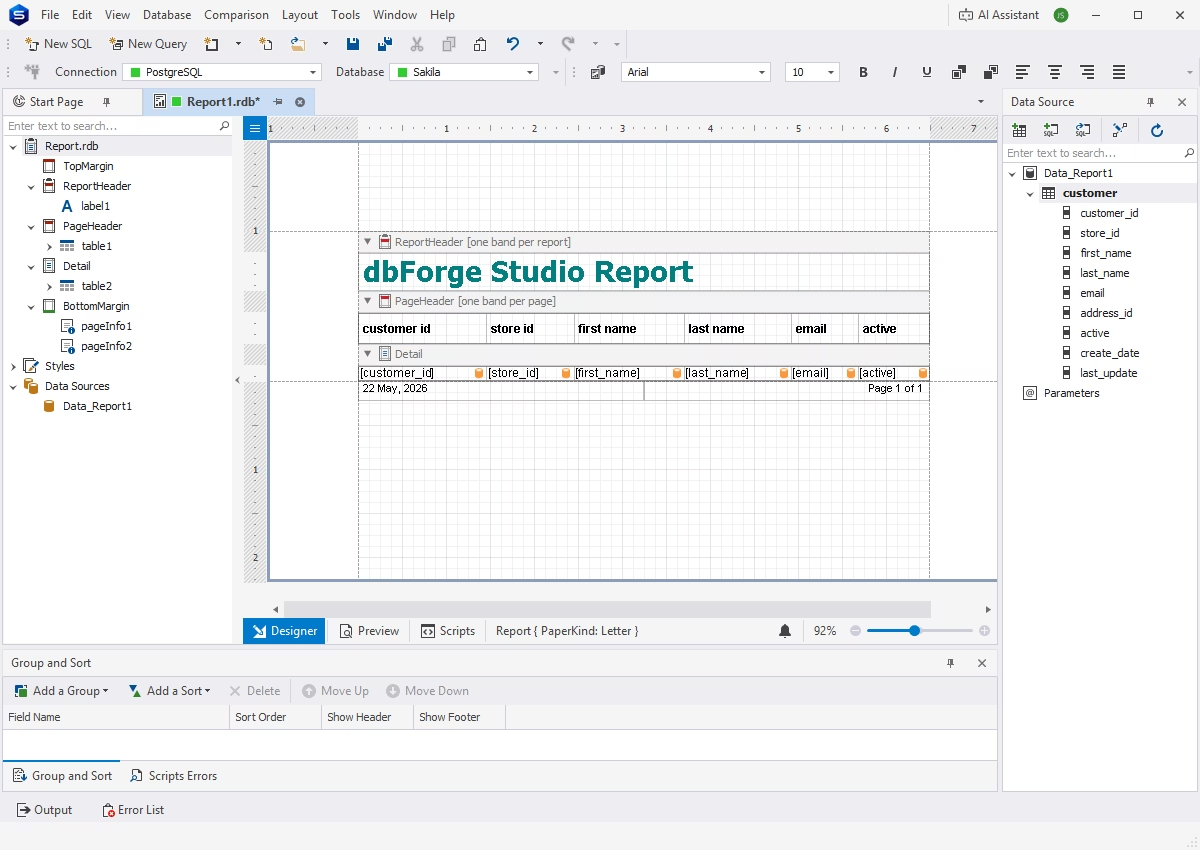
The report designer, with a customer table bound to the report's detail band.
Command-line automation (Professional)
dbForge Studio for PostgreSQL Professional writes a ready-made command line or .bat file for an export, comparison, data generation or report, so you can schedule it. Settings such as the template, connection, output file and error mode are set in a dialog and validated before you save.
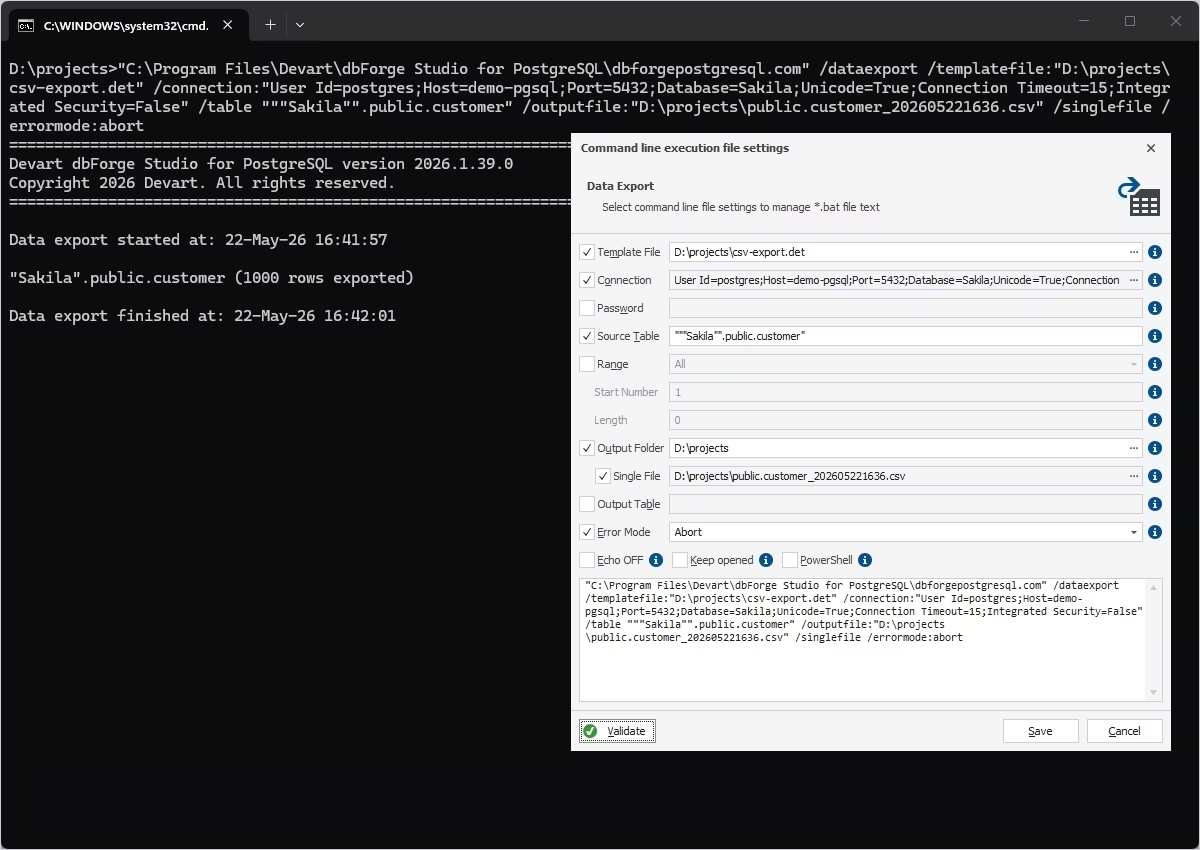
A data export of 1,000 rows run from the Windows command prompt, next to the dialog that builds the command.
Test data generation (Professional)
dbForge Studio for PostgreSQL Professional fills tables with realistic test data, with generators that respect dependencies between columns, regular expressions and Python, and JSON templates.
AI Assistant chat
dbForge Studio for PostgreSQL has Devart's AI Assistant built in, in every edition including Express. It writes queries from plain language, explains and optimizes them, and troubleshoots errors, using your database's metadata for context. It has its own free plan (200,000 tokens a month) and a paid plan at $9.95 a month or $99.95 a year that isn't part of the Studio license.
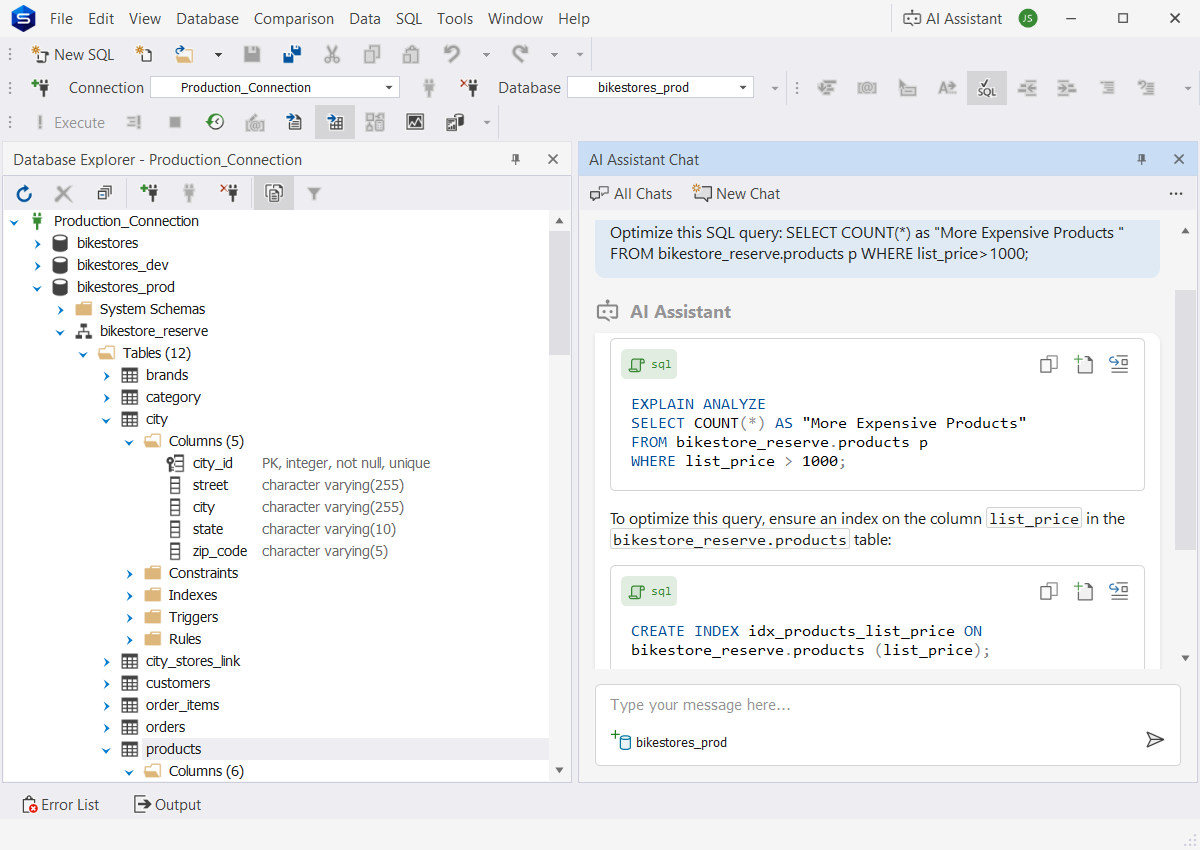
The AI Assistant answering an optimization request with EXPLAIN ANALYZE and a suggested index on list_price.
Benefits
- Faster everyday SQL. Completion that knows your schema and a shared formatting profile cut the typing and the review comments.
- Safer releases. Professional's compare tools show exactly what will change before a sync script touches production.
- Less switching. Querying, editing, exporting, pivoting and reporting happen in one window instead of psql, a spreadsheet and a reporting tool.
Real-World Uses
- Release day: compare staging with production, review the differences and run the generated script, or schedule the same comparison from a .bat file.
- A weekly management report: design it once in the report designer and export it from the command line every Monday.
- A slow dashboard query: run it through the Query Profiler, read the plan, and ask the AI Assistant for an index suggestion.
- Handing data to a colleague: export a query result straight to Excel or Google Sheets with a saved template.
Who It's For, and Who Should Skip It
Buy it if PostgreSQL is a daily tool for you on Windows and you want SSMS-style comfort, particularly if you deploy schema changes between environments (then get Professional).
Skip it if you mainly administer servers from the command line, where pgAdmin and psql are free and enough; if you're on a Mac and don't want CrossOver; or if you need SQL Server, MySQL and Oracle too, where dbForge Edge bundles all four Studios under one license.
Usage Guide
- Download the trial from Devart's download page, sign in with a free Devart account, and run the installer.
- Create a connection with the host, port, database and login; SSH and SSL connections are supported.
- Browse schemas, tables and functions in the Database Explorer, and open a new SQL document to query.
- Right-click a table for Export Data or Import Data, or open its data in the editor.
- For deployments in Professional, start a schema comparison from the Comparison menu, choose source and target, and generate the sync script.
What Users Say
SoftwareSuggest (5/5 from 11 reviews)
All eleven SoftwareSuggest reviews give five stars, mostly from developers who came from pgAdmin, DataGrip or DBeaver. The common complaints are the price, a wish for more tutorials, and occasional minor bugs.
Lili S., Data Analyst (August 2024): "The visual data editor and pivot tables make data manipulation intuitive. The master-detail browser is useful for managing complex datasets." Her wish: "More tutorials would benefit me, as they would help me understand the full range of features and maximize the tools potential." On pgAdmin: "While this tool is free, I think that dbForge Studio's features are worth every dollar."
Vivien G., Database Developer (July 2024): "The Query Profiler is an outstanding feature, providing a convenient way to review and optimize query performance without leaving the main interface." The downside: "Occasionally, minor bugs are encountered, though these are typically addressed quickly with updates." She'd like "an integrated performance monitoring feature beyond query profiling."
Joe R., Full-Stack Dev (January 2023): "I think the biggest disadvantage is that the product is not free. But in my case, it is totally worth it."
Tommy A., Database Developer (July 2022): "I have been developing and working with databases for some time and have found that dbForge Studio is the best IDE for working with PostgreSQL. It is a high-speed and precise tool that significantly simplifies the process of generating queries."
Martin, Software Developer (December 2022): "With the GUI studio interface, I could easily and quickly import and export PostgreSQL data, edit it, report data, build pivot tables, and more."
Customer comments on Devart's page
Devart quotes these on the product page, so read them as the vendor's picks.
A postdoctoral researcher at FER: "We needed a database IDE for Postgres which would be similar to SQL Server Management Studio, and dbForge was just what we were looking for. It's the best possible GUI for creating/modifying database objects and building complex SQL queries."
An adjunct professor at Adelphi University: "What dbForge Studio gave my students was clarity. As the friction disappeared, they learned faster, asked better questions, and genuinely enjoyed working with SQL."
The recurring themes
Users like the interface, the code completion, the Query Profiler and the data tools, and several compare it favorably with pgAdmin. The complaints are mild and consistent: it costs money where pgAdmin doesn't, there's a lot to learn, and small bugs turn up between updates. The reviews are short and mostly enthusiastic, so treat them as a sign of satisfied users rather than a deep test.
Comparisons
dbForge Studio for PostgreSQL vs. pgAdmin 4
pgAdmin 4 is free and the official PostgreSQL tool, strong on server administration. dbForge Studio for PostgreSQL is the better editor and data tool: smarter completion, a formatter, pivot tables, export to more formats and, in Professional, schema and data compare with sync scripts. If you write SQL all day, the Studio earns its price; if you mainly manage servers, pgAdmin is enough.
Express vs. Standard vs. Professional
Express is free and covers basic completion and formatting, the visual query builder and object editors, data import and export, and the AI Assistant. Standard adds the full coding assistance, snippets, refactoring, the Query Profiler, pivot tables and the Master-Detail Browser. Professional adds Schema Compare, Data Compare, test data generation, data reports, syntax check and command-line automation.
Editions and Pricing
The order page opens on Professional with a 1-year subscription. The edition and the perpetual license are options on that page.
| Edition |
1-year subscription |
Perpetual |
What it adds |
| Express |
Free |
Free |
Basic editor, query builder, import and export |
| Standard |
$89.95 |
$179.95 |
Full coding help, Query Profiler, pivot tables |
| Professional |
$139.95 |
$279.95 |
Schema and data compare, test data, reports, command line |
Devart takes 5% off for 5 to 9 licenses, 10% for 10 to 19 and 15% for 20 or more.
FAQs
Does dbForge Studio for PostgreSQL work with Amazon Redshift and Supabase?
Yes. dbForge Studio for PostgreSQL lists Amazon Redshift, RDS and Aurora, Supabase, Neon, Azure PostgreSQL, Google Cloud SQL, YugabyteDB, TimescaleDB, Greenplum, CitusData and other PostgreSQL-based services as compatible.
Can I run dbForge Studio for PostgreSQL on a Mac?
Only through CodeWeavers CrossOver. dbForge Studio for PostgreSQL is a Windows .NET program, and Devart supports it on macOS and on Ubuntu, Debian, Fedora and Red Hat Linux inside CrossOver, which you buy separately.
Is the free Express edition of dbForge Studio for PostgreSQL time-limited?
No. dbForge Studio for PostgreSQL Express is a free edition with basic features, separate from the 30-day trial of the paid editions.
What happens when my subscription ends?
A dbForge Studio for PostgreSQL subscription stops working when it lapses until you renew. A perpetual license keeps working; renewing it only brings new versions and support.
Does dbForge Studio for PostgreSQL have a debugger?
Yes. Devart added a PostgreSQL debugger to dbForge Studio for PostgreSQL in the September 2026 release, along with visual editors for functions, procedures and event triggers.
Can I get a refund?
Yes. Devart refunds dbForge Studio for PostgreSQL within 30 days of purchase for annual subscriptions and perpetual licenses.
System Requirements
- Windows 7, 8, 8.1, 10 or 11, or Windows Server 2008, 2012, 2016, 2019, 2022 or 2025
- .NET Framework 4.7.2 or later
- macOS or Linux: CodeWeavers CrossOver
- About 60 MB for the installer download
Conclusion
dbForge Studio for PostgreSQL is a good buy for Windows developers who live in PostgreSQL: the editor, profiler and data tools are a clear step up from pgAdmin, and the Professional edition's compare-and-sync tools alone can justify $139.95 a year if you deploy schema changes. Standard is hard to recommend over Professional for most buyers, since it drops exactly the features that set this Studio apart. The main reason not to buy is if you're on a Mac or mostly do server administration. Start with the free Express edition or the 30-day trial, and go perpetual if you plan to keep it beyond two years.
Download Free TrialBuy Now